-
.net core框架
ASP.NET Core 入门
跨平台开源框架 B/S
类与方法
Console部分称为“类”。 类“拥有”方法;或者可以说方法存在于类中。WriteLine()部分称为“方法”。想要使用方法就要知道方法在哪里
——————————
执行流
一次执行一段
ASP.NET Core 是什么东西?.net框架吗?
企业里面-把后端完善
1.配置Swagger
1.为生成的api追加注释
Program.cs
- builder.Services.AddSwaggerGen(option =>
- {
- //xml文档绝对路经--读取根据控制器api生成的Xml的文件 ?????
- var file = Path.Combine(AppContext.BaseDirectory,
- "BookReadWebApi.xml");
- //true显示器层展示注释
- option.IncludeXmlComments(file, true);
- //action排序
- option.OrderActionsBy(o => o.RelativePath);
- });

配置让swagger展示注释


2.不同版本api的版本控制
0.创建版本枚举文件夹

1.获取api的名称
- builder.Services.AddSwaggerGen(option =>
- {
- typeof(ApiVersions).GetEnumNames().ToList().ForEach(Version =>
- {
- //1.先获取所有name
- option.SwaggerDoc(Version,new Microsoft.OpenApi.Models.OpenApiInfo()
- {
- Title = $"读书平台",
- Version = Version,
- Description = $"通用版本的CoreApi版本{Version}"
- });
- });
- ......
- }
2.遍历api

- app.UseSwaggerUI(c =>
- {
- foreach(string version in typeof(ApiVersions).GetEnumNames())
- {
- c.SwaggerEndpoint($"/swagger/{version}/swagger.json",$"阅读平台第{version} 版本");
- }
- });
3.控制当前api只在特定(V1)的版本中展示改接口
[ApiExplorerSettings(IgnoreApi =false,GroupName =nameof(Utility.SwaggerExt.ApiVersions.V1))]静态类里面的静态方法的this成为扩展方法
可以将里面的方法调用改写
- CustomSwaggerExt.AddSwaggerExt(builder.Services);等效于
- builder.Services.AddSwaggerExt();
这就是中间件的封装?????不懂,不管
2.连接数据库??
还没学
3.中间件
将文件定义到该代理下面
- app.Use(async (context, next) =>
- {
- await next.Invoke();
- });
- app.Run(async context =>
- {
- await context.Response.WriteAsync("hello");
- });
启用静态文件中间件:
一,可以通过打开浏览器查看该静态文件里的内容
1.根目录下新建文件夹wwwroot->将图片文件存储到该地址下
2.Program.cs配置如下内容
app.UseStaticFiles()//启用静态文件中间件二,指定目录:MyRouse文件夹作为指定目录,RequestPath设置请求前缀
- app.UseStaticFiles(new StaticFileOptions()
- {
- FileProvider=new PhysicalFileProvider(Path.Combine(builder.Environment.ContentRootPath,"MyRouse")),
- RequestPath="/StaticFiles"//https://localhost:7035/StaticFiles/2.png(选择性添加)
- });
三,目录浏览-中间件
在Program.cs配置如下内容
- var fileProvider = new PhysicalFileProvider(
- Path.Combine(builder.Environment.ContentRootPath, "MyRouse"));
- var requestPath = "/MyRouse";
- ....
- app.UseStaticFiles(new StaticFileOptions()
- {
- FileProvider=new PhysicalFileProvider(
- Path.Combine(builder.Environment.ContentRootPath,"MyRouse")),
- RequestPath= requestPath
- });
- app.UseDirectoryBrowser(new DirectoryBrowserOptions
- {
- FileProvider=fileProvider,
- RequestPath= requestPath
- });

https重定向
现在都是默认点击就送
1.启动两个默认地址,默认启动swagger文件,
- "https": {
- "commandName": "Project",
- "dotnetRunMessages": true,
- "launchBrowser": true,
- "launchUrl": "swagger",
- "applicationUrl": "https://localhost:7035;http://localhost:5043",
- "environmentVariables": {
- "ASPNETCORE_ENVIRONMENT": "Development"
- }
但http地址是不安全的所以我们现在重定向
2.在Program.cs配置如下内容
- app.UseHsts();
- app.UseHttpsRedirection();
Hsts是一种安全机制,在未来一段时间只使用https来访问网站
读取配置
ASP.NET Core 项目默认配置文件:appsettings.json文件
- //appsettings.json
- "msg": "yeye"
- //Program.cs
- app.MapGet("config", (IConfiguration configuration) =>
- {
- return configuration["msg"] + '_' + configuration["Logging:LogLevel:befault"];
- });
省略
开发环境
控制swagger仅仅在开发环境中展示,发布之后将不再展示
在Program.cs配置如下内容
- if (app.Environment.IsDevelopment())
- {
- app.UseHsts();
- app.UseSwagger();
- app.UseSwaggerUI();
- }
- ..
- app.Run();
4.more
日志
开发可以使用
app.Logger.LogInformation("程序已启动");//本地自带的
生产环境一般使用第三方的库作为日志:
可以生成txt文件,可以将日志添加到数据库里面,方便排查问题


需要注意的点:保存文件的名称及存储地址
- //CfgFile/log4net.Config
- "1.0" encoding="utf-8"?>
"Console" type="log4net.Appender.ConsoleAppender"> "log4net.Layout.PatternLayout"> value="%5level [%thread] (%file:%line) - %message%newline" /> "RollingFile" type="log4net.Appender.RollingFileAppender"> value="log4\log.log" /> value="true" /> - "Encoding" value="UTF-8"/>
value="100KB" /> value="2" /> "log4net.Layout.PatternLayout"> value="%level %thread %logger - %message%newline" /> value="ALL" />
0了,会生成log.log的日志文件
IIS安装
1.控制面板
2.选择程序
3.

4.

发布项目
默认路经

IIS运行
下载安装:dotnet-hosting-7.0.14-win.exe(官网下载选择Hosting Bundle进行下载安装即可)
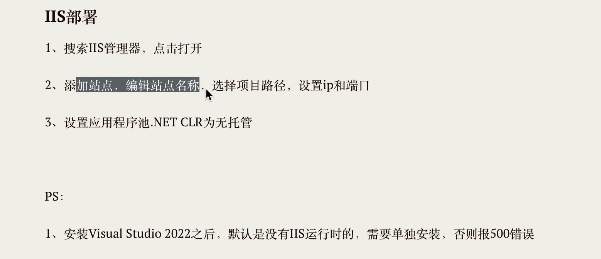
IIS部署
-
相关阅读:
质数判定与质数表的求解
msvcp120.dll丢失怎么办?(五种方法快速解决)
Springboot项目中Controller层的单元测试
Linux安装Phantomjs
【算法】算法题-20231117
提升客户体验,你只需要做到这一点
面试官:Redis中有序集合的内部实现方式是什么?
(自监督学习)前沿初识
LeetCode-47-全排列Ⅱ
华为的隐藏功能,你们知道多少?
- 原文地址:https://blog.csdn.net/qq_57676486/article/details/136618770
