-
spring boot学习第十三篇:使用spring security控制权限
该文章同时也讲到了如何使用swagger。
1、pom.xml文件内容如下:
- <?xml version="1.0" encoding="UTF-8"?>
- <project xmlns="http://maven.apache.org/POM/4.0.0" xmlns:xsi="http://www.w3.org/2001/XMLSchema-instance"
- xsi:schemaLocation="http://maven.apache.org/POM/4.0.0 https://maven.apache.org/xsd/maven-4.0.0.xsd">
- <modelVersion>4.0.0</modelVersion>
- <parent>
- <groupId>org.springframework.boot</groupId>
- <artifactId>spring-boot-starter-parent</artifactId>
- <version>2.3.5.RELEASE</version>
- <relativePath/> <!-- lookup parent from repository -->
- </parent>
- <groupId>com.hmblogs</groupId>
- <artifactId>springboot-security-demo</artifactId>
- <version>0.0.1-SNAPSHOT</version>
- <name>springboot-security-demo</name>
- <description>Demo project for Spring Boot</description>
- <properties>
- <java.version>1.8</java.version>
- </properties>
- <dependencies>
- <!--devtools热部署-->
- <dependency>
- <groupId>org.springframework.boot</groupId>
- <artifactId>spring-boot-devtools</artifactId>
- <optional>true</optional>
- <scope>true</scope>
- </dependency>
- <!-- springboor-->
- <dependency>
- <groupId>org.springframework.boot</groupId>
- <artifactId>spring-boot-starter-web</artifactId>
- </dependency>
- <dependency>
- <groupId>org.springframework.boot</groupId>
- <artifactId>spring-boot-starter</artifactId>
- </dependency>
- <dependency>
- <groupId>org.springframework.boot</groupId>
- <artifactId>spring-boot-starter-security</artifactId>
- </dependency>
- <dependency>
- <groupId>org.springframework.boot</groupId>
- <artifactId>spring-boot-actuator</artifactId>
- </dependency>
- <dependency>
- <groupId>org.springframework.boot</groupId>
- <artifactId>spring-boot-starter-test</artifactId>
- <scope>test</scope>
- </dependency>
- <dependency>
- <groupId>io.jsonwebtoken</groupId>
- <artifactId>jjwt</artifactId>
- <version>0.7.0</version>
- </dependency>
- <!-- swagger -->
- <dependency>
- <groupId>io.springfox</groupId>
- <artifactId>springfox-swagger2</artifactId>
- <version>2.9.2</version>
- </dependency>
- <dependency>
- <groupId>io.springfox</groupId>
- <artifactId>springfox-swagger-ui</artifactId>
- <version>2.9.2</version>
- </dependency>
- <dependency>
- <groupId>org.projectlombok</groupId>
- <artifactId>lombok</artifactId>
- </dependency>
- </dependencies>
- <build>
- <plugins>
- <plugin>
- <groupId>org.springframework.boot</groupId>
- <artifactId>spring-boot-maven-plugin</artifactId>
- </plugin>
- </plugins>
- </build>
- </project>
2、application.yml文件内容如下:
- server:
- port: 8088
- servlet:
- context-path: /springboot-security-demo
- spring:
- security:
- user:
- name: user
- password: 123456
3、SpringbootSecurityDemoApplication文件内容如下:
- package com.hmblogs;
- import org.springframework.boot.SpringApplication;
- import org.springframework.boot.autoconfigure.SpringBootApplication;
- @SpringBootApplication
- public class SpringbootSecurityDemoApplication {
- public static void main(String[] args) {
- SpringApplication.run(SpringbootSecurityDemoApplication.class, args);
- }
- }
4、UserDetailsServiceImpl代码如下:
- package com.hmblogs.service.impl;
- import java.util.ArrayList;
- import java.util.List;
- import com.hmblogs.pojo.Admin;
- import org.springframework.security.core.GrantedAuthority;
- import org.springframework.security.core.authority.SimpleGrantedAuthority;
- import org.springframework.security.core.userdetails.User;
- import org.springframework.security.core.userdetails.UserDetails;
- import org.springframework.security.core.userdetails.UserDetailsService;
- import org.springframework.security.crypto.bcrypt.BCryptPasswordEncoder;
- import org.springframework.stereotype.Service;
- @Service
- public class UserDetailsServiceImpl implements UserDetailsService {
- @Override
- public UserDetails loadUserByUsername(String username) {
- List
grantedAuthorities = new ArrayList (); - Admin admin = new Admin();
- if (username.equals("employee")) {
- admin.setUsername("employee");
- admin.setPassword("123456");
- GrantedAuthority grantedAuthority = new SimpleGrantedAuthority("ROLE_EMPLOYEE");
- grantedAuthorities.add(grantedAuthority);
- // 创建用户,用户判断权限
- return new User(
- admin.getUsername(),
- new BCryptPasswordEncoder().encode(admin.getPassword()),
- grantedAuthorities);
- }
- if (username.equals("admin")) {
- admin.setUsername("admin");
- admin.setPassword("123456");
- GrantedAuthority grantedAuthority = new SimpleGrantedAuthority("ROLE_ADMIN");
- grantedAuthorities.add(grantedAuthority);
- // 创建用户,用户判断权限
- return new User(
- admin.getUsername(),
- new BCryptPasswordEncoder().encode(admin.getPassword()),
- grantedAuthorities);
- }
- return null;
- }
- }
5、Admin这一个对象类代码如下:
- package com.hmblogs.pojo;
- public class Admin {
- private String username;
- private String password;
- public Admin() {
- super();
- }
- public Admin(String username, String password) {
- super();
- this.username = username;
- this.password = password;
- }
- public String getUsername() {
- return username;
- }
- public void setUsername(String username) {
- this.username = username;
- }
- public String getPassword() {
- return password;
- }
- public void setPassword(String password) {
- this.password = password;
- }
- @Override
- public String toString() {
- return "Admin [username=" + username + ", password=" + password + "]";
- }
- }
6、TestController测试接口类代码如下所示:
- package com.hmblogs.controller;
- import org.springframework.web.bind.annotation.RequestMapping;
- import org.springframework.web.bind.annotation.RequestMethod;
- import org.springframework.web.bind.annotation.RestController;
- @RestController
- @RequestMapping("/test/")
- public class TestController {
- @RequestMapping(value = "get", method = RequestMethod.GET)
- public String get() {
- return "success";
- }
- }
7、EmployeeController员工权限的员工接口类代码如下所示:
- package com.hmblogs.controller;
- import org.springframework.web.bind.annotation.RequestMapping;
- import org.springframework.web.bind.annotation.RequestMethod;
- import org.springframework.web.bind.annotation.RestController;
- @RestController
- @RequestMapping("/employee/")
- public class EmployeeController {
- @RequestMapping(value = "greeting", method = RequestMethod.GET)
- public String greeting() {
- return "hello world";
- }
- @RequestMapping(value = "login", method = RequestMethod.GET)
- public String login() {
- return "login success";
- }
- }
8、AdminController管理员接口类的代码如下所示:
- package com.hmblogs.controller;
- import org.springframework.web.bind.annotation.RequestMapping;
- import org.springframework.web.bind.annotation.RequestMethod;
- import org.springframework.web.bind.annotation.RestController;
- @RestController
- @RequestMapping("/admin/")
- public class AdminController {
- @RequestMapping(value = "greeting", method = RequestMethod.GET)
- public String greeting() {
- return "hello world";
- }
- @RequestMapping(value = "login", method = RequestMethod.GET)
- public String login() {
- return "login success";
- }
- }
9、SwaggerConfig代码如下:配置swagger
- package com.hmblogs.config;
- import org.springframework.context.annotation.Bean;
- import org.springframework.context.annotation.Configuration;
- import springfox.documentation.builders.ApiInfoBuilder;
- import springfox.documentation.builders.PathSelectors;
- import springfox.documentation.builders.RequestHandlerSelectors;
- import springfox.documentation.service.ApiInfo;
- import springfox.documentation.spi.DocumentationType;
- import springfox.documentation.spring.web.plugins.Docket;
- import springfox.documentation.swagger2.annotations.EnableSwagger2;
- @Configuration
- @EnableSwagger2
- public class SwaggerConfig {
- @Bean
- public Docket createRestApi(){
- // 添加请求参数,我们这里把token作为请求头部参数传入后端
- return new Docket(DocumentationType.SWAGGER_2).apiInfo(apiInfo())
- .select().apis(RequestHandlerSelectors.any())
- .paths(PathSelectors.any()).build();
- }
- private ApiInfo apiInfo(){
- return new ApiInfoBuilder()
- .title("SpringBoot API Doc")
- .description("This is a restful api document of Spring Boot.")
- .version("1.0")
- .build();
- }
- }
10、SecurityConfig代码如下:
- package com.hmblogs.config;
- import org.springframework.beans.factory.annotation.Autowired;
- import org.springframework.context.annotation.Bean;
- import org.springframework.context.annotation.Configuration;
- import org.springframework.security.config.annotation.authentication.builders.AuthenticationManagerBuilder;
- import org.springframework.security.config.annotation.web.builders.HttpSecurity;
- import org.springframework.security.config.annotation.web.builders.WebSecurity;
- import org.springframework.security.config.annotation.web.configuration.EnableWebSecurity;
- import org.springframework.security.config.annotation.web.configuration.WebSecurityConfigurerAdapter;
- import org.springframework.security.core.userdetails.UserDetailsService;
- import org.springframework.security.crypto.bcrypt.BCryptPasswordEncoder;
- import org.springframework.security.crypto.password.PasswordEncoder;
- @Configuration
- @EnableWebSecurity
- public class SecurityConfig extends WebSecurityConfigurerAdapter {
- @Autowired
- private UserDetailsService userDetailsService;
- @Bean
- public PasswordEncoder passwordEncoder() {
- return new BCryptPasswordEncoder();
- }
- @Override
- public void configure(WebSecurity web) throws Exception {
- super.configure(web);
- }
- @Override
- public void configure(AuthenticationManagerBuilder auth) throws Exception {
- auth.userDetailsService(userDetailsService)
- .passwordEncoder(passwordEncoder());//passwoldEncoder是对密码的加密处理,如果user中密码没有加密,则可以不加此方法。注意加密请使用security自带的加密方式。
- }
- @Override
- protected void configure(HttpSecurity http) throws Exception {
- http.csrf().disable()//禁用了 csrf 功能
- .authorizeRequests()//限定签名成功的请求
- .antMatchers("/decision/**","/govern/**","/employee/*").hasAnyRole("EMPLOYEE","ADMIN")//对decision和govern 下的接口 需要 EMPLOYEE 或者 ADMIN 权限
- .antMatchers("/employee/login").permitAll()///employee/login 不限定
- .antMatchers("/admin/**").hasRole("ADMIN")//对admin下的接口 需要ADMIN权限
- .antMatchers("/oauth/**").permitAll()//不拦截 oauth 开放的资源
- .anyRequest().permitAll()//其他没有限定的请求,允许访问
- .and().anonymous()//对于没有配置权限的其他请求允许匿名访问
- .and().formLogin()//使用 spring security 默认登录页面
- .and().httpBasic();//启用http 基础验证
- }
- }
11.CorsConfig文件代码如下:
- package com.hmblogs.config;
- import org.springframework.context.annotation.Configuration;
- import org.springframework.web.servlet.config.annotation.CorsRegistry;
- import org.springframework.web.servlet.config.annotation.WebMvcConfigurer;
- @Configuration
- public class CorsConfig implements WebMvcConfigurer{
- @Override
- public void addCorsMappings(CorsRegistry registry) {
- registry.addMapping("/**") // 允许跨域访问的路径
- .allowedOrigins("*") // 允许跨域访问的源
- .allowedMethods("POST", "GET", "PUT", "OPTIONS", "DELETE") // 允许请求方法
- .maxAge(168000) // 预检间隔时间
- .allowedHeaders("*") // 允许头部设置
- .allowCredentials(true); // 是否发送cookie
- }
- }
12、启动该微服务,验证。

12.1访问http://localhost:8088/springboot-security-demo/swagger-ui.html

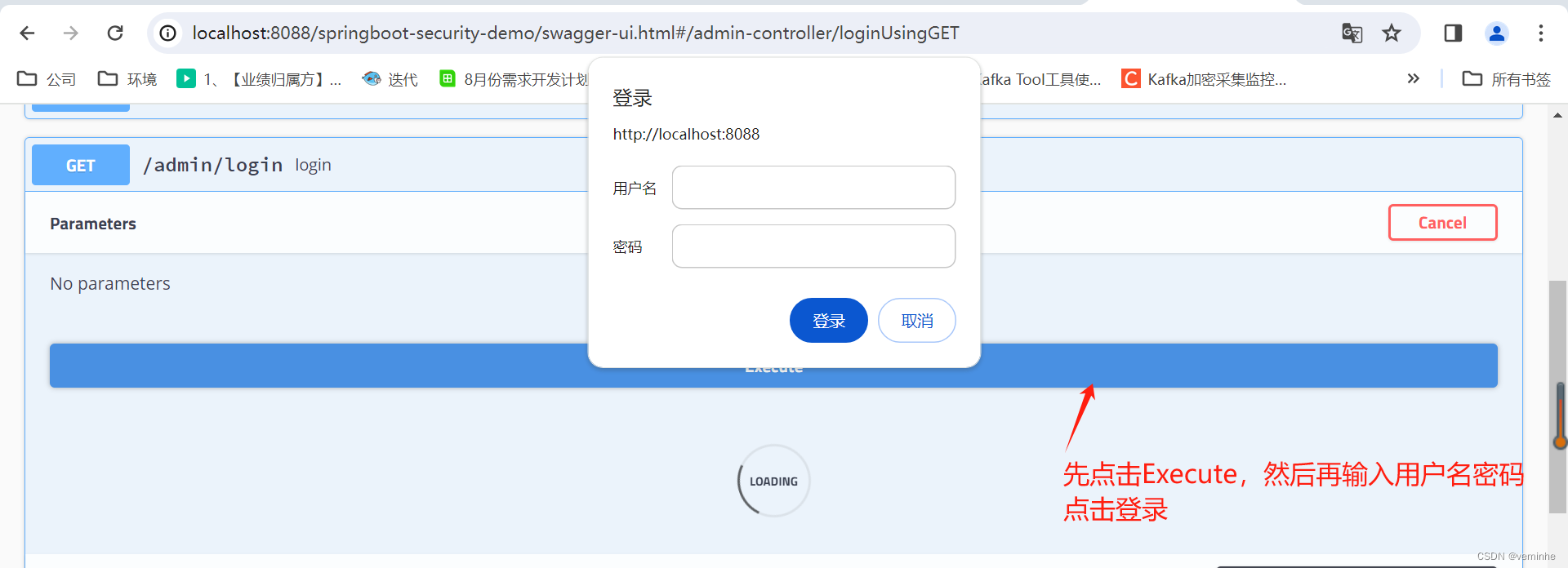
这里我如果用户名输入admin,密码输入123456,点击登录

清除浏览器缓存后,再使用employee和123456登录,则会报401
admin账号能使用admin接口,但是employee账号不能使用admin接口。
12.2使用admin账号密码和empoyee账号密码尝试employee接口,
先试用admin账号密码登录

清除浏览器缓存,再使用employee账号密码登录
点击登录后,查看响应,如下:

admin和employee账号都能正常访问employee接口
达到了预期目的。
-
相关阅读:
计算机视觉基础【OpenCV轻松入门】:获取图像的ROI
渗透测试概念详解
疫情下更合适的开发模式
React源码分析1-jsx转换及React.createElement
如何做好银行统一报送系统UI设计
AIGC启示录:深度解析AIGC技术的现代性与系统性的奇幻旅程
mysql进程信息出现大量Waiting for table level lock信息的原因,怎么处理?
MIMO-OFDM无线通信技术-IEEE802.16d模型(Matlab代码)
拿到第一个用户并提权
Java easy_trans字典绑定,Java字典注解绑定
- 原文地址:https://blog.csdn.net/heming20122012/article/details/136344803
