-
Unity中URP实现水体(水下的扭曲)
前言
在上篇文章中,我们实现了水体中 和 物体接触时,产生泡沫的效果。
在这篇文章中,我们在上一篇文章的基础上来实现水下扭曲的效果。
一、使用一张法线纹理,作为水下扭曲的纹理
原理:
1、在属性面板定义一个纹理,用于传入法线贴图
_DistortTex(“DistortNormalTex”,2D) = “white”{}

2、在Pass中,定义对应的纹理和采样器
TEXTURE2D(_DistortTex);SAMPLER(sampler_DistortTex);
3、在常量缓冲区,申明修改 Tilling 和 Offset 的ST
half4 _DistortTex_ST;
4、在顶点着色器,计算得到 应用了 ST 和 随时间流动的UV,用于纹理采样(_WaterSpeed是上篇文章中用到的)
o.uv.xy = TRANSFORM_TEX(v.uv,_DistortTex)+_Time.y * _WaterSpeed;
5、在片元着色器中,对其进行法线纹理进行采样
half4 distortTex = SAMPLE_TEXTURE2D(_DistortTex,sampler_DistortTex,i.uv.xy);
二、实现水下扭曲的效果
原理:把抓取到的屏幕纹理,使用进行流动扭曲
1、定义一个扰度值,控制扭曲水下的扭曲程度
- 屏幕UV 和 法线纹理扭曲之间线性插值
float2 distortUV = lerp(screenUV,distortTex,_Distort);
- 在后面的文章中,发现以这个采样会有Bug,采样范围超过了水面。所以,这里进行了一下修改。
float2 distortUV = screenUV * _Distort + distortTex.xy;
2、在URP设置中,开启抓屏

3、在Pass中,定义抓屏的 纹理 和 采样器
TEXTURE2D(_CameraOpaqueTexture);SAMPLER(sampler_CameraOpaqueTexture);
4、使用线性插值后的结果,进行抓屏的纹理采样
half4 cameraOpaqueTex = SAMPLE_TEXTURE2D(_CameraOpaqueTexture,sampler_CameraOpaqueTexture,distortUV);


5、最后,与上篇文章计算得到的水的颜色混合
col *= cameraOpaqueTex;
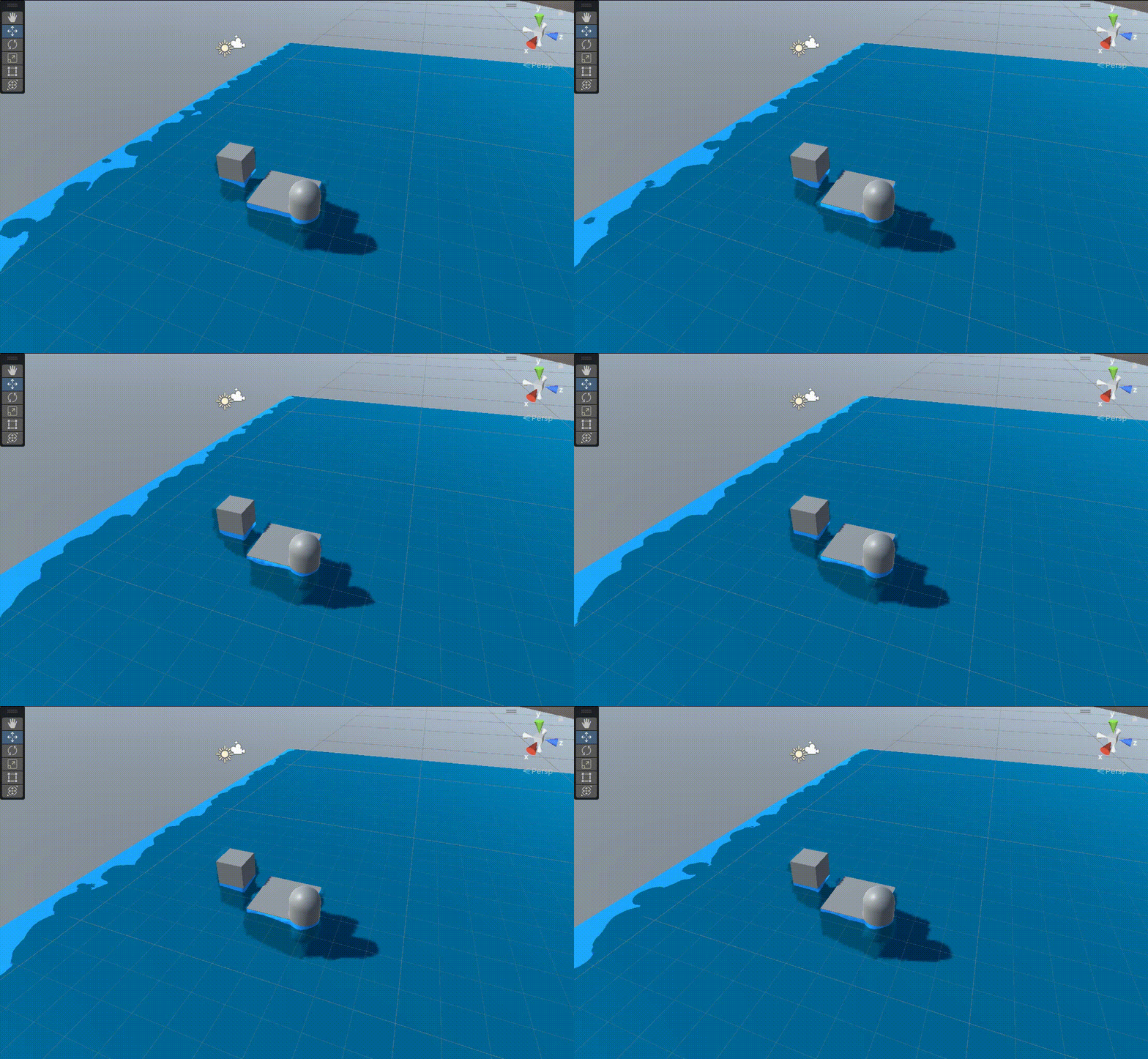
三、最终代码
//水的深度 Shader "MyShader/URP/P4_8" { Properties { [Header(Base)] _WaterColor1("WaterColor1",Color) = (1,1,1,1) _WaterColor2("WaterColor2",Color) = (1,1,1,1) _WaterSpeed("WaterSpeed",Range(0,1)) = 0.1 [Header(Foam)] _FoamTex("FoamTex",2D) = "white"{} _FoamColor("FoamColor",Color) = (1,1,1,1) _FoamRange("FoamRange",Range(0,5)) = 1 _FoamNoise("FoamNoise",Range(0,3)) = 1 [Header(Distort)] _DistortTex("DistortNormalTex",2D) = "white"{} [PowerSlider(3)]_Distort("Distort",Range(0,0.5)) = 0 } SubShader { Tags { //告诉引擎,该Shader只用于 URP 渲染管线 "RenderPipeline"="UniversalPipeline" //渲染类型 "RenderType"="Transparent" //渲染队列 "Queue"="Transparent" } //Blend SrcAlpha OneMinusSrcAlpha ZWrite Off Pass { Name "Unlit" HLSLPROGRAM #pragma vertex vert #pragma fragment frag // Pragmas #pragma target 2.0 // Includes #include "Packages/com.unity.render-pipelines.core/ShaderLibrary/Color.hlsl" #include "Packages/com.unity.render-pipelines.universal/ShaderLibrary/Core.hlsl" #include "Packages/com.unity.render-pipelines.universal/ShaderLibrary/Input.hlsl" CBUFFER_START(UnityPerMaterial) half4 _WaterColor1; half4 _WaterColor2; half _FoamRange; half _WaterSpeed; half4 _FoamColor; half _FoamNoise; half4 _FoamTex_ST; half _Distort; half4 _DistortTex_ST; CBUFFER_END TEXTURE2D(_CameraDepthTexture);SAMPLER(sampler_CameraDepthTexture); TEXTURE2D(_FoamTex);SAMPLER(sampler_FoamTex); TEXTURE2D(_CameraOpaqueTexture);SAMPLER(sampler_CameraOpaqueTexture); TEXTURE2D(_DistortTex);SAMPLER(sampler_DistortTex); //struct appdata //顶点着色器的输入 struct Attributes { float3 positionOS : POSITION; float2 uv : TEXCOORD0; }; //struct v2f //片元着色器的输入 struct Varyings { float4 positionCS : SV_POSITION; float4 uv : TEXCOORD0;// xy = distortUV,zw = foamUV float4 screenPos : TEXCOORD1; float3 positionVS : TEXCOORD2; float3 positionWS : TEXCOORD3; }; //v2f vert(Attributes v) //顶点着色器 Varyings vert(Attributes v) { Varyings o = (Varyings)0; o.positionWS = TransformObjectToWorld(v.positionOS); o.positionVS = TransformWorldToView(o.positionWS); o.positionCS = TransformWViewToHClip(o.positionVS); o.screenPos = ComputeScreenPos(o.positionCS); //计算得到泡沫纹理采样需要的顶点世界空间下的坐标值的流动效果 o.uv.zw += o.positionWS.xz *_FoamTex_ST.xy + _Time.y * _WaterSpeed; //计算得到水下扭曲纹理的流动UV o.uv.xy = TRANSFORM_TEX(v.uv,_DistortTex)+_Time.y * _WaterSpeed; return o; } //fixed4 frag(v2f i) : SV_TARGET //片元着色器 half4 frag(Varyings i) : SV_TARGET { //1、水的深度 //获取屏幕空间下的 UV 坐标 float2 screenUV = i.positionCS.xy / _ScreenParams.xy; half depthTex = SAMPLE_TEXTURE2D(_CameraDepthTexture,sampler_CameraDepthTexture,screenUV).x; //深度图转化到观察空间下 float depthScene = LinearEyeDepth(depthTex,_ZBufferParams); //获取水面模型顶点在观察空间下的Z值(可以在顶点着色器中,对其直接进行转化得到顶点观察空间下的坐标) float4 depthWater = depthScene + i.positionVS.z; //2、水的颜色,线性插值得到水 和 接触物体的水的 颜色的过度 half4 waterColor = lerp(_WaterColor1,_WaterColor2,depthWater); //3、水面泡沫 //对泡沫纹理进行采样(这里使用顶点世界空间下的坐标进行纹理采样,防止水体缩放影响泡沫的平铺和重复方式) half4 foamTex = SAMPLE_TEXTURE2D(_FoamTex,sampler_FoamTex,i.uv.zw); foamTex = pow(foamTex,_FoamNoise); //这里增加一个调整深度图范围的功能 half4 foamRange = depthWater * _FoamRange; //使用泡沫纹理 和 泡沫范围 比较得到泡沫遮罩 half4 foamMask = step(foamRange,foamTex); //给泡沫加上颜色 half4 foamColor = foamMask * _FoamColor; half4 col = foamColor + waterColor; //4、水下的扭曲 half4 distortTex = SAMPLE_TEXTURE2D(_DistortTex,sampler_DistortTex,i.uv.xy); float2 distortUV = lerp(screenUV,distortTex,_Distort); half4 cameraOpaqueTex = SAMPLE_TEXTURE2D(_CameraOpaqueTexture,sampler_CameraOpaqueTexture,distortUV); col *= cameraOpaqueTex; //水的高光 //水的反射 //水的焦散 return col; } ENDHLSL } } FallBack "Hidden/Shader Graph/FallbackError" }- 1
- 2
- 3
- 4
- 5
- 6
- 7
- 8
- 9
- 10
- 11
- 12
- 13
- 14
- 15
- 16
- 17
- 18
- 19
- 20
- 21
- 22
- 23
- 24
- 25
- 26
- 27
- 28
- 29
- 30
- 31
- 32
- 33
- 34
- 35
- 36
- 37
- 38
- 39
- 40
- 41
- 42
- 43
- 44
- 45
- 46
- 47
- 48
- 49
- 50
- 51
- 52
- 53
- 54
- 55
- 56
- 57
- 58
- 59
- 60
- 61
- 62
- 63
- 64
- 65
- 66
- 67
- 68
- 69
- 70
- 71
- 72
- 73
- 74
- 75
- 76
- 77
- 78
- 79
- 80
- 81
- 82
- 83
- 84
- 85
- 86
- 87
- 88
- 89
- 90
- 91
- 92
- 93
- 94
- 95
- 96
- 97
- 98
- 99
- 100
- 101
- 102
- 103
- 104
- 105
- 106
- 107
- 108
- 109
- 110
- 111
- 112
- 113
- 114
- 115
- 116
- 117
- 118
- 119
- 120
- 121
- 122
- 123
- 124
- 125
- 126
- 127
- 128
- 129
- 130
- 131
- 132
- 133
- 134
- 135
- 136
- 137
- 138
- 139
- 140
- 141
- 142
- 143
- 144
- 145
- 146
- 147
- 148
- 149
- 150
- 151
- 152
-
相关阅读:
读书记:认知觉醒(一)大脑、焦虑、耐心
ChatGPT 使用入门
在子页面(弹窗)的表单中填写完信息点击提交按钮后,如何将表单中的内容传递给父页面中的table
Matlab自学笔记二十四:字符串的关系运算和比较
【MHA】MySQL高可用MHA介绍4-故障监控与切换具体流程
C++特性——auto关键字、范围for、指针空值nullptr
软件测试神仙文档,连阿里面试官都说太详细了,搞懂这些直接是P7级
java中关于堆Stack和队列的用法以及实践
从零开始:Django项目的创建与配置指南
(Java版)大小写转换设计一个程序, 输入一行字符串, 将其中大写转为小写, 小写转为大写. 其余字符不变
- 原文地址:https://blog.csdn.net/qq_51603875/article/details/136283054

- 最新文章
-
沪漂五周年了:我越来越迷茫了
Agentic Skill Routing 实战:别再把所有 Skill 塞进 AI Agent 上下文
MySQL-Seconds_behind_master的精度误差
[MAF预定义ChatClient中间件-03]CachingChatClient——利用缓存省钱省时间
AI的至暗历史:从万众期待到被政府撤资,AI的两次死亡徘徊
Agent OS :五种驯服不确定性的范式
PortSwigger SQL注入LAB11
数据库即时编译JIT
[Begin]AI Learn Data Day 0
深度学习进阶(二十七)现代 LLM 的核心架构设计其二:SwiGLU