-
uni-app 使用uni.getLocation获取经纬度配合腾讯地图api获取当前地址
前言
-
最近在开发中需要根据经纬度获取当前位置信息,传递给后端,用来回显显示当前位置
-
查阅uni-app文档,发现uni.getLocation () 可以获取到经纬度,但是在小程序环境没有地址信息
-
思考怎么把经纬度换成地址,如果经纬度是key,那地址就是value,第三方地图就是数据库
-
所以我们只要使用uni.getLocation ()获取经纬度配合地图api就可以解决这个需求
报错情况-对应解决办法
报错一:没有在用户隐私指引中获取当前位置权限
报错二:"errMsg": "getLocation:fail fail:require permission desc"
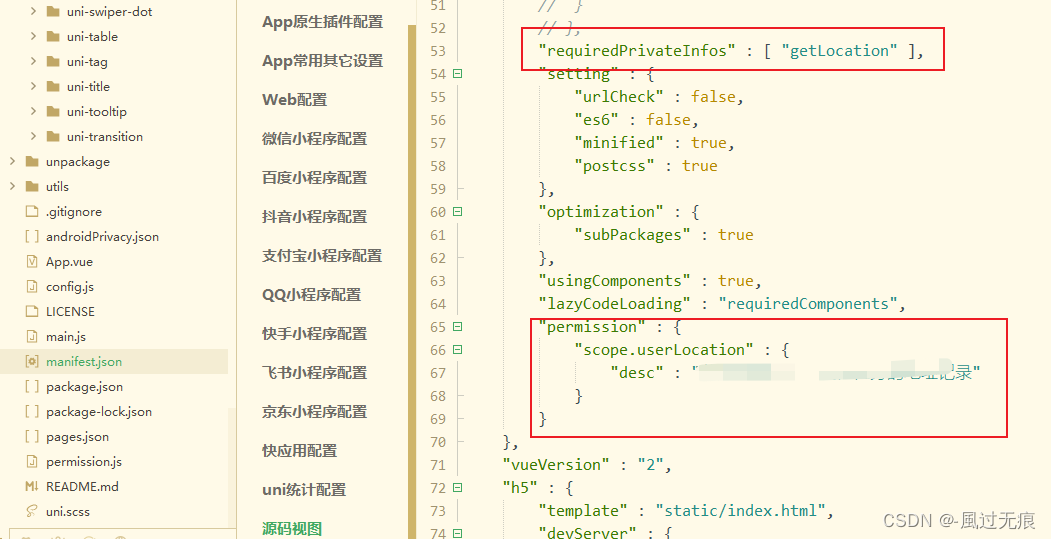
解决方案:在manifest.json-微信小程序配置-位置接口打勾-填写用途

或者直接源码视图-小程序直接配置如下代码
- "permission" : {
- "scope.userLocation" : {
- "desc" : "真实用途"
- }
- }
报错三:ferrMsg: "getlocation;fail the api heed to be declared in the requiredprivateInfosfield in app.json/ext.json"
解决方案:小程序源码视图添加如下代码
"requiredPrivateInfos" : [ "getLocation" ],总结:
-
报错一是因为微信小程序官方最近必须对相应api进行权限申请,询问用户。
-
报错二是询问用户是否愿意获取当前位置信息
-
报错三是用户同意之后,使用相关8个地理位置相关接口时,需要声明该字段,否则将无法正常使用
-
一般用户隐私指引没问题,报错二三使用勾选方式,就会在源码视图帮我们生成对应代码,不会有问题
uni.getLocation ()为什么获取不到位置信息
-
官方文档说的很清楚,只用在APP环境下,这个api才会有位置信息,小程序环境只有经纬度

为什么使用腾讯地图配合uni.getLocation ()来实现
-
因为uni-app提供的官方地图就是腾讯地图
-
并且uni.getLocation ()的type='gcz02'时经纬度在腾讯地图可以直接使用
-
并不是只能用腾讯地图,而是只是获取一个位置信息,这样使用更方便省去很多麻烦

代码实现
1.在腾讯地图注册账号,获取key,下载SDK参考文章:uni-app 小程序使用腾讯地图完成搜索功能
高德地图原生SDK:微信小程序JavaScript SDK | 腾讯位置服务
SDK可以随便下一个

2.在uni-app/utils/建立tenxun文件夹/下面放我们下载sdk文件( qqmap-wx-jssdk.js)代码如下
- /**
- * 微信小程序JavaScriptSDK
- *
- * @version 1.1
- * @date 2019-01-20
- */
-
- var ERROR_CONF = {
- KEY_ERR: 311,
- KEY_ERR_MSG: 'key格式错误',
- PARAM_ERR: 310,
- PARAM_ERR_MSG: '请求参数信息有误',
- SYSTEM_ERR: 600,
- SYSTEM_ERR_MSG: '系统错误',
- WX_ERR_CODE: 1000,
- WX_OK_CODE: 200
- };
- var BASE_URL = 'https://apis.map.qq.com/ws/';
- var URL_SEARCH = BASE_URL + 'place/v1/search';
- var URL_SUGGESTION = BASE_URL + 'place/v1/suggestion';
- var URL_GET_GEOCODER = BASE_URL + 'geocoder/v1/';
- var URL_CITY_LIST = BASE_URL + 'district/v1/list';
- var URL_AREA_LIST = BASE_URL + 'district/v1/getchildren';
- var URL_DISTANCE = BASE_URL + 'distance/v1/';
- var EARTH_RADIUS = 6378136.49;
- var Utils = {
- /**
- * 得到终点query字符串
- * @param {Array|String} 检索数据
- */
- location2query(data) {
- if (typeof data == 'string') {
- return data;
- }
- var query = '';
- for (var i = 0; i < data.length; i++) {
- var d = data[i];
- if (!!query) {
- query += ';';
- }
- if (d.location) {
- query = query + d.location.lat + ',' + d.location.lng;
- }
- if (d.latitude && d.longitude) {
- query = query + d.latitude + ',' + d.longitude;
- }
- }
- return query;
- },
-
- /**
- * 计算角度
- */
- rad(d) {
- return d * Math.PI / 180.0;
- },
- /**
- * 处理终点location数组
- * @return 返回终点数组
- */
- getEndLocation(location){
- var to = location.split(';');
- var endLocation = [];
- for (var i = 0; i < to.length; i++) {
- endLocation.push({
- lat: parseFloat(to[i].split(',')[0]),
- lng: parseFloat(to[i].split(',')[1])
- })
- }
- return endLocation;
- },
-
- /**
- * 计算两点间直线距离
- * @param a 表示纬度差
- * @param b 表示经度差
- * @return 返回的是距离,单位m
- */
- getDistance(latFrom, lngFrom, latTo, lngTo) {
- var radLatFrom = this.rad(latFrom);
- var radLatTo = this.rad(latTo);
- var a = radLatFrom - radLatTo;
- var b = this.rad(lngFrom) - this.rad(lngTo);
- var distance = 2 * Math.asin(Math.sqrt(Math.pow(Math.sin(a / 2), 2) + Math.cos(radLatFrom) * Math.cos(radLatTo) * Math.pow(Math.sin(b / 2), 2)));
- distance = distance * EARTH_RADIUS;
- distance = Math.round(distance * 10000) / 10000;
- return parseFloat(distance.toFixed(0));
- },
- /**
- * 使用微信接口进行定位
- */
- getWXLocation(success, fail, complete) {
- wx.getLocation({
- type: 'gcj02',
- success: success,
- fail: fail,
- complete: complete
- });
- },
-
- /**
- * 获取location参数
- */
- getLocationParam(location) {
- if (typeof location == 'string') {
- var locationArr = location.split(',');
- if (locationArr.length === 2) {
- location = {
- latitude: location.split(',')[0],
- longitude: location.split(',')[1]
- };
- } else {
- location = {};
- }
- }
- return location;
- },
-
- /**
- * 回调函数默认处理
- */
- polyfillParam(param) {
- param.success = param.success || function () { };
- param.fail = param.fail || function () { };
- param.complete = param.complete || function () { };
- },
-
- /**
- * 验证param对应的key值是否为空
- *
- * @param {Object} param 接口参数
- * @param {String} key 对应参数的key
- */
- checkParamKeyEmpty(param, key) {
- if (!param[key]) {
- var errconf = this.buildErrorConfig(ERROR_CONF.PARAM_ERR, ERROR_CONF.PARAM_ERR_MSG + key +'参数格式有误');
- param.fail(errconf);
- param.complete(errconf);
- return true;
- }
- return false;
- },
-
- /**
- * 验证参数中是否存在检索词keyword
- *
- * @param {Object} param 接口参数
- */
- checkKeyword(param){
- return !this.checkParamKeyEmpty(param, 'keyword');
- },
-
- /**
- * 验证location值
- *
- * @param {Object} param 接口参数
- */
- checkLocation(param) {
- var location = this.getLocationParam(param.location);
- if (!location || !location.latitude || !location.longitude) {
- var errconf = this.buildErrorConfig(ERROR_CONF.PARAM_ERR, ERROR_CONF.PARAM_ERR_MSG + ' location参数格式有误');
- param.fail(errconf);
- param.complete(errconf);
- return false;
- }
- return true;
- },
-
- /**
- * 构造错误数据结构
- * @param {Number} errCode 错误码
- * @param {Number} errMsg 错误描述
- */
- buildErrorConfig(errCode, errMsg) {
- return {
- status: errCode,
- message: errMsg
- };
- },
-
- /**
- *
- * 数据处理函数
- * 根据传入参数不同处理不同数据
- * @param {String} feature 功能名称
- * search 地点搜索
- * suggest关键词提示
- * reverseGeocoder逆地址解析
- * geocoder地址解析
- * getCityList获取城市列表:父集
- * getDistrictByCityId获取区县列表:子集
- * calculateDistance距离计算
- * @param {Object} param 接口参数
- * @param {Object} data 数据
- */
- handleData(param,data,feature){
- if (feature === 'search') {
- var searchResult = data.data;
- var searchSimplify = [];
- for (var i = 0; i < searchResult.length; i++) {
- searchSimplify.push({
- id: searchResult[i].id || null,
- title: searchResult[i].title || null,
- latitude: searchResult[i].location && searchResult[i].location.lat || null,
- longitude: searchResult[i].location && searchResult[i].location.lng || null,
- address: searchResult[i].address || null,
- category: searchResult[i].category || null,
- tel: searchResult[i].tel || null,
- adcode: searchResult[i].ad_info && searchResult[i].ad_info.adcode || null,
- city: searchResult[i].ad_info && searchResult[i].ad_info.city || null,
- district: searchResult[i].ad_info && searchResult[i].ad_info.district || null,
- province: searchResult[i].ad_info && searchResult[i].ad_info.province || null
- })
- }
- param.success(data, {
- searchResult: searchResult,
- searchSimplify: searchSimplify
- })
- } else if (feature === 'suggest') {
- var suggestResult = data.data;
- var suggestSimplify = [];
- for (var i = 0; i < suggestResult.length; i++) {
- suggestSimplify.push({
- adcode: suggestResult[i].adcode || null,
- address: suggestResult[i].address || null,
- category: suggestResult[i].category || null,
- city: suggestResult[i].city || null,
- district: suggestResult[i].district || null,
- id: suggestResult[i].id || null,
- latitude: suggestResult[i].location && suggestResult[i].location.lat || null,
- longitude: suggestResult[i].location && suggestResult[i].location.lng || null,
- province: suggestResult[i].province || null,
- title: suggestResult[i].title || null,
- type: suggestResult[i].type || null
- })
- }
- param.success(data, {
- suggestResult: suggestResult,
- suggestSimplify: suggestSimplify
- })
- } else if (feature === 'reverseGeocoder') {
- var reverseGeocoderResult = data.result;
- var reverseGeocoderSimplify = {
- address: reverseGeocoderResult.address || null,
- latitude: reverseGeocoderResult.location && reverseGeocoderResult.location.lat || null,
- longitude: reverseGeocoderResult.location && reverseGeocoderResult.location.lng || null,
- adcode: reverseGeocoderResult.ad_info && reverseGeocoderResult.ad_info.adcode || null,
- city: reverseGeocoderResult.address_component && reverseGeocoderResult.address_component.city || null,
- district: reverseGeocoderResult.address_component && reverseGeocoderResult.address_component.district || null,
- nation: reverseGeocoderResult.address_component && reverseGeocoderResult.address_component.nation || null,
- province: reverseGeocoderResult.address_component && reverseGeocoderResult.address_component.province || null,
- street: reverseGeocoderResult.address_component && reverseGeocoderResult.address_component.street || null,
- street_number: reverseGeocoderResult.address_component && reverseGeocoderResult.address_component.street_number || null,
- recommend: reverseGeocoderResult.formatted_addresses && reverseGeocoderResult.formatted_addresses.recommend || null,
- rough: reverseGeocoderResult.formatted_addresses && reverseGeocoderResult.formatted_addresses.rough || null
- };
- if (reverseGeocoderResult.pois) {//判断是否返回周边poi
- var pois = reverseGeocoderResult.pois;
- var poisSimplify = [];
- for (var i = 0;i < pois.length;i++) {
- poisSimplify.push({
- id: pois[i].id || null,
- title: pois[i].title || null,
- latitude: pois[i].location && pois[i].location.lat || null,
- longitude: pois[i].location && pois[i].location.lng || null,
- address: pois[i].address || null,
- category: pois[i].category || null,
- adcode: pois[i].ad_info && pois[i].ad_info.adcode || null,
- city: pois[i].ad_info && pois[i].ad_info.city || null,
- district: pois[i].ad_info && pois[i].ad_info.district || null,
- province: pois[i].ad_info && pois[i].ad_info.province || null
- })
- }
- param.success(data,{
- reverseGeocoderResult: reverseGeocoderResult,
- reverseGeocoderSimplify: reverseGeocoderSimplify,
- pois: pois,
- poisSimplify: poisSimplify
- })
- } else {
- param.success(data, {
- reverseGeocoderResult: reverseGeocoderResult,
- reverseGeocoderSimplify: reverseGeocoderSimplify
- })
- }
- } else if (feature === 'geocoder') {
- var geocoderResult = data.result;
- var geocoderSimplify = {
- title: geocoderResult.title || null,
- latitude: geocoderResult.location && geocoderResult.location.lat || null,
- longitude: geocoderResult.location && geocoderResult.location.lng || null,
- adcode: geocoderResult.ad_info && geocoderResult.ad_info.adcode || null,
- province: geocoderResult.address_components && geocoderResult.address_components.province || null,
- city: geocoderResult.address_components && geocoderResult.address_components.city || null,
- district: geocoderResult.address_components && geocoderResult.address_components.district || null,
- street: geocoderResult.address_components && geocoderResult.address_components.street || null,
- street_number: geocoderResult.address_components && geocoderResult.address_components.street_number || null,
- level: geocoderResult.level || null
- };
- param.success(data,{
- geocoderResult: geocoderResult,
- geocoderSimplify: geocoderSimplify
- });
- } else if (feature === 'getCityList') {
- var provinceResult = data.result[0];
- var cityResult = data.result[1];
- var districtResult = data.result[2];
- param.success(data,{
- provinceResult: provinceResult,
- cityResult: cityResult,
- districtResult: districtResult
- });
- } else if (feature === 'getDistrictByCityId') {
- var districtByCity = data.result[0];
- param.success(data, districtByCity);
- } else if (feature === 'calculateDistance') {
- var calculateDistanceResult = data.result.elements;
- var distance = [];
- for (var i = 0; i < calculateDistanceResult.length; i++){
- distance.push(calculateDistanceResult[i].distance);
- }
- param.success(data, {
- calculateDistanceResult: calculateDistanceResult,
- distance: distance
- });
- } else {
- param.success(data);
- }
- },
-
- /**
- * 构造微信请求参数,公共属性处理
- *
- * @param {Object} param 接口参数
- * @param {Object} param 配置项
- * @param {String} feature 方法名
- */
- buildWxRequestConfig(param, options, feature) {
- var that = this;
- options.header = { "content-type": "application/json" };
- options.method = 'GET';
- options.success = function (res) {
- var data = res.data;
- if (data.status === 0) {
- that.handleData(param, data, feature);
- } else {
- param.fail(data);
- }
- };
- options.fail = function (res) {
- res.statusCode = ERROR_CONF.WX_ERR_CODE;
- param.fail(that.buildErrorConfig(ERROR_CONF.WX_ERR_CODE, res.errMsg));
- };
- options.complete = function (res) {
- var statusCode = +res.statusCode;
- switch(statusCode) {
- case ERROR_CONF.WX_ERR_CODE: {
- param.complete(that.buildErrorConfig(ERROR_CONF.WX_ERR_CODE, res.errMsg));
- break;
- }
- case ERROR_CONF.WX_OK_CODE: {
- var data = res.data;
- if (data.status === 0) {
- param.complete(data);
- } else {
- param.complete(that.buildErrorConfig(data.status, data.message));
- }
- break;
- }
- default:{
- param.complete(that.buildErrorConfig(ERROR_CONF.SYSTEM_ERR, ERROR_CONF.SYSTEM_ERR_MSG));
- }
-
- }
- };
- return options;
- },
-
- /**
- * 处理用户参数是否传入坐标进行不同的处理
- */
- locationProcess(param, locationsuccess, locationfail, locationcomplete) {
- var that = this;
- locationfail = locationfail || function (res) {
- res.statusCode = ERROR_CONF.WX_ERR_CODE;
- param.fail(that.buildErrorConfig(ERROR_CONF.WX_ERR_CODE, res.errMsg));
- };
- locationcomplete = locationcomplete || function (res) {
- if (res.statusCode == ERROR_CONF.WX_ERR_CODE) {
- param.complete(that.buildErrorConfig(ERROR_CONF.WX_ERR_CODE, res.errMsg));
- }
- };
- if (!param.location) {
- that.getWXLocation(locationsuccess, locationfail, locationcomplete);
- } else if (that.checkLocation(param)) {
- var location = Utils.getLocationParam(param.location);
- locationsuccess(location);
- }
- }
- };
-
-
- class QQMapWX {
-
- /**
- * 构造函数
- *
- * @param {Object} options 接口参数,key 为必选参数
- */
- constructor(options) {
- if (!options.key) {
- throw Error('key值不能为空');
- }
- this.key = options.key;
- };
-
- /**
- * POI周边检索
- *
- * @param {Object} options 接口参数对象
- *
- * 参数对象结构可以参考
- * @see http://lbs.qq.com/webservice_v1/guide-search.html
- */
- search(options) {
- var that = this;
- options = options || {};
-
- Utils.polyfillParam(options);
-
- if (!Utils.checkKeyword(options)) {
- return;
- }
-
- var requestParam = {
- keyword: options.keyword,
- orderby: options.orderby || '_distance',
- page_size: options.page_size || 10,
- page_index: options.page_index || 1,
- output: 'json',
- key: that.key
- };
-
- if (options.address_format) {
- requestParam.address_format = options.address_format;
- }
-
- if (options.filter) {
- requestParam.filter = options.filter;
- }
-
- var distance = options.distance || "1000";
- var auto_extend = options.auto_extend || 1;
- var region = null;
- var rectangle = null;
-
- //判断城市限定参数
- if (options.region) {
- region = options.region;
- }
-
- //矩形限定坐标(暂时只支持字符串格式)
- if (options.rectangle) {
- rectangle = options.rectangle;
- }
-
- var locationsuccess = function (result) {
- if (region && !rectangle) {
- //城市限定参数拼接
- requestParam.boundary = "region(" + region + "," + auto_extend + "," + result.latitude + "," + result.longitude + ")";
- } else if (rectangle && !region) {
- //矩形搜索
- requestParam.boundary = "rectangle(" + rectangle + ")";
- } else {
- requestParam.boundary = "nearby(" + result.latitude + "," + result.longitude + "," + distance + "," + auto_extend + ")";
- }
- wx.request(Utils.buildWxRequestConfig(options, {
- url: URL_SEARCH,
- data: requestParam
- }, 'search'));
- };
- Utils.locationProcess(options, locationsuccess);
- };
-
- /**
- * sug模糊检索
- *
- * @param {Object} options 接口参数对象
- *
- * 参数对象结构可以参考
- * http://lbs.qq.com/webservice_v1/guide-suggestion.html
- */
- getSuggestion(options) {
- var that = this;
- options = options || {};
- Utils.polyfillParam(options);
-
- if (!Utils.checkKeyword(options)) {
- return;
- }
-
- var requestParam = {
- keyword: options.keyword,
- region: options.region || '全国',
- region_fix: options.region_fix || 0,
- policy: options.policy || 0,
- page_size: options.page_size || 10,//控制显示条数
- page_index: options.page_index || 1,//控制页数
- get_subpois : options.get_subpois || 0,//返回子地点
- output: 'json',
- key: that.key
- };
- //长地址
- if (options.address_format) {
- requestParam.address_format = options.address_format;
- }
- //过滤
- if (options.filter) {
- requestParam.filter = options.filter;
- }
- //排序
- if (options.location) {
- var locationsuccess = function (result) {
- requestParam.location = result.latitude + ',' + result.longitude;
- wx.request(Utils.buildWxRequestConfig(options, {
- url: URL_SUGGESTION,
- data: requestParam
- }, "suggest"));
- };
- Utils.locationProcess(options, locationsuccess);
- } else {
- wx.request(Utils.buildWxRequestConfig(options, {
- url: URL_SUGGESTION,
- data: requestParam
- }, "suggest"));
- }
- };
-
- /**
- * 逆地址解析
- *
- * @param {Object} options 接口参数对象
- *
- * 请求参数结构可以参考
- * http://lbs.qq.com/webservice_v1/guide-gcoder.html
- */
- reverseGeocoder(options) {
- var that = this;
- options = options || {};
- Utils.polyfillParam(options);
- var requestParam = {
- coord_type: options.coord_type || 5,
- get_poi: options.get_poi || 0,
- output: 'json',
- key: that.key
- };
- if (options.poi_options) {
- requestParam.poi_options = options.poi_options
- }
-
- var locationsuccess = function (result) {
- requestParam.location = result.latitude + ',' + result.longitude;
- wx.request(Utils.buildWxRequestConfig(options, {
- url: URL_GET_GEOCODER,
- data: requestParam
- }, 'reverseGeocoder'));
- };
- Utils.locationProcess(options, locationsuccess);
- };
-
- /**
- * 地址解析
- *
- * @param {Object} options 接口参数对象
- *
- * 请求参数结构可以参考
- * http://lbs.qq.com/webservice_v1/guide-geocoder.html
- */
- geocoder(options) {
- var that = this;
- options = options || {};
- Utils.polyfillParam(options);
-
- if (Utils.checkParamKeyEmpty(options, 'address')) {
- return;
- }
-
- var requestParam = {
- address: options.address,
- output: 'json',
- key: that.key
- };
-
- //城市限定
- if (options.region) {
- requestParam.region = options.region;
- }
-
- wx.request(Utils.buildWxRequestConfig(options, {
- url: URL_GET_GEOCODER,
- data: requestParam
- },'geocoder'));
- };
-
-
- /**
- * 获取城市列表
- *
- * @param {Object} options 接口参数对象
- *
- * 请求参数结构可以参考
- * http://lbs.qq.com/webservice_v1/guide-region.html
- */
- getCityList(options) {
- var that = this;
- options = options || {};
- Utils.polyfillParam(options);
- var requestParam = {
- output: 'json',
- key: that.key
- };
-
- wx.request(Utils.buildWxRequestConfig(options, {
- url: URL_CITY_LIST,
- data: requestParam
- },'getCityList'));
- };
-
- /**
- * 获取对应城市ID的区县列表
- *
- * @param {Object} options 接口参数对象
- *
- * 请求参数结构可以参考
- * http://lbs.qq.com/webservice_v1/guide-region.html
- */
- getDistrictByCityId(options) {
- var that = this;
- options = options || {};
- Utils.polyfillParam(options);
-
- if (Utils.checkParamKeyEmpty(options, 'id')) {
- return;
- }
-
- var requestParam = {
- id: options.id || '',
- output: 'json',
- key: that.key
- };
-
- wx.request(Utils.buildWxRequestConfig(options, {
- url: URL_AREA_LIST,
- data: requestParam
- },'getDistrictByCityId'));
- };
-
- /**
- * 用于单起点到多终点的路线距离(非直线距离)计算:
- * 支持两种距离计算方式:步行和驾车。
- * 起点到终点最大限制直线距离10公里。
- *
- * 新增直线距离计算。
- *
- * @param {Object} options 接口参数对象
- *
- * 请求参数结构可以参考
- * http://lbs.qq.com/webservice_v1/guide-distance.html
- */
- calculateDistance(options) {
- var that = this;
- options = options || {};
- Utils.polyfillParam(options);
-
- if (Utils.checkParamKeyEmpty(options, 'to')) {
- return;
- }
-
- var requestParam = {
- mode: options.mode || 'walking',
- to: Utils.location2query(options.to),
- output: 'json',
- key: that.key
- };
-
- if (options.from) {
- options.location = options.from;
- }
-
- //计算直线距离
- if(requestParam.mode == 'straight'){
- var locationsuccess = function (result) {
- var locationTo = Utils.getEndLocation(requestParam.to);//处理终点坐标
- var data = {
- message:"query ok",
- result:{
- elements:[]
- },
- status:0
- };
- for (var i = 0; i < locationTo.length; i++) {
- data.result.elements.push({//将坐标存入
- distance: Utils.getDistance(result.latitude, result.longitude, locationTo[i].lat, locationTo[i].lng),
- duration:0,
- from:{
- lat: result.latitude,
- lng:result.longitude
- },
- to:{
- lat: locationTo[i].lat,
- lng: locationTo[i].lng
- }
- });
- }
- var calculateResult = data.result.elements;
- var distanceResult = [];
- for (var i = 0; i < calculateResult.length; i++) {
- distanceResult.push(calculateResult[i].distance);
- }
- return options.success(data,{
- calculateResult: calculateResult,
- distanceResult: distanceResult
- });
- };
- Utils.locationProcess(options, locationsuccess);
- } else {
- var locationsuccess = function (result) {
- requestParam.from = result.latitude + ',' + result.longitude;
- wx.request(Utils.buildWxRequestConfig(options, {
- url: URL_DISTANCE,
- data: requestParam
- },'calculateDistance'));
- };
-
- Utils.locationProcess(options, locationsuccess);
- }
- }
- };
-
- module.exports = QQMapWX;
3.在需要获取位置信息页面引入使用
3.1引入文件sdk
import QQMapWX from "@/utils/tenxun/qqmap-wx-jssdk.js"3.2 获取位置信息方法-复制要填写key,里面有各种信息,根据需求看打印信息
- // 获取位置信息
- async getLocationInfo() {
- //获取位置信息
- return new Promise((resolve) => {
- //位置信息默认数据
- let location = {
- longitude: 0,
- latitude: 0,
- province: "",
- city: "",
- area: "",
- street: "",
- address: "",
- };
- // 获取经纬度(gcjo2)腾讯地图可直接使用
- uni.getLocation({
- type: "gcj02",
- success(res) {
- location.longitude = res.longitude;
- location.latitude = res.latitude;
- // 腾讯地图Api
- const qqmapsdk = new QQMapWX({
- key: '' //这里填写自己申请的key
- });
- // 使用腾讯地图api
- qqmapsdk.reverseGeocoder({
- location,
- success(response) {
- let info = response.result;
- // 注意查看打印信息
- console.log('获取位置信息',info);
- location.province = info.address_component.province;
- location.city = info.address_component.city;
- location.area = info.address_component.district;
- location.street = info.address_component.street;
- location.address = info.address;
- // 详细地址
- location.recommend = info.formatted_addresses.recommend
- location.rough = info.formatted_addresses.rough
- // 我使用这里面地址
- location.standard_address = info.formatted_addresses
- .standard_address
- resolve(location);
- },
- });
- },
- fail(err) {
- console.log(err)
- },
- });
- });
- },
3.3使用该方法获取地址
- // 获取当前地址
- const location = await this.getLocationInfo();
- console.log('获取地址', location);
4.测试效果
-
使用微信开发者工具测试时会出现定位不准-正常,会弹起授权框询问用户是否愿意获取位置信息
-
使用真机测试,或者体验版测试位置就准了,根据自己需求看打印获取信息,自己组装
总结:
经过这一趟流程下来相信你也对 uni-app 使用uni.getLocation获取经纬度配合腾讯地图api获取当前地址 有了初步的深刻印象,但在实际开发中我 们遇到的情况肯定是不一样的,所以我们要理解它的原理,万变不离其宗。加油,打工人!
有什么不足的地方请大家指出谢谢 -- 風过无痕
-
-
相关阅读:
照片后期处理软件DxO FilmPack 6 mac中文说明
HTML5期末大作业:游戏网站设计与实现——基于bootstrap响应式游戏资讯网站制作HTML+CSS+JavaScript...
数据库并发问题及四种隔离级别
虚拟内存分配
Mysql DateTime 问题
优化 cesium 界面广告牌(billboard)数据量大于 10w +时,地图加载缓慢、卡顿、加载完成后浏览器严重卡顿甚至崩溃问题
前端开发学习之【Vue】-上
c语言-数据结构-栈和队列的实现和解析
期刊级别应该是怎样划分的呢?
开发手机软件需要学什么内容才可以呢
- 原文地址:https://blog.csdn.net/weixin_53579656/article/details/134563230
