-
NLog配置文件详解
一、属性详解
1. 属性一览
<target xsi:type="File" name="String" layout="Layout" header="Layout" footer="Layout" encoding="Encoding" lineEnding="Enum" archiveAboveSize="Long" maxArchiveFiles="Integer" maxArchiveDays="Integer" archiveFileName="Layout" archiveNumbering="Enum" archiveDateFormat="String" archiveEvery="Enum" archiveOldFileOnStartup="Boolean" archiveOldFileOnStartupAboveSize="Long" replaceFileContentsOnEachWrite="Boolean" fileAttributes="Enum" fileName="Layout" deleteOldFileOnStartup="Boolean" enableFileDelete="Boolean" createDirs="Boolean" concurrentWrites="Boolean" openFileFlushTimeout="Integer" openFileCacheTimeout="Integer" openFileCacheSize="Integer" networkWrites="Boolean" concurrentWriteAttemptDelay="Integer" concurrentWriteAttempts="Integer" bufferSize="Integer" autoFlush="Boolean" keepFileOpen="Boolean" forceManaged="Boolean" enableArchiveFileCompression="Boolean" cleanupFileName="Boolean" writeFooterOnArchivingOnly="Boolean" writeBom="Boolean" />- 1
- 2
- 3
- 4
- 5
- 6
- 7
- 8
- 9
- 10
- 11
- 12
- 13
- 14
- 15
- 16
- 17
- 18
- 19
- 20
- 21
- 22
- 23
- 24
- 25
- 26
- 27
- 28
- 29
- 30
- 31
- 32
- 33
- 34
- 35
- 36
- 37
2. 属性详情
name:输出配置名称,可以自己定义,随便写
layout:日志的格式模板 自定义,里面的变量可以参考官方文档
header:头部格式
footer:脚部格式
encoding:编码格式,可以是utf-8或者其他字符集
lineEnding:行结束模式
CR - 在每行后插入 CR 字符 (ASCII 13)。
CRLF - 在每行之后插入 CR LF 序列(ASCII 13、ASCII 10)
默认 - 在每行之后插入依赖于平台的行尾序列。
LF - 在每行后插入 LF 字符 (ASCII 10)。
无 - 不插入任何行尾。
这个是官方给的解释及参考值archiveAboveSize:以字节为单位的大小,超过该大小的日志文件将被自动存档
maxArchiveFiles:应保留的最大存档文件数。如果maxArchiveFiles小于或等于 0,则不删除旧文件
maxArchiveDays: 应保留的存档文件的最长期限。当archiveNumbering为时无效Rolling。如果maxArchiveDays小于或等于 0,则不删除旧文件
archiveFileName:要用于存档的文件的名称 可以指定日志,具体参考官方文档
archiveNumbering:对文件档案进行编号的方式
archiveDateFormat:指定用于存档编号的日期格式。此选项仅在“ArchiveNumbering”参数设置为 Date 或 DateAndSequence 时有效
默认: yyyyMMdd
ArchiveEvery = 分钟时的默认值: yyyyMMddHHmm
ArchiveEvery = 小时时的默认值: yyyyMMddHH
ArchiveEvery = Month 时的默认值: yyyyMM
ArchiveEvery = Year 时的默认值: yyyy
archiveEvery:指示是否在每次经过指定时间时自动归档日志文件日 - 每天存档。
小时 - 每小时存档一次。
分钟 - 每分钟存档一次。
月 - 每月存档。
无 - 不要根据时间存档。
年 - 每年存档。
星期日 - 每个星期日存档。在 NLog 4.4.4 中引入。
星期一 - 每周一存档。在 NLog 4.4.4 中引入。
星期二 - 每个星期二存档。在 NLog 4.4.4 中引入。
星期三 - 每周三存档。在 NLog 4.4.4 中引入。
星期四 - 每个星期四存档。在 NLog 4.4.4 中引入。
星期五 - 每星期五存档。在 NLog 4.4.4 中引入。
星期六 - 每星期六存档。在 NLog 4.4.4 中引入。
如果当前时间段发生变化,文件将作为写入操作的一部分移动到存档中。例如,如果当前小时从 10 点更改为 11 点,则在 11:00 或之后发生的第一次写入将触发archiveOldFileOnStartup:在启动时存档旧日志文件
archiveOldFileOnStartupAboveSize:启动时存档旧日志文件的文件大小阈值。默认值为 0,这意味着一旦启用archiveOldFileOnStartup就会归档文件。在 NLog 4.7 中引入
replaceFileContentsOnEachWrite:指示是否在每次写入时替换文件内容,而不是在末尾附加日志消息
fileAttributes:文件属性(仅限 Windows)
存档 - 文件应该被存档。
压缩的- 由于 .Net 限制,压缩将不起作用。您可以使用 enableArchiveFileCompression。
DeleteOnClose - 关闭文件后删除文件。
设备 - 设备文件。
加密 - 加密文件。
隐藏 - 隐藏文件。
NoBuffering - 系统打开一个没有系统缓存的文件。
普通 - 普通文件。
NotContentIndexed - 内容索引服务不应为文件编制索引。
PosixSemantics - 根据 POSIX 规则访问文件。
只读 - 只读
ReadOnly - 只读文件。
ReparsePoint - 重新解析点。
SparseFile - 稀疏文件。
系统 - 系统文件。
临时 - 文件是临时的(应该保存在缓存中,如果可能的话不要写入磁盘)。
WriteThrough - 系统通过任何中间缓存写入并直接进入磁盘。
fileName:要写入的文件的名称deleteOldFileOnStartup: 指示是否在启动时删除旧日志文件,此选项仅在“FileName”参数表示单个文件时有效。
enableFileDelete:指示是否启用删除日志文件
createDirs:是否创建不存在的目录
keepFileOpen:指示是否在每次记录事件时保持日志文件打开,将此属性更改为 true 将大大提高性能,但也会保持文件句柄锁定。启用此选项时,请考虑设置openFileCacheTimeout = 30,因为它将允许存档操作并对被删除的日志文件做出反应。
concurrentWrites:当使用keepFileOpen = true时,支持从同一机器主机上的多个进程优化并发写入同一日志文件。通过使用一种特殊的技术,它可以让文件从多个进程中打开。如果只有单个进程(和单个 AppDomain)应用程序正在记录日志,那么设置为concurrentWrites = False会更快。
openFileCacheTimeout:文件保持打开的最大秒数。如果此数字为负数,则文件在一段时间不活动后不会自动关闭
openFileCacheSize:要保持打开的文件数。在单个 File 目标写入多个文件(例如按级别或按记录器拆分)的情况下,将此设置为更高的值可能会提高性能
openFileFlushTimeout:显式刷新文件缓冲区之间的秒数。有助于确保文件缓冲区在autoFlush = false时最终被刷新
networkWrites:指示是否由不同网络主机上的多个进程并发写入日志文件。
concurrentWriteAttemptDelay:在尝试再次写入文件之前等待的延迟(以毫秒为单位)。整数默认值:1
实际延迟是一个介于 0 和此参数中指定的值之间的随机值。在每次失败的尝试中,延迟基数加倍为 ConcurrentWriteAttempts 次。concurrentWriteAttempts:在 NLog 丢弃日志消息之前尝试写入文件的次数
bufferSize:以字节为单位的日志文件缓冲区大小。整数默认值:32768
autoFlush: 指示是否在每条日志消息后自动刷新文件缓冲区,禁用它会提高性能
forceManaged:指示文件目标应仅使用托管方法。这会禁用某些选项
enableArchiveFileCompression:指示是否将存档文件压缩为 zip 文件
cleanupFileName:在写入文件之前,检查文件名是否包含非法字符(取决于操作系统)。如果写入大量消息,这可能代价高昂。清理缓存为固定名称(无布局渲染器)。将此设置false为最佳性能(但要注意文件名,如果错误,则不会写入任何内容)
writeFooterOnArchivingOnly:指示是否应仅在归档文件时写入页脚
writeBom:指示是否在创建的文件中写入 BOM(字节顺序标记)
二、日志类型
1. JSON Log-file
Nlog不光能记录普通的log文件,还可以记录json格式。
<?xml version="1.0" ?> <nlog xmlns="http://www.nlog-project.org/schemas/NLog.xsd" xmlns:xsi="http://www.w3.org/2001/XMLSchema-instance"> <targets> <target name="jsonfile" xsi:type="File" fileName="${basedir}/file.json"> <layout xsi:type="JsonLayout"> <attribute name="time" layout="${date:format=O}" /> <attribute name="message" layout="${message}" /> <attribute name="logger" layout="${logger}"/> <attribute name="level" layout="${level}"/> </layout> </target> </targets> <rules> <logger name="*" minlevel="Debug" writeTo="jsonfile" /> </rules> </nlog>- 1
- 2
- 3
- 4
- 5
- 6
- 7
- 8
- 9
- 10
- 11
- 12
- 13
- 14
- 15
- 16
- 17
- 18
2. xml Log-file
可以记录xml格式的文件呢
<?xml version="1.0" ?> <nlog xmlns="http://www.nlog-project.org/schemas/NLog.xsd" xmlns:xsi="http://www.w3.org/2001/XMLSchema-instance"> <targets> <target name="csvfile" xsi:type="File" fileName="${basedir}/file.csv"> <layout xsi:type="CSVLayout"> <column name="time" layout="${longdate}" /> <column name="message" layout="${message}" /> <column name="logger" layout="${logger}"/> <column name="level" layout="${level}"/> </layout> </target> </targets> <rules> <logger name="*" minlevel="Debug" writeTo="csvfile" /> </rules> </nlog>- 1
- 2
- 3
- 4
- 5
- 6
- 7
- 8
- 9
- 10
- 11
- 12
- 13
- 14
- 15
- 16
- 17
- 18
3. 示例
3.1 Log
<?xml version="1.0" encoding="utf-8" ?> <!-- XSD manual extracted from package NLog.Schema: https://www.nuget.org/packages/NLog.Schema--> <nlog xmlns="http://www.nlog-project.org/schemas/NLog.xsd" xmlns:xsi="http://www.w3.org/2001/XMLSchema-instance" autoReload="true" internalLogFile="c:\temp\console-example-internal.log" internalLogLevel="Info" > <targets> <target xsi:type="ColoredConsole" name="colorConsole" encoding="Encoding" detectConsoleAvailable="true" detectOutputRedirected="false" useDefaultRowHighlightingRules="false" header="--------------------" layout="${longdate}|${level:uppercase=true}|${logger}|${message}|${exception} ${newline} ${stacktrace} ${newline}" footer="---------------------" > <highlight-row condition="level == LogLevel.Trace" backgroundColor="White" foregroundColor="DarkGray"/> <highlight-row condition="level == LogLevel.Debug" backgroundColor="White" foregroundColor="DarkBlue"/> <highlight-row condition="level == LogLevel.Info" backgroundColor="Green" foregroundColor="White"/> <highlight-row condition="level == LogLevel.Warn" backgroundColor="Magenta" foregroundColor="DarkYellow"/> <highlight-row condition="level == LogLevel.Error" backgroundColor="Gray" foregroundColor="Red"/> <highlight-row condition="level == LogLevel.Fatal" backgroundColor="Gray" foregroundColor="DarkRed"/> </target> <target xsi:type="File" name="myfile" fileName="${basedir}/logs/${level:uppercase=true}.${shortdate}.log" createDirs="true" layout="${longdate}|${level:uppercase=true}|${logger}|${message}|${exception:format=ToString} ${newline} ${stacktrace} ${newline}" header="-------" footer="--------" encoding="utf-8" lineEnding="CRLF" keepFileOpen="true" concurrentWrites="false" openFileCacheTimeout="30" openFileCacheSize="6" openFileFlushTimeout="10" autoFlush="false" cleanupFileName="false" archiveAboveSize="10000" maxArchiveFiles="10" maxArchiveDays="10" archiveFileName="archive.${level:uppercase=true}.{#}.log" archiveNumbering="Date" archiveEvery="Month" archiveOldFileOnStartup="false" archiveOldFileOnStartupAboveSize="0" replaceFileContentsOnEachWrite="false" enableFileDelete="true" concurrentWriteAttempts="20000" networkWrites="false" /> </targets> <rules> <logger name="*" minlevel="Trace" writeTo="colorConsole,myfile" /> </rules> </nlog>- 1
- 2
- 3
- 4
- 5
- 6
- 7
- 8
- 9
- 10
- 11
- 12
- 13
- 14
- 15
- 16
- 17
- 18
- 19
- 20
- 21
- 22
- 23
- 24
- 25
- 26
- 27
- 28
- 29
- 30
- 31
- 32
- 33
- 34
- 35
- 36
- 37
- 38
- 39
- 40
- 41
- 42
- 43
- 44
- 45
- 46
- 47
- 48
- 49
- 50
- 51
- 52
- 53
- 54
- 55
- 56
- 57
- 58
- 59
- 60
- 61
- 62
- 63
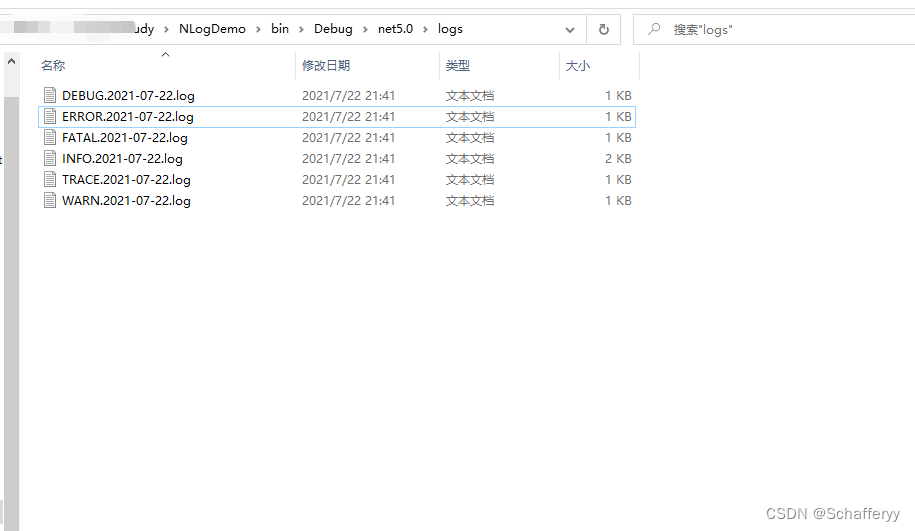
3.2 Json
下面我们试一下json文件,然后我们换个目录看看效果
<?xml version="1.0" encoding="utf-8" ?> <!-- XSD manual extracted from package NLog.Schema: https://www.nuget.org/packages/NLog.Schema--> <nlog xmlns="http://www.nlog-project.org/schemas/NLog.xsd" xmlns:xsi="http://www.w3.org/2001/XMLSchema-instance" autoReload="true" internalLogFile="c:\temp\console-example-internal.log" internalLogLevel="Info" > <targets> <target xsi:type="ColoredConsole" name="colorConsole" encoding="Encoding" detectConsoleAvailable="true" detectOutputRedirected="false" useDefaultRowHighlightingRules="false" header="--------------------" layout="${longdate}|${level:uppercase=true}|${logger}|${message}|${exception} ${newline} ${stacktrace} ${newline}" footer="---------------------" > <highlight-row condition="level == LogLevel.Trace" backgroundColor="White" foregroundColor="DarkGray"/> <highlight-row condition="level == LogLevel.Debug" backgroundColor="White" foregroundColor="DarkBlue"/> <highlight-row condition="level == LogLevel.Info" backgroundColor="Green" foregroundColor="White"/> <highlight-row condition="level == LogLevel.Warn" backgroundColor="Magenta" foregroundColor="DarkYellow"/> <highlight-row condition="level == LogLevel.Error" backgroundColor="Gray" foregroundColor="Red"/> <highlight-row condition="level == LogLevel.Fatal" backgroundColor="Gray" foregroundColor="DarkRed"/> </target> <target xsi:type="File" name="myfile" fileName="${basedir}/logs/${level:uppercase=true}.${shortdate}.log" createDirs="true" layout="${longdate}|${level:uppercase=true}|${logger}|${message}|${exception:format=ToString} ${newline} ${stacktrace} ${newline}" header="-------" footer="--------" encoding="utf-8" lineEnding="CRLF" keepFileOpen="true" concurrentWrites="false" openFileCacheTimeout="30" openFileCacheSize="6" openFileFlushTimeout="10" autoFlush="false" cleanupFileName="false" archiveAboveSize="10000" maxArchiveFiles="10" maxArchiveDays="10" archiveFileName="archive.${level:uppercase=true}.{#}.log" archiveNumbering="Date" archiveEvery="Month" archiveOldFileOnStartup="false" archiveOldFileOnStartupAboveSize="0" replaceFileContentsOnEachWrite="false" enableFileDelete="true" concurrentWriteAttempts="20000" networkWrites="false" /> <target xsi:type="File" name="myjsonfile" fileName="${basedir}/jsonlogs/${level:uppercase=true}.${shortdate}.json" createDirs="true" encoding="utf-8" lineEnding="CRLF" keepFileOpen="true" concurrentWrites="false" openFileCacheTimeout="30" openFileCacheSize="6" openFileFlushTimeout="10" autoFlush="false" cleanupFileName="false" archiveAboveSize="10000" maxArchiveFiles="10" maxArchiveDays="10" archiveFileName="archive.${level:uppercase=true}.{#}.log" archiveNumbering="Date" archiveEvery="Month" archiveOldFileOnStartup="false" archiveOldFileOnStartupAboveSize="0" replaceFileContentsOnEachWrite="false" enableFileDelete="true" concurrentWriteAttempts="20000" networkWrites="false" > <layout xsi:type="JsonLayout"> <attribute name="time" layout="${longdate:format=O}" /> <attribute name="message" layout="${message}" /> <attribute name="logger" layout="${logger}"/> <attribute name="level" layout="${level}"/> <attribute name="exception" layout="${exception:format=ToString}"/> <attribute name="stacktrace" layout="${stacktrace}"/> </layout> </target> </targets> <rules> <logger name="*" minlevel="Trace" writeTo="colorConsole,myfile,myjsonfile" /> </rules> </nlog>- 1
- 2
- 3
- 4
- 5
- 6
- 7
- 8
- 9
- 10
- 11
- 12
- 13
- 14
- 15
- 16
- 17
- 18
- 19
- 20
- 21
- 22
- 23
- 24
- 25
- 26
- 27
- 28
- 29
- 30
- 31
- 32
- 33
- 34
- 35
- 36
- 37
- 38
- 39
- 40
- 41
- 42
- 43
- 44
- 45
- 46
- 47
- 48
- 49
- 50
- 51
- 52
- 53
- 54
- 55
- 56
- 57
- 58
- 59
- 60
- 61
- 62
- 63
- 64
- 65
- 66
- 67
- 68
- 69
- 70
- 71
- 72
- 73
- 74
- 75
- 76
- 77
- 78
- 79
- 80
- 81
- 82
- 83
- 84
- 85
- 86
- 87
- 88
- 89
- 90
- 91
- 92
- 93
- 94
- 95
- 96
- 97
- 98
- 99
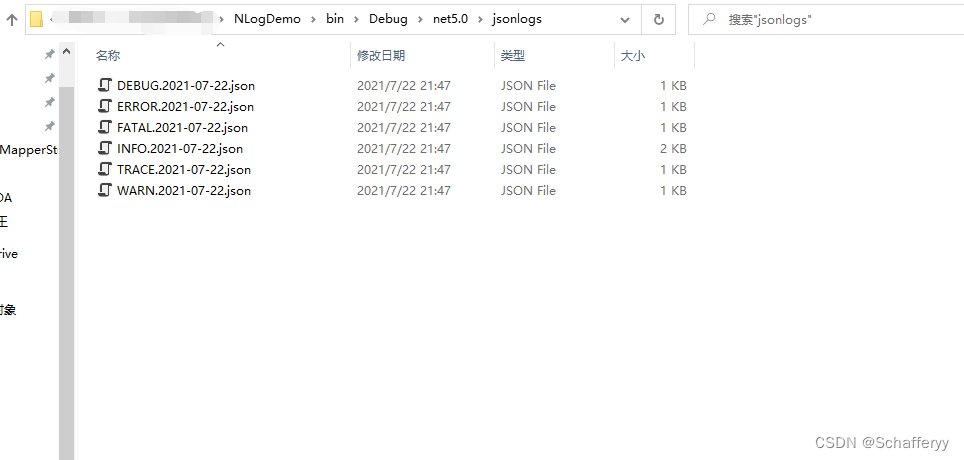
xml我们就不做测试了,使用较少。三、常用配置
以上介绍的所有NLog的属性配置,但是实际使用中,没有必要使用这么多属性。下面展示我常用的NLog配置文件。
<?xml version="1.0" encoding="utf-8" ?> <nlog xmlns="http://www.nlog-project.org/schemas/NLog.xsd" xmlns:xsi="http://www.w3.org/2001/XMLSchema-instance"> <!--输出目标,往哪里输出--> <targets> <!--此部分中的所有目标将自动异步--> <default-wrapper xsi:type="AsyncWrapper"></default-wrapper> <!--type:日志输出类型 File:文件 ColoredConsole:控制台--> <!--fileName:日志存储的路径及名称--> <!--layout:日志输出格式--> <!-- archiveFileName:要用于存档的文件的名称 可以指定日志 --> <!-- archiveAboveSize:以字节为单位的大小,超过该大小的日志文件将被自动存档 --> <!-- archiveNumbering:对文件档案进行编号的方式 --> <!-- concurrentWrites:当使用keepFileOpen = true时,支持从同一机器主机上的多个进程优化并发写入同一日志文件。通过使用一种特殊的技术,它可以让文件从多个进程中打开。如果只有单个进程(和单个 AppDomain)应用程序正在记录日志,那么设置为concurrentWrites = False会更快。 --> <!-- keepFileOpen:指示是否在每次记录事件时保持日志文件打开,将此属性更改为 true 将大大提高性能,但也会保持文件句柄锁定。启用此选项时,请考虑设置openFileCacheTimeout = 30,因为它将允许存档操作并对被删除的日志文件做出反应。 --> <!--项目日志保存文件路径说明fileName="${basedir}/保存目录,以年月日的格式创建/${shortdate}/${记录器名称}-${单级记录}-${shortdate}.txt"--> <target name="info_file" xsi:type="File" fileName="${basedir}/Logs/${shortdate}/info_${shortdate}.txt" layout="${longdate} | ${event-properties:item=EventId_Id:whenEmpty=0} | ${uppercase:${level}} | ${logger} | ${message} ${exception:format=tostring}" archiveFileName="${basedir}/archives/info_${shortdate}-{#####}.txt" archiveAboveSize="102400" archiveNumbering="Sequence" concurrentWrites="true" keepFileOpen="false" /> <target name="error_file" xsi:type="File" fileName="${basedir}/Logs/${shortdate}/error_${shortdate}.txt" layout="${longdate} | ${event-properties:item=EventId_Id:whenEmpty=0} | ${uppercase:${level}} | ${logger} | ${message} ${exception:format=tostring}" archiveFileName="${basedir}/archives/error_${shortdate}-{#####}.txt" archiveAboveSize="102400" archiveNumbering="Sequence" concurrentWrites="true" keepFileOpen="false" /> <!--使用可自定义的着色将日志消息写入控制台--> <!-- <target name="console" xsi:type="ColoredConsole" layout="[${date:format=HH\:mm\:ss}]:${message} ${exception:format=message}" /> --> </targets> <!--规则配置,final - 最终规则匹配后不处理任何规则--> <!--定义使用哪个target输出--> <rules> <!-- 优先级从高到低依次为:OFF、FATAL、ERROR、WARN、INFO、DEBUG、TRACE、 ALL --> <!-- 将所有日志输出到文件 --> <logger name="*" minlevel="Trace" maxlevel="Warn" writeTo="info_file" /> <logger name="*" minlevel="Error" writeTo="error_file" /> <!-- 将所有日志输出到控制台 --> <!-- <logger name="*" minlevel="Debug" writeTo="console" /> --> </rules> </nlog>- 1
- 2
- 3
- 4
- 5
- 6
- 7
- 8
- 9
- 10
- 11
- 12
- 13
- 14
- 15
- 16
- 17
- 18
- 19
- 20
- 21
- 22
- 23
- 24
- 25
- 26
- 27
- 28
- 29
- 30
- 31
- 32
- 33
- 34
- 35
- 36
- 37
- 38
- 39
- 40
- 41
- 42
- 43
- 44
- 45
- 46
- 47
- 48
- 49
- 50
- 51
- 52
配置中根据日志类型不同,分文件夹记录。也可以不这样做,删掉error那支target即可。
-
相关阅读:
JPA - Hibernate
打造一个投资组合管理的金融强化学习环境
草莓熊python turtle绘图代码(玫瑰花版)附源代码
C#【进阶】委托和事件
样式的双向绑定的2种方式,实现样式交互效果
Vue内置组件:teleport和transition组件
【无线传感器】使用 Mamdani 模糊推理系统改进无线传感器网络路由和数据包传递(Matlab代码实现)
【CHI】Ordering保序
JavaSE学习----(七)JDK类库的根类:Object
K8S集群配置私有仓库和集群功能演示
- 原文地址:https://blog.csdn.net/Schaffer_W/article/details/134546161

- 最新文章
-
沪漂五周年了:我越来越迷茫了
Agentic Skill Routing 实战:别再把所有 Skill 塞进 AI Agent 上下文
MySQL-Seconds_behind_master的精度误差
[MAF预定义ChatClient中间件-03]CachingChatClient——利用缓存省钱省时间
AI的至暗历史:从万众期待到被政府撤资,AI的两次死亡徘徊
Agent OS :五种驯服不确定性的范式
PortSwigger SQL注入LAB11
数据库即时编译JIT
[Begin]AI Learn Data Day 0
深度学习进阶(二十七)现代 LLM 的核心架构设计其二:SwiGLU