-
C++基础从0到1入门编程(三)
系统学习C++
方便自己日后复习,错误的地方希望积极指正
往期文章:
C++基础从0到1入门编程(一)
C++基础从0到1入门编程(二)
参考视频:
1.黑马程序员匠心之作|C++教程从0到1入门编程,学习编程不再难
2.系统化学习C++1 简单链表 共同体 枚举
链表
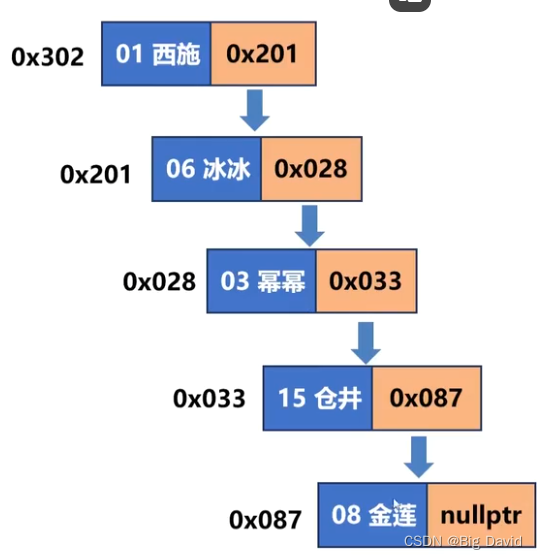
单链表:节点之间只能单向的联系
双链表:可以双向联系struct st_girl { int bo; string name; struct st_girl* next; // 下一个超女节点的地址,如果本节点是最后一条记录,填nullptr };- 1
- 2
- 3
- 4
- 5
- 6
简单的链表操作
1.分配节点
2.遍历链表
3.删除链表#include// 包含头文件。 #include using namespace std; // 指定缺省的命名空间。 struct st_girl { int no; string name; // 超女姓名。 struct st_girl* next; }; int main() { // head 头指针 tail 尾指针 tmp 临时指针 st_girl* head = nullptr, *tail = nullptr, *tmp = nullptr; // 分配第一个节点 tmp = new st_girl({1, "BigDavid", nullptr}); head = tail = tmp; // 分配第二个节点 tmp = new st_girl({6, "LiuXueJin", nullptr}); tail->next = tmp; tail = tmp; // 分配第三个节点 tmp = new st_girl({3, "as", nullptr}); tail->next = tmp; tail = tmp; // 遍历链表 tmp = head; while (tmp!=nullptr) { cout << tmp->no << ' ' << tmp->name << tmp->next << endl; tmp = tmp->next; } // 释放 while (head!=nullptr) { tmp = head; // 让临时节点指向头节点 head = head->next;// 头节点后移 delete tmp; // 删除临时节点 } } - 1
- 2
- 3
- 4
- 5
- 6
- 7
- 8
- 9
- 10
- 11
- 12
- 13
- 14
- 15
- 16
- 17
- 18
- 19
- 20
- 21
- 22
- 23
- 24
- 25
- 26
- 27
- 28
- 29
- 30
- 31
- 32
- 33
- 34
- 35
- 36
- 37
- 38
- 39
- 40
- 41
- 42
- 43
共同体
能存储不同数据类型,但同一时间只能存储一个
union udata { int a; double b; char c[21]; };- 1
- 2
- 3
- 4
- 5
- 6
应用场景:
(1)当数据项使用两种或多种格式(但不会同时使用),可节省空间(嵌入式系统)
(2)回调函数的参数Tip:
- 共同体占用内存的大小是它最大的成员占用内存的大小(内存对齐)
- 全部成员共用一块内存
- 共同体中的值为最后被赋值的成员的值
- 匿名共同体没有名字,可以在定义的时候创建匿名共同体变量(VS和Linux有差别),也可以嵌入结构体中。
#include// 包含头文件。 #include using namespace std; // 指定缺省的命名空间。 //union udata //{ // int a; // double b; // char c[21]; //}; struct st_girl { int no; union { int a; double b; char c[21]; }; }; int main() { // udata data; // cout << sizeof(data) << endl; // 24 对齐到8的整数倍 // cout << (void*)&data.a << endl; // 0x8e5bfff820 // cout << (void*)&data.b << endl; // 0x8e5bfff820 // cout << (void*)&data.c << endl; // 0x8e5bfff820 // // data.a = 3; // data.b = 8.8; // strcpy(data.c, "asd"); // cout << data.a << endl; // cout << data.b << endl; // cout << data.c << endl; struct st_girl girl; cout << (void*)&girl.no << endl; cout << (void*)&girl.a << endl; cout << (void*)&girl.b << endl; cout << (void*)&girl.c << endl; } - 1
- 2
- 3
- 4
- 5
- 6
- 7
- 8
- 9
- 10
- 11
- 12
- 13
- 14
- 15
- 16
- 17
- 18
- 19
- 20
- 21
- 22
- 23
- 24
- 25
- 26
- 27
- 28
- 29
- 30
- 31
- 32
- 33
- 34
- 35
- 36
- 37
- 38
- 39
- 40
- 41
- 42
枚举
枚举:创建符号常量
语法:
enum 枚举名 { 枚举量1, 枚举量2, 枚举量3, ... ,枚举量n };// colors 成了一种新的枚举类型的名称,可以用它创建枚举变量 enum colors { red, yellow, blue }; // 0 1 2- 1
- 2
枚举
#include// 包含头文件。 using namespace std; // 指定缺省的命名空间。 int main() { enum colors {red , yellow, green}; // 0 1 2 colors cc = green; // 2 // colors cc = colors(1); cout << red << ' ' << yellow << ' ' << green << ' ' << cc; } - 1
- 2
- 3
- 4
- 5
- 6
- 7
- 8
- 9
- 10
2 引用
2.1 引用基本概念
引用就是变量的别名
主要用途:函数的形参和返回值
语法:数据类型 &引用名 = 原变量名;
Tip:
(1)引用数据类型要与原变量名类型相同
(2)引用名和原变量名可以互换,值和内存单元是相同的
(3)必须在声名引用的时候初始化,否则编译报错#include// 包含头文件。 using namespace std; // 指定缺省的命名空间。 int main() { int a = 3; int& ra = a; // 创建引用 // long long& b = a; 错误的 cout << a << ' ' << ra << endl; cout << &a << ' ' << &ra << endl; // 地址和值都是相同的 ra = 8; cout << a << ' ' << ra << endl; cout << &a << ' ' << &ra << endl; int b = 5; ra = b; // ra = 5 cout << &ra << ' ' << &b << endl; cout << a << ' ' << ra << endl; cout << &a << ' ' << &ra << endl; } - 1
- 2
- 3
- 4
- 5
- 6
- 7
- 8
- 9
- 10
- 11
- 12
- 13
- 14
- 15
- 16
- 17
- 18
- 19
- 20
- 21
引用是指针常量的伪装
2.2 引用用于函数的参数
把函数的形参声明为引用,调用函数的时候,形参将成为实参的别名(传引用)
最主要的用途:函数的参数
(1)传引用代码更简洁
(2)传引用不必使用二级指针
回顾二级指针#includeint main() { int a = 10; int b = 20; int *p = &a; int** s = &p; //一次解引用*s 此时类型int* *s = &b; //二次解引用**s 此时类型int **s = 200; return 0; } - 1
- 2
- 3
- 4
- 5
- 6
- 7
- 8
- 9
- 10
- 11
- 12
- 13
- 14
- 15
- 16
二级指针s解引用操作:
一次解引用
s的类型变成了(int)(代表着一级指针p)间接改变了p的指向,从a的地址变成了b的地址;
二次解引用
s的类型变成了int (代表着变量b),此时s = 200;(等价于b = 200;)#include// 包含头文件。 using namespace std; // 指定缺省的命名空间。 void fun1(int** p) { *p = new int(3);// p是二级指针,存放指针的地址 cout << *p << ' ' << **p << endl; // 0x1b4b87218c0 3 } void fun2(int* &p) { p = new int(3); // p是指针的别名 cout << p << ' ' << *p << endl; // 0x1b4b87218c0 3 } int main() { int *p = nullptr; // 存放子函数动态分配内存的地址 fun1(&p); // 传地址,实参填指针p的地址 fun2(p); // 传引用,实参填指针p } - 1
- 2
- 3
- 4
- 5
- 6
- 7
- 8
- 9
- 10
- 11
- 12
- 13
- 14
- 15
- 16
- 17
- 18
(3)引用的属性和特别之处
传值:修改形参不会影响实参
传地址:修改形参会影响实参
传引用:修改形参会影响实参2.3 引用的形参和const
如果引用的数据对象类型不匹配,当引用为const,C++会创建临时变量,让引用指向临时变量
创建临时变量
(1)引用是const
(2)数据对象的类型是正确的,但不是左值左值:可以被引用的数据对象,可以通过地址访问(变量,数组元素,结构体成员,引用和解引用的指针)
非左值:字面常量(双引号的字符串除外)和包含多项的表达式(3)数据对象类型不正确,但可以转换为正确的类型
如果函数的实参不是左值或与const引用形参的类型不匹配,那么C++将创建正确类型的匿名变量,将实参的值传递给匿名变量,并让形参来引用该变量引用形参声明为const原因:
- 避免无意修改数据的编程错误
- 用const能使函数处理const和非const实参,否则只能接受非const实参
- 使用const,函数能正确生成并使用临时变量
#include// 包含头文件。 using namespace std; // 指定缺省的命名空间。 void fun(const int& no, const string& str) { cout << no << ' ' << str << endl; } int main() { fun('s', "asd"); int bh = 1; string a = "sadasd"; fun(bh, a); } - 1
- 2
- 3
- 4
- 5
- 6
- 7
- 8
- 9
- 10
- 11
- 12
- 13
2.4 引用用于函数的返回值
函数的返回值被拷贝到一个临时位置(寄存器或栈)
如果返回引用不会拷贝内存
语法:返回值数据类型& 函数名(形参列表);
Tip:
(1)如果返回局部变量的引用,本质是野指针
(2)可以返回函数的引用形参、类的成员、全局变量、静态变量
(3)返回引用的函数是被引用的变量的别名,将const用于引用的返回类型#includeusing namespace std; const int& fun(int &ra) { ra++; cout << &ra << ' ' << ra << endl; return ra; } int main() { int a = 3; const int& b = fun(a); cout << &a << ' ' << &b << ' ' << endl; cout << a << ' ' << b << endl; // fun(a) = 3; // 返回引用的函数是被引用变量的别名 } - 1
- 2
- 3
- 4
- 5
- 6
- 7
- 8
- 9
- 10
- 11
- 12
- 13
- 14
- 15
- 16
- 17
- 18
- 19
- 20
2.5 各种形参的使用场景
重要
(1)如果不需要在函数中修改实参- 如果实参很小,就值传递
- 如果实参是数组,用const指针,因为是唯一的选择(没有为数组建立引用)
- 实参是比较大的结构,使用const指针或const引用
- 如果实参是类,则使用const引用,传递类的标准方式是按引用传递
(2)如果需要在函数中修改实参
- 如果实参是内置数据类型,使用指针。只要看到fun(&x)的调用,表示函数将修改x
- 如果实参是数组,则只能使用指针
- 如果实参是结构体,则使用指针或者引用
- 如果实参是类,则使用引用
3 函数的默认参数
语法:
返回值 函数名(数据类型 参数 = 值,数据类型 参数 = 值,...);#includeusing namespace std; void fun(const string &message = "BigDavid") { cout << message << endl; } int main() { fun("Liu"); // Liu fun(); // BigDavid } - 1
- 2
- 3
- 4
- 5
- 6
- 7
- 8
- 9
- 10
- 11
- 12
- 13
Tip:
(1)函数的声明和定义分开写的,在函数的声名里写默认参数,函数的定义里不能写默认参数#includeusing namespace std; void fun(const string &message = "BigDavid"); int main() { fun("Liu"); // Liu fun(); // BigDavid } //void fun(const string &message = "BigDavid") //{ // cout << message << endl; //} void fun(const string &message) { cout << message << endl; } - 1
- 2
- 3
- 4
- 5
- 6
- 7
- 8
- 9
- 10
- 11
- 12
- 13
- 14
- 15
- 16
- 17
- 18
(2)函数必须右到左设置默认参数。如果为某个参数设置默认值,则它后面所有的参数都设置默认值
#includeusing namespace std; void fun(int no, const string& name = "Big", int bh = 8) { cout << no << ' ' << name << ' ' << bh << endl; } int main() { fun(1); } - 1
- 2
- 3
- 4
- 5
- 6
- 7
- 8
- 9
- 10
- 11
- 12
(3)调用函数的时候,如果指定某个参数的值,该参数前面的值都需要指定
#includeusing namespace std; void fun(int no, const string& name = "Big", int bh = 8) { cout << no << ' ' << name << ' ' << bh << endl; } int main() { //fun(1,8); fun(1,"as"); } - 1
- 2
- 3
- 4
- 5
- 6
- 7
- 8
- 9
- 10
- 11
- 12
- 13
4 函数重载
函数重载(函数多态)是指设计一系列同名函数,完成相似的工作
C++允许定义名称相同的函数,条件是特征不同特征:形参个数,数据类型,排列顺序
int fun(short a, string b); int fun(int a, int b); int fun(short a, string b, double c); int fun(string b, short a);- 1
- 2
- 3
- 4
需求重载各种数据类型,不要重载功能不同的函数
注意事项:
(1)使用重载函数时,如果数据类型不匹配,C++尝试使用类型转换与形参进行匹配,如果转换后有多个函数能匹配上,编译将报错void fun(short a, string b) { cout << a << ' ' << b << endl; } void fun(int a, string b) { cout << a << ' ' << b << endl; } int main() { long bh = 0; // 有多个函数能匹配上,编译将报错 fun(bh,"sas"); // long->short 会丢失精度 }- 1
- 2
- 3
- 4
- 5
- 6
- 7
- 8
- 9
- 10
- 11
- 12
- 13
- 14
(2)引用可以作为函数重载的条件,但是,调用重载函数的时候,如果实参是变量,编译器将形参类型的本身和类型引用视为同一特征
#includeusing namespace std; void show(int bh, string a) { cout << bh << ' ' << a << endl; } void show(int& bh, string a) { cout << bh << ' ' << a << endl; } int main() { int a = 0; show(a, "asd"); // 报错 show(10, "sd"); } - 1
- 2
- 3
- 4
- 5
- 6
- 7
- 8
- 9
- 10
- 11
- 12
- 13
- 14
- 15
- 16
(3)如果重载函数有默认参数,调用函数时,可能导致匹配失败
#includeusing namespace std; void show(int bh, string a) { cout << bh << ' ' << a << endl; } void show(int bh, string a, string c = "sad") { cout << bh << ' ' << a << ' ' << c << endl; } int main() { show(1,"asd");// 可能导致匹配失败 } - 1
- 2
- 3
- 4
- 5
- 6
- 7
- 8
- 9
- 10
- 11
- 12
- 13
- 14
(4)const不能作为函数重载的特征
#includeusing namespace std; void show(int bh, string a) { cout << bh << ' ' << a << endl; } void show(const int bh, string a) { cout << bh << ' ' << a << endl; } int main() { show(1,"asd");// 报错,函数已有主体 } - 1
- 2
- 3
- 4
- 5
- 6
- 7
- 8
- 9
- 10
- 11
- 12
- 13
- 14
(5)返回值的数据类型不同不能作为函数重载的特征
(6)C++的名称修饰:编译时,对每个函数名进行加密,替换成不同名的函数。5 内联函数
用途:提高程序运行的速度
语法:在函数声名和定义前加上关键字inline
常见的做法是将函数声名和定义写在一起
Tip:
(1)内联函数节省时间,但消耗内存
(2)如果函数过大,编译器可能不将其作为内联函数
(3)内联函数不能递归#includeusing namespace std; inline void show(const int bh, const string& message) { cout << bh << ' ' << message << endl; } int main() { show(1,"sd"); show(2, "qwe"); show(4, "asaaa"); } - 1
- 2
- 3
- 4
- 5
- 6
- 7
- 8
- 9
- 10
- 11
- 12
- 13
- 14
-
相关阅读:
【计算机视觉 | 语义分割】语义分割常用数据集及其介绍(八)
element-ui封装loading,便于在拦截请求或其他场景使用
5款良心办公软件,功能强大到离谱,可免费使用
推荐一个在线视频学习、在线试题练习、在线同步考试开源系统
ERP 技术列表
阿里云将投入70亿元建国际生态、增设6大海外服务中心
企业怎么找包收录的媒体做推广,便宜又好用的软文发稿平台推荐
第十二章 Spring Cloud Config 统一配置中心详解-客户端动态刷新
十六、代码校验(4)
VC++删除文件夹
- 原文地址:https://blog.csdn.net/BigDavid123/article/details/134474761
