码农知识堂 - 1000bd
  •   Python
  •   PHP
  •   JS/TS
  •   JAVA
  •   C/C++
  •   C#
  •   GO
  •   Kotlin
  •   Swift
  • 【vue】AntDV组件库中a-upload实现文件上传:


    文章目录

          • 一、文档:
          • 二、使用(以Jeecg为例):
              • 【1】template:
              • 【2】script:
          • 三、效果图:


    一、文档:

    Upload 上传–Ant Design Vue
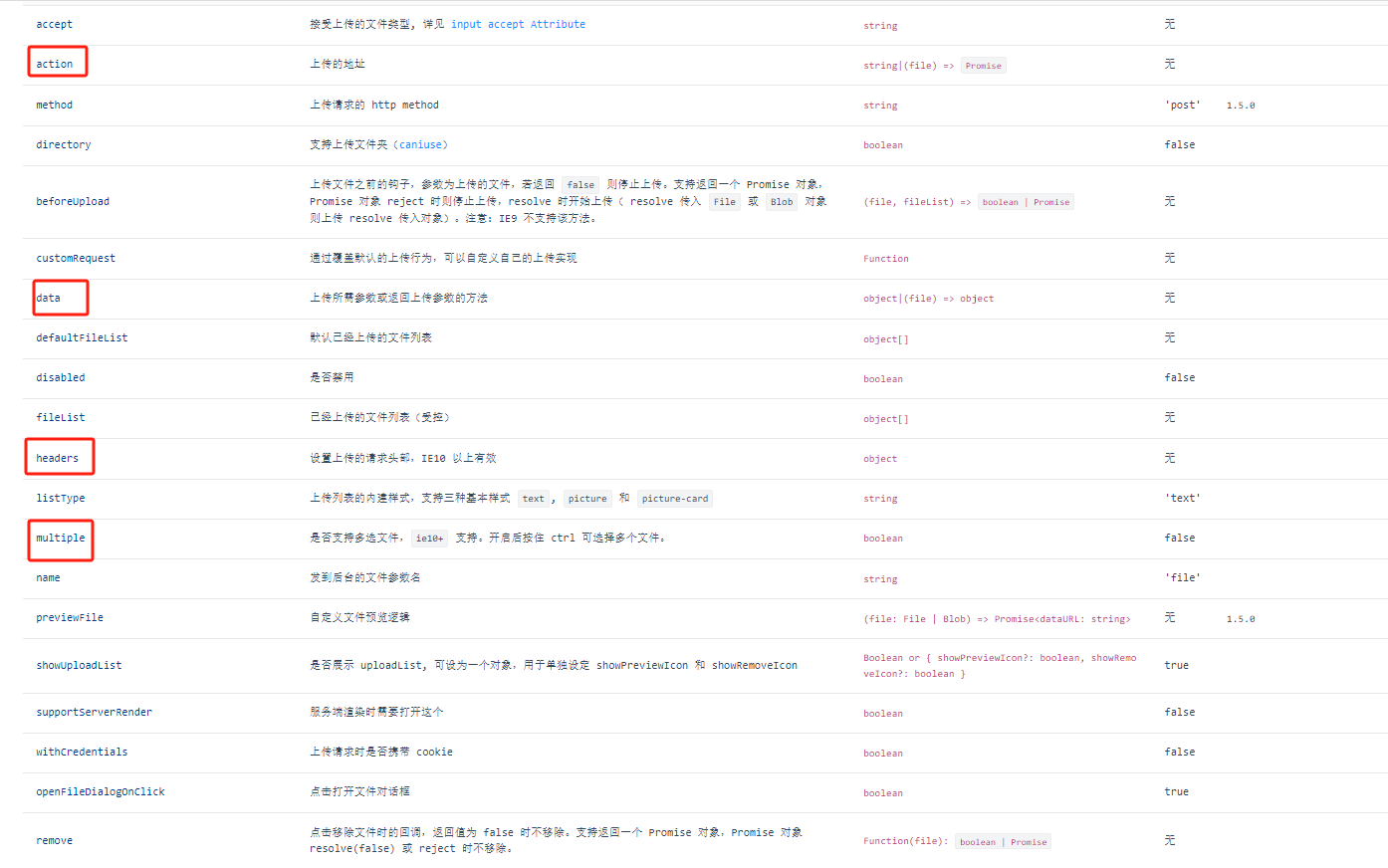
    image.png

    二、使用(以Jeecg为例):
    【1】template:
    <a-upload name="file" :showUploadList="false" :multiple="false" :headers="tokenHeader"
    	 :data="{ 'orderId': record.id }" :action="importExcelUrlDispatchCar"
       @change="handleImportExcel">导入
    </a-upload>
    
    • 1
    • 2
    • 3
    • 4
    【2】script:
    <script>
     	export default {
      	data() {
        	return {
            
            url:{
               importExcelUrlDispatchCar:"/kd/xxx/importTemplate"
            }
          }
        },
        computed: {
            //拼接上传的地址
            importExcelUrlDispatchCar: function () {
              return `${window._CONFIG['domianURL']}/${this.url.importExcelUrlDispatchCar}`;
            },
          	// 设置上传的Header参数
          	tokenHeader() {
             	let head = { 'X-Access-Token': Vue.ls.get(ACCESS_TOKEN) }
              let tenantid = Vue.ls.get(TENANT_ID)
              if (tenantid) {
                head['tenant-id'] = tenantid
              }
          		return head;
          	},
        },
        methods:{
          handleImportExcel(info){
            this.loading = true;
          	if (info.file.status !==  'uploading') {
               console.log(info.file,  info.fileList);
            }
          	if (info.file.status === 'done') {
              this.loading = false;
              if (info.file.response.success){
              	if (info.file.response.code === 201) {
                	let { message, result:{ msg, fileUrl, fileName } }= info.file.response
                	let href = window._CONFIG['domianURL'] + fileUrl
                	this.$warning({
                  	title: message,
                 		content: (<div><span>{msg}</span>
    
                    	<span>具体详情请 
                    	<a href={href}target="_blank" download={fileName}>点击下载</a> 
                    	</span></div>)
                	})
               	} else {
                 	this.$message.success(info.file.response.message ||`${info.file.name} 文件上传成功`)
               	}
              	this.loadData()
              } else {
                this.$message.error(`${info.file.name} ${info.file.response.message}.`);
              }
            }else if (info.file.status === 'error') {
              this.loading = false;
              if (info.file.response.status === 500) {
              	let data = info.file.response
                const token = Vue.ls.get(ACCESS_TOKEN)
                if (token && data.message.includes("Token失效")) {
                  this.$error({
                    title: '登录已过期',
                    content: '很抱歉,登录已过期,请重新登录',
                    okText: '重新登录',
                    mask: false,
                    onOk: () => {
                      store.dispatch('Logout').then(() => {
                        Vue.ls.remove(ACCESS_TOKEN)
                        window.location.reload();
                      })
                    }
                  })
                }
              }
            }else{
              this.$message.error(`文件上传失败: ${info.file.msg} `);
            }
          },
        }
    	}
    </script>
    
    • 1
    • 2
    • 3
    • 4
    • 5
    • 6
    • 7
    • 8
    • 9
    • 10
    • 11
    • 12
    • 13
    • 14
    • 15
    • 16
    • 17
    • 18
    • 19
    • 20
    • 21
    • 22
    • 23
    • 24
    • 25
    • 26
    • 27
    • 28
    • 29
    • 30
    • 31
    • 32
    • 33
    • 34
    • 35
    • 36
    • 37
    • 38
    • 39
    • 40
    • 41
    • 42
    • 43
    • 44
    • 45
    • 46
    • 47
    • 48
    • 49
    • 50
    • 51
    • 52
    • 53
    • 54
    • 55
    • 56
    • 57
    • 58
    • 59
    • 60
    • 61
    • 62
    • 63
    • 64
    • 65
    • 66
    • 67
    • 68
    • 69
    • 70
    • 71
    • 72
    • 73
    • 74
    • 75
    • 76
    • 77
    • 78
    • 79
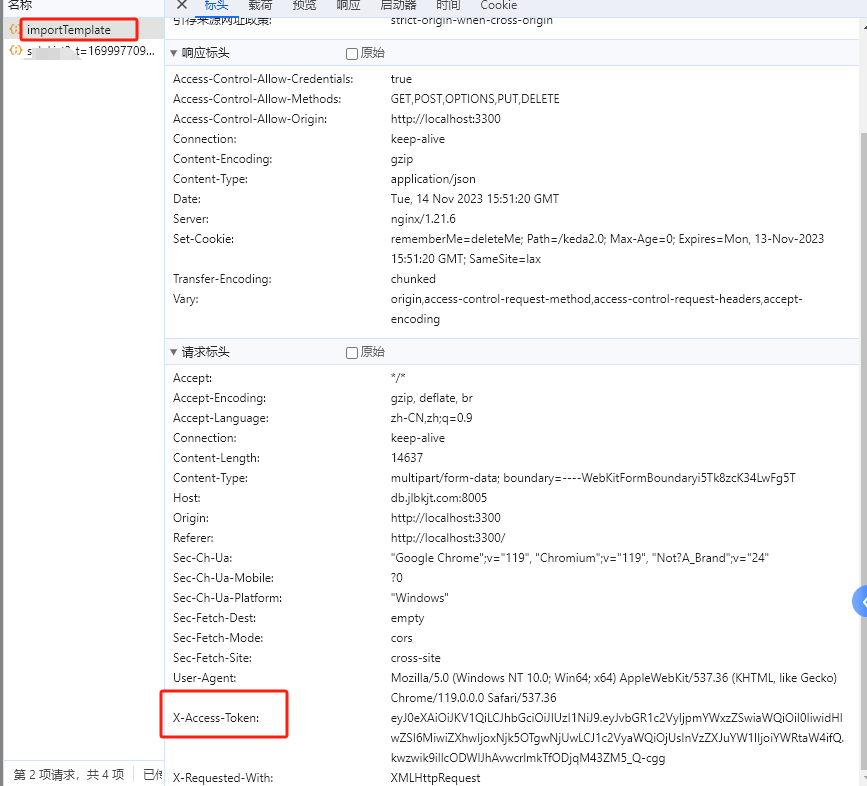
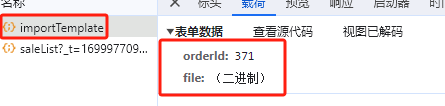
    三、效果图:

    image.png
    image.png
    image.png

  • 相关阅读:
    radio日志sim卡信号状态分析
    nvm使用教程:node.js的管理工具
    【云原生 | Kubernetes 系列】--Ceph认证和RBD
    操作系统笔记
    领英手册-利用点赞功能提升领英账号曝光率和活跃度及导出Linkedin非好友电话、邮箱技巧
    C语言基础与总结(1)C 数据类型及语句
    第二十八章 管理许可(一)
    ChatGPT王炸升级
    计算机视觉——飞桨深度学习实战-图像分类算法原理与实战
    SpringCloud 源码学习笔记2——Feign声明式http客户端源码分析
  • 原文地址:https://blog.csdn.net/weixin_53791978/article/details/134410791
  • 最新文章
  • 攻防演习之三天拿下官网站群
    数据安全治理学习——前期安全规划和安全管理体系建设
    企业安全 | 企业内一次钓鱼演练准备过程
    内网渗透测试 | Kerberos协议及其部分攻击手法
    0day的产生 | 不懂代码的"代码审计"
    安装scrcpy-client模块av模块异常,环境问题解决方案
    leetcode hot100【LeetCode 279. 完全平方数】java实现
    OpenWrt下安装Mosquitto
    AnatoMask论文汇总
    【AI日记】24.11.01 LangChain、openai api和github copilot
  • 热门文章
  • 十款代码表白小特效 一个比一个浪漫 赶紧收藏起来吧!!!
    奉劝各位学弟学妹们,该打造你的技术影响力了!
    五年了,我在 CSDN 的两个一百万。
    Java俄罗斯方块,老程序员花了一个周末,连接中学年代!
    面试官都震惊,你这网络基础可以啊!
    你真的会用百度吗?我不信 — 那些不为人知的搜索引擎语法
    心情不好的时候,用 Python 画棵樱花树送给自己吧
    通宵一晚做出来的一款类似CS的第一人称射击游戏Demo!原来做游戏也不是很难,连憨憨学妹都学会了!
    13 万字 C 语言从入门到精通保姆级教程2021 年版
    10行代码集2000张美女图,Python爬虫120例,再上征途
Copyright © 2022 侵权请联系2656653265@qq.com    京ICP备2022015340号-1
正则表达式工具 cron表达式工具 密码生成工具

京公网安备 11010502049817号