-
Java拼图游戏
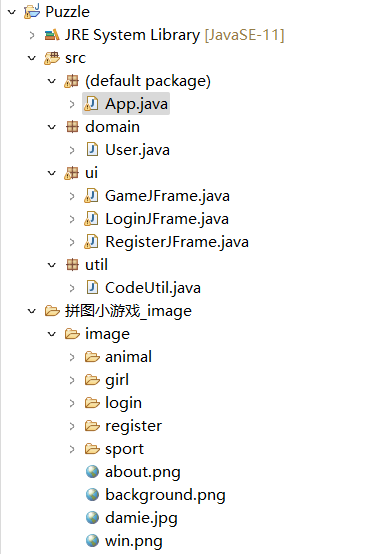
运行出的游戏界面如下:

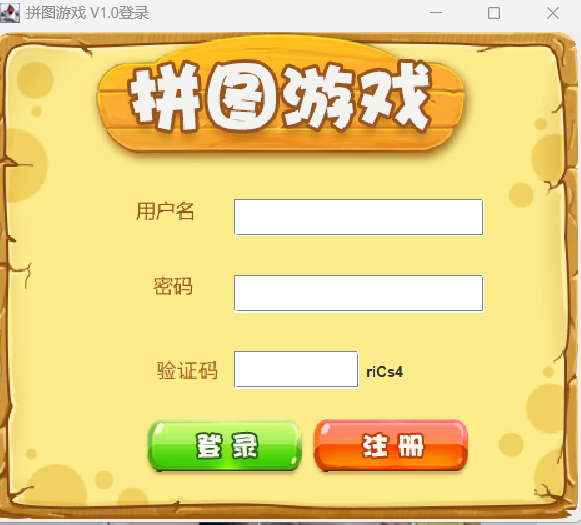
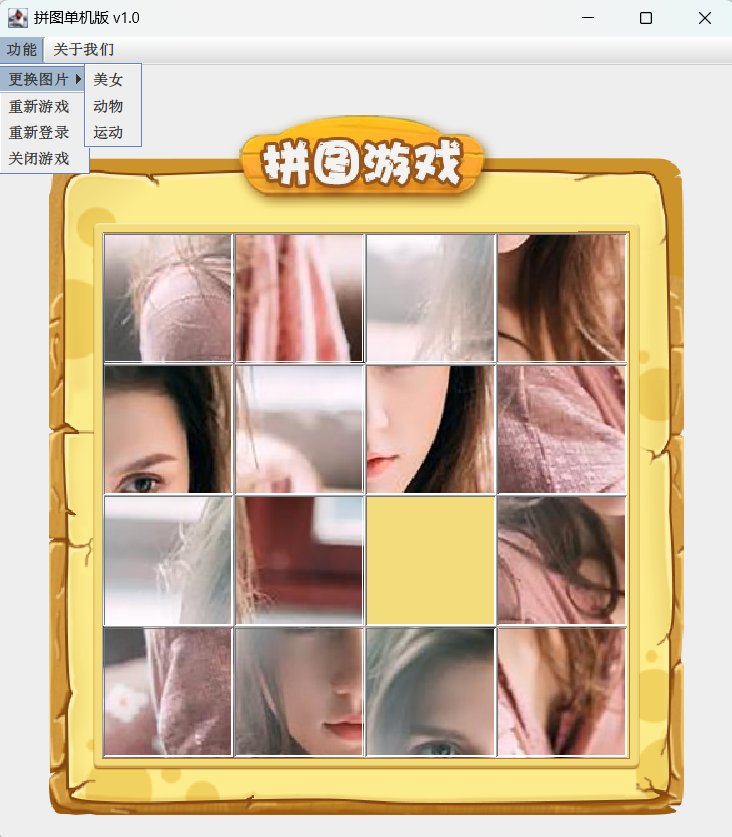
按住A不松开,显示完整图片;松开A显示随机打乱的图片。

User类
- package domain;
- /**
- * @ClassName: User
- * @Author: Kox
- * @Data: 2023/2/2
- * @Sketch:
- */
- public class User {
- private String username;
- private String password;
- public User() {
- }
- public User(String username, String password) {
- this.username = username;
- this.password = password;
- }
- /**
- * 获取
- * @return username
- */
- public String getUsername() {
- return username;
- }
- /**
- * 设置
- * @param username
- */
- public void setUsername(String username) {
- this.username = username;
- }
- /**
- * 获取
- * @return password
- */
- public String getPassword() {
- return password;
- }
- /**
- * 设置
- * @param password
- */
- public void setPassword(String password) {
- this.password = password;
- }
- }
CodeUtil类
- package util;
- import java.util.ArrayList;
- import java.util.Random;
- public class CodeUtil {
- public static String getCode(){
- //1.创建一个集合
- ArrayList
list = new ArrayList<>();//52 索引的范围:0 ~ 51 - //2.添加字母 a - z A - Z
- for (int i = 0; i < 26; i++) {
- list.add((char)('a' + i));//a - z
- list.add((char)('A' + i));//A - Z
- }
- //3.打印集合
- //System.out.println(list);
- //4.生成4个随机字母
- String result = "";
- Random r = new Random();
- for (int i = 0; i < 4; i++) {
- //获取随机索引
- int randomIndex = r.nextInt(list.size());
- char c = list.get(randomIndex);
- result = result + c;
- }
- //System.out.println(result);//长度为4的随机字符串
- //5.在后面拼接数字 0~9
- int number = r.nextInt(10);
- //6.把随机数字拼接到result的后面
- result = result + number;
- //System.out.println(result);//ABCD5
- //7.把字符串变成字符数组
- char[] chars = result.toCharArray();//[A,B,C,D,5]
- //8.在字符数组中生成一个随机索引
- int index = r.nextInt(chars.length);
- //9.拿着4索引上的数字,跟随机索引上的数字进行交换
- char temp = chars[4];
- chars[4] = chars[index];
- chars[index] = temp;
- //10.把字符数组再变回字符串
- String code = new String(chars);
- //System.out.println(code);
- return code;
- }
- }
登陆代码
- package ui;
- import domain.User;
- import util.CodeUtil;
- import javax.swing.*;
- import java.awt.event.MouseEvent;
- import java.awt.event.MouseListener;
- import java.io.BufferedReader;
- import java.io.File;
- import java.io.FileReader;
- import java.util.ArrayList;
- public class LoginJFrame extends JFrame implements MouseListener {
- static ArrayList
allUsers = new ArrayList<>(); - static {
- allUsers.add(new User("zhangsan","123"));
- allUsers.add(new User("lisi","1234"));
- }
- JButton login = new JButton();
- JButton register = new JButton();
- JTextField username = new JTextField();
- //JTextField password = new JTextField();
- JPasswordField password = new JPasswordField();
- JTextField code = new JTextField();
- //正确的验证码
- JLabel rightCode = new JLabel();
- public LoginJFrame() {
- //初始化界面
- initJFrame();
- //在这个界面中添加内容
- initView();
- //让当前界面显示出来
- this.setVisible(true);
- }
- public void initView() {
- //1. 添加用户名文字
- JLabel usernameText = new JLabel(new ImageIcon("拼图小游戏_image\\image\\login\\用户名.png"));
- usernameText.setBounds(116, 135, 47, 17);
- this.getContentPane().add(usernameText);
- //2.添加用户名输入框
- username.setBounds(195, 134, 200, 30);
- this.getContentPane().add(username);
- //3.添加密码文字
- JLabel passwordText = new JLabel(new ImageIcon("拼图小游戏_image\\image\\login\\密码.png"));
- passwordText.setBounds(130, 195, 32, 16);
- this.getContentPane().add(passwordText);
- //4.密码输入框
- password.setBounds(195, 195, 200, 30);
- this.getContentPane().add(password);
- //验证码提示
- JLabel codeText = new JLabel(new ImageIcon("拼图小游戏_image\\image\\login\\验证码.png"));
- codeText.setBounds(133, 256, 50, 30);
- this.getContentPane().add(codeText);
- //验证码的输入框
- code.setBounds(195, 256, 100, 30);
- this.getContentPane().add(code);
- String codeStr = CodeUtil.getCode();
- //设置内容
- rightCode.setText(codeStr);
- //绑定鼠标事件
- rightCode.addMouseListener(this);
- //位置和宽高
- rightCode.setBounds(300, 256, 50, 30);
- //添加到界面
- this.getContentPane().add(rightCode);
- //5.添加登录按钮
- login.setBounds(123, 310, 128, 47);
- login.setIcon(new ImageIcon("拼图小游戏_image\\image\\login\\登录按钮.png"));
- //去除按钮的边框
- login.setBorderPainted(false);
- //去除按钮的背景
- login.setContentAreaFilled(false);
- //给登录按钮绑定鼠标事件
- login.addMouseListener(this);
- this.getContentPane().add(login);
- //6.添加注册按钮
- register.setBounds(256, 310, 128, 47);
- register.setIcon(new ImageIcon("拼图小游戏_image\\image\\login\\注册按钮.png"));
- //去除按钮的边框
- register.setBorderPainted(false);
- //去除按钮的背景
- register.setContentAreaFilled(false);
- //给注册按钮绑定鼠标事件
- register.addMouseListener(this);
- this.getContentPane().add(register);
- //7.添加背景图片
- JLabel background = new JLabel(new ImageIcon("拼图小游戏_image\\image\\login\\background.png"));
- background.setBounds(0, 0, 470, 390);
- this.getContentPane().add(background);
- }
- public void initJFrame() {
- this.setSize(488, 430);//设置宽高
- this.setTitle("拼图游戏 V1.0登录");//设置标题
- this.setDefaultCloseOperation(3);//设置关闭模式
- this.setLocationRelativeTo(null);//居中
- this.setAlwaysOnTop(true);//置顶
- this.setLayout(null);//取消内部默认布局
- }
- //点击
- @Override
- public void mouseClicked(MouseEvent e) {
- if (e.getSource() == login) {
- System.out.println("点击了登录按钮");
- //获取两个文本输入框中的内容
- String usernameInput = username.getText();
- String passwordInput = password.getText();
- //获取用户输入的验证码
- String codeInput = code.getText();
- //创建一个User对象
- User userInfo = new User(usernameInput, passwordInput);
- System.out.println("用户输入的用户名为" + usernameInput);
- System.out.println("用户输入的密码为" + passwordInput);
- if (codeInput.length() == 0) {
- showJDialog("验证码不能为空");
- } else if (usernameInput.length() == 0 || passwordInput.length() == 0) {
- //校验用户名和密码是否为空
- System.out.println("用户名或者密码为空");
- //调用showJDialog方法并展示弹框
- showJDialog("用户名或者密码为空");
- } else if (!codeInput.equalsIgnoreCase(rightCode.getText())) {
- showJDialog("验证码输入错误");
- } else if (contains(userInfo)) {
- System.out.println("用户名和密码正确可以开始玩游戏了");
- //关闭当前登录界面
- this.setVisible(false);
- //打开游戏的主界面
- //需要把当前登录的用户名传递给游戏界面
- new GameJFrame();
- } else {
- System.out.println("用户名或密码错误");
- showJDialog("用户名或密码错误");
- }
- } else if (e.getSource() == register) {
- System.out.println("点击了注册按钮");
- } else if (e.getSource() == rightCode) {
- System.out.println("更换验证码");
- //获取一个新的验证码
- String code = CodeUtil.getCode();
- rightCode.setText(code);
- }
- }
- public void showJDialog(String content) {
- //创建一个弹框对象
- JDialog jDialog = new JDialog();
- //给弹框设置大小
- jDialog.setSize(200, 150);
- //让弹框置顶
- jDialog.setAlwaysOnTop(true);
- //让弹框居中
- jDialog.setLocationRelativeTo(null);
- //弹框不关闭永远无法操作下面的界面
- jDialog.setModal(true);
- //创建Jlabel对象管理文字并添加到弹框当中
- JLabel warning = new JLabel(content);
- warning.setBounds(0, 0, 200, 150);
- jDialog.getContentPane().add(warning);
- //让弹框展示出来
- jDialog.setVisible(true);
- }
- //按下不松
- @Override
- public void mousePressed(MouseEvent e) {
- if (e.getSource() == login) {
- login.setIcon(new ImageIcon("拼图小游戏_image\\image\\login\\登录按下.png"));
- } else if (e.getSource() == register) {
- register.setIcon(new ImageIcon("拼图小游戏_image\\image\\login\\注册按下.png"));
- }
- }
- //松开按钮
- @Override
- public void mouseReleased(MouseEvent e) {
- if (e.getSource() == login) {
- login.setIcon(new ImageIcon("jigsawgame\\image\\login\\登录按钮.png"));
- } else if (e.getSource() == register) {
- register.setIcon(new ImageIcon("jigsawgame\\image\\login\\注册按钮.png"));
- }
- }
- //鼠标划入
- @Override
- public void mouseEntered(MouseEvent e) {
- }
- //鼠标划出
- @Override
- public void mouseExited(MouseEvent e) {
- }
- //判断用户在集合中是否存在
- public boolean contains(User userInput){
- for (int i = 0; i < allUsers.size(); i++) {
- User rightUser = allUsers.get(i);
- if(userInput.getUsername().equals(rightUser.getUsername()) && userInput.getPassword().equals(rightUser.getPassword())){
- //有相同的代表存在,返回true,后面的不需要再比了
- return true;
- }
- }
- //循环结束之后还没有找到就表示不存在
- return false;
- }
- }
注册代码
- package ui;
- import domain.User;
- import util.CodeUtil;
- import javax.swing.*;
- import java.awt.event.MouseEvent;
- import java.awt.event.MouseListener;
- import java.io.*;
- import java.util.ArrayList;
- import java.util.List;
- public class RegisterJFrame extends JFrame implements MouseListener {
- ArrayList
list = new ArrayList<>(); - //提升三个输入框的变量的作用范围,让这三个变量可以在本类中所有方法里面可以使用。
- JTextField username = new JTextField();
- JTextField password = new JTextField();
- JTextField rePassword = new JTextField();
- //提升两个按钮变量的作用范围,让这两个变量可以在本类中所有方法里面可以使用。
- JButton submit = new JButton();
- JButton reset = new JButton();
- public RegisterJFrame() throws IOException {
- user();
- initFrame();
- initView();
- setVisible(true);
- }
- public void user() throws IOException {
- File file = new File("user.txt");
- file.createNewFile();
- BufferedReader br = new BufferedReader(new FileReader("user.txt"));
- String str;
- while ((str = br.readLine()) != null) {
- String[] user = str.split("&");
- //name
- String name = user[0].split("=")[1];
- //password
- String password = user[1].split("=")[1];
- list.add(new User(name, password));
- }
- }
- @Override
- public void mouseClicked(MouseEvent e) {
- //获取输入框中的内容
- String userNameStr = username.getText();
- String passWordStr = password.getText();
- String rePasswordText = rePassword.getText();
- if (e.getSource() == submit){//注册
- System.out.println("注册");
- //判断输入框是否有空
- if ((userNameStr.length() == 0) || (passWordStr.length() == 0) || (rePasswordText.length() == 0)){
- showDialog("账号或密码不能为空");
- //清空密码
- password.setText("");
- rePassword.setText("");
- } else if (!passWordStr.equals(rePasswordText)) {
- showDialog("密码不一致");
- //清空密码
- rePassword.setText("");
- } else if (!tfUsername(userNameStr)) { //账户已存在
- showDialog("账号已存在");
- } else {
- try {
- //将数据存入本地文件中
- User(userNameStr,passWordStr);
- showDialog("注册成功");
- this.setVisible(false);
- new LoginJFrame();
- } catch (IOException ex) {
- throw new RuntimeException(ex);
- }
- }
- //
- }else if(e.getSource() == reset){//重置
- System.out.println("重置");
- password.setText("");
- rePassword.setText("");
- username.setText("");
- }
- }
- /*
- * 将数据账号数据存入本地文件中
- * 参数1:账号 参数2:密码
- * */
- private void User(String name , String password) throws IOException {
- String user = "name="+name+"&password="+password;
- BufferedWriter bw = new BufferedWriter(new FileWriter("user.txt",true));
- bw.write(user);
- bw.newLine();
- bw.close();
- }
- /*
- * 检测账号是否存在
- * 返回值 boolean
- * 传入 username
- * */
- private boolean tfUsername(String userName){
- for (User user : list) {
- if(user.getUsername().equals(userName))
- return false;
- }
- return true;
- }
- @Override
- public void mousePressed(MouseEvent e) {
- if (e.getSource() == submit) {
- submit.setIcon(new ImageIcon("拼图小游戏_image\\image\\register\\注册按下.png"));
- } else if (e.getSource() == reset) {
- reset.setIcon(new ImageIcon("拼图小游戏_image\\image\\register\\重置按下.png"));
- }
- }
- @Override
- public void mouseReleased(MouseEvent e) {
- if (e.getSource() == submit) {
- submit.setIcon(new ImageIcon("拼图小游戏_image\\image\\register\\注册按钮.png"));
- } else if (e.getSource() == reset) {
- reset.setIcon(new ImageIcon("拼图小游戏_image\\image\\register\\重置按钮.png"));
- }
- }
- @Override
- public void mouseEntered(MouseEvent e) {
- }
- @Override
- public void mouseExited(MouseEvent e) {
- }
- private void initView() {
- //添加注册用户名的文本
- JLabel usernameText = new JLabel(new ImageIcon("拼图小游戏_image\\image\\login\\用户名.png"));
- usernameText.setBounds(85, 135, 80, 20);
- //添加注册用户名的输入框
- username.setBounds(195, 134, 200, 30);
- //添加注册密码的文本
- JLabel passwordText = new JLabel(new ImageIcon("拼图小游戏_image\\image\\register\\注册密码.png"));
- passwordText.setBounds(97, 193, 70, 20);
- //添加密码输入框
- password.setBounds(195, 195, 200, 30);
- //添加再次输入密码的文本
- JLabel rePasswordText = new JLabel(new ImageIcon("拼图小游戏_image\\image\\register\\再次输入密码.png"));
- rePasswordText.setBounds(64, 255, 95, 20);
- //添加再次输入密码的输入框
- rePassword.setBounds(195, 255, 200, 30);
- //注册的按钮
- submit.setIcon(new ImageIcon("拼图小游戏_image\\image\\register\\注册按钮.png"));
- submit.setBounds(123, 310, 128, 47);
- submit.setBorderPainted(false);
- submit.setContentAreaFilled(false);
- submit.addMouseListener(this);
- //重置的按钮
- reset.setIcon(new ImageIcon("拼图小游戏_image\\image\\register\\重置按钮.png"));
- reset.setBounds(256, 310, 128, 47);
- reset.setBorderPainted(false);
- reset.setContentAreaFilled(false);
- reset.addMouseListener(this);
- //背景图片
- JLabel background = new JLabel(new ImageIcon("拼图小游戏_image\\image\\background.png"));
- background.setBounds(0, 0, 470, 390);
- this.getContentPane().add(usernameText);
- this.getContentPane().add(passwordText);
- this.getContentPane().add(rePasswordText);
- this.getContentPane().add(username);
- this.getContentPane().add(password);
- this.getContentPane().add(rePassword);
- this.getContentPane().add(submit);
- this.getContentPane().add(reset);
- this.getContentPane().add(background);
- }
- private void initFrame() {
- //对自己的界面做一些设置。
- //设置宽高
- setSize(488, 430);
- //设置标题
- setTitle("拼图游戏 V1.0注册");
- //取消内部默认布局
- setLayout(null);
- //设置关闭模式
- setDefaultCloseOperation(3);
- //设置居中
- setLocationRelativeTo(null);
- //设置置顶
- setAlwaysOnTop(true);
- }
- //只创建一个弹框对象
- JDialog jDialog = new JDialog();
- //因为展示弹框的代码,会被运行多次
- //所以,我们把展示弹框的代码,抽取到一个方法中。以后用到的时候,就不需要写了
- //直接调用就可以了。
- public void showDialog(String content){
- if(!jDialog.isVisible()){
- //把弹框中原来的文字给清空掉。
- jDialog.getContentPane().removeAll();
- JLabel jLabel = new JLabel(content);
- jLabel.setBounds(0,0,200,150);
- jDialog.add(jLabel);
- //给弹框设置大小
- jDialog.setSize(200, 150);
- //要把弹框在设置为顶层 -- 置顶效果
- jDialog.setAlwaysOnTop(true);
- //要让jDialog居中
- jDialog.setLocationRelativeTo(null);
- //让弹框
- jDialog.setModal(true);
- //让jDialog显示出来
- jDialog.setVisible(true);
- }
- }
- }
游戏代码
- import java.io.IOException;
- import ui.GameJFrame;
- import ui.LoginJFrame;
- import ui.RegisterJFrame;
- /**
- * @ClassName: App
- * @Author: Kox
- * @Data: 2023/1/30
- * @Sketch:
- */
- public class App {
- public static void main(String[] args) throws IOException {
- // 登录界面
- new LoginJFrame();
- // 注册界面
- new RegisterJFrame();
- // 游戏界面
- // new GameJFrame();
- }
- }
-
相关阅读:
【AI案例】(一)NPL文本情感分析
#ubuntu# #git# repository git config --global --add safe.directory
`Executor` 接口
【操作系统】十分钟了解关于TCP/IP网络的基础知识(一)CSMA/CD、MAC、IP以及子网掩码
PCB - 封装焊盘阻焊层的检查
人工智能之机器学习
Python自动化测试selenium指定截图文件名方法
vue中预览epub文件
00后表示真干不过,部门新来的00后测试员已把我卷崩溃,想离职了...
OS | 【三 内存管理】存储管理及大题解构
- 原文地址:https://blog.csdn.net/2301_76549057/article/details/134486611
