-
Visual Studio 2022编写学校收费管理系统
Visual Studio 2022编写学校收费管理系统,后端数据库是Access,数据库中有账号表,学生信息表,学费表,学期表,教材表,教材费表,住宿表,住宿费表等
这是我的部分代码,有无大佬可以指导一下,我的程序哪里出问题了,输入正确账号密码之后,点击登录页面的登录按钮无法跳转到系统导航页面,后续都无法进行。
或者有无大佬有这样的程序

LoginForm页面代码
using SchoolFeeManagementSystem;
using System;
using System.Collections.Generic;
using System.ComponentModel;
using System.Data;
using System.Data.OleDb;
using System.Drawing;
using System.Linq;
using System.Text;
using System.Threading.Tasks;
using System.Windows.Forms;
namespace WindowsFormsApp7
{
public partial class LoginForm : Form
{
private string connectionString = @"Provider=Microsoft.ACE.OLEDB.12.0;Data Source=E:新建文件夹\WindowsFormsApp7\WindowsFormsApp7\学校收费管理系统1.accdb";
private OleDbConnection connection;
public LoginForm()
{
InitializeComponent();
connection = new OleDbConnection(connectionString);
}
private void btnLogin_Click(object sender, EventArgs e)
{
string username = txtUsername.Text.Trim();
string password = txtPassword.Text.Trim();
bool isAuthenticated = ValidateUser(username, password);
if (isAuthenticated)
{
NavigationForm navigationForm = new NavigationForm(username, password);
this.Hide();
navigationForm.Show();
}
else
{
MessageBox.Show("用户名或密码错误!", "错误", MessageBoxButtons.OK, MessageBoxIcon.Error);
}
}
private bool ValidateUser(string username, string password)
{
bool isAuthenticated = false;
try
{
connection.Open();
string query = "SELECT COUNT(*) FROM 账号表 WHERE 账号 = @username AND 密码 = @password";
using (OleDbCommand command = new OleDbCommand(query, connection))
{
command.Parameters.AddWithValue("@username", username);
command.Parameters.AddWithValue("@password", password);
int count = (int)command.ExecuteScalar();
if (count > 0)
{
isAuthenticated = true;
}
}
}
catch (Exception ex)
{
MessageBox.Show("数据库连接错误:" + ex.Message, "错误", MessageBoxButtons.OK, MessageBoxIcon.Error);
}
return isAuthenticated;
}
}
}
系统导航页面代码
using System;
using System.Windows.Forms;
namespace SchoolFeeManagementSystem
{
public partial class NavigationForm : Form
{
private string username;
private string password;
public NavigationForm(string username, string password)
{
InitializeComponent();
this.username = username;
this.password = password;
}
private void btnPersonalInfo_Click(object sender, EventArgs e)
{
PersonalInfoForm personalInfoForm = new PersonalInfoForm(username, password);
personalInfoForm.ShowDialog();
}
private void btnExit_Click(object sender, EventArgs e)
{
Application.Exit();
}
}
}
个人信息管理页面代码
using System;
using System.Windows.Forms;
using System.Data.OleDb;
using System.Data;
namespace SchoolFeeManagementSystem
{
public partial class PersonalInfoForm : Form
{
private string connectionString = @"Provider=Microsoft.ACE.OLEDB.12.0;Data Source=E:新建文件夹\WindowsFormsApp7\WindowsFormsApp7\学校收费管理系统1.accdb";
private string username = "";
private string password = "";
public PersonalInfoForm(string username, string password)
{
InitializeComponent();
this.username = username;
this.password = password;
}
private void PersonalInfoForm_Load(object sender, EventArgs e)
{
QueryPersonalInfo();
}
private void QueryPersonalInfo()
{
string studentId = txtStudentId.Text.Trim();
try
{
using (OleDbConnection connection = new OleDbConnection(connectionString))
{
connection.Open();
string query = "SELECT * FROM 学生信息表 WHERE 学号 = @studentId AND 账号 = @username AND 密码 = @password";
using (OleDbCommand command = new OleDbCommand(query, connection))
{
command.Parameters.AddWithValue("@studentId", studentId);
command.Parameters.AddWithValue("@username", username);
command.Parameters.AddWithValue("@password", password);
OleDbDataAdapter adapter = new OleDbDataAdapter(command);
DataTable dataTable = new DataTable();
adapter.Fill(dataTable);
dataGridView1.DataSource = dataTable;
}
}
}
catch (Exception ex)
{
MessageBox.Show("数据库连接错误:" + ex.Message, "错误", MessageBoxButtons.OK, MessageBoxIcon.Error);
}
}
private void PersonalInfoForm_Load_1(object sender, EventArgs e)
{
this.学生信息查询TableAdapter1.Fill(this.学校收费管理系统1DataSet1.学生信息查询);
}
}
}
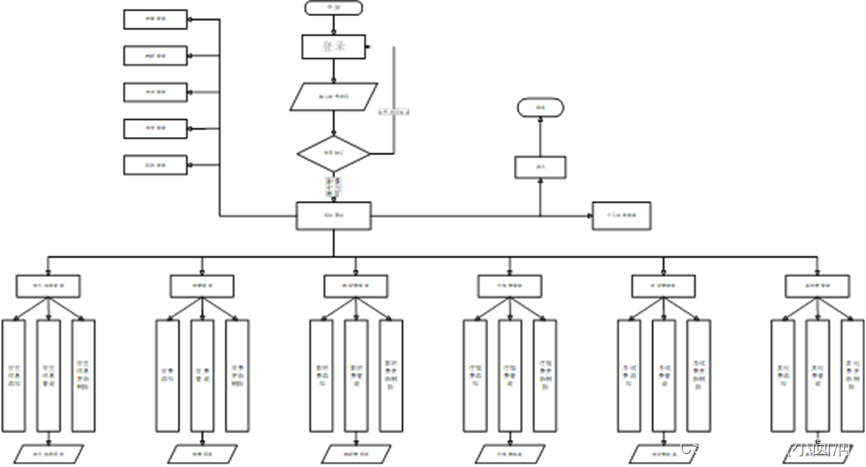
这是我的程序流程图,但是在编写代码的时候我只设计了登录页面系统导航页面还有个人管理页面的相关操作代码
-
相关阅读:
初识HTML超文本标记语言
JSP企业快信(短信猫+java邮件)的设计与实现
单链表经典算法题 1
VCP-DCV VMware vSphere,即将开课~想了解点击查看
倍福PLC基于CX5130实现数据的断电保持
JDK集合源码之ArrayList解析
【 C++ 】用一个哈希表封装unordered_map和unordered_set
BlueTeam 加固
m1 rvm install 3.0.0 Error running ‘__rvm_make -j8‘
SpringCloud-NacosFoundation
- 原文地址:https://blog.csdn.net/weixin_68425424/article/details/132618013