-
【uniapp】 video视频层级、遮挡其他弹窗或顶部导航 使用nvue覆盖
uniapp 顶部导航和弹窗被video遮挡解决办法

第一步:配置 subNVues
- {
- "path": "pages/index/index",
- "style": {
- "navigationBarTitleText": "uni-app",
- "navigationStyle": "custom",
- "app-plus": {
- "titleNView": false, //禁用原生导航栏
- "subNVues": [{
- "id": "subnvue", //顶部导航配置
- "path": "pages/index/subnvue",
- "type": "navigationBar"
- },
- {
- "id": "drawer",
- "path": "pages/index/drawer.nvue", // 配置分享弹窗
- "style": {
- "position": "popup",
- "width": "100%",
- "background": "rgba(0,0,0,0.6)"
- }
- }
- ]
- }
- }
- }
第二步:分别在index文件夹下建立三个文件分别为:index.vue 、drawer.nvue、subnvue.nvue文件
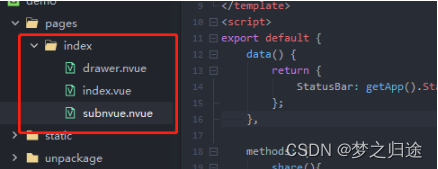
第三步:index.vue
- <template>
- <view class="home">
- <view class="home-h">
- <video object-fit="cover" :src="videoUrl2" poster="https://img0.baidu.com/it/u=1678650643,2593729507&fm=253&fmt=auto&app=138&f=JPEG?w=906&h=500"></video>
- <view class="home-title-info">
- <view class="home-title-tips">
- <text>免费</text>
- <text>6万+ 人最近报名</text>
- </view>
- <view class="home-title">CAD2020速成班【零基础入门到精通】</view>
- </view>
- </view>
- <view class="home-desc">
- <view class="home-title">课程目录</view>
- <view class="home-title2">课程名称 : 全栈开发实战视频课程</view>
- <image
- src="https://img1.baidu.com/it/u=2412284462,1528860568&fm=253&app=138&size=w931&n=0&f=JPEG&fmt=auto?sec=1685552400&t=00023e9d720d0d598b47044bc7078124"
- mode="widthFix"
- style="margin-top: 20rpx;width: 100%;"
- ></image>
- <view class="home-text">
- 课程简介:本视频教程由资深全栈工程师团队录制,旨在通过实战项目案例,从零开始让学习者掌握全栈开发技能,包括前端、后端、数据库等方面的知识。课程内容涵盖了
- HTML、CSS、JavaScript、Vue.js、Node.js、Express、MongoDB 等最新流行的前后端技术,并针对实际应用场景进行详细讲解,让学习者真正理解技术的本质和应用。 课程特点:
- 实战为主,通过逐步构建完整的项目和模块,让学习者在实际操作中熟练掌握技能和方法。 涵盖全栈开发基础知识和高级应用场景,以及备受关注的 Node.js 和 Vue.js 技术。
- 由行业资深工程师团队亲自录制,内容全面且深入浅出,生动易懂,可让初学者或有一定经验的开发人员都能轻松上手。
- 在初级到高级的各个阶段,都配有多个具体难点及技巧的案例视频,让学习者快速掌握开发技能及实战经验。 配备大量代码示例和模板,可以加快学习者自主学习和完成实践任务。
- 目标学习人群:本教程适合对全栈开发感兴趣的学习者,尤其是希望通过实际项目学习完整技术链路的新手和有基础进阶的开发工程师。需要具备一定的编程基础知识,包括
- HTML、CSS、JavaScript 等,或具备其他编程语言相关经验,如 Python、Java等。
- <image
- style="width: 100%;margin: 10rpx 0;"
- src="https://img2.baidu.com/it/u=1711732258,3382239816&fm=253&app=138&size=w931&n=0&f=JPEG&fmt=auto?sec=1685552400&t=1814a851132581dc5773480345b497ba"
- mode="widthFix"
- ></image>
- 学习收获: 学习者将掌握最新前后端开发技能,熟练掌握 HTML、CSS、JavaScript 前端语言、Vue.js 前端框架、Node.js 后端语言以及 MongoDB 数据库等技能。
- 了解全栈开发中的综合性条漏和思路,并将学会在真实场景中进行全栈开发,为你的下一次项目积累实战技能。 能够牢固掌握更多前端为服务器准备编写请求与远程响应的知识。
- 让学习者在多样化的实际场景和应用中,把技能转化为实际收益。 学习者将拥有更广阔的职业发展空间,包括全栈工程师、前端开发工程师、后端开发工程师等多个角色。
- 总之,本视频教程是一条涵盖广泛且实用性极高的路径,让学习者不再被单纯粗暴地困住于技术点上,并能真正适应未来更多元需求的研发环境中。
- </view>
- </view>
- </view>
- </template>
- <script>
- export default {
- components: {},
- data() {
- return {
- videoUrl2: 'https://zhiyuanhuyu.oss-cn-nanjing.aliyuncs.com/uploads/files/b2/dca4476575c9910ce75ffc8c345f16.mp4'
- };
- },
- onLoad() {
- this.initShowDrawer(1);
- /**
- * 顶部导航
- *
- * */
- uni.$on('openShare', res => {
- if (res.type == 1) {
- //分享
- this.initShowDrawer(2);
- }
- });
- /**
- * popup弹窗
- *
- * */
- uni.$on('funDrawer', res => {
- if (res.type == 1) {
- //关闭弹窗
- this.initShowDrawer(1);
- }
- });
- },
- methods: {
- initShowDrawer(type) {
- if (type == 1) {
- //关闭
- uni.getSubNVueById('drawer').hide();
- } else if (type == 2) {
- //打开弹窗
- uni.getSubNVueById('drawer').show();
- }
- }
- }
- };
- </script>
- <style lang="scss">
- page {
- background-color: #f1f1f1;
- }
- .home {
- width: 100%;
- font-size: 24rpx;
- font-family: 'Trebuchet MS', 'Lucida Sans Unicode', 'Lucida Grande', 'Lucida Sans', Arial, sans-serif;
- .home-title2 {
- width: 100%;
- font-size: 28rpx;
- font-weight: 600;
- margin-top: 20rpx;
- }
- .home-text {
- width: 100%;
- margin-top: 20rpx;
- font-size: 24rpx;
- line-height: 40rpx;
- color: #666;
- }
- .home-desc {
- width: 100%;
- background-color: #fff;
- border-radius: 20rpx 20rpx 0 0;
- margin-top: 20rpx;
- padding: 24rpx;
- box-sizing: border-box;
- .home-title {
- width: 100%;
- font-size: 30rpx;
- font-weight: 600;
- }
- }
- .home-h {
- width: 100%;
- background-color: #fff;
- border-radius: 0 0 20rpx 20rpx;
- video {
- width: 100%;
- height: 400rpx;
- }
- .home-title-info {
- width: 100%;
- padding: 24rpx;
- box-sizing: border-box;
- .home-title-tips {
- width: 100%;
- display: flex;
- align-items: center;
- justify-content: space-between;
- text:first-child {
- color: #ff5500;
- font-size: 28rpx;
- }
- text:last-child {
- color: #999;
- font-size: 22rpx;
- }
- }
- .home-title {
- width: 100%;
- margin-top: 10rpx;
- font-size: 30rpx;
- font-weight: 600;
- }
- }
- }
- }
- </style>
第四步:drawer.nvue
- <template>
- <view class="drawer">
- <image @click="closePop" class="close" src="../../static/7.png" mode=""></image>
- <view class="drawer-box-title"><text class="drawer-box-title-text">分享</text></view>
- <view class="drawer-box">
- <block v-for="(item, i) in list" :keep-index="i">
- <view class="drawer-box-item" @click="funShare(item)">
- <image class="drawer-box-item-img" :src="item.path" mode=""></image>
- <text class="drawer-box-item-text">{{ item.name }}</text>
- </view>
- </block>
- </view>
- </view>
- </template>
- <script>
- export default {
- data() {
- return {
- list: [
- { id: 1, name: 'QQ好友', path: '../../static/3.png' },
- { id: 2, name: 'QQ微博', path: '../../static/4.png' },
- { id: 3, name: '微信好友', path: '../../static/5.png' },
- { id: 4, name: '微信朋友圈', path: '../../static/6.png' }
- ]
- };
- },
- methods: {
- funShare(item) {
- uni.showToast({
- title: item.name,
- icon:"none"
- });
- },
- closePop() {
- uni.$emit('funDrawer', {
- type: 1
- });
- }
- }
- };
- </script>
- <style>
- .drawer {
- width: 750rpx;
- height: 340rpx;
- padding: 0 24rpx;
- box-sizing: border-box;
- background-color: #fff;
- position: fixed;
- left: 0;
- bottom: 0;
- border-radius: 30rpx 30rpx 0 0;
- }
- .drawer-box-title {
- width: 702rpx;
- padding-bottom: 40rpx;
- box-sizing: border-box;
- margin-top: 50rpx;
- display: flex;
- flex-direction: row;
- text-align: center;
- justify-content: center;
- border-bottom: 1px solid #f1f1f1;
- }
- .drawer-box-title-text {
- font-size: 32rpx;
- font-weight: 600;
- }
- .close {
- width: 70rpx;
- height: 70rpx;
- position: absolute;
- right: 40rpx;
- top: 35rpx;
- }
- .drawer-box {
- width: 702rpx;
- margin-top: 50rpx;
- display: flex;
- align-items: center;
- flex-direction: row;
- }
- .drawer-box-item {
- width: 175.5rpx;
- display: flex;
- align-items: center;
- justify-content: center;
- flex-direction: column;
- }
- .drawer-box-item-img {
- width: 70rpx;
- height: 70rpx;
- }
- .drawer-box-item-text {
- font-size: 26rpx;
- font-weight: 500;
- margin-top: 20rpx;
- color: #666;
- }
- </style>
第五步:subnvue.vue
- <template>
- <view class="subnvue" :style="{ paddingTop: StatusBar + 13 + 'rpx' }">
- <view class="subnvue-box">
- <view class="subnvue-box-left"><img @click="goBack" class="arrow" src="./../../static/1.png" alt="" /></view>
- <view class="subnvue-box-center"><text class="title">课程详情</text></view>
- <view class="subnvue-box-right"><img @click="share" class="share" src="./../../static/2.png" alt="" /></view>
- </view>
- </view>
- </template>
- <script>
- export default {
- data() {
- return {
- StatusBar: getApp().StatusBar
- };
- },
- methods: {
- share(){
- uni.$emit('openShare', {
- type:1
- });
- },
- goBack() {
- uni.showToast({
- title: '点击了返回按钮',
- mask: true,
- duration: 1500
- });
- }
- }
- };
- </script>
- <style>
- .subnvue {
- width: 750rpx;
- background-color: #fff;
- }
- .subnvue-box {
- width: 750rpx;
- height: 88rpx;
- display: flex;
- flex-direction: row;
- padding: 0 24rpx;
- box-sizing: border-box;
- }
- .subnvue-box-left {
- width: 100rpx;
- height: 88rpx;
- display: flex;
- justify-content: center;
- }
- .arrow {
- width: 21rpx;
- height: 32rpx;
- }
- .subnvue-box-center {
- flex: 1;
- height: 88rpx;
- display: flex;
- align-items: center;
- justify-content: center;
- }
- .title {
- font-size: 32rpx;
- font-weight: 600;
- font-family: 'Segoe UI', Tahoma, Geneva, Verdana, sans-serif;
- }
- .subnvue-box-right {
- width: 100rpx;
- height: 88rpx;
- display: flex;
- flex-direction: row;
- align-items: center;
- justify-content: flex-end;
- }
- .share {
- width: 36rpx;
- height: 36rpx;
- }
- </style>
祝:学习愉快、工作顺利
温馨提示:源码获取方式 关注【码农园区】 回复 “ video”

-
相关阅读:
使用Optional和直接返回null,哪个更好?
Linux-磁盘分区,挂载
EMQ 助力青岛研博建设智慧水务平台
[界面开发]DevExpress WinForms流程图控件——XtraDiagrams组件入门指南
【AUTOSAR-CanIf】-2.2-图解常用Software Filter Algorithm及其应用场景
原始航片匀色调色方法
mysql统计所有分类下的数量,没有的也要展示
Python自学教程5-字符串有哪些常用操作
app自动化测试——capability 配置参数解析
CCRC 网络安全技术课程
- 原文地址:https://blog.csdn.net/lwzhang1101/article/details/134461603
- 最新文章
-
Fable 5.1操刀,内存腰斩,外星科技——SimdPaddleOCR 1.4 发布!
2026互联网大厂秋招AI Coding笔试全攻略!
AI为什么能处理超大Excel,却不消耗等量Token?
「骂 AI 它就变聪明」,能用机制解释的只有一半
Docker Swarm 线上环境 MariaDB XA 悬停事务故障排查
Jev:当 AI 不再生成 Token,而是直接做决策
服务器又卡了?一篇讲透 Linux 性能排查(基础四件套 + perf/strace/火焰图)
HarmonyOS智慧多窗,让应用在任意窗口都“恰到好处”
OctaFuse Gateway 2.11.0:流式请求优化、用户折扣策略与错误契约升级
使用 DuckDB 分析 Parquet 文件