-
C# Onnx 轻量实时的M-LSD直线检测
目录
介绍
github地址:https://github.com/navervision/mlsd
M-LSD: Towards Light-weight and Real-time Line Segment Detection
Official Tensorflow implementation of "M-LSD: Towards Light-weight and Real-time Line Segment Detection" (AAAI 2022 Oral session)Geonmo Gu*, Byungsoo Ko*, SeoungHyun Go, Sung-Hyun Lee, Jingeun Lee, Minchul Shin (* Authors contributed equally.)
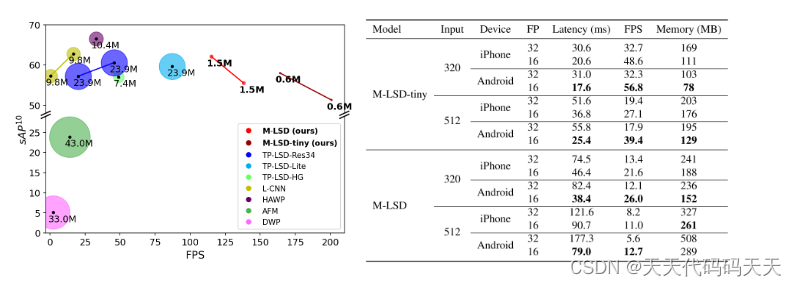
First figure: Comparison of M-LSD and existing LSD methods on GPU. Second figure: Inference speed and memory usage on mobile devices.
We present a real-time and light-weight line segment detector for resource-constrained environments named Mobile LSD (M-LSD). M-LSD exploits extremely efficient LSD architecture and novel training schemes, including SoL augmentation and geometric learning scheme. Our model can run in real-time on GPU, CPU, and even on mobile devices.
效果
效果1
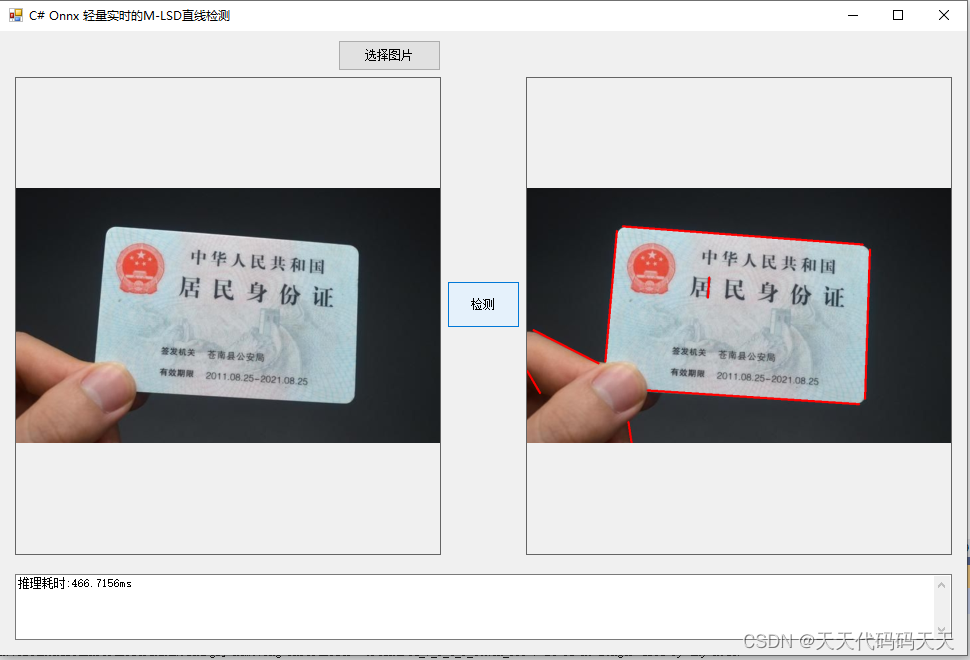
效果2

效果3

效果4

模型信息
Inputs
-------------------------
name:input_image_with_alpha:0
tensor:Float[1, 512, 512, 4]
---------------------------------------------------------------Outputs
-------------------------
name:Identity
tensor:Int32[1, 200, 2]
name:Identity_1
tensor:Float[1, 200]
name:Identity_2
tensor:Float[1, 256, 256, 4]
---------------------------------------------------------------项目
VS2022
.net framework 4.8
OpenCvSharp 4.8
Microsoft.ML.OnnxRuntime 1.16.2

代码
- using Microsoft.ML.OnnxRuntime.Tensors;
- using Microsoft.ML.OnnxRuntime;
- using OpenCvSharp;
- using System;
- using System.Collections.Generic;
- using System.Windows.Forms;
- using System.Linq;
- using System.Drawing;
- namespace Onnx_Demo
- {
- public partial class frmMain : Form
- {
- public frmMain()
- {
- InitializeComponent();
- }
- string fileFilter = "*.*|*.bmp;*.jpg;*.jpeg;*.tiff;*.tiff;*.png";
- string image_path = "";
- DateTime dt1 = DateTime.Now;
- DateTime dt2 = DateTime.Now;
- int inpWidth;
- int inpHeight;
- Mat image;
- string model_path = "";
- SessionOptions options;
- InferenceSession onnx_session;
- Tensor<float> input_tensor;
- Tensor<float> mask_tensor;
- List<NamedOnnxValue> input_ontainer;
- IDisposableReadOnlyCollection<DisposableNamedOnnxValue> result_infer;
- DisposableNamedOnnxValue[] results_onnxvalue;
- float conf_threshold = 0.5f;
- float dist_threshold = 20.0f;
- private void button1_Click(object sender, EventArgs e)
- {
- OpenFileDialog ofd = new OpenFileDialog();
- ofd.Filter = fileFilter;
- if (ofd.ShowDialog() != DialogResult.OK) return;
- pictureBox1.Image = null;
- pictureBox2.Image = null;
- textBox1.Text = "";
- image_path = ofd.FileName;
- pictureBox1.Image = new System.Drawing.Bitmap(image_path);
- image = new Mat(image_path);
- }
- private void Form1_Load(object sender, EventArgs e)
- {
- // 创建输入容器
- input_ontainer = new List<NamedOnnxValue>();
- // 创建输出会话
- options = new SessionOptions();
- options.LogSeverityLevel = OrtLoggingLevel.ORT_LOGGING_LEVEL_INFO;
- options.AppendExecutionProvider_CPU(0);// 设置为CPU上运行
- // 创建推理模型类,读取本地模型文件
- model_path = "model/model_512x512_large.onnx";
- inpWidth = 512;
- inpHeight = 512;
- onnx_session = new InferenceSession(model_path, options);
- // 创建输入容器
- input_ontainer = new List<NamedOnnxValue>();
- image_path = "test_img/4.jpg";
- pictureBox1.Image = new Bitmap(image_path);
- }
- private unsafe void button2_Click(object sender, EventArgs e)
- {
- if (image_path == "")
- {
- return;
- }
- textBox1.Text = "检测中,请稍等……";
- pictureBox2.Image = null;
- System.Windows.Forms.Application.DoEvents();
- image = new Mat(image_path);
- Mat resize_image = new Mat();
- Cv2.Resize(image, resize_image, new OpenCvSharp.Size(512, 512));
- float h_ratio = (float)image.Rows / 512;
- float w_ratio = (float)image.Cols / 512;
- int row = resize_image.Rows;
- int col = resize_image.Cols;
- float[] input_tensor_data = new float[1 * 4 * row * col];
- int k = 0;
- for (int i = 0; i < row; i++)
- {
- for (int j = 0; j < col; j++)
- {
- for (int c = 0; c < 3; c++)
- {
- float pix = ((byte*)(resize_image.Ptr(i).ToPointer()))[j * 3 + c];
- input_tensor_data[k] = pix;
- k++;
- }
- input_tensor_data[k] = 1;
- k++;
- }
- }
- input_tensor = new DenseTensor<float>(input_tensor_data, new[] { 1, 512, 512, 4 });
- //将 input_tensor 放入一个输入参数的容器,并指定名称
- input_ontainer.Add(NamedOnnxValue.CreateFromTensor("input_image_with_alpha:0", input_tensor));
- dt1 = DateTime.Now;
- //运行 Inference 并获取结果
- result_infer = onnx_session.Run(input_ontainer);
- dt2 = DateTime.Now;
- //将输出结果转为DisposableNamedOnnxValue数组
- results_onnxvalue = result_infer.ToArray();
- int[] pts = results_onnxvalue[0].AsTensor<int>().ToArray();
- float[] pts_score = results_onnxvalue[1].AsTensor<float>().ToArray();
- float[] vmap = results_onnxvalue[2].AsTensor<float>().ToArray();
- List<List<int>> segments_list = new List
- int num_lines = 200;
- int map_h = 256;
- int map_w = 256;
- for (int i = 0; i < num_lines; i++)
- {
- int y = pts[i * 2];
- int x = pts[i * 2 + 1];
- float disp_x_start = vmap[0 + y * map_w * 4 + x * 4];
- float disp_y_start = vmap[1 + y * map_w * 4 + x * 4];
- float disp_x_end = vmap[2 + y * map_w * 4 + x * 4];
- float disp_y_end = vmap[3 + y * map_w * 4 + x * 4];
- float distance = (float)Math.Sqrt(Math.Pow(disp_x_start - disp_x_end, 2) + Math.Pow(disp_y_start - disp_y_end, 2));
- if (pts_score[i] > conf_threshold && distance > dist_threshold)
- {
- float x_start = (x + disp_x_start) * 2 * w_ratio;
- float y_start = (y + disp_y_start) * 2 * h_ratio;
- float x_end = (x + disp_x_end) * 2 * w_ratio;
- float y_end = (y + disp_y_end) * 2 * h_ratio;
- List<int> line = new List<int>() { (int)x_start, (int)y_start, (int)x_end, (int)y_end };
- segments_list.Add(line);
- }
- }
- Mat result_image = image.Clone();
- for (int i = 0; i < segments_list.Count; i++)
- {
- Cv2.Line(result_image, new OpenCvSharp.Point(segments_list[i][0], segments_list[i][1]), new OpenCvSharp.Point(segments_list[i][2], segments_list[i][3]), new Scalar(0, 0, 255), 3);
- }
- pictureBox2.Image = new System.Drawing.Bitmap(result_image.ToMemoryStream());
- textBox1.Text = "推理耗时:" + (dt2 - dt1).TotalMilliseconds + "ms";
- }
- private void pictureBox2_DoubleClick(object sender, EventArgs e)
- {
- Common.ShowNormalImg(pictureBox2.Image);
- }
- private void pictureBox1_DoubleClick(object sender, EventArgs e)
- {
- Common.ShowNormalImg(pictureBox1.Image);
- }
- }
- }
下载
其他
结合透视变换可实现图像校正,图像校正参考
-
相关阅读:
力扣labuladong——一刷day22
Spring 系列 - - -spring bean 生命周期
wireshark 流量抓包例题
MacOS 环境编译 JVM 源码
C++ Qt开发:QHostInfo主机地址查询组件
CY7C68013A芯片与FPGA
WSL2环境下Debian 12的Docker安装与配置
结合NBA主题,Niantic再寻LBS AR游戏破局之道
阿里云数据盘挂载目录
[笔记] 深度学习的部分专业名词
- 原文地址:https://blog.csdn.net/lw112190/article/details/134411886