李俊才(jcLee95) 的个人博客:https://blog.csdn.net/qq_28550263
本文地址:https://blog.csdn.net/qq_28550263/article/details/134374857
本文提供 Flutter 框架中 ListView 类源码注释的中文翻译以及必要的分析解说。
/// 一个线性排列的可滚动组件列表。
///
/// {@youtube 560 315 https://www.youtube.com/watch?v=KJpkjHGiI5A}
///
/// [ListView] 是最常用的滚动组件。它在滚动方向上一个接一个地显示其子组件。在交叉轴上,
/// 子组件需要填充 [ListView]。
///
/// 如果非空,[itemExtent] 会强制子组件在滚动方向上具有给定的尺寸。
///
/// 如果非空,[prototypeItem] 会强制子组件在滚动方向上具有与给定组件相同的尺寸。
///
/// 指定 [itemExtent] 或 [prototypeItem] 比让子组件确定自己的尺寸更高效,因为滚动机制可以利用
/// 子组件尺寸的预知来节省工作,例如当滚动位置发生剧变时。
///
/// 你不能同时指定 [itemExtent] 和 [prototypeItem],只能指定其中一个或都不指定。
///
/// 构造 [ListView] 有四种选项:
///
/// 1. 默认构造函数接受一个明确的 [List] 子组件。这个构造函数适用于具有少量子组件的列表视图,
/// 因为构造 [List] 需要为可能在列表视图中显示的每个子组件做工作,而不仅仅是那些实际可见的子组件。
///
/// 2. [ListView.builder] 构造函数接受一个 [IndexedWidgetBuilder],它根据需求构建子组件。这个构造函数适用于
/// 具有大量(或无限)子组件的列表视图,因为构建器只为那些实际可见的子组件调用。
///
/// 3. [ListView.separated] 构造函数接受两个 [IndexedWidgetBuilder]:itemBuilder 根据需求构建子项,
/// separatorBuilder 类似地构建出现在子项之间的分隔符子项。这个构造函数适用于具有固定数量子组件的列表视图。
///
/// 4. [ListView.custom] 构造函数接受一个 [SliverChildDelegate],它提供了自定义子模型的其他方面的能力。例如,
/// [SliverChildDelegate] 可以控制用于估计实际不可见的子组件的大小的算法。
///
/// 要控制滚动视图的初始滚动偏移量,提供一个设置了其 [ScrollController.initialScrollOffset] 属性的 [controller]。
///
/// 默认情况下,[ListView] 会自动填充列表的可滚动极限,以避免 [MediaQuery] 的填充指示的部分阻塞。要避免此行为,
/// 使用零 [padding] 属性覆盖。
///
/// {@tool snippet}
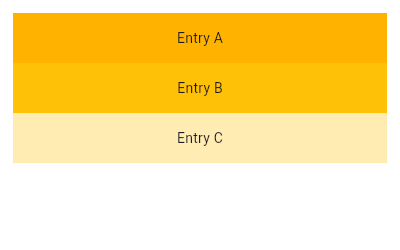
// 这个示例使用 [ListView] 的默认构造函数,它接受一个明确的 [List] 子组件。这个 [ListView] 的子组件由
/// 带有 [Text] 的 [Container] 组成。
///
/// 
///
/// ```dart
/// ListView(
/// padding: const EdgeInsets.all(8),
/// children: [
/// Container(
/// height: 50,
/// color: Colors.amber[600],
/// child: const Center(child: Text('Entry A')),
/// ),
/// Container(
/// height: 50,
/// color: Colors.amber[500],
/// child: const Center(child: Text('Entry B')),
/// ),
/// Container(
/// height: 50,
/// color: Colors.amber[100],
/// child: const Center(child: Text('Entry C')),
/// ),
/// ],
/// )
/// ```
/// {@end-tool}
///
/// {@tool snippet}
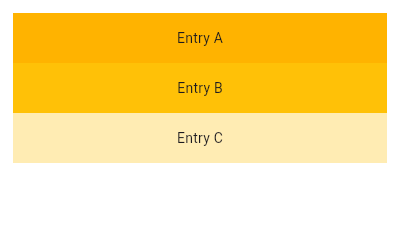
/// 这个示例与前一个相同,使用 [ListView.builder] 构造函数创建相同的列表。使用 [IndexedWidgetBuilder],子组件可以懒加载,数量可以无限。
///
/// 
///
/// ```dart
/// final List entries = ['A', 'B', 'C'];
/// final List colorCodes = [600, 500, 100];
///
/// Widget build(BuildContext context) {
/// return ListView.builder(
/// padding: const EdgeInsets.all(8),
/// itemCount: entries.length,
/// itemBuilder: (BuildContext context, int index) {
/// return Container(
/// height: 50,
/// color: Colors.amber[colorCodes[index]],
/// child: Center(child: Text('Entry ${entries[index]}')),
/// );
/// }
/// );
/// }
/// ```
/// {@end-tool}
///
/// {@tool snippet}
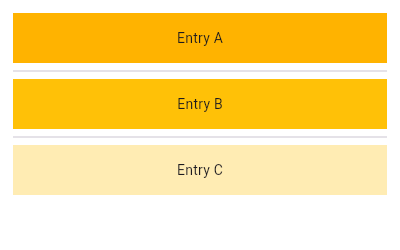
/// 这个示例继续从前面的示例构建,使用 [ListView.separated] 创建类似的列表。这里,[Divider] 被用作分隔符。
///
/// 
///
/// ```dart
/// final List entries = ['A', 'B', 'C'];
/// final List colorCodes = [600, 500, 100];
///
/// Widget build(BuildContext context) {
/// return ListView.separated(
/// padding: const EdgeInsets.all(8),
/// itemCount: entries.length,
/// itemBuilder: (BuildContext context, int index) {
/// return Container(
/// height: 50,
/// color: Colors.amber[colorCodes[index]],
/// child: Center(child: Text('Entry ${entries[index]}')),
/// );
/// },
/// separatorBuilder: (BuildContext context, int index) => const Divider(),
/// );
/// }
/// ```
/// {@end-tool}
///
/// ## 子元素的生命周期
///
/// ### 创建
///
/// 在布局列表时,可见子元素的元素、状态和渲染对象将根据现有组件(例如使用默认构造函数时)或懒加载提供的组件(例如使用 [ListView.builder] 构造函数时)懒加载创建。
///
/// ### 销毁
///
/// 当一个子组件滚动出视图时,关联的元素子树、状态和渲染对象被销毁。当它滚动回来时,将懒加载创建一个新的子组件,以及新的元素、状态和渲染对象。
///
/// ### 减轻销毁
///
/// 为了在子元素滚动进出视图时保留状态,有以下可能的选项:
///
/// * M将非琐碎的驱动 UI 状态的业务逻辑的所有权移出列表子组件子树。例如,如果列表包含帖子,其点赞数来自缓存的网络响应,将帖子列表和点赞数存储在列表外的数据模型中。让列表子组件 UI 子树可以轻松地从真实源模型对象重新创建。在子组件子树中使用 [StatefulWidget] 来存储瞬时 UI 状态。
///
/// * 让 [KeepAlive] 成为需要保留的列表子组件子树的根组件。[KeepAlive] 组件将子树的顶部渲染对象子项标记为 keepalive。当关联的顶部渲染对象滚动出视图时,列表将子组件的渲染对象(以及相应的元素和状态)保存在缓存列表中,而不是销毁它们。当滚动回视图时,渲染对象会原样重绘(如果在此期间没有被标记为脏)。
///
/// 这只有在 `addAutomaticKeepAlives` 和 `addRepaintBoundaries` 为 false 时才有效,因为这些参数会导致 [ListView] 用其他组件包装每个子组件子树。
///
/// * 使用 [AutomaticKeepAlive] 组件(当 `addAutomaticKeepAlives` 为 true 时默认插入)。[AutomaticKeepAlive] 允许后代组件控制子树是否真的保持活动状态。
/// 这种行为与 [KeepAlive] 形成对比,后者会无条件地保持子树活动(alive)。
///
/// 例如,[EditableText] 组件在其文本字段具有输入焦点时,会发出信号让其列表子元素子树保持活动。如果它没有焦点,且没有其他后代通过 [KeepAliveNotification] 发出保持活动的信号,
/// 列表子元素子树将在滚动出视图时被销毁。
///
/// [AutomaticKeepAlive] 的后代通常通过使用 [AutomaticKeepAliveClientMixin] 发出保持活动的信号,然后实现 [AutomaticKeepAliveClientMixin.wantKeepAlive] getter
/// 并调用 [AutomaticKeepAliveClientMixin.updateKeepAlive]。
///
/// ## 转换为 [CustomScrollView]
///
/// [ListView] 基本上是一个 [CustomScrollView],其 [CustomScrollView.slivers] 属性中有一个 [SliverList]。
///
/// 如果 [ListView] 不再足够,例如因为滚动视图既要有列表又要有网格,或者因为列表要与 [SliverAppBar] 结合等,那么直接使用 [CustomScrollView] 替换 [ListView] 的代码是直接的。
///
/// [ListView] 上的 [key]、[scrollDirection]、[reverse]、[controller]、[primary]、[physics] 和 [shrinkWrap] 属性直接映射到 [CustomScrollView] 上的同名属性。
///
/// [CustomScrollView.slivers] 属性应该是一个列表,包含以下内容:
/// * 如果 [itemExtent] 和 [prototypeItem] 都为 null,则为 [SliverList];
/// * 如果 [itemExtent] 不为 null,则为 [SliverFixedExtentList];
/// * 如果 [prototypeItem] 不为 null,则为 [SliverPrototypeExtentList]。
///
/// [ListView] 上的 [childrenDelegate] 属性对应于 [SliverList.delegate](或 [SliverFixedExtentList.delegate])属性。[ListView] 构造函数的 `children` 参数对应于
/// [childrenDelegate] 是一个带有相同参数的 [SliverChildListDelegate]。[ListView.builder] 构造函数的 `itemBuilder` 和 `itemCount` 参数对应于
/// [childrenDelegate] 是一个带有等效参数的 [SliverChildBuilderDelegate]。
///
/// [padding] 属性对应于在 [CustomScrollView.slivers] 属性中有一个 [SliverPadding],而不是列表本身,并且 [SliverList] 是 [SliverPadding] 的子组件。
///
/// [CustomScrollView] 不会像 [ListView] 那样自动避免 [MediaQuery] 的阻塞。要复制这种行为,将 slivers 包装在 [SliverSafeArea] 中。
///
/// 一旦代码已经被移植为使用 [CustomScrollView],其他的 slivers,如 [SliverGrid] 或 [SliverAppBar],可以放入 [CustomScrollView.slivers] 列表中。
///
/// {@tool snippet}
///
/// 这里有两个简短的片段,显示了一个 [ListView] 及其使用 [CustomScrollView] 的等效代码:
///
/// ```dart
/// ListView(
/// padding: const EdgeInsets.all(20.0),
/// children: const [
/// Text("I'm dedicating every day to you"),
/// Text('Domestic life was never quite my style'),
/// Text('When you smile, you knock me out, I fall apart'),
/// Text('And I thought I was so smart'),
/// ],
/// )
/// ```
/// {@end-tool}
/// {@tool snippet}
///
/// ```dart
/// CustomScrollView(
/// slivers: [
/// SliverPadding(
/// padding: const EdgeInsets.all(20.0),
/// sliver: SliverList(
/// delegate: SliverChildListDelegate(
/// [
/// const Text("I'm dedicating every day to you"),
/// const Text('Domestic life was never quite my style'),
/// const Text('When you smile, you knock me out, I fall apart'),
/// const Text('And I thought I was so smart'),
/// ],
/// ),
/// ),
/// ),
/// ],
/// )
/// ```
/// {@end-tool}
///
/// ## 空列表的特殊处理
///
/// 一个常见的设计模式是为空列表有一个自定义的 UI。在 Flutter 中实现这个的最好方式就是在构建时根据条件替换 [ListView],显示你需要的空列表状态的组件:
///
/// {@tool snippet}
///
/// 简单的空列表界面示例:
///
/// ```dart
/// Widget build(BuildContext context) {
/// return Scaffold(
/// appBar: AppBar(title: const Text('Empty List Test')),
/// body: itemCount > 0
/// ? ListView.builder(
/// itemCount: itemCount,
/// itemBuilder: (BuildContext context, int index) {
/// return ListTile(
/// title: Text('Item ${index + 1}'),
/// );
/// },
/// )
/// : const Center(child: Text('No items')),
/// );
/// }
/// ```
/// {@end-tool}
///
/// ## 空列表的特殊处理
///
/// 一个常见的设计模式是为空列表有一个自定义的 UI。在 Flutter 中实现这个的最好方式就是在构建时根据条件替换 [ListView],显示你需要的空列表状态的组件:
///
/// {@tool dartpad}
/// 这个示例展示了在 [ListView] 或 [GridView] 中 [ListTile] 选择的自定义实现。
/// 长按任何 [ListTile] 以启用选择模式。
///
/// **参见 examples/api/lib/widgets/scroll_view/list_view.0.dart 中的代码**
/// {@end-tool}
///
/// {@macro flutter.widgets.BoxScroll.scrollBehaviour}
///
/// 另请参阅:
///
/// * [SingleChildScrollView],这是一个有单个子组件的可滚动组件。
/// * [PageView],这是一个滚动的子组件列表,每个子组件都是视口(viewport)的大小。
/// * [GridView],这是一个可滚动的,2D 组件数组。
/// * [CustomScrollView],这是一个使用 slivers 创建自定义滚动效果的可滚动组件。
/// * [ListBody],它以类似的方式排列其子组件,但没有滚动。
/// * [ScrollNotification] 和 [NotificationListener],可以用来观察滚动位置,而无需使用 [ScrollController]。
/// * [布局组件目录](https://flutter.dev/widgets/layout/)。
/// * Cookbook: [使用列表](https://flutter.dev/docs/cookbook/lists/basic-list)
/// * Cookbook: [处理长列表](https://flutter.dev/docs/cookbook/lists/long-lists)
/// * Cookbook: [创建水平列表](https://flutter.dev/docs/cookbook/lists/horizontal-list)
/// * Cookbook: [创建包含不同类型项目的列表](https://flutter.dev/docs/cookbook/lists/mixed-list)
/// * Cookbook: [实现滑动以解除](https://flutter.dev/docs/cookbook/gestures/dismissible)
class ListView extends BoxScrollView{
// ...
}
  /// 从显式的 [List] 创建一个可滚动的线性组件数组。
  ///
  /// 当列表视图的子组件数量较少时,此构造函数是合适的,因为构造 [List] 需要为可能在列表视图中显示的每个子组件做工作,
  /// 而不仅仅是那些实际可见的子组件。
  ///
  /// 与框架中的其他组件一样,此组件期望 [children] 列表在此处传入后不会发生变化。
  /// 有关更多详细信息,请参阅 [SliverChildListDelegate.children] 的文档。
  ///
  /// 通常,使用 [ListView.builder] 按需创建子组件更高效,因为它会在必要时懒加载组件子组件。
  ///
  /// `addAutomaticKeepAlives` 参数对应于 [SliverChildListDelegate.addAutomaticKeepAlives] 属性。
  /// `addRepaintBoundaries` 参数对应于 [SliverChildListDelegate.addRepaintBoundaries] 属性。
  /// `addSemanticIndexes` 参数对应于 [SliverChildListDelegate.addSemanticIndexes] 属性。这些参数都不能为 null。
  ListView({
    super.key,
    super.scrollDirection,
    super.reverse,
    super.controller,
    super.primary,
    super.physics,
    super.shrinkWrap,
    super.padding,
    this.itemExtent,
    this.prototypeItem,
    bool addAutomaticKeepAlives = true,
    bool addRepaintBoundaries = true,
    bool addSemanticIndexes = true,
    super.cacheExtent,
    List<Widget> children = const <Widget>[],
    int? semanticChildCount,
    super.dragStartBehavior,
    super.keyboardDismissBehavior,
    super.restorationId,
    super.clipBehavior,
  }) : assert(
         itemExtent == null || prototypeItem == null,
         // 你只能传入 itemExtent 或 prototypeItem,不能两者都传。
         'You can only pass itemExtent or prototypeItem, not both.',
       ),
       childrenDelegate = SliverChildListDelegate(
         children,
         addAutomaticKeepAlives: addAutomaticKeepAlives,
         addRepaintBoundaries: addRepaintBoundaries,
         addSemanticIndexes: addSemanticIndexes,
       ),
       super(
         semanticChildCount: semanticChildCount ?? children.length,
       );
  /// 创建一个可滚动的线性组件数组,这些组件是按需创建的。
  ///
  /// 对于具有大量(或无限)子组件的列表视图,此构造函数是合适的,因为构建器只会为实际可见的子组件调用。
  ///
  /// 提供非空的 `itemCount` 可以提高 [ListView] 估计最大滚动范围的能力。
  ///
  /// `itemBuilder` 回调只会被调用大于等于零且小于 `itemCount` 的索引。
  ///
  /// {@template flutter.widgets.ListView.builder.itemBuilder}
  /// `itemBuilder` 返回 `null` 是合法的。如果它这样做了,滚动视图将停止调用 `itemBuilder`,即使它尚未达到 `itemCount`。
  /// 通过返回 `null`,除非用户已经到达了 [ScrollView] 的末尾,否则 [ScrollPosition.maxScrollExtent] 将不准确。
  /// 这也可能导致用户滚动时 [Scrollbar] 的增长。
  ///
  /// 对于更准确的 [ScrollMetrics],请考虑指定 `itemCount`。
  /// {@endtemplate}
  ///
  /// `itemBuilder` 应始终在被调用时创建组件实例。
  /// 避免使用返回先前构造的组件的构建器;如果列表视图的子组件是提前创建的,或者在创建 [ListView] 本身时一次性创建的,
  /// 使用 [ListView] 构造函数会更高效。然而,更高效的方式是使用此构造函数的 `itemBuilder` 回调按需创建实例。
  ///
  /// {@macro flutter.widgets.PageView.findChildIndexCallback}
  ///
  /// `addAutomaticKeepAlives` 参数对应于 [SliverChildBuilderDelegate.addAutomaticKeepAlives] 属性。
  /// `addRepaintBoundaries` 参数对应于 [SliverChildBuilderDelegate.addRepaintBoundaries] 属性。
  /// `addSemanticIndexes` 参数对应于 [SliverChildBuilderDelegate.addSemanticIndexes] 属性。这些参数都不能为 null。
  ListView.builder({
    super.key,
    super.scrollDirection,
    super.reverse,
    super.controller,
    super.primary,
    super.physics,
    super.shrinkWrap,
    super.padding,
    this.itemExtent,
    this.prototypeItem,
    required NullableIndexedWidgetBuilder itemBuilder,
    ChildIndexGetter? findChildIndexCallback,
    int? itemCount,
    bool addAutomaticKeepAlives = true,
    bool addRepaintBoundaries = true,
    bool addSemanticIndexes = true,
    super.cacheExtent,
    int? semanticChildCount,
    super.dragStartBehavior,
    super.keyboardDismissBehavior,
    super.restorationId,
    super.clipBehavior,
  }) : assert(itemCount == null || itemCount >= 0),
       assert(semanticChildCount == null || semanticChildCount <= itemCount!),
       assert(
         itemExtent == null || prototypeItem == null,
         'You can only pass itemExtent or prototypeItem, not both.',
       ),
       childrenDelegate = SliverChildBuilderDelegate(
         itemBuilder,
         findChildIndexCallback: findChildIndexCallback,
         childCount: itemCount,
         addAutomaticKeepAlives: addAutomaticKeepAlives,
         addRepaintBoundaries: addRepaintBoundaries,
         addSemanticIndexes: addSemanticIndexes,
       ),
       super(
         semanticChildCount: semanticChildCount ?? itemCount,
       );
  /// 创建一个固定长度的可滚动线性数组,列表的"项"由列表项的"分隔符"分隔。
  ///
  /// 对于具有大量项和分隔符子组件的列表视图,此构造函数是合适的,因为构建器只会为实际可见的子组件调用。
  ///
  /// `itemBuilder` 回调将被调用大于等于零且小于 `itemCount` 的索引。
  ///
  /// 分隔符只出现在列表项之间:分隔符 0 出现在项 0 之后,最后一个分隔符出现在最后一项之前。
  ///
  /// `separatorBuilder` 回调将被调用大于等于零且小于 `itemCount - 1` 的索引。
  ///
  /// `itemBuilder` 和 `separatorBuilder` 回调应始终在被调用时创建组件实例。
  /// 避免使用返回先前构造的组件的构建器;如果列表视图的子组件是提前创建的,或者在创建 [ListView] 本身时一次性创建的,
  /// 使用 [ListView] 构造函数会更高效。
  ///
  /// {@macro flutter.widgets.ListView.builder.itemBuilder}
  ///
  /// {@macro flutter.widgets.PageView.findChildIndexCallback}
  ///
  /// {@tool snippet}
  ///
  /// 这个示例展示了如何创建一个 [ListView],其 [ListTile] 列表项由 [Divider] 分隔。
  ///
  /// ```dart
  /// ListView.separated(
  ///   itemCount: 25,
  ///   separatorBuilder: (BuildContext context, int index) => const Divider(),
  ///   itemBuilder: (BuildContext context, int index) {
  ///     return ListTile(
  ///       title: Text('item $index'),
  ///     );
  ///   },
  /// )
  /// ```
  /// {@end-tool}
  ///
  /// `addAutomaticKeepAlives` 参数对应于 [SliverChildBuilderDelegate.addAutomaticKeepAlives] 属性。
  /// `addRepaintBoundaries` 参数对应于 [SliverChildBuilderDelegate.addRepaintBoundaries] 属性。
  /// `addSemanticIndexes` 参数对应于 [SliverChildBuilderDelegate.addSemanticIndexes] 属性。这些参数都不能为 null。
  ListView.separated({
    super.key,
    super.scrollDirection,
    super.reverse,
    super.controller,
    super.primary,
    super.physics,
    super.shrinkWrap,
    super.padding,
    required NullableIndexedWidgetBuilder itemBuilder,
    ChildIndexGetter? findChildIndexCallback,
    required IndexedWidgetBuilder separatorBuilder,
    required int itemCount,
    bool addAutomaticKeepAlives = true,
    bool addRepaintBoundaries = true,
    bool addSemanticIndexes = true,
    super.cacheExtent,
    super.dragStartBehavior,
    super.keyboardDismissBehavior,
    super.restorationId,
    super.clipBehavior,
  }) : assert(itemCount >= 0),
       itemExtent = null,
       prototypeItem = null,
       childrenDelegate = SliverChildBuilderDelegate(
         (BuildContext context, int index) {
           final int itemIndex = index ~/ 2;
           if (index.isEven) {
             return itemBuilder(context, itemIndex);
           }
           return separatorBuilder(context, itemIndex);
         },
         findChildIndexCallback: findChildIndexCallback,
         childCount: _computeActualChildCount(itemCount),
         addAutomaticKeepAlives: addAutomaticKeepAlives,
         addRepaintBoundaries: addRepaintBoundaries,
         addSemanticIndexes: addSemanticIndexes,
         semanticIndexCallback: (Widget widget, int index) {
           return index.isEven ? index ~/ 2 : null;
         },
       ),
       super(
         semanticChildCount: itemCount,
       );
  /// 使用自定义子模型创建一个可滚动的线性组件数组。
  ///
  /// 例如,自定义子模型可以控制用于估计实际不可见的子组件大小的算法。
  ///
  /// {@tool snippet}
  ///
  /// 这个 [ListView] 使用自定义的 [SliverChildBuilderDelegate] 来支持子组件的重新排序。
  ///
  /// ```dart
  /// class MyListView extends StatefulWidget {
  ///   const MyListView({super.key});
  ///
  ///   @override
  ///   State createState() => _MyListViewState();
  /// }
  ///
  /// class _MyListViewState extends State {
  ///   List items = ['1', '2', '3', '4', '5'];
  ///
  ///   void _reverse() {
  ///     setState(() {
  ///       items = items.reversed.toList();
  ///     });
  ///   }
  ///
  ///   @override
  ///   Widget build(BuildContext context) {
  ///     return Scaffold(
  ///       body: SafeArea(
  ///         child: ListView.custom(
  ///           childrenDelegate: SliverChildBuilderDelegate(
  ///             (BuildContext context, int index) {
  ///               return KeepAlive(
  ///                 data: items[index],
  ///                 key: ValueKey(items[index]),
  ///               );
  ///             },
  ///             childCount: items.length,
  ///             findChildIndexCallback: (Key key) {
  ///               final ValueKey valueKey = key as ValueKey;
  ///               final String data = valueKey.value;
  ///               return items.indexOf(data);
  ///             }
  ///           ),
  ///         ),
  ///       ),
  ///       bottomNavigationBar: BottomAppBar(
  ///         child: Row(
  ///           mainAxisAlignment: MainAxisAlignment.center,
  ///           children: [
  ///             TextButton(
  ///               onPressed: () => _reverse(),
  ///               child: const Text('Reverse items'),
  ///             ),
  ///           ],
  ///         ),
  ///       ),
  ///     );
  ///   }
  /// }
  ///
  /// class KeepAlive extends StatefulWidget {
  ///   const KeepAlive({
  ///     required Key key,
  ///     required this.data,
  ///   }) : super(key: key);
  ///
  ///   final String data;
  ///
  ///   @override
  ///   State createState() => _KeepAliveState();
  /// }
  ///
  /// class _KeepAliveState extends State with AutomaticKeepAliveClientMixin{
  ///   @override
  ///   bool get wantKeepAlive => true;
  ///
  ///   @override
  ///   Widget build(BuildContext context) {
  ///     super.build(context);
  ///     return Text(widget.data);
  ///   }
  /// }
  /// ```
  /// {@end-tool}
  const ListView.custom({
    super.key,
    super.scrollDirection,
    super.reverse,
    super.controller,
    super.primary,
    super.physics,
    super.shrinkWrap,
    super.padding,
    this.itemExtent,
    this.prototypeItem,
    required this.childrenDelegate,
    super.cacheExtent,
    super.semanticChildCount,
    super.dragStartBehavior,
    super.keyboardDismissBehavior,
    super.restorationId,
    super.clipBehavior,
  }) : assert(
         itemExtent == null || prototypeItem == null,
         // 你只能传入 itemExtent 或 prototypeItem,不能两者都传
         'You can only pass itemExtent or prototypeItem, not both',
       );
/// {@template flutter.widgets.list_view.itemExtent}
/// 如果非空,则强制子组件在滚动方向上具有给定的范围。
///
/// 指定 [itemExtent] 比让子组件确定自己的范围更高效,因为滚动机制可以利用对子组件范围的预知来节省工作,
/// 例如当滚动位置发生剧变时。
///
/// 另请参阅:
///
///  * [SliverFixedExtentList],当提供此属性时内部使用的 sliver。它约束其盒子子组件在主轴上具有特定的给定范围。
///  * [prototypeItem] 属性,它允许强制子组件的范围与给定的组件相同。
/// {@endtemplate}
final double? itemExtent;
/// {@template flutter.widgets.list_view.prototypeItem}
/// 如果非空,则强制子组件在滚动方向上具有与给定组件相同的范围。
///
/// 指定 [prototypeItem] 比让子组件确定自己的范围更高效,因为滚动机制可以利用对子组件范围的预知来节省工作,例如当滚动位置发生剧变时。
///
/// 另请参阅:
///
///  * [SliverPrototypeExtentList],当提供此属性时内部使用的 sliver。它约束其盒子子组件在主轴上具有与原型项相同的范围。
///  * [itemExtent] 属性,它允许强制子组件的范围为给定的值
/// {@endtemplate}
final Widget? prototypeItem;
  /// 为 [ListView] 提供子组件的委托。
  ///
  /// [ListView.custom] 构造函数让你可以明确地指定此委托。[ListView] 和 [ListView.builder] 构造函数创建一个 [childrenDelegate],
  /// 分别包装给定的 [List] 和 [IndexedWidgetBuilder]。
  final SliverChildDelegate childrenDelegate;
Widget buildChildLayout(BuildContext context) {
if (itemExtent != null) {
return SliverFixedExtentList(
delegate: childrenDelegate,
itemExtent: itemExtent!,
);
} else if (prototypeItem != null) {
return SliverPrototypeExtentList(
delegate: childrenDelegate,
prototypeItem: prototypeItem!,
);
}
return SliverList(delegate: childrenDelegate);
}
buildChildLayout 方法是 ListView 类中的一个重要方法,它负责构建 ListView 的子布局。
这个方法接收一个 BuildContext 对象作为参数,然后根据 ListView 的属性来决定使用哪种类型的滑动列表。
itemExtent 属性不为 null,则使用 SliverFixedExtentList。SliverFixedExtentList 是一种所有子项都有固定长度的滑动列表。itemExtent 属性表示每个子项的长度。itemExtent 为 null,但 prototypeItem 不为 null,则使用 SliverPrototypeExtentList。SliverPrototypeExtentList 是一种所有子项都根据原型项 prototypeItem 来决定长度的滑动列表。itemExtent 和 prototypeItem 都为 null,则使用 SliverList。SliverList 是一种子项长度可以不同的滑动列表。debugFillProperties 方法用于在调试时提供有关 ListView 的信息。这个方法会将 itemExtent 属性添加到 DiagnosticPropertiesBuilder 对象中。
_computeActualChildCount 是一个静态辅助方法,用于计算 ListView.separated 构造函数的实际子项数。这个方法接收一个 itemCount 参数,然后返回 itemCount * 2 - 1 和 0 中的较大值。这是因为在 ListView.separated 中,每两个子项之间都有一个 分隔器,所以实际的子项数是 itemCount 的两倍减一。
void debugFillProperties(DiagnosticPropertiesBuilder properties) {
super.debugFillProperties(properties);
properties.add(DoubleProperty('itemExtent', itemExtent, defaultValue: null));
}
// 来计算separated构造函数的实际 child 数的帮助方法。
static int _computeActualChildCount(int itemCount) {
return math.max(0, itemCount * 2 - 1);
}