-
【libGDX】初识libGDX
1 前言
libGDX 是一个开源且跨平台的 Java 游戏开发框架,于 2010 年 3 月 11 日推出 0.1 版本,它通过 OpenGL ES 2.0/3.0 渲染图像,支持 Windows、Linux、macOS、Android、iOS、Web 等平台,提供了统一的 API,用户只需要写一套代码就可以在多个平台上运行,官方介绍见 → Features。
libGDX 相关链接如下:
- libGDX 官网:https://libgdx.com
- libGDX 官方文档:https://libgdx.com/dev
- libGDX 启动简介:https://libgdx.com/wiki/start/setup
- libGDX 工具下载:https://libgdx.com/dev/tools
- libGDX GitHub:https://github.com/libgdx/libgdx
2 libGDX 环境搭建
1)下载 gdx-setup
官方下载链接:gdx-setup.jar,如果网速较慢,用户也可以从这里下载:libGDX全套工具包。
2)生成项目
双击 gdx-setup.jar 文件,填写 Project name、Package name、Game Class、Output folder、Android SDK、Supported Platforms 等信息,点击 Generate 生成项目。官方介绍见 → Generate a Project。

注意:JDK 最低版为 11,见官方说明 → Set Up a Dev Environment。
3)打开项目
使用 Android Studio 打开生成的 Drop 项目,等待自动下载依赖,项目结构如下。

注意:如果选择了 Android 启动,需要在 gradle.properties 文件中添加 AndroidX 支持,如下。
android.useAndroidX=trueDesktopLauncher.java
- package com.zhyan8.drop;
- import com.badlogic.gdx.backends.lwjgl3.Lwjgl3Application;
- import com.badlogic.gdx.backends.lwjgl3.Lwjgl3ApplicationConfiguration;
- public class DesktopLauncher {
- public static void main (String[] arg) {
- Lwjgl3ApplicationConfiguration config = new Lwjgl3ApplicationConfiguration();
- config.setForegroundFPS(60);
- config.setTitle("Drop");
- new Lwjgl3Application(new Drop(), config);
- }
- }
AndroidLauncher.java
- package com.zhyan8.drop;
- import android.os.Bundle;
- import com.badlogic.gdx.backends.android.AndroidApplication;
- import com.badlogic.gdx.backends.android.AndroidApplicationConfiguration;
- public class AndroidLauncher extends AndroidApplication {
- @Override
- protected void onCreate (Bundle savedInstanceState) {
- super.onCreate(savedInstanceState);
- AndroidApplicationConfiguration config = new AndroidApplicationConfiguration();
- initialize(new Drop(), config);
- }
- }
Drop.java
- package com.zhyan8.drop;
- import com.badlogic.gdx.ApplicationAdapter;
- import com.badlogic.gdx.graphics.Texture;
- import com.badlogic.gdx.graphics.g2d.SpriteBatch;
- import com.badlogic.gdx.utils.ScreenUtils;
- public class Drop extends ApplicationAdapter {
- SpriteBatch batch;
- Texture img;
- @Override
- public void create () {
- batch = new SpriteBatch();
- img = new Texture("badlogic.jpg");
- }
- @Override
- public void render () {
- ScreenUtils.clear(1, 0, 0, 1);
- batch.begin();
- batch.draw(img, 0, 0);
- batch.end();
- }
- @Override
- public void dispose () {
- batch.dispose();
- img.dispose();
- }
- }
4)运行项目(点击操作)
Desktop:

Android:

运行效果如下。

5)运行项目(通过命令)
可以通过在 Terminal 中运行以下命令来运行项目,见官方介绍 → Importing & Running。
Desktop:
./gradlew desktop:runAndroid:
./gradlew android:installDebug android:runiOS:
./gradlew ios:launchIPhoneSimulatorHTML:
./gradlew html:superDev3 libGDX 官方案例
官方接水游戏见 → A Simple Game。
在第二节的基础上,修改 Drop.java,如下。
Drop.java
- package com.zhyan8.drop;
- import java.util.Iterator;
- import com.badlogic.gdx.ApplicationAdapter;
- import com.badlogic.gdx.Gdx;
- import com.badlogic.gdx.Input.Keys;
- import com.badlogic.gdx.audio.Music;
- import com.badlogic.gdx.audio.Sound;
- import com.badlogic.gdx.graphics.OrthographicCamera;
- import com.badlogic.gdx.graphics.Texture;
- import com.badlogic.gdx.graphics.g2d.SpriteBatch;
- import com.badlogic.gdx.math.MathUtils;
- import com.badlogic.gdx.math.Rectangle;
- import com.badlogic.gdx.math.Vector3;
- import com.badlogic.gdx.utils.Array;
- import com.badlogic.gdx.utils.ScreenUtils;
- import com.badlogic.gdx.utils.TimeUtils;
- public class Drop extends ApplicationAdapter {
- private Texture dropImage;
- private Texture bucketImage;
- private Sound dropSound;
- private Music rainMusic;
- private SpriteBatch batch;
- private OrthographicCamera camera;
- private Rectangle bucket;
- private Array
raindrops; - private long lastDropTime;
- @Override
- public void create() {
- // load the images for the droplet and the bucket, 64x64 pixels each
- dropImage = new Texture(Gdx.files.internal("droplet.png"));
- bucketImage = new Texture(Gdx.files.internal("bucket.png"));
- // load the drop sound effect and the rain background "music"
- dropSound = Gdx.audio.newSound(Gdx.files.internal("drop.mp3"));
- rainMusic = Gdx.audio.newMusic(Gdx.files.internal("rain.mp3"));
- // start the playback of the background music immediately
- rainMusic.setLooping(true);
- rainMusic.play();
- // create the camera and the SpriteBatch
- camera = new OrthographicCamera();
- camera.setToOrtho(false, 800, 480);
- batch = new SpriteBatch();
- // create a Rectangle to logically represent the bucket
- bucket = new Rectangle();
- bucket.x = 800 / 2 - 64 / 2; // center the bucket horizontally
- bucket.y = 20; // bottom left corner of the bucket is 20 pixels above the bottom screen edge
- bucket.width = 64;
- bucket.height = 64;
- // create the raindrops array and spawn the first raindrop
- raindrops = new Array
(); - spawnRaindrop();
- }
- private void spawnRaindrop() {
- Rectangle raindrop = new Rectangle();
- raindrop.x = MathUtils.random(0, 800-64);
- raindrop.y = 480;
- raindrop.width = 64;
- raindrop.height = 64;
- raindrops.add(raindrop);
- lastDropTime = TimeUtils.nanoTime();
- }
- @Override
- public void render() {
- // clear the screen with a dark blue color. The
- // arguments to clear are the red, green
- // blue and alpha component in the range [0,1]
- // of the color to be used to clear the screen.
- ScreenUtils.clear(0, 0, 0.2f, 1);
- // tell the camera to update its matrices.
- camera.update();
- // tell the SpriteBatch to render in the
- // coordinate system specified by the camera.
- batch.setProjectionMatrix(camera.combined);
- // begin a new batch and draw the bucket and
- // all drops
- batch.begin();
- batch.draw(bucketImage, bucket.x, bucket.y);
- for(Rectangle raindrop: raindrops) {
- batch.draw(dropImage, raindrop.x, raindrop.y);
- }
- batch.end();
- // process user input
- if(Gdx.input.isTouched()) {
- Vector3 touchPos = new Vector3();
- touchPos.set(Gdx.input.getX(), Gdx.input.getY(), 0);
- camera.unproject(touchPos);
- bucket.x = touchPos.x - 64 / 2;
- }
- if(Gdx.input.isKeyPressed(Keys.LEFT)) bucket.x -= 200 * Gdx.graphics.getDeltaTime();
- if(Gdx.input.isKeyPressed(Keys.RIGHT)) bucket.x += 200 * Gdx.graphics.getDeltaTime();
- // make sure the bucket stays within the screen bounds
- if(bucket.x < 0) bucket.x = 0;
- if(bucket.x > 800 - 64) bucket.x = 800 - 64;
- // check if we need to create a new raindrop
- if(TimeUtils.nanoTime() - lastDropTime > 1000000000) spawnRaindrop();
- // move the raindrops, remove any that are beneath the bottom edge of
- // the screen or that hit the bucket. In the latter case we play back
- // a sound effect as well.
- for (Iterator
iter = raindrops.iterator(); iter.hasNext(); ) { - Rectangle raindrop = iter.next();
- raindrop.y -= 200 * Gdx.graphics.getDeltaTime();
- if(raindrop.y + 64 < 0) iter.remove();
- if(raindrop.overlaps(bucket)) {
- dropSound.play();
- iter.remove();
- }
- }
- }
- @Override
- public void dispose() {
- // dispose of all the native resources
- dropImage.dispose();
- bucketImage.dispose();
- dropSound.dispose();
- rainMusic.dispose();
- batch.dispose();
- }
- }
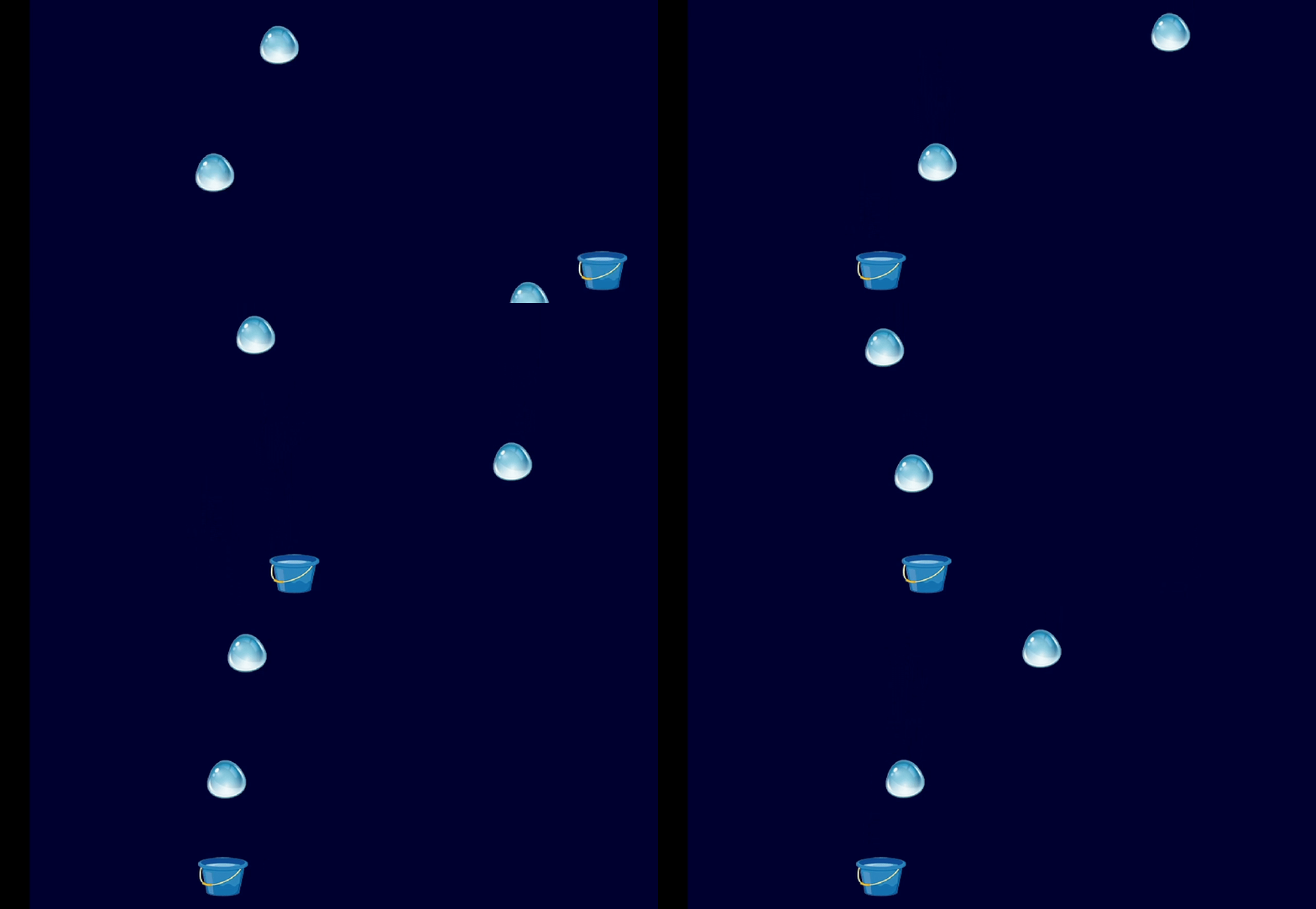
音频和图片资源放在 assets 目录下面,如下。

Desktop 运行效果如下:

Android 运行效果如下:
-
相关阅读:
入学四个月反思
设计模式之单例和原型
@Slf4j打印异常信息打印出堆栈信息
数据链路层主要问题及源于课本的答案
MS5192T/MS5193T——低噪声、低功耗、16/24 位∑-ΔADC
ubuntu配置java环境jdk
[Codeforces] number theory (R1600) Part.8
go实现异常捕捉
DeepMind 推出 OPRO 技术,可用于优化 ChatGPT 提示
微信小程序案例2-1:学生信息
- 原文地址:https://blog.csdn.net/m0_37602827/article/details/134388619
