-
Day02_《MySQL索引与性能优化》
文章目录
- 一、SQL执行顺序
- 二、索引简介
- 三、Explain简介
- 四、Explain 详解
- 五、索引优化
- 六、索引失效
- 1、带头大哥不能死,中间兄弟不能断
- 2、不在索引列上做任何操作(函数、计算、类型转换等操作)
- 3、范围之后的索引字段全失效
- 4、索引列和查询列尽量一致,减少`select *`
- 5、mysql在使用不等于(!=或者<>)的时候无法使用索引会导致全表扫描
- 6、is null,is not null 也无法使用索引
- 7、 like操作时%开头会导致索引失效,`like '%abc%'`还有`like '%abc'`会导致索引失效,但是`like 'abc%'`不会导致索引失效
- 8、解决【like ‘%str%’ 】索引失效的问题——覆盖索引
- 9、字符串不加单引号索引失效
- 10、少用or,用它连接时会索引失效
- 11、索引优化面试题
- 12、索引失效总结
- 七、in和Exists语句怎么使用性能好
- 八、ORDER BY 优化
一、SQL执行顺序
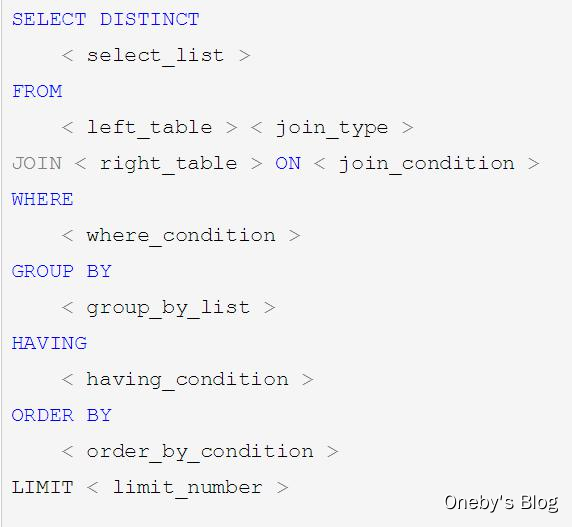
我们手写的 SQL 顺序
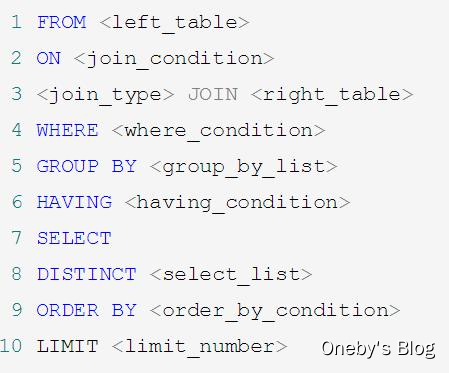
MySQL 实际执行 SQL 顺序
二、索引简介
1、关于索引
- 单值索引:给一个字段添加索引。在user表中给name属性建个索引,
create index idx_user_name on user(name) - 复合索引:给几个字段添加索引。在user表中给name、email属性建个索引,
create index idx_user_nameEmail on user(name,email)
索引的本质:
索引就是排序,你对某个字段建索引数据库就会对所有数据针对这个字段做一个排序。站队从高到低站好找人就很好找,如果没有索引那就是全表扫描。
建索引时注意点:
由于肯定有一张表要全表扫描,被全表扫描的这个表最好是数据量很小的表。
务必小表驱动大表,然后在大表上面建索引哪些情况下适合建立索引
- 主键自动建立唯一索引
- 频繁作为查询的条件的字段应该创建索引
- 查询中与其他表关联的字段,外键关系建立索引
- 频繁更新的字段不适合创建索引
- Where 条件里用不到的字段不创建索引
- 单间/组合索引的选择问题,Who?(在高并发下倾向创建组合索引)
- 查询中排序的字段,排序字段若通过索引去访问将大大提高排序的速度
- 查询中统计或者分组字段
哪些情况不要创建索引
- 表记录太少
- 经常增删改的表
- 数据重复且分布平均的表字段,如性别只有男女两种结果,建了索引也没有意义。如果一个表中有2000条记录,表索引列有1980个不同的值,那么这个索引的选择性就是1980/2000=0.99,一个索引的选择性越接近于1,这个索引的效率就越高。
2、索引的类型
Btree 索引
Btree 索引搜索过程
【初始化介绍】
- 一颗 b 树, 浅蓝色的块我们称之为一个磁盘块, 可以看到每个磁盘块包含几个数据项(深蓝色所示) 和指针(黄色所示)
- 如磁盘块 1 包含数据项 17 和 35, 包含指针 P1、 P2、 P3
- P1 表示小于 17 的磁盘块, P2 表示在 17 和 35 之间的磁盘块, P3 表示大于 35 的磁盘块
- 真实的数据存在于叶子节点和非叶子节点中
【查找过程】
- 如果要查找数据项 29, 那么首先会把磁盘块 1 由磁盘加载到内存, 此时发生一次 IO, 在内存中用二分查找确定 29在 17 和 35 之间, 锁定磁盘块 1 的 P2 指针, 内存时间因为非常短(相比磁盘的 IO) 可以忽略不计
- 通过磁盘块 1的 P2 指针的磁盘地址把磁盘块 3 由磁盘加载到内存, 发生第二次 IO, 29 在 26 和 30 之间, 锁定磁盘块 3 的 P2 指针
- 通过指针加载磁盘块 8 到内存, 发生第三次 IO, 同时内存中做二分查找找到 29, 结束查询, 总计三次 IO。

B+tree 索引
B+tree 索引搜索过程
【B+Tree 与 BTree 的区别】
B-树的关键字(数据项)和记录是放在一起的; B+树的非叶子节点中只有关键字和指向下一个节点的索引, 记录只放在叶子节点中。
【B+Tree 与 BTree 的查找过程】
- 在 B 树中, 越靠近根节点的记录查找时间越快, 只要找到关键字即可确定记录的存在; 而 B+ 树中每个记录的查找时间基本是一样的, 都需要从根节点走到叶子节点, 而且在叶子节点中还要再比较关键字。
- 从这个角度看 B 树的性能好像要比 B+ 树好, 而在实际应用中却是 B+ 树的性能要好些。 因为 B+ 树的非叶子节点不存放实际的数据,这样每个节点可容纳的元素个数比 B 树多, 树高比 B 树小, 这样带来的好处是减少磁盘访问次数。
- 尽管 B+ 树找到一个记录所需的比较次数要比 B 树多, 但是一次磁盘访问的时间相当于成百上千次内存比较的时间, 因此实际中B+ 树的性能可能还会好些, 而且 B+树的叶子节点使用指针连接在一起, 方便顺序遍历(范围搜索), 这也是很多数据库和文件系统使用 B+树的缘故。
【性能提升】
真实的情况是, 3 层的 B+ 树可以表示上百万的数据, 如果上百万的数据查找只需要三次 IO, 性能提高将是巨大的,如果没有索引, 每个数据项都要发生一次 IO, 那么总共需要百万次的 IO, 显然成本非常非常高。
【思考: 为什么说 B+树比 B-树更适合实际应用中操作系统的文件索引和数据库索引?】
- B+树的磁盘读写代价更低:B+树的内部结点并没有指向关键字具体信息的指针。 因此其内部结点相对 B 树更小。 如果把所有同一内部结点的关键字存放在同一盘块中, 那么盘块所能容纳的关键字数量也越多。 一次性读入内存中的需要查找的关键字也就越多。 相对来说 IO 读写次数也就降低了。
- B+树的查询效率更加稳定:由于非终结点并不是最终指向文件内容的结点, 而只是叶子结点中关键字的索引。 所以任何关键字的查找必须走一条从根结点到叶子结点的路。 所有关键字查询的路径长度相同, 导致每一个数据的查询效率相当。

三、Explain简介
Explain能干嘛?
- 能看到一条sql语句实际执行时的MySQL底层的加载顺序(根据输出的id 字段去看)
- 数据读取操作的操作类型(select_type 字段)
- 哪些索引可能被使用(possible_keys 字段)
- 哪些索引被实际使用(keys 字段)
- 表之间的引用(ref 字段)
- 每张表有多少行被优化器查询(rows 字段)
Explain的用法:
- Explain + SQL语句
mysql> explain select * from tbl_emp; +----+-------------+---------+------+---------------+------+---------+------+------+-------+ | id | select_type | table | type | possible_keys | key | key_len | ref | rows | Extra | +----+-------------+---------+------+---------------+------+---------+------+------+-------+ | 1 | SIMPLE | tbl_emp | ALL | NULL | NULL | NULL | NULL | 8 | NULL | +----+-------------+---------+------+---------------+------+---------+------+------+-------+ 1 row in set (0.00 sec)- 1
- 2
- 3
- 4
- 5
- 6
- 7
四、Explain 详解
1、id
id:根据id字段你可以看到这条sql实际执行时的MySQL底层的加载顺序
id 取值的三种情况:
- id相同,执行顺序由上至下
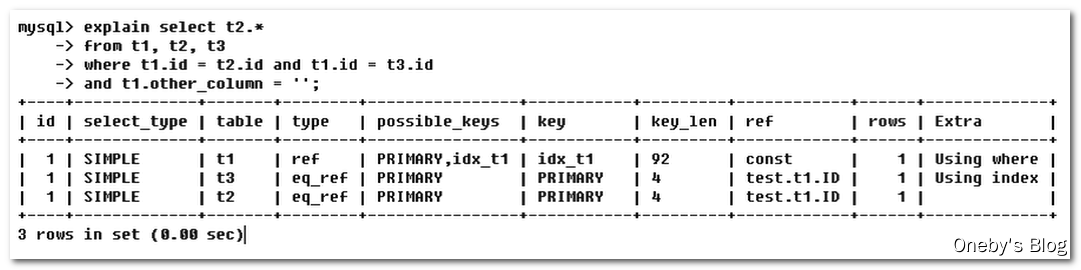
可以看到MySQL底层是先读取t1,然后读取t3,最后读取的t2- id不同,id值越大优先级越高,越先被执行
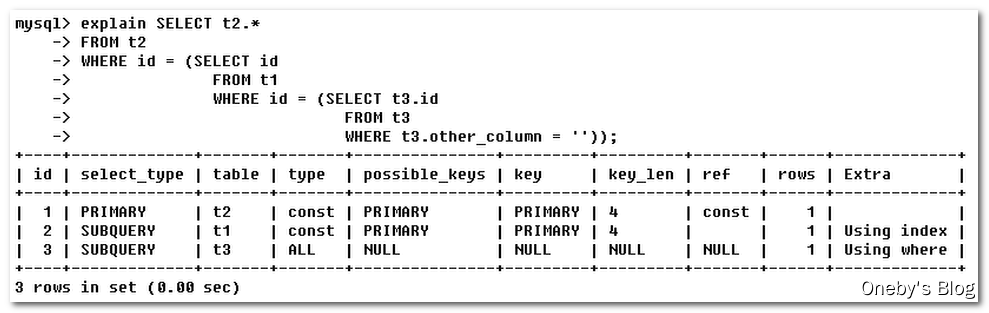
可以看到MySQL底层是先读取t3,然后读取t1,最后读取的t2- id既有相同的也有不同的:id相同时,可以认为是一组,从上往下顺序执行;id不同时,id值越大,优先级越高,越先执行;
可以看到MySQL底层是先读取t3,然后读取
DERIVED是衍生的意思,
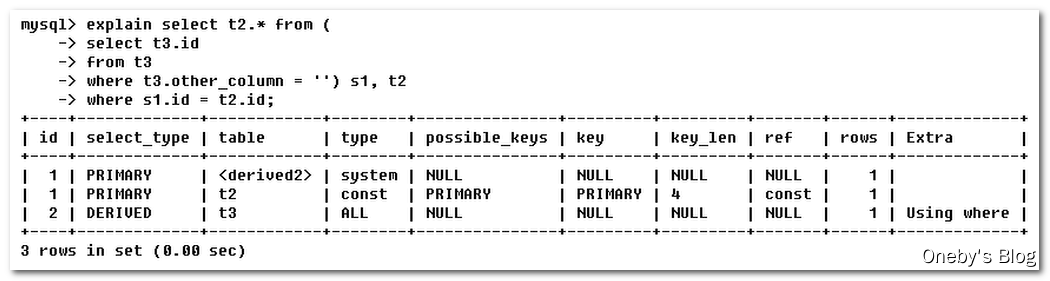
2、select_type
select_type:查询的类型,主要用于区别普通查询、联合查询、子查询等复杂查询
- SIMPLE:简单的select查询,查询中不包含子查询或者UNION
- PRIMARY:查询中若包含任何复杂的子部分,最外层查询则被标记为PRIMARY。
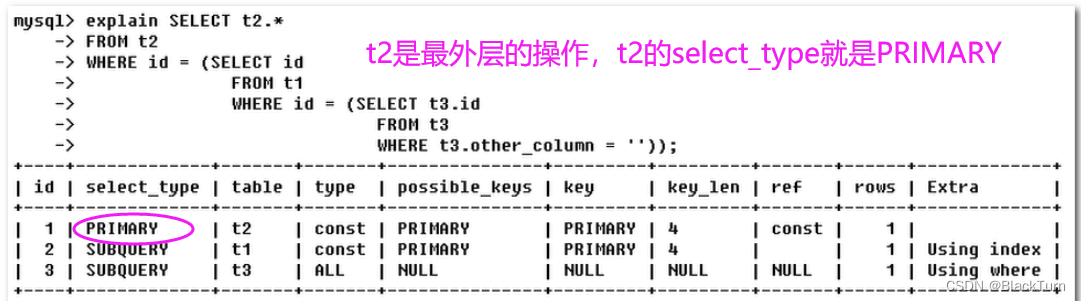
- SUBQUERY:在SELECT或者WHERE列表中包含了子查询
- DERIVED:在FROM列表中包含的子查询被标记为DERIVED(衍生)MySQL会递归执行这些子查询,把结果放在临时表里
- UNION:若第二个SELECT出现在UNION之后,则被标记为UNION;若UNION包含在FROM子句的子查询中,外层SELECT将被标记为:DERIVED
- UNION RESULT:从UNION表获取结果的SELECT
UNION 和 UNION RESULT举例
explain -> select * from tbl_emp e left join tbl_dept d on e.deptId = d.id -> union -> select * from tbl_emp e right join tbl_dept d on e.deptId = d.id; +----+--------------+------------+------+---------------+------------+---------+-----------+------+----------------------------------------------------+ | id | select_type | table | type | possible_keys | key | key_len | ref | rows | Extra | +----+--------------+------------+------+---------------+------------+---------+-----------+------+----------------------------------------------------+ | 1 | PRIMARY | e | ALL | NULL | NULL | NULL | NULL | 8 | NULL | | 1 | PRIMARY | d | ALL | PRIMARY | NULL | NULL | NULL | 5 | Using where; Using join buffer (Block Nested Loop) | | 2 | UNION | d | ALL | NULL | NULL | NULL | NULL | 5 | NULL | | 2 | UNION | e | ref | fk_dept_Id | fk_dept_Id | 5 | db01.d.id | 1 | NULL | | NULL | UNION RESULT |- 1
- 2
- 3
- 4
- 5
- 6
- 7
- 8
- 9
- 10
- 11
- 12
- 13
- 14
- 15
3、table
table:显示这一行的数据是关于哪张表的
4、type
type:访问类型排列,显示查询使用了何种类型
- type显示的是访问类型,是较为重要的一个指标,结果值从最好到最坏依次是:
system>const>eq_ref>ref>fultext>ref_or_null>index_merge>unique_subquery>index_subquery>range>index>ALL - 挑重要的来说:
system>const>eq_ref>ref>range>index>ALL,一般来说,得保证查询至少达到range级别,最好能达到ref。
从最好到最差依次是:system>const>eq_ref>ref>range>index>ALL
-
system:一张表中只有一行记录才会出现的情况。那么这种表类似于系统表一样只有一条记录,平时基本不会出现。
-
const:表示通过索引一次就找到了,const用于比较primary key或者unique索引。因为只匹配一行数据,所以很快。如将主键置于where列表中,MySQL就能将该查询转换为一个常量

- eq_ref:唯一性索引,对于每个索引键,表中只有一条记录与之匹配,常见于主键或唯一索引扫描
下图中的sql语句执行时先全表扫描了t2,然后以t2的数据为基石去匹配t1的数据,匹配t1的数据时因为是一对一的关系,所以就是eq_ref

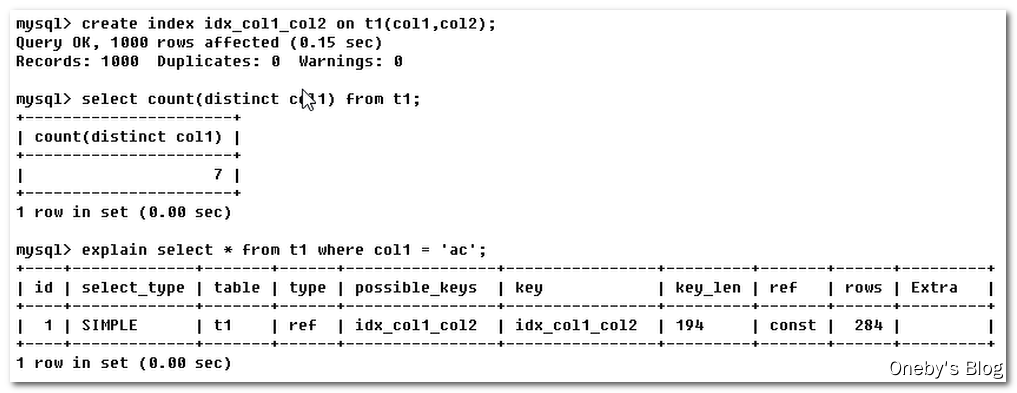
- ref:非唯一索引扫描,返回匹配某个单独值的所有行。本质上也是一种索引访问,它返回所有匹配某个单独值的行,然而,它可能会找到多个符合条件的行,所以他应该属于查找和扫描的混合体
找t1表中col1为ac的数据,由于是一对多,所以type就是ref
- range:在你的where语句中出现了
between、<、>、in等的查询这种范围扫描索就是range类型,因为他只需要开始索引的某一点,而结束于另一点,不用扫描全部数据

- index:Full Index Scan,index与ALL区别为index类型是全索引扫描,而all是全表扫描。index通常比ALL快,因为索引文件通常比数据文件小。(也就是说虽然all和index都是读全表,但index是从索引中读取的,而all是从硬盘数据库文件中读的)

- all:将遍历全表以找到匹配的行(全表扫描)

- 备注:一般来说,得保证查询只是达到range级别,最好达到ref
5、possible_keys
possible_keys显示可能会用到的索引(若查询涉及的字段上存在索引,则该索引将被列出,但不一定被查询实际使用)
好比是大摆筵席,possible_keys就是你可能会摆多少桌,但实际有多少桌这个看的是key
6、key
-
实际使用的索引,如果为null,则没有使用索引
-
若查询中使用了覆盖索引,则该索引仅出现在key列表中
下图就很有意思,程序判断可能用到的索引是空,结果实际用到的索引是idx_col1_col2,这种情况就是索引覆盖,这是好事情,我本来以为么有索引可以使用结果有。

7、key_len
key_len显示的值为索引最大可能长度,一般来讲长度越短越好,但是随着你查询条件的变多,key_len会不可避免的变长。(我找找山西里面的李华,我要找山西太原的李华,我要找山西太原小店区的李华,由于你找的越来越精确,所以key_len会不可避免的变长,这是正常情况)

8、ref
- 显示索引哪一列被使用了,如果可能的话,最好是一个常数。哪些列或常量被用于查找索引列上的值
- 由key_len可知t1表的索引idx_col1_col2被充分使用,t1表的col1匹配t2表的col1,t1表的col2匹配了一个常量,即’ac’
下图的sql就是说我先全表扫描了t2,然后以t2的数据为基石,查找t1表中t1.col1 = t2.col1 而且 t1.col2为ac的数据。
ref中的shared.t2.col1是啥意思?它表示t1表的col1用到了shared数据库下t2表的col1字段。
ref中的const是啥意思?它表示t1表的col2匹配了一个常量,即’ac’。
也就是说查找t1表中t1.col1 = t2.col1 而且 t1.col2为ac的数据时既用到shared数据库下t2表的col1字段 还用到了一个常量。
9、rows
根据表统计信息及索引选用情况,大致估算出找到所需的记录所需要读取的行数

10、Extra
Extra包含不适合在其他列中显示但十分重要的额外信息,这个是重点,一定不能忽视!!!
Extra可能有以下几个值:-
Using filesort(文件排序):
- 出现 Using filesort 不好(九死一生),需要尽快优化 SQL
- MySQL中无法利用索引完成排序操作成为“文件排序”
- 说明mysql会对数据使用一个外部的索引排序,而不是按照表内的索引顺序进行读取
你定义了一个索引,然后MySQL底层按照你的索引给你排好序了,结果你不仅没有用上这个索引,你还和索引规定的东西反着来,那么就会出现 Using filesort ,这个非常不好,需要尽快优化 SQL。举例:你基于col1,col2,col3做了一个索引,然后你select查询时要求按照col1的升序、col2的降序、col3的升序排序,MySQL底层的B+树是按照col1,col2,col3的升序排队的,结果你查询语句是按照col1的升序、
col2的降序、col3的升序排序,你的要求有升又有降,和底层不符合,那么就会出现Using filesort 。下图中\G表示竖着展示(以前都是横着展示指标)。你基于col1,col2,col3做了一个索引,示例中第一个查询只使用了 col1然后按照col3做了排序,原有索引派不上用场,所以进行了外部文件排序。示例中第二个查询使用了 col1、col2 和col3,原有索引派上用场,无需进行文件排序

-
Using temporary(创建临时表):
- 使用了临时表保存中间结果,MySQL在对查询结果排序时使用临时表。常见于排序 order by 和分组查询 group by
- 出现 Using temporary 超级不好(十死无生),需要立即优化 SQL
你基于col1,col2,col3做了一个索引,示例中第一个查询只使用了col1,原有索引派不上用场,所以创建了临时表进行分组;示例中第二个查询使用了 col1、col2,原有索引派上用场,无需创建临时表

-
Using index(覆盖索引):
-
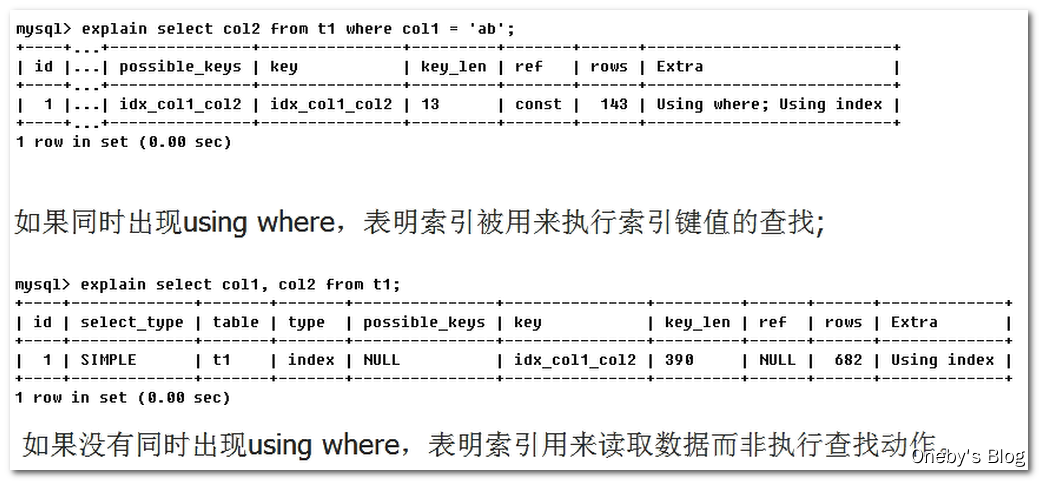
表示相应的select操作中使用了覆盖索引(Coveing Index),避免访问了表的数据行,效率不错!
-
如果同时出现using where,表明索引被用来执行索引键值的查找
-
如果没有同时出现using where,表明索引用来读取数据而非执行查找动作
-
覆盖索引(Covering Index),也说为索引覆盖
- 理解方式一:就是select的数据列只用从索引中就能够取得,不必读取数据行,MySQL可以利用索引返回select列表中的字段,而不必根据索引再次读取数据文件,换句话说查询列要被所建的索引覆盖。
- 理解方式二:索引是高效找到行的一个方法,但是一般数据库也能使用索引找到一个列的数据,因此它不必读取整个行。毕竟索引叶子节点存储了它们索引的数据;当能通过读取索引就可以得到想要的数据,那就不需要读取行了。一个索引包含了(或覆盖了)满足查询结果的数据就叫做覆盖索引。
- 注意:如果要使用覆盖索引,一定要注意select列表中只取出需要的列,不可以用
select *,因为如果将所有字段一起做索引会导致索引文件过大,查询性能下降。
-
-
Using where:表明使用了where过滤
-
Using join buffer:表明使用了连接缓存
-
impossible where:where子句的值总是false,不能用来获取任何元组

-
select tables optimized away:在没有GROUPBY子句的情况下,基于索引优化MIN/MAX操作或者对于MyISAM存储引擎优化
COUNT(*)操作,不必等到执行阶段再进行计算,查询执行计划生成的阶段即完成优化。 -
distinct:优化distinct,在找到第一匹配的元组后即停止找同样值的工作
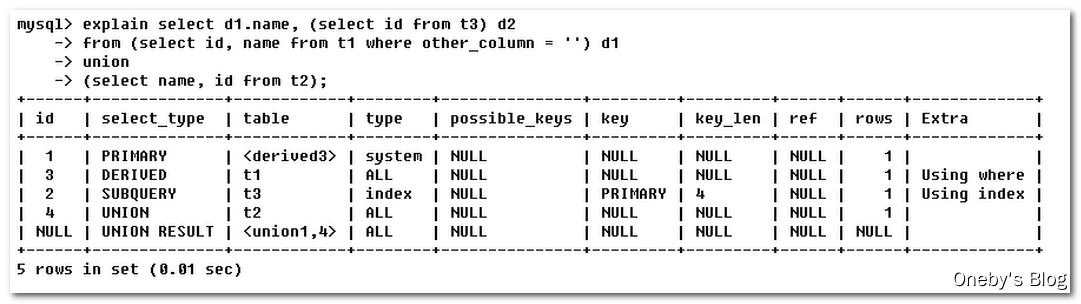
11、小案例
- 第一行(id为1,但它的执行顺序是4):id列为1,select_type列的primary表示该查询为外层查询,table列被标记为
select d1.name ...】 - 第二行(id为3,但执行顺序2):id为3,是整个查询中第三个select的一部分。因查询包含在from中,所以为derived。【
select id, name from t1 where other_column= ' '】 - 第三行(id为2,但执行顺序3):select列表中的子查询select_type为subquery,为整个查询中的第二个select。【
select id from t3】 - 第四行(id为4,但执行顺序1):select_type为union,说明第四个select是union里的第二个select,最先执行【
select name, id from t2】 - 第五行(id为null,执行顺序5):代表从union的临时表中读取行的阶段,table列的
五、索引优化
1、单表索引优化
单表索引优化分析
创建表
- 建表 SQL
CREATE TABLE IF NOT EXISTS article( id INT(10) UNSIGNED NOT NULL PRIMARY KEY AUTO_INCREMENT, author_id INT(10) UNSIGNED NOT NULL, category_id INT(10) UNSIGNED NOT NULL, views INT(10) UNSIGNED NOT NULL, comments INT(10) UNSIGNED NOT NULL, title VARCHAR(255) NOT NULL, content TEXT NOT NULL ); INSERT INTO article(author_id,category_id,views,comments,title,content) VALUES (1,1,1,1,'1','1'), (2,2,2,2,'2','2'), (1,1,3,3,'3','3');- 1
- 2
- 3
- 4
- 5
- 6
- 7
- 8
- 9
- 10
- 11
- 12
- 13
- 14
- 15
- 表中的测试数据
mysql> SELECT * FROM article; +----+-----------+-------------+-------+----------+-------+---------+ | id | author_id | category_id | views | comments | title | content | +----+-----------+-------------+-------+----------+-------+---------+ | 1 | 1 | 1 | 1 | 1 | 1 | 1 | | 2 | 2 | 2 | 2 | 2 | 2 | 2 | | 3 | 1 | 1 | 3 | 3 | 3 | 3 | +----+-----------+-------------+-------+----------+-------+---------+ 3 rows in set (0.00 sec)- 1
- 2
- 3
- 4
- 5
- 6
- 7
- 8
- 9
查询案例
- 查询category_id为1且comments 大于1的情况下,views最多的article_id。
mysql> SELECT id, author_id FROM article WHERE category_id = 1 AND comments > 1 ORDER BY views DESC LIMIT 1; +----+-----------+ | id | author_id | +----+-----------+ | 3 | 1 | +----+-----------+ 1 row in set (0.00 sec)- 1
- 2
- 3
- 4
- 5
- 6
- 7
- 此时 article 表中只有一个主键索引
mysql> SHOW INDEX FROM article; +---------+------------+----------+--------------+-------------+-----------+-------------+----------+--------+------+------------+---------+---------------+ | Table | Non_unique | Key_name | Seq_in_index | Column_name | Collation | Cardinality | Sub_part | Packed | Null | Index_type | Comment | Index_comment | +---------+------------+----------+--------------+-------------+-----------+-------------+----------+--------+------+------------+---------+---------------+ | article | 0 | PRIMARY | 1 | id | A | 3 | NULL | NULL | | BTREE | | | +---------+------------+----------+--------------+-------------+-----------+-------------+----------+--------+------+------------+---------+---------------+ 1 row in set (0.00 sec) 1234567- 1
- 2
- 3
- 4
- 5
- 6
- 7
- 8
- 使用 explain 分析 SQL 语句的执行效率:
EXPLAIN SELECT id, author_id FROM article WHERE category_id = 1 AND comments > 1 ORDER BY views DESC LIMIT 1;
mysql> EXPLAIN SELECT id, author_id FROM article WHERE category_id = 1 AND comments > 1 ORDER BY views DESC LIMIT 1; +----+-------------+---------+------+---------------+------+---------+------+------+-----------------------------+ | id | select_type | table | type | possible_keys | key | key_len | ref | rows | Extra | +----+-------------+---------+------+---------------+------+---------+------+------+-----------------------------+ | 1 | SIMPLE | article | ALL | NULL | NULL | NULL | NULL | 3 | Using where; Using filesort | +----+-------------+---------+------+---------------+------+---------+------+------+-----------------------------+ 1 row in set (0.00 sec)- 1
- 2
- 3
- 4
- 5
- 6
- 7
- 结论:
- 很显然,type是ALL,即最坏的情况。
- Extra 里还出现了Using filesort,也是最坏的情况。
- 优化是必须的。
开始优化:新建索引
- 创建索引的 SQL 命令
# ALTER TABLE article ADD INDEX idx_article_ccv('category_id', 'comments', 'views'); create index idx_article_ccv on article(category_id, comments, views);- 1
- 2
- 在 category_id 列、comments 列和 views 列上建立联合索引
mysql> create index idx_article_ccv on article(category_id, comments, views); Query OK, 0 rows affected (0.01 sec) Records: 0 Duplicates: 0 Warnings: 0 mysql> SHOW INDEX FROM article; +---------+------------+-----------------+--------------+-------------+-----------+-------------+----------+--------+------+------------+---------+---------------+ | Table | Non_unique | Key_name | Seq_in_index | Column_name | Collation | Cardinality | Sub_part | Packed | Null | Index_type | Comment | Index_comment | +---------+------------+-----------------+--------------+-------------+-----------+-------------+----------+--------+------+------------+---------+---------------+ | article | 0 | PRIMARY | 1 | id | A | 3 | NULL | NULL | | BTREE | | | | article | 1 | idx_article_ccv | 1 | category_id | A | 3 | NULL | NULL | | BTREE | | | | article | 1 | idx_article_ccv | 2 | comments | A | 3 | NULL | NULL | | BTREE | | | | article | 1 | idx_article_ccv | 3 | views | A | 3 | NULL | NULL | | BTREE | | | +---------+------------+-----------------+--------------+-------------+-----------+-------------+----------+--------+------+------------+---------+---------------+ 4 rows in set (0.00 sec)- 1
- 2
- 3
- 4
- 5
- 6
- 7
- 8
- 9
- 10
- 11
- 12
- 13
- 14
- 再次执行查询:type变成了range,这是可以忍受的。但是extra里使用Using filesort仍是无法接受的。
mysql> EXPLAIN SELECT id, author_id FROM article WHERE category_id = 1 AND comments > 1 ORDER BY views DESC LIMIT 1; +----+-------------+---------+-------+-----------------+-----------------+---------+------+------+---------------------------------------+ | id | select_type | table | type | possible_keys | key | key_len | ref | rows | Extra | +----+-------------+---------+-------+-----------------+-----------------+---------+------+------+---------------------------------------+ | 1 | SIMPLE | article | range | idx_article_ccv | idx_article_ccv | 8 | NULL | 1 | Using index condition; Using filesort | +----+-------------+---------+-------+-----------------+-----------------+---------+------+------+---------------------------------------+ 1 row in set (0.00 sec)- 1
- 2
- 3
- 4
- 5
- 6
- 7
- 分析:
- 但是我们已经建立了索引,为啥没用呢?
- 这是因为按照B+Tree索引的工作原理,先排序 category_id,如果遇到相同的 category_id 则再排序comments,如果遇到相同的 comments 则再排序 views。
- 当comments字段在联合索引里处于中间位置时,因为
comments>1条件是一个范围值(所谓 range),MySQL 无法利用索引再对后面的views部分进行检索,即 range 类型查询字段后面的索引无效。
- 将查询条件中的
comments > 1改为comments = 1,发现 Use filesort 神奇地消失了,从这点可以验证:范围查询会导致索引失效 - 范围查询会导致索引失效,但是并不是说该索引就没有用到。你的索引顺序是ctegory_id、comments、views,你的查询语句是category_id = 1 AND comments > 1 ORDER BY views ,这个comments > 1是个范围会导致索引失效但是它是从comments后面才失效的,ctegory_id和comments还是用到索引了的。
mysql> EXPLAIN SELECT id, author_id FROM article WHERE category_id = 1 AND comments = 1 ORDER BY views DESC LIMIT 1; +----+-------------+---------+------+-----------------+-----------------+---------+-------------+------+-------------+ | id | select_type | table | type | possible_keys | key | key_len | ref | rows | Extra | +----+-------------+---------+------+-----------------+-----------------+---------+-------------+------+-------------+ | 1 | SIMPLE | article | ref | idx_article_ccv | idx_article_ccv | 8 | const,const | 1 | Using where | +----+-------------+---------+------+-----------------+-----------------+---------+-------------+------+-------------+ 1 row in set (0.00 sec)- 1
- 2
- 3
- 4
- 5
- 6
- 7
删除索引
- 删除索引的 SQL 指令
DROP INDEX idx_article_ccv ON article;- 1
- 删除刚才创建的 idx_article_ccv 索引
mysql> DROP INDEX idx_article_ccv ON article; Query OK, 0 rows affected (0.00 sec) Records: 0 Duplicates: 0 Warnings: 0 mysql> SHOW INDEX FROM article; +---------+------------+----------+--------------+-------------+-----------+-------------+----------+--------+------+------------+---------+---------------+ | Table | Non_unique | Key_name | Seq_in_index | Column_name | Collation | Cardinality | Sub_part | Packed | Null | Index_type | Comment | Index_comment | +---------+------------+----------+--------------+-------------+-----------+-------------+----------+--------+------+------------+---------+---------------+ | article | 0 | PRIMARY | 1 | id | A | 3 | NULL | NULL | | BTREE | | | +---------+------------+----------+--------------+-------------+-----------+-------------+----------+--------+------+------------+---------+---------------+ 1 row in set (0.00 sec)- 1
- 2
- 3
- 4
- 5
- 6
- 7
- 8
- 9
- 10
- 11
再次创建索引
- 创建索引的 SQL 指令
# ALTER TABLE article ADD INDEX idx_article_ccv('category_id', 'views'); create index idx_article_ccv on article(category_id, views);- 1
- 2
- 由于 range 后(
comments > 1)的索引会失效,这次我们建立索引时,直接抛弃 comments 列,先利用 category_id 和 views 的联合索引查询所需要的数据,再从其中取出comments > 1的数据(我觉着应该是这样的)
mysql> create index idx_article_ccv on article(category_id, views); Query OK, 0 rows affected (0.30 sec) Records: 0 Duplicates: 0 Warnings: 0 mysql> SHOW INDEX FROM article; +---------+------------+-----------------+--------------+-------------+-----------+-------------+----------+--------+------+------------+---------+---------------+ | Table | Non_unique | Key_name | Seq_in_index | Column_name | Collation | Cardinality | Sub_part | Packed | Null | Index_type | Comment | Index_comment | +---------+------------+-----------------+--------------+-------------+-----------+-------------+----------+--------+------+------------+---------+---------------+ | article | 0 | PRIMARY | 1 | id | A | 3 | NULL | NULL | | BTREE | | | | article | 1 | idx_article_ccv | 1 | category_id | A | 3 | NULL | NULL | | BTREE | | | | article | 1 | idx_article_ccv | 2 | views | A | 3 | NULL | NULL | | BTREE | | | +---------+------------+-----------------+--------------+-------------+-----------+-------------+----------+--------+------+------------+---------+---------------+ 3 rows in set (0.00 sec)- 1
- 2
- 3
- 4
- 5
- 6
- 7
- 8
- 9
- 10
- 11
- 12
- 13
- 再次执行查询:可以看到,type变为了ref,Extra中的Using filesort也消失了,结果非常理想
ysql> EXPLAIN SELECT id, author_id FROM article WHERE category_id = 1 AND comments > 1 ORDER BY views DESC LIMIT 1; +----+-------------+---------+------+-----------------+-----------------+---------+-------+------+-------------+ | id | select_type | table | type | possible_keys | key | key_len | ref | rows | Extra | +----+-------------+---------+------+-----------------+-----------------+---------+-------+------+-------------+ | 1 | SIMPLE | article | ref | idx_article_ccv | idx_article_ccv | 4 | const | 2 | Using where | +----+-------------+---------+------+-----------------+-----------------+---------+-------+------+-------------+ 1 row in set (0.00 sec)- 1
- 2
- 3
- 4
- 5
- 6
- 7
- 为了不影响之后的测试,删除该表的 idx_article_ccv 索引
mysql> DROP INDEX idx_article_ccv ON article; Query OK, 0 rows affected (0.05 sec) Records: 0 Duplicates: 0 Warnings: 0 mysql> SHOW INDEX FROM article; +---------+------------+----------+--------------+-------------+-----------+-------------+----------+--------+------+------------+---------+---------------+ | Table | Non_unique | Key_name | Seq_in_index | Column_name | Collation | Cardinality | Sub_part | Packed | Null | Index_type | Comment | Index_comment | +---------+------------+----------+--------------+-------------+-----------+-------------+----------+--------+------+------------+---------+---------------+ | article | 0 | PRIMARY | 1 | id | A | 3 | NULL | NULL | | BTREE | | | +---------+------------+----------+--------------+-------------+-----------+-------------+----------+--------+------+------------+---------+---------------+ 1 row in set (0.01 sec)- 1
- 2
- 3
- 4
- 5
- 6
- 7
- 8
- 9
- 10
- 11
2、两表索引优化
两表索引优化分析:主外键
创建表
- 建表 SQL
CREATE TABLE IF NOT EXISTS class( id INT(10) UNSIGNED NOT NULL AUTO_INCREMENT, card INT(10) UNSIGNED NOT NULL, PRIMARY KEY(id) ); CREATE TABLE IF NOT EXISTS book( bookid INT(10) UNSIGNED NOT NULL AUTO_INCREMENT, card INT(10) UNSIGNED NOT NULL, PRIMARY KEY(bookid) ); INSERT INTO class(card) VALUES(FLOOR(1+(RAND()*20))); INSERT INTO class(card) VALUES(FLOOR(1+(RAND()*20))); INSERT INTO class(card) VALUES(FLOOR(1+(RAND()*20))); INSERT INTO class(card) VALUES(FLOOR(1+(RAND()*20))); INSERT INTO class(card) VALUES(FLOOR(1+(RAND()*20))); INSERT INTO class(card) VALUES(FLOOR(1+(RAND()*20))); INSERT INTO class(card) VALUES(FLOOR(1+(RAND()*20))); INSERT INTO class(card) VALUES(FLOOR(1+(RAND()*20))); INSERT INTO class(card) VALUES(FLOOR(1+(RAND()*20))); INSERT INTO class(card) VALUES(FLOOR(1+(RAND()*20))); INSERT INTO class(card) VALUES(FLOOR(1+(RAND()*20))); INSERT INTO class(card) VALUES(FLOOR(1+(RAND()*20))); INSERT INTO class(card) VALUES(FLOOR(1+(RAND()*20))); INSERT INTO class(card) VALUES(FLOOR(1+(RAND()*20))); INSERT INTO class(card) VALUES(FLOOR(1+(RAND()*20))); INSERT INTO class(card) VALUES(FLOOR(1+(RAND()*20))); INSERT INTO class(card) VALUES(FLOOR(1+(RAND()*20))); INSERT INTO class(card) VALUES(FLOOR(1+(RAND()*20))); INSERT INTO class(card) VALUES(FLOOR(1+(RAND()*20))); INSERT INTO class(card) VALUES(FLOOR(1+(RAND()*20))); INSERT INTO class(card) VALUES(FLOOR(1+(RAND()*20))); INSERT INTO book(card) VALUES(FLOOR(1+(RAND()*20))); INSERT INTO book(card) VALUES(FLOOR(1+(RAND()*20))); INSERT INTO book(card) VALUES(FLOOR(1+(RAND()*20))); INSERT INTO book(card) VALUES(FLOOR(1+(RAND()*20))); INSERT INTO book(card) VALUES(FLOOR(1+(RAND()*20))); INSERT INTO book(card) VALUES(FLOOR(1+(RAND()*20))); INSERT INTO book(card) VALUES(FLOOR(1+(RAND()*20))); INSERT INTO book(card) VALUES(FLOOR(1+(RAND()*20))); INSERT INTO book(card) VALUES(FLOOR(1+(RAND()*20))); INSERT INTO book(card) VALUES(FLOOR(1+(RAND()*20))); INSERT INTO book(card) VALUES(FLOOR(1+(RAND()*20))); INSERT INTO book(card) VALUES(FLOOR(1+(RAND()*20))); INSERT INTO book(card) VALUES(FLOOR(1+(RAND()*20))); INSERT INTO book(card) VALUES(FLOOR(1+(RAND()*20))); INSERT INTO book(card) VALUES(FLOOR(1+(RAND()*20))); INSERT INTO book(card) VALUES(FLOOR(1+(RAND()*20))); INSERT INTO book(card) VALUES(FLOOR(1+(RAND()*20))); INSERT INTO book(card) VALUES(FLOOR(1+(RAND()*20))); INSERT INTO book(card) VALUES(FLOOR(1+(RAND()*20))); INSERT INTO book(card) VALUES(FLOOR(1+(RAND()*20)));- 1
- 2
- 3
- 4
- 5
- 6
- 7
- 8
- 9
- 10
- 11
- 12
- 13
- 14
- 15
- 16
- 17
- 18
- 19
- 20
- 21
- 22
- 23
- 24
- 25
- 26
- 27
- 28
- 29
- 30
- 31
- 32
- 33
- 34
- 35
- 36
- 37
- 38
- 39
- 40
- 41
- 42
- 43
- 44
- 45
- 46
- 47
- 48
- 49
- 50
- 51
- 52
- 53
- 54
- class 表中的测试数据
mysql> select * from class; +----+------+ | id | card | +----+------+ | 1 | 12 | | 2 | 13 | | 3 | 12 | | 4 | 17 | | 5 | 11 | | 6 | 3 | | 7 | 1 | | 8 | 16 | | 9 | 17 | | 10 | 16 | | 11 | 9 | | 12 | 17 | | 13 | 18 | | 14 | 16 | | 15 | 7 | | 16 | 8 | | 17 | 19 | | 18 | 9 | | 19 | 6 | | 20 | 5 | | 21 | 6 | +----+------+ 21 rows in set (0.00 sec)- 1
- 2
- 3
- 4
- 5
- 6
- 7
- 8
- 9
- 10
- 11
- 12
- 13
- 14
- 15
- 16
- 17
- 18
- 19
- 20
- 21
- 22
- 23
- 24
- 25
- 26
- 27
- book 表中的测试数据
mysql> select * from book; +--------+------+ | bookid | card | +--------+------+ | 1 | 16 | | 2 | 1 | | 3 | 17 | | 4 | 3 | | 5 | 20 | | 6 | 12 | | 7 | 18 | | 8 | 13 | | 9 | 13 | | 10 | 4 | | 11 | 1 | | 12 | 13 | | 13 | 20 | | 14 | 20 | | 15 | 1 | | 16 | 2 | | 17 | 9 | | 18 | 16 | | 19 | 14 | | 20 | 2 | +--------+------+ 20 rows in set (0.00 sec)- 1
- 2
- 3
- 4
- 5
- 6
- 7
- 8
- 9
- 10
- 11
- 12
- 13
- 14
- 15
- 16
- 17
- 18
- 19
- 20
- 21
- 22
- 23
- 24
- 25
- 26
查询案例
- 实现两表的连接,连接条件是 class.card = book.card
mysql> SELECT * FROM class LEFT JOIN book ON class.card = book.card; +----+------+--------+------+ | id | card | bookid | card | +----+------+--------+------+ | 1 | 12 | 6 | 12 | | 2 | 13 | 8 | 13 | | 2 | 13 | 9 | 13 | | 2 | 13 | 12 | 13 | | 3 | 12 | 6 | 12 | | 4 | 17 | 3 | 17 | | 5 | 11 | NULL | NULL | | 6 | 3 | 4 | 3 | | 7 | 1 | 2 | 1 | | 7 | 1 | 11 | 1 | | 7 | 1 | 15 | 1 | | 8 | 16 | 1 | 16 | | 8 | 16 | 18 | 16 | | 9 | 17 | 3 | 17 | | 10 | 16 | 1 | 16 | | 10 | 16 | 18 | 16 | | 11 | 9 | 17 | 9 | | 12 | 17 | 3 | 17 | | 13 | 18 | 7 | 18 | | 14 | 16 | 1 | 16 | | 14 | 16 | 18 | 16 | | 15 | 7 | NULL | NULL | | 16 | 8 | NULL | NULL | | 17 | 19 | NULL | NULL | | 18 | 9 | 17 | 9 | | 19 | 6 | NULL | NULL | | 20 | 5 | NULL | NULL | | 21 | 6 | NULL | NULL | +----+------+--------+------+ 28 rows in set (0.00 sec)- 1
- 2
- 3
- 4
- 5
- 6
- 7
- 8
- 9
- 10
- 11
- 12
- 13
- 14
- 15
- 16
- 17
- 18
- 19
- 20
- 21
- 22
- 23
- 24
- 25
- 26
- 27
- 28
- 29
- 30
- 31
- 32
- 33
- 34
- 使用 explain 分析 SQL 语句的性能,可以看到:驱动表是左表 class 表
mysql> EXPLAIN SELECT * FROM class LEFT JOIN book ON class.card = book.card; +----+-------------+-------+------+---------------+------+---------+------+------+----------------------------------------------------+ | id | select_type | table | type | possible_keys | key | key_len | ref | rows | Extra | +----+-------------+-------+------+---------------+------+---------+------+------+----------------------------------------------------+ | 1 | SIMPLE | class | ALL | NULL | NULL | NULL | NULL | 21 | NULL | | 1 | SIMPLE | book | ALL | NULL | NULL | NULL | NULL | 20 | Using where; Using join buffer (Block Nested Loop) | +----+-------------+-------+------+---------------+------+---------+------+------+----------------------------------------------------+ 2 rows in set (0.00 sec)- 1
- 2
- 3
- 4
- 5
- 6
- 7
- 8
- 结论:
- type 有 All ,rows 为表中数据总行数,说明 class 和 book 进行了全表检索
- 即每次 class 表对 book 表进行左外连接时,都需要在 book 表中进行一次全表检索
添加索引:在右表添加索引
- 添加索引的 SQL 指令
ALTER TABLE 'book' ADD INDEX Y ('card');- 1
- 在 book 的 card 字段上添加索引
mysql> ALTER TABLE book ADD INDEX Y (card); Query OK, 0 rows affected (0.30 sec) Records: 0 Duplicates: 0 Warnings: 0 mysql> SHOW INDEX FROM book; +-------+------------+----------+--------------+-------------+-----------+-------------+----------+--------+------+------------+---------+---------------+ | Table | Non_unique | Key_name | Seq_in_index | Column_name | Collation | Cardinality | Sub_part | Packed | Null | Index_type | Comment | Index_comment | +-------+------------+----------+--------------+-------------+-----------+-------------+----------+--------+------+------------+---------+---------------+ | book | 0 | PRIMARY | 1 | bookid | A | 20 | NULL | NULL | | BTREE | | | | book | 1 | Y | 1 | card | A | 20 | NULL | NULL | | BTREE | | | +-------+------------+----------+--------------+-------------+-----------+-------------+----------+--------+------+------------+---------+---------------+ 2 rows in set (0.00 sec)- 1
- 2
- 3
- 4
- 5
- 6
- 7
- 8
- 9
- 10
- 11
- 12
- 测试结果:可以看到第二行的type变为了ref,rows也变成了优化比较明显。
mysql> EXPLAIN SELECT * FROM class LEFT JOIN book ON class.card = book.card; +----+-------------+-------+------+---------------+------+---------+-----------------+------+-------------+ | id | select_type | table | type | possible_keys | key | key_len | ref | rows | Extra | +----+-------------+-------+------+---------------+------+---------+-----------------+------+-------------+ | 1 | SIMPLE | class | ALL | NULL | NULL | NULL | NULL | 21 | NULL | | 1 | SIMPLE | book | ref | Y | Y | 4 | db01.class.card | 1 | Using index | +----+-------------+-------+------+---------------+------+---------+-----------------+------+-------------+ 2 rows in set (0.00 sec)- 1
- 2
- 3
- 4
- 5
- 6
- 7
- 8
- 分析:
- 这是由左连接特性决定的。LEFT JOIN条件用于确定如何从右表搜索行,左边一定都有,所以右边是我们的关键点,一定需要建立索引。
- 左表连接右表,则需要拿着左表的数据去右表里面查,索引需要在右表中建立索引
添加索引:在右表添加索引
- 删除之前 book 表中的索引
DROP INDEX Y ON book;- 1
- 在 class 表的 card 字段上建立索引
ALTER TABLE class ADD INDEX X(card);- 1
- 再次执行左连接,凉凉~~~
mysql> EXPLAIN SELECT * FROM class LEFT JOIN book ON class.card = book.card; +----+-------------+-------+-------+---------------+------+---------+------+------+----------------------------------------------------+ | id | select_type | table | type | possible_keys | key | key_len | ref | rows | Extra | +----+-------------+-------+-------+---------------+------+---------+------+------+----------------------------------------------------+ | 1 | SIMPLE | class | index | NULL | X | 4 | NULL | 21 | Using index | | 1 | SIMPLE | book | ALL | NULL | NULL | NULL | NULL | 20 | Using where; Using join buffer (Block Nested Loop) | +----+-------------+-------+-------+---------------+------+---------+------+------+----------------------------------------------------+ 2 rows in set (0.00 sec)- 1
- 2
- 3
- 4
- 5
- 6
- 7
- 8
- 别怕,我们来执行右连接:可以看到第二行的type变为了ref,rows也变成了优化比较明显。
mysql> EXPLAIN SELECT * FROM class RIGHT JOIN book ON class.card = book.card; +----+-------------+-------+------+---------------+------+---------+----------------+------+-------------+ | id | select_type | table | type | possible_keys | key | key_len | ref | rows | Extra | +----+-------------+-------+------+---------------+------+---------+----------------+------+-------------+ | 1 | SIMPLE | book | ALL | NULL | NULL | NULL | NULL | 20 | NULL | | 1 | SIMPLE | class | ref | X | X | 4 | db01.book.card | 1 | Using index | +----+-------------+-------+------+---------------+------+---------+----------------+------+-------------+ 2 rows in set (0.00 sec)- 1
- 2
- 3
- 4
- 5
- 6
- 7
- 8
- 分析:
- 这是因为RIGHT JOIN条件用于确定如何从左表搜索行,右边一定都有,所以左边是我们的关键点,一定需要建立索引。
- class RIGHT JOIN book :book 里面的数据一定存在于结果集中,我们需要拿着 book 表中的数据,去 class 表中搜索,所以索引需要建立在 class 表中
- 为了不影响之后的测试,删除该表的 idx_article_ccv 索引
mysql> DROP INDEX X ON class; Query OK, 0 rows affected (0.04 sec) Records: 0 Duplicates: 0 Warnings: 0 mysql> SHOW INDEX FROM class; +-------+------------+----------+--------------+-------------+-----------+-------------+----------+--------+------+------------+---------+---------------+ | Table | Non_unique | Key_name | Seq_in_index | Column_name | Collation | Cardinality | Sub_part | Packed | Null | Index_type | Comment | Index_comment | +-------+------------+----------+--------------+-------------+-----------+-------------+----------+--------+------+------------+---------+---------------+ | class | 0 | PRIMARY | 1 | id | A | 21 | NULL | NULL | | BTREE | | | +-------+------------+----------+--------------+-------------+-----------+-------------+----------+--------+------+------------+---------+---------------+ 1 row in set (0.00 sec)- 1
- 2
- 3
- 4
- 5
- 6
- 7
- 8
- 9
- 10
- 11
3、三表索引优化
三表索引优化分析
创建表
- 建表 SQL
CREATE TABLE IF NOT EXISTS phone( phoneid INT(10) UNSIGNED NOT NULL AUTO_INCREMENT, card INT(10) UNSIGNED NOT NULL, PRIMARY KEY(phoneid) )ENGINE=INNODB; INSERT INTO phone(card) VALUES(FLOOR(1+(RAND()*20))); INSERT INTO phone(card) VALUES(FLOOR(1+(RAND()*20))); INSERT INTO phone(card) VALUES(FLOOR(1+(RAND()*20))); INSERT INTO phone(card) VALUES(FLOOR(1+(RAND()*20))); INSERT INTO phone(card) VALUES(FLOOR(1+(RAND()*20))); INSERT INTO phone(card) VALUES(FLOOR(1+(RAND()*20))); INSERT INTO phone(card) VALUES(FLOOR(1+(RAND()*20))); INSERT INTO phone(card) VALUES(FLOOR(1+(RAND()*20))); INSERT INTO phone(card) VALUES(FLOOR(1+(RAND()*20))); INSERT INTO phone(card) VALUES(FLOOR(1+(RAND()*20))); INSERT INTO phone(card) VALUES(FLOOR(1+(RAND()*20))); INSERT INTO phone(card) VALUES(FLOOR(1+(RAND()*20))); INSERT INTO phone(card) VALUES(FLOOR(1+(RAND()*20))); INSERT INTO phone(card) VALUES(FLOOR(1+(RAND()*20))); INSERT INTO phone(card) VALUES(FLOOR(1+(RAND()*20))); INSERT INTO phone(card) VALUES(FLOOR(1+(RAND()*20))); INSERT INTO phone(card) VALUES(FLOOR(1+(RAND()*20))); INSERT INTO phone(card) VALUES(FLOOR(1+(RAND()*20))); INSERT INTO phone(card) VALUES(FLOOR(1+(RAND()*20))); INSERT INTO phone(card) VALUES(FLOOR(1+(RAND()*20)));- 1
- 2
- 3
- 4
- 5
- 6
- 7
- 8
- 9
- 10
- 11
- 12
- 13
- 14
- 15
- 16
- 17
- 18
- 19
- 20
- 21
- 22
- 23
- 24
- 25
- 26
- phone 表中的测试数据
mysql> select * from phone; +---------+------+ | phoneid | card | +---------+------+ | 1 | 7 | | 2 | 7 | | 3 | 13 | | 4 | 6 | | 5 | 8 | | 6 | 4 | | 7 | 16 | | 8 | 4 | | 9 | 15 | | 10 | 1 | | 11 | 20 | | 12 | 18 | | 13 | 9 | | 14 | 9 | | 15 | 20 | | 16 | 11 | | 17 | 15 | | 18 | 3 | | 19 | 8 | | 20 | 10 | +---------+------+ 20 rows in set (0.00 sec)- 1
- 2
- 3
- 4
- 5
- 6
- 7
- 8
- 9
- 10
- 11
- 12
- 13
- 14
- 15
- 16
- 17
- 18
- 19
- 20
- 21
- 22
- 23
- 24
- 25
- 26
查询案例
- 实现三表的连接查询:
mysql> SELECT * FROM class LEFT JOIN book ON class.card = book.card LEFT JOIN phone ON book.card = phone.card; +----+------+--------+------+---------+------+ | id | card | bookid | card | phoneid | card | +----+------+--------+------+---------+------+ | 2 | 13 | 8 | 13 | 3 | 13 | | 2 | 13 | 9 | 13 | 3 | 13 | | 2 | 13 | 12 | 13 | 3 | 13 | | 8 | 16 | 1 | 16 | 7 | 16 | | 10 | 16 | 1 | 16 | 7 | 16 | | 14 | 16 | 1 | 16 | 7 | 16 | | 8 | 16 | 18 | 16 | 7 | 16 | | 10 | 16 | 18 | 16 | 7 | 16 | | 14 | 16 | 18 | 16 | 7 | 16 | | 7 | 1 | 2 | 1 | 10 | 1 | | 7 | 1 | 11 | 1 | 10 | 1 | | 7 | 1 | 15 | 1 | 10 | 1 | | 13 | 18 | 7 | 18 | 12 | 18 | | 11 | 9 | 17 | 9 | 13 | 9 | | 18 | 9 | 17 | 9 | 13 | 9 | | 11 | 9 | 17 | 9 | 14 | 9 | | 18 | 9 | 17 | 9 | 14 | 9 | | 6 | 3 | 4 | 3 | 18 | 3 | | 4 | 17 | 3 | 17 | NULL | NULL | | 9 | 17 | 3 | 17 | NULL | NULL | | 12 | 17 | 3 | 17 | NULL | NULL | | 1 | 12 | 6 | 12 | NULL | NULL | | 3 | 12 | 6 | 12 | NULL | NULL | | 5 | 11 | NULL | NULL | NULL | NULL | | 15 | 7 | NULL | NULL | NULL | NULL | | 16 | 8 | NULL | NULL | NULL | NULL | | 17 | 19 | NULL | NULL | NULL | NULL | | 19 | 6 | NULL | NULL | NULL | NULL | | 20 | 5 | NULL | NULL | NULL | NULL | | 21 | 6 | NULL | NULL | NULL | NULL | +----+------+--------+------+---------+------+ 30 rows in set (0.00 sec)- 1
- 2
- 3
- 4
- 5
- 6
- 7
- 8
- 9
- 10
- 11
- 12
- 13
- 14
- 15
- 16
- 17
- 18
- 19
- 20
- 21
- 22
- 23
- 24
- 25
- 26
- 27
- 28
- 29
- 30
- 31
- 32
- 33
- 34
- 35
- 36
- 使用 explain 分析 SQL 指令:
mysql> EXPLAIN SELECT * FROM class LEFT JOIN book ON class.card = book.card LEFT JOIN phone ON book.card = phone.card; +----+-------------+-------+------+---------------+------+---------+------+------+----------------------------------------------------+ | id | select_type | table | type | possible_keys | key | key_len | ref | rows | Extra | +----+-------------+-------+------+---------------+------+---------+------+------+----------------------------------------------------+ | 1 | SIMPLE | class | ALL | NULL | NULL | NULL | NULL | 21 | NULL | | 1 | SIMPLE | book | ALL | NULL | NULL | NULL | NULL | 20 | Using where; Using join buffer (Block Nested Loop) | | 1 | SIMPLE | phone | ALL | NULL | NULL | NULL | NULL | 20 | Using where; Using join buffer (Block Nested Loop) | +----+-------------+-------+------+---------------+------+---------+------+------+----------------------------------------------------+ 3 rows in set (0.00 sec)- 1
- 2
- 3
- 4
- 5
- 6
- 7
- 8
- 9
- 结论:
- type 有All ,rows 为表数据总行数,说明 class、 book 和 phone 表都进行了全表检索
- Extra 中 Using join buffer ,表明连接过程中使用了 join 缓冲区
创建索引
- 创建索引的 SQL 语句
ALTER TABLE book ADD INDEX Y (card); ALTER TABLE phone ADD INDEX Z (card);- 1
- 2
- 进行 LEFT JOIN ,永远都在右表的字段上建立索引
mysql> ALTER TABLE book ADD INDEX Y (card); Query OK, 0 rows affected (0.06 sec) Records: 0 Duplicates: 0 Warnings: 0 mysql> SHOW INDEX FROM book; +-------+------------+----------+--------------+-------------+-----------+-------------+----------+--------+------+------------+---------+---------------+ | Table | Non_unique | Key_name | Seq_in_index | Column_name | Collation | Cardinality | Sub_part | Packed | Null | Index_type | Comment | Index_comment | +-------+------------+----------+--------------+-------------+-----------+-------------+----------+--------+------+------------+---------+---------------+ | book | 0 | PRIMARY | 1 | bookid | A | 20 | NULL | NULL | | BTREE | | | | book | 1 | Y | 1 | card | A | 20 | NULL | NULL | | BTREE | | | +-------+------------+----------+--------------+-------------+-----------+-------------+----------+--------+------+------------+---------+---------------+ 2 rows in set (0.00 sec) mysql> ALTER TABLE phone ADD INDEX Z (card); Query OK, 0 rows affected (0.05 sec) Records: 0 Duplicates: 0 Warnings: 0 mysql> SHOW INDEX FROM phone; +-------+------------+----------+--------------+-------------+-----------+-------------+----------+--------+------+------------+---------+---------------+ | Table | Non_unique | Key_name | Seq_in_index | Column_name | Collation | Cardinality | Sub_part | Packed | Null | Index_type | Comment | Index_comment | +-------+------------+----------+--------------+-------------+-----------+-------------+----------+--------+------+------------+---------+---------------+ | phone | 0 | PRIMARY | 1 | phoneid | A | 20 | NULL | NULL | | BTREE | | | | phone | 1 | Z | 1 | card | A | 20 | NULL | NULL | | BTREE | | | +-------+------------+----------+--------------+-------------+-----------+-------------+----------+--------+------+------------+---------+---------------+ 2 rows in set (0.00 sec)- 1
- 2
- 3
- 4
- 5
- 6
- 7
- 8
- 9
- 10
- 11
- 12
- 13
- 14
- 15
- 16
- 17
- 18
- 19
- 20
- 21
- 22
- 23
- 24
- 25
- 执行查询:后2行的type都是ref,且总rows优化很好,效果不错。因此索引最好设置在需要经常查询的字段中。
mysql> EXPLAIN SELECT * FROM class LEFT JOIN book ON class.card=book.card LEFT JOIN phone ON book.card = phone.card; +----+-------------+-------+------+---------------+------+---------+-----------------+------+-------------+ | id | select_type | table | type | possible_keys | key | key_len | ref | rows | Extra | +----+-------------+-------+------+---------------+------+---------+-----------------+------+-------------+ | 1 | SIMPLE | class | ALL | NULL | NULL | NULL | NULL | 21 | NULL | | 1 | SIMPLE | book | ref | Y | Y | 4 | db01.class.card | 1 | Using index | | 1 | SIMPLE | phone | ref | Z | Z | 4 | db01.book.card | 1 | Using index | +----+-------------+-------+------+---------------+------+---------+-----------------+------+-------------+ 3 rows in set (0.00 sec)- 1
- 2
- 3
- 4
- 5
- 6
- 7
- 8
- 9
Join 语句优化的结论
将 left join 看作是两层嵌套 for 循环
- 尽可能减少Join语句中的NestedLoop的循环总次数;
- 永远用小结果集驱动大的结果集(在大结果集中建立索引,在小结果集中遍历全表);
- 优先优化NestedLoop的内层循环;
- 保证Join语句中被驱动表上Join条件字段已经被索引;
- 当无法保证被驱动表的Join条件字段被索引且内存资源充足的前提下,不要太吝惜JoinBuffer的设置;
我的理解
- 使用小表驱动大表,这就相当于外层 for 循环的次数少,内层 for 循环的次数多
- 然后我们在大表中建立了索引,这样内层 for 循环的效率明显提高
- 综上,使用小表驱动大表,在大表中建立了索引
六、索引失效
索引失效判断准则
- 全值匹配我最爱
- 带头大哥不能死,中间兄弟不能断:如果索引包含多列,查询从索引的最左前列开始并且不要跳过索引中的列。
- 不在索引列上做任何操作(函数、计算、类型转换等操作),会导致索引失效而转向全表扫描
- 存储引擎不能使用索引中范围条件右边的列
- 索引列和查询列尽量一致,减少
select * - mysql在使用不等于(!=或者<>)的时候无法使用索引会导致全表扫描
is null,is not null也无法使用索引(早期版本不能走索引,后续版本应该优化过,可以走索引)- like操作时%开头会导致索引失效,
like '%abc%'还有like '%abc'会导致索引失效,但是like 'abc%'不会导致索引失效 - 字符串不加单引号会导致索引失效
- 少用or,用它连接时会索引失效
先建一张表,用来做案例
- 建表 SQL
CREATE TABLE staffs( id INT PRIMARY KEY AUTO_INCREMENT, `name` VARCHAR(24)NOT NULL DEFAULT'' COMMENT'姓名', `age` INT NOT NULL DEFAULT 0 COMMENT'年龄', `pos` VARCHAR(20) NOT NULL DEFAULT'' COMMENT'职位', `add_time` TIMESTAMP NOT NULL DEFAULT CURRENT_TIMESTAMP COMMENT'入职时间' )CHARSET utf8 COMMENT'员工记录表'; INSERT INTO staffs(`name`,`age`,`pos`,`add_time`) VALUES('z3',22,'manager',NOW()); INSERT INTO staffs(`name`,`age`,`pos`,`add_time`) VALUES('July',23,'dev',NOW()); INSERT INTO staffs(`name`,`age`,`pos`,`add_time`) VALUES('2000',23,'dev',NOW()); ALTER TABLE staffs ADD INDEX index_staffs_nameAgePos(`name`,`age`,`pos`);- 1
- 2
- 3
- 4
- 5
- 6
- 7
- 8
- 9
- 10
- 11
- 12
- 13
- staffs 表中的测试数据
mysql> select * from staffs; +----+------+-----+---------+---------------------+ | id | name | age | pos | add_time | +----+------+-----+---------+---------------------+ | 1 | z3 | 22 | manager | 2020-08-04 14:42:33 | | 2 | July | 23 | dev | 2020-08-04 14:42:33 | | 3 | 2000 | 23 | dev | 2020-08-04 14:42:33 | +----+------+-----+---------+---------------------+ 3 rows in set (0.00 sec)- 1
- 2
- 3
- 4
- 5
- 6
- 7
- 8
- 9
- staffs 表中的复合索引:name、age、pos
mysql> SHOW INDEX FROM staffs; +--------+------------+-------------------------+--------------+-------------+-----------+-------------+----------+--------+------+------------+---------+---------------+ | Table | Non_unique | Key_name | Seq_in_index | Column_name | Collation | Cardinality | Sub_part | Packed | Null | Index_type | Comment | Index_comment | +--------+------------+-------------------------+--------------+-------------+-----------+-------------+----------+--------+------+------------+---------+---------------+ | staffs | 0 | PRIMARY | 1 | id | A | 3 | NULL | NULL | | BTREE | | | | staffs | 1 | index_staffs_nameAgePos | 1 | name | A | 3 | NULL | NULL | | BTREE | | | | staffs | 1 | index_staffs_nameAgePos | 2 | age | A | 3 | NULL | NULL | | BTREE | | | | staffs | 1 | index_staffs_nameAgePos | 3 | pos | A | 3 | NULL | NULL | | BTREE | | | +--------+------------+-------------------------+--------------+-------------+-----------+-------------+----------+--------+------+------------+---------+---------------+ 4 rows in set (0.00 sec)- 1
- 2
- 3
- 4
- 5
- 6
- 7
- 8
- 9
- 10
1、带头大哥不能死,中间兄弟不能断
- staffs 表中的复合索引:name、age、pos,你只根据name去找是可以走索引的
mysql> EXPLAIN SELECT * FROM staffs WHERE name = 'July'; +----+-------------+--------+------+-------------------------+-------------------------+---------+-------+------+-----------------------+ | id | select_type | table | type | possible_keys | key | key_len | ref | rows | Extra | +----+-------------+--------+------+-------------------------+-------------------------+---------+-------+------+-----------------------+ | 1 | SIMPLE | staffs | ref | index_staffs_nameAgePos | index_staffs_nameAgePos | 74 | const | 1 | Using index condition | +----+-------------+--------+------+-------------------------+-------------------------+---------+-------+------+-----------------------+ 1 row in set (0.00 sec) key = index_staffs_nameAgePos 表明索引生效,ref = const :这个常量就是查询时的 ‘July’ 字符串常量,可以看到有用到索引- 1
- 2
- 3
- 4
- 5
- 6
- 7
- 8
- 9
- 带头大哥 name 带上小弟 age(staffs 表中的复合索引:name、age、pos,你根据name和age去找也是走索引的)
- key = index_staffs_nameAgePos 表明索引生效
- ref = const,const:两个常量分别为 ‘July’ 和 23
mysql> EXPLAIN SELECT * FROM staffs WHERE name = 'July'AND age = 23; +----+-------------+--------+------+-------------------------+-------------------------+---------+-------------+------+-----------------------+ | id | select_type | table | type | possible_keys | key | key_len | ref | rows | Extra | +----+-------------+--------+------+-------------------------+-------------------------+---------+-------------+------+-----------------------+ | 1 | SIMPLE | staffs | ref | index_staffs_nameAgePos | index_staffs_nameAgePos | 78 | const,const | 1 | Using index condition | +----+-------------+--------+------+-------------------------+-------------------------+---------+-------------+------+-----------------------+ 1 row in set (0.00 sec)- 1
- 2
- 3
- 4
- 5
- 6
- 7
- 带头大哥 name 带上小弟 age ,小弟 age 带上小小弟 pos(staffs 表中的复合索引:name、age、pos,你根据name和age和pos去找也是走索引的)
- key = index_staffs_nameAgePos 表明索引生效
- ref = const,const,const :三个常量分别为 ‘July’、23 和 ‘dev’
mysql> EXPLAIN SELECT * FROM staffs WHERE name = 'July'AND age = 23 AND pos = 'dev'; +----+-------------+--------+------+-------------------------+-------------------------+---------+-------------------+------+-----------------------+ | id | select_type | table | type | possible_keys | key | key_len | ref | rows | Extra | +----+-------------+--------+------+-------------------------+-------------------------+---------+-------------------+------+-----------------------+ | 1 | SIMPLE | staffs | ref | index_staffs_nameAgePos | index_staffs_nameAgePos | 140 | const,const,const | 1 | Using index condition | +----+-------------+--------+------+-------------------------+-------------------------+---------+-------------------+------+-----------------------+ 1 row in set (0.00 sec)- 1
- 2
- 3
- 4
- 5
- 6
- 7
- 带头大哥 name 挂了(staffs 表中的复合索引:name、age、pos,你根据age和pos去找就索引失效了)
- key = NULL 说明索引失效
- ref = null 表示 ref 也失效
mysql> EXPLAIN SELECT * FROM staffs WHERE age = 23 AND pos = 'dev'; +----+-------------+--------+------+---------------+------+---------+------+------+-------------+ | id | select_type | table | type | possible_keys | key | key_len | ref | rows | Extra | +----+-------------+--------+------+---------------+------+---------+------+------+-------------+ | 1 | SIMPLE | staffs | ALL | NULL | NULL | NULL | NULL | 3 | Using where | +----+-------------+--------+------+---------------+------+---------+------+------+-------------+ 1 row in set (0.00 sec)- 1
- 2
- 3
- 4
- 5
- 6
- 7
- 带头大哥 name 没挂,小弟 age 跑了(staffs 表中的复合索引:name、age、pos,你根据name和pos去找就只用到name索引,pos没有走索引)
- key = index_staffs_nameAgePos 说明索引没有失效
- ref = const 表明只使用了一个常量,即第二个常量(pos = ‘dev’)没有生效
mysql> EXPLAIN SELECT * FROM staffs WHERE name = 'July'AND pos = 'dev'; +----+-------------+--------+------+-------------------------+-------------------------+---------+-------+------+-----------------------+ | id | select_type | table | type | possible_keys | key | key_len | ref | rows | Extra | +----+-------------+--------+------+-------------------------+-------------------------+---------+-------+------+-----------------------+ | 1 | SIMPLE | staffs | ref | index_staffs_nameAgePos | index_staffs_nameAgePos | 74 | const | 1 | Using index condition | +----+-------------+--------+------+-------------------------+-------------------------+---------+-------+------+-----------------------+ 1 row in set (0.00 sec)- 1
- 2
- 3
- 4
- 5
- 6
- 7
2、不在索引列上做任何操作(函数、计算、类型转换等操作)
- 不对带头大哥 name 进行任何操作:key = index_staffs_nameAgePos 表明索引生效
mysql> EXPLAIN SELECT * FROM staffs WHERE name = 'July'; +----+-------------+--------+------+-------------------------+-------------------------+---------+-------+------+-----------------------+ | id | select_type | table | type | possible_keys | key | key_len | ref | rows | Extra | +----+-------------+--------+------+-------------------------+-------------------------+---------+-------+------+-----------------------+ | 1 | SIMPLE | staffs | ref | index_staffs_nameAgePos | index_staffs_nameAgePos | 74 | const | 1 | Using index condition | +----+-------------+--------+------+-------------------------+-------------------------+---------+-------+------+-----------------------+ 1 row in set (0.00 sec)- 1
- 2
- 3
- 4
- 5
- 6
- 7
- 对带头大哥 name 进行操作:使用 LEFT 函数截取子串
- key = NULL 表明索引生效
- type = ALL 表明进行了全表扫描
mysql> EXPLAIN SELECT * FROM staffs WHERE LEFT(name,4) = 'July'; +----+-------------+--------+------+---------------+------+---------+------+------+-------------+ | id | select_type | table | type | possible_keys | key | key_len | ref | rows | Extra | +----+-------------+--------+------+---------------+------+---------+------+------+-------------+ | 1 | SIMPLE | staffs | ALL | NULL | NULL | NULL | NULL | 3 | Using where | +----+-------------+--------+------+---------------+------+---------+------+------+-------------+ 1 row in set (0.00 sec)- 1
- 2
- 3
- 4
- 5
- 6
- 7
3、范围之后的索引字段全失效
- 精确匹配
- type = ref 表示非唯一索引扫描,SQL 语句将返回匹配某个单独值的所有行。
- key_len = 140 表明表示索引中使用的字节数
mysql> EXPLAIN SELECT * FROM staffs WHERE name = 'July'AND age = 23 AND pos = 'dev'; +----+-------------+--------+------+-------------------------+-------------------------+---------+-------------------+------+-----------------------+ | id | select_type | table | type | possible_keys | key | key_len | ref | rows | Extra | +----+-------------+--------+------+-------------------------+-------------------------+---------+-------------------+------+-----------------------+ | 1 | SIMPLE | staffs | ref | index_staffs_nameAgePos | index_staffs_nameAgePos | 140 | const,const,const | 1 | Using index condition | +----+-------------+--------+------+-------------------------+-------------------------+---------+-------------------+------+-----------------------+ 1 row in set (0.00 sec)- 1
- 2
- 3
- 4
- 5
- 6
- 7
- 将 age 改为范围匹配
- type = range 表示范围扫描
- key = index_staffs_nameAgePos 表示索引并没有失效
- key_len = 78 ,ref = NULL 均表明范围搜索使其后面的索引均失效
mysql> EXPLAIN SELECT * FROM staffs WHERE name = 'July'AND age > 23 AND pos = 'dev'; +----+-------------+--------+-------+-------------------------+-------------------------+---------+------+------+-----------------------+ | id | select_type | table | type | possible_keys | key | key_len | ref | rows | Extra | +----+-------------+--------+-------+-------------------------+-------------------------+---------+------+------+-----------------------+ | 1 | SIMPLE | staffs | range | index_staffs_nameAgePos | index_staffs_nameAgePos | 78 | NULL | 1 | Using index condition | +----+-------------+--------+-------+-------------------------+-------------------------+---------+------+------+-----------------------+ 1 row in set (0.00 sec)- 1
- 2
- 3
- 4
- 5
- 6
- 7
4、索引列和查询列尽量一致,减少
select *SELECT *的写法
mysql> EXPLAIN SELECT * FROM staffs WHERE name = 'July'AND age > 23 AND pos = 'dev'; +----+-------------+--------+-------+-------------------------+-------------------------+---------+------+------+-----------------------+ | id | select_type | table | type | possible_keys | key | key_len | ref | rows | Extra | +----+-------------+--------+-------+-------------------------+-------------------------+---------+------+------+-----------------------+ | 1 | SIMPLE | staffs | range | index_staffs_nameAgePos | index_staffs_nameAgePos | 78 | NULL | 1 | Using index condition | +----+-------------+--------+-------+-------------------------+-------------------------+---------+------+------+-----------------------+ 1 row in set (0.00 sec)- 1
- 2
- 3
- 4
- 5
- 6
- 7
- 覆盖索引的写法:Extra = Using where; Using index ,Using index 表示使用索引列进行查询,将大大提高查询的效率
mysql> EXPLAIN SELECT name, age, pos FROM staffs WHERE name = 'July'AND age = 23 AND pos = 'dev'; +----+-------------+--------+------+-------------------------+-------------------------+---------+-------------------+------+--------------------------+ | id | select_type | table | type | possible_keys | key | key_len | ref | rows | Extra | +----+-------------+--------+------+-------------------------+-------------------------+---------+-------------------+------+--------------------------+ | 1 | SIMPLE | staffs | ref | index_staffs_nameAgePos | index_staffs_nameAgePos | 140 | const,const,const | 1 | Using where; Using index | +----+-------------+--------+------+-------------------------+-------------------------+---------+-------------------+------+--------------------------+ 1 row in set (0.00 sec)- 1
- 2
- 3
- 4
- 5
- 6
- 7
- 覆盖索引中包含 range 条件:type = ref 并且 Extra = Using where; Using index ,虽然在查询条件中使用了 范围搜索,但是由于select的字段是索引列,所以无需进行全表扫描
mysql> EXPLAIN SELECT name, age, pos FROM staffs WHERE name = 'July'AND age > 23 AND pos = 'dev'; +----+-------------+--------+------+-------------------------+-------------------------+---------+-------+------+--------------------------+ | id | select_type | table | type | possible_keys | key | key_len | ref | rows | Extra | +----+-------------+--------+------+-------------------------+-------------------------+---------+-------+------+--------------------------+ | 1 | SIMPLE | staffs | ref | index_staffs_nameAgePos | index_staffs_nameAgePos | 74 | const | 1 | Using where; Using index | +----+-------------+--------+------+-------------------------+-------------------------+---------+-------+------+--------------------------+ 1 row in set (0.00 sec)- 1
- 2
- 3
- 4
- 5
- 6
- 7
5、mysql在使用不等于(!=或者<>)的时候无法使用索引会导致全表扫描
- 在使用 != 会 <> 时会导致索引失效:
- key = null 表示索引失效
- rows = 3 表示进行了全表扫描
mysql> EXPLAIN SELECT * FROM staffs WHERE name != 'July'; +----+-------------+--------+------+-------------------------+------+---------+------+------+-------------+ | id | select_type | table | type | possible_keys | key | key_len | ref | rows | Extra | +----+-------------+--------+------+-------------------------+------+---------+------+------+-------------+ | 1 | SIMPLE | staffs | ALL | index_staffs_nameAgePos | NULL | NULL | NULL | 3 | Using where | +----+-------------+--------+------+-------------------------+------+---------+------+------+-------------+ 1 row in set (0.00 sec) mysql> EXPLAIN SELECT * FROM staffs WHERE name <> 'July'; +----+-------------+--------+------+-------------------------+------+---------+------+------+-------------+ | id | select_type | table | type | possible_keys | key | key_len | ref | rows | Extra | +----+-------------+--------+------+-------------------------+------+---------+------+------+-------------+ | 1 | SIMPLE | staffs | ALL | index_staffs_nameAgePos | NULL | NULL | NULL | 3 | Using where | +----+-------------+--------+------+-------------------------+------+---------+------+------+-------------+ 1 row in set (0.00 sec)- 1
- 2
- 3
- 4
- 5
- 6
- 7
- 8
- 9
- 10
- 11
- 12
- 13
- 14
- 15
6、is null,is not null 也无法使用索引
- is null,is not null 会导致索引失效:key = null 表示索引失效
ysql> EXPLAIN SELECT * FROM staffs WHERE name is null; +----+-------------+-------+------+---------------+------+---------+------+------+------------------+ | id | select_type | table | type | possible_keys | key | key_len | ref | rows | Extra | +----+-------------+-------+------+---------------+------+---------+------+------+------------------+ | 1 | SIMPLE | NULL | NULL | NULL | NULL | NULL | NULL | NULL | Impossible WHERE | +----+-------------+-------+------+---------------+------+---------+------+------+------------------+ 1 row in set (0.00 sec) mysql> EXPLAIN SELECT * FROM staffs WHERE name is not null; +----+-------------+--------+------+-------------------------+------+---------+------+------+-------------+ | id | select_type | table | type | possible_keys | key | key_len | ref | rows | Extra | +----+-------------+--------+------+-------------------------+------+---------+------+------+-------------+ | 1 | SIMPLE | staffs | ALL | index_staffs_nameAgePos | NULL | NULL | NULL | 3 | Using where | +----+-------------+--------+------+-------------------------+------+---------+------+------+-------------+ 1 row in set (0.00 sec)- 1
- 2
- 3
- 4
- 5
- 6
- 7
- 8
- 9
- 10
- 11
- 12
- 13
- 14
- 15
7、 like操作时%开头会导致索引失效,
like '%abc%'还有like '%abc'会导致索引失效,但是like 'abc%'不会导致索引失效- staffs 表的索引关系
mysql> SHOW INDEX from staffs; +--------+------------+-------------------------+--------------+-------------+-----------+-------------+----------+--------+------+------------+---------+---------------+ | Table | Non_unique | Key_name | Seq_in_index | Column_name | Collation | Cardinality | Sub_part | Packed | Null | Index_type | Comment | Index_comment | +--------+------------+-------------------------+--------------+-------------+-----------+-------------+----------+--------+------+------------+---------+---------------+ | staffs | 0 | PRIMARY | 1 | id | A | 3 | NULL | NULL | | BTREE | | | | staffs | 1 | index_staffs_nameAgePos | 1 | name | A | 3 | NULL | NULL | | BTREE | | | | staffs | 1 | index_staffs_nameAgePos | 2 | age | A | 3 | NULL | NULL | | BTREE | | | | staffs | 1 | index_staffs_nameAgePos | 3 | pos | A | 3 | NULL | NULL | | BTREE | | | +--------+------------+-------------------------+--------------+-------------+-----------+-------------+----------+--------+------+------------+---------+---------------+ 4 rows in set (0.00 sec)- 1
- 2
- 3
- 4
- 5
- 6
- 7
- 8
- 9
- 10
- like % 写在左边的情况
- type = All ,rows = 3 表示进行了全表扫描
- key = null 表示索引失效
mysql> EXPLAIN SELECT * FROM staffs WHERE name like '%July'; +----+-------------+--------+------+---------------+------+---------+------+------+-------------+ | id | select_type | table | type | possible_keys | key | key_len | ref | rows | Extra | +----+-------------+--------+------+---------------+------+---------+------+------+-------------+ | 1 | SIMPLE | staffs | ALL | NULL | NULL | NULL | NULL | 3 | Using where | +----+-------------+--------+------+---------------+------+---------+------+------+-------------+ 1 row in set (0.00 sec) mysql> EXPLAIN SELECT * FROM staffs WHERE name like '%July%'; +----+-------------+--------+------+---------------+------+---------+------+------+-------------+ | id | select_type | table | type | possible_keys | key | key_len | ref | rows | Extra | +----+-------------+--------+------+---------------+------+---------+------+------+-------------+ | 1 | SIMPLE | staffs | ALL | NULL | NULL | NULL | NULL | 3 | Using where | +----+-------------+--------+------+---------------+------+---------+------+------+-------------+ 1 row in set (0.00 sec)- 1
- 2
- 3
- 4
- 5
- 6
- 7
- 8
- 9
- 10
- 11
- 12
- 13
- 14
- 15
- like % 写在右边的情况:key = index_staffs_nameAgePos 表示索引未失效
mysql> EXPLAIN SELECT * FROM staffs WHERE name like 'July%'; +----+-------------+--------+-------+-------------------------+-------------------------+---------+------+------+-----------------------+ | id | select_type | table | type | possible_keys | key | key_len | ref | rows | Extra | +----+-------------+--------+-------+-------------------------+-------------------------+---------+------+------+-----------------------+ | 1 | SIMPLE | staffs | range | index_staffs_nameAgePos | index_staffs_nameAgePos | 74 | NULL | 1 | Using index condition | +----+-------------+--------+-------+-------------------------+-------------------------+---------+------+------+-----------------------+ 1 row in set (0.00 sec)- 1
- 2
- 3
- 4
- 5
- 6
- 7
8、解决【like ‘%str%’ 】索引失效的问题——覆盖索引
创建表
- 建表 SQL
CREATE TABLE `tbl_user`( `id` INT(11) NOT NULL AUTO_INCREMENT, `name` VARCHAR(20) DEFAULT NULL, `age`INT(11) DEFAULT NULL, `email` VARCHAR(20) DEFAULT NULL, PRIMARY KEY(`id`) )ENGINE=INNODB AUTO_INCREMENT=1 DEFAULT CHARSET=utf8; INSERT INTO tbl_user(`name`,`age`,`email`)VALUES('1aa1',21,'a@163.com'); INSERT INTO tbl_user(`name`,`age`,`email`)VALUES('2bb2',23,'b@163.com'); INSERT INTO tbl_user(`name`,`age`,`email`)VALUES('3cc3',24,'c@163.com'); INSERT INTO tbl_user(`name`,`age`,`email`)VALUES('4dd4',26,'d@163.com');- 1
- 2
- 3
- 4
- 5
- 6
- 7
- 8
- 9
- 10
- 11
- 12
- tbl_user 表中的测试数据
mysql> select * from tbl_user; +----+------+------+-----------+ | id | name | age | email | +----+------+------+-----------+ | 1 | 1aa1 | 21 | a@163.com | | 2 | 2bb2 | 23 | b@163.com | | 3 | 3cc3 | 24 | c@163.com | | 4 | 4dd4 | 26 | d@163.com | +----+------+------+-----------+ 4 rows in set (0.00 sec)- 1
- 2
- 3
- 4
- 5
- 6
- 7
- 8
- 9
- 10
创建索引
- 创建索引的 SQL 指令
CREATE INDEX idx_user_nameAge ON tbl_user(name, age);- 1
- 在 tbl_user 表的 name 字段和 age 字段创建联合索引
mysql> CREATE INDEX idx_user_nameAge ON tbl_user(name, age); Query OK, 0 rows affected (0.05 sec) Records: 0 Duplicates: 0 Warnings: 0 mysql> SHOW INDEX FROM tbl_user; +----------+------------+------------------+--------------+-------------+-----------+-------------+----------+--------+------+------------+---------+---------------+ | Table | Non_unique | Key_name | Seq_in_index | Column_name | Collation | Cardinality | Sub_part | Packed | Null | Index_type | Comment | Index_comment | +----------+------------+------------------+--------------+-------------+-----------+-------------+----------+--------+------+------------+---------+---------------+ | tbl_user | 0 | PRIMARY | 1 | id | A | 4 | NULL | NULL | | BTREE | | | | tbl_user | 1 | idx_user_nameAge | 1 | name | A | 4 | NULL | NULL | YES | BTREE | | | | tbl_user | 1 | idx_user_nameAge | 2 | age | A | 4 | NULL | NULL | YES | BTREE | | | +----------+------------+------------------+--------------+-------------+-----------+-------------+----------+--------+------+------------+---------+---------------+ 3 rows in set (0.00 sec)- 1
- 2
- 3
- 4
- 5
- 6
- 7
- 8
- 9
- 10
- 11
- 12
- 13
测试覆盖索引
- 如下 SQL 的索引均不会失效:
- 只要查询的字段是索引或主键字段,并且没有多余字段,覆盖索引就不会失效。所有当你万不得已要使用like查询时,你可以限制查询的字段是id或索引字段,这样索引就不会失效。
EXPLAIN SELECT name, age FROM tbl_user WHERE NAME LIKE '%aa%'; EXPLAIN SELECT name FROM tbl_user WHERE NAME LIKE '%aa%'; EXPLAIN SELECT age FROM tbl_user WHERE NAME LIKE '%aa%'; EXPLAIN SELECT id FROM tbl_user WHERE NAME LIKE '%aa%'; EXPLAIN SELECT id, name FROM tbl_user WHERE NAME LIKE '%aa%'; EXPLAIN SELECT id, age FROM tbl_user WHERE NAME LIKE '%aa%'; EXPLAIN SELECT id, name, age FROM tbl_user WHERE NAME LIKE '%aa%'; mysql> EXPLAIN SELECT id FROM tbl_user WHERE NAME LIKE '%aa%'; +----+-------------+----------+-------+---------------+------------------+---------+------+------+--------------------------+ | id | select_type | table | type | possible_keys | key | key_len | ref | rows | Extra | +----+-------------+----------+-------+---------------+------------------+---------+------+------+--------------------------+ | 1 | SIMPLE | tbl_user | index | NULL | idx_user_nameAge | 68 | NULL | 4 | Using where; Using index | +----+-------------+----------+-------+---------------+------------------+---------+------+------+--------------------------+ 1 row in set (0.00 sec) mysql> EXPLAIN SELECT name, age FROM tbl_user WHERE NAME LIKE '%aa%'; +----+-------------+----------+-------+---------------+------------------+---------+------+------+--------------------------+ | id | select_type | table | type | possible_keys | key | key_len | ref | rows | Extra | +----+-------------+----------+-------+---------------+------------------+---------+------+------+--------------------------+ | 1 | SIMPLE | tbl_user | index | NULL | idx_user_nameAge | 68 | NULL | 4 | Using where; Using index | +----+-------------+----------+-------+---------------+------------------+---------+------+------+--------------------------+ 1 row in set (0.00 sec)- 1
- 2
- 3
- 4
- 5
- 6
- 7
- 8
- 9
- 10
- 11
- 12
- 13
- 14
- 15
- 16
- 17
- 18
- 19
- 20
- 21
- 22
- 23
- 24
- 25
- 26
- 27
- 28
- 29
- 如下 SQL 的索引均会失效:但凡有多余字段,覆盖索引就会失效
EXPLAIN SELECT * FROM tbl_user WHERE NAME LIKE '%aa%'; EXPLAIN SELECT id, name, age, email FROM tbl_user WHERE NAME LIKE '%aa%'; mysql> EXPLAIN SELECT * FROM tbl_user WHERE NAME LIKE '%aa%'; +----+-------------+----------+------+---------------+------+---------+------+------+-------------+ | id | select_type | table | type | possible_keys | key | key_len | ref | rows | Extra | +----+-------------+----------+------+---------------+------+---------+------+------+-------------+ | 1 | SIMPLE | tbl_user | ALL | NULL | NULL | NULL | NULL | 4 | Using where | +----+-------------+----------+------+---------------+------+---------+------+------+-------------+ 1 row in set (0.00 sec) mysql> EXPLAIN SELECT id, name, age, email FROM tbl_user WHERE NAME LIKE '%aa%'; +----+-------------+----------+------+---------------+------+---------+------+------+-------------+ | id | select_type | table | type | possible_keys | key | key_len | ref | rows | Extra | +----+-------------+----------+------+---------------+------+---------+------+------+-------------+ | 1 | SIMPLE | tbl_user | ALL | NULL | NULL | NULL | NULL | 4 | Using where | +----+-------------+----------+------+---------------+------+---------+------+------+-------------+ 1 row in set (0.00 sec)- 1
- 2
- 3
- 4
- 5
- 6
- 7
- 8
- 9
- 10
- 11
- 12
- 13
- 14
- 15
- 16
- 17
- 18
- 19
9、字符串不加单引号索引失效
- 正常操作,索引没有失效
mysql> SHOW INDEX FROM staffs; +--------+------------+-------------------------+--------------+-------------+-----------+-------------+----------+--------+------+------------+---------+---------------+ | Table | Non_unique | Key_name | Seq_in_index | Column_name | Collation | Cardinality | Sub_part | Packed | Null | Index_type | Comment | Index_comment | +--------+------------+-------------------------+--------------+-------------+-----------+-------------+----------+--------+------+------------+---------+---------------+ | staffs | 0 | PRIMARY | 1 | id | A | 3 | NULL | NULL | | BTREE | | | | staffs | 1 | index_staffs_nameAgePos | 1 | name | A | 3 | NULL | NULL | | BTREE | | | | staffs | 1 | index_staffs_nameAgePos | 2 | age | A | 3 | NULL | NULL | | BTREE | | | | staffs | 1 | index_staffs_nameAgePos | 3 | pos | A | 3 | NULL | NULL | | BTREE | | | +--------+------------+-------------------------+--------------+-------------+-----------+-------------+----------+--------+------+------------+---------+---------------+ 4 rows in set (0.00 sec) mysql> explain select * from staffs where name='2000'; +----+-------------+--------+------+-------------------------+-------------------------+---------+-------+------+-----------------------+ | id | select_type | table | type | possible_keys | key | key_len | ref | rows | Extra | +----+-------------+--------+------+-------------------------+-------------------------+---------+-------+------+-----------------------+ | 1 | SIMPLE | staffs | ref | index_staffs_nameAgePos | index_staffs_nameAgePos | 74 | const | 1 | Using index condition | +----+-------------+--------+------+-------------------------+-------------------------+---------+-------+------+-----------------------+ 1 row in set (0.00 sec)- 1
- 2
- 3
- 4
- 5
- 6
- 7
- 8
- 9
- 10
- 11
- 12
- 13
- 14
- 15
- 16
- 17
- 18
- 如果字符串忘记写 ‘’ ,那么 mysql 会为我们进行隐式的类型转换,但凡进行了类型转换,索引都会失效
mysql> explain select * from staffs where name=2000; +----+-------------+--------+------+-------------------------+------+---------+------+------+-------------+ | id | select_type | table | type | possible_keys | key | key_len | ref | rows | Extra | +----+-------------+--------+------+-------------------------+------+---------+------+------+-------------+ | 1 | SIMPLE | staffs | ALL | index_staffs_nameAgePos | NULL | NULL | NULL | 3 | Using where | +----+-------------+--------+------+-------------------------+------+---------+------+------+-------------+ 1 row in set (0.00 sec)- 1
- 2
- 3
- 4
- 5
- 6
- 7
10、少用or,用它连接时会索引失效
- 使用 or 连接,会导致索引失效
mysql> SHOW INDEX FROM staffs; +--------+------------+-------------------------+--------------+-------------+-----------+-------------+----------+--------+------+------------+---------+---------------+ | Table | Non_unique | Key_name | Seq_in_index | Column_name | Collation | Cardinality | Sub_part | Packed | Null | Index_type | Comment | Index_comment | +--------+------------+-------------------------+--------------+-------------+-----------+-------------+----------+--------+------+------------+---------+---------------+ | staffs | 0 | PRIMARY | 1 | id | A | 3 | NULL | NULL | | BTREE | | | | staffs | 1 | index_staffs_nameAgePos | 1 | name | A | 3 | NULL | NULL | | BTREE | | | | staffs | 1 | index_staffs_nameAgePos | 2 | age | A | 3 | NULL | NULL | | BTREE | | | | staffs | 1 | index_staffs_nameAgePos | 3 | pos | A | 3 | NULL | NULL | | BTREE | | | +--------+------------+-------------------------+--------------+-------------+-----------+-------------+----------+--------+------+------------+---------+---------------+ 4 rows in set (0.00 sec) mysql> explain select * from staffs where name='z3' or name = 'July'; +----+-------------+--------+------+-------------------------+------+---------+------+------+-------------+ | id | select_type | table | type | possible_keys | key | key_len | ref | rows | Extra | +----+-------------+--------+------+-------------------------+------+---------+------+------+-------------+ | 1 | SIMPLE | staffs | ALL | index_staffs_nameAgePos | NULL | NULL | NULL | 3 | Using where | +----+-------------+--------+------+-------------------------+------+---------+------+------+-------------+ 1 row in set (0.00 sec)- 1
- 2
- 3
- 4
- 5
- 6
- 7
- 8
- 9
- 10
- 11
- 12
- 13
- 14
- 15
- 16
- 17
- 18
11、索引优化面试题
创建表
- 建表 SQL
create table test03( id int primary key not null auto_increment, c1 char(10), c2 char(10), c3 char(10), c4 char(10), c5 char(10) ); insert into test03(c1,c2,c3,c4,c5) values ('a1','a2','a3','a4','a5'); insert into test03(c1,c2,c3,c4,c5) values ('b1','b2','b3','b4','b5'); insert into test03(c1,c2,c3,c4,c5) values ('c1','c2','c3','c4','c5'); insert into test03(c1,c2,c3,c4,c5) values ('d1','d2','d3','d4','d5'); insert into test03(c1,c2,c3,c4,c5) values ('e1','e2','e3','e4','e5'); create index idx_test03_c1234 on test03(c1,c2,c3,c4);- 1
- 2
- 3
- 4
- 5
- 6
- 7
- 8
- 9
- 10
- 11
- 12
- 13
- 14
- 15
- 16
- test03 表中的测试数据
mysql> select * from test03; +----+------+------+------+------+------+ | id | c1 | c2 | c3 | c4 | c5 | +----+------+------+------+------+------+ | 1 | a1 | a2 | a3 | a4 | a5 | | 2 | b1 | b2 | b3 | b4 | b5 | | 3 | c1 | c2 | c3 | c4 | c5 | | 4 | d1 | d2 | d3 | d4 | d5 | | 5 | e1 | e2 | e3 | e4 | e5 | +----+------+------+------+------+------+ 5 rows in set (0.00 sec)- 1
- 2
- 3
- 4
- 5
- 6
- 7
- 8
- 9
- 10
- 11
- test03 表中的索引
mysql> SHOW INDEX FROM test03; +--------+------------+------------------+--------------+-------------+-----------+-------------+----------+--------+------+------------+---------+---------------+ | Table | Non_unique | Key_name | Seq_in_index | Column_name | Collation | Cardinality | Sub_part | Packed | Null | Index_type | Comment | Index_comment | +--------+------------+------------------+--------------+-------------+-----------+-------------+----------+--------+------+------------+---------+---------------+ | test03 | 0 | PRIMARY | 1 | id | A | 5 | NULL | NULL | | BTREE | | | | test03 | 1 | idx_test03_c1234 | 1 | c1 | A | 5 | NULL | NULL | YES | BTREE | | | | test03 | 1 | idx_test03_c1234 | 2 | c2 | A | 5 | NULL | NULL | YES | BTREE | | | | test03 | 1 | idx_test03_c1234 | 3 | c3 | A | 5 | NULL | NULL | YES | BTREE | | | | test03 | 1 | idx_test03_c1234 | 4 | c4 | A | 5 | NULL | NULL | YES | BTREE | | | +--------+------------+------------------+--------------+-------------+-----------+-------------+----------+--------+------+------------+---------+---------------+ 5 rows in set (0.00 sec)- 1
- 2
- 3
- 4
- 5
- 6
- 7
- 8
- 9
- 10
- 11
问题:我们创建了复合索引idx_test03_c1234,根据以下SQL分析下索引使用情况?
EXPLAIN SELECT * FROM test03 WHERE c1='a1' AND c2='a2' AND c3='a3' AND c4='a4';- 即全值匹配,索引不会失效
mysql> EXPLAIN SELECT * FROM test03 WHERE c1='a1' AND c2='a2' AND c3='a3' AND c4='a4'; +----+-------------+--------+------+------------------+------------------+---------+-------------------------+------+-----------------------+ | id | select_type | table | type | possible_keys | key | key_len | ref | rows | Extra | +----+-------------+--------+------+------------------+------------------+---------+-------------------------+------+-----------------------+ | 1 | SIMPLE | test03 | ref | idx_test03_c1234 | idx_test03_c1234 | 124 | const,const,const,const | 1 | Using index condition | +----+-------------+--------+------+------------------+------------------+---------+-------------------------+------+-----------------------+ 1 row in set (0.00 sec)- 1
- 2
- 3
- 4
- 5
- 6
- 7
EXPLAIN SELECT * FROM test03 WHERE c4='a4' AND c3='a3' AND c2='a2' AND c1='a1';- mysql 优化器进行了优化,所以我们的索引都生效了
mysql> EXPLAIN SELECT * FROM test03 WHERE c4='a4' AND c3='a3' AND c2='a2' AND c1='a1'; +----+-------------+--------+------+------------------+------------------+---------+-------------------------+------+-----------------------+ | id | select_type | table | type | possible_keys | key | key_len | ref | rows | Extra | +----+-------------+--------+------+------------------+------------------+---------+-------------------------+------+-----------------------+ | 1 | SIMPLE | test03 | ref | idx_test03_c1234 | idx_test03_c1234 | 124 | const,const,const,const | 1 | Using index condition | +----+-------------+--------+------+------------------+------------------+---------+-------------------------+------+-----------------------+ 1 row in set (0.00 sec)- 1
- 2
- 3
- 4
- 5
- 6
- 7
EXPLAIN SELECT * FROM test03 WHERE c1='a1' AND c2='a2' AND c3>'a3' AND c4='a4';- c3 列使用了索引进行排序,并没有进行查找,导致 c4 无法用索引进行查找(c1、c2、c3是用到索引的,c4没有)
mysql> EXPLAIN SELECT * FROM test03 WHERE c1='a1' AND c2='a2' AND c3>'a3' AND c4='a4'; +----+-------------+--------+-------+------------------+------------------+---------+------+------+-----------------------+ | id | select_type | table | type | possible_keys | key | key_len | ref | rows | Extra | +----+-------------+--------+-------+------------------+------------------+---------+------+------+-----------------------+ | 1 | SIMPLE | test03 | range | idx_test03_c1234 | idx_test03_c1234 | 93 | NULL | 1 | Using index condition | +----+-------------+--------+-------+------------------+------------------+---------+------+------+-----------------------+ 1 row in set (0.00 sec)- 1
- 2
- 3
- 4
- 5
- 6
- 7
EXPLAIN SELECT * FROM test03 WHERE c1='a1' AND c2='a2' AND c4>'a4' AND c3='a3';- mysql 优化器进行了优化,所以我们的索引都生效了,在 c4 时进行了范围搜索(c1、c2、c3和c4都用到索引了)
mysql> EXPLAIN SELECT * FROM test03 WHERE c1='a1' AND c2='a2' AND c4>'a4' AND c3='a3'; +----+-------------+--------+-------+------------------+------------------+---------+------+------+-----------------------+ | id | select_type | table | type | possible_keys | key | key_len | ref | rows | Extra | +----+-------------+--------+-------+------------------+------------------+---------+------+------+-----------------------+ | 1 | SIMPLE | test03 | range | idx_test03_c1234 | idx_test03_c1234 | 124 | NULL | 1 | Using index condition | +----+-------------+--------+-------+------------------+------------------+---------+------+------+-----------------------+ 1 row in set (0.00 sec)- 1
- 2
- 3
- 4
- 5
- 6
- 7
EXPLAIN SELECT * FROM test03 WHERE c1='a1' AND c2='a2' AND c4='a4' ORDER BY c3;- c3 列将索引用于排序,而不是查找,c4 列没有用到索引
mysql> EXPLAIN SELECT * FROM test03 WHERE c1='a1' AND c2='a2' AND c4='a4' ORDER BY c3; +----+-------------+--------+------+------------------+------------------+---------+-------------+------+------------------------------------+ | id | select_type | table | type | possible_keys | key | key_len | ref | rows | Extra | +----+-------------+--------+------+------------------+------------------+---------+-------------+------+------------------------------------+ | 1 | SIMPLE | test03 | ref | idx_test03_c1234 | idx_test03_c1234 | 62 | const,const | 1 | Using index condition; Using where | +----+-------------+--------+------+------------------+------------------+---------+-------------+------+------------------------------------+ 1 row in set (0.00 sec)- 1
- 2
- 3
- 4
- 5
- 6
- 7
EXPLAIN SELECT * FROM test03 WHERE c1='a1' AND c2='a2' ORDER BY c3;- 那不就和上面一样的嘛~~~,c4 列都没有用到索引
mysql> EXPLAIN SELECT * FROM test03 WHERE c1='a1' AND c2='a2' ORDER BY c3; +----+-------------+--------+------+------------------+------------------+---------+-------------+------+------------------------------------+ | id | select_type | table | type | possible_keys | key | key_len | ref | rows | Extra | +----+-------------+--------+------+------------------+------------------+---------+-------------+------+------------------------------------+ | 1 | SIMPLE | test03 | ref | idx_test03_c1234 | idx_test03_c1234 | 62 | const,const | 1 | Using index condition; Using where | +----+-------------+--------+------+------------------+------------------+---------+-------------+------+------------------------------------+ 1 row in set (0.00 sec)- 1
- 2
- 3
- 4
- 5
- 6
- 7
EXPLAIN SELECT * FROM test03 WHERE c1='a1' AND c2='a2' ORDER BY c4;- 因为索引建立的顺序(c1、c2、c3、c4)和使用的顺序(c1、c2、c4)不一致,导致 mysql 动用了文件排序
- 看到 Using filesort 就要知道:此句 SQL 必须优化
mysql> EXPLAIN SELECT * FROM test03 WHERE c1='a1' AND c2='a2' ORDER BY c4; +----+-------------+--------+------+------------------+------------------+---------+-------------+------+----------------------------------------------------+ | id | select_type | table | type | possible_keys | key | key_len | ref | rows | Extra | +----+-------------+--------+------+------------------+------------------+---------+-------------+------+----------------------------------------------------+ | 1 | SIMPLE | test03 | ref | idx_test03_c1234 | idx_test03_c1234 | 62 | const,const | 1 | Using index condition; Using where; Using filesort | +----+-------------+--------+------+------------------+------------------+---------+-------------+------+----------------------------------------------------+ 1 row in set (0.00 sec)- 1
- 2
- 3
- 4
- 5
- 6
- 7
EXPLAIN SELECT * FROM test03 WHERE c1='a1' AND c5='a5' ORDER BY c2, c3;- c1用于查找,c2、c3用于排序(c1、c2、c3都用到索引了),无filesort
mysql> EXPLAIN SELECT * FROM test03 WHERE c1='a1' AND c5='a5' ORDER BY c2, c3; +----+-------------+--------+------+------------------+------------------+---------+-------+------+------------------------------------+ | id | select_type | table | type | possible_keys | key | key_len | ref | rows | Extra | +----+-------------+--------+------+------------------+------------------+---------+-------+------+------------------------------------+ | 1 | SIMPLE | test03 | ref | idx_test03_c1234 | idx_test03_c1234 | 31 | const | 1 | Using index condition; Using where | +----+-------------+--------+------+------------------+------------------+---------+-------+------+------------------------------------+ 1 row in set (0.00 sec)- 1
- 2
- 3
- 4
- 5
- 6
- 7
EXPLAIN SELECT * FROM test03 WHERE c1='a1' AND c5='a5' ORDER BY c3, c2;- 出现了filesort,因为索引建立的顺序(c1、c2、c3、c4)和使用的顺序(c1、c3、c2)不一致,导致 mysql 动用了文件排序
mysql> EXPLAIN SELECT * FROM test03 WHERE c1='a1' AND c5='a5' ORDER BY c3, c2; +----+-------------+--------+------+------------------+------------------+---------+-------+------+----------------------------------------------------+ | id | select_type | table | type | possible_keys | key | key_len | ref | rows | Extra | +----+-------------+--------+------+------------------+------------------+---------+-------+------+----------------------------------------------------+ | 1 | SIMPLE | test03 | ref | idx_test03_c1234 | idx_test03_c1234 | 31 | const | 1 | Using index condition; Using where; Using filesort | +----+-------------+--------+------+------------------+------------------+---------+-------+------+----------------------------------------------------+ 1 row in set (0.00 sec)- 1
- 2
- 3
- 4
- 5
- 6
- 7
EXPLAIN SELECT * FROM test03 WHERE c1='a1' AND c2='a2' ORDER BY c2, c3;- 用c1、c2两个字段索引,但是c2、c3用于排序(c1、c2、c3都用到索引了),无filesort
mysql> EXPLAIN SELECT * FROM test03 WHERE c1='a1' AND c2='a2' ORDER BY c2, c3; +----+-------------+--------+------+------------------+------------------+---------+-------------+------+------------------------------------+ | id | select_type | table | type | possible_keys | key | key_len | ref | rows | Extra | +----+-------------+--------+------+------------------+------------------+---------+-------------+------+------------------------------------+ | 1 | SIMPLE | test03 | ref | idx_test03_c1234 | idx_test03_c1234 | 62 | const,const | 1 | Using index condition; Using where | +----+-------------+--------+------+------------------+------------------+---------+-------------+------+------------------------------------+ 1 row in set (0.00 sec)- 1
- 2
- 3
- 4
- 5
- 6
- 7
EXPLAIN SELECT * FROM test03 WHERE c1='a1' AND c2='a2' AND c5='a5' ORDER BY c2, c3;- 用c1、c2两个字段做查询,c2、c3用于排序(c1、c2、c3都用到索引了),无filesort,和c5没有关系,c5不会影响什么。
mysql> EXPLAIN SELECT * FROM test03 WHERE c1='a1' AND c2='a2' AND c5='a5' ORDER BY c2, c3; +----+-------------+--------+------+------------------+------------------+---------+-------------+------+------------------------------------+ | id | select_type | table | type | possible_keys | key | key_len | ref | rows | Extra | +----+-------------+--------+------+------------------+------------------+---------+-------------+------+------------------------------------+ | 1 | SIMPLE | test03 | ref | idx_test03_c1234 | idx_test03_c1234 | 62 | const,const | 1 | Using index condition; Using where | +----+-------------+--------+------+------------------+------------------+---------+-------------+------+------------------------------------+ 1 row in set (0.00 sec)- 1
- 2
- 3
- 4
- 5
- 6
- 7
EXPLAIN SELECT * FROM test03 WHERE c1='a1' AND c2='a2' AND c5='a5' ORDER BY c3, c2;- 用c1、c2两个字段做查询,c3、c2用于排序(c1、c2、c3都用到索引了),无filesort
mysql> EXPLAIN SELECT * FROM test03 WHERE c1='a1' AND c2='a2' AND c5='a5' ORDER BY c3, c2; +----+-------------+--------+------+------------------+------------------+---------+-------------+------+------------------------------------+ | id | select_type | table | type | possible_keys | key | key_len | ref | rows | Extra | +----+-------------+--------+------+------------------+------------------+---------+-------------+------+------------------------------------+ | 1 | SIMPLE | test03 | ref | idx_test03_c1234 | idx_test03_c1234 | 62 | const,const | 1 | Using index condition; Using where | +----+-------------+--------+------+------------------+------------------+---------+-------------+------+------------------------------------+ 1 row in set (0.00 sec)- 1
- 2
- 3
- 4
- 5
- 6
- 7
EXPLAIN SELECT * FROM test03 WHERE c1='a1' AND c4='a4' GROUP BY c2, c3;这次是group by- 顺序为 1 2 3 ,没有产生文件排序
mysql> EXPLAIN SELECT * FROM test03 WHERE c1='a1' AND c4='a4' GROUP BY c2, c3; +----+-------------+--------+------+------------------+------------------+---------+-------+------+------------------------------------+ | id | select_type | table | type | possible_keys | key | key_len | ref | rows | Extra | +----+-------------+--------+------+------------------+------------------+---------+-------+------+------------------------------------+ | 1 | SIMPLE | test03 | ref | idx_test03_c1234 | idx_test03_c1234 | 31 | const | 1 | Using index condition; Using where | +----+-------------+--------+------+------------------+------------------+---------+-------+------+------------------------------------+ 1 row in set (0.00 sec)- 1
- 2
- 3
- 4
- 5
- 6
- 7
EXPLAIN SELECT * FROM test03 WHERE c1='a1' AND c4='a4' GROUP BY c3, c2;这次是group by- group by 表面上叫分组,分组之前必排序,group by 和 order by 在索引上的问题基本是一样的。索引建立顺序c1234和使用顺序c132不一致,导致性能差
- Using temporary; Using filesort 两个都有,我只能说是灭绝师太,性能很差
mysql> EXPLAIN SELECT * FROM test03 WHERE c1='a1' AND c4='a4' GROUP BY c3, c2; +----+-------------+--------+------+------------------+------------------+---------+-------+------+---------------------------------------------------------------------+ | id | select_type | table | type | possible_keys | key | key_len | ref | rows | Extra | +----+-------------+--------+------+------------------+------------------+---------+-------+------+---------------------------------------------------------------------+ | 1 | SIMPLE | test03 | ref | idx_test03_c1234 | idx_test03_c1234 | 31 | const | 1 | Using index condition; Using where; Using temporary; Using filesort | +----+-------------+--------+------+------------------+------------------+---------+-------+------+---------------------------------------------------------------------+ 1 row in set (0.01 sec)- 1
- 2
- 3
- 4
- 5
- 6
- 7
- 结论:
- group by 基本上都需要进行排序,但凡使用不当,会有临时表产生
- 定值为常量、范围之后失效,最终看排序的顺序
12、索引失效总结
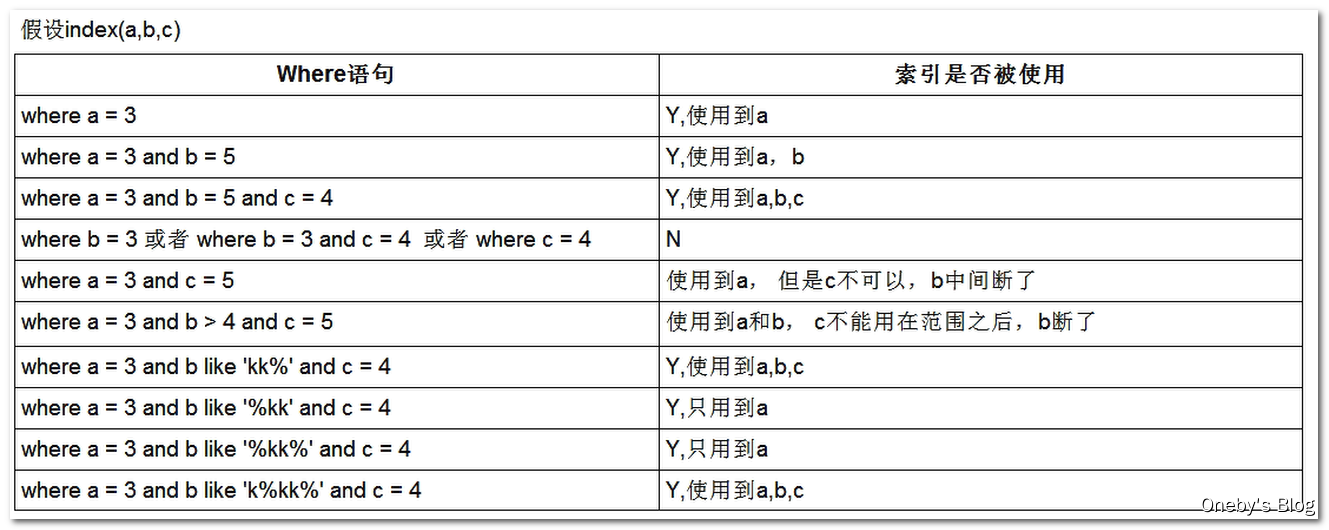
七、in和Exists语句怎么使用性能好
永远小表驱动大表
select * from A where id in (select id from B) 上面的语句你可以理解为先查B表,然后查询A表,所以B表数据集小于A表的数据集时用in的效率要高(小表驱动大表)- 1
- 2
- 3
select * from A where id in (select id from B) 等价于 select * from A where exists (select 1 from B where B.id = A.id) 对于exists语句 select * from A where exists (select 1 from B where B.id = A.id) 你可以理解为先查A表,然后将A表的数据在exists语句后面做过滤,所以查询顺序是先查A表后查B表。所以A表数据集小于B表的数据集时用exists的效率要高(小表驱动大表)- 1
- 2
- 3
- 4
- 5
- 6
八、ORDER BY 优化
MySQL支持二种方式的排序,FileSort和Index,Index效率高,它指MySQL扫描索引本身完成排序,FileSort方式效率较低。
ORDER BY子句,尽量使用Index方式排序,避免使用FileSort方式排序
创建表
- 建表 SQL
create table tblA( #id int primary key not null auto_increment, age int, birth timestamp not null ); insert into tblA(age, birth) values(22, now()); insert into tblA(age, birth) values(23, now()); insert into tblA(age, birth) values(24, now()); create index idx_A_ageBirth on tblA(age, birth);- 1
- 2
- 3
- 4
- 5
- 6
- 7
- 8
- 9
- 10
- 11
- 12
- tblA 表中的测试数据
mysql> select * from tblA; +------+---------------------+ | age | birth | +------+---------------------+ | 22 | 2020-08-05 10:36:32 | | 23 | 2020-08-05 10:36:32 | | 24 | 2020-08-05 10:36:32 | +------+---------------------+ 3 rows in set (0.00 sec)- 1
- 2
- 3
- 4
- 5
- 6
- 7
- 8
- 9
- tbl 中的索引
mysql> SHOW INDEX FROM tblA; +-------+------------+----------------+--------------+-------------+-----------+-------------+----------+--------+------+------------+---------+---------------+ | Table | Non_unique | Key_name | Seq_in_index | Column_name | Collation | Cardinality | Sub_part | Packed | Null | Index_type | Comment | Index_comment | +-------+------------+----------------+--------------+-------------+-----------+-------------+----------+--------+------+------------+---------+---------------+ | tblA | 1 | idx_A_ageBirth | 1 | age | A | 3 | NULL | NULL | YES | BTREE | | | | tblA | 1 | idx_A_ageBirth | 2 | birth | A | 3 | NULL | NULL | | BTREE | | | +-------+------------+----------------+--------------+-------------+-----------+-------------+----------+--------+------+------------+---------+---------------+ 2 rows in set (0.00 sec)- 1
- 2
- 3
- 4
- 5
- 6
- 7
- 8
CASE1:能使用索引进行排序的情况
- 只有带头大哥 age
mysql> EXPLAIN SELECT * FROM tblA where age>20 order by age; +----+-------------+-------+-------+----------------+----------------+---------+------+------+--------------------------+ | id | select_type | table | type | possible_keys | key | key_len | ref | rows | Extra | +----+-------------+-------+-------+----------------+----------------+---------+------+------+--------------------------+ | 1 | SIMPLE | tblA | index | idx_A_ageBirth | idx_A_ageBirth | 9 | NULL | 3 | Using where; Using index | +----+-------------+-------+-------+----------------+----------------+---------+------+------+--------------------------+ 1 row in set (0.01 sec) mysql> EXPLAIN SELECT * FROM tblA where birth>'2016-01-28 00:00:00' order by age; +----+-------------+-------+-------+---------------+----------------+---------+------+------+--------------------------+ | id | select_type | table | type | possible_keys | key | key_len | ref | rows | Extra | +----+-------------+-------+-------+---------------+----------------+---------+------+------+--------------------------+ | 1 | SIMPLE | tblA | index | NULL | idx_A_ageBirth | 9 | NULL | 3 | Using where; Using index | +----+-------------+-------+-------+---------------+----------------+---------+------+------+--------------------------+ 1 row in set (0.00 sec)- 1
- 2
- 3
- 4
- 5
- 6
- 7
- 8
- 9
- 10
- 11
- 12
- 13
- 14
- 15
- 16
- 带头大哥 age + 小弟 birth
mysql> EXPLAIN SELECT * FROM tblA where age>20 order by age,birth; +----+-------------+-------+-------+----------------+----------------+---------+------+------+--------------------------+ | id | select_type | table | type | possible_keys | key | key_len | ref | rows | Extra | +----+-------------+-------+-------+----------------+----------------+---------+------+------+--------------------------+ | 1 | SIMPLE | tblA | index | idx_A_ageBirth | idx_A_ageBirth | 9 | NULL | 3 | Using where; Using index | +----+-------------+-------+-------+----------------+----------------+---------+------+------+--------------------------+ 1 row in set (0.00 sec)- 1
- 2
- 3
- 4
- 5
- 6
- 7
- mysql 默认升序排列,全升序或者全降序,都扛得住(方向要一致,同升同降,不能说有升有降)
mysql> EXPLAIN SELECT * FROM tblA ORDER BY age ASC, birth ASC; +----+-------------+-------+-------+---------------+----------------+---------+------+------+-------------+ | id | select_type | table | type | possible_keys | key | key_len | ref | rows | Extra | +----+-------------+-------+-------+---------------+----------------+---------+------+------+-------------+ | 1 | SIMPLE | tblA | index | NULL | idx_A_ageBirth | 9 | NULL | 3 | Using index | +----+-------------+-------+-------+---------------+----------------+---------+------+------+-------------+ 1 row in set (0.00 sec) mysql> EXPLAIN SELECT * FROM tblA ORDER BY age DESC, birth DESC; +----+-------------+-------+-------+---------------+----------------+---------+------+------+-------------+ | id | select_type | table | type | possible_keys | key | key_len | ref | rows | Extra | +----+-------------+-------+-------+---------------+----------------+---------+------+------+-------------+ | 1 | SIMPLE | tblA | index | NULL | idx_A_ageBirth | 9 | NULL | 3 | Using index | +----+-------------+-------+-------+---------------+----------------+---------+------+------+-------------+ 1 row in set (0.01 sec)- 1
- 2
- 3
- 4
- 5
- 6
- 7
- 8
- 9
- 10
- 11
- 12
- 13
- 14
- 15
CASE2:不能使用索引进行排序的情况
- 带头大哥 age 挂了
mysql> EXPLAIN SELECT * FROM tblA where age>20 order by birth; +----+-------------+-------+-------+----------------+----------------+---------+------+------+------------------------------------------+ | id | select_type | table | type | possible_keys | key | key_len | ref | rows | Extra | +----+-------------+-------+-------+----------------+----------------+---------+------+------+------------------------------------------+ | 1 | SIMPLE | tblA | index | idx_A_ageBirth | idx_A_ageBirth | 9 | NULL | 3 | Using where; Using index; Using filesort | +----+-------------+-------+-------+----------------+----------------+---------+------+------+------------------------------------------+ 1 row in set (0.01 sec)- 1
- 2
- 3
- 4
- 5
- 6
- 7
- 8
- 小弟 birth 居然敢在带头大哥 age 前面
mysql> EXPLAIN SELECT * FROM tblA where age>20 order by birth,age; +----+-------------+-------+-------+----------------+----------------+---------+------+------+------------------------------------------+ | id | select_type | table | type | possible_keys | key | key_len | ref | rows | Extra | +----+-------------+-------+-------+----------------+----------------+---------+------+------+------------------------------------------+ | 1 | SIMPLE | tblA | index | idx_A_ageBirth | idx_A_ageBirth | 9 | NULL | 3 | Using where; Using index; Using filesort | +----+-------------+-------+-------+----------------+----------------+---------+------+------+------------------------------------------+ 1 row in set (0.00 sec)- 1
- 2
- 3
- 4
- 5
- 6
- 7
- 8
- mysql 默认升序排列,如果全升序或者全降序,都 ok ,但是一升一降 mysql 就扛不住了
mysql> EXPLAIN SELECT * FROM tblA ORDER BY age ASC, birth DESC; +----+-------------+-------+-------+---------------+----------------+---------+------+------+-----------------------------+ | id | select_type | table | type | possible_keys | key | key_len | ref | rows | Extra | +----+-------------+-------+-------+---------------+----------------+---------+------+------+-----------------------------+ | 1 | SIMPLE | tblA | index | NULL | idx_A_ageBirth | 9 | NULL | 3 | Using index; Using filesort | +----+-------------+-------+-------+---------------+----------------+---------+------+------+-----------------------------+ 1 row in set (0.00 sec)- 1
- 2
- 3
- 4
- 5
- 6
- 7
- 8
遵循如下规则,可提高Order By的速度
- Order by时select *是一个大忌,只查询要的字段(最好是索引字段),这点非常重要。在这里的影响是:
Order By 排序索引优化的总结
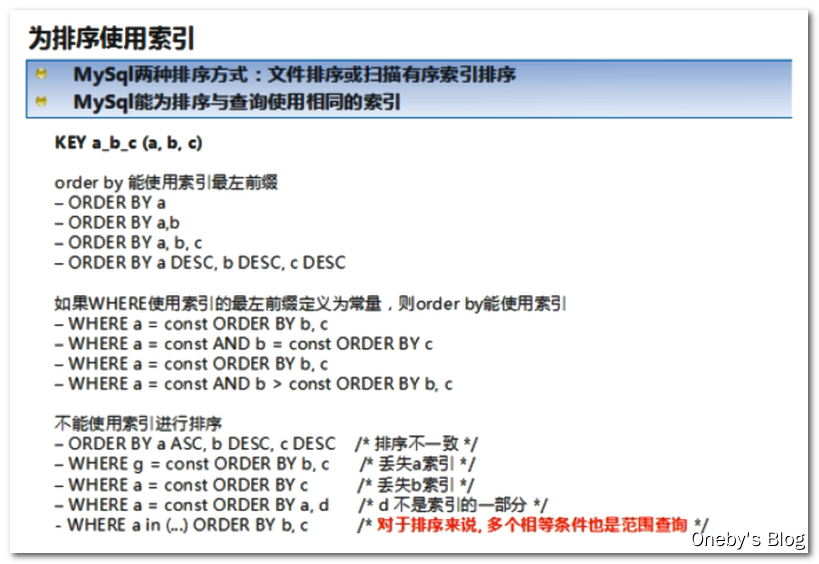
group by关键字优化
- group by实质是先排序后进行分组,遵照索引的最佳左前缀
- where高于having,能写在where限定的条件就不要去having限定了
- 其余的规则均和 order by 一致
-
相关阅读:
Lesson5-2:OpenCV视频操作---视频追踪
Java多线程篇(8)——AQS之条件等待队列(CyclicBarrier)
2022 LGR 非专业级别软件能力认证第一轮 (SCP-S) 提高级 C++语言模拟试题
css常见布局
Golang实现JAVA虚拟机-运行时数据区
go 分支与循环
Selenium使用注意事项
《Java编程思想》读书笔记(五)
车牌识别 支持12种中文车牌类型 车牌数据集下载
淘宝API商品详情接口,通过商品ID获取商品名称,淘宝主图,价格,颜色规格尺寸,库存,SKU等调用演示案例
- 原文地址:https://blog.csdn.net/weixin_45014721/article/details/134359060
