-
小程序 打开方式 页面效果 表单页面 点击跳到详情页 图标 获取后台数据 进行页面渲染
请求地址:geecg-uniapp 同源策略 数据请求 获取后台数据 ui库安装 冲突解决(3)-CSDN博客
一.uniapp转小程序
(1) 运行微信开发工具

(2) 配置id 然后运行

打开小程序 路径 E:\通\uniapp-jeecg\unpackage\dist\dev\mp-weixin

(5)运行

二.表单页面

- <template>
- <view>
- <cu-custom bgColor="bg-gradual-blue" :isBack="true">
- <block slot="content">额外加工</block>
- </cu-custom>
- <uni-section title=" ">
- <view style="margin: 0 20px;">
- <uni-forms ref="customForm" :rules="customRules" :modelValue="customFormData">
- <uni-forms-item label="类型" required name="seType">
- <uni-data-select v-model="customFormData.seType" :localdata="range" style="width: 215px; "
- @change="select"></uni-data-select>
- </uni-forms-item>
- <uni-forms-item label="石材编号" required name="seRknum">
- <uni-data-select style="width: 215px; " v-model="customFormData.seRknum" :localdata="candidates"></uni-data-select>
- </uni-forms-item>
- <uni-forms-item label="日期时间" required name="seDate">
- <uni-datetime-picker style="width: 215px; " type="datetime" return-type="timestamp" v-model="customFormData.seDate" />
- </uni-forms-item>
- <uni-forms-item label="长" required name="seLong">
- <!-- <input v-model="customFormData.seLong" placeholder="请输入长" type="number" /> -->
- <input class="uni-input " name="input" v-model="customFormData.seLong" placeholder="请输入长"
- @input="fpNumInput" />
- </uni-forms-item>
- <uni-forms-item label="宽" required name="seWeight">
- <input class="uni-input " name="input" v-model="customFormData.seWeight" placeholder="请输入宽"
- type="number" @input="fpNumInputseWeight" />
- </uni-forms-item>
- <uni-forms-item label="高" required name="seHeight">
- <input class="uni-input " name="input" v-model="customFormData.seHeight" placeholder="请输入高"
- type="number" @input="fpNumInputseHeight" />
- </uni-forms-item>
- <uni-forms-item label="数量" required name="seNum">
- <input class="uni-input " name="input" v-model="customFormData.seNum" placeholder="请输入数量"
- type="number" @input="fpNumInputseNum" />
- </uni-forms-item>
- <uni-forms-item label="面积" required name="seMj">
- <input class="uni-input " name="input" v-model="customFormData.seMj" placeholder="请输入面积"
- type="number" @input="fpNumInputseMj" />
- </uni-forms-item>
- <uni-forms-item label="体积" required name="seTj">
- <input class="uni-input " name="input" v-model="customFormData.seTj" placeholder="请输入体积"
- type="number" @input="fpNumInputseTj" />
- </uni-forms-item>
- <uni-forms-item label="额外加工" required name="sePromed">
- <uni-data-select style="width: 215px; " v-model="customFormData.sePromed" :localdata="sePromed"></uni-data-select>
- </uni-forms-item>
- <uni-forms-item label="机组" required name="seSet">
- <uni-data-select style="width: 215px; " v-model="customFormData.seSet" :localdata="seSets"></uni-data-select>
- </uni-forms-item>
- <uni-forms-item label="单价" required name="sePrice">
- <input class="uni-input " name="input" v-model="customFormData.sePrice" placeholder="请输入单价"
- type="number" @input="fpNumInputsePrice" />
- </uni-forms-item>
- <uni-forms-item label="总价">
- <input class="uni-input " name="input" v-model="customFormData.seZprice" placeholder="请输入总价"
- type="number" @input="fpNumInputseZprice" />
- </uni-forms-item>
- <uni-forms-item label="人员" required name="sePerson">
- <uni-data-select style="width: 215px; " v-model="customFormData.sePerson" :localdata="sePerson"></uni-data-select>
- </uni-forms-item>
- <uni-forms-item label="操作人">
- <uni-easyinput v-model="customFormData.seOpuser" placeholder="请输入操作人" disabled style="width: 215px; "/>
- <!-- <input class="uni-input " v-model="customFormData.seOpuser" placeholder="请输入操作人" disabled /> -->
- </uni-forms-item>
- <uni-forms-item label="图片" required name="sePic">
- <uni-file-picker v-model="imageValue" fileMediatype="image" mode="grid" @select="upload"
- @delete="delIMG" title="最多选择3张图片" :auto-upload='false' limit="3"></uni-file-picker>
- </uni-forms-item>
- <uni-forms-item label="备注">
- <uni-easyinput style="width: 215px; " type="textarea" v-model="customFormData.seRemake" placeholder="请输入备注" />
- </uni-forms-item>
- </uni-forms>
- <button type="primary" @click="submit('customForm')" style='background-color: blue;'>提交</button>
- </view>
- </uni-section>
- </view>
- </template>
- <script>
- export default {
- data() {
- return {
- imgURL: '',
- imageValue: [],
- imageUrls: [],
- tableDatafinish: [],
- // 定义初始数据 绑定类型 :localdata="range"
- range: [{
- value: 1,
- text: "荒料"
- },
- {
- value: 2,
- text: "板材成品"
- },
- {
- value: 3,
- text: "板材半成品"
- },
- {
- value: 4,
- text: "路边石成品"
- },
- {
- value: 5,
- text: "路边石半成品"
- },
- {
- value: 6,
- text: "界石成品"
- },
- {
- value: 7,
- text: "界石半成品"
- }
- ],
- // 定义初始数据 绑定石材编号 :localdata="candidates"
- candidates: [],
- // 定义初始数据 绑定机组 :localdata="seSet"
- seSets: [],
- // 定义初始数据 绑定机组 :localdata="seSet"
- sePerson: [],
- sePromed: [],
- // 定义初始数据 绑定输入框 获取输入数据 v-model="customFormData.xxx" aa
- customFormData: {
- seType: '',
- seRknum: '',
- seDate: new Date(),
- seLong: '',
- seWeight: '',
- seHeight: '',
- seNum: '',
- seMj: '',
- seTj: '',
- sePromed: '',
- seSet: '',
- sePrice: '',
- seZprice: '',
- sePerson: '',
- seOpuser: '',
- seRemake: '',
- sePic: ''
- },
- customRules: {
- seType: {
- rules: [{
- required: true,
- errorMessage: '石材编号不能为空'
- }]
- },
- seRknum: {
- rules: [{
- required: true,
- errorMessage: '石材编号不能为空'
- }]
- },
- seDate: {
- rules: [{
- required: true,
- errorMessage: '时间不能为空'
- }]
- },
- seLong: {
- rules: [{
- required: true,
- errorMessage: '长度不能为空'
- }]
- },
- // seLong: [
- // { required: true, message: '请再次输入密码', trigger: 'blur' },
- // { pattern: /^\S{6,15}$/, message: '请输入 6 ~ 15 位的非空字符', trigger: 'blur' },
- // ],
- seWeight: {
- rules: [{
- required: true,
- errorMessage: '宽度不能为空'
- }]
- },
- seHeight: {
- rules: [{
- required: true,
- errorMessage: '高度不能为空'
- }]
- },
- seNum: {
- rules: [{
- required: true,
- errorMessage: '数量不能为空'
- }]
- },
- seMj: {
- rules: [{
- required: true,
- errorMessage: '面积不能为空'
- }]
- },
- seTj: {
- rules: [{
- required: true,
- errorMessage: '体积不能为空'
- }]
- },
- sePromed: {
- rules: [{
- required: true,
- errorMessage: '额外加工不能为空'
- }]
- },
- seSet: {
- rules: [{
- required: true,
- errorMessage: '机组不能为空'
- }]
- },
- sePrice: {
- rules: [{
- required: true,
- errorMessage: '单价不能为空'
- }]
- },
- sePerson: {
- rules: [{
- required: true,
- errorMessage: '人员不能为空'
- }]
- },
- },
- }
- },
- mounted() {
- // 机组
- let url33 = '/ewjg/smsEwjg/gztj';
- this.$http.get(url33).then(res => {
- console.log(res.data.result)
- res.data.result.records.forEach(value => { //循环 添加到 candidates
- this.seSets.push({
- value: value.seSet,
- text: value.seSet_dictText
- })
- })
- res.data.result.records.forEach(value => { //循环 添加到 candidates
- this.sePerson.push({
- value: value.sePerson,
- text: value.sePerson_dictText
- })
- })
- res.data.result.records.forEach(value => { //循环 添加到 candidates
- this.sePromed.push({
- value: value.sePromed,
- text: value.sePromed_dictText
- })
- })
- })
- },
- methods: {
- fpNumInput(e) {
- const o = e.target;
- const inputRule = /[^\d]/g
- this.$nextTick(function() {
- this.customFormData.seLong = o.value.replace(inputRule, '');
- })
- },
- fpNumInputseWeight(e) {
- const o = e.target;
- const inputRule = /[^\d]/g
- this.$nextTick(function() {
- this.customFormData.seWeight = o.value.replace(inputRule, '');
- })
- },
- fpNumInputseHeight(e) {
- const o = e.target;
- const inputRule = /[^\d]/g
- this.$nextTick(function() {
- this.customFormData.seHeight = o.value.replace(inputRule, '');
- })
- },
- fpNumInputseNum(e) {
- const o = e.target;
- const inputRule = /[^\d]/g
- this.$nextTick(function() {
- this.customFormData.seNum = o.value.replace(inputRule, '');
- })
- },
- fpNumInputseMj(e) {
- const o = e.target;
- const inputRule = /[^\d]/g
- this.$nextTick(function() {
- this.customFormData.seMj = o.value.replace(inputRule, '');
- })
- },
- fpNumInputseTj(e) {
- const o = e.target;
- const inputRule = /[^\d]/g
- this.$nextTick(function() {
- this.customFormData.seTj = o.value.replace(inputRule, '');
- })
- },
- fpNumInputsePrice(e) {
- const o = e.target;
- const inputRule = /[^\d]/g
- this.$nextTick(function() {
- this.customFormData.sePrice = o.value.replace(inputRule, '');
- })
- },
- fpNumInputseZprice(e) {
- const o = e.target;
- const inputRule = /[^\d]/g
- this.$nextTick(function() {
- this.customFormData.seZprice = o.value.replace(inputRule, '');
- })
- },
- // 获取上传状态
- upload(e) {
- this.imageValue.push(e.tempFiles[0])
- },
- delIMG(e) {
- const index = this.imageValue.findIndex(v => v.url === e.tempFilePath);
- if (index !== -1) {
- this.imageValue.splice(index, 1);
- }
- },
- submitImage() {
- if (this.imageValue.length != 0) {
- const uploadPromises = this.imageValue.map(val => {
- const formData = {
- biz: 'temp',
- };
- return new Promise((resolve, reject) => {
- uni.uploadFile({
- url: 'http://43.138.31.228:1888/jeecg-boot/sys/common/upload',
- formData: formData,
- filePath: val.path,
- name: 'file',
- fileType: 'image',
- fileName: val.name,
- success: (uploadFileRes) => {
- var jsonObject = JSON.parse(uploadFileRes.data);
- const imageUrl = jsonObject.message;
- this.imageUrls.push(imageUrl); // 将每次上传的图片链接添加到数组中
- if (this.imageUrls.length > 1) {
- this.customFormData.sePic = this.imageUrls.join(',');
- } else {
- this.customFormData.sePic = imageUrl
- }
- resolve();
- },
- fail: (err) => {
- reject(err);
- }
- });
- });
- });
- this.imageUrls = []
- return Promise.all(uploadPromises)
- } else {
- this.customFormData.sePic = '';
- return Promise.resolve(); // 如果没有上传图片,直接返回一个已解决的Promise对象
- }
- },
- select() {
- let url3 = '/cwkhfk/cwKhfk/scxxList';
- let params = {
- type: this.value //定义 this.value 赋值给type 最后parmas
- }
- this.$http.get(url3, {
- params: params //定义赋值 params = parmas
- }).then(res => {
- // this.candidates = res.data.result
- res.data.result.forEach(value => { //循环 添加到 candidates
- this.candidates.push({
- value: value.number,
- text: value.number
- })
- })
- })
- },
- async submit(ref) {
- console.log('tijiao')
- // await this.submitImage();
- // console.log(this.customFormData.sePic)
- // //添加上传
- // let customFormData = this.customFormData
- // // 获取数据进行添加
- // let url = '/ewjg/smsEwjg/add';
- // var params = customFormData //定义赋值 params = customFormData 后端带着parmas去后端
- // this.$http.post(url, params).then(res => {
- // this.customFormData = res.data.result
- // })
- // this.customFormData = ''
- // this.$refs[ref].validate().then(res => {
- // console.log('success', res);
- // uni.showToast({
- // title: `校验通过`
- // })
- // }).catch(err => {
- // console.log('err', err);
- // })
- },
- }
- }
- </script>
- <style>
- .uni-input {
- width: 215px;
- font-size: 12px;
- height: 35px;
- border: 1px solid #dedede;
- padding: 0 5px;
- border-radius: 5px;
- }
- </style>
二. 点击跳到详情页
父页面
- <template>
- <view class="order-list">
- <cu-custom bgColor="bg-gradual-blue" :isBack="true">
- <block slot="content">荒料管理</block>
- </cu-custom>
- <view class="" >
- <!-- 订单展示 -->
- <mescroll-uni ref="mescrollRef" @init="mescrollInit" top="60rpx" @down="downCallback" @up="upCallback">
- <!-- 数据列表 -->
- <view class="data-list" style=" margin-top: 2rem;">
- <!-- 空内容展示-->
- <u-empty :text="textNoMore" v-if="dataList.length==0" mode="list"></u-empty>
- <!-- 空内容展示End-->
- <view class="order margin-top-sm" v-for="(item, aindex) in dataList" :key="item.id"
- @click="jumpToOrder(item)">
- <view class='bg-white padding-sm flex padding-right-zero flex-between'>
- <view class='flex-sub radius text-left text-xs margin-top-xs'>
- <image src="../../static/common/huang.png"
- style="width: 100rpx;height: 80rpx;margin-top: -10px;"></image>
- </view>
- <view class='flex-sub radius text-left text-xs margin-top-xs'
- style="margin-left: -200px;font-size: 12px;">
- 编号:{{ item.sbwWarehousingNumber}}</view>
- </view>
- <view class="bg-white padding-sm solid-top" >
- <view class='padding-top-sm text-sm flex'>
- <view class="left-title" style="font-size: 12px;">日期:</view><view class="right-content" style="font-size: 12px;">{{ item.sbwWarehousingDate}}</view>
- </view>
- <view class='padding-top-sm text-sm flex'></view>
- </view>
- </view>
- <!-- 返回顶部 -->
- <u-back-top :scroll-top="scrollTop" top="600">
- </u-back-top>
- <!-- 返回顶部End -->
- </view>
- </mescroll-uni>
- </view>
- <!-- 订单展示完毕End -->
- </view>
- </template>
- <script>
- import MescrollMixin from "@/components/mescroll-uni/mescroll-mixins.js";
- import configService from '@/common/service/config.service.js';
- export default {
- mixins: [MescrollMixin],
- data() {
- return {
- pageable: {
- pageIndex: 0,
- pageSize: 10
- },
- list: [{
- complainantStatus: '0',
- name: '待解决'
- }, {
- complainantStatus: '10',
- name: '已解决'
- }],
- textNoMore :'-- 没有更多数据了 --',
- tabCurrent: 0,
- scrollTop: 0,
- dataList: [],
- }
- },
- methods: {
- //下拉刷新
- downCallback() {
- this.mescroll.scrollTo(0, 0)
- this.mescroll.resetUpScroll();
- },
- //上拉加载
- async upCallback(pages) {
- let pageIndex = pages.num // 页码, 默认从1开始
- let pageSize = pages.size // 页长, 默认每页10条
- this.pageable.pageIndex = pageIndex
- this.pageable.pageSize = pageSize
- let data = await this.getOrder(this.pageable)
- console.log("data" + data)
- const curPageData = data.records || []
- if (data && curPageData.length > 0) {
- const curPageLen = curPageData.length // 当前数据长度
- const totalPage = data.total // 获取接口总共有多少页
- this.mescroll.endByPage(curPageLen, totalPage);
- } else {
- this.mescroll.endErr()
- }
- },
- //订单列表
- async getOrder(pageable) {
- let that = this
- let params = {
- openid: uni.getStorageSync("openId"),
- complainantStatus: this.list[this.tabCurrent].complainantStatus,
- pageNo: pageable.pageIndex,
- pageSize: pageable.pageSize
- }
- // console.log(params)
- let preData = {
- records: []
- }
- // 获取列表数据
- await that.$http.get('/block/smsBlockWarehousing/list', {
- params: params
- }).then(res => {
- console.log(res)
- if (res.data.success !== true) {
- that.$tip.alert(res.data.message)
- } else {
- if (pageable.pageIndex < 2)
- that.dataList = [] // 如果是第一页需手动置空列表
- that.dataList.push(...res.data.result.records) //数据添加到dataList
- console.log(res.data.result)
- preData = res.data.result;
- }
- }).catch(err => {
- // that.$tip.alert("网络波动,请重试!")
- console.log("err")
- })
- console.log(preData)
- return preData
- },
- // 点击跳转到huangliao页面 携带当前点击的id 过去
- jumpToOrder(item) {
- // console.log(item, 'adad')
- uni.navigateTo({
- url: '/pages/common/huangliao?id=' + item.id
- })
- },
- }
- }
- </script>
子页面
- <template>
- <view style="background-color: #ffffff;">
- <cu-custom bgColor="bg-gradual-blue" :isBack="true">
- <block slot="content">荒料详情</block>
- </cu-custom>
- <u-form :model="form" ref="uForm">
- <view class="container">
- <view style="margin-top: 5px; font-size: 13px;padding:10px 15px ; display: flex;">入库编号 :<span
- style="color:#666;">{{form.sbwWarehousingNumber}}</span></view>
- <view style="border: #e5e5e5 1px solid; margin: 10px;"></view>
- <view style="margin-top: 5px; font-size: 13px;padding:10px 15px ;">入库日期 :<span
- style="color:#666;">{{form.sbwWarehousingDate}}</span></view>
- <view style="border: #e5e5e5 1px solid; margin: 10px;;"></view>
- <view style="margin-top: 5px; font-size: 13px;padding:10px 15px ;">荒料种类 :<span
- style="color:#666;">{{form.sbwName_dictText}}</span></view>
- <view style="border: #e5e5e5 1px solid; margin: 10px;;"></view>
- <view style="margin-top: 5px; font-size: 13px;padding:10px 15px ;">长 :<span
- style="color:#666;">{{form.sbwLong}}</span></view>
- <view style="border: #e5e5e5 1px solid; margin: 10px;;"></view>
- <view style="margin-top: 5px; font-size: 13px;padding:10px 15px ;">宽 :<span
- style="color:#666;">{{form.sbwWidth}}</span></view>
- <view style="border: #e5e5e5 1px solid; margin: 10px;;"></view>
- <view style="margin-top: 5px; font-size: 13px;padding:10px 15px ;">高 :<span
- style="color:#666;">{{form.sbwTall}}</span></view>
- <view style="border: #e5e5e5 1px solid; margin: 10px;;"></view>
- <view style="margin-top: 5px; font-size: 13px;padding:10px 15px ;">体积 :<span
- style="color:#666;">{{form.sbwSbwVolume}}</span></view>
- <view style="border: #e5e5e5 1px solid; margin: 10px;;"></view>
- <view style="margin-top: 5px; font-size: 13px;padding:10px 15px ;">颜色 :<span
- style="color:#666;">{{form.sbwColor_dictText}}</span></view>
- <view style="border: #e5e5e5 1px solid; margin: 10px;;"></view>
- <view style="margin-top: 5px; font-size: 13px;padding:10px 15px ;">价格 :<span
- style="color:#666;">{{form.sbwPrice}}</span></view>
- <view style="border: #e5e5e5 1px solid; margin: 10px;;"></view>
- <view style="margin-top: 5px; font-size: 13px;padding:10px 15px ;">数量 :<span
- style="color:#666;">{{form.sbwNum}}</span></view>
- <view style="border: #e5e5e5 1px solid; margin: 10px;;"></view>
- <view style="margin-top: 5px; font-size: 13px;padding:10px 15px ;">运单单价 :<span
- style="color:#666;">{{form.sbwFreightPrice}}</span></view>
- <view style="border: #e5e5e5 1px solid; margin: 10px;;"></view>
- <view style="margin-top: 5px; font-size: 13px;padding:10px 15px ;">运费 :<span
- style="color:#666;">{{form.sbwFreight}}</span></view>
- <view style="border: #e5e5e5 1px solid; margin: 10px;;"></view>
- <view style="margin-top: 5px; font-size: 13px;padding:10px 15px ;">运输人 :<span
- style="color:#666;">{{form.sbwTransporter_dictText}}</span></view>
- <view style="border: #e5e5e5 1px solid; margin: 10px;;"></view>
- <view style="margin-top: 5px; font-size: 13px;padding:10px 15px ;">总价 :<span
- style="color:#666;">{{form.sbwNum}}</span></view>
- <view style="border: #e5e5e5 1px solid; margin: 10px;;"></view>
- <view style="margin-top: 5px; font-size: 13px;padding:10px 15px ;">料场 :<span
- style="color:#666;">{{form.sbwFreight}}</span></view>
- <view style="border: #e5e5e5 1px solid; margin: 10px;;"></view>
- <view style="margin-top: 5px; font-size: 13px;padding:10px 15px ;">操作员 :<span
- style="color:#666;">{{form.sbwTransporter_dictText}}</span></view>
- <view style="border: #e5e5e5 1px solid; margin: 10px;;"></view>
- <view style="margin-top: 5px; font-size: 13px;padding:10px 15px ;">图片 :<!-- <span
- style="color:#666;">{{form.sbwPic}}</span> -->
- <image src="form.sbwPic" mode=""></image>
- </view>
- <view style="border: #e5e5e5 1px solid; margin: 10px;;"></view>
- <view style="margin-top: 5px; font-size: 13px;padding:10px 15px ;">文件 :<span
- style="color:#666;">{{form.sbwFile}}</span></view>
- <view style="border: #e5e5e5 1px solid; margin: 10px;;"></view>
- <view style="margin-top: 5px; font-size: 13px;padding:10px 15px ;">备注 :<span
- style="color:#666;">{{form.sbwRemake}}</span></view>
- <view style="border: #e5e5e5 1px solid; margin: 10px;;"></view>
- </view>
- </u-form>
- </view>
- </template>
- <script>
- export default {
- data() {
- return {
- form: {
- sbwWarehousingDate: '',
- sbwWarehousingNumber: '',
- sbwName_dictText: '',
- sbwLong: '',
- sbwWidth: '',
- sbwTall: '',
- sbwSbwVolume: '',
- sbwColor_dictText: '',
- sbwPrice: '',
- sbwNum: '',
- sbwFreightPrice: '',
- sbwFreight: '',
- sbwTransporter_dictText: '',
- sbwTotalPrice: '',
- sbwStockyard_dictText: '',
- sbwPic: '',
- sbwFile: '',
- sbwRemake: ''
- },
- }
- },
- onLoad: function(options) {
- this.getOrderDetail()
- },
- methods: {
- // 接受数据
- async getOrderDetail() {
- let that = this
- let params = {
- id: this.id
- }
- console.log(params)
- //return
- await this.$http.get('/block/smsBlockWarehousing/list', {
- params: params
- }).then(res => {
- console.log("get RES")
- console.log(res.data.result.records[0], '马甲的喇嘛是的')
- if (res.data.success !== true) {
- that.form = res.data.result.records[0]
- that.$tip.alert(res.data.message)
- } else {
- that.form = res.data.result.records[0]
- if (that.form.complaintFileString) {
- that.fileList = that.form.complaintFileString.split(",")
- }
- console.log(that.fileList)
- }
- }).catch(err => {
- // that.$tip.alert("网络波动,请重试!")
- console.log(err)
- })
- },
- }
- }
- </script>

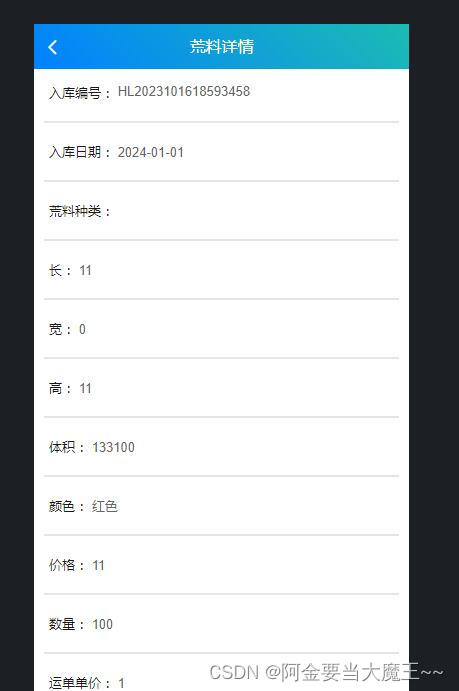
三.图标
- <template>
- <view>
- <cu-custom bgColor="bg-gradual-blue" :isBack="true">
- <block slot="content">出库统计图</block>
- </cu-custom>
- <view>
- <uni-segmented-control :current="current" :values="items" @clickItem="onClickItem" styleType="button" activeColor="#3a82f8"></uni-segmented-control>
- </view>
- <view class="charts-box">
- <qiun-data-charts
- type="pie"
- :opts="opts"
- :chartData="chartData"
- />
- <qiun-data-charts
- type="mount"
- :opts="opt"
- :chartData="chartData"
- />
- </view>
- </view>
- </template>
- <script>
- import { forEach } from '../../common/luch-request/utils';
- export default {
- data() {
- return {
- items: ['日', '月', '年'],
- current: 0,
- chartData: {},
- //您可以通过修改 config-ucharts.js 文件中下标为 ['pie'] 的节点来配置全局默认参数,如都是默认参数,此处可以不传 opts 。实际应用过程中 opts 只需传入与全局默认参数中不一致的【某一个属性】即可实现同类型的图表显示不同的样式,达到页面简洁的需求。
- // 饼图
- opts: {
- color: ["#1890FF","#91CB74","#FAC858","#EE6666","#73C0DE","#3CA272","#FC8452","#9A60B4","#ea7ccc"],
- // padding: [15,5,5,5],
- // enableScroll: false,
- // legend: {
- // show:true,
- // lineHeight:20
- // },
- // extra: {
- // pie: {
- // activeOpacity: 0.5,
- // activeRadius: 10,
- // offsetAngle: 0,
- // labelWidth: 15,
- // border: true,
- // borderWidth: 3,
- // borderColor: "#FFFFFF"
- // }
- // }
- },
- // 条形图
- opt: {
- color: ["#1890FF","#91CB74","#FAC858","#EE6666","#73C0DE","#3CA272","#FC8452","#9A60B4","#ea7ccc"],
- // padding: [15,10,0,5],
- // enableScroll: false,
- // legend: {
- // show:false,
- // },
- // xAxis: {
- // disableGrid: true,
- // rotateLabel:true,
- // rotateAngle:"45",
- // },
- // yAxis: {
- // data: [
- // {
- // min: 0
- // }
- // ]
- // },
- // extra: {
- // mount: {
- // type: "bar",
- // widthRatio: 0.3,
- // borderWidth: 0,
- // barBorderRadius: [
- // 50,
- // 50,
- // 50,
- // 50
- // ],
- // linearType: "custom"
- // }
- // }
- }
- };
- },
- mounted() {
- var today = new Date(); // 日
- var yesterday = new Date(today.getTime()); // 月
- this.getServerData(yesterday.getFullYear() + "-" + (yesterday.getMonth() + 1) + "-" + yesterday.getDate(),'0') //年
- },
- methods: {
- // 定义方法 和值 (item,type)
- async getServerData(item,type) {
- let that = this
- let params = {
- item: item, //自己定义的值 和后端的值要对应 问后端
- type: type
- }
- // 请求数据 携带 params
- await that.$http.get('/totalView/totalView/PieChuKu',{params: params}).then(res => {
- // 计算总值 reduce 累加
- // 在括号内的箭头函数(acc, item) => acc + item.value是reduce方法所接受的函数。这个箭头函数接收两个参数,acc表示累加器(accumulator),item表示当前正在处理的数组元素。箭头函数的功能是将累加器acc和当前元素的value属性相加,并返回相加的结果。
- //最后的, 0表示reduce方法的初始值为0。这意味着在开始累加之前,累加器acc的初始值为0。
- const totalValue = res.data.result.reduce((acc, item) => acc + item.value, 0);
- // console.log(totalValue,'asasasasa')
- // 计算占比并更新数组
- // console.log(res.data.result,'dadsada')
- // 判断数据 要是是0 要么是有数值
- // 如果totalValue值 等于0 就循环遍历渲染
- if(totalValue==0){
- res.data.result.forEach(item => {
- item.labelText = '0%'; //强制数值变成0% 不写的话 就平均分成6份 因为有6份
- });
- }
- else{
- // 如果不是 就截取后两位 拼接上%
- res.data.result.forEach(item => {
- const percentage = (item.value / totalValue) * 100; //获取的数值× 100
- item.labelText = percentage.toFixed(2)+"%"; //然后 拼接上%
- });
- }
- // ress是一个包含series属性的对象。
- // series是一个包含一个对象的数组。
- // 这个对象包含一个名为data的属性,其值为res.data.result,假设res是一个包含data属性的对象,而data属性包含一个名为result的数组。
- let ress = {
- series: [
- {
- data:res.data.result
- }
- ]
- };
- this.chartData = JSON.parse(JSON.stringify(ress));
- }).catch(err => {
- console.log(err,"err")
- })
- },
- onClickItem(e) {
- if (this.current != e.currentIndex) {
- this.current = e.currentIndex;
- if(this.current=="0"){
- // var today = new Date(); 创建了一个Date对象,表示当前的日期和时间。它会将当前的日期和时间信息存储在today变量中。
- // console.log(today,'sasasasa') 打印出了today的值,以及额外的字符串sasasasa到控制台。这里主要是用来调试和查看today的值。
- // var yesterday = new Date(today.getTime()); 创建了另一个Date对象,其时间戳(以毫秒为单位的时间值)与today相同。这意味着yesterday代表的是和today相同的日期和时间。
- // this.getServerData(yesterday.getFullYear() + "-" + (yesterday.getMonth() + 1) + "-" + yesterday.getDate(),'2'); 这行代码调用了一个名为getServerData的方法,并传递了两个参数。第一个参数是一个表示日期的字符串,格式为"年-月-日",通过yesterday.getFullYear() + "-" + (yesterday.getMonth() + 1) + "-" + yesterday.getDate()获取。第二个参数是字符串'2'。
- var today = new Date();
- var yesterday = new Date(today.getTime());
- this.getServerData(yesterday.getFullYear() + "-" + (yesterday.getMonth() + 1) + "-" + yesterday.getDate(),'0')
- }
- if(this.current=="1"){
- var today = new Date();
- var yesterday = new Date(today.getTime());
- this.getServerData(yesterday.getFullYear() + "-" + (yesterday.getMonth() + 1) + "-" + yesterday.getDate(),'1');
- }
- if(this.current=="2"){
- var today = new Date(); //显示
- console.log(today,'sasasasa')
- var yesterday = new Date(today.getTime());
- this.getServerData(yesterday.getFullYear() + "-" + (yesterday.getMonth() + 1) + "-" + yesterday.getDate(),'2');
- }
- }
- }
- }
- };
- </script>
- <style scoped>
- /* 请根据实际需求修改父元素尺寸,组件自动识别宽高 */
- .charts-box {
- width: 100%;
- height: 230px;
- }
- </style>

五,获取后台数据 进行页面渲染
案例一
(1)代码展示
- <template>
- <view>
- <cu-custom bgColor="bg-gradual-pink" :isBack="true">
- <block slot="content">荒料管理</block>
- </cu-custom>
- <view class="uni-container">
- <uni-table border stripe emptyText="暂无更多数据">
- <uni-tr style="background-color:#ebebeb;">
- <uni-th width="150" align="center">序号</uni-th>
- <uni-th width="150" align="center">入库编号</uni-th>
- <uni-th align="center">日期</uni-th>
- <uni-th align="center">荒料种类</uni-th>
- <uni-th align="center">长</uni-th>
- <uni-th align="center">宽</uni-th>
- <uni-th align="center">高</uni-th>
- <uni-th align="center">体积</uni-th>
- <uni-th align="center">颜色</uni-th>
- <uni-th align="center">价格</uni-th>
- <uni-th align="center">数量</uni-th>
- <uni-th align="center">运单单价</uni-th>
- <uni-th align="center">运费</uni-th>
- <uni-th width="204" align="center">运输人</uni-th>
- <uni-th width="204" align="center">总价</uni-th>
- <uni-th width="204" align="center">料场</uni-th>
- <uni-th align="center">操作员</uni-th>
- <uni-th align="center">图片</uni-th>
- <uni-th align="center">文件</uni-th>
- <uni-th align="center">备注</uni-th>
- </uni-tr>
- <uni-tr v-for="(item, index) in tableData" :key="index">
- <uni-td>{{index+1}}</uni-td>
- <uni-td>
- <view class="name">{{ item.sbwWarehousingNumber}}</view>
- </uni-td>
- <uni-td align="center">{{ item.sbwWarehousingDate}}</uni-td>
- <uni-td align="center">{{ item.sbwName_dictText }}</uni-td>
- <uni-td align="center">{{ item.sbwLong }}</uni-td>
- <uni-td align="center">{{ item.sbwWidth }}</uni-td>
- <uni-td align="center">{{ item.sbwTall }}</uni-td>
- <uni-td align="center">{{ item.sbwSbwVolume }}</uni-td>
- <uni-td align="center">{{ item.sbwColor_dictText }}</uni-td>
- <uni-td align="center">{{ item.sbwPrice }}</uni-td>
- <uni-td align="center">{{ item.sbwNum }}</uni-td>
- <uni-td align="center">{{ item.sbwFreightPrice }}</uni-td>
- <uni-td align="center">{{ item.sbwFreight }}</uni-td>
- <uni-td align="center">{{ item.sbwTransporter_dictText }}</uni-td>
- <uni-td align="center">{{ item.sbwTotalPrice }}</uni-td>
- <uni-td align="center">{{ item.sbwStockyard_dictText }}</uni-td>
- <uni-td align="center">{{ item.sbwTransporter_dictText }}</uni-td>
- <uni-td align="center">{{ item.sbwPic }}</uni-td>
- <uni-td align="center">{{ item.sbwFile }}</uni-td>
- <uni-td align="center">{{ item.sbwRemake }}</uni-td>
- </uni-tr>
- </uni-table>
- <p>总数据量{{this.total}}</p>
- <view class="uni-pagination-box"><uni-pagination show-icon :page-size="pageSize" :current="pageCurrent"
- :total="total" @change="change" /></view>
- </view>
- </view>
- </template>
- <script>
- export default {
- data() {
- return {
- searchVal: '',
- tableData: [],
- // 每页数据量
- pageSize: 10,
- // 当前页
- pageCurrent: 1,
- // 数据总量
- total: 0,
- }
- },
- onLoad() {
- this.selectedIndexs = []
- this.getData(1) //初始化默认第一页
- },
- methods: {
- // 分页触发
- change(e) {
- // this.selectedIndexs.length = 0
- this.getData(e.current) //点击出发 :current="pageCurrent" 当前页
- },
- // 获取数据
- getData(pageCurrent) {
- // 定义请求数据 然后通过路径带到后端返回需要的数据
- this.pageCurrent = pageCurrent
- let pageNo=this.pageCurrent //当前页
- let pageSize=this.pageSize //每页数据量
- // 路径拼接数据 发送到后端 获取翻页的数据和效果
- let url = '/block/smsBlockWarehousing/list?pageNo='+pageNo+"&pageSize="+pageSize;
- this.$http.get(url).then(res => {
- this.tableData = res.data.result.records
- this.total=res.data.result.total; //总数据量
- // console.log('结果', res.data.result.records)
- })
- },
- }
- }
- </script>
(2)页面展示

案例二
(1)代码展示
- <template>
- <view>
- <cu-custom bgColor="bg-gradual-pink" :isBack="true">
- <block slot="content">路边石管理</block>
- </cu-custom>
- <uni-section title="">
- <view>
- <uni-segmented-control :current="current" :values="items" @clickItem="onClickItem" />
- </view>
- <view class="content">
- <view v-if="current === 0">
- <uni-table border stripe emptyText="暂无更多数据">
- <uni-tr style="background-color:#ebebeb;">
- <uni-th width="100" align="center">序号</uni-th>
- <uni-th width="204" align="center">入库编号</uni-th>
- <uni-th align="center" width="204">库存日期</uni-th>
- <uni-th width="150" align="center">长(m)</uni-th>
- <uni-th width="150" align="center">宽(m)</uni-th>
- <uni-th width="150" align="center">高(m)</uni-th>
- <uni-th width="150" align="center">数量</uni-th>
- <uni-th width="150" align="center">单价</uni-th>
- <uni-th width="150" align="center">体积(㎡)</uni-th>
- <uni-th width="204" align="center">加工费</uni-th>
- <uni-th width="150" align="center">颜色</uni-th>
- <uni-th width="150" align="center">机组</uni-th>
- <uni-th width="150" align="center">人员</uni-th>
- <uni-th width="204" align="center">操作员</uni-th>
- <uni-th width="204" align="center">图片</uni-th>
- <uni-th width="150" align="center">文件</uni-th>
- <uni-th width="204" align="center">备注</uni-th>
- </uni-tr>
- <uni-tr v-for="(item, index) in tableData" :key="index">
- <uni-td>{{index+1}}</uni-td>
- <uni-td align="center">{{ item.sskwRkid }}</uni-td>
- <uni-td align="center">{{ item.sskwDate }}</uni-td>
- <uni-td align="center">{{ item.sskwLong }}</uni-td>
- <uni-td align="center">{{ item.sskwWight }}</uni-td>
- <uni-td align="center">{{ item.sskwHight }}</uni-td>
- <uni-td align="center">{{ item.sskwNum }}</uni-td>
- <uni-td align="center">{{ item.sskwPrice }}</uni-td>
- <uni-td align="center">{{ item.sskwVolume }}</uni-td>
- <uni-td align="center">{{ item.sskwWages }}</uni-td>
- <uni-td align="center">{{item.sskwColor_dictText}}</uni-td>
- <uni-td align="center">{{item.sskwSet_dictText}}</uni-td>
- <uni-td align="center">{{ item.sskwPromed_dictText }}</uni-td>
- <uni-td align="center">{{ item.sskwOpuser }}</uni-td>
- <uni-td align="center"><img :src="item.sabwPic" /></uni-td>
- <uni-td align="center">{{ item.sskwFile }}</uni-td>
- <uni-td align="center">{{ item.sskwRemake }}</uni-td>
- </uni-tr>
- </uni-table>
- <view class="uni-pagination-box"><uni-pagination show-icon :page-size="pageSize"
- :current="pageCurrent" :total="total" @change="change" /></view>
- </view>
- <view v-if="current === 1">
- <uni-table border stripe emptyText="暂无更多数据">
- <uni-tr style="background-color:#ebebeb;">
- <uni-th width="100" align="center">序号</uni-th>
- <uni-th width="204" align="center">入库编号</uni-th>
- <uni-th align="center" width="204">库存日期</uni-th>
- <uni-th width="150" align="center">长(m)</uni-th>
- <uni-th width="150" align="center">宽(m)</uni-th>
- <uni-th width="150" align="center">高(m)</uni-th>
- <uni-th width="150" align="center">数量</uni-th>
- <uni-th width="150" align="center">单价</uni-th>
- <uni-th width="150" align="center">体积(㎡)</uni-th>
- <uni-th width="204" align="center">加工费</uni-th>
- <uni-th width="150" align="center">颜色</uni-th>
- <uni-th width="150" align="center">机组</uni-th>
- <uni-th width="150" align="center">人员</uni-th>
- <uni-th width="204" align="center">操作员</uni-th>
- <uni-th width="150" align="center">加工方式</uni-th>
- <uni-th width="204" align="center">图片</uni-th>
- <uni-th width="150" align="center">文件</uni-th>
- <uni-th width="204" align="center">备注</uni-th>
- </uni-tr>
- <uni-tr v-for="(item, index) in tableData2" :key="index">
- <uni-td>{{index+1}}</uni-td>
- <uni-td>
- <view class="name">{{ item.skwRkid }}</view>
- </uni-td>
- <uni-td align="center">{{ item.skwDate }}</uni-td>
- <uni-td align="center">{{ item.skwLong }}</uni-td>
- <uni-td align="center">{{ item.skwWight}}</uni-td>
- <uni-td align="center">{{ item.skwHight }}</uni-td>
- <uni-td align="center">{{ item.skwNum }}</uni-td>
- <uni-td align="center">{{ item.skwPrice}}</uni-td>
- <uni-td align="center">{{ item.skwVolume }}</uni-td>
- <uni-td align="center">{{ item.skwWages }}</uni-td>
- <uni-td align="center">{{item.skwColor_dictText}}</uni-td>
- <uni-td align="center">{{item.skwSet_dictText}}</uni-td>
- <uni-td align="center">{{ item.skwPerson_dictText }}</uni-td>
- <uni-td align="center">{{ item.skwOpuser }}</uni-td>
- <uni-td align="center">{{ item.skwPromed_dictText}}</uni-td>
- <uni-td align="center"><img :src="item.skwPic" /></uni-td>
- <uni-td align="center">{{ item.skwFile }}</uni-td>
- <uni-td align="center">{{ item.skwRemake }}</uni-td>
- </uni-tr>
- </uni-table>
- <view class="uni-pagination-box"><uni-pagination show-icon :page-size="pageSize2"
- :current="pageCurrent2" :total="total2" @change="changeChengpin" /></view>
- </view>
- </view>
- </uni-section>
- </view>
- </template>
- <script>
- export default {
- data() {
- return {
- tableData: [], //半成品获取数据
- tableData2: [], //成品获取数据
- // 每页数据量
- pageSize: 7,
- pageSize2: 7,
- // 当前页
- pageCurrent: 1,
- pageCurrent2: 1,
- // 数据总量
- total: 0,
- total2:0,
- loading: false,
- current: 0,
- current2: 0,
- items: ['半成品展示', '成品展示'],
- }
- },
- // 初始值
- onLoad() {
- // this.getRemote()
- this.selectedIndexs = []
- this.getData(1)
- this.getData2(1)
- },
- // 方法
- methods: {
- // 点击切换展示页面
- onClickItem(e) {
- if (this.current !== e.currentIndex) {
- this.current = e.currentIndex
- }
- },
- // 分页触发
- change(e) {
- // this.$refs.table.clearSelection()
- this.selectedIndexs.length = 0
- this.getData(e.current) //半成品
- },
- changeChengpin(e) {
- // this.$refs.table.clearSelection()
- this.selectedIndexs.length = 0
- this.getData2(e.current) //成品
- },
- // 半成品获取数据
- getData(pageCurrent) {
- this.loading = true
- this.pageCurrent = pageCurrent
- let pageNo = this.pageCurrent
- let pageSize = this.pageSize
- let url = '/sakerb/smsSaKerbWarehousing/list?pageNo=' + pageNo + "&pageSize=" + pageSize;
- this.$http.get(url).then(res => {
- this.tableData = res.data.result.records
- this.total = res.data.result.total;
- // console.log('结果', res.data.result.records)
- });
- },
- // 成品获取数据
- getData2(pageCurrent2) {
- this.loading = true
- this.pageCurrent2 = pageCurrent2
- let pageNo = this.pageCurrent2
- let pageSize = this.pageSize2
- let url2 = '/kerb/smsKerbWarehousing/list?pageNo=' + pageNo + "&pageSize=" + pageSize;
- this.$http.get(url2).then(res => {
- this.tableData2 = res.data.result.records
- this.total2 = res.data.result.total;
- // console.log('结果', res.data.result.records)
- })
- }
- // 成品伪request请求
- }
- }
- </script>
(2)页面展示

-
相关阅读:
JVM Metaspace内存溢出问题
自动驾驶大模型,是怎么学习「世界知识」的?
基于PHP+MySQL的宠物领养救助社交网站
内存泄露检测工具VLD(Visual Leak Detector)使用说明
网站服务器域名怎么配置的
第三章《数组与循环》第4节:for循环
vSphere+、vSAN+来了!VMware 混合云聚焦:原生、快速迁移、混合负载
vue+elementUI el-table实现单选
网络编程、poll轮询、select机制
基于SSM实现酒店入住预定管理系统
- 原文地址:https://blog.csdn.net/weixin_68266812/article/details/134293000