-
在Gradio实现分栏、分页的效果(二)
1 fastapi+gradio的联合使用:
mount_gradio_app1.1
mount_gradio_app一个页面两个模块分页的效果实现,主要依靠
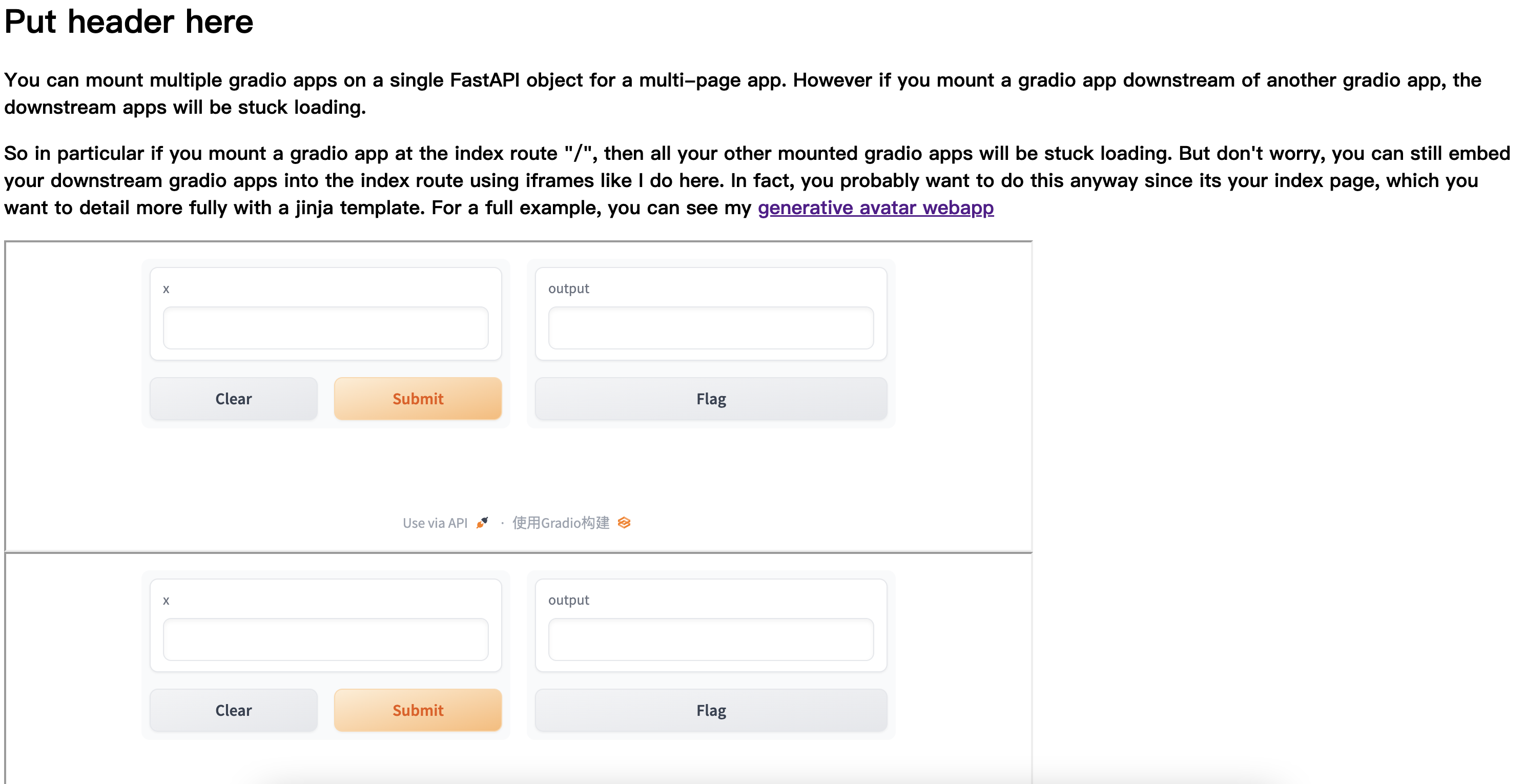
mount_gradio_app,启发于:Support multiple pages in a gradio appfrom fastapi import FastAPI from fastapi.responses import HTMLResponse import gradio as gr app = FastAPI() HELLO_ROUTE = "/hello" GOODBYE_ROUTE = "/goodbye" iframe_dimensions = "height=300px width=1000px" index_html = f'''Put header here
You can mount multiple gradio apps on a single FastAPI object for a multi-page app. However if you mount a gradio app downstream of another gradio app, the downstream apps will be stuck loading.
So in particular if you mount a gradio app at the index route "/", then all your other mounted gradio apps will be stuck loading. But don't worry, you can still embed your downstream gradio apps into the index route using iframes like I do here. In fact, you probably want to do this anyway since its your index page, which you want to detail more fully with a jinja template. For a full example, you can see my generative avatar webapp
''' @app.get("/", response_class=HTMLResponse) def index(): return index_html hello_app = gr.Interface(lambda x: "Hello, " + x + "!", "textbox", "textbox") goodbye_app = gr.Interface(lambda x: "Goodbye, " + x + "!", "textbox", "textbox") app = gr.mount_gradio_app(app, hello_app, path=HELLO_ROUTE) app = gr.mount_gradio_app(app, goodbye_app, path=GOODBYE_ROUTE) if __name__ == "__main__": import uvicorn uvicorn.run(app)- 1
- 2
- 3
- 4
- 5
- 6
- 7
- 8
- 9
- 10
- 11
- 12
- 13
- 14
- 15
- 16
- 17
- 18
- 19
- 20
- 21
- 22
- 23
- 24
- 25
- 26
- 27
- 28
- 29
- 30
- 31
- 32
- 33
- 34
- 35
- 36
- 37
- 38
- 39
- 40
- 41
- 42
- 43
- 44
- 45
- 46
- 47
- 48
- 49
- 50
- 51
- 52
- 53
- 54
- 55
此时通过
mount_gradio_app在fastapi同时部署两个模块,来看一下例子:
1.2
mount_gradio_app两个页面两个模块启发于:230902-部署Gradio到已有FastAPI及服务器中
import gradio as gr def greet(text: str) -> str: return text demo1 = gr.Interface( fn=greet, inputs=gr.components.Textbox(label='Input-1'), outputs=gr.components.Textbox(label='Output-1'), allow_flagging='never' ) demo2 = gr.Interface( fn=greet, inputs=gr.components.Textbox(label='Input-2'), outputs=gr.components.Textbox(label='Output-2'), allow_flagging='never' ) from fastapi import FastAPI import gradio as gr app = FastAPI() @app.get('/') async def root(): return 'Gradio app is running at /gradio', 200 app = gr.mount_gradio_app(app, demo1, path='/gradio1') app = gr.mount_gradio_app(app, demo2, path='/gradio2') import uvicorn uvicorn.run(app)- 1
- 2
- 3
- 4
- 5
- 6
- 7
- 8
- 9
- 10
- 11
- 12
- 13
- 14
- 15
- 16
- 17
- 18
- 19
- 20
- 21
- 22
- 23
- 24
- 25
- 26
- 27
- 28
- 29
- 30
- 31
- 32
- 33
- 34
- 35
- 36
- 37
- 38
- 39
- 40
这里定义了两个gradio模块,
demo1和demo2,通过mount_gradio_app,映射到两个子路径,gradio1和gradio2
所以这里,需要通过http://127.0.0.1:8000/gradio2/和http://127.0.0.1:8000/gradio1/到达两个页面:

2 TabbedInterface组件进行选项卡布局
官方教程:tabbedinterface
启发于:Gradio使用介绍 和 优雅组合,高效交互:Gradio Combining Interfaces模块解析
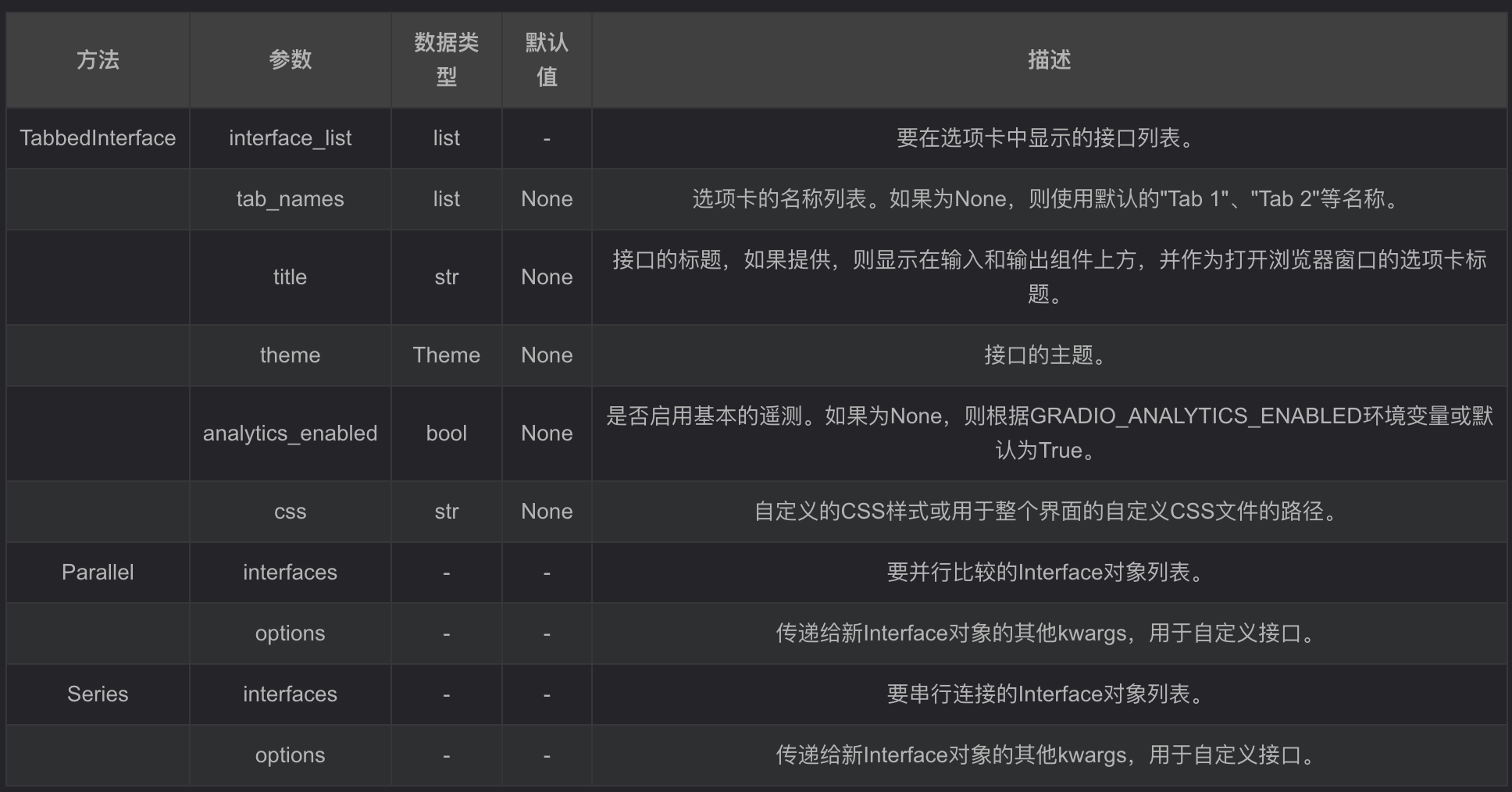
TabbedInterface可以通过提供一个Interface列表来创建,每个Interface都会在一个单独的选项卡中显示。您可以根据需要为每个选项卡指定名称,也可以使用默认的"Tab 1"、"Tab 2"等名称。
几个参数的构成:
2.1 Parallel:并行比较案例
Parallel可以将多个接口并行比较它们的输出。要将接口放在Parallel中,它们必须共享相同的输入组件,但可以有不同的输出组件。
import gradio as gr greeter_1 = gr.Interface(lambda name: f"Hello {name}!", inputs="textbox", outputs=gr.Textbox(label="Greeter 1")) greeter_2 = gr.Interface(lambda name: f"Greetings {name}!", inputs="textbox", outputs=gr.Textbox(label="Greeter 2")) demo = gr.Parallel(greeter_1, greeter_2) if __name__ == "__main__": demo.launch()- 1
- 2
- 3
- 4
- 5
- 6
- 7
- 8
- 9
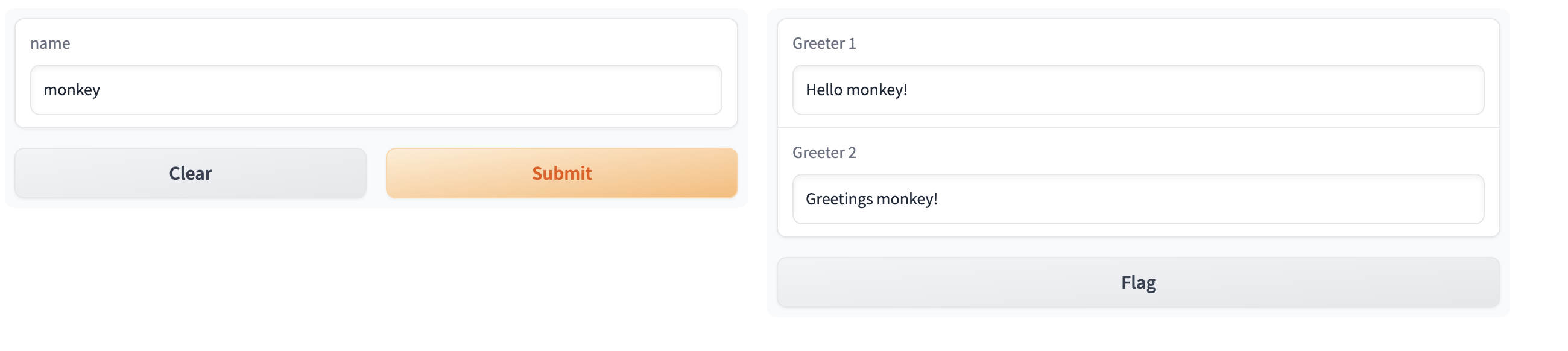
可以看到一个输入,两个输出2.2 Series:串行连接
Series可以将多个接口串行连接在一起,将一个接口的输出作为下一个接口的输入。要使用Series,接口之间的输入和输出组件必须匹配。
示例用法:
import gradio as gr get_name = gr.Interface(lambda name: name, inputs="textbox", outputs="textbox") prepend_hello = gr.Interface(lambda name: f"Hello {name}!", inputs="textbox", outputs="textbox") append_nice = gr.Interface(lambda greeting: f"{greeting} Nice to meet you!", inputs="textbox", outputs=gr.Textbox(label="Greeting")) demo = gr.Series(get_name, prepend_hello, append_nice) if __name__ == "__main__": demo.launch()- 1
- 2
- 3
- 4
- 5
- 6
- 7
- 8
- 9
- 10
- 11

两个组件可以联动2.3 第三个
TabbedInterface的案例:import gradio as gr css = """ #warning {background-color: #FFCCCB} .feedback textarea {font-size: 24px !important} """ with gr.Blocks(css=css) as demo1: with gr.Row(): with gr.Column(scale=1): gr.Textbox(label="name", elem_id="warning") gr.Textbox(label="age", elem_classes="feedback") with gr.Column(scale=2): gr.Dropdown(["one", "two", "tree"], label="class") gr.CheckboxGroup(["male", "female"], label="sex") with gr.Column(scale=1): gr.Radio(["is_girl"], label="is_girl") gr.Slider(1, 100, 20) with gr.Row(): gr.Button(value="Submit") gr.Button(value="Clear") with gr.Blocks(css=css) as demo2: with gr.Row(): with gr.Column(scale=1): gr.Textbox(label="name", elem_id="warning") gr.Textbox(label="age", elem_classes="feedback") with gr.Column(scale=2): gr.Dropdown(["one", "two", "tree"], label="class") gr.CheckboxGroup(["male", "female"], label="sex") with gr.Column(scale=1): gr.Radio(["is_girl"], label="is_girl") gr.Slider(1, 100, 20) with gr.Row(): gr.Button(value="Submit") gr.Button(value="Clear") app = gr.TabbedInterface([demo1, demo2], ["First", "Second"]) app.launch()- 1
- 2
- 3
- 4
- 5
- 6
- 7
- 8
- 9
- 10
- 11
- 12
- 13
- 14
- 15
- 16
- 17
- 18
- 19
- 20
- 21
- 22
- 23
- 24
- 25
- 26
- 27
- 28
- 29
- 30
- 31
- 32
- 33
- 34
- 35
- 36
- 37
- 38
- 39
- 40
- 41
如果应用的并发流量很大,gradio还提供排队处理机制,在demo.queue()中可以指定并发处理数量,例如
with gr.Blocks() as demo: #... demo.queue(concurrency_count=3) demo.launch()- 1
- 2
- 3
- 4
最终的效果为:
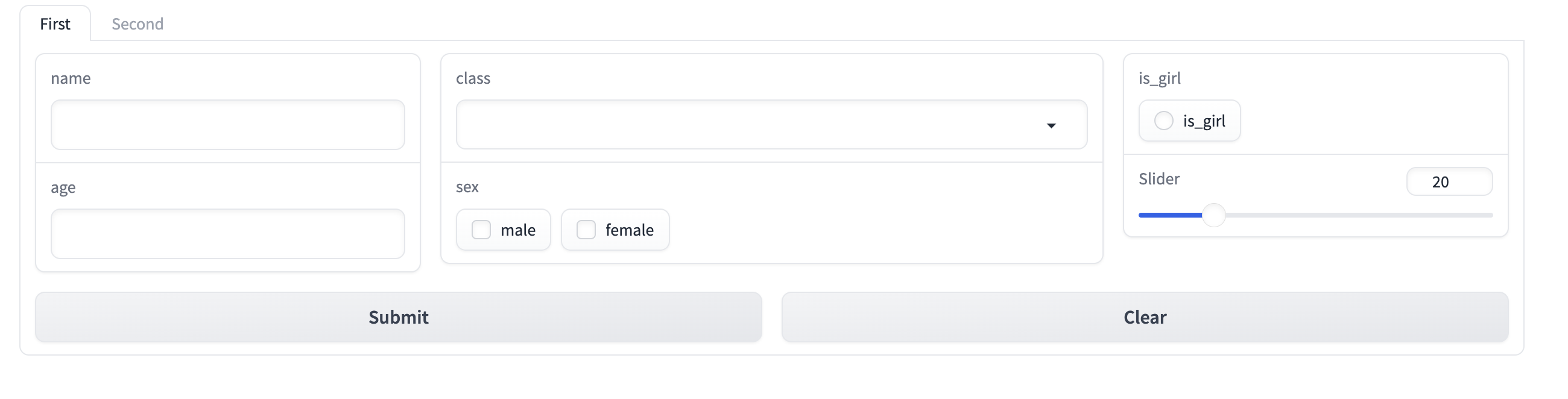
可以看到最上面有两个选项可以选择不同的控件组成3 未测试
分页的效果实现,主要依靠
mount_gradio_app,启发于:Support multiple pages in a gradio appimport gradio as gr gr.Blocks(): gr.Page("My amazing page", route="/"): gr.Markdown("# My amazing page") gr.Textbox("Page one") gr.Page("My second amazing page", route="/page-two"): gr.Markdown("# My second amazing page") gr.Textbox("Page two")- 1
- 2
- 3
- 4
- 5
- 6
- 7
- 8
- 9
-
相关阅读:
SRM供应商管理系统如何助力口腔护理企业实现采购战略的转型升级
云计算时代改变了什么?
【计算机网络】网络层(五)—— IPv6总结
GPT-4o如何重塑AI未来!
数据结构--排序
故障电弧探测器的必要性及组网方案 安科瑞 时丽花
分享:第十届“泰迪杯”数据挖掘挑战赛优秀作品--A1-基于深度学习的农田害虫定位与识别研究(一)
蔚小理处境越发尴尬了?
Python函数
Qt QScrollBar滚动条样式设置
- 原文地址:https://blog.csdn.net/sinat_26917383/article/details/134288468

- 最新文章
-
【FHE】我们如何实现同态加密推理(八):SiLU 的密文化——两条路径,和一个 8 字节的开关
SQLcl 中 c/old/new 替换变量为何失效?先定位再替换
不让模型写作文,直接从它脑子里读答案:Jev 决策在 .NET 的两条路线
Halo插件:支持GitHub的图床附件策略
电视投屏界的“一股清流”!SimpleTVCast 6.0.0-beta 抢先体验:无需TV端App,界面大换血!✨
华三VXLAN集中式网关实战指南:Spine多活网关 + 双活接入(M-LAG)
软件更好写之后口碑会更重要
大 O、大 Omega、大 Theta 的区别,O(n) 复杂度是什么意思
Java标签跳转:一个鲜为人知但却很实用的小技巧
多智能体系统论文速读