-
【Redis】SSM整合Redis&注解式缓存的使用
一、SSM整合Redis
1.1.pom.xml配置
在Maven或Gradle的构建文件中添加Redis相关的依赖。
注意:resources的配置必须涵盖读取.properties结尾的文件
pom.xml
- "1.0" encoding="UTF-8"?>
- <project xmlns="http://maven.apache.org/POM/4.0.0" xmlns:xsi="http://www.w3.org/2001/XMLSchema-instance"
- xsi:schemaLocation="http://maven.apache.org/POM/4.0.0 http://maven.apache.org/xsd/maven-4.0.0.xsd">
- <modelVersion>4.0.0modelVersion>
- <groupId>org.examplegroupId>
- <artifactId>ssm2artifactId>
- <version>1.0-SNAPSHOTversion>
- <packaging>warpackaging>
- <name>ssm2 Maven Webappname>
- <url>http://www.example.comurl>
- <properties>
- <project.build.sourceEncoding>UTF-8project.build.sourceEncoding>
- <maven.compiler.source>1.8maven.compiler.source>
- <maven.compiler.target>1.8maven.compiler.target>
- <maven.compiler.plugin.version>3.7.0maven.compiler.plugin.version>
- <spring.version>5.0.2.RELEASEspring.version>
- <mybatis.version>3.4.5mybatis.version>
- <mysql.version>5.1.44mysql.version>
- <pagehelper.version>5.1.2pagehelper.version>
- <mybatis.spring.version>1.3.1mybatis.spring.version>
- <commons.dbcp2.version>2.1.1commons.dbcp2.version>
- <commons.pool2.version>2.4.3commons.pool2.version>
- <log4j2.version>2.9.1log4j2.version>
- <junit.version>4.12junit.version>
- <servlet.version>4.0.0servlet.version>
- <lombok.version>1.18.2lombok.version>
- <ehcache.version>2.10.0ehcache.version>
- <slf4j-api.version>1.7.7slf4j-api.version>
- <redis.version>2.9.0redis.version>
- <redis.spring.version>1.7.1.RELEASEredis.spring.version>
- properties>
- <dependencies>
- <dependency>
- <groupId>org.springframeworkgroupId>
- <artifactId>spring-contextartifactId>
- <version>${spring.version}version>
- dependency>
- <dependency>
- <groupId>org.springframeworkgroupId>
- <artifactId>spring-ormartifactId>
- <version>${spring.version}version>
- dependency>
- <dependency>
- <groupId>org.springframeworkgroupId>
- <artifactId>spring-txartifactId>
- <version>${spring.version}version>
- dependency>
- <dependency>
- <groupId>org.springframeworkgroupId>
- <artifactId>spring-aspectsartifactId>
- <version>${spring.version}version>
- dependency>
- <dependency>
- <groupId>org.springframeworkgroupId>
- <artifactId>spring-webartifactId>
- <version>${spring.version}version>
- dependency>
- <dependency>
- <groupId>org.springframeworkgroupId>
- <artifactId>spring-testartifactId>
- <version>${spring.version}version>
- dependency>
- <dependency>
- <groupId>org.mybatisgroupId>
- <artifactId>mybatisartifactId>
- <version>${mybatis.version}version>
- dependency>
- <dependency>
- <groupId>mysqlgroupId>
- <artifactId>mysql-connector-javaartifactId>
- <version>${mysql.version}version>
- dependency>
- <dependency>
- <groupId>com.github.pagehelpergroupId>
- <artifactId>pagehelperartifactId>
- <version>${pagehelper.version}version>
- dependency>
- <dependency>
- <groupId>org.mybatisgroupId>
- <artifactId>mybatis-springartifactId>
- <version>${mybatis.spring.version}version>
- dependency>
- <dependency>
- <groupId>org.apache.commonsgroupId>
- <artifactId>commons-dbcp2artifactId>
- <version>${commons.dbcp2.version}version>
- dependency>
- <dependency>
- <groupId>org.apache.commonsgroupId>
- <artifactId>commons-pool2artifactId>
- <version>${commons.pool2.version}version>
- dependency>
- <dependency>
- <groupId>org.apache.logging.log4jgroupId>
- <artifactId>log4j-coreartifactId>
- <version>${log4j2.version}version>
- dependency>
- <dependency>
- <groupId>org.apache.logging.log4jgroupId>
- <artifactId>log4j-apiartifactId>
- <version>${log4j2.version}version>
- dependency>
- <dependency>
- <groupId>org.apache.logging.log4jgroupId>
- <artifactId>log4j-webartifactId>
- <version>${log4j2.version}version>
- dependency>
- <dependency>
- <groupId>junitgroupId>
- <artifactId>junitartifactId>
- <version>${junit.version}version>
- <scope>testscope>
- dependency>
- <dependency>
- <groupId>javax.servletgroupId>
- <artifactId>javax.servlet-apiartifactId>
- <version>${servlet.version}version>
- <scope>providedscope>
- dependency>
- <dependency>
- <groupId>org.projectlombokgroupId>
- <artifactId>lombokartifactId>
- <version>${lombok.version}version>
- <scope>providedscope>
- dependency>
- <dependency>
- <groupId>org.springframeworkgroupId>
- <artifactId>spring-webmvcartifactId>
- <version>${spring.version}version>
- dependency>
- <dependency>
- <groupId>javax.servlet.jspgroupId>
- <artifactId>javax.servlet.jsp-apiartifactId>
- <version>2.3.3version>
- dependency>
- <dependency>
- <groupId>jstlgroupId>
- <artifactId>jstlartifactId>
- <version>1.2version>
- dependency>
- <dependency>
- <groupId>taglibsgroupId>
- <artifactId>standardartifactId>
- <version>1.1.2version>
- dependency>
- <dependency>
- <groupId>commons-fileuploadgroupId>
- <artifactId>commons-fileuploadartifactId>
- <version>1.3.3version>
- dependency>
- <dependency>
- <groupId>org.hibernategroupId>
- <artifactId>hibernate-validatorartifactId>
- <version>6.0.7.Finalversion>
- dependency>
- <dependency>
- <groupId>com.fasterxml.jackson.coregroupId>
- <artifactId>jackson-databindartifactId>
- <version>2.9.3version>
- dependency>
- <dependency>
- <groupId>com.fasterxml.jackson.coregroupId>
- <artifactId>jackson-coreartifactId>
- <version>2.9.3version>
- dependency>
- <dependency>
- <groupId>com.fasterxml.jackson.coregroupId>
- <artifactId>jackson-annotationsartifactId>
- <version>2.9.3version>
- dependency>
- <dependency>
- <groupId>org.apache.shirogroupId>
- <artifactId>shiro-coreartifactId>
- <version>1.3.2version>
- dependency>
- <dependency>
- <groupId>org.apache.shirogroupId>
- <artifactId>shiro-webartifactId>
- <version>1.3.2version>
- dependency>
- <dependency>
- <groupId>org.apache.shirogroupId>
- <artifactId>shiro-springartifactId>
- <version>1.3.2version>
- dependency>
- <dependency>
- <groupId>net.sf.ehcachegroupId>
- <artifactId>ehcacheartifactId>
- <version>${ehcache.version}version>
- dependency>
- <dependency>
- <groupId>org.slf4jgroupId>
- <artifactId>slf4j-apiartifactId>
- <version>${slf4j-api.version}version>
- dependency>
- <dependency>
- <groupId>org.slf4jgroupId>
- <artifactId>jcl-over-slf4jartifactId>
- <version>${slf4j-api.version}version>
- <scope>runtimescope>
- dependency>
- <dependency>
- <groupId>org.apache.logging.log4jgroupId>
- <artifactId>log4j-slf4j-implartifactId>
- <version>${log4j2.version}version>
- dependency>
- <dependency>
- <groupId>redis.clientsgroupId>
- <artifactId>jedisartifactId>
- <version>${redis.version}version>
- dependency>
- <dependency>
- <groupId>org.springframework.datagroupId>
- <artifactId>spring-data-redisartifactId>
- <version>${redis.spring.version}version>
- dependency>
- dependencies>
- <build>
- <finalName>ssm2finalName>
- <resources>
- <resource>
- <directory>src/main/javadirectory>
- <includes>
- <include>**/*.xmlinclude>
- includes>
- resource>
- <resource>
- <directory>src/main/resourcesdirectory>
- <includes>
- <include>*.propertiesinclude>
- <include>*.xmlinclude>
- includes>
- resource>
- resources>
- <pluginManagement>
- <plugins>
- <plugin>
- <groupId>org.apache.maven.pluginsgroupId>
- <artifactId>maven-compiler-pluginartifactId>
- <version>${maven.compiler.plugin.version}version>
- <configuration>
- <source>${maven.compiler.source}source>
- <target>${maven.compiler.target}target>
- <encoding>${project.build.sourceEncoding}encoding>
- configuration>
- plugin>
- <plugin>
- <groupId>org.mybatis.generatorgroupId>
- <artifactId>mybatis-generator-maven-pluginartifactId>
- <version>1.3.2version>
- <dependencies>
- <dependency>
- <groupId>mysqlgroupId>
- <artifactId>mysql-connector-javaartifactId>
- <version>${mysql.version}version>
- dependency>
- dependencies>
- <configuration>
- <overwrite>trueoverwrite>
- configuration>
- plugin>
- <plugin>
- <artifactId>maven-clean-pluginartifactId>
- <version>3.1.0version>
- plugin>
- <plugin>
- <artifactId>maven-resources-pluginartifactId>
- <version>3.0.2version>
- plugin>
- <plugin>
- <artifactId>maven-compiler-pluginartifactId>
- <version>3.8.0version>
- plugin>
- <plugin>
- <artifactId>maven-surefire-pluginartifactId>
- <version>2.22.1version>
- plugin>
- <plugin>
- <artifactId>maven-war-pluginartifactId>
- <version>3.2.2version>
- plugin>
- <plugin>
- <artifactId>maven-install-pluginartifactId>
- <version>2.5.2version>
- plugin>
- <plugin>
- <artifactId>maven-deploy-pluginartifactId>
- <version>2.8.2version>
- plugin>
- plugins>
- pluginManagement>
- build>
- project>
1.2.配置文件spring-redis.xml
这个配置文件的作用主要用于配置数据源和连接工厂还有配置序列化的用途
redis.properties
- redis.hostName=localhost
- redis.port=6379
- redis.password=123456
- redis.timeout=10000
- redis.maxIdle=300
- redis.maxTotal=1000
- redis.maxWaitMillis=1000
- redis.minEvictableIdleTimeMillis=300000
- redis.numTestsPerEvictionRun=1024
- redis.timeBetweenEvictionRunsMillis=30000
- redis.testOnBorrow=true
- redis.testWhileIdle=true
- redis.expiration=3600
spring-redis.xml
- "1.0" encoding="UTF-8"?>
- <beans xmlns="http://www.springframework.org/schema/beans"
- xmlns:xsi="http://www.w3.org/2001/XMLSchema-instance"
- xmlns:context="http://www.springframework.org/schema/context"
- xmlns:cache="http://www.springframework.org/schema/cache"
- xsi:schemaLocation="http://www.springframework.org/schema/beans
- http://www.springframework.org/schema/beans/spring-beans.xsd
- http://www.springframework.org/schema/context
- http://www.springframework.org/schema/context/spring-context.xsd
- http://www.springframework.org/schema/cache
- http://www.springframework.org/schema/cache/spring-cache.xsd">
- <bean id="poolConfig" class="redis.clients.jedis.JedisPoolConfig">
- <property name="maxIdle" value="${redis.maxIdle}"/>
- <property name="maxTotal" value="${redis.maxTotal}"/>
- <property name="maxWaitMillis" value="${redis.maxWaitMillis}"/>
- <property name="minEvictableIdleTimeMillis" value="${redis.minEvictableIdleTimeMillis}"/>
- <property name="numTestsPerEvictionRun" value="${redis.numTestsPerEvictionRun}"/>
- <property name="timeBetweenEvictionRunsMillis" value="${redis.timeBetweenEvictionRunsMillis}"/>
- <property name="testOnBorrow" value="${redis.testOnBorrow}"/>
- <property name="testWhileIdle" value="${redis.testWhileIdle}"/>
- bean>
- <bean id="connectionFactory" class="org.springframework.data.redis.connection.jedis.JedisConnectionFactory"
- destroy-method="destroy">
- <property name="poolConfig" ref="poolConfig"/>
- <property name="hostName" value="${redis.hostName}"/>
- <property name="port" value="${redis.port}"/>
- <property name="password" value="${redis.password}"/>
- <property name="timeout" value="${redis.timeout}"/>
- bean>
- <bean id="redisTemplate" class="org.springframework.data.redis.core.RedisTemplate">
- <property name="connectionFactory" ref="connectionFactory"/>
- <property name="keySerializer">
- <bean class="org.springframework.data.redis.serializer.StringRedisSerializer"/>
- property>
- <property name="valueSerializer">
- <bean class="org.springframework.data.redis.serializer.GenericJackson2JsonRedisSerializer"/>
- property>
- <property name="hashKeySerializer">
- <bean class="org.springframework.data.redis.serializer.StringRedisSerializer"/>
- property>
- <property name="hashValueSerializer">
- <bean class="org.springframework.data.redis.serializer.GenericJackson2JsonRedisSerializer"/>
- property>
- <property name="enableTransactionSupport" value="true"/>
- bean>
- <bean id="redisCacheManager" class="org.springframework.data.redis.cache.RedisCacheManager">
- <constructor-arg name="redisOperations" ref="redisTemplate"/>
- <property name="defaultExpiration" value="${redis.expiration}"/>
- <property name="usePrefix" value="true"/>
- <property name="cachePrefix">
- <bean class="org.springframework.data.redis.cache.DefaultRedisCachePrefix">
- <constructor-arg index="0" value="-cache-"/>
- bean>
- property>
- bean>
- <bean id="cacheKeyGenerator" class="com.zking.ssm.redis.CacheKeyGenerator">bean>
- <cache:annotation-driven cache-manager="redisCacheManager" key-generator="cacheKeyGenerator"/>
- beans>
1.3.修改applicationContext.xml
如果spring配置文件中需要配置两个及以上的properties文件则需要在applicationContext.xml中进行配置处理,否则会出现覆盖的情况。
- <?xml version="1.0" encoding="UTF-8"?>
- <beans xmlns="http://www.springframework.org/schema/beans"
- xmlns:xsi="http://www.w3.org/2001/XMLSchema-instance"
- xmlns:context="http://www.springframework.org/schema/context" xmlns:tx="http://www.springframework.org/schema/tx"
- xmlns:aop="http://www.springframework.org/schema/aop"
- xsi:schemaLocation="http://www.springframework.org/schema/beans http://www.springframework.org/schema/beans/spring-beans.xsd http://www.springframework.org/schema/context http://www.springframework.org/schema/context/spring-context.xsd http://www.springframework.org/schema/tx http://www.springframework.org/schema/tx/spring-tx.xsd http://www.springframework.org/schema/aop http://www.springframework.org/schema/aop/spring-aop.xsd">
- <!--1. 引入外部多文件方式 -->
- <bean id="propertyConfigurer"
- class="org.springframework.beans.factory.config.PropertyPlaceholderConfigurer">
- <property name="systemPropertiesModeName" value="SYSTEM_PROPERTIES_MODE_OVERRIDE" />
- <property name="ignoreResourceNotFound" value="true" />
- <property name="locations">
- <list>
- <value>classpath:jdbc.properties</value>
- <value>classpath:redis.properties</value>
- </list>
- </property>
- </bean>
- <!-- 随着后续学习,框架会越学越多,不能将所有的框架配置,放到同一个配制间,否者不便于管理 -->
- <import resource="applicationContext-mybatis.xml"></import>
- <import resource="spring-redis.xml"></import>
- <import resource="applicationContext-shiro.xml"></import>
- </beans>
1.4.配置redis的key生成策略
CacheKeyGenerator.java
- package com.zking.ssm.redis;
- import lombok.extern.slf4j.Slf4j;
- import org.springframework.cache.interceptor.KeyGenerator;
- import org.springframework.util.ClassUtils;
- import java.lang.reflect.Array;
- import java.lang.reflect.Method;
- @Slf4j
- public class CacheKeyGenerator implements KeyGenerator {
- // custom cache key
- public static final int NO_PARAM_KEY = 0;
- public static final int NULL_PARAM_KEY = 53;
- @Override
- public Object generate(Object target, Method method, Object... params) {
- StringBuilder key = new StringBuilder();
- key.append(target.getClass().getSimpleName()).append(".").append(method.getName()).append(":");
- if (params.length == 0) {
- key.append(NO_PARAM_KEY);
- } else {
- int count = 0;
- for (Object param : params) {
- if (0 != count) {//参数之间用,进行分隔
- key.append(',');
- }
- if (param == null) {
- key.append(NULL_PARAM_KEY);
- } else if (ClassUtils.isPrimitiveArray(param.getClass())) {
- int length = Array.getLength(param);
- for (int i = 0; i < length; i++) {
- key.append(Array.get(param, i));
- key.append(',');
- }
- } else if (ClassUtils.isPrimitiveOrWrapper(param.getClass()) || param instanceof String) {
- key.append(param);
- } else {//Java一定要重写hashCode和eqauls
- key.append(param.hashCode());
- }
- count++;
- }
- }
- String finalKey = key.toString();
- // IEDA要安装lombok插件
- log.debug("using cache key={}", finalKey);
- return finalKey;
- }
- }
二、Redis的注解式开发及应用场景
2.1.什么是Redis注解式
Redis的注解式是指通过使用Spring框架提供的缓存注解,在业务代码中对Redis进行读写操作的方式。这种方式可以大大简化开发人员对缓存的操作,避免了手动编写Redis API代码的繁琐操作。
Spring框架提供了一系列缓存注解,其中常用的有:
@Cacheable: 表示方法的返回值可以被缓存,如果缓存中已经存在相同Key的值,则直接返回缓存中的值,否则会执行方法体中的代码,并将返回值存储到缓存中。
@CachePut: 表示将方法的返回值存储到缓存中,常用于更新缓存中的值。
@CacheEvict: 表示从缓存中删除指定的Key,常用于删除缓存中的某个值。
@Caching: 表示对多个缓存注解进行组合,常用于同时使用多个注解的场景。
@CacheConfig: 可以在类级别上设置缓存相关的配置,避免在每个方法上重复设置。
通过使用这些缓存注解,开发人员可以快速方便地实现对Redis的读写操作,同时也能够灵活地控制缓存的过期时间、缓存Key的生成规则等。
2.2.为什么使用Redis注解式
使用缓存注解的主要目的是为了提高应用程序的性能和响应速度。当应用程序从数据库或其他资源中获取数据时,如果这些数据在未来的请求中可能会被多次读取,那么使用缓存可以显著减少每个请求的响应时间。缓存将数据存储在内存中,因此可以快速读取,而不需要每次都访问数据库或其他资源。
使用缓存注解还可以减少对数据库或其他资源的负载,从而减少应用程序的资源消耗。当数据被缓存时,应用程序不需要每次都访问数据库或其他资源,从而减轻了这些资源的负载。
在使用缓存注解时,需要注意该注解的生命周期和缓存策略。缓存的生命周期指定了数据在缓存中存储的时间,而缓存策略则指定了何时应将数据从缓存中删除。通过选择适当的生命周期和缓存策略,可以优化缓存的性能和效率。
2.3.Redis注解式的应用
- @Cacheable
- @Cacheable 的作用 主要针对方法配置,能够根据方法的请求参数对其结果进行缓存
- @Cacheable 作用和配置方法
参数 解释 example value 缓存的名称,在 spring 配置文件中定义,必须指定至少一个 例如:
@Cacheable(value=”mycache”)
@Cacheable(value={”cache1”,”cache2”}key 缓存的 key,可以为空,如果指定要按照 SpEL 表达式编写,如果不指定,则缺省按照方法的所有参数进行组合 @Cacheable(value=”testcache”,key=”#userName”) condition 缓存的条件,可以为空,使用 SpEL 编写,返回 true 或者 false,只有为 true 才进行缓存 @Cacheable(value=”testcache”,condition=”#userName.length()>2”) @Cacheable (可读取与写入)
@Cacheable是Spring框架提供的一个缓存注解,用于标记方法的返回结果可以被缓存起来,以提高系统的性能。如下:
- @Cacheable(value = "xx",key = "'cid:'+#cid",condition = "#cid > 6")
- Clazz selectByPrimaryKey(Integer cid);
value:缓存位置的一段名称,不能为空
key:缓存的key,默认为空,表示使用方法的参数类型及参数值作为key,支持SpEL
condition:触发条件,满足条件就加入缓存,默认为空,表示全部都加入缓存,支持SpEL
@CachePut
- @CachePut 的作用 主要针对方法配置,能够根据方法的请求参数对其结果进行缓存,和 @Cacheable 不同的是,它每次都会触发真实方法的调用
- @CachePut 作用和配置方法
- @CachePut(value = "xx",key = "'cid:'+#cid")
- Clazz selectByPrimaryKey(Integer cid);
参数 解释 example value 缓存的名称,在 spring 配置文件中定义,必须指定至少一个 @CachePut(value=”my cache”) key 缓存的 key,可以为空,如果指定要按照 SpEL 表达式编写,如果不指定,则缺省按照方法的所有参数进行组合 @CachePut(value=”testcache”,key=”#userName”) condition 缓存的条件,可以为空,使用 SpEL 编写,返回 true 或者 false,只有为 true 才进行缓存 @CachePut(value=”testcache”,condition=”#userName.length()>2”) @CacheEvict
- @CachEvict 的作用 主要针对方法配置,能够根据一定的条件对缓存进行清空
- @CacheEvict 作用和配置方法
- @CacheEvict(value = "xx",key = "'cid:'+#cid",allEntries = true)
- int deleteByPrimaryKey(Integer cid);
参数 解释 example value 缓存的名称,在 spring 配置文件中定义,必须指定至少一个 @CacheEvict(value=”my cache”) key 缓存的 key,可以为空,如果指定要按照 SpEL 表达式编写,如果不指定,则缺省按照方法的所有参数进行组合 @CacheEvict(value=”testcache”,key=”#userName”) condition 缓存的条件,可以为空,使用 SpEL 编写,返回 true 或者 false,只有为 true 才进行缓存 @CacheEvict(value=”testcache”,condition=”#userName.length()>2”) allEntries 是否清空所有缓存内容,缺省为 false,如果指定为 true,则方法调用后将立即清空所有缓存 @CachEvict(value=”testcache”,allEntries=true) beforeInvocation 是否在方法执行前就清空,缺省为 false,如果指定为 true,则在方法还没有执行的时候就清空缓存,缺省情况下,如果方法执行抛出异常,则不会清空缓存 @CachEvict(value=”testcache”,beforeInvocation=true) SpEL上下文数据
Spring Cache提供了一些供我们使用的SpEL上下文数据,下表直接摘自Spring官方文档:
名称 位置 描述 示例 methodName root对象 当前被调用的方法名 root.methodName method root对象 当前被调用的方法 root.method.name target root对象 当前被调用的目标对象 root.target targetClass root对象 当前被调用的目标对象类 root.targetClass args root对象 当前被调用的方法的参数列表 root.args[0] caches root对象 当前方法调用使用的缓存列表(如@Cacheable(value={“cache1”, “cache2”})),则有两个cache root.caches[0].name argument name 执行上下文 当前被调用的方法的参数,如findById(Long id),我们可以通过#id拿到参数 user.id result 执行上下文 方法执行后的返回值(仅当方法执行之后的判断有效,如‘unless','cache evict'的beforeInvocation=false) result 三. 什么是缓存雪崩、击穿、穿透?
用户的数据一般都是存储于数据库,数据库的数据是落在磁盘上的,磁盘的读写速度可以说是计算机里最慢的硬件了。
当用户的请求,都访问数据库的话,请求数量一上来,数据库很容易就奔溃的了,所以为了避免用户直接访问数据库,会用 Redis 作为缓存层。
因为 Redis 是内存数据库,我们可以将数据库的数据缓存在 Redis 里,相当于数据缓存在内存,内存的读写速度比硬盘快好几个数量级,这样大大提高了系统性能。

引入了缓存层,就会有缓存异常的三个问题,分别是缓存雪崩、缓存击穿、缓存穿透。
这三个问题也是面试中很常考察的问题,我们不光要清楚地知道它们是怎么发生,还需要知道如何解决它们。

3.1 缓存雪崩
通常我们为了保证缓存中的数据与数据库中的数据一致性,会给 Redis 里的数据设置过期时间,当缓存数据过期后,用户访问的数据如果不在缓存里,业务系统需要重新生成缓 存,因此就会访问数据库,并将数据更新到 Redis 里,这样后续请求都可以直接命中缓存。

那么,当大量缓存数据在同一时间过期(失效)或者 Redis 故障宕机时,如果此时有大量的用户请求,都无法在 Redis 中处理,于是全部请求都直接访问数据库,从而导致数据库的压力骤增,严重的会造成数据库宕机,从而形成一系列连锁反应,造成整个系统崩溃,这就是缓存雪崩的问题。

可以看到,发生缓存雪崩有两个原因:
- 大量数据同时过期;
- Redis 故障宕机;
不同的诱因,应对的策略也会不同。
举个例子
对于系统 A,假设每天高峰期每秒 5000 个请求,本来缓存在高峰期可以扛住每秒 4000 个请求,但是缓存机器意外发生了全盘宕机。缓存挂了,此时 1 秒 5000 个请求全部落数据库,数据库必然扛不住,它会报一下警,然后就挂了。此时,如果没有采用什么特别的方案来处理这个故障,DBA 很着急,重启数据库,但是数据库立马又被新的流量给打死了。
这就是缓存雪崩。

大约在 3 年前,国内比较知名的一个互联网公司,曾因为缓存事故,导致雪崩,后台系统全部崩溃,事故从当天下午持续到晚上凌晨 3~4 点,公司损失了几千万。
缓存雪崩的事前事中事后的解决方案如下。
- 事前:redis 高可用,主从+哨兵,redis cluster,避免全盘崩溃。
- 事中:本地 ehcache 缓存 + hystrix 限流&降级,避免 MySQL 被打死。
- 事后:redis 持久化,一旦重启,自动从磁盘上加载数据,快速恢复缓存数据。

用户发送一个请求,系统 A 收到请求后,先查本地 ehcache 缓存,如果没查到再查 redis。如果 ehcache 和 redis 都没有,再查数据库,将数据库中的结果,写入 ehcache 和 redis 中。
限流组件,可以设置每秒的请求,有多少能通过组件,剩余的未通过的请求,怎么办?走降级!可以返回一些默认的值,或者友情提示,或者空白的值。
好处:
- 数据库绝对不会死,限流组件确保了每秒只有多少个请求能通过。
- 只要数据库不死,就是说,对用户来说,2/5 的请求都是可以被处理的。
- 只要有 2/5 的请求可以被处理,就意味着你的系统没死,对用户来说,可能就是点击几次刷不出来页面,但是多点几次,就可以刷出来一次。
3.1.1大量数据同时过期
针对大量数据同时过期而引发的缓存雪崩问题,常见的应对方法有下面这几种:
- 均匀设置过期时间;
- 互斥锁;
- 后台更新缓存;
1. 均匀设置过期时间
如果要给缓存数据设置过期时间,应该避免将大量的数据设置成同一个过期时间。我们可以在对缓存数据设置过期时间时,给这些数据的过期时间加上一个随机数,这样就保证数据不会在同一时间过期。
2. 互斥锁
当业务线程在处理用户请求时,如果发现访问的数据不在 Redis 里,就加个互斥锁,保证同一时间内只有一个请求来构建缓存(从数据库读取数据,再将数据更新到 Redis 里),当缓存构建完成后,再释放锁。未能获取互斥锁的请求,要么等待锁释放后重新读取缓存,要么就返回空值或者默认值。
实现互斥锁的时候,最好设置超时时间,不然第一个请求拿到了锁,然后这个请求发生了某种意外而一直阻塞,一直不释放锁,这时其他请求也一直拿不到锁,整个系统就会出现无响应的现象。
3. 后台更新缓存
业务线程不再负责更新缓存,缓存也不设置有效期,而是让缓存“永久有效”,并将更新缓存的工作交由后台线程定时更新。
事实上,缓存数据不设置有效期,并不是意味着数据一直能在内存里,因为当系统内存紧张的时候,有些缓存数据会被“淘汰”,而在缓存被“淘汰”到下一次后台定时更新缓存的这段时间内,业务线程读取缓存失败就返回空值,业务的视角就以为是数据丢失了。
解决上面的问题的方式有两种。
第一种方式,后台线程不仅负责定时更新缓存,而且也负责频繁地检测缓存是否有效,检测到缓存失效了,原因可能是系统紧张而被淘汰的,于是就要马上从数据库读取数据,并更新到缓存。
这种方式的检测时间间隔不能太长,太长也导致用户获取的数据是一个空值而不是真正的数据,所以检测的间隔最好是毫秒级的,但是总归是有个间隔时间,用户体验一般。
第二种方式,在业务线程发现缓存数据失效后(缓存数据被淘汰),通过消息队列发送一条消息通知后台线程更新缓存,后台线程收到消息后,在更新缓存前可以判断缓存是否存在,存在就不执行更新缓存操作;不存在就读取数据库数据,并将数据加载到缓存。这种方式相比第一种方式缓存的更新会更及时,用户体验也比较好。
在业务刚上线的时候,我们最好提前把数据缓起来,而不是等待用户访问才来触发缓存构建,这就是所谓的缓存预热,后台更新缓存的机制刚好也适合干这个事情。
3.1.2 Redis 故障宕机
针对 Redis 故障宕机而引发的缓存雪崩问题,常见的应对方法有下面这几种:
- 服务熔断或请求限流机制;
- 构建 Redis 缓存高可靠集群;
1. 服务熔断或请求限流机制
因为 Redis 故障宕机而导致缓存雪崩问题时,我们可以启动服务熔断机制,暂停业务应用对缓存服务的访问,直接返回错误,不用再继续访问数据库,从而降低对数据库的访问压力,保证数据库系统的正常运行,然后等到 Redis 恢复正常后,再允许业务应用访问缓存服务。
服务熔断机制是保护数据库的正常允许,但是暂停了业务应用访问缓存服系统,全部业务都无法正常工作
为了减少对业务的影响,我们可以启用请求限流机制,只将少部分请求发送到数据库进行处理,再多的请求就在入口直接拒绝服务,等到 Redis 恢复正常并把缓存预热完后,再解除请求限流的机制。
2. 构建 Redis 缓存高可靠集群
服务熔断或请求限流机制是缓存雪崩发生后的应对方案,我们最好通过主从节点的方式构建 Redis 缓存高可靠集群。
如果 Redis 缓存的主节点故障宕机,从节点可以切换成为主节点,继续提供缓存服务,避免了由于 Redis 故障宕机而导致的缓存雪崩问题。
3.2 缓存击穿
我们的业务通常会有几个数据会被频繁地访问,比如秒杀活动,这类被频地访问的数据被称为热点数据。
如果缓存中的某个热点数据过期了,此时大量的请求访问了该热点数据,就无法从缓存中读取,直接访问数据库,数据库很容易就被高并发的请求冲垮,这就是缓存击穿的问题。

可以发现缓存击穿跟缓存雪崩很相似,你可以认为缓存击穿是缓存雪崩的一个子集。
应对缓存击穿可以采取前面说到两种方案:
- 互斥锁方案,保证同一时间只有一个业务线程更新缓存,未能获取互斥锁的请求,要么等待锁释放后重新读取缓存,要么就返回空值或者默认值。
- 不给热点数据设置过期时间,由后台异步更新缓存,或者在热点数据准备要过期前,提前通知后台线程更新缓存以及重新设置过期时间;
3.3 缓存穿透
当发生缓存雪崩或击穿时,数据库中还是保存了应用要访问的数据,一旦缓存恢复相对应的数据,就可以减轻数据库的压力,而缓存穿透就不一样了。
当用户访问的数据,既不在缓存中,也不在数据库中,导致请求在访问缓存时,发现缓存缺失,再去访问数据库时,发现数据库中也没有要访问的数据,没办法构建缓存数据,来服务后续的请求。那么当有大量这样的请求到来时,数据库的压力骤增,这就是缓存穿透的问题。

缓存穿透的发生一般有这两种情况:
- 业务误操作,缓存中的数据和数据库中的数据都被误删除了,所以导致缓存和数据库中都没有数据;
- 黑客恶意攻击,故意大量访问某些读取不存在数据的业务;
举个例子
对于系统A,假设一秒 5000 个请求,结果其中 4000 个请求是黑客发出的恶意攻击。
黑客发出的那 4000 个攻击,缓存中查不到,每次你去数据库里查,也查不到。
举个栗子。数据库 id 是从 1 开始的,结果黑客发过来的请求 id 全部都是负数。这样的话,缓存中不会有,请求每次都“视缓存于无物”,直接查询数据库。这种恶意攻击场景的缓存穿透就会直接把数据库给打死。

解决方式很简单,每次系统 A 从数据库中只要没查到,就写一个空值到缓存里去,比如
set -999 UNKNOWN。然后设置一个过期时间,这样的话,下次有相同的 key 来访问的时候,在缓存失效之前,都可以直接从缓存中取数据。应对缓存穿透的方案,常见的方案有三种。
- 第一种方案,非法请求的限制;
- 第二种方案,缓存空值或者默认值;
- 第三种方案,使用布隆过滤器快速判断数据是否存在,避免通过查询数据库来判断数据是否存在;
第一种方案,非法请求的限制
当有大量恶意请求访问不存在的数据的时候,也会发生缓存穿透,因此在 API 入口处我们要判断求请求参数是否合理,请求参数是否含有非法值、请求字段是否存在,如果判断出是恶意请求就直接返回错误,避免进一步访问缓存和数据库。
第二种方案,缓存空值或者默认值
当我们线上业务发现缓存穿透的现象时,可以针对查询的数据,在缓存中设置一个空值或者默认值,这样后续请求就可以从缓存中读取到空值或者默认值,返回给应用,而不会继续查询数据库。
第三种方案,使用布隆过滤器快速判断数据是否存在,避免通过查询数据库来判断数据是否存在。
我们可以在写入数据库数据时,使用布隆过滤器做个标记,然后在用户请求到来时,业务线程确认缓存失效后,可以通过查询布隆过滤器快速判断数据是否存在,如果不存在,就不用通过查询数据库来判断数据是否存在。
即使发生了缓存穿透,大量请求只会查询 Redis 和布隆过滤器,而不会查询数据库,保证了数据库能正常运行,Redis 自身也是支持布隆过滤器的。
那问题来了,布隆过滤器是如何工作的呢?接下来,我介绍下。
布隆过滤器由「初始值都为 0 的位图数组」和「 N 个哈希函数」两部分组成。当我们在写入数据库数据时,在布隆过滤器里做个标记,这样下次查询数据是否在数据库时,只需要查询布隆过滤器,如果查询到数据没有被标记,说明不在数据库中。
布隆过滤器会通过 3 个操作完成标记:
- 第一步,使用 N 个哈希函数分别对数据做哈希计算,得到 N 个哈希值;
- 第二步,将第一步得到的 N 个哈希值对位图数组的长度取模,得到每个哈希值在位图数组的对应位置。
- 第三步,将每个哈希值在位图数组的对应位置的值设置为 1;
举个例子,假设有一个位图数组长度为 8,哈希函数 3 个的布隆过滤器。

在数据库写入数据 x 后,把数据 x 标记在布隆过滤器时,数据 x 会被 3 个哈希函数分别计算出 3 个哈希值,然后在对这 3 个哈希值对 8 取模,假设取模的结果为 1、4、6,然后把位图数组的第 1、4、6 位置的值设置为 1。当应用要查询数据 x 是否数据库时,通过布隆过滤器只要查到位图数组的第 1、4、6 位置的值是否全为 1,只要有一个为 0,就认为数据 x 不在数据库中。
布隆过滤器由于是基于哈希函数实现查找的,高效查找的同时存在哈希冲突的可能性,比如数据 x 和数据 y 可能都落在第 1、4、6 位置,而事实上,可能数据库中并不存在数据 y,存在误判的情况。
所以,查询布隆过滤器说数据存在,并不一定证明数据库中存在这个数据,但是查询到数据不存在,数据库中一定就不存在这个数据。
总结
缓存异常会面临的三个问题:缓存雪崩、击穿和穿透。
其中,缓存雪崩和缓存击穿主要原因是数据不在缓存中,而导致大量请求访问了数据库,数据库压力骤增,容易引发一系列连锁反应,导致系统奔溃。不过,一旦数据被重新加载回缓存,应用又可以从缓存快速读取数据,不再继续访问数据库,数据库的压力也会瞬间降下来。因此,缓存雪崩和缓存击穿应对的方案比较类似。
而缓存穿透主要原因是数据既不在缓存也不在数据库中。因此,缓存穿透与缓存雪崩、击穿应对的方案不太一样。
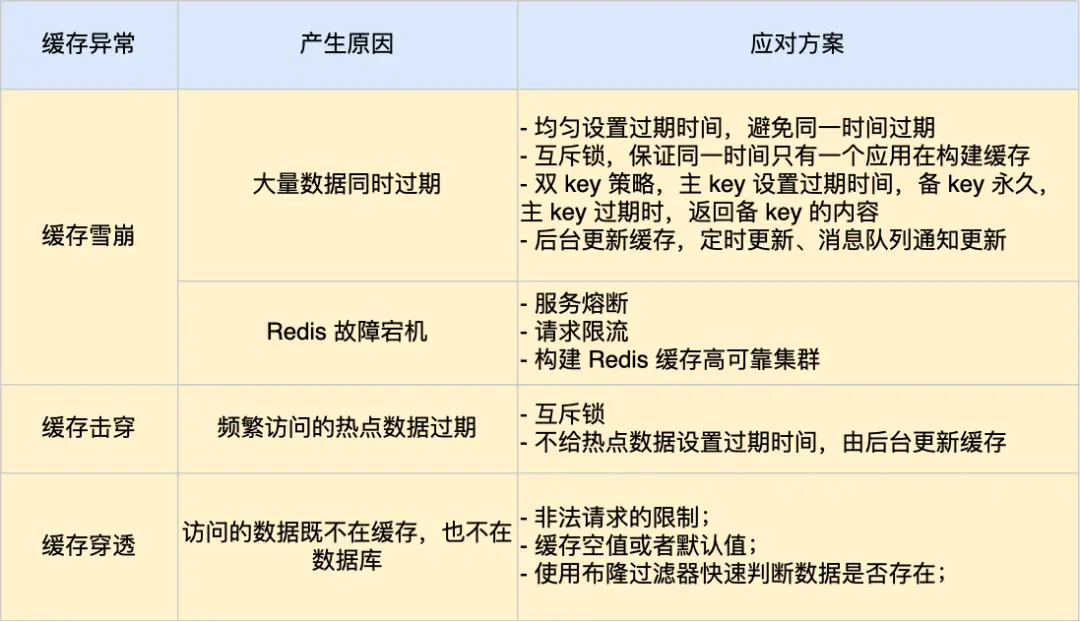
我这里整理了表格,你可以从下面这张表格很好的知道缓存雪崩、击穿和穿透的区别以及应对方案。
-
相关阅读:
"科来杯"第十届山东省大学生网络安全技能大赛决赛复现WP
istio介绍(二)
神经网络与机器学习 - 第0章 导言
Jmeter接口测试响应数据中文显示为Unicode码的解决方法
spark-sql 指定metastore地址
Bootstrap的CSS类积累学习
Linux | Centos下几种CPU查看使用率的常用命令
鲜花销售管理系统,鲜花商城管理系统,鲜花网站毕业设计
[python 刷题] 42 Trapping Rain Water
上海某公司医疗实施工程师笔试题
- 原文地址:https://blog.csdn.net/liaozhixiangjava/article/details/134250469

- 最新文章
-
沪漂五周年了:我越来越迷茫了
Agentic Skill Routing 实战:别再把所有 Skill 塞进 AI Agent 上下文
MySQL-Seconds_behind_master的精度误差
[MAF预定义ChatClient中间件-03]CachingChatClient——利用缓存省钱省时间
AI的至暗历史:从万众期待到被政府撤资,AI的两次死亡徘徊
Agent OS :五种驯服不确定性的范式
PortSwigger SQL注入LAB11
数据库即时编译JIT
[Begin]AI Learn Data Day 0
深度学习进阶(二十七)现代 LLM 的核心架构设计其二:SwiGLU