-
MapReduce WordCount程序实践(IDEA版)
环境
Linux:Hadoop2.x
Windows:jdk1.8、Maven3、IDEA2021
步骤
编程分析

编程分析包括:
1.数据过程分析:数据从输入到输出的过程分析。
2.数据类型分析:Map的输入输出类型,Reduce的输入输出类型;
编程分析决定了我们该如何编写代码。新建Maven工程
打开IDEA–>点击File–>New–>Project

选择Maven–>点击Next

选择一个空目录作为项目目录,目录名称例如:wordcount,建议目录路径不包含中文和空格,点击Finish
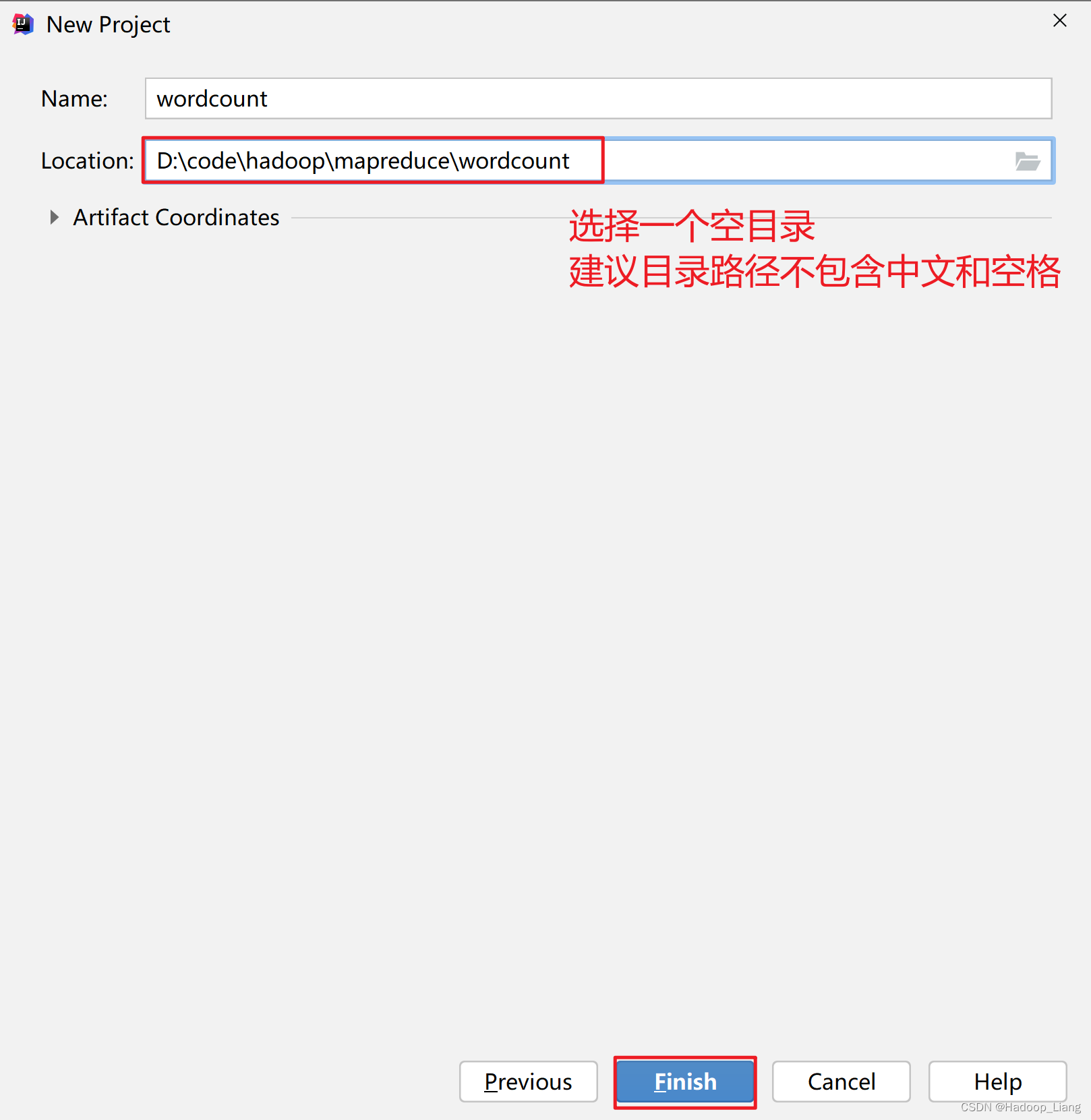
添加依赖
修改
pom.xml,添加如下依赖<dependencies> <dependency> <groupId>org.apache.hadoopgroupId> <artifactId>hadoop-commonartifactId> <version>2.7.3version> dependency> <dependency> <groupId>org.apache.hadoopgroupId> <artifactId>hadoop-clientartifactId> <version>2.7.3version> dependency> <dependency> <groupId>org.apache.hadoopgroupId> <artifactId>hadoop-hdfsartifactId> <version>2.7.3version> dependency> <dependency> <groupId>org.apache.hadoopgroupId> <artifactId>hadoop-mapreduce-client-coreartifactId> <version>2.7.3version> dependency> dependencies>- 1
- 2
- 3
- 4
- 5
- 6
- 7
- 8
- 9
- 10
- 11
- 12
- 13
- 14
- 15
- 16
- 17
- 18
- 19
- 20
- 21
- 22

加载依赖

新建包
在
src\main\java目录下,新建包:org.example

填入
org.example,效果如下:

新建类
在
org.example包下,新建出三个类,分别为:MyMapper、MyReducer、MyMain,效果如下:
编写Map程序
编辑
MyMapper类,步骤如下:1.继承Mapper 2.重写map()方法 3.编写Map逻辑代码: 1.v1由Text类型转换为String 2.按空格进行分词:split(" ")方法 3.输出k2, v2- 1
- 2
- 3
- 4
- 5
- 6

编写Reduce程序
编辑
MyReducer类,步骤如下:1.继承Reducer 2.重写reduce()方法 3.编写Reduce逻辑代码: 1.k4 = k3 2.v4 = v3元素的和 3.输出k4, v4- 1
- 2
- 3
- 4
- 5
- 6

编写Main程序(Driver程序)
编辑
MyMain类,步骤如下:1. 创建一个job和任务入口(指定主类) 2. 指定job的mapper和输出的类型3. 指定job的reducer和输出的类型 4. 指定job的输入和输出路径 5. 执行job - 1
- 2
- 3
- 4
- 5

思考
代码编写完成后,可以先在Windows本地运行吗?
打包

看到
BUILD SUCCESS为打包成功
打包后得到的jar包,在项目的target目录下

提交到Hadoop集群运行
1.将上一步打包得到的jar包,上传到linux

2.启动hadoop集群
start-all.sh- 1
3.运行jar包
从Linux本地上传一个文件到hdfs
hdfs dfs -put 1.txt /input/1.txt- 1
hdfs查看输入数据

运行jar包
hadoop jar wordcount-1.0-SNAPSHOT.jar org.example.MyMain /input/1.txt /output/wordcount- 1
正常运行过程输出如下:
[hadoop@node1 ~]$ hadoop jar wordcount-1.0-SNAPSHOT.jar org.example.MyMain /input/1.txt /output/wordcount 22/03/29 00:23:59 INFO client.RMProxy: Connecting to ResourceManager at node1/192.168.193.140:8032 22/03/29 00:23:59 WARN mapreduce.JobResourceUploader: Hadoop command-line option parsing not performed. Implement the Tool interface and execute your application with ToolRunner to remedy this. 22/03/29 00:24:00 INFO input.FileInputFormat: Total input paths to process : 1 22/03/29 00:24:00 INFO mapreduce.JobSubmitter: number of splits:1 22/03/29 00:24:01 INFO mapreduce.JobSubmitter: Submitting tokens for job: job_1648484275192_0001 22/03/29 00:24:01 INFO impl.YarnClientImpl: Submitted application application_1648484275192_0001 22/03/29 00:24:01 INFO mapreduce.Job: The url to track the job: http://node1:8088/proxy/application_1648484275192_0001/ 22/03/29 00:24:01 INFO mapreduce.Job: Running job: job_1648484275192_0001 22/03/29 00:24:08 INFO mapreduce.Job: Job job_1648484275192_0001 running in uber mode : false 22/03/29 00:24:08 INFO mapreduce.Job: map 0% reduce 0% 22/03/29 00:24:12 INFO mapreduce.Job: map 100% reduce 0% 22/03/29 00:24:17 INFO mapreduce.Job: map 100% reduce 100% 22/03/29 00:24:19 INFO mapreduce.Job: Job job_1648484275192_0001 completed successfully 22/03/29 00:24:19 INFO mapreduce.Job: Counters: 49 File System Counters FILE: Number of bytes read=55 FILE: Number of bytes written=237261 FILE: Number of read operations=0 FILE: Number of large read operations=0 FILE: Number of write operations=0 HDFS: Number of bytes read=119 HDFS: Number of bytes written=25 HDFS: Number of read operations=6 HDFS: Number of large read operations=0 HDFS: Number of write operations=2 Job Counters Launched map tasks=1 Launched reduce tasks=1 Data-local map tasks=1 Total time spent by all maps in occupied slots (ms)=2290 Total time spent by all reduces in occupied slots (ms)=2516 Total time spent by all map tasks (ms)=2290 Total time spent by all reduce tasks (ms)=2516 Total vcore-milliseconds taken by all map tasks=2290 Total vcore-milliseconds taken by all reduce tasks=2516 Total megabyte-milliseconds taken by all map tasks=2344960 Total megabyte-milliseconds taken by all reduce tasks=2576384 Map-Reduce Framework Map input records=2 Map output records=4 Map output bytes=41 Map output materialized bytes=55 Input split bytes=94 Combine input records=0 Combine output records=0 Reduce input groups=3 Reduce shuffle bytes=55 Reduce input records=4 Reduce output records=3 Spilled Records=8 Shuffled Maps =1 Failed Shuffles=0 Merged Map outputs=1 GC time elapsed (ms)=103 CPU time spent (ms)=1200 Physical memory (bytes) snapshot=425283584 Virtual memory (bytes) snapshot=4223356928 Total committed heap usage (bytes)=277348352 Shuffle Errors BAD_ID=0 CONNECTION=0 IO_ERROR=0 WRONG_LENGTH=0 WRONG_MAP=0 WRONG_REDUCE=0 File Input Format Counters Bytes Read=25 File Output Format Counters Bytes Written=25 [hadoop@node1 ~]$- 1
- 2
- 3
- 4
- 5
- 6
- 7
- 8
- 9
- 10
- 11
- 12
- 13
- 14
- 15
- 16
- 17
- 18
- 19
- 20
- 21
- 22
- 23
- 24
- 25
- 26
- 27
- 28
- 29
- 30
- 31
- 32
- 33
- 34
- 35
- 36
- 37
- 38
- 39
- 40
- 41
- 42
- 43
- 44
- 45
- 46
- 47
- 48
- 49
- 50
- 51
- 52
- 53
- 54
- 55
- 56
- 57
- 58
- 59
- 60
- 61
- 62
- 63
- 64
- 65
- 66
- 67
- 68
- 69
- 70
- 71
- 72
查看输出结果

思考
-
如果运行过程报如下错误,该如何解决?

-
代码还可以优化吗?如何优化?
完成!enjoy it!
-
相关阅读:
项目总结(制作报表)
【物流中心选址】智能优化算法在物流中心选址的应用(Matlab代码实现)
回溯算法总结
RGMII接口--->(013)FPGA实现RGMII接口(十三)
前端项目通过 Nginx 发布至 Linux,并通过 rewrite 配置访问后端接口
XUbuntu22.04之关闭todesk开机自启动(二百二十一)
shell编程
Nginx入门--安装部署,修改端口
JAVA设计模式第七讲:设计模式在 Spring 源码中的应用
Microsoft Defender Vulnerability部署方案
- 原文地址:https://blog.csdn.net/qq_42881421/article/details/134230591

- 最新文章
-
沪漂五周年了:我越来越迷茫了
Agentic Skill Routing 实战:别再把所有 Skill 塞进 AI Agent 上下文
MySQL-Seconds_behind_master的精度误差
[MAF预定义ChatClient中间件-03]CachingChatClient——利用缓存省钱省时间
AI的至暗历史:从万众期待到被政府撤资,AI的两次死亡徘徊
Agent OS :五种驯服不确定性的范式
PortSwigger SQL注入LAB11
数据库即时编译JIT
[Begin]AI Learn Data Day 0
深度学习进阶(二十七)现代 LLM 的核心架构设计其二:SwiGLU