-
vue3的getCurrentInstance获取组件实例踩坑记录
一、getCurrentInstance基本用法
我们可以通过 getCurrentInstance这个函数来返回当前组件的实例对象,也就是当前vue这个实例对象
Vue2中,可以通过this来获取当前组件实例;
Vue3中,在setup中无法通过this获取组件实例,console.log(this)打印出来的值是undefined。在Vue3中,
getCurrentInstance()可以用来获取当前组件实例
常见的用途包括:-
访问组件实例的属性:可以通过
getCurrentInstance().ctx或getCurrentInstance().proxy来获取当前组件实例的属性。例如,可以使用getCurrentInstance().ctx.$props访问组件的 props 属性。 -
调用组件实例的方法:可以通过
getCurrentInstance().ctx或getCurrentInstance().proxy来调用当前组件实例的方法。例如,可以使用getCurrentInstance().ctx.$emit来触发组件的自定义事件。 -
在生命周期钩子中使用:可以在组件的生命周期钩子中使用
getCurrentInstance()来获取当前组件实例,以便在钩子函数中访问组件实例的属性或调用组件实例的方法。
请注意,
getCurrentInstance的返回值是一个组件实例对象,可以通过.ctx来访问该实例的上下文对象,或者通过.proxy来访问该实例的代理对象。两者的区别在于,通过.ctx访问的是真实的组件实例,而通过.proxy访问的是一个代理对象,该代理对象可以在模板中直接使用。基本使用:
import { getCurrentInstance, onMounted} from 'vue' export default { setup() { onMounted(() => { const instance = getCurrentInstance() console.log('实例', instance) }) return {} }- 1
- 2
- 3
- 4
- 5
- 6
- 7
- 8
- 9
打印出来的内容如下

我们可以根据自己的需求使用当前实例的一些属性和方法,比如我们获取当前组件中某个div的dom代码如下:
<template> <div id="cx-container" :ref="refName"> </div> </template> <script> import { getCurrentInstance, onMounted} from 'vue' export default { setup() { const refName = 'cxContainer' onMounted(() => { const instance = getCurrentInstance().ctx const dom = instance.$refs[refName] console.log('dom', dom) }) return { refName } } </script>- 1
- 2
- 3
- 4
- 5
- 6
- 7
- 8
- 9
- 10
- 11
- 12
- 13
- 14
- 15
- 16
- 17
- 18
- 19
打印结果如下:

可以看到成功的获取了dom注意:这种获取dom方式不推荐使用,具体见下文二、getCurrentInstance使用注意点
1. getCurrentInstance 只能在 setup 或生命周期钩子中使用
举个例子:
<script> import { getCurrentInstance, onMounted} from 'vue' export default { setup() { const refName = 'cxContainer' const onResize = () => { const instance = getCurrentInstance() console.log('instance', instance) } onMounted(() => { window.addEventListener('resize', onResize) }) return { refName } } </script>- 1
- 2
- 3
- 4
- 5
- 6
- 7
- 8
- 9
- 10
- 11
- 12
- 13
- 14
- 15
- 16
- 17
以上代码我们将
const instance = getCurrentInstance()放在了onResize函数中,然后在onMounted中监听浏览器尺寸变化,尺寸变化就出发onResize函数。
打印结果如下:

可以看到instance为null,
这时如果我们将const instance = getCurrentInstance()放到setup函数中,或者onMounted中就可以成功获取实例如需在 setup或生命周期钩子外使用,先在 setup 中调用 getCurrentInstance() 获取该实例然后再使用。
2. getCurrentInstance线上环境报错问题
本地代码
<script> import {getCurrentInstance} from "vue"; export default { setup() { const {ctx} = getCurrentInstance(); console.log('ctx', ctx) } </script>- 1
- 2
- 3
- 4
- 5
- 6
- 7
- 8
- 9
以上代码在本地开发调试没有问题,在线上环境会报错,
如果通过这个ctx.$refs[xxx]获取dom,线上就会有问题。
解决方案使用proxy代替ctx,proxy线上不会出现问题
const { proxy } = getCurrentInstance()- 1
三、在vue3中不推荐使用getCurrentInstance获取组件实例
大家可以看看这位大佬的记录vue3中getCurrentInstance不推荐使用以及在<script setup>中获取全局内容(三种方式)
官方解释:
主要还是 getCurrentInstance 是一个内部的API,并不是公开的API,使用内部API去实现一些业务功能,可能会因为后续 Vue 的版本迭代而造成业务上的 BUG。并且 Vue3 的 Composition API 强调的就是业务的解耦和复用性,依赖组件实例属性并不是一个很好的开发方式。而 vue 相关生态的使用其实就是他们内部的事情了,他们有完善的测试用例可以跑测试,但是我们并没有,如果后续的某一个版本Vue变更了这个API,那么如果没有经过完整测试就部署上去的项目就会出现大规模的BUG反馈了
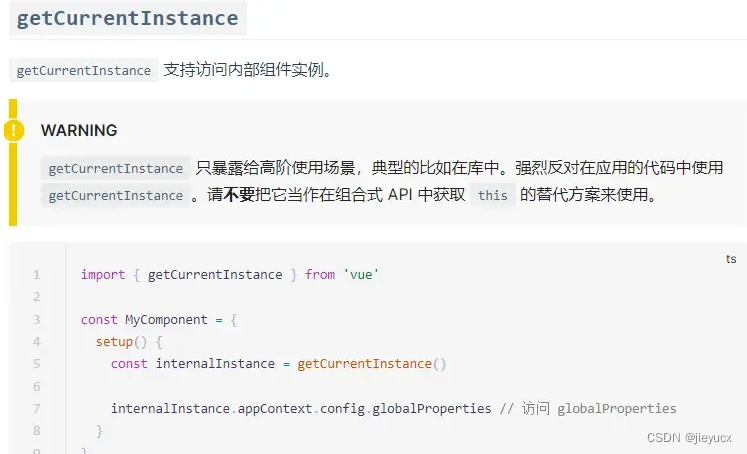
如果是获取dom大家可以通过ref获取,比如:<template> <div ref="test">hhhhhhdiv> template> <script> import {ref,onMounted } from 'vue' export default { setup() { const test = ref(null) onMounted(() => { console.log('test实例',test.value) }) return { test } } script>- 1
- 2
- 3
- 4
- 5
- 6
- 7
- 8
- 9
- 10
- 11
- 12
- 13
- 14
- 15
- 16
- 17
打印结果如下:

至于其他的一些常用属性和方法,vue3中的setup中提供了props和contexts上下文。官方setup用法
props

context

-
-
相关阅读:
钥匙环服务,打造无缝的跨设备登录体验
shiro721复现
Framwork入门のPiex 6P源码(下载/编译/刷机)
数字IC笔试千题解--编程&&脚本篇(八)
uni-app:实现view元素强制换行(解决长字符和英文字符不换行问题)
阿里巴巴全球数学竞赛报名条件
引入短信服务
大厂真题:【DP】米哈游2023秋招-米小游与魔法少女-奇运
Unity 预制体放在场景中可见,通过代码复制出来不可见的处理
Netty—Channel
- 原文地址:https://blog.csdn.net/jieyucx/article/details/134030633
- 最新文章
-
Paxos算法:如何解决分布式系统中的共识问题?
和AI一起搞事情#5:技能进阶与Claude Design初体验
.NET 11 Preview 4 正式发布:Runtime-Async 全面启用、Process API 大幅扩展
大数据没那么远:把散乱数据理顺,让业务敢用
高性能百度OCR ONNX Runtime C#实现
C#/.NET/.NET Core技术前沿周刊 | 第 70 期(2026年5.01-5.10)
Triton学习 · Part 1 · Hello, world!
manyspeech-cli 本地命令行语音识别工具
PortSwigger SQL注入LAB5 & LAB6
Go-Spring 项目概览