-
games101作业七,计算机图形学作业三,详细知识点总结(附代码)
计算机图形学课程作业总结,同课程慎重Ctrl C/V
文章目录
下面是一做本次实验的一些算法知识总结:
1. 光线追踪算法
在光线追踪中最重要的操作之一就是找到光线与物体的交点。一旦找到光线与物体的交点,就可以执行着色并返回像素颜色。因此 光线的生成和光线与三角的相交在光线追踪算法 中至关重要!!
光线追踪的准备工作
光线追踪的一些假设:
- 出发点是一个点
- 光源是点光源
- 场景物体的反射为镜面反射
光线投射步骤:
- 从出射点穿过成像平面打出一根光线到场景中
- 找到与场景最近的交点
- 将交点与光源连接,判断是否在阴影中
- 计算着色情况写回像素中
递归光线追踪:
- 光线不仅回反射而且会折射,然后再与其他物体进行反射
- 每次反射有能量损耗,若没有损耗则无数次后的累加会变成白色
- 递归设置一个最大次数
确定光线与场景的交点:
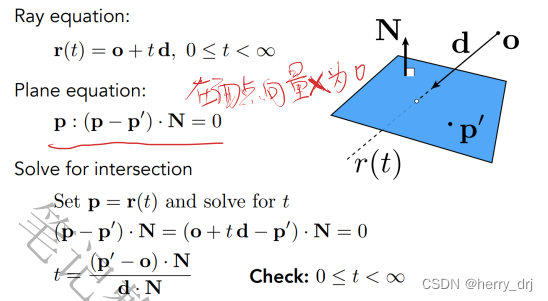
- 光线方程
- 以o为起点 d为方向(单位向量)t为时间 r(t) = o+ td 0<=t<∞
- 在隐式几何中,可以直接通过将光线方程带入表达式就可以进行计算;
- 在显示几何中,需要将几何体中每一个三角形面进行判断,
具体方法如下: - 几何面用 一个点 和 一个法线 表示平面 (p-p’)·N = 0;
- 将光线方程r(t)带入光线方程中;
- 求出交点,判断交点是在三角形内,还是在三角形外,若在内侧则是三角形的交点;
- 判断交点在三角形内外侧的方法在前面章节中学习过
Moller Trumbore算法:
射线三角相交算法:可以更快的求出三角形与射线的交点
- P0 P1 P2为 三角形的三个顶点
- 光线方程为 r(t) = o+ td 0<=t<∞
- 通过解出来参数``E1 E2 S S1 S2`参数的定义解出来交点。

rayTriangleIntersect()函数
rayTriangleIntersect(): 判断光线是否与三角形相交。bool rayTriangleIntersect(const Vector3f& v0, const Vector3f& v1, const Vector3f& v2, const Vector3f& orig, const Vector3f& dir, float& tnear, float& u, float& v)v0, v1, v2 是三角形的三个顶点,orig 是光线的起点,dir 是光线单位化的方向向量。tnear, u, v 使用下述算法推导的 Moller-Trumbore 算法来更新的参数
bool rayTriangleIntersect(const Vector3f& v0, const Vector3f& v1, const Vector3f& v2, const Vector3f& orig, const Vector3f& dir, float& tnear, float& u, float& v) { // TODO: Implement this function that tests whether the triangle // that's specified bt v0, v1 and v2 intersects with the ray (whose // origin is *orig* and direction is *dir*) // Also don't forget to update tnear, u and v. Vector3f E1 = v1 - v0; Vector3f E2 = v2 - v0; Vector3f S = orig - v0; Vector3f S1 = crossProduct(dir, E2); Vector3f S2 = crossProduct(S, E1); float n = 1.0f/dotProduct(S1, E1); Vector3f res(dotProduct(S2,E2),dotProduct(S1,S),dotProduct(S2,dir)); res = n*res; tnear = res.x; u = res.y; v = res.z; if(tnear > 0.f && 1-u-v>=0.f && u>=0.f && v>=0.f) return true; else return false; }- 1
- 2
- 3
- 4
- 5
- 6
- 7
- 8
- 9
- 10
- 11
- 12
- 13
- 14
- 15
- 16
- 17
- 18
- 19
- 20
- 21
- 22
- 23
2. 光线追踪包围盒加速算法
在显式几何计算交点时当面足够多的时候,计算起来是十分耗费时间了,因此如何优化十分关键。AABB模型就是加速计算光线与场景交点的方法
1. AABB 包围盒又称 轴对齐包围盒
AABB 包围盒就是采用一个长方体将物体包裹起来,进行两个物体的相交性检测时仅检测物体对应包围盒(包裹物体的长方体)的相交性。
另外,AABB 包围盒有一个重要特性,那就是包围盒对应的长方体每一个面都是与某个坐标轴平面平行的,因此,AABB 包围盒又称了 轴对齐包围盒 。
有了上述约定后,确定 AABB 包围盒就简单多了,仅需要记录 6 个值即可,这 6 个值分别代表包围盒在每个坐标轴上的最小值与最大值,即 xmin、xmax、ymin、ymax、zmin、zmax。
2. 光线与包围盒(AABB)的相交检测算法
下面是光线与物体相交的三种不同情况


观察上述三幅图可以得出,只要发生区间交叠,光线与平面就能相交,
那么区间交叠出现的条件便是:光线==进入平面处的最大t值==小于光线==离开平面处的最小t值==
那么问题就变成了如何求光线进入平面处的最大t值以及光线离开平面处的最小t值
这个问题通过 线与平面相交 的参数方程求解就可以了。
- 几何面用 一个点 和 一个法线 表示平面 (p-p’)·N = 0;
- 将光线方程
P = r(t)代入光线方程中; - 求出交点,找出对应的t值;
3. 三维空间的拓展
- 增加一对平面,判断三对面的相交时间tmin,tmax。
- 求出tmin最大值,tmax最小值。
- 若tmax-tmin大于0则说明光线与包围盒相交。
- AABB有交点当且仅当(tmin
=0 ) - 几种tmin 或 tmax 为负值的特殊说明:
-tmax<0说明包围盒在光线背面,无交点(我们假设光源是一个点,如果包围盒在背面是不会有光传播到的)。
-tmax>=0 且tmin<0说明光源在包围盒中。

在下面的例子中用盒子8个顶点斜对角线的两个点的xyz坐标 作为平面的值 进行判断
4. 包围盒模型的算法
IntersectP(): 判断光线是否与盒子相交// 判断光线是否与盒子相交 用盒子8个顶点斜对角线的两个点的xyz坐标 作为平面的值 进行判断 inline bool Bounds3::IntersectP(const Ray& ray, const Vector3f& invDir, const std::array<int, 3>& dirIsNeg) const { // invDir: ray direction(x,y,z), invDir=(1.0/x,1.0/y,1.0/z), use this because Multiply is faster that Division // dirIsNeg: ray direction(x,y,z), dirIsNeg=[int(x>0),int(y>0),int(z>0)], use this to simplify your logic // TODO test if ray bound intersects float t_Min_x = (pMin.x - ray.origin.x) * invDir[0]; // 乘以每个方向的权重 float t_Min_y = (pMin.y - ray.origin.y) * invDir[1]; // 于每一组平面都需要分别计算一个最小时间和最大时间,代入公式即可, // 这里的invDir分别记录了光线传播沿xyz方向的倒数,便于计算公式中的 “÷某一传播方向” 。 float t_Min_z = (pMin.z - ray.origin.z) * invDir[2]; // pMix.x .y .z都相当于一个平面d float t_Max_x = (pMax.x - ray.origin.x) * invDir[0]; float t_Max_y = (pMax.y - ray.origin.y) * invDir[1]; float t_Max_z = (pMax.z - ray.origin.z) * invDir[2]; if (!dirIsNeg[0]) // 判断如果为负数的话,那就改变方向交换最大最小值。 { float t = t_Min_x; t_Min_x = t_Max_x; t_Max_x = t; } if (!dirIsNeg[1]) { float t = t_Min_y; t_Min_y = t_Max_y; t_Max_y = t; } if (!dirIsNeg[2]) { float t = t_Min_z; t_Min_z = t_Max_z; t_Max_z = t; } float t_enter = std::max(t_Min_x, std::max(t_Min_y, t_Min_z)); //找到进盒子的最大值 float t_exit = std::min(t_Max_x, std::min(t_Max_y, t_Max_z)); //找到出玻璃盒的最小值 if (t_enter <= t_exit && t_exit >= 0) // 判断必要条件 return true; else return false; }- 1
- 2
- 3
- 4
- 5
- 6
- 7
- 8
- 9
- 10
- 11
- 12
- 13
- 14
- 15
- 16
- 17
- 18
- 19
- 20
- 21
- 22
- 23
- 24
- 25
- 26
- 27
- 28
- 29
- 30
- 31
- 32
- 33
- 34
- 35
- 36
- 37
- 38
- 39
- 40
3. 层次包围盒BVH加速
1. 前述问题
如果三角形的面特别多,那么用Moller Trumenbore算法进行计算光线与三角形相交的计算就会变慢许多。因此我们采用包围盒的形式,先进行一个初步判断。以用来加速算法
建立网格的目的:
- 通过网格可以判断有tmin,tmax
- 若有 则对遍历到的网格测试与其有的交点
- 网格密度一般认为是27x物体数量
- 主要分类: Oct-Tree 八叉树 KD-Tree(原来用的多) BSP-Tree
由于KD树的一些问题:
- 难以判断物体与包围盒边界的相交问题。
- 一个物体容易相对穿过多个包围盒被重复计算影响性能。
- KD数的应用场景越来越小。
- 因此我们使用新的更加广泛的包围盒算法(BVH)进行加速
2. BVH层次包围盒
BVH的特点:
- 按照三角形进行划分,一个三角形只可能出现在一个包围盒内,但是不同包围盒之间可能有相交
- 思想像分组,只对三角形较多的组进行递归分组
- 每次划分都选择XYZ最长的轴进行划分,这样划分比较均匀
- 总选择中间的三角形进行划分,因此划分结果接近平衡二叉树
- 划分到一个比较小的数量后停止继续划分(比如5个三角形)
在看函数实现之前我们可以看一下
Intersecton的结构体:如下结构体,关键的属性值即为
happened(是否相交),coords(交点坐标),normal(交点所在平面法线),distance(光线起点到交点的距离),obj(交点所在物体的物体类型),m(交点所在物体的材料类型)。depth类似于“视深”,在后续的代码中对于可以反光的材质如会发生反射、折射或者透明的材质,会继续递归调用castRay并且把depth+1,而在最初又规定了可处理的depth的最大深度,这里认为反映了一个像素已反射其他像素的次数,即当前的光线是第几层次的间接光源,程序设定的最大depth为5,故一个像素点最多能显示五次光线反射的效果。
struct Intersection { Intersection(){ happened=false; coords=Vector3f(); normal=Vector3f(); distance= std::numeric_limits<double>::max(); obj =nullptr; m=nullptr; } bool happened; Vector3f coords; Vector3f normal; double distance; Object* obj; Material* m; };- 1
- 2
- 3
- 4
- 5
- 6
- 7
- 8
- 9
- 10
- 11
- 12
- 13
- 14
- 15
- 16
- 17
实现代码:
-
思路描述:
-
先判断是否与当前判断的盒子边界是否与光线相交,若无交点则判断结束返回;
-
若当前节点有物体,则判断是否有物体和光线相交,有相交,则进一步判断物体和光线的交点;
-
前两个判断完毕: 满足 1. 当前节点的盒子跟光线有相交 2. 当前节点的盒子里面没有物体, 因此需要判断大盒子的细分节点 左右两个小盒子;
-
循环递归判断左右节点重复上述步骤,最终返回与物体交点更近的
Intersection
Intersection BVHAccel::Intersect(const Ray& ray) const // in BVH.cpp { Intersection isect; if (!root) return isect; isect = BVHAccel::getIntersection(root, ray); return isect; } Intersection BVHAccel::getIntersection(BVHBuildNode* node, const Ray& ray) const // in BVH.cpp { Intersection isect; // TODO Traverse the BVH to find intersection if (!node->bounds.IntersectP(ray, ray.direction_inv, std::array<int, 3> {ray.direction.x > 0, ray.direction.y > 0, ray.direction.z > 0})) return isect; if (node->object != nullptr) return node->object->getIntersection(ray); Intersection isect_left, isect_right; isect_left = getIntersection(node->left, ray); isect_right = getIntersection(node->right, ray); return isect_left.distance <= isect_right.distance ? isect_left : isect_right; } Intersection Scene::intersect(const Ray &ray) const //in Scene.cpp { // TO DO Use BVH.cpp's Intersect function instead of the current return this->bvh->Intersect(ray); }- 1
- 2
- 3
- 4
- 5
- 6
- 7
- 8
- 9
- 10
- 11
- 12
- 13
- 14
- 15
- 16
- 17
- 18
- 19
- 20
- 21
- 22
- 23
- 24
- 25
- 26
- 27
- 28
- 29
- 30
4. 最终渲染函数 Render() && castRay()
1. Render()函数
Render():计算像素着色 生成图像,根据像素点,生成光线,再用生成的光线进行判断,找到交点,返回最近的颜色。 (然后根据计算出来的交点,通过反射折射继续不断递归计算)在遍历所有像素的循环里,生成对应的光线并 将返回的颜色保存在帧缓冲区( framebuffer) 中。在渲染过程结束后,帧缓冲区中的信息将被保存为图像

void Renderer::Render(const Scene& scene) { std::vector<Vector3f> framebuffer(scene.width * scene.height); // 在遍历所有像素的循环里,生成对应的光线并将返回的颜色保存在帧缓冲区( framebuffer)中 float scale = std::tan(deg2rad(scene.fov * 0.5f)); float imageAspectRatio = scene.width / (float)scene.height; // imageAspectRatio即宽高比,是原本scene的宽高比,所以要想恢复原始的比例需要用 宽 * 宽高比,即 x * imageAspectRatio。 // Use this variable as the eye position to start your rays. Vector3f eye_pos(0); int m = 0; for (int j = 0; j < scene.height; ++j) { for (int i = 0; i < scene.width; ++i) { // generate primary ray direction float x ; x = (2 * ((float)i + 0.5) / scene.width - 1) * imageAspectRatio * scale ; float y; y = (1.0 - 2 * ((float)j + 0.5) / scene.height) * scale; // TODO: Find the x and y positions of the current pixel to get the direction // vector that passes through it. // Also, don't forget to multiply both of them with the variable *scale*, and // x (horizontal) variable with the *imageAspectRatio* Vector3f dir = normalize(Vector3f(x, y, -1)); // Don't forget to normalize this direction! framebuffer[m++] = castRay(eye_pos, dir, scene, 0); // 该函数调用 trace 来查询光线与场景中最近的对象的交点 castRay返回该像素点的颜色,并存入缓冲区里 } UpdateProgress(j / (float)scene.height); } // save framebuffer to file FILE * fp = fopen("binary.ppm", "wb"); (void)fprintf(fp, "P6\n%d %d\n255\n", scene.width, scene.height); for (auto i = 0; i < scene.height * scene.width; ++i) { static unsigned char color[3]; color[0] = (char)(255 * clamp(0, 1, framebuffer[i].x)); color[1] = (char)(255 * clamp(0, 1, framebuffer[i].y)); color[2] = (char)(255 * clamp(0, 1, framebuffer[i].z)); fwrite(color, 1, 3, fp); } fclose(fp); }- 1
- 2
- 3
- 4
- 5
- 6
- 7
- 8
- 9
- 10
- 11
- 12
- 13
- 14
- 15
- 16
- 17
- 18
- 19
- 20
- 21
- 22
- 23
- 24
- 25
- 26
- 27
- 28
- 29
- 30
- 31
- 32
- 33
- 34
- 35
- 36
- 37
- 38
- 39
- 40
- 41
- 42
- 43
- 44
2. castRay()函数
// Implementation of Path Tracing Vector3f Scene::castRay(const Ray& ray, int depth) const { // TO DO Implement Path Tracing Algorithm here Intersection intersection = Scene::intersect(ray); //先得到相交的点 if (intersection.happened) { Vector3f hitPoint = intersection.coords; Vector3f N = intersection.normal; // normal Material* m = intersection.m; Vector3f L_dir(0.0), L_indir(0.0); // Uniformly sample the light at x (pdf_light = 1 / A) Intersection intersection_light; float pdf_light; sampleLight(intersection_light, pdf_light); // Shoot a ray from p to x Vector3f dir_p_x = (intersection_light.coords - hitPoint).normalized(); Ray ray_p_x(hitPoint + EPSILON * N, dir_p_x); Intersection intersection_p_x = Scene::intersect(ray_p_x); if (intersection_p_x.happened && intersection_p_x.m->hasEmission()) { Vector3f NN = intersection_p_x.normal; L_dir = intersection_p_x.m->m_emission * m->eval(ray.direction, dir_p_x, N) * dotProduct(dir_p_x, N) * dotProduct(-dir_p_x, NN) / intersection_p_x.distance / pdf_light; } if (get_random_float() <= RussianRoulette) { // Trace a ray r(p, wi) Vector3f dir_i = m->sample(ray.direction, N).normalized(); Ray ray_p_diri(hitPoint, dir_i); Intersection intersection_p_diri = Scene::intersect(ray_p_diri); if (intersection_p_diri.happened && !intersection_p_diri.m->hasEmission()) { L_indir = castRay(ray_p_diri, depth + 1) * m->eval(ray.direction, dir_i, N) * dotProduct(dir_i, N) / m->pdf(ray.direction, dir_i, N) / RussianRoulette; } } return m->getEmission() + L_dir + L_indir; } else { return Vector3f(0, 0, 0); } }- 1
- 2
- 3
- 4
- 5
- 6
- 7
- 8
- 9
- 10
- 11
- 12
- 13
- 14
- 15
- 16
- 17
- 18
- 19
- 20
- 21
- 22
- 23
- 24
- 25
- 26
- 27
- 28
- 29
- 30
- 31
- 32
- 33
- 34
- 35
- 36
- 37
- 38
- 39
- 40
- 41
- 42
- 43
5. Debug处理
1. fopen函数
3.右键项目------->Properties(属性)------->Configuration Properties(配置属性)------>C/C++ ------>Preprocessor(预处理器)------->Preprocessor Difinitions (预处理器定义) 添加 _CRT_SECURE_NO_WARNINGS 之后点击OK。最后 应用------>确定。具体操作如下。

原文链接:https://blog.csdn.net/join_yuan/article/details/1056292922. C2039 “optional“: 不是 “std“ 的成员
std::optional 需要C++17.
Visual Studio:
项目 -> 属性 -> C/C++ -> 所有选项 -> 附加选项,增加:/std:c++17
gcc/clang:
添加-std=c++17
6. games101的一些前置作业:
下面是我做的一些games101的一些前置作业用以过渡
games101作业五
历史作业可以参考 作业七
在这次作业中,我们需要实现两个部分:光线的生成和光线与三角的相交。
std::optional<hit_payload> trace(const Vector3f &orig, const Vector3f &dir,const std::vector<std::unique_ptr<Object> > &objects) { float tNear = kInfinity; std::optional<hit_payload> payload; for (const auto & object : objects) { float tNearK = kInfinity; uint32_t indexK; Vector2f uvK; if (object->intersect(orig, dir, tNearK, indexK, uvK) && tNearK < tNear) { payload.emplace(); payload->hit_obj = object.get(); payload->tNear = tNearK; payload->index = indexK; payload->uv = uvK; tNear = tNearK; } } return payload; } Vector3f castRay(const Vector3f &orig, const Vector3f &dir, const Scene& scene,int depth) { if (depth > scene.maxDepth) { return Vector3f(0.0,0.0,0.0); } Vector3f hitColor = scene.backgroundColor; if (auto payload = trace(orig, dir, scene.get_objects()); payload) { Vector3f hitPoint = orig + dir * payload->tNear; Vector3f N; // normal Vector2f st; // st coordinates payload->hit_obj->getSurfaceProperties(hitPoint, dir, payload->index, payload->uv, N, st); switch (payload->hit_obj->materialType) { case REFLECTION_AND_REFRACTION: { Vector3f reflectionDirection = normalize(reflect(dir, N)); Vector3f refractionDirection = normalize(refract(dir, N, payload->hit_obj->ior)); Vector3f reflectionRayOrig = (dotProduct(reflectionDirection, N) < 0) ? hitPoint - N * scene.epsilon : hitPoint + N * scene.epsilon; Vector3f refractionRayOrig = (dotProduct(refractionDirection, N) < 0) ? hitPoint - N * scene.epsilon : hitPoint + N * scene.epsilon; Vector3f reflectionColor = castRay(reflectionRayOrig, reflectionDirection, scene, depth + 1); Vector3f refractionColor = castRay(refractionRayOrig, refractionDirection, scene, depth + 1); float kr = fresnel(dir, N, payload->hit_obj->ior); hitColor = reflectionColor * kr + refractionColor * (1 - kr); break; } case REFLECTION: { float kr = fresnel(dir, N, payload->hit_obj->ior); Vector3f reflectionDirection = reflect(dir, N); Vector3f reflectionRayOrig = (dotProduct(reflectionDirection, N) < 0) ? hitPoint + N * scene.epsilon : hitPoint - N * scene.epsilon; hitColor = castRay(reflectionRayOrig, reflectionDirection, scene, depth + 1) * kr; break; } default: { Vector3f lightAmt = 0, specularColor = 0; Vector3f shadowPointOrig = (dotProduct(dir, N) < 0) ? hitPoint + N * scene.epsilon : hitPoint - N * scene.epsilon; for (auto& light : scene.get_lights()) { Vector3f lightDir = light->position - hitPoint; // square of the distance between hitPoint and the light float lightDistance2 = dotProduct(lightDir, lightDir); lightDir = normalize(lightDir); float LdotN = std::max(0.f, dotProduct(lightDir, N)); // is the point in shadow, and is the nearest occluding object closer to the object than the light itself? auto shadow_res = trace(shadowPointOrig, lightDir, scene.get_objects()); bool inShadow = shadow_res && (shadow_res->tNear * shadow_res->tNear < lightDistance2); lightAmt += inShadow ? 0 : light->intensity * LdotN; Vector3f reflectionDirection = reflect(-lightDir, N); specularColor += powf(std::max(0.f, -dotProduct(reflectionDirection, dir)), payload->hit_obj->specularExponent) * light->intensity; } hitColor = lightAmt * payload->hit_obj->evalDiffuseColor(st) * payload->hit_obj->Kd + specularColor * payload->hit_obj->Ks; break; } } } return hitColor; } void Renderer::Render(const Scene& scene) { std::vector<Vector3f> framebuffer(scene.width * scene.height); // 在遍历所有像素的循环里,生成对应的光线并将返回的颜色保存在帧缓冲区( framebuffer)中 float scale = std::tan(deg2rad(scene.fov * 0.5f)); float imageAspectRatio = scene.width / (float)scene.height; // imageAspectRatio即宽高比,是原本scene的宽高比,所以要想恢复原始的比例需要用 宽 * 宽高比,即 x * imageAspectRatio。 // Use this variable as the eye position to start your rays. Vector3f eye_pos(0); int m = 0; for (int j = 0; j < scene.height; ++j) { for (int i = 0; i < scene.width; ++i) { // generate primary ray direction float x ; x = (2 * ((float)i + 0.5) / scene.width - 1) * imageAspectRatio * scale ; float y; y = (1.0 - 2 * ((float)j + 0.5) / scene.height) * scale; // TODO: Find the x and y positions of the current pixel to get the direction // vector that passes through it. // Also, don't forget to multiply both of them with the variable *scale*, and // x (horizontal) variable with the *imageAspectRatio* Vector3f dir = normalize(Vector3f(x, y, -1)); // Don't forget to normalize this direction! framebuffer[m++] = castRay(eye_pos, dir, scene, 0); } UpdateProgress(j / (float)scene.height); } // save framebuffer to file FILE * fp = fopen("binary.ppm", "wb"); (void)fprintf(fp, "P6\n%d %d\n255\n", scene.width, scene.height); for (auto i = 0; i < scene.height * scene.width; ++i) { static unsigned char color[3]; color[0] = (char)(255 * clamp(0, 1, framebuffer[i].x)); color[1] = (char)(255 * clamp(0, 1, framebuffer[i].y)); color[2] = (char)(255 * clamp(0, 1, framebuffer[i].z)); fwrite(color, 1, 3, fp); } fclose(fp); }- 1
- 2
- 3
- 4
- 5
- 6
- 7
- 8
- 9
- 10
- 11
- 12
- 13
- 14
- 15
- 16
- 17
- 18
- 19
- 20
- 21
- 22
- 23
- 24
- 25
- 26
- 27
- 28
- 29
- 30
- 31
- 32
- 33
- 34
- 35
- 36
- 37
- 38
- 39
- 40
- 41
- 42
- 43
- 44
- 45
- 46
- 47
- 48
- 49
- 50
- 51
- 52
- 53
- 54
- 55
- 56
- 57
- 58
- 59
- 60
- 61
- 62
- 63
- 64
- 65
- 66
- 67
- 68
- 69
- 70
- 71
- 72
- 73
- 74
- 75
- 76
- 77
- 78
- 79
- 80
- 81
- 82
- 83
- 84
- 85
- 86
- 87
- 88
- 89
- 90
- 91
- 92
- 93
- 94
- 95
- 96
- 97
- 98
- 99
- 100
- 101
- 102
- 103
- 104
- 105
- 106
- 107
- 108
- 109
- 110
- 111
- 112
- 113
- 114
- 115
- 116
- 117
- 118
- 119
- 120
- 121
- 122
- 123
- 124
- 125
- 126
- 127
- 128
- 129
- 130
- 131
- 132
- 133
- 134
- 135
- 136
- 137
- 138
- 139
三角形库
#pragma once #include "Object.hpp" #includebool rayTriangleIntersect(const Vector3f& v0, const Vector3f& v1, const Vector3f& v2, const Vector3f& orig, const Vector3f& dir, float& tnear, float& u, float& v) // : v0, v1, v2 是三角形的三个 // 顶点,orig 是光线的起点, dir 是光线单位化的方向向量。tnear, u, v 是你需 // 要使用我们课上推导的 Moller - Trumbore 算法来更新的参数 { // TODO: Implement this function that tests whether the triangle // that's specified bt v0, v1 and v2 intersects with the ray (whose // origin is *orig* and direction is *dir*) // Also don't forget to update tnear, u and v. Vector3f E1 = v1 - v0, E2 = v2 - v0, S = orig - v0; Vector3f S1 = crossProduct(dir, E2), S2 = crossProduct(S, E1); if (dotProduct(S1, E1) <= 0) return false; // 更新了tnear 和 u, v tnear = dotProduct(S2, E2) / dotProduct(S1, E1); u = dotProduct(S1, S) / dotProduct(S1, E1); v = dotProduct(S2, dir) / dotProduct(S1, E1); if (tnear >= 0 && u >= 0 && v >= 0 && (1 - u - v) >= 0) { return true; } return false; } class MeshTriangle : public Object { public: MeshTriangle(const Vector3f* verts, const uint32_t* vertsIndex, const uint32_t& numTris, const Vector2f* st) { uint32_t maxIndex = 0; for (uint32_t i = 0; i < numTris * 3; ++i) if (vertsIndex[i] > maxIndex) maxIndex = vertsIndex[i]; maxIndex += 1; vertices = std::unique_ptr<Vector3f[]>(new Vector3f[maxIndex]); memcpy(vertices.get(), verts, sizeof(Vector3f) * maxIndex); vertexIndex = std::unique_ptr<uint32_t[]>(new uint32_t[numTris * 3]); memcpy(vertexIndex.get(), vertsIndex, sizeof(uint32_t) * numTris * 3); numTriangles = numTris; stCoordinates = std::unique_ptr<Vector2f[]>(new Vector2f[maxIndex]); memcpy(stCoordinates.get(), st, sizeof(Vector2f) * maxIndex); } bool intersect(const Vector3f& orig, const Vector3f& dir, float& tnear, uint32_t& index, Vector2f& uv) const override { bool intersect = false; for (uint32_t k = 0; k < numTriangles; ++k) { const Vector3f& v0 = vertices[vertexIndex[k * 3]]; const Vector3f& v1 = vertices[vertexIndex[k * 3 + 1]]; const Vector3f& v2 = vertices[vertexIndex[k * 3 + 2]]; float t, u, v; if (rayTriangleIntersect(v0, v1, v2, orig, dir, t, u, v) && t < tnear) { tnear = t; uv.x = u; uv.y = v; index = k; intersect |= true; } } return intersect; } void getSurfaceProperties(const Vector3f&, const Vector3f&, const uint32_t& index, const Vector2f& uv, Vector3f& N, Vector2f& st) const override { const Vector3f& v0 = vertices[vertexIndex[index * 3]]; const Vector3f& v1 = vertices[vertexIndex[index * 3 + 1]]; const Vector3f& v2 = vertices[vertexIndex[index * 3 + 2]]; Vector3f e0 = normalize(v1 - v0); Vector3f e1 = normalize(v2 - v1); N = normalize(crossProduct(e0, e1)); const Vector2f& st0 = stCoordinates[vertexIndex[index * 3]]; const Vector2f& st1 = stCoordinates[vertexIndex[index * 3 + 1]]; const Vector2f& st2 = stCoordinates[vertexIndex[index * 3 + 2]]; st = st0 * (1 - uv.x - uv.y) + st1 * uv.x + st2 * uv.y; } Vector3f evalDiffuseColor(const Vector2f& st) const override { float scale = 5; float pattern = (fmodf(st.x * scale, 1) > 0.5) ^ (fmodf(st.y * scale, 1) > 0.5); return lerp(Vector3f(0.815, 0.235, 0.031), Vector3f(0.937, 0.937, 0.231), pattern); } std::unique_ptr<Vector3f[]> vertices; uint32_t numTriangles; std::unique_ptr<uint32_t[]> vertexIndex; std::unique_ptr<Vector2f[]> stCoordinates; }; - 1
- 2
- 3
- 4
- 5
- 6
- 7
- 8
- 9
- 10
- 11
- 12
- 13
- 14
- 15
- 16
- 17
- 18
- 19
- 20
- 21
- 22
- 23
- 24
- 25
- 26
- 27
- 28
- 29
- 30
- 31
- 32
- 33
- 34
- 35
- 36
- 37
- 38
- 39
- 40
- 41
- 42
- 43
- 44
- 45
- 46
- 47
- 48
- 49
- 50
- 51
- 52
- 53
- 54
- 55
- 56
- 57
- 58
- 59
- 60
- 61
- 62
- 63
- 64
- 65
- 66
- 67
- 68
- 69
- 70
- 71
- 72
- 73
- 74
- 75
- 76
- 77
- 78
- 79
- 80
- 81
- 82
- 83
- 84
- 85
- 86
- 87
- 88
- 89
- 90
- 91
- 92
- 93
- 94
- 95
- 96
- 97
- 98
games101作业六
重点关注物体 划分算法 Bounding Volume Hierarchy (BVH)。
实现 Ray-Bounding Volume 求交与 BVH 查找。
depth类似于“视深”,在后续的代码中对于可以反光的材质如会发生反射、折射或者透明的材质,会继续递归调用castRay并且把depth+1,而在最初又规定了可处理的depth的最大深度,这里认为反映了一个像素已反射其他像素的次数,即当前的光线是第几层次的间接光源,程序设定的最大depth为5,故一个像素点最多能显示五次光线反射的效果。
struct Intersection { Intersection(){ happened=false; coords=Vector3f(); normal=Vector3f(); distance= std::numeric_limits<double>::max(); obj =nullptr; m=nullptr; } bool happened; Vector3f coords; Vector3f normal; double distance; Object* obj; Material* m; };- 1
- 2
- 3
- 4
- 5
- 6
- 7
- 8
- 9
- 10
- 11
- 12
- 13
- 14
- 15
- 16
- 17
如上,关键的属性值即为happened(是否相交),coords(交点坐标),normal(交点所在平面法线),distance(光线起点到交点的距离),obj(交点所在物体的物体类型),m(交点所在物体的材料类型)。
games101作业七

-
相关阅读:
MyBatis-----4、MyBatis各种查询功能
Unity UI Toolkit学习笔记-USS
【物联网】简要解释RTK(Real-Time Kinematic)>>实时动态差分定位
汉威科技亮相上海传感器展并发表主题演讲,智能传感器大有可为
【数据结构】B : DS图应用--最短路径
YOLOv7——论文简述
基于SSH的网络预约挂号系统的设计与实现
在 Amazon 搭建无代码可视化的数据分析和建模平台
SpringCloud Gateway源码跟踪解析
黑马点评(十二) -- UV统计
- 原文地址:https://blog.csdn.net/m0_63669388/article/details/134031582
- 最新文章
-
沪漂五周年了:我越来越迷茫了
Agentic Skill Routing 实战:别再把所有 Skill 塞进 AI Agent 上下文
MySQL-Seconds_behind_master的精度误差
[MAF预定义ChatClient中间件-03]CachingChatClient——利用缓存省钱省时间
AI的至暗历史:从万众期待到被政府撤资,AI的两次死亡徘徊
Agent OS :五种驯服不确定性的范式
PortSwigger SQL注入LAB11
数据库即时编译JIT
[Begin]AI Learn Data Day 0
深度学习进阶(二十七)现代 LLM 的核心架构设计其二:SwiGLU