-
k8s之Flannel网络插件安装提示forbidden无权限
一、问题描述
在安装k8s的网络插件时,提示如下信息,各种forbidden无权限
[root@zzyk8s01 scripts]# kubectl apply -f kube-flannel.yml Error from server (Forbidden): error when retrieving current configuration of: Resource: "policy/v1beta1, Resource=podsecuritypolicies", GroupVersionKind: "policy/v1beta1, Kind=PodSecurityPolicy" Name: "psp.flannel.unprivileged", Namespace: "" from server for: "kube-flannel.yml": podsecuritypolicies.policy "psp.flannel.unprivileged" is forbidden: User "system:node:zzyk8s01" cannot get resource "podsecuritypolicies" in API group "policy" at the cluster scope Error from server (Forbidden): error when retrieving current configuration of: Resource: "rbac.authorization.k8s.io/v1, Resource=clusterroles", GroupVersionKind: "rbac.authorization.k8s.io/v1, Kind=ClusterRole" Name: "flannel", Namespace: "" from server for: "kube-flannel.yml": clusterroles.rbac.authorization.k8s.io "flannel" is forbidden: User "system:node:zzyk8s01" cannot get resource "clusterroles" in API group "rbac.authorization.k8s.io" at the cluster scope Error from server (Forbidden): error when retrieving current configuration of: Resource: "rbac.authorization.k8s.io/v1, Resource=clusterrolebindings", GroupVersionKind: "rbac.authorization.k8s.io/v1, Kind=ClusterRoleBinding" Name: "flannel", Namespace: "" from server for: "kube-flannel.yml": clusterrolebindings.rbac.authorization.k8s.io "flannel" is forbidden: User "system:node:zzyk8s01" cannot get resource "clusterrolebindings" in API group "rbac.authorization.k8s.io" at the cluster scope Error from server (Forbidden): error when retrieving current configuration of: Resource: "/v1, Resource=serviceaccounts", GroupVersionKind: "/v1, Kind=ServiceAccount" Name: "flannel", Namespace: "kube-system" from server for: "kube-flannel.yml": serviceaccounts "flannel" is forbidden: User "system:node:zzyk8s01" cannot get resource "serviceaccounts" in API group "" in the namespace "kube-system": can only create tokens for individual service accounts Error from server (Forbidden): error when retrieving current configuration of: Resource: "/v1, Resource=configmaps", GroupVersionKind: "/v1, Kind=ConfigMap" Name: "kube-flannel-cfg", Namespace: "kube-system" from server for: "kube-flannel.yml": configmaps "kube-flannel-cfg" is forbidden: User "system:node:zzyk8s01" cannot get resource "configmaps" in API group "" in the namespace "kube-system": no relationship found between node 'zzyk8s01' and this object Error from server (Forbidden): error when retrieving current configuration of: Resource: "apps/v1, Resource=daemonsets", GroupVersionKind: "apps/v1, Kind=DaemonSet" Name: "kube-flannel-ds", Namespace: "kube-system" from server for: "kube-flannel.yml": daemonsets.apps "kube-flannel-ds" is forbidden: User "system:node:zzyk8s01" cannot get resource "daemonsets" in API group "apps" in the namespace "kube-system" [root@zzyk8s01 scripts]#- 1
- 2
- 3
- 4
- 5
- 6
- 7
- 8
- 9
- 10
- 11
- 12
- 13
- 14
- 15
- 16
- 17
- 18
- 19
- 20
- 21
- 22
- 23
- 24
- 25
- 26
二、解决方法
这可能是由于config没有更新导致的,/root/.kube/config是从/etc/kubernetes/admin.conf复制而来。复制来之后,是需要执行更新kubeconfig命令的。
2.1 更新 kubeconfig 命令:
export KUBECONFIG=/root/.kube/config chmod g-r /root/.kube/config- 1
- 2
2.2 再次执行安装flannel的命令
提示各种OK
[root@zzyk8s01 scripts]# kubectl apply -f kube-flannel.yml Warning: policy/v1beta1 PodSecurityPolicy is deprecated in v1.21+, unavailable in v1.25+ podsecuritypolicy.policy/psp.flannel.unprivileged created clusterrole.rbac.authorization.k8s.io/flannel created clusterrolebinding.rbac.authorization.k8s.io/flannel created serviceaccount/flannel created configmap/kube-flannel-cfg created daemonset.apps/kube-flannel-ds created- 1
- 2
- 3
- 4
- 5
- 6
- 7
- 8
2.3 查看flannel的运行情况
显示各种Running
[root@zzyk8s01 scripts]# kubectl get pods -n kube-system NAME READY STATUS RESTARTS AGE coredns-78fcd69978-vlzpd 1/1 Running 0 2d16h coredns-78fcd69978-vmtdm 1/1 Running 0 2d16h etcd-zzyk8s01 1/1 Running 1 2d16h kube-apiserver-zzyk8s01 1/1 Running 1 2d16h kube-controller-manager-zzyk8s01 1/1 Running 2 2d16h kube-flannel-ds-fpzm9 1/1 Running 0 36s kube-flannel-ds-gkgnz 1/1 Running 0 36s kube-flannel-ds-tmb5s 1/1 Running 0 36s kube-proxy-2gxv9 1/1 Running 0 2d16h kube-proxy-h2zdl 1/1 Running 0 2d16h kube-proxy-v6drm 1/1 Running 1 2d16h kube-scheduler-zzyk8s01 1/1 Running 2 2d16h- 1
- 2
- 3
- 4
- 5
- 6
- 7
- 8
- 9
- 10
- 11
- 12
- 13
- 14
- 15
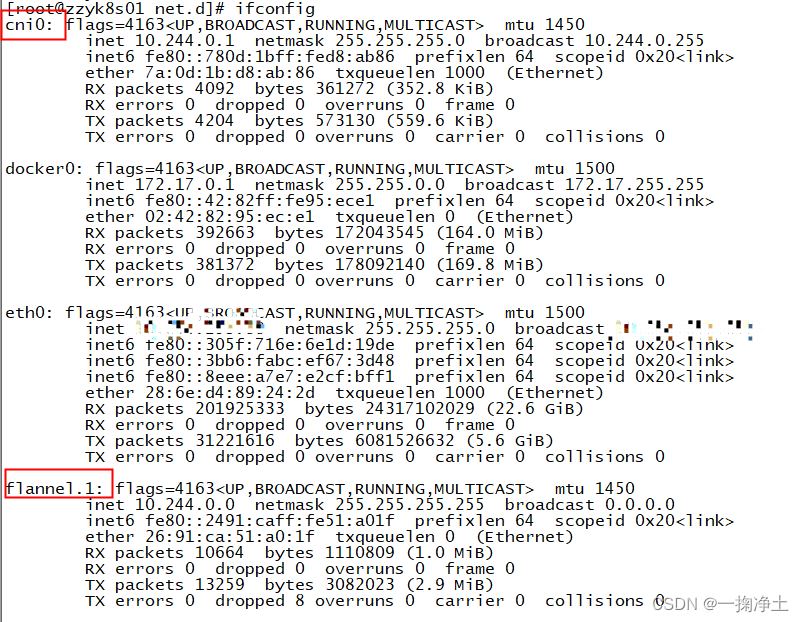
2.4 查看flannel网络情况
如下图,cni0和flannel.1网络都UP状态
三、附上
kube-flannel.yml的文件--- apiVersion: policy/v1beta1 kind: PodSecurityPolicy metadata: name: psp.flannel.unprivileged annotations: seccomp.security.alpha.kubernetes.io/allowedProfileNames: docker/default seccomp.security.alpha.kubernetes.io/defaultProfileName: docker/default apparmor.security.beta.kubernetes.io/allowedProfileNames: runtime/default apparmor.security.beta.kubernetes.io/defaultProfileName: runtime/default spec: privileged: false volumes: - configMap - secret - emptyDir - hostPath allowedHostPaths: - pathPrefix: "/etc/cni/net.d" - pathPrefix: "/etc/kube-flannel" - pathPrefix: "/run/flannel" readOnlyRootFilesystem: false # Users and groups runAsUser: rule: RunAsAny supplementalGroups: rule: RunAsAny fsGroup: rule: RunAsAny # Privilege Escalation allowPrivilegeEscalation: false defaultAllowPrivilegeEscalation: false # Capabilities allowedCapabilities: ['NET_ADMIN', 'NET_RAW'] defaultAddCapabilities: [] requiredDropCapabilities: [] # Host namespaces hostPID: false hostIPC: false hostNetwork: true hostPorts: - min: 0 max: 65535 # SELinux seLinux: # SELinux is unused in CaaSP rule: 'RunAsAny' --- kind: ClusterRole apiVersion: rbac.authorization.k8s.io/v1 metadata: name: flannel rules: - apiGroups: ['extensions'] resources: ['podsecuritypolicies'] verbs: ['use'] resourceNames: ['psp.flannel.unprivileged'] - apiGroups: - "" resources: - pods verbs: - get - apiGroups: - "" resources: - nodes verbs: - list - watch - apiGroups: - "" resources: - nodes/status verbs: - patch --- kind: ClusterRoleBinding apiVersion: rbac.authorization.k8s.io/v1 metadata: name: flannel roleRef: apiGroup: rbac.authorization.k8s.io kind: ClusterRole name: flannel subjects: - kind: ServiceAccount name: flannel namespace: kube-system --- apiVersion: v1 kind: ServiceAccount metadata: name: flannel namespace: kube-system --- kind: ConfigMap apiVersion: v1 metadata: name: kube-flannel-cfg namespace: kube-system labels: tier: node app: flannel data: cni-conf.json: | { "name": "cbr0", "cniVersion": "0.3.1", "plugins": [ { "type": "flannel", "delegate": { "hairpinMode": true, "isDefaultGateway": true } }, { "type": "portmap", "capabilities": { "portMappings": true } } ] } net-conf.json: | { "Network": "10.244.0.0/16", "Backend": { "Type": "vxlan" } } --- apiVersion: apps/v1 kind: DaemonSet metadata: name: kube-flannel-ds namespace: kube-system labels: tier: node app: flannel spec: selector: matchLabels: app: flannel template: metadata: labels: tier: node app: flannel spec: affinity: nodeAffinity: requiredDuringSchedulingIgnoredDuringExecution: nodeSelectorTerms: - matchExpressions: - key: kubernetes.io/os operator: In values: - linux hostNetwork: true priorityClassName: system-node-critical tolerations: - operator: Exists effect: NoSchedule serviceAccountName: flannel initContainers: - name: install-cni image: jmgao1983/flannel #quay.io/coreos/flannel:v0.13.1-rc2 command: - cp args: - -f - /etc/kube-flannel/cni-conf.json - /etc/cni/net.d/10-flannel.conflist volumeMounts: - name: cni mountPath: /etc/cni/net.d - name: flannel-cfg mountPath: /etc/kube-flannel/ containers: - name: kube-flannel image: jmgao1983/flannel #quay.io/coreos/flannel:v0.13.1-rc2 command: - /opt/bin/flanneld args: - --ip-masq - --kube-subnet-mgr resources: requests: cpu: "100m" memory: "50Mi" limits: cpu: "100m" memory: "50Mi" securityContext: privileged: false capabilities: add: ["NET_ADMIN", "NET_RAW"] env: - name: POD_NAME valueFrom: fieldRef: fieldPath: metadata.name - name: POD_NAMESPACE valueFrom: fieldRef: fieldPath: metadata.namespace volumeMounts: - name: run mountPath: /run/flannel - name: flannel-cfg mountPath: /etc/kube-flannel/ volumes: - name: run hostPath: path: /run/flannel - name: cni hostPath: path: /etc/cni/net.d - name: flannel-cfg configMap: name: kube-flannel-cfg- 1
- 2
- 3
- 4
- 5
- 6
- 7
- 8
- 9
- 10
- 11
- 12
- 13
- 14
- 15
- 16
- 17
- 18
- 19
- 20
- 21
- 22
- 23
- 24
- 25
- 26
- 27
- 28
- 29
- 30
- 31
- 32
- 33
- 34
- 35
- 36
- 37
- 38
- 39
- 40
- 41
- 42
- 43
- 44
- 45
- 46
- 47
- 48
- 49
- 50
- 51
- 52
- 53
- 54
- 55
- 56
- 57
- 58
- 59
- 60
- 61
- 62
- 63
- 64
- 65
- 66
- 67
- 68
- 69
- 70
- 71
- 72
- 73
- 74
- 75
- 76
- 77
- 78
- 79
- 80
- 81
- 82
- 83
- 84
- 85
- 86
- 87
- 88
- 89
- 90
- 91
- 92
- 93
- 94
- 95
- 96
- 97
- 98
- 99
- 100
- 101
- 102
- 103
- 104
- 105
- 106
- 107
- 108
- 109
- 110
- 111
- 112
- 113
- 114
- 115
- 116
- 117
- 118
- 119
- 120
- 121
- 122
- 123
- 124
- 125
- 126
- 127
- 128
- 129
- 130
- 131
- 132
- 133
- 134
- 135
- 136
- 137
- 138
- 139
- 140
- 141
- 142
- 143
- 144
- 145
- 146
- 147
- 148
- 149
- 150
- 151
- 152
- 153
- 154
- 155
- 156
- 157
- 158
- 159
- 160
- 161
- 162
- 163
- 164
- 165
- 166
- 167
- 168
- 169
- 170
- 171
- 172
- 173
- 174
- 175
- 176
- 177
- 178
- 179
- 180
- 181
- 182
- 183
- 184
- 185
- 186
- 187
- 188
- 189
- 190
- 191
- 192
- 193
- 194
- 195
- 196
- 197
- 198
- 199
- 200
- 201
- 202
- 203
- 204
- 205
- 206
- 207
- 208
- 209
- 210
- 211
- 212
- 213
- 214
- 215
- 216
- 217
- 218
- 219
- 220
- 221
- 222
- 223
END
-
相关阅读:
【Mysql】内置函数
【伪彩色图像处理】将灰度图像转换为彩色图像研究(Matlab代码实现)
【C++】超详细入门——详解函数返回类型
浅析森林烟火AI检测算法的应用及场景使用说明
不懂就问,快速成为容器服务进阶玩家!
MySQL-数据库的设计范式
SAP MM 关于事务代码VL04的一个测试
AndroidStudio中虚拟机(AVD)无法启动,出现unable to locate adb错误
【uni-app系列】uni-ui扩展组件和uViewUI的安装使用
Toronto Research Chemicals霉菌毒素分析丨伏马菌素B2
- 原文地址:https://blog.csdn.net/wdy_2099/article/details/134005881
- 最新文章
-
沪漂五周年了:我越来越迷茫了
Agentic Skill Routing 实战:别再把所有 Skill 塞进 AI Agent 上下文
MySQL-Seconds_behind_master的精度误差
[MAF预定义ChatClient中间件-03]CachingChatClient——利用缓存省钱省时间
AI的至暗历史:从万众期待到被政府撤资,AI的两次死亡徘徊
Agent OS :五种驯服不确定性的范式
PortSwigger SQL注入LAB11
数据库即时编译JIT
[Begin]AI Learn Data Day 0
深度学习进阶(二十七)现代 LLM 的核心架构设计其二:SwiGLU