-
Kubernetes 通过 Deployment 部署Jupyterlab
概要
在Kubernetes上部署jupyterlab服务,链接Kubernetes集群内的MySQL,实现简单的数据开发功能。
前置条件
镜像准备:自定义Docker镜像--Jupyterlab-CSDN博客
MySQL-Statefulset准备:StatefulSet 简单实践 Kubernetes-CSDN博客
步骤
1-namespace.yaml
- apiVersion: v1
- kind: Namespace
- metadata:
- name: jupyterlab
- labels:
- app1: jupyterlab
- app.kubernetes.io/name: jupyterlab
2-jupyter-config.yaml
关键配置:
- c.ServerApp.allow_remote_access = True
- c.ServerApp.ip = '*'
- c.ServerApp.open_browser = False
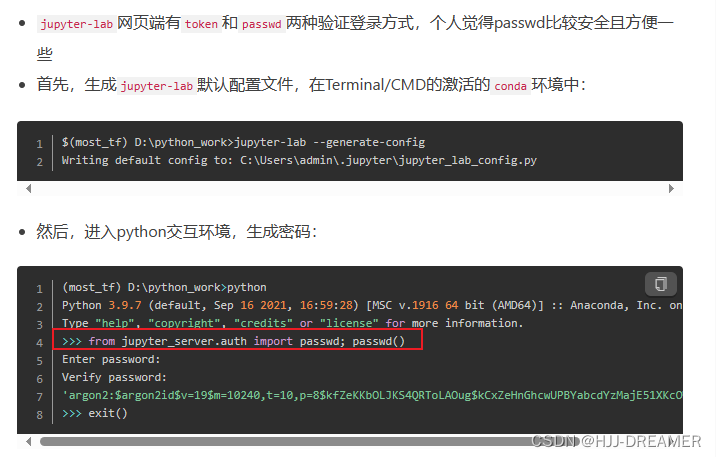
- c.ServerApp.password = ''
- c.ServerApp.port = 8888
c.ServerApp.ip = '' 默认事localhost,配置 "*" 便于访问,便于nodeport的访问
如何生成password,参考:
jupyter-lab 设置密码(password) - 简书 (jianshu.com)
详细内容:
- apiVersion: v1
- kind: ConfigMap
- metadata:
- labels:
- app1: jupyterlab
- app.kubernetes.io/name: jupyterlab
- name: jupyter-config
- namespace: jupyterlab
- data:
- jupyter_lab_config.py: |-
- # Configuration file for lab.
- #------------------------------------------------------------------------------
- # Application(SingletonConfigurable) configuration
- #------------------------------------------------------------------------------
- ## This is an application.
- ## The date format used by logging formatters for %(asctime)s
- #c.Application.log_datefmt = '%Y-%m-%d %H:%M:%S'
- ## The Logging format template
- #c.Application.log_format = '[%(name)s]%(highlevel)s %(message)s'
- ## Set the log level by value or name.
- #c.Application.log_level = 30
- #------------------------------------------------------------------------------
- # JupyterApp(Application) configuration
- #------------------------------------------------------------------------------
- ## Base class for Jupyter applications
- ## Answer yes to any prompts.
- #c.JupyterApp.answer_yes = False
- ## Full path of a config file.
- c.JupyterApp.config_file = '/root/.jupyter/jupyter_lab_config.py'
- ## Specify a config file to load.
- #c.JupyterApp.config_file_name = ''
- ## Generate default config file.
- #c.JupyterApp.generate_config = False
- #------------------------------------------------------------------------------
- # ExtensionApp(JupyterApp) configuration
- #------------------------------------------------------------------------------
- ## Base class for configurable Jupyter Server Extension Applications.
- #
- # ExtensionApp subclasses can be initialized two ways:
- # 1. Extension is listed as a jpserver_extension, and ServerApp calls
- # its load_jupyter_server_extension classmethod. This is the
- # classic way of loading a server extension.
- # 2. Extension is launched directly by calling its `launch_instance`
- # class method. This method can be set as a entry_point in
- # the extensions setup.py
- ##
- #c.ExtensionApp.default_url = ''
- ## Handlers appended to the server.
- #c.ExtensionApp.handlers = []
- ## Whether to open in a browser after starting. The specific browser used is
- # platform dependent and determined by the python standard library `webbrowser`
- # module, unless it is overridden using the --browser (ServerApp.browser)
- # configuration option.
- #c.ExtensionApp.open_browser = False
- ## Settings that will passed to the server.
- #c.ExtensionApp.settings = {}
- ## paths to search for serving static files.
- #
- # This allows adding javascript/css to be available from the notebook server
- # machine, or overriding individual files in the IPython
- #c.ExtensionApp.static_paths = []
- ## Url where the static assets for the extension are served.
- #c.ExtensionApp.static_url_prefix = ''
- ## Paths to search for serving jinja templates.
- #
- # Can be used to override templates from notebook.templates.
- #c.ExtensionApp.template_paths = []
- #------------------------------------------------------------------------------
- # LabServerApp(ExtensionAppJinjaMixin,LabConfig,ExtensionApp) configuration
- #------------------------------------------------------------------------------
- ## A Lab Server Application that runs out-of-the-box
- ## "A list of comma-separated URIs to get the allowed extensions list
- #
- # .. versionchanged:: 2.0.0
- # `LabServerApp.whitetlist_uris` renamed to `allowed_extensions_uris`
- #c.LabServerApp.allowed_extensions_uris = ''
- ## Deprecated, use `LabServerApp.blocked_extensions_uris`
- #c.LabServerApp.blacklist_uris = ''
- ## A list of comma-separated URIs to get the blocked extensions list
- #
- # .. versionchanged:: 2.0.0
- # `LabServerApp.blacklist_uris` renamed to `blocked_extensions_uris`
- #c.LabServerApp.blocked_extensions_uris = ''
- ## The interval delay in seconds to refresh the lists
- #c.LabServerApp.listings_refresh_seconds = 3600
- ## The optional kwargs to use for the listings HTTP requests as
- # described on https://2.python-requests.org/en/v2.7.0/api/#requests.request
- #c.LabServerApp.listings_request_options = {}
- ## Deprecated, use `LabServerApp.allowed_extensions_uris`
- #c.LabServerApp.whitelist_uris = ''
- #------------------------------------------------------------------------------
- # LabApp(NBClassicConfigShimMixin,LabServerApp) configuration
- #------------------------------------------------------------------------------
- ## The app directory to launch JupyterLab from.
- #c.LabApp.app_dir = None
- ## Whether to enable collaborative mode.
- #c.LabApp.collaborative = False
- ## Whether to start the app in core mode. In this mode, JupyterLab will run using
- # the JavaScript assets that are within the installed JupyterLab Python package.
- # In core mode, third party extensions are disabled. The `--dev-mode` flag is an
- # alias to this to be used when the Python package itself is installed in
- # development mode (`pip install -e .`).
- #c.LabApp.core_mode = False
- ## The default URL to redirect to from `/`
- #c.LabApp.default_url = '/lab'
- ## Whether to start the app in dev mode. Uses the unpublished local JavaScript
- # packages in the `dev_mode` folder. In this case JupyterLab will show a red
- # stripe at the top of the page. It can only be used if JupyterLab is installed
- # as `pip install -e .`.
- #c.LabApp.dev_mode = False
- ## Whether to expose the global app instance to browser via window.jupyterlab
- #c.LabApp.expose_app_in_browser = False
- ## Whether to load prebuilt extensions in dev mode. This may be useful to run and
- # test prebuilt extensions in development installs of JupyterLab. APIs in a
- # JupyterLab development install may be incompatible with published packages, so
- # prebuilt extensions compiled against published packages may not work
- # correctly.
- #c.LabApp.extensions_in_dev_mode = False
- ## The override url for static lab assets, typically a CDN.
- #c.LabApp.override_static_url = ''
- ## The override url for static lab theme assets, typically a CDN.
- #c.LabApp.override_theme_url = ''
- ## Splice source packages into app directory.
- #c.LabApp.splice_source = False
- ## The directory for user settings.
- #c.LabApp.user_settings_dir = '/root/.jupyter/lab/user-settings'
- ## Whether to serve the app in watch mode
- #c.LabApp.watch = False
- ## The directory for workspaces
- #c.LabApp.workspaces_dir = '/root/.jupyter/lab/workspaces'
- #------------------------------------------------------------------------------
- # ServerApp(JupyterApp) configuration
- #------------------------------------------------------------------------------
- ## Set the Access-Control-Allow-Credentials: true header
- #c.ServerApp.allow_credentials = False
- ## Set the Access-Control-Allow-Origin header
- #
- # Use '*' to allow any origin to access your server.
- #
- # Takes precedence over allow_origin_pat.
- #c.ServerApp.allow_origin = ''
- ## Use a regular expression for the Access-Control-Allow-Origin header
- #
- # Requests from an origin matching the expression will get replies with:
- #
- # Access-Control-Allow-Origin: origin
- #
- # where `origin` is the origin of the request.
- #
- # Ignored if allow_origin is set.
- #c.ServerApp.allow_origin_pat = ''
- ## Allow password to be changed at login for the Jupyter server.
- #
- # While logging in with a token, the Jupyter server UI will give the opportunity
- # to the user to enter a new password at the same time that will replace the
- # token login mechanism.
- #
- # This can be set to false to prevent changing password from the UI/API.
- #c.ServerApp.allow_password_change = True
- ## Allow requests where the Host header doesn't point to a local server
- #
- # By default, requests get a 403 forbidden response if the 'Host' header shows
- # that the browser thinks it's on a non-local domain. Setting this option to
- # True disables this check.
- #
- # This protects against 'DNS rebinding' attacks, where a remote web server
- # serves you a page and then changes its DNS to send later requests to a local
- # IP, bypassing same-origin checks.
- #
- # Local IP addresses (such as 127.0.0.1 and ::1) are allowed as local, along
- # with hostnames configured in local_hostnames.
- c.ServerApp.allow_remote_access = True
- ## Whether to allow the user to run the server as root.
- c.ServerApp.allow_root = True
- ## " Require authentication to access prometheus metrics.
- #c.ServerApp.authenticate_prometheus = True
- ## Reload the webapp when changes are made to any Python src files.
- #c.ServerApp.autoreload = False
- ## The base URL for the Jupyter server.
- #
- # Leading and trailing slashes can be omitted, and will automatically be added.
- #c.ServerApp.base_url = '/'
- ## Specify what command to use to invoke a web browser when starting the server.
- # If not specified, the default browser will be determined by the `webbrowser`
- # standard library module, which allows setting of the BROWSER environment
- # variable to override it.
- #c.ServerApp.browser = ''
- ## The full path to an SSL/TLS certificate file.
- #c.ServerApp.certfile = ''
- ## The full path to a certificate authority certificate for SSL/TLS client
- # authentication.
- #c.ServerApp.client_ca = ''
- ## The config manager class to use
- #c.ServerApp.config_manager_class = 'jupyter_server.services.config.manager.ConfigManager'
- ## The content manager class to use.
- #c.ServerApp.contents_manager_class = 'jupyter_server.services.contents.largefilemanager.LargeFileManager'
- ## Extra keyword arguments to pass to `set_secure_cookie`. See tornado's
- # set_secure_cookie docs for details.
- #c.ServerApp.cookie_options = {}
- ## The random bytes used to secure cookies. By default this is a new random
- # number every time you start the server. Set it to a value in a config file to
- # enable logins to persist across server sessions.
- #
- # Note: Cookie secrets should be kept private, do not share config files with
- # cookie_secret stored in plaintext (you can read the value from a file).
- #c.ServerApp.cookie_secret = b''
- ## The file where the cookie secret is stored.
- #c.ServerApp.cookie_secret_file = ''
- ## Override URL shown to users.
- #
- # Replace actual URL, including protocol, address, port and base URL, with the
- # given value when displaying URL to the users. Do not change the actual
- # connection URL. If authentication token is enabled, the token is added to the
- # custom URL automatically.
- #
- # This option is intended to be used when the URL to display to the user cannot
- # be determined reliably by the Jupyter server (proxified or containerized
- # setups for example).
- #c.ServerApp.custom_display_url = ''
- ## The default URL to redirect to from `/`
- #c.ServerApp.default_url = '/'
- ## Disable cross-site-request-forgery protection
- #
- # Jupyter notebook 4.3.1 introduces protection from cross-site request
- # forgeries, requiring API requests to either:
- #
- # - originate from pages served by this server (validated with XSRF cookie and
- # token), or - authenticate with a token
- #
- # Some anonymous compute resources still desire the ability to run code,
- # completely without authentication. These services can disable all
- # authentication and security checks, with the full knowledge of what that
- # implies.
- #c.ServerApp.disable_check_xsrf = False
- ## handlers that should be loaded at higher priority than the default services
- #c.ServerApp.extra_services = []
- ## Extra paths to search for serving static files.
- #
- # This allows adding javascript/css to be available from the Jupyter server
- # machine, or overriding individual files in the IPython
- #c.ServerApp.extra_static_paths = []
- ## Extra paths to search for serving jinja templates.
- #
- # Can be used to override templates from jupyter_server.templates.
- #c.ServerApp.extra_template_paths = []
- ## Open the named file when the application is launched.
- #c.ServerApp.file_to_run = ''
- ## The URL prefix where files are opened directly.
- #c.ServerApp.file_url_prefix = 'notebooks'
- ## Extra keyword arguments to pass to `get_secure_cookie`. See tornado's
- # get_secure_cookie docs for details.
- #c.ServerApp.get_secure_cookie_kwargs = {}
- ## (bytes/sec) Maximum rate at which stream output can be sent on iopub before
- # they are limited.
- #c.ServerApp.iopub_data_rate_limit = 1000000
- ## (msgs/sec) Maximum rate at which messages can be sent on iopub before they are
- # limited.
- #c.ServerApp.iopub_msg_rate_limit = 1000
- ## The IP address the Jupyter server will listen on.
- c.ServerApp.ip = '*'
- ## Supply extra arguments that will be passed to Jinja environment.
- #c.ServerApp.jinja_environment_options = {}
- ## Extra variables to supply to jinja templates when rendering.
- #c.ServerApp.jinja_template_vars = {}
- ## Dict of Python modules to load as Jupyter server extensions.Entry values can
- # be used to enable and disable the loading ofthe extensions. The extensions
- # will be loaded in alphabetical order.
- #c.ServerApp.jpserver_extensions = {}
- ## The kernel manager class to use.
- #c.ServerApp.kernel_manager_class = 'jupyter_server.services.kernels.kernelmanager.AsyncMappingKernelManager'
- ## The kernel spec manager class to use. Should be a subclass of
- # `jupyter_client.kernelspec.KernelSpecManager`.
- #
- # The Api of KernelSpecManager is provisional and might change without warning
- # between this version of Jupyter and the next stable one.
- #c.ServerApp.kernel_spec_manager_class = 'jupyter_client.kernelspec.KernelSpecManager'
- ## The full path to a private key file for usage with SSL/TLS.
- #c.ServerApp.keyfile = ''
- ## Hostnames to allow as local when allow_remote_access is False.
- #
- # Local IP addresses (such as 127.0.0.1 and ::1) are automatically accepted as
- # local as well.
- #c.ServerApp.local_hostnames = ['localhost']
- ## The login handler class to use.
- #c.ServerApp.login_handler_class = 'jupyter_server.auth.login.LoginHandler'
- ## The logout handler class to use.
- #c.ServerApp.logout_handler_class = 'jupyter_server.auth.logout.LogoutHandler'
- ## Sets the maximum allowed size of the client request body, specified in the
- # Content-Length request header field. If the size in a request exceeds the
- # configured value, a malformed HTTP message is returned to the client.
- #
- # Note: max_body_size is applied even in streaming mode.
- #c.ServerApp.max_body_size = 536870912
- ## Gets or sets the maximum amount of memory, in bytes, that is allocated for use
- # by the buffer manager.
- #c.ServerApp.max_buffer_size = 536870912
- ## Gets or sets a lower bound on the open file handles process resource limit.
- # This may need to be increased if you run into an OSError: [Errno 24] Too many
- # open files. This is not applicable when running on Windows.
- #c.ServerApp.min_open_files_limit = 0
- ## DEPRECATED, use root_dir.
- #c.ServerApp.notebook_dir = ''
- ## Whether to open in a browser after starting. The specific browser used is
- # platform dependent and determined by the python standard library `webbrowser`
- # module, unless it is overridden using the --browser (ServerApp.browser)
- # configuration option.
- #c.ServerApp.open_browser = False
- ## Hashed password to use for web authentication.
- #
- # To generate, type in a python/IPython shell:
- #
- # from jupyter_server.auth import passwd; passwd()
- #
- # The string should be of the form type:salt:hashed-password.
- # password = 1
- c.ServerApp.password = 'argon2:$argon2id$v=19$m=10240,t=10,p=8$3SVwOn5jZCsVPToRwHfo6A$/Q67MolIfT+ztoV26F6eeuE0NxfhFFsyzLV//9IV+J4'
- ## Forces users to use a password for the Jupyter server. This is useful in a
- # multi user environment, for instance when everybody in the LAN can access each
- # other's machine through ssh.
- #
- # In such a case, serving on localhost is not secure since any user can connect
- # to the Jupyter server via ssh.
- #c.ServerApp.password_required = False
- ## The port the server will listen on (env: JUPYTER_PORT).
- c.ServerApp.port = 8888
- ## The number of additional ports to try if the specified port is not available
- # (env: JUPYTER_PORT_RETRIES).
- #c.ServerApp.port_retries = 50
- ## Preferred starting directory to use for notebooks and kernels.
- #c.ServerApp.preferred_dir = ''
- ## DISABLED: use %pylab or %matplotlib in the notebook to enable matplotlib.
- #c.ServerApp.pylab = 'disabled'
- ## If True, display controls to shut down the Jupyter server, such as menu items
- # or buttons.
- #c.ServerApp.quit_button = True
- ## (sec) Time window used to check the message and data rate limits.
- #c.ServerApp.rate_limit_window = 3
- ## Reraise exceptions encountered loading server extensions?
- #c.ServerApp.reraise_server_extension_failures = False
- ## The directory to use for notebooks and kernels.
- c.ServerApp.root_dir = '/home/jupyterlab'
- ## The session manager class to use.
- #c.ServerApp.session_manager_class = 'jupyter_server.services.sessions.sessionmanager.SessionManager'
- ## Shut down the server after N seconds with no kernels or terminals running and
- # no activity. This can be used together with culling idle kernels
- # (MappingKernelManager.cull_idle_timeout) to shutdown the Jupyter server when
- # it's not in use. This is not precisely timed: it may shut down up to a minute
- # later. 0 (the default) disables this automatic shutdown.
- #c.ServerApp.shutdown_no_activity_timeout = 0
- ## The UNIX socket the Jupyter server will listen on.
- #c.ServerApp.sock = ''
- ## The permissions mode for UNIX socket creation (default: 0600).
- #c.ServerApp.sock_mode = '0600'
- ## Supply SSL options for the tornado HTTPServer. See the tornado docs for
- # details.
- #c.ServerApp.ssl_options = {}
- ## Supply overrides for terminado. Currently only supports "shell_command".
- #c.ServerApp.terminado_settings = {}
- ## Set to False to disable terminals.
- #
- # This does *not* make the server more secure by itself. Anything the user can
- # in a terminal, they can also do in a notebook.
- #
- # Terminals may also be automatically disabled if the terminado package is not
- # available.
- #c.ServerApp.terminals_enabled = True
- ## Token used for authenticating first-time connections to the server.
- #
- # The token can be read from the file referenced by JUPYTER_TOKEN_FILE or set
- # directly with the JUPYTER_TOKEN environment variable.
- #
- # When no password is enabled, the default is to generate a new, random token.
- #
- # Setting to an empty string disables authentication altogether, which is NOT
- # RECOMMENDED.
- #c.ServerApp.token = '
' - ## Supply overrides for the tornado.web.Application that the Jupyter server uses.
- #c.ServerApp.tornado_settings = {}
- ## Whether to trust or not X-Scheme/X-Forwarded-Proto and X-Real-Ip/X-Forwarded-
- # For headerssent by the upstream reverse proxy. Necessary if the proxy handles
- # SSL
- #c.ServerApp.trust_xheaders = False
- ## Disable launching browser by redirect file For versions of notebook > 5.7.2, a
- # security feature measure was added that prevented the authentication token
- # used to launch the browser from being visible. This feature makes it difficult
- # for other users on a multi-user system from running code in your Jupyter
- # session as you. However, some environments (like Windows Subsystem for Linux
- # (WSL) and Chromebooks), launching a browser using a redirect file can lead the
- # browser failing to load. This is because of the difference in file
- # structures/paths between the runtime and the browser.
- #
- # Disabling this setting to False will disable this behavior, allowing the
- # browser to launch by using a URL and visible token (as before).
- #c.ServerApp.use_redirect_file = True
- ## Specify where to open the server on startup. This is the `new` argument passed
- # to the standard library method `webbrowser.open`. The behaviour is not
- # guaranteed, but depends on browser support. Valid values are:
- #
- # - 2 opens a new tab,
- # - 1 opens a new window,
- # - 0 opens in an existing window.
- #
- # See the `webbrowser.open` documentation for details.
- #c.ServerApp.webbrowser_open_new = 2
- ## Set the tornado compression options for websocket connections.
- #
- # This value will be returned from
- # :meth:`WebSocketHandler.get_compression_options`. None (default) will disable
- # compression. A dict (even an empty one) will enable compression.
- #
- # See the tornado docs for WebSocketHandler.get_compression_options for details.
- #c.ServerApp.websocket_compression_options = None
- ## The base URL for websockets, if it differs from the HTTP server (hint: it
- # almost certainly doesn't).
- #
- # Should be in the form of an HTTP origin: ws[s]://hostname[:port]
- #c.ServerApp.websocket_url = ''
3-jupyter-class.yaml
- apiVersion: storage.k8s.io/v1
- kind: StorageClass
- metadata:
- name: nfs-jupyterlab
- namespace: jupyterlab
- annotations:
- storageclass.kubernetes.io/is-default-class: "false" ## 是否设置为默认的storageclass
- provisioner: k8s-sigs.io/nfs-subdir-external-provisioner # or choose another name, must match deployment's env PROVISIONER_NAME'
- #provisioner: nfs-subdir-external-provisioner # or choose another name, must match deployment's env PROVISIONER_NAME'
- parameters:
- archiveOnDelete: "true"
- pathPattern: "${.PVC.namespace}/${.PVC.name}/${.PVC.annotations.nfs.io/storage-path}"
- # pathPattern: "${.PVC.namespace}/${.PVC.annotations.nfs.io/storage-path}"
- # pathPattern: "${.PVC.namespace}-${.PVC.name}"
5-pvc.yaml
- ---
- apiVersion: v1
- kind: PersistentVolumeClaim
- metadata:
- name: nfs-jupyterlab
- namespace: jupyterlab
- annotations:
- volume.beta.kubernetes.io/storage-class: "nfs-jupyterlab"
- spec:
- accessModes:
- - ReadWriteMany
- resources:
- requests:
- storage: 50Mi
6-jupyter-deployment.yaml
- apiVersion: apps/v1
- kind: Deployment
- metadata:
- name: jupyterlab-deployment
- namespace: jupyterlab
- labels:
- app1: jupyterlab
- app.kubernetes.io/name: jupyterlab
- spec:
- replicas: 1
- selector:
- matchLabels:
- app1: jupyterlab
- app.kubernetes.io/name: jupyterlab
- template:
- metadata:
- labels:
- app1: jupyterlab
- app.kubernetes.io/name: jupyterlab
- spec:
- affinity:
- nodeAffinity:
- requiredDuringSchedulingIgnoredDuringExecution:
- nodeSelectorTerms:
- - matchExpressions:
- - key: kubernetes.io/hostname
- operator: NotIn
- values:
- - master01
- - master02
- - master03
- hostNetwork: true
- containers:
- - name: jupyterlab
- image: reporsitory:5000/jupyterlab:1.1
- imagePullPolicy: Always
- ports:
- - name: jupyterlab
- containerPort: 8888
- command:
- - bash
- - "-c"
- - |
- set -ex
- /usr/local/bin/jupyter-lab
- resources:
- requests:
- cpu: 250m
- memory: 500Mi
- limits:
- cpu: 250m
- memory: 500Mi
- volumeMounts:
- - name: data
- mountPath: "/home/jupyterlab/data"
- - name: jupyter-config
- mountPath: /root/.jupyter/
- - name: jupyter
- mountPath: /home/jupyterlab
- volumes:
- - name: data
- persistentVolumeClaim:
- claimName: nfs-jupyter-mysql
- - name: jupyter
- persistentVolumeClaim:
- claimName: nfs-jupyterlab
- - name: jupyter-config
- configMap:
- name: jupyter-config
7-services.yaml
- ---
- apiVersion: v1
- kind: Service
- metadata:
- name: jupyterlab-svc
- namespace: jupyterlab
- labels:
- app1: jupyterlab
- app.kubernetes.io/name: jupyterlab
- spec:
- ports:
- - name: jupyterlab
- port: 8888
- selector:
- app1: jupyterlab
- type: NodePort
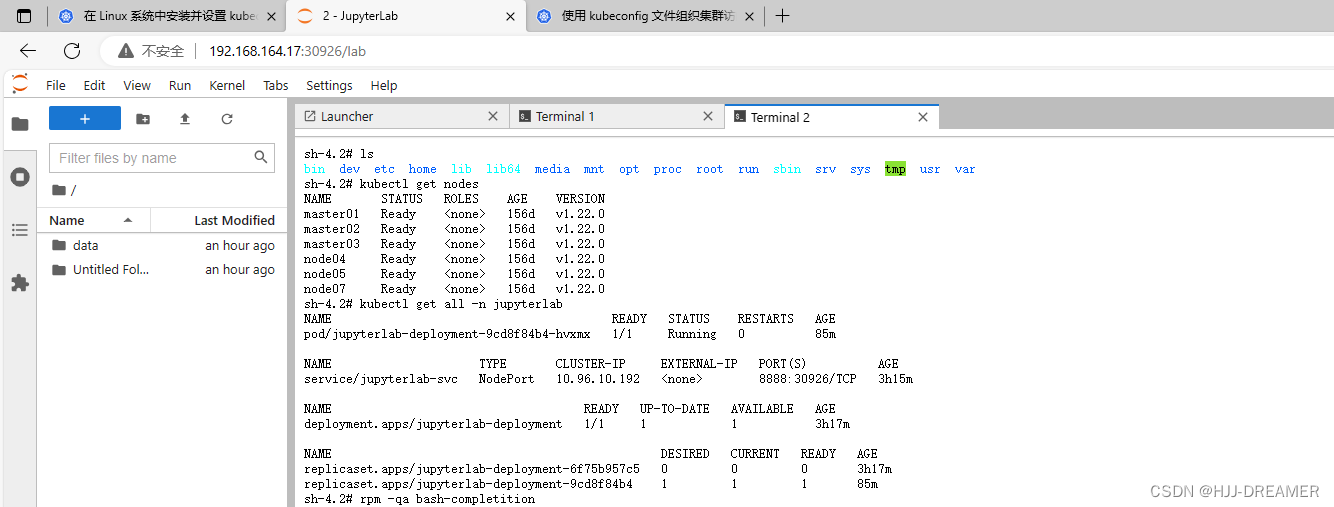
成功
后端状况:

网页访问:

Jupyterlab服务的Pod提升
部署kubectl + bash-completion
在 Linux 系统中安装并设置 kubectl | Kubernetes
使用 kubeconfig 文件组织集群访问 | Kubernetes
更新数据库使用者权限
- grant all privileges on *.* to 'root'@'%' identified by '1' with grant option;
- flush privileges;

参考文档
https://developer.aliyun.com/article/857365
https://www.jianshu.com/p/743ed2209a8c
https://www.runoob.com/linux/linux-comm-nohup.html
https://cloud.tencent.com/developer/article/1783227
https://zhuanlan.zhihu.com/p/468585680 -
相关阅读:
新能源汽车行业资讯-2022-9-19
设计模式之中介者模式
基础讲解——ES6
epiiAdmin框架注意事项
List集合&UML图
java子类向父类转型再转回子类
老哥们平日是怎么排查线上问题的?
No.1 - 职场关键角色通识宝典之课程内容先导
一篇文章带你走进cookie,session,Token的世界
java8 新特性
- 原文地址:https://blog.csdn.net/m0_59267075/article/details/133981046
