-
muduo异步日志库
一、日志库模型
- muduo日志库由前端和后端组成。
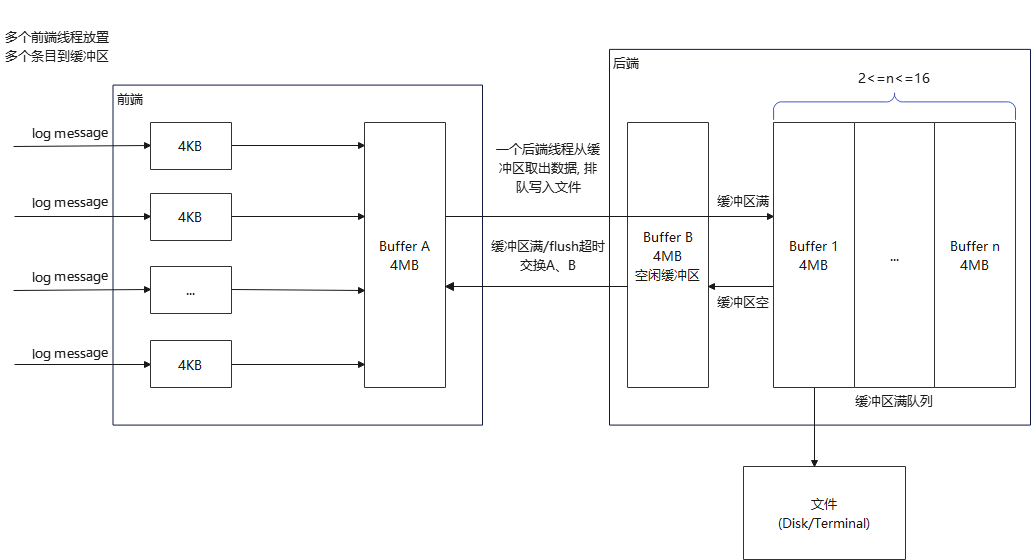
muduo日志库是异步高性能日志库,其性能开销大约是前端每写一条日志消息耗时1.0us~1.6us。
采用双缓冲区(double buffering)交互技术。基本思想是准备2部分buffer:A和B,前端(front end)线程往buffer A填入数据(日志消息),后端(back end)线程负责将buffer B写入日志文件。当A写满时,交换A和B。如此往复。
实现时,在后端设置一个已满缓冲队列(Buffer1~n,2<=n<=16),用于缓存一个周期内临时要写的日志消息。
这样做到好处在于:
- 1)线程安全;
- 2)非阻塞。
这样,2个buffer在前端写日志时,不必等待磁盘文件操作,也避免每写一条日志消息都触发后端线程。
异常处理:
- 当一个周期内,产生过多Buffer入队列,当超过队列元素上限数量值25时,直接丢弃多余部分,并记录。
二、前端
前端主要包括:Logger, LogStream,FixedBuffer,SourceFile。
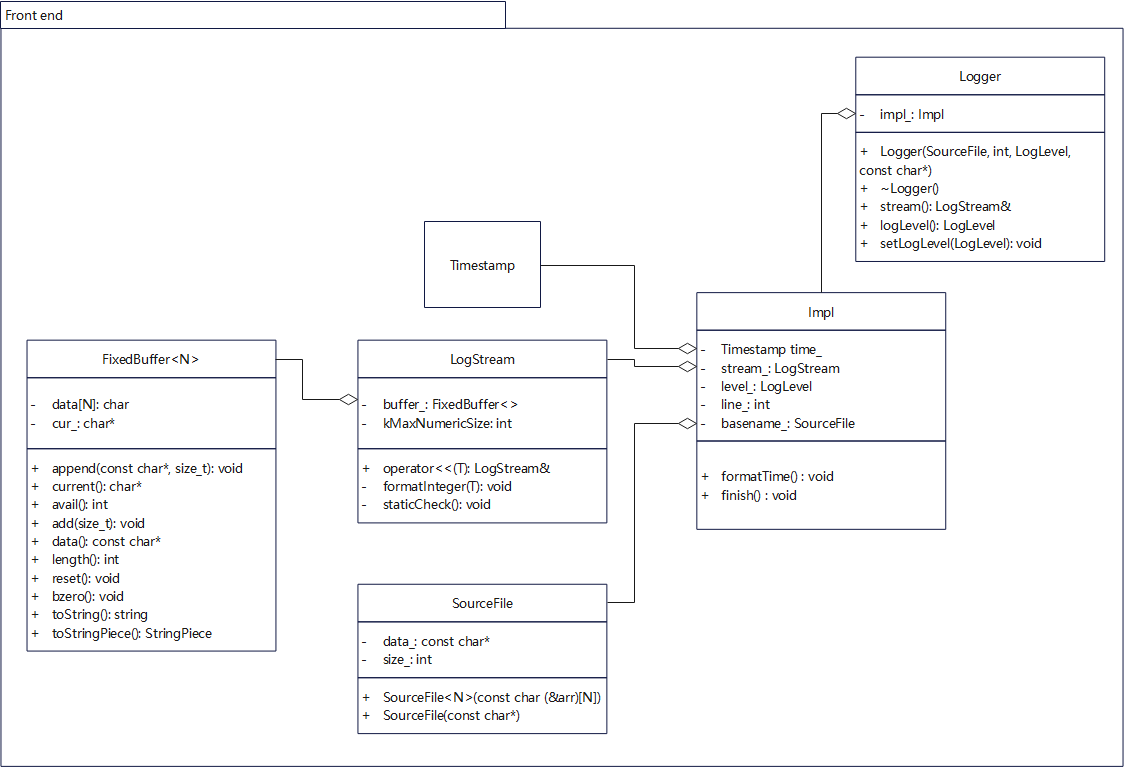
2.1 Logger类
Logger位于Logging.h/Logging.cc,主要为用户(前端线程)提供使用日志库的接口,是一个pointer to impl的实现(即GoF 桥接模式),详细由内部类Impl实现。
Logger 可以根据用户提供的__FILE__,__LINE__等宏构造对象,记录日志的代码自身信息(所在文件、行数);还提供构造不同等级的日志消息对象。每个Logger对象代表一个日志消息。
Logger 内部定义了日志等级(enum LogLevel),提供全局日志等级(g_logLevel)的获取、设置接口;提供访问内部LogStream对象的接口。
日志等级类型LogLevel
enum LogLevel { TRACE = 0, DEBUG, INFO, WARN, ERROR, FATAL, NUM_LOG_LEVELS };- 1
- 2
- 3
- 4
- 5
- 6
- 7
- 8
- 9
- 10
TRACE
指出比DEBUG粒度更细的一些信息事件(开发过程中使用)
DEBUG
指出细粒度信息事件对调试应用程序是非常有帮助的(开发过程中使用)
INFO
表明消息在粗粒度级别上突出强调应用程序的运行过程。
WARN
系统能正常运行,但可能会出现潜在错误的情形。
ERROR
指出虽然发生错误事件,但仍然不影响系统的继续运行。
FATAL
指出每个严重的错误事件将会导致应用程序的退出。muduo默认级别为INFO,开发过程中可以选择TRACE或DEBUG。低于指定级别日志不会被输出。
用户接口
Logging.h中,还定义了一系列LOG_开头的宏,便于用户以C++风格记录日志:#define LOG_TRACE if (muduo::Logger::logLevel() <= muduo::Logger::TRACE) \ muduo::Logger(__FILE__, __LINE__, muduo::Logger::TRACE, __func__).stream() #define LOG_DEBUG if (muduo::Logger::logLevel() <= muduo::Logger::DEBUG) \ muduo::Logger(__FILE__, __LINE__, muduo::Logger::DEBUG, __func__).stream() #define LOG_INFO if (muduo::Logger::logLevel() <= muduo::Logger::INFO) \ muduo::Logger(__FILE__, __LINE__).stream() #define LOG_WARN muduo::Logger(__FILE__, __LINE__, muduo::Logger::WARN).stream() #define LOG_ERROR muduo::Logger(__FILE__, __LINE__, muduo::Logger::ERROR).stream() #define LOG_FATAL muduo::Logger(__FILE__, __LINE__, muduo::Logger::FATAL).stream() #define LOG_SYSERR muduo::Logger(__FILE__, __LINE__, false).stream() #define LOG_SYSFATAL muduo::Logger(__FILE__, __LINE__, true).stream()- 1
- 2
- 3
- 4
- 5
- 6
- 7
- 8
- 9
- 10
- 11
- 12
例如,用户可以用这样的方式使用日志:
LOG_TRACE << "trace" << 1;- 1
构造函数
- 不难发现,每个宏定义都构造了一个Logger临时对象,然后通过stream(),来达到写日志的功能。
选取参数最完整的Logger构造函数,构造Logger临时对象:
muduo::Logger(__FILE__, __LINE__, muduo::Logger::TRACE, __func__) __FILE__ 是一个宏, 表示当前代码所在文件名(含路径) __LINE__ 是一个宏, 表示当前代码所在文件的行数 muduo::Logger::TRACE 日志等级TRACE __func__ 是一个宏, 表示当前代码所在函数名- 1
- 2
- 3
- 4
- 5
- 6
对应原型:
Logger(SourceFile file, int line, LogLevel level, const char* func);- 1
这里SourceFile也是一个内部类,用来对构造Logger对象的代码所在文件名进行了包装,只记录基本的文件名(不含路径),以节省日志消息长度。
输出位置,冲刷日志
- 一个应用程序,通常只有一个全局Logger。Logger类定义了2个函数指针,用于设置日志的输出位置(g_output),冲刷日志(g_flush)。
- 类型:
typedef void (*OutputFunc)(const char* msg, int len); typedef void (*FlushFunc)();- 1
- 2
Logger默认向stdout输出、冲刷:
void defaultOutput(const char* msg, int len) { size_t n = fwrite(msg, 1, static_cast<size_t>(len), stdout); //FIXME check n (void)n; } void defaultFlush() { fflush(stdout); } Logger::OutputFunc g_output = defaultOutput; Logger::FlushFunc g_flush = defaultFlush;- 1
- 2
- 3
- 4
- 5
- 6
- 7
- 8
- 9
- 10
- 11
- 12
- 13
- 14
Logger也提供2个static函数来设置g_output和g_flush。
static void setOutput(OutputFunc); static void setFlush(FlushFunc);- 1
- 2
用户代码可以这两个函数修改Logger的输出位置(需要同步修改)。
一种典型的应用,就是将g_output重定位到后端AsyncLogging::append(),这样后端线程就能在缓冲区满或定时,从缓冲区取出数据并(与前端线程异步)写到日志文件。
muduo::AsyncLogging* g_asyncLog = NULL; void asyncOutput(const char* msg, int len) { g_asyncLog->append(msg, len); } void func() { muduo::Logger::setOutput(asyncOutput); LOG_INFO << "123456"; } int main() { char name[256] = { '\0' }; strncpy(name, argv[0], sizeof name - 1); muduo::AsyncLogging log(::basename(name), kRollSize); log.start(); g_asyncLog = &log; func(); }- 1
- 2
- 3
- 4
- 5
- 6
- 7
- 8
- 9
- 10
- 11
- 12
- 13
- 14
- 15
- 16
- 17
- 18
- 19
- 20
- 21
- 22
- 23
- 24
日志等级,时区
- 还定义了2个全局变量,用于存储日志等级(g_logLevel),时区(g_logTimeZone)。当前日志消息等级,如果低于g_logLevel,就不会进行任何操作,几乎0开销;只有不低于g_logLevel等级的日志消息,才能被记录。这是通过LOG_xxx宏定义 的if语句实现的。
#define LOG_TRACE if (muduo::Logger::logLevel() <= muduo::Logger::TRACE) \ ...- 1
- 2
g_logTimeZone 会影响日志记录的时间是用什么时区,默认UTC时间(GMT时区)。例如:
- 这里面的“20220306 07:37:08.031441Z”会受到日志时区的影响。
20220306 07:37:08.031441Z 3779 WARN Hello - Logging_test.cpp:75- 1
根据g_logTimeZone产生日志记录的时间,位于formatTime()
析构函数
- 具体实现交给Impl。Logger析构代码如下:
Logger::~Logger() { impl_.finish(); // 往Small Buffer添加后缀 文件名:行数 const LogStream::Buffer& buf(stream().buffer()); g_output(buf.data(), buf.length()); // 回调保存的g_output, 输出Small Buffer到指定文件流 if (impl_.level_ == FATAL) // 发生致命错误, 输出log并终止程序 { g_flush(); // 回调冲刷 abort(); } }- 1
- 2
- 3
- 4
- 5
- 6
- 7
- 8
- 9
- 10
- 11
析构函数中,Logger主要完成工作:为LogStream对象stream_中的log消息加上后缀(文件名:行号,LF指换行符’\n’),将stream_缓存的log消息通过g_output回调写入指定文件流。另外,如果有致命错误(FATAL级别log),就终止程序。
缓冲Small Buffer 大小默认4KB,实际保存每条log消息,具体参见LogStream描述。
2.2 Impl类
Logger::Impl是Logger的内部类,负责Logger主要实现,提供组装一条完整log消息的功能。
下面是3条完整log:
20220306 09:15:44.681220Z 4013 WARN Hello - Logging_test.cpp:75 20220306 09:15:44.681289Z 4013 ERROR Error - Logging_test.cpp:76 20220306 09:15:44.681296Z 4013 INFO 4056 - Logging_test.cpp:77- 1
- 2
- 3
- 4
格式:
日期 时间 微秒 线程 级别 正文 源文件名: 行号 20220306 09:15:44.681220Z 4013 WARN Hello - Logging_test.cpp:75 ...- 1
- 2
- 3
Impl的数据结构
- 包含了需要组装成一条完整log信息的所有组成部分。
- 当然,正文部分是由用户线程直接通过Logstream::operator<<,传递给stream_的。
class Impl { public: typedef Logger::LogLevel LogLevel; Impl(LogLevel level, int old_errno, const SourceFile& file, int line); void formatTime(); // 根据时区格式化当前时间字符串, 也是一条log消息的开头 void finish(); // 添加一条log消息的后缀 Timestamp time_; // 用于获取当前时间 LogStream stream_; // 用于格式化用户log数据, 提供operator<<接口, 保存log消息 LogLevel level_; // 日志等级 int line_; // 源代码所在行 SourceFile basename_; // 源代码所在文件名(不含路径)信息 };- 1
- 2
- 3
- 4
- 5
- 6
- 7
- 8
- 9
- 10
- 11
- 12
- 13
- 14
Impl构造函数
- 除了对各成员进行初始构造,还生成线程tid、格式化时间字符串等,并通过stream_加入Samall Buffer。
Logger::Impl::Impl(LogLevel level, int savedErrno, const SourceFile &file, int line) : time_(Timestamp::now()), stream_(), level_(level), line_(line), basename_(file) { formatTime(); CurrentThread::tid(); stream_ << T(CurrentThread::tidString(), static_cast<unsigned int>(CurrentThread::tidStringLength())); stream_ << T(LogLevelName[level], kLogLevelNameLength); // 6 if (savedErrno != 0) // 发生系统调用错误 { stream_ << strerror_tl(savedErrno) << " (errno=" << savedErrno << ") "; // 自定义函数strerror_tl将错误号转换为字符串, 相当于strerror_r(3) } }- 1
- 2
- 3
- 4
- 5
- 6
- 7
- 8
- 9
- 10
- 11
- 12
- 13
- 14
- 15
- 16
2.3 LogStream类
LogStream 主要提供operator<<操作,将用户提供的整型数、浮点数、字符、字符串、字符数组、二进制内存、另一个Small Buffer,格式化为字符串,并加入当前类的Small Buffer。
Small Buffer存放log消息
- Small Buffer,是模板类FixedBuffer<>的一个具现,i.e.FixedBuffer,默认大小4KB,用于存放一条log消息。为前端类LogStream持有。
- 相对的,还有Large Buffer,也是FixedBuffer的一个具现,FixedBuffer,默认大小4MB,用于存放多条log消息。为后端类AsyncLogging持有。
const int kSmallBuffer = 4000; const int kLargeBuffer = 4000 * 1000; class LogStream : noncopyable { ... typedef detail::FixedBuffer<detail::kSmallBuffer> Buffer; // Small Buffer Type ... Buffer buffer_; // 用于存放log消息的Small Buffer } class AsyncLogging: noncopyable { ... typedef muduo::detail::FixedBuffer<muduo::detail::kLargeBuffer> Buffer; // Large Buffer Type ... }- 1
- 2
- 3
- 4
- 5
- 6
- 7
- 8
- 9
- 10
- 11
- 12
- 13
- 14
- 15
- 16
- 17
- 18
模板类FixedBuffer,内部是用数组char data_[SIZE]存储,用指针char* cur_表示当前待写数据的位置。对FixedBuffer<>的各种操作,实际上是对data_数组和cur_指针的操作。
template<int SIZE> class FixedBuffer : noncopyable { public: ... private: ... char data_[SIZE]; char* cur_; }- 1
- 2
- 3
- 4
- 5
- 6
- 7
- 8
- 9
- 10
operator<<格式化数据
针对不同类型数据,LogStream重载了一系列operator<<操作符,用于将数据格式化为字符串,并存入LogStream::buffer_。{ typedef LogStream self; public: ... self& operator<<(bool v) self& operator<<(short); self& operator<<(unsigned short); self& operator<<(int); self& operator<<(unsigned int); self& operator<<(long); self& operator<<(unsigned long); self& operator<<(long long); self& operator<<(unsigned long long); self& operator<<(const void*); self& operator<<(float v); self& operator<<(double); self& operator<<(char v); self& operator<<(const char* str); self& operator<<(const unsigned char* str); self& operator<<(const string& v); self& operator<<(const StringPiece& v); self& operator<<(const Buffer& v); ... }- 1
- 2
- 3
- 4
- 5
- 6
- 7
- 8
- 9
- 10
- 11
- 12
- 13
- 14
- 15
- 16
- 17
- 18
- 19
- 20
- 21
- 22
- 23
- 24
- 25
1)对于字符串类型参数,operator<<本质上是调用buffer_对应的FixedBuffer<>::append(),将其存放当到Small Buffer中。
self& operator<<(const char* str) { if (str) { buffer_.append(str, strlen(str)); } else { buffer_.append("(null)", 6); } return *this; }- 1
- 2
- 3
- 4
- 5
- 6
- 7
- 8
- 9
- 10
- 11
- 12
2)对于字符类型,跟参数是字符串类型区别是长度只有1,并且无需判断指针是否为空。
self& operator<<(char v) { buffer_.append(&v, 1); return *this; }- 1
- 2
- 3
- 4
- 5
3)对于十进制整型,如int/long,则是通过模板函数formatInteger(),将转换为字符串并直接填入Small Buffer尾部。
formatInteger() 并没有用snprintf对整型数据进行格式转换,而是用到了Matthew Wilson提出的高效的转换方法convert()。基本思想是:从末尾开始,对待转换的整型数,由十进制位逐位转换为char类型,然后填入缓存,直到剩余待转数值已为0。
注意:将int等整型转换为string,muduo并没有使用std::to_string,而是使用了效率更高的自定义函数formatInteger()。
template<typename T> void LogStream::formatInteger(T v) { if (buffer_.avail() >= kMaxNumericSize) // Small Buffer剩余空间够用 { size_t len = convert(buffer_.current(), v); buffer_.add(len); } } const char digits[] = "9876543210123456789"; const char* zero = digits + 9; // zero pointer to '0' static_assert(sizeof(digits) == 20, "wrong number of digits"); /* Efficient Integer to String Conversions, by Matthew Wilson. */ template<typename T> size_t convert(char buf[], T value) { T i = value; char* p = buf; do { int lsd = static_cast<int>(i % 10); i /= 10; *p++ = zero[lsd]; } while (i != 0); if (value < 0) { *p++ = '-'; } *p = '\0'; std::reverse(buf, p); return static_cast<size_t>(p - buf); }- 1
- 2
- 3
- 4
- 5
- 6
- 7
- 8
- 9
- 10
- 11
- 12
- 13
- 14
- 15
- 16
- 17
- 18
- 19
- 20
- 21
- 22
- 23
- 24
- 25
- 26
- 27
- 28
- 29
- 30
- 31
- 32
- 33
- 34
- 35
- 36
- 37
4)对于double类型,使用库函数snprintf转换为const char*,并直接填入Small Buffer尾部。
注意:uintptr_t 位数跟平台地址位数相同,在64位系统中,占64位;在32位系统中,占32位。使用uintptr_t是为了提高可移植性。
5)对于其他类型,都是转换为以上基本类型,然后再转换为字符串,添加到Small Buffer末尾。
LogStream::self &LogStream::operator<<(double v) { if (buffer_.avail() >= kMaxNumericSize) { int len = snprintf(buffer_.current(), kMaxNumericSize, "%.12g", v ); // 将v转换为字符串, 并填入buffer_当前尾部. %g 自动选择%f, %e格式, 并且不输出无意义0. %.12g 最多保留12位小数 buffer_.add(static_cast<size_t>(len)); } return *this; }- 1
- 2
- 3
- 4
- 5
- 6
- 7
- 8
- 9
6)对于二进制数,原理同整型数,不过并不以10进制格式存放到Small Buffer,而是以16进制字符串(非NUL结尾)形式,在每个数会加上前缀"0x"。
将二进制内存转换为16进制数的核心函数convertHex,使用了类似于convert的高效转换算法。LogStream::self &LogStream::operator<<(const void* p) { uintptr_t v = reinterpret_cast<uintptr_t>(p); // uintptr_t 位数与地址位数相同, 便于跨平台使用 if (buffer_.avail() >= kMaxNumericSize) // Small Buffer剩余空间够用 { char* buf = buffer_.current(); buf[0] = '0'; buf[1] = 'x'; size_t len = convertHex(&buf[2], v); buffer_.add(len + 2); } return *this; } const char digitsHex[] = "0123465789ABCDEF"; static_assert(sizeof(digitsHex) == 17, "wrong number of digitsHex"); size_t convertHex(char buf[], uintptr_t value) { uintptr_t i = value; char* p = buf; do { int lsd = static_cast<int>(i % 16); // last digit for hex number i /= 16; *p++ = digitsHex[lsd]; } while (i != 0); *p = '\0'; std::reverse(buf, p); return static_cast<size_t>(p - buf); }- 1
- 2
- 3
- 4
- 5
- 6
- 7
- 8
- 9
- 10
- 11
- 12
- 13
- 14
- 15
- 16
- 17
- 18
- 19
- 20
- 21
- 22
- 23
- 24
- 25
- 26
- 27
- 28
- 29
- 30
- 31
- 32
- 33
注意:uintptr_t 位数跟平台地址位数相同,在64位系统中,占64位;在32位系统中,占32位。使用uintptr_t是为了提高可移植性。
7)对于其他类型,都是转换为以上基本类型,然后再转换为字符串,添加到Small Buffer末尾。
8)staticCheck()静态检查
这就可以用到staticCheck()进行验证了。目的是为了确保kMaxNumericSize取值,能满足Small Buffer剩余空间一定能存放下要格式化的数据。取数据位较长的double、long double、long、long long,进行static_assert断言。
void LogStream::staticCheck() { static_assert(kMaxNumericSize - 10 > std::numeric_limits<double>::digits10, "kMaxNumericSize is large enough"); static_assert(kMaxNumericSize - 10 > std::numeric_limits<long double>::digits10, "kMaxNumericSize is large enough"); static_assert(kMaxNumericSize - 10 > std::numeric_limits<long>::digits10, "kMaxNumericSize is large enough"); static_assert(kMaxNumericSize - 10 > std::numeric_limits<long long>::digits10, "kMaxNumericSize is large enough"); }- 1
- 2
- 3
- 4
- 5
- 6
- 7
- 8
- 9
- 10
- 11
- 12
2.4 小结
至此,muduo日志库前端核心部分已讲完。但默认只能将数据以非线程安全方式输出到stdout,还不能实现异步记录log消息。
关键点:
1)Logger 提供用户接口,将实现细节隐藏到Impl,Logger定义一组宏定义LOG_XXX方便用户在前端使用日志库;
2)Impl实现除正文部分,一条完整log消息的组装;
3)LogStream提供operator<< 格式化用户正文内容,将其转换为字符串,并添加到Small Buffer(4KB)末尾三、后端
参考
- muduo日志库由前端和后端组成。
-
相关阅读:
SSM+文达学院贫困生认定系统 毕业设计-附源码261621
iptables使用详解(centos7)
Visual Interpretability for Deep Learning: a Survey
ArcGIS进阶:栅格计算器里的Con函数使用方法
Flask数据库_query函数的使用
Android笔记(七)Android JetPack Compose组件搭建Scaffold脚手架
牛客网:NC32 求平方根
【总结】岛屿类问题(二维表格的dfs)
Flutter开发GridView控件详解
java计算机毕业设计计算机类专业考研交流学习平台MyBatis+系统+LW文档+源码+调试部署
- 原文地址:https://blog.csdn.net/u011436427/article/details/133969545

- 最新文章
-
沪漂五周年了:我越来越迷茫了
Agentic Skill Routing 实战:别再把所有 Skill 塞进 AI Agent 上下文
MySQL-Seconds_behind_master的精度误差
[MAF预定义ChatClient中间件-03]CachingChatClient——利用缓存省钱省时间
AI的至暗历史:从万众期待到被政府撤资,AI的两次死亡徘徊
Agent OS :五种驯服不确定性的范式
PortSwigger SQL注入LAB11
数据库即时编译JIT
[Begin]AI Learn Data Day 0
深度学习进阶(二十七)现代 LLM 的核心架构设计其二:SwiGLU