-
【Arduino TFT】基于 ESP8266 以及 SSD1306实现的天气时钟
忘记过去,超越自己
- ❤️ 博客主页 单片机菜鸟哥,一个野生非专业硬件IOT爱好者 ❤️
- ❤️ 本篇创建记录 2023-10-21 ❤️
- ❤️ 本篇更新记录 2023-10-21 ❤️
- 🎉 欢迎关注 🔎点赞 👍收藏 ⭐️留言📝
- 🙏 此博客均由博主单独编写,不存在任何商业团队运营,如发现错误,请留言轰炸哦!及时修正!感谢支持!
- 🔥 Arduino ESP8266教程累计帮助过超过1W+同学入门学习硬件网络编程,入选过选修课程,刊登过无线电杂志 🔥零基础从入门到熟悉Arduino平台下开发ESP8266,同时会涉及网络编程知识。专栏文章累计超过60篇,分为基础篇、网络篇、应用篇、高级篇,涵盖ESP8266大部分开发技巧。
如果觉得有用,麻烦点赞收藏,您的支持是博主创作的动力。
1. 前言

使用esp8266驱动 oled 1306 实现:- 日期时间
- 城市温度信息
- 未来三天预报信息
2. 软件代码
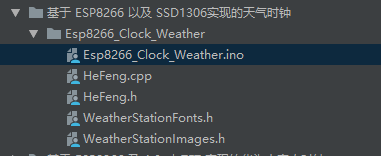
2.1 主工程代码
Esp8266_Clock_Weather.ino
#include#include #include #include #include #include #include "SSD1306Wire.h" //0.96寸用这个 #include "OLEDDisplayUi.h" #include "HeFeng.h" #include "WeatherStationFonts.h" #include "WeatherStationImages.h" /*************************** Begin Settings **************************/ const char* WIFI_SSID = "CMCC-pm3h"; //填写你的WIFI名称及密码 const char* WIFI_PWD = "hw2htwv4"; //由于太多人使用我的秘钥,导致获取次数超额,所以不提供秘钥了,大家可以到 https://dev.heweather.com/ 获取免费的 const char* HEFENG_KEY = "f78a1c10fe5c490b8f3dc3946fe00975";//填写你的和风天气秘钥 const char* HEFENG_LOCATION = "101280107";//填写你的城市ID,可到 https://where.heweather.com/index.html 查询 #define TZ 8 // 中国时区为8 #define DST_MN 0 // 默认为0 const int UPDATE_INTERVAL_SECS = 30 * 60; // 30分钟更新一次天气 const int I2C_DISPLAY_ADDRESS = 0x3c; //I2c地址默认 const String WDAY_NAMES[] = {"Sun", "Mon", "Tue", "Wed", "Thu", "Fri", "Sat"}; //星期 const String MONTH_NAMES[] = {"Jan", "Feb", "Mar", "Apr", "May", "Jun", "Jul", "Aug", "Sep", "Oct", "Nov", "Dec"}; //月份 /*************************** End Settings **************************/ SSD1306Wire display(I2C_DISPLAY_ADDRESS, SDA, SCL); // 0.96寸用这个 OLEDDisplayUi ui( &display ); HeFengCurrentData currentWeather; //实例化对象 HeFengForeData foreWeather[3]; HeFeng HeFengClient; #define TZ_MN ((TZ)*60) //时间换算 #define TZ_SEC ((TZ)*3600) #define DST_SEC ((DST_MN)*60) time_t now; //实例化时间 bool readyForWeatherUpdate = false; // 天气更新标志 bool first = true; //首次更新标志 long timeSinceLastWUpdate = 0; //上次更新后的时间 long timeSinceLastCurrUpdate = 0; //上次天气更新后的时间 void drawProgress(OLEDDisplay *display, int percentage, String label); //提前声明函数 void updateData(OLEDDisplay *display); void updateDatas(OLEDDisplay *display); void drawDateTime(OLEDDisplay *display, OLEDDisplayUiState* state, int16_t x, int16_t y); void drawCurrentWeather(OLEDDisplay *display, OLEDDisplayUiState* state, int16_t x, int16_t y); void drawForecast(OLEDDisplay *display, OLEDDisplayUiState* state, int16_t x, int16_t y); void drawForecastDetails(OLEDDisplay *display, int x, int y, int dayIndex); void drawHeaderOverlay(OLEDDisplay *display, OLEDDisplayUiState* state); void setReadyForWeatherUpdate(); //添加框架 //此数组保留指向所有帧的函数指针 //框架是从右向左滑动的单个视图 FrameCallback frames[] = { drawDateTime, drawCurrentWeather, drawForecast }; //页面数量 int numberOfFrames = 3; OverlayCallback overlays[] = { drawHeaderOverlay }; //覆盖回调函数 int numberOfOverlays = 1; //覆盖数 void setup() { Serial.begin(115200); Serial.println(); Serial.println(); // 屏幕初始化 display.init(); display.clear(); display.display(); display.flipScreenVertically(); //屏幕翻转 display.setContrast(120); //屏幕亮度 wifiConnect(); ui.setTargetFPS(30); //刷新频率 ui.setActiveSymbol(activeSymbole); //设置活动符号 ui.setInactiveSymbol(inactiveSymbole); //设置非活动符号 // 符号位置 // 你可以把这个改成TOP, LEFT, BOTTOM, RIGHT ui.setIndicatorPosition(BOTTOM); // 定义第一帧在栏中的位置 ui.setIndicatorDirection(LEFT_RIGHT); // 屏幕切换方向 // 您可以更改使用的屏幕切换方向 SLIDE_LEFT, SLIDE_RIGHT, SLIDE_TOP, SLIDE_DOWN ui.setFrameAnimation(SLIDE_LEFT); ui.setFrames(frames, numberOfFrames); // 设置框架 ui.setTimePerFrame(5000); //设置切换时间 ui.setOverlays(overlays, numberOfOverlays); //设置覆盖 // UI负责初始化显示 ui.init(); display.flipScreenVertically(); //屏幕反转 configTime(TZ_SEC, DST_SEC, "ntp.ntsc.ac.cn", "ntp1.aliyun.com"); //ntp获取时间,你也可用其他"pool.ntp.org","0.cn.pool.ntp.org","1.cn.pool.ntp.org","ntp1.aliyun.com" delay(200); } void loop() { if (first) { //首次加载 updateDatas(&display); first = false; } if (millis() - timeSinceLastWUpdate > (1000L * UPDATE_INTERVAL_SECS)) { //屏幕刷新 setReadyForWeatherUpdate(); timeSinceLastWUpdate = millis(); } if (readyForWeatherUpdate && ui.getUiState()->frameState == FIXED) { //天气更新 updateData(); } int remainingTimeBudget = ui.update(); //剩余时间预算 if (remainingTimeBudget > 0) { //你可以在这里工作如果你低于你的时间预算。 delay(remainingTimeBudget); } } void wifiConnect() { //WIFI密码连接,Web配网请注释 WiFi.begin(WIFI_SSID, WIFI_PWD); while (WiFi.status() != WL_CONNECTED) { Serial.print('.'); delay(80); display.clear(); display.drawXbm(34, 0, bili_Logo_width, bili_Logo_height, bili_Logo_5); display.display(); delay(80); display.clear(); display.drawXbm(34, 0, bili_Logo_width, bili_Logo_height, bili_Logo_6); display.display(); delay(80); display.clear(); display.drawXbm(34, 0, bili_Logo_width, bili_Logo_height, bili_Logo_7); display.display(); delay(80); display.clear(); display.drawXbm(34, 0, bili_Logo_width, bili_Logo_height, bili_Logo_8); display.display(); delay(80); display.clear(); display.drawXbm(34, 0, bili_Logo_width, bili_Logo_height, bili_Logo_1); display.display(); delay(80); display.clear(); display.drawXbm(34, 0, bili_Logo_width, bili_Logo_height, bili_Logo_2); display.display(); delay(80); display.clear(); display.drawXbm(34, 0, bili_Logo_width, bili_Logo_height, bili_Logo_3); display.display(); delay(80); display.clear(); display.drawXbm(34, 0, bili_Logo_width, bili_Logo_height, bili_Logo_4); display.display(); } Serial.println(""); delay(500); } void drawProgress(OLEDDisplay *display, int percentage, String label) { //绘制进度 display->clear(); display->setTextAlignment(TEXT_ALIGN_CENTER); display->setFont(ArialMT_Plain_10); display->drawString(64, 10, label); display->drawProgressBar(2, 28, 124, 10, percentage); display->display(); } void updateData(void) { //天气更新 HeFengClient.doUpdateCurr(¤tWeather, HEFENG_KEY, HEFENG_LOCATION); HeFengClient.doUpdateFore(foreWeather, HEFENG_KEY, HEFENG_LOCATION); readyForWeatherUpdate = false; } void updateDatas(OLEDDisplay *display) { //首次天气更新 drawProgress(display, 33, "Updating weather..."); HeFengClient.doUpdateCurr(¤tWeather, HEFENG_KEY, HEFENG_LOCATION); drawProgress(display, 66, "Updating forecasts..."); HeFengClient.doUpdateFore(foreWeather, HEFENG_KEY, HEFENG_LOCATION); readyForWeatherUpdate = false; drawProgress(display, 100, "Done..."); delay(200); } void drawDateTime(OLEDDisplay *display, OLEDDisplayUiState* state, int16_t x, int16_t y) { //显示时间 now = time(nullptr); struct tm* timeInfo; timeInfo = localtime(&now); char buff[16]; display->setTextAlignment(TEXT_ALIGN_CENTER); display->setFont(ArialMT_Plain_16); String date = WDAY_NAMES[timeInfo->tm_wday]; sprintf_P(buff, PSTR("%04d-%02d-%02d %s"), timeInfo->tm_year + 1900, timeInfo->tm_mon + 1, timeInfo->tm_mday, WDAY_NAMES[timeInfo->tm_wday].c_str()); display->drawString(64 + x, 5 + y, String(buff)); display->setFont(ArialMT_Plain_24); sprintf_P(buff, PSTR("%02d:%02d:%02d"), timeInfo->tm_hour, timeInfo->tm_min, timeInfo->tm_sec); display->drawString(64 + x, 22 + y, String(buff)); display->setTextAlignment(TEXT_ALIGN_LEFT); } void drawCurrentWeather(OLEDDisplay *display, OLEDDisplayUiState* state, int16_t x, int16_t y) { //显示天气 display->setFont(ArialMT_Plain_10); display->setTextAlignment(TEXT_ALIGN_CENTER); display->drawString(64 + x, 38 + y, currentWeather.cond_txt + " | Wind: " + currentWeather.wind_sc + " "); display->setFont(ArialMT_Plain_24); display->setTextAlignment(TEXT_ALIGN_LEFT); String temp = currentWeather.tmp + "°C" ; display->drawString(60 + x, 3 + y, temp); display->setFont(ArialMT_Plain_10); display->drawString(62 + x, 26 + y, currentWeather.fl + "°C | " + currentWeather.hum + "%"); display->setFont(Meteocons_Plain_36); display->setTextAlignment(TEXT_ALIGN_CENTER); display->drawString(32 + x, 0 + y, currentWeather.iconMeteCon); } void drawForecast(OLEDDisplay *display, OLEDDisplayUiState* state, int16_t x, int16_t y) { //天气预报 drawForecastDetails(display, x, y, 0); drawForecastDetails(display, x + 44, y, 1); drawForecastDetails(display, x + 88, y, 2); } void drawForecastDetails(OLEDDisplay *display, int x, int y, int dayIndex) { //天气预报 display->setTextAlignment(TEXT_ALIGN_CENTER); display->setFont(ArialMT_Plain_10); display->drawString(x + 20, y, foreWeather[dayIndex].dateStr); display->setFont(Meteocons_Plain_21); display->drawString(x + 20, y + 12, foreWeather[dayIndex].iconMeteCon); String temp = foreWeather[dayIndex].tmp_min + " | " + foreWeather[dayIndex].tmp_max; display->setFont(ArialMT_Plain_10); display->drawString(x + 20, y + 34, temp); display->setTextAlignment(TEXT_ALIGN_LEFT); } void drawHeaderOverlay(OLEDDisplay *display, OLEDDisplayUiState* state) { //绘图页眉覆盖 now = time(nullptr); struct tm* timeInfo; timeInfo = localtime(&now); char buff[14]; sprintf_P(buff, PSTR("%02d:%02d"), timeInfo->tm_hour, timeInfo->tm_min); display->setColor(WHITE); display->setFont(ArialMT_Plain_10); display->setTextAlignment(TEXT_ALIGN_LEFT); display->drawString(6, 54, String(buff)); display->setTextAlignment(TEXT_ALIGN_RIGHT); display->drawHorizontalLine(0, 52, 128); } void setReadyForWeatherUpdate() { //为天气更新做好准备 Serial.println("Setting readyForUpdate to true"); readyForWeatherUpdate = true; } - 1
- 2
- 3
- 4
- 5
- 6
- 7
- 8
- 9
- 10
- 11
- 12
- 13
- 14
- 15
- 16
- 17
- 18
- 19
- 20
- 21
- 22
- 23
- 24
- 25
- 26
- 27
- 28
- 29
- 30
- 31
- 32
- 33
- 34
- 35
- 36
- 37
- 38
- 39
- 40
- 41
- 42
- 43
- 44
- 45
- 46
- 47
- 48
- 49
- 50
- 51
- 52
- 53
- 54
- 55
- 56
- 57
- 58
- 59
- 60
- 61
- 62
- 63
- 64
- 65
- 66
- 67
- 68
- 69
- 70
- 71
- 72
- 73
- 74
- 75
- 76
- 77
- 78
- 79
- 80
- 81
- 82
- 83
- 84
- 85
- 86
- 87
- 88
- 89
- 90
- 91
- 92
- 93
- 94
- 95
- 96
- 97
- 98
- 99
- 100
- 101
- 102
- 103
- 104
- 105
- 106
- 107
- 108
- 109
- 110
- 111
- 112
- 113
- 114
- 115
- 116
- 117
- 118
- 119
- 120
- 121
- 122
- 123
- 124
- 125
- 126
- 127
- 128
- 129
- 130
- 131
- 132
- 133
- 134
- 135
- 136
- 137
- 138
- 139
- 140
- 141
- 142
- 143
- 144
- 145
- 146
- 147
- 148
- 149
- 150
- 151
- 152
- 153
- 154
- 155
- 156
- 157
- 158
- 159
- 160
- 161
- 162
- 163
- 164
- 165
- 166
- 167
- 168
- 169
- 170
- 171
- 172
- 173
- 174
- 175
- 176
- 177
- 178
- 179
- 180
- 181
- 182
- 183
- 184
- 185
- 186
- 187
- 188
- 189
- 190
- 191
- 192
- 193
- 194
- 195
- 196
- 197
- 198
- 199
- 200
- 201
- 202
- 203
- 204
- 205
- 206
- 207
- 208
- 209
- 210
- 211
- 212
- 213
- 214
- 215
- 216
- 217
- 218
- 219
- 220
- 221
- 222
- 223
- 224
- 225
- 226
- 227
- 228
- 229
- 230
- 231
- 232
- 233
- 234
- 235
- 236
- 237
- 238
- 239
- 240
- 241
- 242
- 243
- 244
- 245
- 246
- 247
- 248
- 249
- 250
- 251
- 252
- 253
- 254
- 255
- 256
- 257
- 258
- 259
- 260
- 261
- 262
- 263
- 264
- 265
- 266
- 267
- 268
- 269
- 270
- 271
- 272
- 273
- 274
- 275
- 276
- 277
- 278
- 279
- 280
2.2 和风天气
- HeFeng.h
#pragma once #includetypedef struct HeFengCurrentData { String cond_txt; String fl; String tmp; String hum; String wind_sc; String iconMeteCon; } HeFengCurrentData; typedef struct HeFengForeData { String dateStr; String tmp_min; String tmp_max; String iconMeteCon; } HeFengForeData; class HeFeng { private: String getMeteConIcon(String cond_code); bool fetchBuffer(const char* url); static uint8_t _buffer[1024 * 3]; //gzip流最大缓冲区 static size_t _bufferSize; public: HeFeng(); void doUpdateCurr(HeFengCurrentData *data, String key, String location); void doUpdateFore(HeFengForeData *data, String key, String location); }; - 1
- 2
- 3
- 4
- 5
- 6
- 7
- 8
- 9
- 10
- 11
- 12
- 13
- 14
- 15
- 16
- 17
- 18
- 19
- 20
- 21
- 22
- 23
- 24
- 25
- 26
- 27
- 28
- 29
- 30
- 31
- 32
- 33
- 34
- HeFeng.cpp
#include#include #include #include "ArduinoUZlib.h" // gzip库 #include "HeFeng.h" uint8_t HeFeng::_buffer[1024 * 3]; size_t HeFeng::_bufferSize = 0; HeFeng::HeFeng() { } bool HeFeng::fetchBuffer(const char *url) { _bufferSize = 0; std::unique_ptr<WiFiClientSecure> client(new WiFiClientSecure); client->setInsecure(); HTTPClient https; Serial.print("[HTTPS] begin...now\n"); if (https.begin(*client, url)) { https.addHeader("Accept-Encoding", "gzip"); https.setUserAgent("Mozilla/5.0 (Windows NT 10.0; Win64; x64; rv:109.0) Gecko/20100101 Firefox/115.0"); int httpCode = https.GET(); if (httpCode > 0) { if (httpCode == HTTP_CODE_OK) { int len = https.getSize(); // get length of document (is -1 when Server sends no Content-Length header) static uint8_t buff[128 * 1] = {0}; // create buffer for read int offset = 0; // read all data from server while (https.connected() && (len > 0 || len == -1)) { size_t size = client->available(); // get available data size if (size) { int c = client->readBytes(buff, ((size > sizeof(buff)) ? sizeof(buff) : size)); memcpy(_buffer + offset, buff, sizeof(uint8_t) * c); offset += c; if (len > 0) { len -= c; } } delay(1); } _bufferSize = offset; } } else { Serial.printf("[HTTPS] GET... failed, error: %s\n", https.errorToString(httpCode).c_str()); } https.end(); }else{ Serial.printf("Unable to connect\n"); } Serial.print("[HTTPS] end...now\n"); return _bufferSize > 0; } void HeFeng::doUpdateCurr(HeFengCurrentData *data, String key, String location) { //获取天气 String url = "https://devapi.qweather.com/v7/weather/now?lang=en&gzip=n&location=" + location + "&key=" + key; Serial.print("[HTTPS] begin...now\n"); fetchBuffer(url.c_str()); // HTTPS获取数据流 if (_bufferSize){ Serial.print("bufferSize:"); Serial.println(_bufferSize, DEC); uint8_t *outBuf=NULL; size_t outLen = 0; ArduinoUZlib::decompress(_buffer, _bufferSize, outBuf, outLen); // GZIP解压 // 输出解密后的数据到控制台。 Serial.write(outBuf,outLen); if(outBuf && outLen){ DynamicJsonDocument jsonBuffer(2048); deserializeJson(jsonBuffer, (char*)outBuf,outLen); JsonObject root = jsonBuffer.as<JsonObject>(); String tmp = root["now"]["temp"];//温度 data->tmp = tmp; String fl = root["now"]["feelsLike"];//体感温度 data->fl = fl; String hum = root["now"]["humidity"];//湿度 data->hum = hum; String wind_sc = root["now"]["windScale"];//风力 data->wind_sc = wind_sc; String cond_code = root["now"]["icon"];//天气图标 String meteConIcon = getMeteConIcon(cond_code); String cond_txt = root["now"]["text"];//天气 data->cond_txt = cond_txt; data->iconMeteCon = meteConIcon; jsonBuffer.clear(); } else { Serial.println("doUpdateCurr failed"); data->tmp = "-1"; data->fl = "-1"; data->hum = "-1"; data->wind_sc = "-1"; data->cond_txt = "no network"; data->iconMeteCon = ")"; } //一定要记得释放内存 if(outBuf != NULL) { free(outBuf); outBuf=NULL; } _bufferSize = 0; } } void HeFeng::doUpdateFore(HeFengForeData *data, String key, String location) { //获取预报 String url = "https://devapi.qweather.com/v7/weather/3d?lang=en&gzip=n&location=" + location + "&key=" + key; Serial.print("[HTTPS] begin...forecast\n"); fetchBuffer(url.c_str()); // HTTPS获取数据流 if (_bufferSize){ Serial.print("bufferSize:"); Serial.println(_bufferSize, DEC); uint8_t *outBuf=NULL; size_t outLen = 0; ArduinoUZlib::decompress(_buffer, _bufferSize, outBuf, outLen); // GZIP解压 // 输出解密后的数据到控制台。 Serial.write(outBuf,outLen); if(outBuf && outLen){ DynamicJsonDocument jsonBuffer(2048); deserializeJson(jsonBuffer, (char*)outBuf,outLen); JsonObject root = jsonBuffer.as<JsonObject>(); int i; for (i = 0; i < 3; i++) { String dateStr = root["daily"][i]["fxDate"]; data[i].dateStr = dateStr.substring(5, dateStr.length()); String tmp_min = root["daily"][i]["tempMin"]; data[i].tmp_min = tmp_min; String tmp_max = root["daily"][i]["tempMax"]; data[i].tmp_max = tmp_max; String cond_code = root["daily"][i]["iconDay"]; String meteConIcon = getMeteConIcon(cond_code); data[i].iconMeteCon = meteConIcon; } jsonBuffer.clear(); } else { int i; for (i = 0; i < 3; i++) { data[i].tmp_min = "-1"; data[i].tmp_max = "-1"; data[i].dateStr = "N/A"; data[i].iconMeteCon = ")"; } } //一定要记得释放内存 if(outBuf != NULL) { free(outBuf); outBuf=NULL; } _bufferSize = 0; } } String HeFeng::getMeteConIcon(String cond_code) { //获取天气图标 见 https://dev.qweather.com/docs/start/icons/ if (cond_code == "100" || cond_code == "150" || cond_code == "9006") {//晴 Sunny/Clear return "B"; } if (cond_code == "101") {//多云 Cloudy return "Y"; } if (cond_code == "102") {//少云 Few Clouds return "N"; } if (cond_code == "103" || cond_code == "153") {//晴间多云 Partly Cloudy/ return "H"; } if (cond_code == "104" || cond_code == "154") {//阴 Overcast return "D"; } if (cond_code == "300" || cond_code == "301") {//阵雨 Shower Rain 301-强阵雨 Heavy Shower Rain return "T"; } if (cond_code == "302" || cond_code == "303") {//302-雷阵雨 Thundershower / 303-强雷阵雨 return "P"; } if (cond_code == "304" || cond_code == "313" || cond_code == "404" || cond_code == "405" || cond_code == "406") { //304-雷阵雨伴有冰雹 Freezing Rain //313-冻雨 Freezing Rain //404-雨夹雪 Sleet //405-雨雪天气 Rain And Snow //406-阵雨夹雪 Shower Snow return "X"; } if (cond_code == "305" || cond_code == "308" || cond_code == "309" || cond_code == "314" || cond_code == "399") { //305-小雨 Light Rain //308-极端降雨 Extreme Rain //309-毛毛雨/细雨 Drizzle Rain //314-小到中雨 Light to moderate rain //399-雨 Light to moderate rain return "Q"; } if (cond_code == "306" || cond_code == "307" || cond_code == "310" || cond_code == "311" || cond_code == "312" || cond_code == "315" || cond_code == "316" || cond_code == "317" || cond_code == "318") { //306-中雨 Moderate Rain //307-大雨 Heavy Rain //310-暴雨 Storm //311-大暴雨 Heavy Storm //312-特大暴雨 Severe Storm //315-中到大雨 Moderate to heavy rain //316-大到暴雨 Heavy rain to storm //317-暴雨到大暴雨 Storm to heavy storm //318-大暴雨到特大暴雨 Heavy to severe storm return "R"; } if (cond_code == "400" || cond_code == "408") { //400-小雪 Light Snow //408-小到中雪 Light to moderate snow return "U"; } if (cond_code == "401" || cond_code == "402" || cond_code == "403" || cond_code == "409" || cond_code == "410") { //401-中雪 Moderate Snow //402-大雪 Heavy Snow //403-暴雪 Snowstorm //409-中到大雪 Moderate to heavy snow //410-大到暴雪 Heavy snow to snowstorm return "W"; } if (cond_code == "407") { //407-阵雪 Snow Flurry return "V"; } if (cond_code == "499" || cond_code == "901") { //499-雪 Snow //901-冷 Cold return "G"; } if (cond_code == "500") { //500-薄雾 Mist return "E"; } if (cond_code == "501" || cond_code == "509" || cond_code == "510" || cond_code == "514" || cond_code == "515") { //501-雾 Foggy return "M"; } if (cond_code == "502" || cond_code == "511" || cond_code == "512" || cond_code == "513") { //502-霾 Haze return "L"; } if (cond_code == "503" || cond_code == "504" || cond_code == "507" || cond_code == "508") { //503-扬沙 Sand return "F"; } if (cond_code == "999") {//未知 return ")"; } if (cond_code == "213") { return "O"; } if (cond_code == "200" || cond_code == "201" || cond_code == "202" || cond_code == "203" || cond_code == "204" || cond_code == "205" || cond_code == "206" || cond_code == "207" || cond_code == "208" || cond_code == "209" || cond_code == "210" || cond_code == "211" || cond_code == "212") { return "S"; } return ")"; } - 1
- 2
- 3
- 4
- 5
- 6
- 7
- 8
- 9
- 10
- 11
- 12
- 13
- 14
- 15
- 16
- 17
- 18
- 19
- 20
- 21
- 22
- 23
- 24
- 25
- 26
- 27
- 28
- 29
- 30
- 31
- 32
- 33
- 34
- 35
- 36
- 37
- 38
- 39
- 40
- 41
- 42
- 43
- 44
- 45
- 46
- 47
- 48
- 49
- 50
- 51
- 52
- 53
- 54
- 55
- 56
- 57
- 58
- 59
- 60
- 61
- 62
- 63
- 64
- 65
- 66
- 67
- 68
- 69
- 70
- 71
- 72
- 73
- 74
- 75
- 76
- 77
- 78
- 79
- 80
- 81
- 82
- 83
- 84
- 85
- 86
- 87
- 88
- 89
- 90
- 91
- 92
- 93
- 94
- 95
- 96
- 97
- 98
- 99
- 100
- 101
- 102
- 103
- 104
- 105
- 106
- 107
- 108
- 109
- 110
- 111
- 112
- 113
- 114
- 115
- 116
- 117
- 118
- 119
- 120
- 121
- 122
- 123
- 124
- 125
- 126
- 127
- 128
- 129
- 130
- 131
- 132
- 133
- 134
- 135
- 136
- 137
- 138
- 139
- 140
- 141
- 142
- 143
- 144
- 145
- 146
- 147
- 148
- 149
- 150
- 151
- 152
- 153
- 154
- 155
- 156
- 157
- 158
- 159
- 160
- 161
- 162
- 163
- 164
- 165
- 166
- 167
- 168
- 169
- 170
- 171
- 172
- 173
- 174
- 175
- 176
- 177
- 178
- 179
- 180
- 181
- 182
- 183
- 184
- 185
- 186
- 187
- 188
- 189
- 190
- 191
- 192
- 193
- 194
- 195
- 196
- 197
- 198
- 199
- 200
- 201
- 202
- 203
- 204
- 205
- 206
- 207
- 208
- 209
- 210
- 211
- 212
- 213
- 214
- 215
- 216
- 217
- 218
- 219
- 220
- 221
- 222
- 223
- 224
- 225
- 226
- 227
- 228
- 229
- 230
- 231
- 232
- 233
- 234
- 235
- 236
- 237
- 238
- 239
- 240
- 241
- 242
- 243
- 244
- 245
- 246
- 247
- 248
- 249
- 250
- 251
- 252
- 253
- 254
- 255
- 256
- 257
- 258
- 259
- 260
- 261
- 262
- 263
- 264
2.3 字体图片(过大)
- WeatherStationFonts.h
- WeatherStationImages.h
-
相关阅读:
【网络安全】1.3 常见的网络安全威胁
nfs详解
STL常用库函数复习
Spring Cloud 整合 nacos 实现动态配置中心
`算法知识` Trie字典树
[Linux] Linux下多Tomcat部署
Jenkins(3)Jenkins自动化发布到 测试服务器 并 自动运行
HTTP协议详解
遗传算法解决旅行商问题
节省时间的分层测试,到底怎么做?
- 原文地址:https://blog.csdn.net/dpjcn1990/article/details/133963562
