-
点云cloudpoint生成octomap的OcTree的两种方法以及rviz可视化
第一种:在自己的项目中将点云通过ros的topic发布,用octomap_server订阅点云消息,在octomap_server中生成ocTree
再用rviz进行可视化。
创建工作空间,记得source
- mkdir temp_ocotmap_test/src
- cd temp_ocotmap_test
- catkin_make
- source devel/setup.bash
将这两个功能包下载放进自己的ros项目
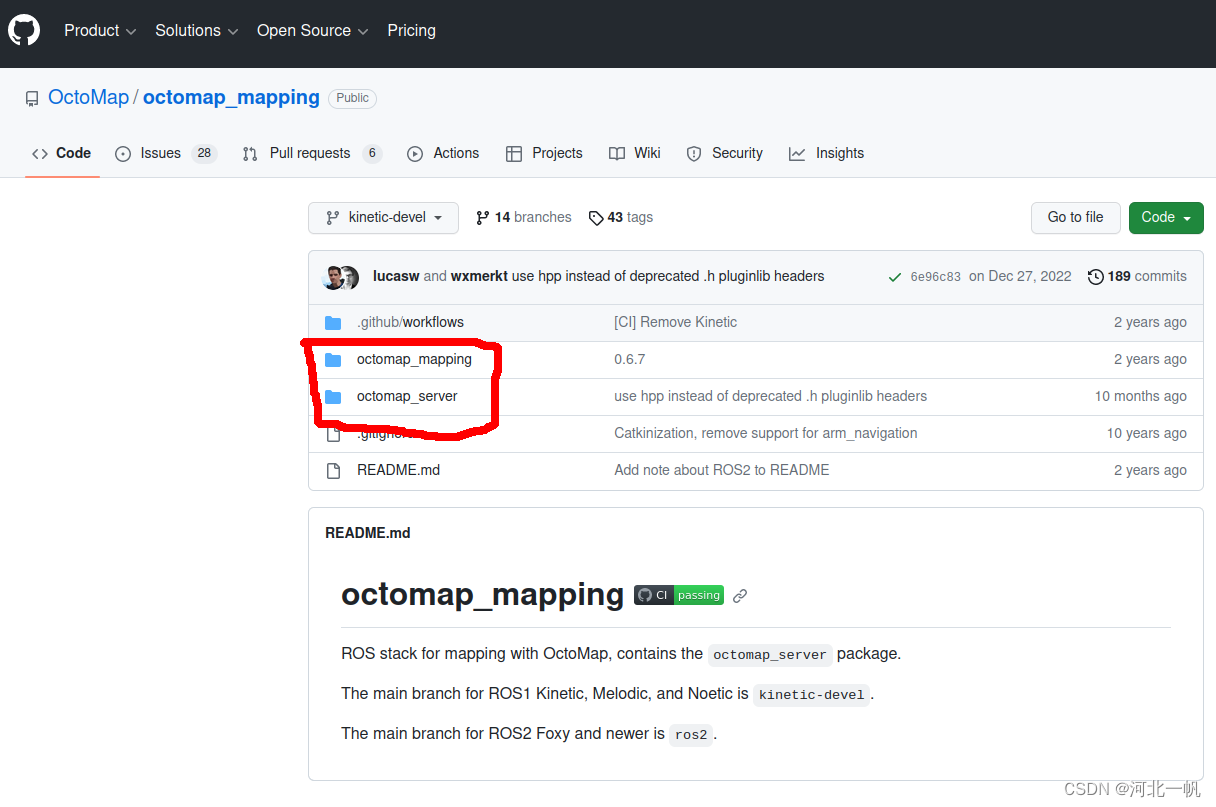
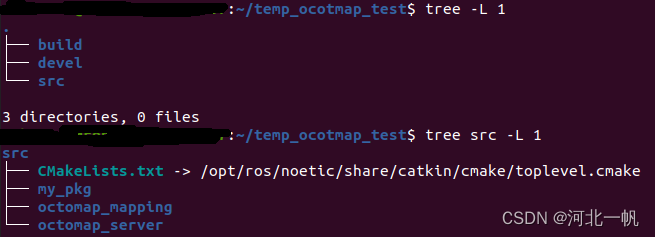
再创建一个用于发布点云的功能包
- cd src
- catkin_create_pkg my_pkg std_msgs roscpp
形成这样的目录结构
这里使用:Octomap 在ROS环境下实时显示_ros octomap-CSDN博客
的点云数据进行说明。
进入自己的功能包,创建一个data文件,将那位博主的点云文件test.pcd放进data文件夹
- cd my_pkg
- mkdir data
接下来写自己节点的cpp文件和自己功能包的CMakeLists.txt
- cd my_pkg/src
- vim my_pkg.cpp
my_pkg.cpp写入如下内容
- #include
- #include
- #include
- #include
- #include
- #include
- #include
- #include
- #include
- #include
- #include
- #include
- #include
- #include
- #include
- #include
- #include
- #include
- #define TESTCLOUDPOINTS 1
- #define TESTOCTOTREE 0
- int main (int argc, char **argv)
- {
- std::string topic,path,frame_id;
- int hz=5;
- ros::init (argc, argv, "publish_pointcloud");
- ros::NodeHandle nh;
- nh.param
- nh.param
- nh.param
- nh.param<int>("hz", hz, 5);
- // load cloudpoint
- pcl::PointCloud
- pcl::io::loadPCDFile (path, pcl_cloud);
- #if TESTCLOUDPOINTS
- ros::Publisher pcl_pub = nh.advertise
- // 转换成ROS下的数据类型 通过topic发布
- sensor_msgs::PointCloud2 output;
- pcl::toROSMsg(pcl_cloud, output);
- output.header.stamp=ros::Time::now();
- output.header.frame_id =frame_id;
- std::cout<<"path = "<std::cout<<"frame_id = "<std::cout<<"topic = "<std::cout<<"hz = "<ros::Rate loop_rate(hz);while (ros::ok()){pcl_pub.publish(output);ros::spinOnce();loop_rate.sleep();}#endif#if TESTOCTOTREEros::Publisher octomap_pub = nh.advertiseoctomap::OcTree tree(0.1); // You can adjust the resolution as neededfor (const auto& point : pcl_cloud.points) {tree.updateNode(point.x, point.y, point.z, true);}// Publish the octree as an OctoMap messageoctomap_msgs::Octomap octomap_msg;octomap_msgs::fullMapToMsg(tree, octomap_msg);// Assuming you have a publisher for the octomapoctomap_msg.header.stamp=ros::Time::now();octomap_msg.header.frame_id =frame_id;std::cout<<"path = "<std::cout<<"frame_id = "<std::cout<<"topic = "<std::cout<<"hz = "<ros::Rate loop_rate(hz);while (ros::ok()){octomap_pub.publish(octomap_msg);ros::spinOnce();loop_rate.sleep();}#endifreturn 0;}
CMakeLists.txt这样写
- cmake_minimum_required(VERSION 3.0.2)
- project(my_pkg)
- ## Compile as C++11, supported in ROS Kinetic and newer
- # add_compile_options(-std=c++11)
- ## Find catkin macros and libraries
- ## if COMPONENTS list like find_package(catkin REQUIRED COMPONENTS xyz)
- ## is used, also find other catkin packages
- find_package(catkin REQUIRED COMPONENTS
- roscpp
- std_msgs
- sensor_msgs
- octomap_msgs
- geometry_msgs
- )
- find_package(PCL REQUIRED)
- find_package(octomap REQUIRED)
- ## System dependencies are found with CMake's conventions
- # find_package(Boost REQUIRED COMPONENTS system)
- ## Uncomment this if the package has a setup.py. This macro ensures
- ## modules and global scripts declared therein get installed
- ## See http://ros.org/doc/api/catkin/html/user_guide/setup_dot_py.html
- # catkin_python_setup()
- ################################################
- ## Declare ROS messages, services and actions ##
- ################################################
- ## To declare and build messages, services or actions from within this
- ## package, follow these steps:
- ## * Let MSG_DEP_SET be the set of packages whose message types you use in
- ## your messages/services/actions (e.g. std_msgs, actionlib_msgs, ...).
- ## * In the file package.xml:
- ## * add a build_depend tag for "message_generation"
- ## * add a build_depend and a exec_depend tag for each package in MSG_DEP_SET
- ## * If MSG_DEP_SET isn't empty the following dependency has been pulled in
- ## but can be declared for certainty nonetheless:
- ## * add a exec_depend tag for "message_runtime"
- ## * In this file (CMakeLists.txt):
- ## * add "message_generation" and every package in MSG_DEP_SET to
- ## find_package(catkin REQUIRED COMPONENTS ...)
- ## * add "message_runtime" and every package in MSG_DEP_SET to
- ## catkin_package(CATKIN_DEPENDS ...)
- ## * uncomment the add_*_files sections below as needed
- ## and list every .msg/.srv/.action file to be processed
- ## * uncomment the generate_messages entry below
- ## * add every package in MSG_DEP_SET to generate_messages(DEPENDENCIES ...)
- ## Generate messages in the 'msg' folder
- # add_message_files(
- # FILES
- # Message1.msg
- # Message2.msg
- # )
- ## Generate services in the 'srv' folder
- # add_service_files(
- # FILES
- # Service1.srv
- # Service2.srv
- # )
- ## Generate actions in the 'action' folder
- # add_action_files(
- # FILES
- # Action1.action
- # Action2.action
- # )
- ## Generate added messages and services with any dependencies listed here
- # generate_messages(
- # DEPENDENCIES
- # std_msgs
- # )
- ################################################
- ## Declare ROS dynamic reconfigure parameters ##
- ################################################
- ## To declare and build dynamic reconfigure parameters within this
- ## package, follow these steps:
- ## * In the file package.xml:
- ## * add a build_depend and a exec_depend tag for "dynamic_reconfigure"
- ## * In this file (CMakeLists.txt):
- ## * add "dynamic_reconfigure" to
- ## find_package(catkin REQUIRED COMPONENTS ...)
- ## * uncomment the "generate_dynamic_reconfigure_options" section below
- ## and list every .cfg file to be processed
- ## Generate dynamic reconfigure parameters in the 'cfg' folder
- # generate_dynamic_reconfigure_options(
- # cfg/DynReconf1.cfg
- # cfg/DynReconf2.cfg
- # )
- ###################################
- ## catkin specific configuration ##
- ###################################
- ## The catkin_package macro generates cmake config files for your package
- ## Declare things to be passed to dependent projects
- ## INCLUDE_DIRS: uncomment this if your package contains header files
- ## LIBRARIES: libraries you create in this project that dependent projects also need
- ## CATKIN_DEPENDS: catkin_packages dependent projects also need
- ## DEPENDS: system dependencies of this project that dependent projects also need
- catkin_package(
- # INCLUDE_DIRS include
- # LIBRARIES my_pkg
- # CATKIN_DEPENDS roscpp std_msgs
- # DEPENDS system_lib
- )
- ###########
- ## Build ##
- ###########
- ## Specify additional locations of header files
- ## Your package locations should be listed before other locations
- include_directories(
- # include
- ${catkin_INCLUDE_DIRS}
- ${PCL_INCLUDE_DIRS}
- ${OCTOMAP_INCLUDE_DIRS}
- )
- ## Declare a C++ library
- # add_library(${PROJECT_NAME}
- # src/${PROJECT_NAME}/my_pkg.cpp
- # )
- ## Add cmake target dependencies of the library
- ## as an example, code may need to be generated before libraries
- ## either from message generation or dynamic reconfigure
- # add_dependencies(${PROJECT_NAME} ${${PROJECT_NAME}_EXPORTED_TARGETS} ${catkin_EXPORTED_TARGETS})
- ## Declare a C++ executable
- ## With catkin_make all packages are built within a single CMake context
- ## The recommended prefix ensures that target names across packages don't collide
- add_executable(publish_pointcloud src/my_pkg.cpp)
- ## Rename C++ executable without prefix
- ## The above recommended prefix causes long target names, the following renames the
- ## target back to the shorter version for ease of user use
- ## e.g. "rosrun someones_pkg node" instead of "rosrun someones_pkg someones_pkg_node"
- # set_target_properties(${PROJECT_NAME}_node PROPERTIES OUTPUT_NAME node PREFIX "")
- ## Add cmake target dependencies of the executable
- ## same as for the library above
- # add_dependencies(${PROJECT_NAME}_node ${${PROJECT_NAME}_EXPORTED_TARGETS} ${catkin_EXPORTED_TARGETS})
- ## Specify libraries to link a library or executable target against
- target_link_libraries(publish_pointcloud
- ${catkin_LIBRARIES}
- ${PCL_LIBRARIES}
- ${OCTOMAP_LIBRARIES}
- )
- #############
- ## Install ##
- #############
- # all install targets should use catkin DESTINATION variables
- # See http://ros.org/doc/api/catkin/html/adv_user_guide/variables.html
- ## Mark executable scripts (Python etc.) for installation
- ## in contrast to setup.py, you can choose the destination
- # catkin_install_python(PROGRAMS
- # scripts/my_python_script
- # DESTINATION ${CATKIN_PACKAGE_BIN_DESTINATION}
- # )
- ## Mark executables for installation
- ## See http://docs.ros.org/melodic/api/catkin/html/howto/format1/building_executables.html
- # install(TARGETS ${PROJECT_NAME}_node
- # RUNTIME DESTINATION ${CATKIN_PACKAGE_BIN_DESTINATION}
- # )
- ## Mark libraries for installation
- ## See http://docs.ros.org/melodic/api/catkin/html/howto/format1/building_libraries.html
- # install(TARGETS ${PROJECT_NAME}
- # ARCHIVE DESTINATION ${CATKIN_PACKAGE_LIB_DESTINATION}
- # LIBRARY DESTINATION ${CATKIN_PACKAGE_LIB_DESTINATION}
- # RUNTIME DESTINATION ${CATKIN_GLOBAL_BIN_DESTINATION}
- # )
- ## Mark cpp header files for installation
- # install(DIRECTORY include/${PROJECT_NAME}/
- # DESTINATION ${CATKIN_PACKAGE_INCLUDE_DESTINATION}
- # FILES_MATCHING PATTERN "*.h"
- # PATTERN ".svn" EXCLUDE
- # )
- ## Mark other files for installation (e.g. launch and bag files, etc.)
- # install(FILES
- # # myfile1
- # # myfile2
- # DESTINATION ${CATKIN_PACKAGE_SHARE_DESTINATION}
- # )
- #############
- ## Testing ##
- #############
- ## Add gtest based cpp test target and link libraries
- # catkin_add_gtest(${PROJECT_NAME}-test test/test_my_pkg.cpp)
- # if(TARGET ${PROJECT_NAME}-test)
- # target_link_libraries(${PROJECT_NAME}-test ${PROJECT_NAME})
- # endif()
- ## Add folders to be run by python nosetests
- # catkin_add_nosetests(test)
my_pkg.cpp中,先使用 宏TESTCLOUDPOINTS,发布点云数据
- #define TESTCLOUDPOINTS 1
- #define TESTOCTOTREE 0
定义好frame_id 和topic
- nh.param
- nh.param
- nh.param
- nh.param<int>("hz", hz, 5);
回到工作空间,编译
- cd temp_ocotmap_test
- caikin_make
在工作空间中运行节点
rosrun my_pkg publish_pointcloud打开一个terminal,进入工作空间,新打开terminal要source一下
source devel/setup.bash接下来要运行octomap_server,通过octomap_server中的launch文件运行,launch文件在octomap_server/launch,运行之前,要修改其中的frame_id 和topic为你自己定义的frame_id和topic
"octomap_server" type="octomap_server_node" name="octomap_server"> - "resolution" value="0.05" />
- "frame_id" type="string" value="your_frame_id" />
- "sensor_model/max_range" value="100.0" />
- "latch" value="true" />
- "pointcloud_max_z" value="1000" />
- "pointcloud_min_z" value="0" />
"/cloud_in" to="your_pointcloud_topic" />
在工作空间中运行octomap_server
roslaunch octomap_server octomap_mapping.launch这时会出现

不用担心,其实octree已经生成,不知道为什么会显示这个,因为这个问题困扰了好久
再打开一个terminal,运行rviz,记得提前要安装rviz的octomap 插件
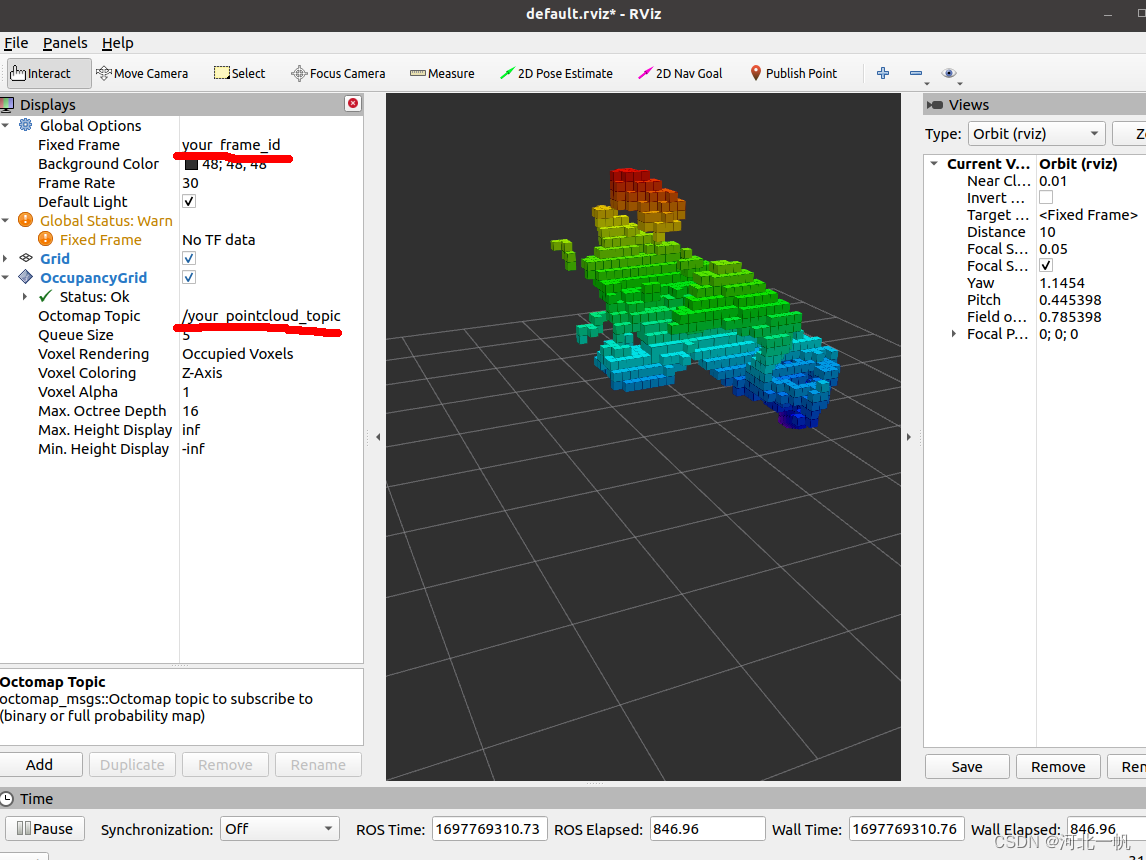
rosrun rviz rviz修改Fixed Frame,Add一个OccupancyGrid,订阅/ocotmap_full这个topic,就可以看到生成的octree了

第二种:不使用octomap_server,在自己项目中引用octomap包,生成octree,直接发布octree的topic,rviz订阅topic进行可视化
将上面my_pkg.cpp中的宏改为
- #define TESTCLOUDPOINTS 0
- #define TESTOCTOTREE 1
这样就运行了直接生成octree并发布的那段代码,回到工作空间,编译,运行节点
- cd temp_ocotmap_test
- catkin_make
- rosrun my_pkg publish_pointcloud
在rviz中修改topic和frame_id,便可以看到octree
以上!
- 相关阅读:
蓝牙mesh系统开发三 Ble Mesh 配网器 Provisioner
【异常的打卡记录】python实现-附ChatGPT解析
Jmeter接口自动化测试 —— Jmeter断言之Json断言!
git中无法使用方向键的问题
HTML5新增的input元素属性:placeholder、required、autofocus、min、max等
408-2016真题
Android实现在activity启动时传递对象和字符串参数
Spring-security流程讲解01:basic模式
(mouse_event参数)鼠标事件表
【黄色手套22】6话:构造数据类型
- 原文地址:https://blog.csdn.net/qq_41816368/article/details/133939890
