-
【uni-app+vue3】分享功能,App端调用手机的系统分享,可分享到微信、QQ、朋友圈等,已实现
前言:
uniapp分享功能,之前考虑的思路一直都是如何使用uni.share()实现
需要下载插件,需要申请微信appid,插件已下载,主要就是没有appid,所以只好换方向实现效果:
在需要分享的页面,有三个分享按钮

点击任意按钮,都会打开系统自带的页面,可以发送到微信,qq,朋友圈,还有别的选项

将图片发送到朋友圈的效果如下,(文字,链接,图片都可以)

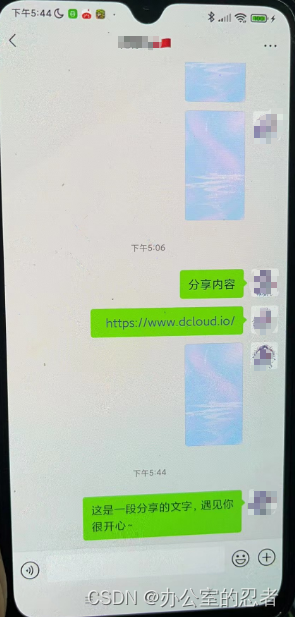
将文字或链接或图片分享给微信好友(文字,链接,图片都可以),分享给qq好友效果一样,不重复演示了
具体实现:<view class="bottom"> <view class="bottom-box" @click="shareText"> <image src="@/static/images/share.png" mode=""></image> <view class="text"> 分享文字 </view> </view> <view class="bottom-box" @click="shareLink"> <image src="@/static/images/share.png" mode=""></image> <view class="text"> 分享链接 </view> </view> <view class="bottom-box" @click="shareCode"> <image src="@/static/images/share.png" mode=""></image> <view class="text"> 分享二维码 </view> </view> </view>- 1
- 2
- 3
- 4
- 5
- 6
- 7
- 8
- 9
- 10
- 11
- 12
- 13
- 14
- 15
- 16
- 17
- 18
- 19
- 20
<script lang="ts" setup> function shareText() { plus.share.sendWithSystem({ content: '这是一段分享的文字,遇见你很开心~' }, function () { console.log('分享成功'); }, function (e) { console.log('分享失败:' + JSON.stringify(e)); }); } function shareLink() { plus.share.sendWithSystem({ href: 'https://www.dcloud.io/' }, function () { console.log('分享成功'); }, function (e) { console.log('分享失败:' + JSON.stringify(e)); }); } function shareCode() { plus.share.sendWithSystem({ content: '分享内容', type: 'image', pictures: ['_www/static/images/my/invitecodeBcg.png'] }, function () { console.log('分享成功'); }, function (e) { console.log('分享失败:' + JSON.stringify(e)); }); } </script>- 1
- 2
- 3
- 4
- 5
- 6
- 7
- 8
- 9
- 10
- 11
- 12
- 13
- 14
- 15
- 16
- 17
- 18
- 19
- 20
- 21
- 22
- 23
- 24
-
相关阅读:
gin-gonic/gin使用详解
云计算等保测评
查询 (Tcode)跳转ID方法:(SET PARAMETER ID)
巧用数组——一维数组
Python中的常用函数
Error-onnxruntime.capi.onnxruntime_pybind11_state.Fail:
java继承
networkx学习记录
【C语言深入理解指针(2)】
Java idea编译器工程out目录修改
- 原文地址:https://blog.csdn.net/weixin_49668076/article/details/133951231
