-
Nvm管理NodeJs版本
Nvm管理NodeJs版本
一、前言
1.简介
Node Version Manager(nvm)可通过命令行快速安装和使用不同版本的Node.js
2.环境
- Windows 10 专业版
- nvm 版本:v1.1.11
nvm - github:https://github.com/nvm-sh/nvm
nvm - Releases:https://github.com/coreybutler/nvm-windows/releases
Node.js 版本:https://nodejs.org/en/download/releases
Vuejs入门和使用实践:https://blog.csdn.net/u011424614/article/details/94478809
vue集成cesium:https://blog.csdn.net/u011424614/article/details/103403275
二、正文
1.卸载NodeJs
如未安装过 Node.js 可跳过第 1 步1)使用 Windows 的
应用和功能卸载 Node.js2)删除
.npmrc文件C:\Users\用户名\.npmrc- 1
3)清除 npm 缓存
npm cache clean --force- 1
4)删除以下 npm 文件夹
C:\Users\用户名\AppData\Roaming\npm C:\Users\用户名\AppData\Roaming\npm-cache- 1
- 2
2.安装Nvm
nvm-noinstall.zip:绿色免安装版nvm-setup.exe:安装版,【推荐使用】
- 双击
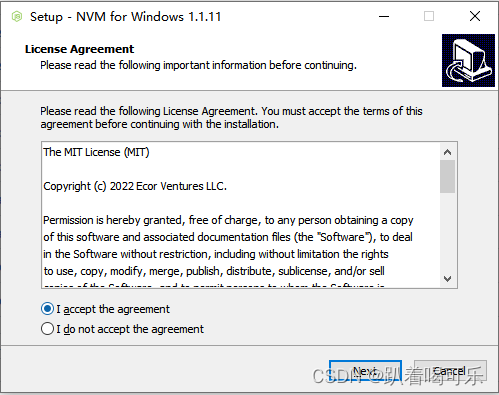
nvm-setup.exe安装文件,按步骤安装即可 - 建议:安装目录是无空格和无特殊字符的全英文目录
3.配置国内镜像
- 查询 nvm 安装目录
where nvm- 1
- 安装目录下,找到
settings.txt,写入淘宝镜像
node_mirror: https://npm.taobao.org/mirrors/node/ npm_mirror: https://npm.taobao.org/mirrors/npm/- 1
- 2
4.Nvm使用
- 查询
命令 说明 nvm list 显示已安装的 Node.js 版本 nvm list installed 显示已安装的 Node.js 版本 nvm list available 显示所有可下载的 Node.js 版本 npm -v 显示 npm 版本 node -v 显示 Node.js 版本 - 安装
命令 说明 nvm install 12.20.1
nvm install 14.21.3
nvm install 18.18.2安装指定的 Node.js 版本 nvm install latest 安装最新的 Node.js 版本 - 使用
命令 说明 nvm use 12.20.1 使用指定的 Node.js 版本 - 卸载
命令 说明 nvm uninstall 12.20.1 卸载指定的 Node.js 版本 - 其它
命令 说明 nvm arch 显示 Node.js 运行的系统位数(32位或64位) nvm on 开启 Node.js 版本管理 nvm off 关闭 Node.js 版本管理 nvm version 显示 nvm 版本 nvm proxy [url] 设置下载代理
不加可选参数 url,则显示当前代理
如 url 设置为 none,则移除代理nvm root [path] 设置存储不同版本 Node.js 的目录
如果未设置,则默认使用当前目录nvm node_mirror [url] 设置 Node.js 镜像;设置后可在安装目录下的 settings.txt 查看 nvm npm_mirror [url] 设置 npm 镜像;设置后可在安装目录下的 settings.txt 查看 5.其它
1)报错1
- 错误提示
'"node"' 不是内部或外部命令,也不是可运行的程序或批处理文件。- 1
- 解决方法
1)找到 nvm 的安装目录
2)安装目录下,新建
nodejs文件夹3)环境变量中的用户变量和系统变量,找到
NVM_SYMLINK配置nodejs的目录4)使用
nvm use 12.20.1切换 Node.js 环境2)报错2
-
场景说明:nvm 切换 Node.js 版本后,而 npm 版本未切换
-
解决方法
(1)使用 Windows 的
应用和功能卸载 Node.js(2)删除
.npmrc文件C:\Users\用户名\.npmrc- 1
(3)清除 npm 缓存
npm cache clean --force- 1
(4)删除以下 npm 文件夹
C:\Users\用户名\AppData\Roaming\npm C:\Users\用户名\AppData\Roaming\npm-cache- 1
- 2
(3)清除 npm 缓存
npm cache clean --force- 1
(4)删除以下 npm 文件夹
C:\Users\用户名\AppData\Roaming\npm C:\Users\用户名\AppData\Roaming\npm-cache- 1
- 2
-
相关阅读:
RT201 国产PA射频功率放大器 兼容RFX2401C
设计模式之备忘录模式
Redisson实现延迟队列
Spring IoC容器及原理
【Java基础篇】逻辑控制
Linux的tomcat的shutdown.sh关闭不了进程程
spring redis 工具类
self-attention 李宏毅
【Pytest实战】Pytest+Allure+Jenkins自动化测试框架搭建
RabbitMQ 之 Work Queues 工作队列
- 原文地址:https://blog.csdn.net/u011424614/article/details/133938401