-
基于Flume+Kafka+Hbase+Flink+FineBI的实时综合案例(五)FineBI可视化
22:FineBI配置数据集
-
目标:实现FineBI访问MySQL结果数据集的配置
-
实施
-
安装FineBI
-
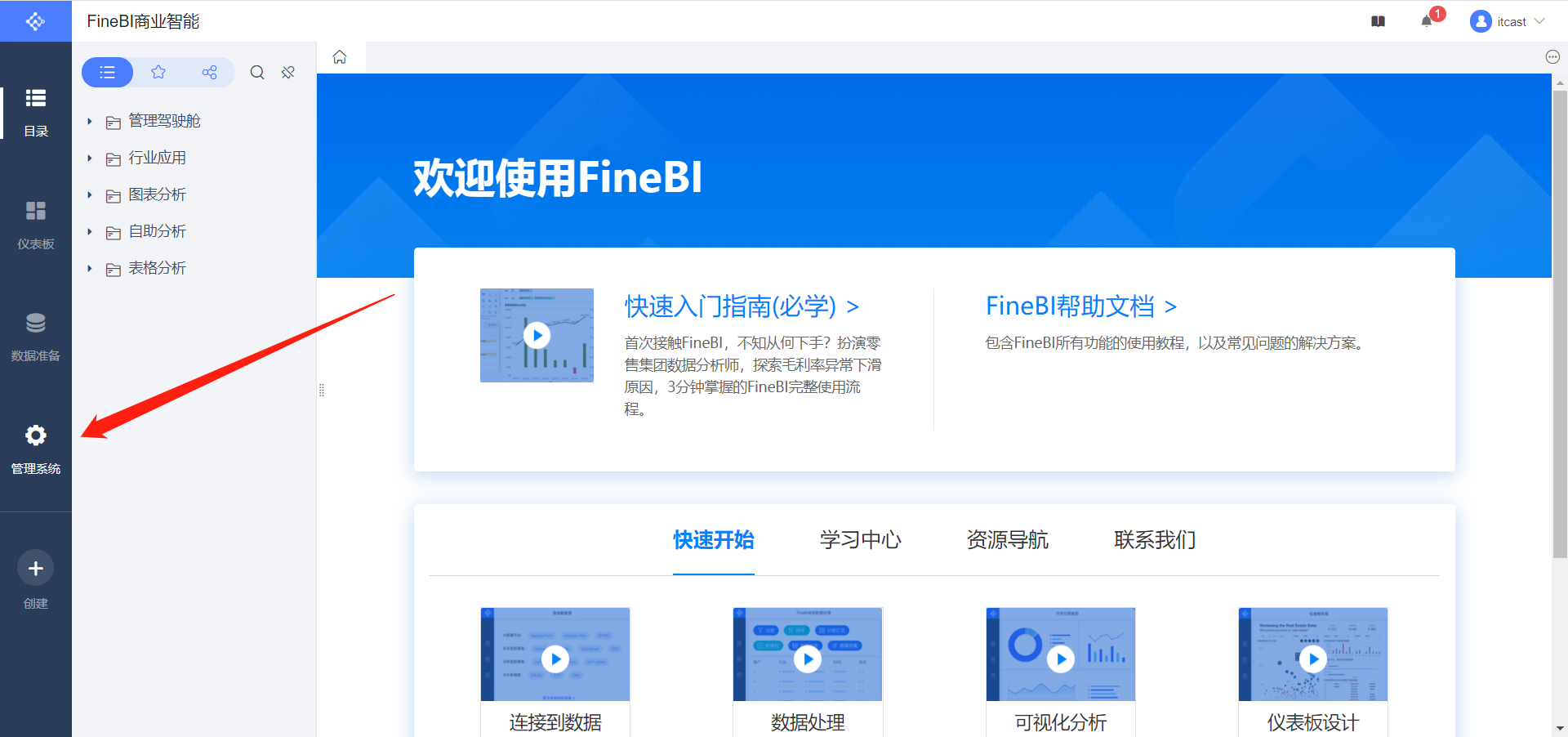
参考《FineBI Windows版本安装手册.docx》安装FineBI

-
-
配置连接


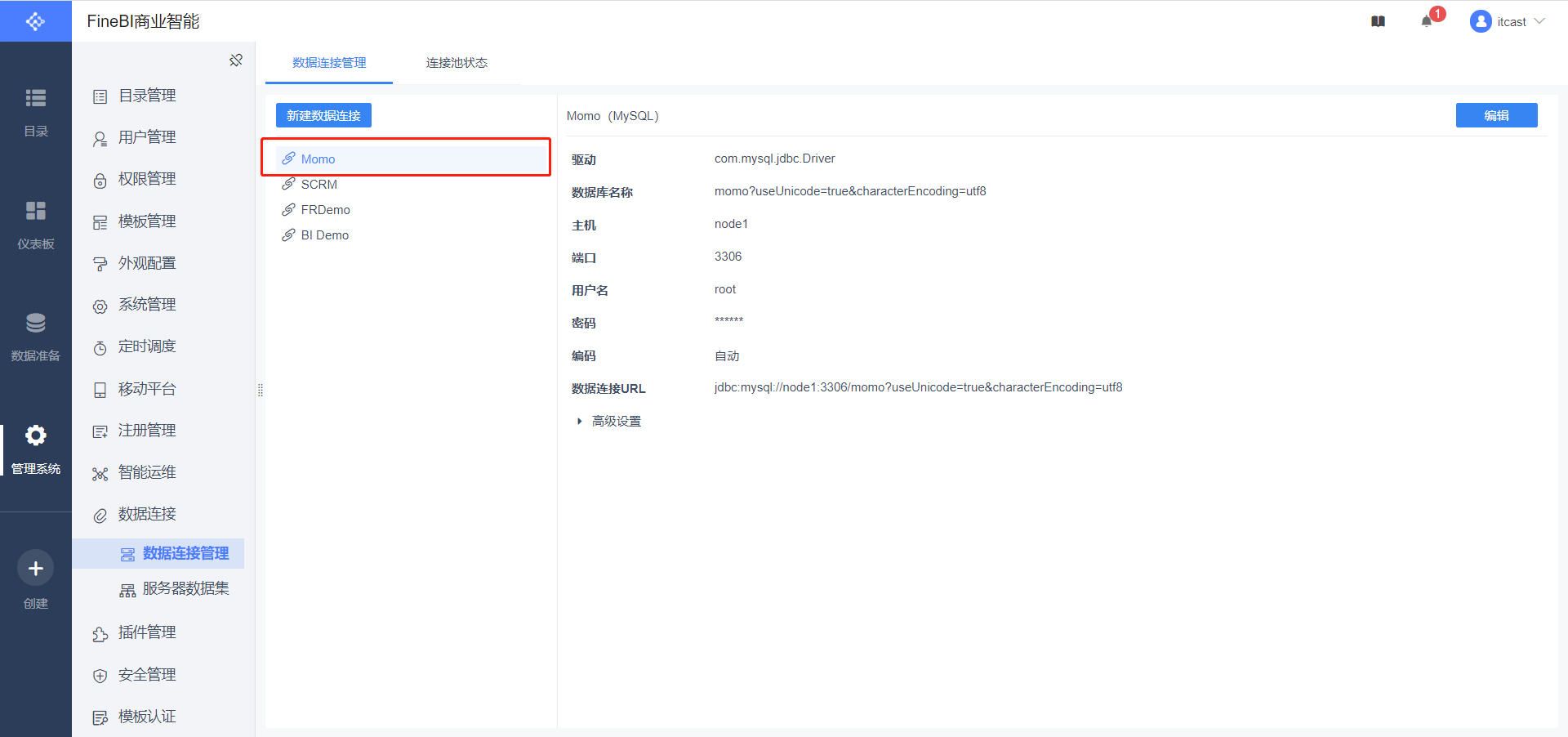
数据连接名称:Momo 用户名:root 密码:自己MySQL的密码 数据连接URL:jdbc:mysql://node1:3306/momo?useUnicode=true&characterEncoding=utf8- 1
- 2
- 3
- 4

-
数据准备


SELECT id, momo_totalcount,momo_province,momo_username,momo_msgcount, CASE momo_grouptype WHEN '1' THEN '总消息量' WHEN '2' THEN '各省份发送量' WHEN '3' THEN '各省份接收量' WHEN '4' THEN '各用户发送量' WHEN '5' THEN '各用户接收量' END AS momo_grouptype FROM momo_count- 1
- 2
- 3
- 4
- 5
-
-
小结
- 实现FineBI访问MySQL结果数据集的配置
23:FineBI构建报表
-
目标:实现FineBI实时报表构建
-
路径
- step1:实时报表构建
- step2:实时报表配置
- step3:实时刷新测试
-
实施
-
实时报表构建
-
新建仪表盘


-
添加标题


-
实时总消息数

-
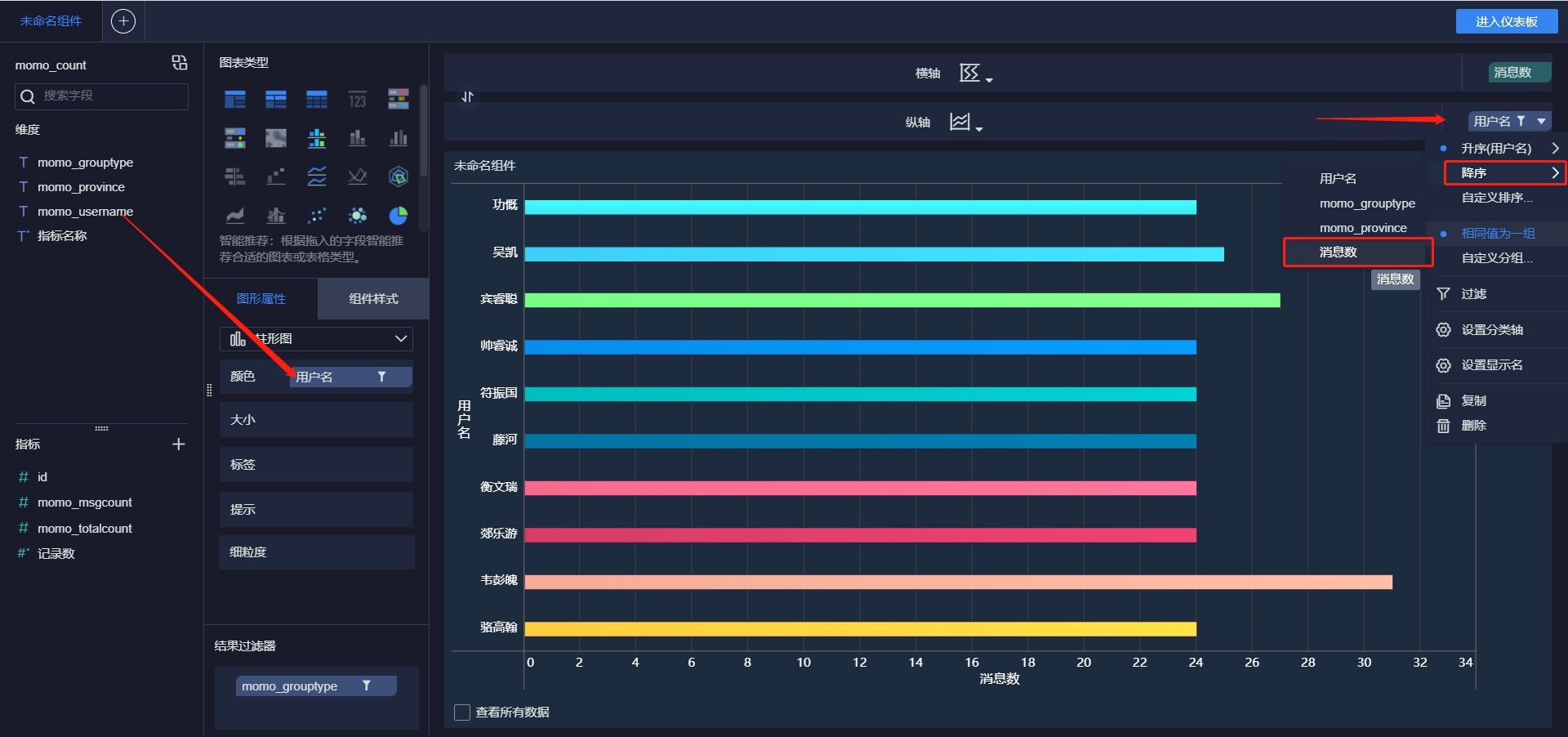
发送消息最多的Top10用户



-
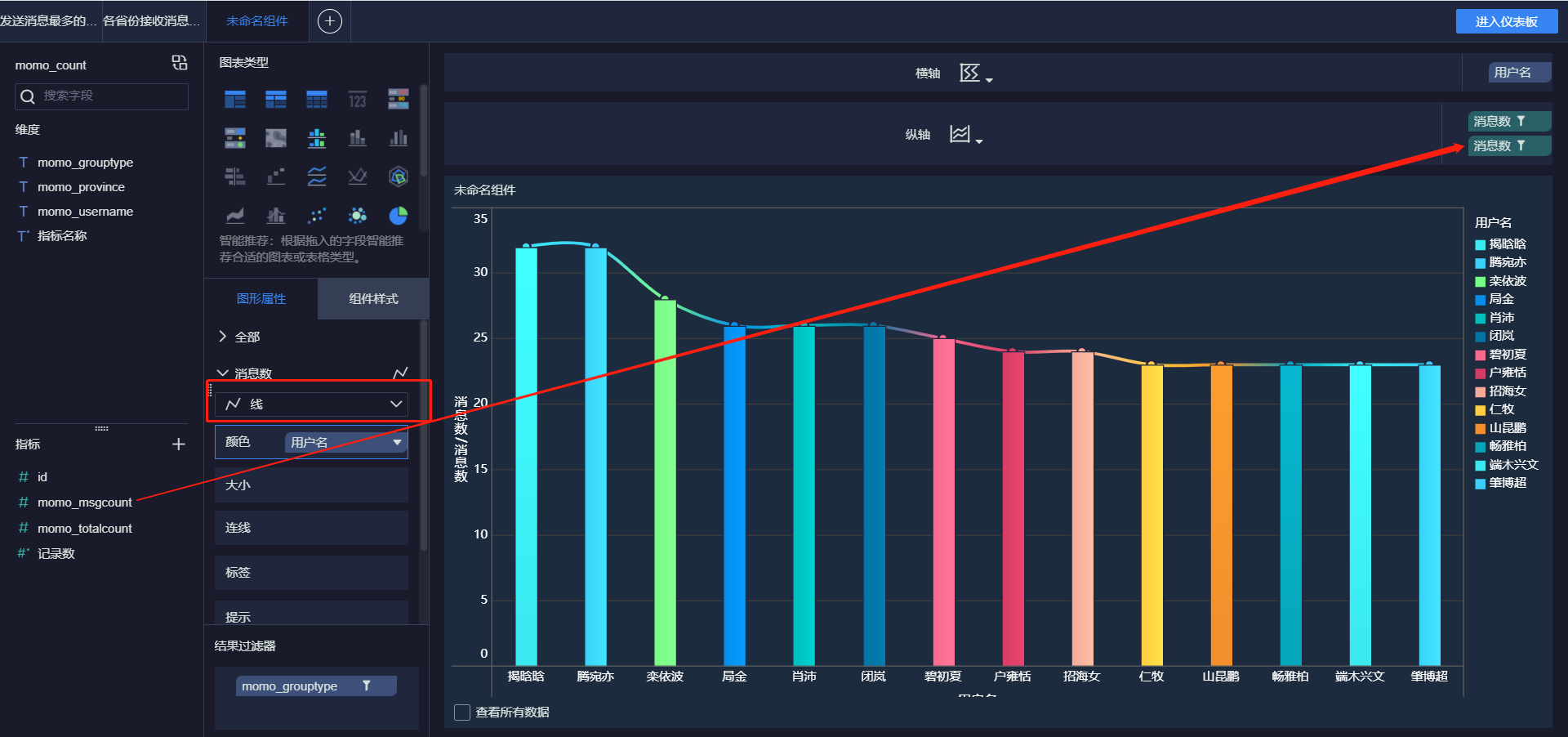
接受消息最多的Top10用户


-
各省份发送消息Top10


-
各省份接收消息Top10


-
各省份总消息量


-
-
-
小结
- 实现FineBI实时报表构建
24:FineBI实时配置测试
-
目标:实现实时报表测试
-
实施
-
实时报表配置
-
官方文档:https://help.fanruan.com/finebi/doc-view-363.html
-
添加jar包:将jar包放入FineBI安装目录的 webapps\webroot\WEB-INF\lib目录下

- 注意:如果提示已存在,就选择覆盖
-
添加JS文件
-
创建js文件:refresh.js
setTimeout(function () { var b =document.title; var a =BI.designConfigure.reportId;//获取仪表板id //这里要指定自己仪表盘的id if (a=="d574631848bd4e33acae54f986d34e69") { setInterval(function () { BI.SharingPool.put("controlFilters", BI.Utils.getControlCalculations()); //Data.SharingPool.put("controlFilters", BI.Utils.getControlCalculations()); BI.Utils.broadcastAllWidgets2Refresh(true); }, 3000);//5000000为定时刷新的频率,单位ms } }, 2000)- 1
- 2
- 3
- 4
- 5
- 6
- 7
- 8
- 9
- 10
- 11
- 12
-
将创建好的refresh.js文件放至 FineBI 安装目录%FineBI%/webapps/webroot中

-
关闭FineBI缓存,然后关闭FineBI

-
修改jar包,添加js


- 1
- 2
- 1
-
-
重启FineBI
-
-
-
实时刷新测试
-
清空MySQL结果表
-
启动Flink程序:运行MoMoFlinkCount
-
启动Flume程序
cd /export/server/flume-1.9.0-bin bin/flume-ng agent -c conf/ -n a1 -f usercase/momo_mem_kafka.properties -Dflume.root.logger=INFO,console- 1
- 2
-
启动模拟数据
java -jar /export/data/momo_init/MoMo_DataGen.jar \ /export/data/momo_init/MoMo_Data.xlsx \ /export/data/momo_data/ \ 10- 1
- 2
- 3
- 4
- 观察报表- 1
- 2
- 3
-
-
小结
- 实现FineBI实时测试
## 附录一:Maven依赖 ```xmlaliyun http://maven.aliyun.com/nexus/content/groups/public/ true false never org.apache.hbase hbase-client 2.1.0 org.apache.kafka kafka-clients 2.4.1 com.alibaba fastjson 1.2.62 org.apache.flink flink-java 1.10.0 org.apache.flink flink-streaming-java_2.11 1.10.0 org.apache.flink flink-runtime-web_2.11 1.10.0 org.apache.flink flink-shaded-hadoop-2-uber 2.7.5-10.0 org.apache.flink flink-connector-kafka_2.11 1.10.0 org.apache.flink flink-jdbc_2.11 1.10.0 org.apache.bahir flink-connector-redis_2.11 1.0 org.apache.httpcomponents httpclient 4.5.4 mysql mysql-connector-java 5.1.38 org.apache.maven.plugins maven-compiler-plugin 3.1 1.8 1.8 - 1
- 2
- 3
- 4
- 5
- 6
- 7
- 8
- 9
- 10
- 11
- 12
- 13
- 14
- 15
- 16
- 17
- 18
- 19
- 20
- 21
- 22
- 23
- 24
- 25
- 26
- 27
- 28
- 29
- 30
- 31
- 32
- 33
- 34
- 35
- 36
- 37
- 38
- 39
- 40
- 41
- 42
- 43
- 44
- 45
- 46
- 47
- 48
- 49
- 50
- 51
- 52
- 53
- 54
- 55
- 56
- 57
- 58
- 59
- 60
- 61
- 62
- 63
- 64
- 65
- 66
- 67
- 68
- 69
- 70
- 71
- 72
- 73
- 74
- 75
- 76
- 77
- 78
- 79
- 80
- 81
- 82
- 83
- 84
- 85
- 86
- 87
- 88
- 89
- 90
- 91
- 92
- 93
- 94
- 95
- 96
- 97
- 98
- 99
- 100
- 101
- 102
附录二:离线消费者完整代码
package bigdata.itcast.cn.momo.offline; import org.apache.hadoop.conf.Configuration; import org.apache.hadoop.hbase.HBaseConfiguration; import org.apache.hadoop.hbase.TableName; import org.apache.hadoop.hbase.client.Connection; import org.apache.hadoop.hbase.client.ConnectionFactory; import org.apache.hadoop.hbase.client.Put; import org.apache.hadoop.hbase.client.Table; import org.apache.hadoop.hbase.util.Bytes; import org.apache.hadoop.hbase.util.MD5Hash; import org.apache.kafka.clients.consumer.ConsumerRecord; import org.apache.kafka.clients.consumer.ConsumerRecords; import org.apache.kafka.clients.consumer.KafkaConsumer; import org.apache.kafka.clients.consumer.OffsetAndMetadata; import org.apache.kafka.common.TopicPartition; import java.io.IOException; import java.text.ParseException; import java.text.SimpleDateFormat; import java.time.Duration; import java.util.*; /** * @ClassName MomoKafkaToHbase * @Description TODO 离线场景:消费Kafka的数据写入Hbase * @Create By Maynor */ public class MomoKafkaToHbase { private static SimpleDateFormat format = new SimpleDateFormat("yyyy-MM-dd HH:mm:ss"); private static Connection conn; private static Table table; private static TableName tableName = TableName.valueOf("MOMO_CHAT:MOMO_MSG");//表名 private static byte[] family = Bytes.toBytes("C1");//列族 //todo:2-构建Hbase连接 //静态代码块: 随着类的加载而加载,一般只会加载一次,避免构建多个连接影响性能 static{ try { //构建配置对象 Configuration conf = HBaseConfiguration.create(); conf.set("hbase.zookeeper.quorum","node1:2181,node2:2181,node3:2181"); //构建连接 conn = ConnectionFactory.createConnection(conf); //获取表对象 table = conn.getTable(tableName); } catch (IOException e) { e.printStackTrace(); } } public static void main(String[] args) throws Exception { //todo:1-构建消费者,获取数据 consumerKafkaToHbase(); // String momoRowkey = getMomoRowkey("2020-08-13 12:30:00", "13071949728", "17719988692"); // System.out.println(momoRowkey); } /** * 用于消费Kafka的数据,将合法数据写入Hbase */ private static void consumerKafkaToHbase() throws Exception { //构建配置对象 Properties props = new Properties(); //指定服务端地址 props.setProperty("bootstrap.servers", "node1:9092,node2:9092,node3:9092"); //指定消费者组的id props.setProperty("group.id", "momo1"); //关闭自动提交 props.setProperty("enable.auto.commit", "false"); //指定K和V反序列化的类型 props.setProperty("key.deserializer", "org.apache.kafka.common.serialization.StringDeserializer"); props.setProperty("value.deserializer", "org.apache.kafka.common.serialization.StringDeserializer"); //构建消费者的连接 KafkaConsumer<String, String> consumer = new KafkaConsumer<>(props); //指定订阅哪些Topic consumer.subscribe(Arrays.asList("MOMO_MSG")); //持续拉取数据 while (true) { //向Kafka请求拉取数据,等待Kafka响应,在100ms以内如果响应,就拉取数据,如果100ms内没有响应,就提交下一次请求: 100ms为等待Kafka响应时间 //拉取到的所有数据:多条KV数据都在ConsumerRecords对象,类似于一个集合 ConsumerRecords<String, String> records = consumer.poll(Duration.ofMillis(100)); //todo:3-处理拉取到的数据:打印 //取出每个分区的数据进行处理 Set<TopicPartition> partitions = records.partitions();//获取本次数据中所有分区 //对每个分区的数据做处理 for (TopicPartition partition : partitions) { List<ConsumerRecord<String, String>> partRecords = records.records(partition);//取出这个分区的所有数据 //处理这个分区的数据 long offset = 0; for (ConsumerRecord<String, String> record : partRecords) { //获取Topic String topic = record.topic(); //获取分区 int part = record.partition(); //获取offset offset = record.offset(); //获取Key String key = record.key(); //获取Value String value = record.value(); System.out.println(topic + "\t" + part + "\t" + offset + "\t" + key + "\t" + value); //将Value数据写入Hbase if(value != null && !"".equals(value) && value.split("\001").length == 20 ){ writeToHbase(value); } } //手动提交分区的commit offset Map<TopicPartition, OffsetAndMetadata> offsets = Collections.singletonMap(partition,new OffsetAndMetadata(offset+1)); consumer.commitSync(offsets); } } } /** * 用于实现具体的写入Hbase的方法 * @param value */ private static void writeToHbase(String value) throws Exception { //todo:3-写入Hbase //切分数据 String[] items = value.split("\001"); String stime = items[0]; String sender_accounter = items[2]; String receiver_accounter = items[11]; //构建rowkey String rowkey = getMomoRowkey(stime,sender_accounter,receiver_accounter); //构建Put Put put = new Put(Bytes.toBytes(rowkey)); //添加列 put.addColumn(Bytes.toBytes("C1"),Bytes.toBytes("msg_time"),Bytes.toBytes(items[0])); put.addColumn(Bytes.toBytes("C1"),Bytes.toBytes("sender_nickyname"),Bytes.toBytes(items[1])); put.addColumn(Bytes.toBytes("C1"),Bytes.toBytes("sender_account"),Bytes.toBytes(items[2])); put.addColumn(Bytes.toBytes("C1"),Bytes.toBytes("sender_sex"),Bytes.toBytes(items[3])); put.addColumn(Bytes.toBytes("C1"),Bytes.toBytes("sender_ip"),Bytes.toBytes(items[4])); put.addColumn(Bytes.toBytes("C1"),Bytes.toBytes("sender_os"),Bytes.toBytes(items[5])); put.addColumn(Bytes.toBytes("C1"),Bytes.toBytes("sender_phone_type"),Bytes.toBytes(items[6])); put.addColumn(Bytes.toBytes("C1"),Bytes.toBytes("sender_network"),Bytes.toBytes(items[7])); put.addColumn(Bytes.toBytes("C1"),Bytes.toBytes("sender_gps"),Bytes.toBytes(items[8])); put.addColumn(Bytes.toBytes("C1"),Bytes.toBytes("receiver_nickyname"),Bytes.toBytes(items[9])); put.addColumn(Bytes.toBytes("C1"),Bytes.toBytes("receiver_ip"),Bytes.toBytes(items[10])); put.addColumn(Bytes.toBytes("C1"),Bytes.toBytes("receiver_account"),Bytes.toBytes(items[11])); put.addColumn(Bytes.toBytes("C1"),Bytes.toBytes("receiver_os"),Bytes.toBytes(items[12])); put.addColumn(Bytes.toBytes("C1"),Bytes.toBytes("receiver_phone_type"),Bytes.toBytes(items[13])); put.addColumn(Bytes.toBytes("C1"),Bytes.toBytes("receiver_network"),Bytes.toBytes(items[14])); put.addColumn(Bytes.toBytes("C1"),Bytes.toBytes("receiver_gps"),Bytes.toBytes(items[15])); put.addColumn(Bytes.toBytes("C1"),Bytes.toBytes("receiver_sex"),Bytes.toBytes(items[16])); put.addColumn(Bytes.toBytes("C1"),Bytes.toBytes("msg_type"),Bytes.toBytes(items[17])); put.addColumn(Bytes.toBytes("C1"),Bytes.toBytes("distance"),Bytes.toBytes(items[18])); put.addColumn(Bytes.toBytes("C1"),Bytes.toBytes("message"),Bytes.toBytes(items[19])); //执行写入 table.put(put); } /** * 基于消息时间、发送人id、接受人id构建rowkey * @param stime * @param sender_accounter * @param receiver_accounter * @return * @throws Exception */ private static String getMomoRowkey(String stime, String sender_accounter, String receiver_accounter) throws Exception { //转换时间戳 long time = format.parse(stime).getTime(); String suffix = sender_accounter+"_"+receiver_accounter+"_"+time; //构建MD5 String prefix = MD5Hash.getMD5AsHex(Bytes.toBytes(suffix)).substring(0,8); //合并返回 return prefix+"_"+suffix; } }- 1
- 2
- 3
- 4
- 5
- 6
- 7
- 8
- 9
- 10
- 11
- 12
- 13
- 14
- 15
- 16
- 17
- 18
- 19
- 20
- 21
- 22
- 23
- 24
- 25
- 26
- 27
- 28
- 29
- 30
- 31
- 32
- 33
- 34
- 35
- 36
- 37
- 38
- 39
- 40
- 41
- 42
- 43
- 44
- 45
- 46
- 47
- 48
- 49
- 50
- 51
- 52
- 53
- 54
- 55
- 56
- 57
- 58
- 59
- 60
- 61
- 62
- 63
- 64
- 65
- 66
- 67
- 68
- 69
- 70
- 71
- 72
- 73
- 74
- 75
- 76
- 77
- 78
- 79
- 80
- 81
- 82
- 83
- 84
- 85
- 86
- 87
- 88
- 89
- 90
- 91
- 92
- 93
- 94
- 95
- 96
- 97
- 98
- 99
- 100
- 101
- 102
- 103
- 104
- 105
- 106
- 107
- 108
- 109
- 110
- 111
- 112
- 113
- 114
- 115
- 116
- 117
- 118
- 119
- 120
- 121
- 122
- 123
- 124
- 125
- 126
- 127
- 128
- 129
- 130
- 131
- 132
- 133
- 134
- 135
- 136
- 137
- 138
- 139
- 140
- 141
- 142
- 143
- 144
- 145
- 146
- 147
- 148
- 149
- 150
- 151
- 152
- 153
- 154
- 155
- 156
- 157
- 158
- 159
- 160
- 161
- 162
- 163
- 164
- 165
- 166
- 167
- 168
- 169
- 170
- 171
- 172
- 173
- 174
- 175
-
-
相关阅读:
vue 前端预览 Excel 表
【附源码】Python计算机毕业设计数据时代下的疫情管理系统
FreeRTOS入门教程(任务优先级,Tick)
函数式编程
Vue之混入(mixin)
超高真空度精密控制解决方案设计中百度“文心一言”的具体应用
SLAM从入门到精通(里程计的计算)
【学习总结】LSD-SLAM配置与运行记录
算法 - 组合总和3
python特别篇—github基本操作手册
- 原文地址:https://blog.csdn.net/xianyu120/article/details/133922455
