-
【无标题】
)1.创建自定义组件

要新建component才可以使用组件

自动会生成4个文件,现在可以开始使用主件。2…在tabs的wxml文件中定制组件模板
<view class="tabs"> <view class="tabs_title"> <view wx:for="{{tabList}}" wx:key="id" class="title_item {{index==tabIndex?'item_active':''}}" bindtap="handleItemTap" data-index="{{index}}"> <view style="margin-bottom:5rpx">{{item}}view> <view style="width:30px" class="{{index==tabIndex?'item_active1':''}}">view> view> view> <view class="tabs_content"> <slot>slot> view> view>- 1
- 2
- 3
- 4
- 5
- 6
- 7
- 8
- 9
- 10
- 11
- 12
- 13
2.给模板设计样式
/* components/tabs/tabs.wxss */ .tabs { position: fixed; top: 0; width: 100%; background-color: #fff; z-index: 99; border-bottom: 1px solid #efefef; padding-bottom: 20rpx; } .tabs_title { /* width: 400rpx; */ width: 90%; display: flex; font-size: 9pt; padding: 0 20rpx; } .title_item { color: #999; padding: 15rpx 0; display: flex; flex: 1; flex-flow: column nowrap; justify-content: center; align-items: center; } .item_active { /* color:#ED8137; */ color: #000000; font-size: 11pt; font-weight: 800; } .item_active1 { /* color:#ED8137; */ color: #000000; font-size: 11pt; font-weight: 800; border-bottom: 6rpx solid #333; border-radius: 2px; }- 1
- 2
- 3
- 4
- 5
- 6
- 7
- 8
- 9
- 10
- 11
- 12
- 13
- 14
- 15
- 16
- 17
- 18
- 19
- 20
- 21
- 22
- 23
- 24
- 25
- 26
- 27
- 28
- 29
- 30
- 31
- 32
- 33
- 34
- 35
- 36
- 37
- 38
- 39
- 40
- 41
- 42
- 43
- 44
2.1.js中定义组件的属性
properties: { tabList:Object },- 1
- 2
- 3
2.2.定义组件的相关事件
methods: { handleItemTap(e){ // 获取索引 const {index} = e.currentTarget.dataset; // 触发 父组件的事件 this.triggerEvent("tabsItemChange",{index}) this.setData({ tabIndex:index }) }- 1
- 2
- 3
- 4
- 5
- 6
- 7
- 8
- 9
- 10
2.3在其他页面引用组件
{ "usingComponents": { "tabs":"/components/tabs/tabs"}, "navigationBarTitleText": "会议" }- 1
- 2
- 3
- 4
2.4在使用组件的wxml页面中使用组件
<tabs tabList="{{tabs}}" bindtabsItemChange="tabsItemChange">- 1
2.5定义属性值
Page({ /** * 页面的初始数据 */ data: { tabs:['会议中','已完成','已取消','全部会议'], lists: [ { 'id': '1', 'image': '/static/persons/1.jpg', 'title': '对话产品总监 | 深圳·北京PM大会 【深度对话小米/京东/等产品总监】', 'num':'304', 'state':'进行中', 'time': '10月09日 17:59', 'address': '深圳市·南山区' }, { 'id': '1', 'image': '/static/persons/2.jpg', 'title': 'AI WORLD 2016世界人工智能大会', 'num':'380', 'state':'已结束', 'time': '10月09日 17:39', 'address': '北京市·朝阳区' }, { 'id': '1', 'image': '/static/persons/3.jpg', 'title': 'H100太空商业大会', 'num':'500', 'state':'进行中', 'time': '10月09日 17:31', 'address': '大连市' }, { 'id': '1', 'image': '/static/persons/4.jpg', 'title': '报名年度盛事,大咖云集!2016凤凰国际论坛邀您“与世界对话”', 'num':'150', 'state':'已结束', 'time': '10月09日 17:21', 'address': '北京市·朝阳区' }, { 'id': '1', 'image': '/static/persons/5.jpg', 'title': '新质生活 · 品质时代 2016消费升级创新大会', 'num':'217', 'state':'进行中', 'time': '10月09日 16:59', 'address': '北京市·朝阳区' } ], lists1: [ { 'id': '1', 'image': '/static/persons/1.jpg', 'title': '对话产品总监 | 深圳·北京PM大会 【深度对话小米/京东/等产品总监】', 'num':'304', 'state':'进行中', 'time': '10月09日 17:59', 'address': '深圳市·南山区' }, { 'id': '1', 'image': '/static/persons/2.jpg', 'title': 'AI WORLD 2016世界人工智能大会', 'num':'380', 'state':'已结束', 'time': '10月09日 17:39', 'address': '北京市·朝阳区' }, { 'id': '1', 'image': '/static/persons/3.jpg', 'title': 'H100太空商业大会', 'num':'500', 'state':'进行中', 'time': '10月09日 17:31', 'address': '大连市' } ], lists2: [ { 'id': '1', 'image': '/static/persons/1.jpg', 'title': '对话产品总监 | 深圳·北京PM大会 【深度对话小米/京东/等产品总监】', 'num':'304', 'state':'进行中', 'time': '10月09日 17:59', 'address': '深圳市·南山区' }, { 'id': '1', 'image': '/static/persons/2.jpg', 'title': 'AI WORLD 2016世界人工智能大会', 'num':'380', 'state':'已结束', 'time': '10月09日 17:39', 'address': '北京市·朝阳区' } ], lists3: [ { 'id': '1', 'image': '/static/persons/1.jpg', 'title': '对话产品总监 | 深圳·北京PM大会 【深度对话小米/京东/等产品总监】', 'num':'304', 'state':'进行中', 'time': '10月09日 17:59', 'address': '深圳市·南山区' }, { 'id': '1', 'image': '/static/persons/2.jpg', 'title': 'AI WORLD 2016世界人工智能大会', 'num':'380', 'state':'已结束', 'time': '10月09日 17:39', 'address': '北京市·朝阳区' }, { 'id': '1', 'image': '/static/persons/3.jpg', 'title': 'H100太空商业大会', 'num':'500', 'state':'进行中', 'time': '10月09日 17:31', 'address': '大连市' }, { 'id': '1', 'image': '/static/persons/4.jpg', 'title': '报名年度盛事,大咖云集!2016凤凰国际论坛邀您“与世界对话”', 'num':'150', 'state':'已结束', 'time': '10月09日 17:21', 'address': '北京市·朝阳区' }, { 'id': '1', 'image': '/static/persons/5.jpg', 'title': '新质生活 · 品质时代 2016消费升级创新大会', 'num':'217', 'state':'进行中', 'time': '10月09日 16:59', 'address': '北京市·朝阳区' } ] }, /** * 生命周期函数--监听页面加载 */ onLoad(options) { }, /** * 生命周期函数--监听页面显示 */ onShow() { }, tabsItemChange(e){ let tolists; if(e.detail.index==1){ tolists = this.data.lists1; }else if(e.detail.index==2){ tolists = this.data.lists2; }else{ tolists = this.data.lists3; } this.setData({ lists: tolists }) } })- 1
- 2
- 3
- 4
- 5
- 6
- 7
- 8
- 9
- 10
- 11
- 12
- 13
- 14
- 15
- 16
- 17
- 18
- 19
- 20
- 21
- 22
- 23
- 24
- 25
- 26
- 27
- 28
- 29
- 30
- 31
- 32
- 33
- 34
- 35
- 36
- 37
- 38
- 39
- 40
- 41
- 42
- 43
- 44
- 45
- 46
- 47
- 48
- 49
- 50
- 51
- 52
- 53
- 54
- 55
- 56
- 57
- 58
- 59
- 60
- 61
- 62
- 63
- 64
- 65
- 66
- 67
- 68
- 69
- 70
- 71
- 72
- 73
- 74
- 75
- 76
- 77
- 78
- 79
- 80
- 81
- 82
- 83
- 84
- 85
- 86
- 87
- 88
- 89
- 90
- 91
- 92
- 93
- 94
- 95
- 96
- 97
- 98
- 99
- 100
- 101
- 102
- 103
- 104
- 105
- 106
- 107
- 108
- 109
- 110
- 111
- 112
- 113
- 114
- 115
- 116
- 117
- 118
- 119
- 120
- 121
- 122
- 123
- 124
- 125
- 126
- 127
- 128
- 129
- 130
- 131
- 132
- 133
- 134
- 135
- 136
- 137
- 138
- 139
- 140
- 141
- 142
- 143
- 144
- 145
- 146
- 147
- 148
- 149
- 150
- 151
- 152
- 153
- 154
- 155
- 156
- 157
- 158
- 159
- 160
- 161
- 162
- 163
- 164
- 165
- 166
- 167
- 168
- 169
- 170
- 171
- 172
- 173
- 174
- 175
- 176
- 177
- 178
- 179
- 180

三。个人中心的实现
wxml
<view class="userInfo"> <image class="userInfo-head" src="/static/persons/1.jpg">image> <view class="userInfo-login">匿瘾view> <text class="userInfo-set">修改>text> view> <view class="cells"> <view class="cell-items"> <image src="/static/tabBar/sdk.png" class="cell-items-icon">image> <text class="cell-items-title">我发布的会议text> <view class="cell-items-num">1view> <text class="cell-items-detail">>text> view> <hr /> <view class="cell-items"> <image src="/static/tabBar/sdk.png" class="cell-items-icon">image> <text class="cell-items-title">我主持的会议text> <view class="cell-items-num">1view> <text class="cell-items-detail">>text> view> view> <view class="cells"> <view class="cell-items"> <image src="/static/tabBar/coding.png" class="cell-items-icon">image> <text class="cell-items-title">投票的会议text> <view class="cell-items-num">2view> <text class="cell-items-detail">>text> view> <hr /> <view class="cell-items"> <image src="/static/tabBar/coding.png" class="cell-items-icon">image> <text class="cell-items-title">未投票的会议text> <view class="cell-items-num">2view> <text class="cell-items-detail">>text> view> view> <view class="cells"> <view class="cell-items"> <image src="/static/tabBar/template.png" class="cell-items-icon">image> <text class="cell-items-title">我参与的会议text> <view class="cell-items-num">5view> <text class="cell-items-detail">>text> view> <hr /> <view class="cell-items"> <image src="/static/tabBar/template.png" class="cell-items-icon">image> <text class="cell-items-title">我审核的会议text> <view class="cell-items-num">4view> <text class="cell-items-detail">>text> view> view> <view class="cells"> <view class="cell-items"> <image src="/static/tabBar/coding.png" class="cell-items-icon">image> <text class="cell-items-title">消息text> view> <hr /> <view class="cell-items"> <image src="/static/tabBar/component.png" class="cell-items-icon">image> <text class="cell-items-title">设置text> view> view>- 1
- 2
- 3
- 4
- 5
- 6
- 7
- 8
- 9
- 10
- 11
- 12
- 13
- 14
- 15
- 16
- 17
- 18
- 19
- 20
- 21
- 22
- 23
- 24
- 25
- 26
- 27
- 28
- 29
- 30
- 31
- 32
- 33
- 34
- 35
- 36
- 37
- 38
- 39
- 40
- 41
- 42
- 43
- 44
- 45
- 46
- 47
- 48
- 49
- 50
- 51
- 52
- 53
- 54
- 55
- 56
- 57
- 58
- 59
- 60
- 61
- 62
- 63
- 64
- 65
/* pages/ucenter/index/index.wxss */ .userInfo{ padding: 5px 0px 20px 10px; display: flex; align-items: center; } .userInfo-head{ height: 80px; width: 80px;} .userInfo-login{ width: 245px; padding-left: 10px; font-weight: 700; } .userInfo-set{ margin-right:20rpx ; color: rgb(196, 170, 56); } .cells{ border-top: 8px solid rgb(238, 238, 238); } .cell-items{ display: flex; align-items: center; border-top: 1px solid rgb(238, 238, 238); padding-top: 20px; padding-bottom: 20px; } .cell-items-icon{ height: 25px; width: 25px; padding: 0px 10px 0px 5px;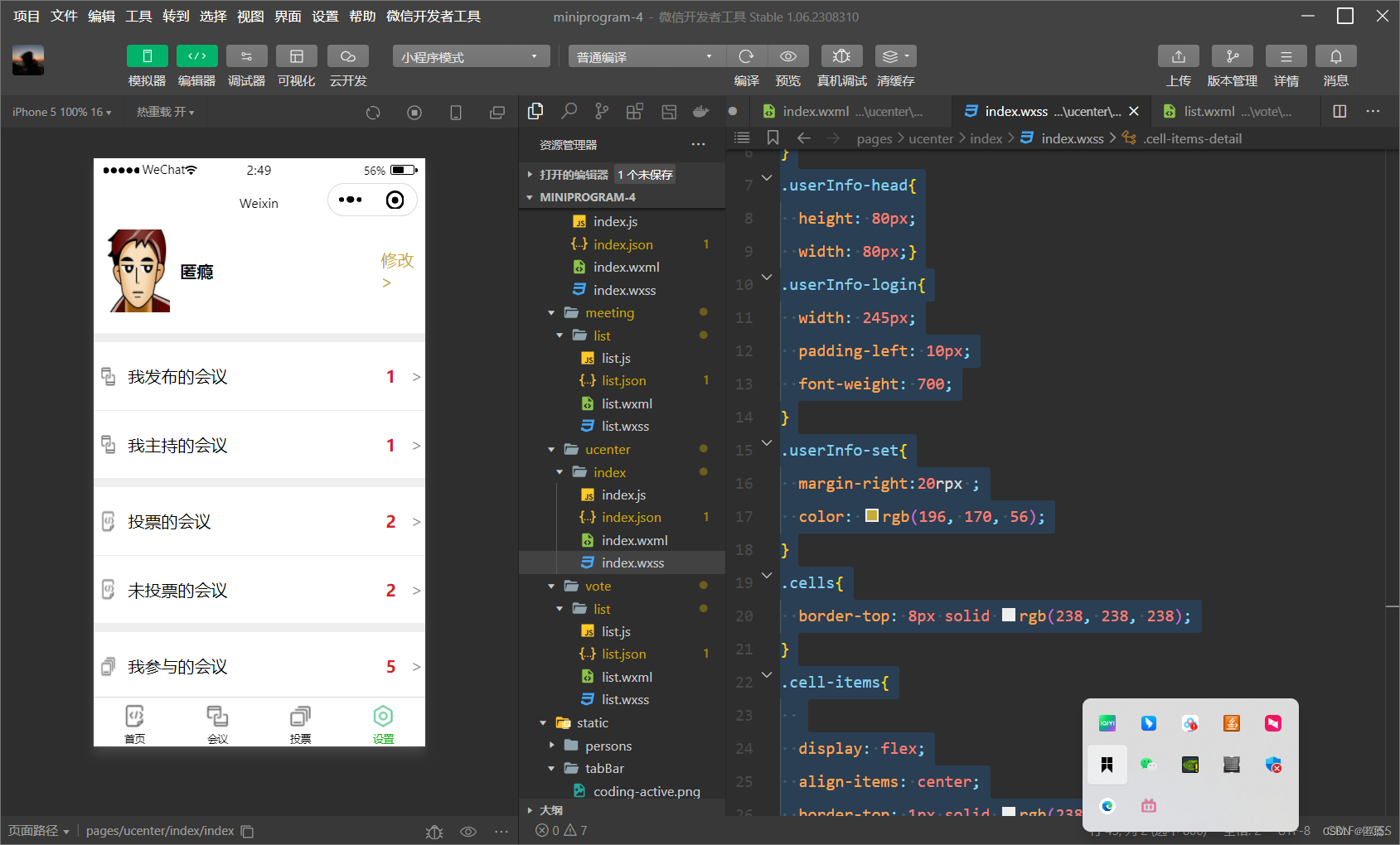 } .cell-items-title{ width: 340px; } .cell-items-num{ width: 30px; font-weight: 700; color: rgb(218, 31, 31); } .cell-items-detail{ color: rgb(146, 151, 155); }- 1
- 2
- 3
- 4
- 5
- 6
- 7
- 8
- 9
- 10
- 11
- 12
- 13
- 14
- 15
- 16
- 17
- 18
- 19
- 20
- 21
- 22
- 23
- 24
- 25
- 26
- 27
- 28
- 29
- 30
- 31
- 32
- 33
- 34
- 35
- 36
- 37
- 38
- 39
- 40
- 41
- 42
- 43
- 44
- 45
- 46

-
相关阅读:
自制操作系统日志——第十二天
GO的继承重写多态反射学习
【大前端攻城狮之路】百度爱番番前端性能监控体系方案设计
60 个前端 Web 开发流行语你都知道哪些?
图片处理后再保存为图片到文件夹中,文件夹下文件名不变改格式保存
C语言--每日五道选择题--Day2
数据治理之数据质量
架构基本概念和架构本质
动态规划求解最大子段和 (两种写法+还原最优解)
基础知识:临界阻尼
- 原文地址:https://blog.csdn.net/m0_74018330/article/details/133937894
