-
C++进阶语法之函数和指针【学习笔记(二)】
1、C++ 函数
什么是函数?
• C++ 程序
• ---->C++ 标准库(functions 和 classes)
• ---->第三⽅库(functions 和classes)
• ---->⾃定义的functions 和 classes• 函数让我们的程序更加模块化
• ---->让代码解耦,分成按业务,按逻辑的单元
• ----> 提⾼代码复⽤性如下图中可以用右图的3个函数语句来实现左图10个语句,

左图3个函数的实现过程如右图,

1.1 函数的定义
• 函数名称
• 参数列表
-----> 传给函数的变量
-----> 变量类型需声明
• 返回值类型
• 函数体
-----> 函数被调⽤执⾏的部分
-----> 花括号 { }内部A、函数的定义——⽆参数

B、 函数的定义——1个参数

C、函数的定义——⽆返回类型
D、 函数的定义——多个参数

E、函数的定义——函数的调⽤(calling)


代码:
#include#include using namespace std; const double pi {3.1415926}; double calculate_area(double radius){ return pi * pow(radius, 2); } void circle_area(){ cout << "请输入圆的半径:"; double radius {}; cin >> radius; cout << "圆的面积是" << calculate_area(radius) << endl; } int main() { // 计算圆的面积 circle_area(); return 0; } - 1
- 2
- 3
- 4
- 5
- 6
- 7
- 8
- 9
- 10
- 11
- 12
- 13
- 14
- 15
- 16
- 17
- 18
- 19
- 20
- 21
- 22
- 23
1.2 函数原型(function prototypes)
编译器要求:使⽤函数前必须“⻅过”这个函数
• 先定义函数再调⽤
----->• 适⽤于⼩型程序,不适⽤于⼤型项⽬
• 使⽤函数原型
----->• 告诉编译器函数定义必要的信息
----->• 也称为前向声明(forward declaration)
----->• 放在程序开始的部分,在#include之后
----->• 或者放在头⽂件(header files)(.h)中
函数原型中的参数可以写参数名称也可以不写参数名称,因为编译器关注的是参数类型,

代码:
先定义函数原型,再编译就不会报错
#include#include using namespace std; const double pi {3.1415926}; // 定义函数原型 void circle_area(); double calculate_area(double); int main() { // 计算圆的面积 circle_area(); return 0; } double calculate_area(double radius){ return pi * pow(radius, 2); } void circle_area(){ cout << "请输入圆的半径:"; double radius {}; cin >> radius; cout << "圆的面积是" << calculate_area(radius) << endl; } - 1
- 2
- 3
- 4
- 5
- 6
- 7
- 8
- 9
- 10
- 11
- 12
- 13
- 14
- 15
- 16
- 17
- 18
- 19
- 20
- 21
- 22
- 23
- 24
- 25
- 26
- 27
- 28
1.3 参数(parameter)——值传递(pass by value)
• 当我们传递数据给函数时,其实⽤的是值传递(pass by value)
• 数据的拷⻉会传给函数
• 函数内部的代码不会改变我们传给它的变量• 形参(formal parameters)与实参(actual parameters):
------>• 形参(formal parameters):函数定义语句中的参数
------>• 实参(actual parameters):调⽤函数时传递的参数(arguments)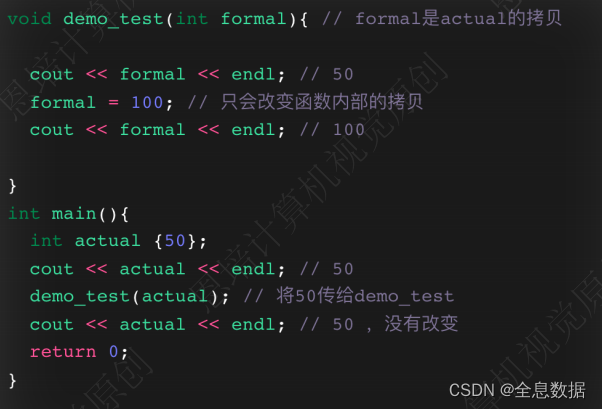
代码:
#include#include #include using namespace std; // 函数原型 void change_num(int num); void change_string(string str); void change_vector(vector <string> vec); void print_vector(vector <string> vec); // 函数定义 void change_num(int num) { num = 1000; cout << "在change_num函数中,num的值是" << num << endl; } void change_string(string str) { str = "World"; cout << "在change_string函数中,str的值是" << str << endl; } void change_vector(vector <string> vec){ vec.clear(); // 清空vector } void print_vector(vector <string> vec){ for (auto s: vec){ cout << s << " "; } cout << endl; } // 主函数 int main() { cout << "====================" << endl; int my_num {10}; cout << "调用change_num函数前,my_num的值是" << my_num << endl; change_num(my_num); cout << "调用change_num函数后,my_num的值是" << my_num << endl; cout << "====================" << endl; string my_string {"Hello"}; cout << "调用change_string函数前,my_string的值是" << my_string << endl; change_string(my_string); cout << "调用change_string函数后,my_string的值是" << my_string << endl; cout << "====================" << endl; vector <string> my_vector {"Hello", "World", "computer", "vision"}; cout << "调用change_vector函数前,my_vector的值是:" ; print_vector(my_vector); change_vector(my_vector); cout << "调用change_vector函数后,my_vector的值是:" ; print_vector(my_vector); return 0; } - 1
- 2
- 3
- 4
- 5
- 6
- 7
- 8
- 9
- 10
- 11
- 12
- 13
- 14
- 15
- 16
- 17
- 18
- 19
- 20
- 21
- 22
- 23
- 24
- 25
- 26
- 27
- 28
- 29
- 30
- 31
- 32
- 33
- 34
- 35
- 36
- 37
- 38
- 39
- 40
- 41
- 42
- 43
- 44
- 45
- 46
- 47
- 48
- 49
- 50
- 51
- 52
- 53
- 54
- 55
- 56
- 57
- 58
- 59
- 60
- 61
- 62
- 63
- 64
1.4 重载(overloading)
⼀组函数具有相同函数名,不同参数列表


代码:
#include#include #include using namespace std; void demo_print(int); // 打印整数 void demo_print(double); // 打印浮点数 void demo_print(string); // 打印1个字符串 void demo_print(string, string); // 打印2个字符串 void demo_print(vector <string>); // 打印字符串向量 int main() { // 函数重载示例,打印不同类型的数据 demo_print(100); demo_print(123.456); //double demo_print(123.5f); // float demo_print('A'); // 会被转换为整数ascii码 demo_print("C style string"); // c-style string 被转换为string string s {"C++ string"}; // C++ string demo_print(s); demo_print("C style string ", s); // c-style string 和C++ string vector <string> languages {"C++", "Python", "Java"}; demo_print(languages); return 0; } void demo_print(int num){ cout << "整数:" << num << endl; } void demo_print(double num){ cout << "浮点数:" << num << endl; } void demo_print(string s){ cout << "字符串:" << s << endl; } void demo_print(string s1, string s2){ cout << s1 << s2 << endl; } void demo_print(vector <string> v){ cout << "字符串向量:" << endl; for (auto s: v){ cout << s << " "; } cout << endl; } - 1
- 2
- 3
- 4
- 5
- 6
- 7
- 8
- 9
- 10
- 11
- 12
- 13
- 14
- 15
- 16
- 17
- 18
- 19
- 20
- 21
- 22
- 23
- 24
- 25
- 26
- 27
- 28
- 29
- 30
- 31
- 32
- 33
- 34
- 35
- 36
- 37
- 38
- 39
- 40
- 41
- 42
- 43
- 44
- 45
- 46
- 47
- 48
- 49
- 50
- 51
- 52
- 53
- 54
- 55
1.5 函数传参——传递数组(array)

• 数组元素并没有复制!
• 数组变量名称表示第⼀个元素在内存中的地址——这个地址才被复制了
• 函数内部⽆法知道数组⼤⼩(数组⼤⼩需要额外传参)


• 声明参数 numbers是常量(只读 read-only)

代码:
#includeusing namespace std; // 打印数组 void print_arr(const int arr[], size_t size); // 变更数组内容 void change_arr(int arr[], size_t size); int main() { // 传递数组给函数 int student_scores [] {100,99,98,97}; cout << "数组的地址是:" << student_scores << endl; print_arr(student_scores, 4); // 100 99 98 97 change_arr(student_scores, 4); // 变更数组内容 print_arr(student_scores, 4); // 60 60 60 60 // print_arr(student_scores, 4); // 1000 60 60 60 } void print_arr(const int arr[], size_t size){ cout << "print_arr函数内数组的地址是:" << arr << endl; for (size_t i {0}; i < size; i++){ cout << arr[i] << " "; } // arr[0] = 1000; // 不能修改数组内容 cout << endl; } void change_arr(int arr[], size_t size){ cout << "change_arr函数内数组的地址是:" << arr << endl; for (size_t i {0}; i < size; i++){ arr[i] = 60; } } - 1
- 2
- 3
- 4
- 5
- 6
- 7
- 8
- 9
- 10
- 11
- 12
- 13
- 14
- 15
- 16
- 17
- 18
- 19
- 20
- 21
- 22
- 23
- 24
- 25
- 26
- 27
- 28
- 29
- 30
- 31
- 32
- 33
- 34
- 35
- 36
- 37
- 38
- 39
1.6 函数的传参——引⽤传递(pass by reference)
• 有时希望在函数体内部改变实参的值
• 需要实参的地址
• 类似数组⽅式改变原始实参,别的类型能否⽀持?
• 可以使⽤引⽤传参给函数,形参会变成实参的⼀个别名(alias)例子:


代码:
#include#include #include using namespace std; void pass_by_ref_1(int &num) { num = 100; } void pass_by_ref_2(string &s) { s = "Changed"; } void pass_by_ref_3(vector<string> &v) { v.clear(); // 清空vector } void print_vector(const vector<string> &v) { for (auto s : v){ cout << s << " "; } cout << endl; } int main() { cout << "====================" << endl; int my_num {19}; cout << "修改前的值:" << my_num << endl; // 19 pass_by_ref_1(my_num); cout << "修改后的值:" << my_num << endl; // 100 cout << "====================" << endl; string my_str {"Hello"}; cout << "修改前的值:" << my_str << endl; // Hello pass_by_ref_2(my_str); cout << "修改后的值:" << my_str << endl; // Changed cout << "====================" << endl; vector<string> my_vec {"apple", "banana", "orange"}; cout << "修改前的值:"; print_vector(my_vec); // apple banana orange pass_by_ref_3(my_vec); cout << "修改后的值:"; print_vector(my_vec); // 空 return 0; } - 1
- 2
- 3
- 4
- 5
- 6
- 7
- 8
- 9
- 10
- 11
- 12
- 13
- 14
- 15
- 16
- 17
- 18
- 19
- 20
- 21
- 22
- 23
- 24
- 25
- 26
- 27
- 28
- 29
- 30
- 31
- 32
- 33
- 34
- 35
- 36
- 37
- 38
- 39
- 40
- 41
- 42
- 43
- 44
- 45
- 46
- 47
- 48
- 49
1.7 函数的传参——vector Demo
通过值传递,内存会重新开一处地址存储vector的内容,如果vector较大,将会耗时耗资源,

而通过vector的地址传递,内存就不会再开一处地址存储,


示例代码:
#include#include #include using namespace std; void pass_by_ref_1(int &num) { num = 100; } void pass_by_ref_2(string &s) { s = "Changed"; } void pass_by_ref_3(vector<string> &v) { v.clear(); // 清空vector } void print_vector(const vector<string> &v) { for (auto s : v){ cout << s << " "; } cout << endl; } int main() { cout << "====================" << endl; int my_num {19}; cout << "修改前的值:" << my_num << endl; // 19 pass_by_ref_1(my_num); cout << "修改后的值:" << my_num << endl; // 100 cout << "====================" << endl; string my_str {"Hello"}; cout << "修改前的值:" << my_str << endl; // Hello pass_by_ref_2(my_str); cout << "修改后的值:" << my_str << endl; // Changed cout << "====================" << endl; vector<string> my_vec {"apple", "banana", "orange"}; cout << "修改前的值:"; print_vector(my_vec); // apple banana orange pass_by_ref_3(my_vec); cout << "修改后的值:"; print_vector(my_vec); // 空 return 0; } - 1
- 2
- 3
- 4
- 5
- 6
- 7
- 8
- 9
- 10
- 11
- 12
- 13
- 14
- 15
- 16
- 17
- 18
- 19
- 20
- 21
- 22
- 23
- 24
- 25
- 26
- 27
- 28
- 29
- 30
- 31
- 32
- 33
- 34
- 35
- 36
- 37
- 38
- 39
- 40
- 41
- 42
- 43
- 44
- 45
- 46
- 47
- 48
- 49
1.8 函数调⽤机制
1、 使⽤函数调⽤栈(function call stack)
----->• 类⽐⼀摞书
----->• LIFO(后⼊先出,last in first out)
----->• ⼊栈(push):在栈顶添加记录
----->• 出栈(pop):从栈顶移除记录
2、 栈帧(stack frame)或活动记录(activation record)
----->• 每次函数被调⽤,⼊栈⼀条新的活动记录;
----->• 函数结束,活动记录出栈移除,返回⾄调⽤函数的位置
----->• 局部变量(local variables)和函数会在栈上分配空间
3、 栈的⼤⼩有限,超出会栈溢出(stack overflow)内存模型:

代码1:
#includeusing namespace std; void func_2(int &x, int y,int z) { x += y + z; } int func_1(int a, int b) { int result {}; result = a + b; func_2(result, a, b); return result; } int main() { int x {20}; int y {30}; int z {}; z = func_1(x, y); cout << "z = " << z << endl; // 100 return 0; } - 1
- 2
- 3
- 4
- 5
- 6
- 7
- 8
- 9
- 10
- 11
- 12
- 13
- 14
- 15
- 16
- 17
- 18
- 19
- 20
- 21
- 22
- 23
- 24
- 25
- 26
- 27
- 28
- 29
代码2:
#includeusing namespace std; unsigned long long factorial(unsigned long long n) { if (n == 0) return 1; // 最终返回的是1 return n * factorial(n - 1); // 递归调用 } int main() { cout << factorial(3) << endl; // 6 cout << factorial(8) << endl; // 40320 cout << factorial(12) << endl; // 479001600 cout << factorial(20) << endl; // 2432902008176640000 } - 1
- 2
- 3
- 4
- 5
- 6
- 7
- 8
- 9
- 10
- 11
- 12
- 13
- 14
- 15
- 16
- 17
2、C++ 指针(pointer)
2.1 指针(pointer)介绍
1、 指针是变量
------>• 变量的值是⼀个地址
2、指针的值可以存储哪些地址?
------>• 另⼀个变量
------>• 函数
3、⽐如:int a = 20,可以声明⼀个指针指向它
A、声明指针

B、初始化指针

C、地址操作符 &

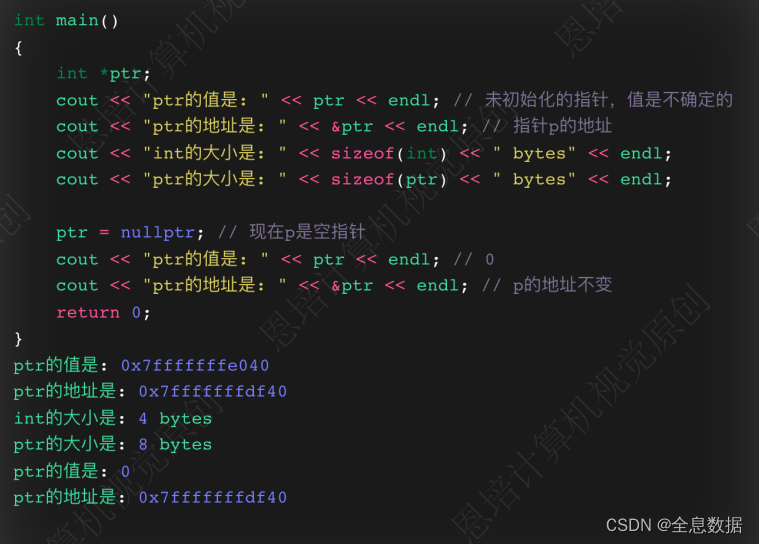
指针的大小都是一样的,但指针指向的变量大小可能就不一样;需要区分指针和指针指向的变量的关系

• 编译器需要检查指针变量存储地址的类型

D、重要概念
• & 地址操作符
• 指针也是⼀个变量(variable),所以它的值可以改变
• 指针可以为null
• 指针可以不初始化
代码:
#include#include #include using namespace std; int main() { cout << "=====================" << endl; int my_num {10}; cout << "my_num变量的值是: " << my_num << endl; cout << "my_num变量的sizeof是: " << sizeof(my_num) << endl; cout << "my_num变量的地址是: " << &my_num << endl; cout << "=====================" << endl; int *num_ptr; cout << "num_ptr变量的值是: " << num_ptr << endl; // 随机的地址 cout << "num_ptr变量的sizeof是: " << sizeof(num_ptr) << endl; cout << "num_ptr变量的地址是: " << &num_ptr << endl; // 指向num_ptr的地址 num_ptr = nullptr; // 0 cout << "num_ptr变量的值是: " << num_ptr << endl; // 0 cout << "=====================" << endl; int *p1 {nullptr}; double *p2 {nullptr}; long long *p3 {nullptr}; string *p4 {nullptr}; vector<string> *p5 {nullptr}; cout << "p1的sizeof是: " << sizeof(p1) << endl; // 8 cout << "p2的sizeof是: " << sizeof(p2) << endl; // 8 cout << "p3的sizeof是: " << sizeof(p3) << endl; // 8 cout << "p4的sizeof是: " << sizeof(p4) << endl; // 8 cout << "p5的sizeof是: " << sizeof(p5) << endl; // 8 cout << "=====================" << endl; int student_score {100}; double high_temp {41.5}; int *score_ptr {nullptr}; score_ptr = &student_score; cout << "student_score的值是: " << student_score << endl; cout << "student_score的地址是: " << &student_score << endl; cout << "score_ptr的值是: " << score_ptr << endl; // score_ptr = &high_temp; // 会报错,因为score_ptr是int类型的指针,不能指向double类型的变量 return 0; } - 1
- 2
- 3
- 4
- 5
- 6
- 7
- 8
- 9
- 10
- 11
- 12
- 13
- 14
- 15
- 16
- 17
- 18
- 19
- 20
- 21
- 22
- 23
- 24
- 25
- 26
- 27
- 28
- 29
- 30
- 31
- 32
- 33
- 34
- 35
- 36
- 37
- 38
- 39
- 40
- 41
- 42
- 43
- 44
- 45
- 46
- 47
- 48
- 49
- 50
- 51
- 52
- 53
- 54
2.2 指针的解引⽤(dereference)
• 获取指针指向的数据——解引⽤


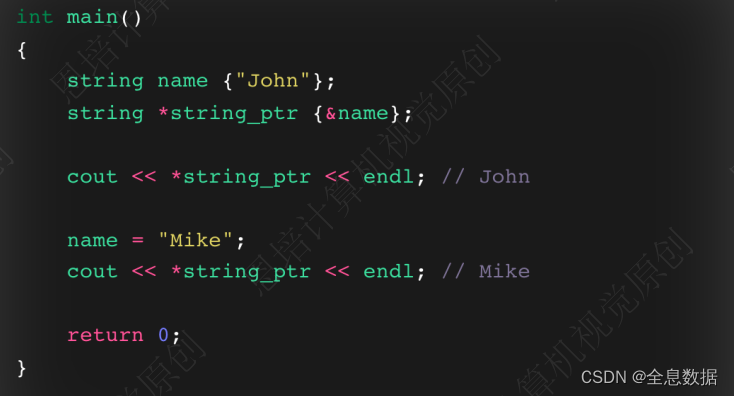
代码:#include#include using namespace std; int main() { cout << "========================" << endl; int student_score {100}; int *score_ptr {&student_score}; cout << "student_score的值是: " << student_score << endl; // 100 cout << "通过指针score_ptr访问student_score的值是: " << *score_ptr << endl; // 100 // 重新赋值 *score_ptr = 150; cout << "Updated,student_score的值是: " << student_score << endl; // 150 cout << "Updated,通过指针score_ptr访问student_score的值是: " << *score_ptr << endl; // 150 cout << "========================" << endl; double high_temp {41.5}; double low_temp {37.5}; double *temp_ptr {&high_temp}; cout << "通过指针temp_ptr访问high_temp的值是: " << *temp_ptr << endl; temp_ptr = &low_temp; cout << "通过指针temp_ptr访问low_temp的值是: " << *temp_ptr << endl; cout << "========================" << endl; string str {"Hello"}; string *str_ptr {&str}; cout << "通过指针str_ptr访问str的值是: " << *str_ptr << endl; str = "World"; cout << "Updated,通过指针str_ptr访问str的值是: " << *str_ptr << endl; cout << "========================" << endl; vector <string> my_str_vec {"Hello", "World", "computer", "vision"}; vector <string> *vector_ptr {&my_str_vec}; cout << "my_str_vec的第一个元素是: " << my_str_vec.at(0) << endl; cout << "通过指针vector_ptr访问my_str_vec的第一个元素是: " << (*vector_ptr).at(0) << endl; cout << "遍历所有元素:"; for (auto str: *vector_ptr) { cout << str << " "; } cout << endl; return 0; } - 1
- 2
- 3
- 4
- 5
- 6
- 7
- 8
- 9
- 10
- 11
- 12
- 13
- 14
- 15
- 16
- 17
- 18
- 19
- 20
- 21
- 22
- 23
- 24
- 25
- 26
- 27
- 28
- 29
- 30
- 31
- 32
- 33
- 34
- 35
- 36
- 37
- 38
- 39
- 40
- 41
- 42
- 43
- 44
- 45
- 46
- 47
- 48
- 49
- 50
- 51
- 52
- 53
- 54
- 55
2.3 动态内存分配(dynamic memory allocation)
• 在堆(heap)上程序员⾃⼰分配内存空间;
• 回忆下C++ 数组(array)
------>• 使⽤数组需要知道数组⼤⼩,并且数组⼤⼩是固定的;
------>• Vector容器⼤⼩可以动态调整
• 使⽤指针获取堆上刚分配的内存空间• 使⽤new 关键字 分配内存空间
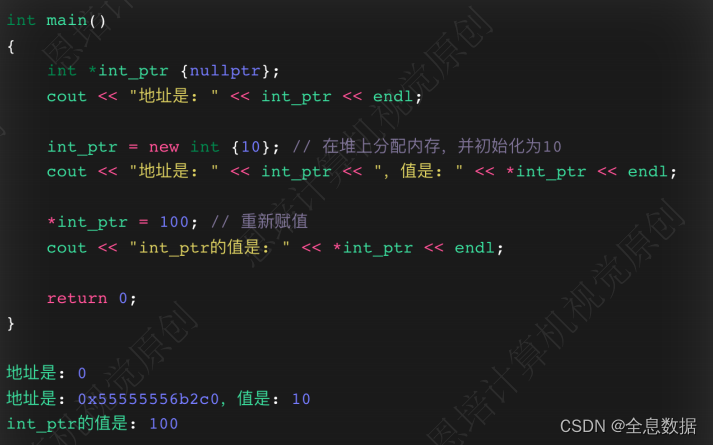
• 使⽤delete 关键字 释放内存空间
• 使⽤new[ ] 为数组分配内存空间
• 使⽤delete[ ] 释放内存
代码:
#include#include using namespace std; int main() { int *int_ptr {nullptr}; cout << "分配前的int_ptr的值是: " << int_ptr << endl; // 0 int_ptr = new int; // 在heap堆上分配一个int类型的内存空间,返回该内存空间的地址 cout << "分配后的int_ptr的值是: " << int_ptr << endl; // 0x7ffeeb5c9f7c cout << *int_ptr << endl; // 0 *int_ptr = 100; // 通过指针修改内存空间的值 cout << *int_ptr << endl; // 100 delete int_ptr; // 释放内存空间 size_t size {0}; double *temp_ptr {nullptr}; cout << "多少个温度值?"; cin >> size; temp_ptr = new double[size]; // 在heap堆上分配size个double类型的内存空间,返回该内存空间的地址 cout << "地址是: " << temp_ptr << endl; delete [] temp_ptr; // 释放内存空间 return 0; } - 1
- 2
- 3
- 4
- 5
- 6
- 7
- 8
- 9
- 10
- 11
- 12
- 13
- 14
- 15
- 16
- 17
- 18
- 19
- 20
- 21
- 22
- 23
- 24
- 25
- 26
- 27
- 28
- 29
- 30
2.4 指针和数组的关系
• 数组变量名称的值是数组第⼀个元素的地址;
• 指针变量的的值是⼀个地址;
• 如果指针指向的类型和数组元素的类型⼀致,那么指针和数组名称⼏乎是等价的


代码:
#includeusing namespace std; int main() { int student_scores [] {100, 98, 90}; cout << "student_scores的值是: " << student_scores << endl; int *score_ptr {student_scores}; // score_ptr指向student_scores数组的第一个元素 cout << "score_ptr的值是: " << score_ptr << endl; cout << "====== 数组名称,下标方式访问元素 ====== " << endl; cout << student_scores[0] << endl; // 100 cout << student_scores[1] << endl; // 98 cout << student_scores[2] << endl; // 90 cout << "====== 指针名称,下标方式访问元素 ====== " << endl; cout << score_ptr[0] << endl; // 100 cout << score_ptr[1] << endl; // 98 cout << score_ptr[2] << endl; // 90 cout << "====== 指针名称,指针运算符方式访问元素 ====== " << endl; cout << *score_ptr << endl; // 100 cout << *(score_ptr + 1) << endl; // 98 cout << *(score_ptr + 2) << endl; // 90 cout << "====== 数组名称,指针运算符方式访问元素 ====== " << endl; cout << *student_scores << endl; // 100 cout << *(student_scores + 1) << endl; // 98 cout << *(student_scores + 2) << endl; // 90 cout << "====== ++运算符 ====== " << endl; // 但需要注意++会改变指针的值,下次访问的就不是原来的位置了 cout << *score_ptr++ << endl; // 100 cout << *score_ptr++ << endl; // 98 cout << *score_ptr << endl; // 90 return 0; } - 1
- 2
- 3
- 4
- 5
- 6
- 7
- 8
- 9
- 10
- 11
- 12
- 13
- 14
- 15
- 16
- 17
- 18
- 19
- 20
- 21
- 22
- 23
- 24
- 25
- 26
- 27
- 28
- 29
- 30
- 31
- 32
- 33
- 34
- 35
- 36
- 37
- 38
- 39
2.5 const和指针
• 指针可以操作:地址及被指向的对象,可以分为以下3种情况:
------>• 被指向的对象是常量(pointers to constants)
------>• 指针本身是常量(constant pointers)
------>• 指针本身和被指向的对象都是常量(constant pointers to constants)A、被指向的对象是常量
• 被指向的对象是常量,不可以通过指针改动
• 指针本身可以改变
B、指针本身是常量
• 被指向的对象可以通过指针改动
• 指针本身不可以改变C、指针本身和被指向的对象都是常量
• 被指向的对象不可以改动
• 指针本身不可以改变
代码:
#include#include #include using namespace std; void display(const vector<string> *const v) { // (*v).at(0) = "kiwi"; // 修改vector中的第一个元素 for (auto str: *v) cout << str << " "; cout << endl; // v = nullptr; // 修改指针的值 } void display(int *array, int sentinel) { while (*array != sentinel) cout << *array++ << endl; cout << endl; } int main() { // 定义string vector,并打印 vector<string> my_str {"apple", "orange", "banana"}; display(&my_str); cout << "====================" << endl; int student_scores [] {100, 98, 90, 86, 84, -1}; display(student_scores, -1); return 0; } - 1
- 2
- 3
- 4
- 5
- 6
- 7
- 8
- 9
- 10
- 11
- 12
- 13
- 14
- 15
- 16
- 17
- 18
- 19
- 20
- 21
- 22
- 23
- 24
- 25
- 26
- 27
- 28
- 29
- 30
- 31
- 32
- 33
- 34
2.6 函数指针传参
• 使⽤指针、解引⽤实现函数引⽤传参
• 函数的形参是指针
• 实参可以是指针或⼀个变量的地址

代码1:
#includeusing namespace std; // 定义函数 void double_data(int *int_ptr); void double_data(int *int_ptr) { *int_ptr *= 2; } int main() { // 函数调用 int value {20}; cout << "value的值是: " << value << endl; // 20 double_data(&value); // 传递value的地址 cout << "value的值是: " << value << endl; // 40 int *int_ptr {nullptr}; // 声明指针 int_ptr = &value; // 将value的地址赋值给指针 double_data(int_ptr); // 传递指针 cout << "value的值是: " << value << endl; // 80 return 0; } - 1
- 2
- 3
- 4
- 5
- 6
- 7
- 8
- 9
- 10
- 11
- 12
- 13
- 14
- 15
- 16
- 17
- 18
- 19
- 20
- 21
- 22
- 23
- 24
- 25
- 26
- 27
代码2:
#includeusing namespace std; // 定义函数 void swap_value(int *a, int *b) { int temp = *a; *a = *b; *b = temp; } int main() { // 函数调用 int x {100}, y {200}; cout << "交换前,x的值是: " << x << endl; // 100 cout << "交换前,y的值是: " << y << endl; // 200 swap_value(&x, &y); // 将变量x和y的地址传递给函数 cout << "====================" << endl; cout << "交换后,x的值是: " << x << endl; // 200 cout << "交换后,y的值是: " << y << endl; // 100 return 0; } - 1
- 2
- 3
- 4
- 5
- 6
- 7
- 8
- 9
- 10
- 11
- 12
- 13
- 14
- 15
- 16
- 17
- 18
- 19
- 20
- 21
- 22
- 23
- 24
- 25
2.7 函数返回指针
• 函数可以返回指针:
------->• Type *function( );
• 返回哪些指针:
------->• 函数内部动态分配的内存空间
------->• 传⼊的数据
• 不能返回函数内的局部变量
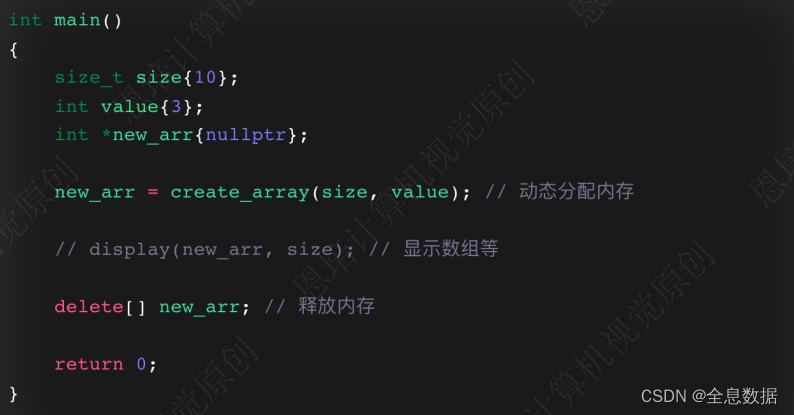
不能返回函数内的局部变量,如下面的示例,如果返回的是函数内的局部变量,随着函数运行结束,同在栈上的 size 变量也会被释放,size 的地址有可能被其他新的变量所占用,如果使用解引用指向其他变量就有可能造成程序的 bug,

代码:
#includeusing namespace std; // 返回动态分配的内存 int *create_array(size_t size, int initial_value = 0) { int *new_storage{nullptr}; new_storage = new int[size]; // 分配内存 for (size_t i{0}; i < size; i++) { // 初始化值 *(new_storage + i) = initial_value; // new_storage[i] = initial_value; // 等价于上一行 } return new_storage; } // 显示数组 void display(int *array, size_t size) { for (size_t i{0}; i < size; i++) { cout << *array++ << " "; } cout << endl; } int main() { size_t size{}; int value{}; int *new_arr{nullptr}; cout << "请输入数组的大小: "; cin >> size; cout << "请输入数组的初始值: "; cin >> value; new_arr = create_array(size, value); // 动态分配内存 display(new_arr, size); // 显示数组 delete[] new_arr; // 释放内存 return 0; } - 1
- 2
- 3
- 4
- 5
- 6
- 7
- 8
- 9
- 10
- 11
- 12
- 13
- 14
- 15
- 16
- 17
- 18
- 19
- 20
- 21
- 22
- 23
- 24
- 25
- 26
- 27
- 28
- 29
- 30
- 31
- 32
- 33
- 34
- 35
- 36
- 37
- 38
- 39
- 40
- 41
- 42
- 43
- 44
- 45
- 46
- 47
- 48
2.8 指针、引⽤对⽐——回顾⼀下引⽤(reference)
引用是变量的替身或别名
引用本身是一个常量的指针
指针、引⽤的对⽐, 其中我对引用传值中不支持指向其他变量有疑惑,

代码:
#include#include #include using namespace std; int main() { int my_num {10}; int &my_ref {my_num}; // 引用 cout << "my_num: " << my_num << endl; // 10 cout << "my_ref: " << my_ref << endl; //10 my_ref = 100; // 修改引用,my_num也会被修改 cout << "my_num: " << my_num << endl; //100 cout << "my_ref: " << my_ref << endl; //100 vector<string> my_str {"Hello", "World", "!"}; cout << "=====================" << endl; for (auto str:my_str) // 这里的str是一个拷贝 str = "Hello"; for (auto str:my_str) cout << str << endl; // 输出的是原来的字符串 cout << "=====================" << endl; for (auto &str:my_str) // 这里的str是一个引用 str = "Hello"; for (auto str:my_str) cout << str << endl; // 输出的是修改后的字符串 cout << "=====================" << endl; for (auto const &str:my_str) // 这里的str是一个常量引用 { // str = "computer"; // 这里会报错,因为str是一个常量引用 cout << str << endl; } return 0; } - 1
- 2
- 3
- 4
- 5
- 6
- 7
- 8
- 9
- 10
- 11
- 12
- 13
- 14
- 15
- 16
- 17
- 18
- 19
- 20
- 21
- 22
- 23
- 24
- 25
- 26
- 27
- 28
- 29
- 30
- 31
- 32
- 33
- 34
- 35
- 36
- 37
- 38
- 39
- 40
- 41
- 42
-
相关阅读:
create-vite‘ 不是内部或外部命令,也不是可运行的程序
五分钟搞懂POM设计模式
程序员应该专注技术还是转管理?
如何解决maven依赖冲突?
23_ue4人物控制切换
汇编指令概述 AT&T汇编基本语法
分类预测 | Matlab实现CNN-BiLSTM-SAM-Attention卷积双向长短期记忆神经网络融合空间注意力机制的数据分类预测
什么是单片机?聊聊它的历史
小程序day04
态势丨黑客侵扰加剧,靶场为网络安全架设“防御盾”
- 原文地址:https://blog.csdn.net/qq_23022733/article/details/133863982
