-
模型的选择与调优(网格搜索与交叉验证)
1、为什么需要交叉验证
- 交叉验证目的:为了让被评估的模型更加准确可信
2、什么是交叉验证(cross validation)
- 交叉验证:将拿到的训练数据,分为训练和验证集。以下图为例:将数据分成4份,其中一份作为验证集。然后经过4次(组)的测试,每次都更换不同的验证集。即得到4组模型的结果,取平均值作为最终结果。又称4折交叉验证。
- 训练集:训练集+验证集
- 测试集:测试集

问题:那么这个只是对于参数得出更好的结果,那么怎么选择或者调优参数呢?
3、超参数搜索-网格搜索(Grid Search)
通常情况下,有很多参数是需要手动指定的(如k-近邻算法中的K值),这种叫超参数。但是手动过程繁杂,网格搜索帮我们实现了这个调参过程,首先需要对模型预设几种超参数组合,每组超参数都采用交叉验证来进行评估,最后选出最优参数组合建立模型。

3.1、模型选择与调优 API
- sklearn.model_selection.GridSearchCV(estimator, param_grid=None,cv=None)
- 对估计器的指定参数值进行详尽搜索
- estimator:估计器对象
- param_grid:估计器参数(dict){“n_neighbors”:[1,3,5]}
- cv:指定几折交叉验证
- fit:输入训练数据
- score:准确率
- 结果分析:
- bestscore:在交叉验证中验证的最好结果_
- bestestimator:最好的参数模型
- cvresults:每次交叉验证后的验证集准确率结果和训练集准确率结果
3.2、网格搜索与交叉验证代码
from sklearn.datasets import load_iris from sklearn.model_selection import train_test_split, GridSearchCV from sklearn.neighbors import KNeighborsClassifier from sklearn.preprocessing import StandardScaler """ 用KNN算法对鸢尾花进行分类,添加网格搜索和交叉验证 :return: """ # 1)获取数据 iris = load_iris() # 2)划分数据集 x_train, x_test, y_train, y_test = train_test_split(iris.data, iris.target, test_size=0.3, random_state=22) # 3)特征工程:标准化 transfer = StandardScaler() x_train = transfer.fit_transform(x_train) x_test = transfer.transform(x_test) # 4)KNN算法预估器 estimator = KNeighborsClassifier() # 加入网格搜索与交叉验证 # 参数准备 param_dict = {"n_neighbors": [1, 2, 3, 4, 5, 6, 7, 8, 9, 11]} estimator = GridSearchCV(estimator, param_grid=param_dict, cv=10) estimator.fit(x_train, y_train) # 5)模型评估 # 方法1:直接比对真实值和预测值 y_predict = estimator.predict(x_test) print("y_predict:\n", y_predict) print("直接比对真实值和预测值:\n", y_test == y_predict) # 方法2:计算准确率 score = estimator.score(x_test, y_test) print("准确率为:\n", score) # 最佳参数:best_params_ print("最佳参数:\n", estimator.best_params_) # 最佳结果:best_score_ print("最佳结果:\n", estimator.best_score_) # 最佳估计器:best_estimator_ print("最佳估计器:\n", estimator.best_estimator_) # 交叉验证结果:cv_results_ print("交叉验证结果:\n", estimator.cv_results_)- 1
- 2
- 3
- 4
- 5
- 6
- 7
- 8
- 9
- 10
- 11
- 12
- 13
- 14
- 15
- 16
- 17
- 18
- 19
- 20
- 21
- 22
- 23
- 24
- 25
- 26
- 27
- 28
- 29
- 30
- 31
- 32
- 33
- 34
- 35
- 36
- 37
- 38
- 39
- 40
- 41
- 42
- 43
- 44
- 45
- 46
- 47
- 48

4、facebook 签到位置预测


- 数据介绍:将根据用户的位置,准确性和时间戳预测用户正在查看的业务。
- train.csv
- row_id:登记事件的ID
- xy:坐标
- 准确性:定位准确性
- 时间:时间戳
- place_id:业务的ID,这是您预测的目标
官网:https://www.kaggle.com/navoshta/grid-knn/data
4.1、流程分析
对于数据做一些基本处理(这里所做的一些处理不一定达到很好的效果,我们只是简单尝试,有些特征我们可以根据一些特征选择的方式去做处理)
1、缩小数据集范围 DataFrame.query()(选择性处理!)
2、删除没用的日期数据 DataFrame.drop(可以选择保留)
3、将签到位置少于n个用户的删除place_count = data.groupby('place_id').count() tf = place_count[place_count.row_id > 3].reset_index() data = data[data['place_id'].isin(tf.place_id)]- 1
- 2
- 3
4、分割数据集
5、标准化处理
6、k-近邻预测4.2、代码
import pandas as pd # 1、获取数据 data = pd.read_csv("train.csv") data.head()- 1
- 2
- 3
- 4

# 1)处理时间特征 time_value = pd.to_datetime(data["time"], unit="s") date = pd.DatetimeIndex(time_value) data["day"] = date.day data["weekday"] = date.weekday data["hour"] = date.hour data.head()- 1
- 2
- 3
- 4
- 5
- 6
- 7

# 2)过滤签到次数少的地点 place_count = data.groupby("place_id").count()["row_id"] data_final = data[data["place_id"].isin(place_count[place_count > 3].index.values)] data_final.head()- 1
- 2
- 3
- 4

# 筛选特征值和目标值 x = data_final[["x", "y", "accuracy", "day", "weekday", "hour"]] y = data_final["place_id"]- 1
- 2
- 3
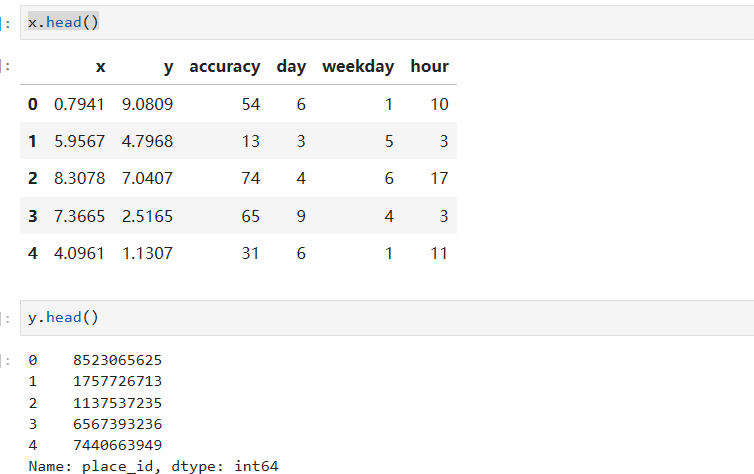
# 数据集划分 from sklearn.model_selection import train_test_split x_train, x_test, y_train, y_test = train_test_split(x, y) from sklearn.preprocessing import StandardScaler from sklearn.neighbors import KNeighborsClassifier from sklearn.model_selection import GridSearchCV # 3)特征工程:标准化 transfer = StandardScaler() x_train = transfer.fit_transform(x_train) x_test = transfer.transform(x_test) # 4)KNN算法预估器 estimator = KNeighborsClassifier() # 加入网格搜索与交叉验证 # 参数准备 param_dict = {"n_neighbors": [3, 5, 7, 9]} estimator = GridSearchCV(estimator, param_grid=param_dict, cv=3) estimator.fit(x_train, y_train) # 5)模型评估 # 方法1:直接比对真实值和预测值 y_predict = estimator.predict(x_test) print("y_predict:\n", y_predict) print("直接比对真实值和预测值:\n", y_test == y_predict) # 方法2:计算准确率 score = estimator.score(x_test, y_test) print("准确率为:\n", score) # 最佳参数:best_params_ print("最佳参数:\n", estimator.best_params_) # 最佳结果:best_score_ print("最佳结果:\n", estimator.best_score_) # 最佳估计器:best_estimator_ print("最佳估计器:\n", estimator.best_estimator_) # 交叉验证结果:cv_results_ print("交叉验证结果:\n", estimator.cv_results_)- 1
- 2
- 3
- 4
- 5
- 6
- 7
- 8
- 9
- 10
- 11
- 12
- 13
- 14
- 15
- 16
- 17
- 18
- 19
- 20
- 21
- 22
- 23
- 24
- 25
- 26
- 27
- 28
- 29
- 30
- 31
- 32
- 33
- 34
- 35
- 36
- 37
- 38
- 39
这个结果数据量比较大,毕竟两千万训练数据了,各位可自行试验及调参;
-
相关阅读:
PX4实战之旅(五):利用T265实现室内定点飞行
算法——双指针
架构-三层架构:三层架构
dubbo通信原理
“AI文明的新纪元:从ChatGPT到Sora的跨越“
Java(十)——内部类
谈谈什么是缓存穿透,缓存击穿,缓存雪崩?怎么解决?
Spring Boot 5 创建个人中心页面(API+Vue)
[JavaScript]_[初级]_[关于forin或for...in循环语句的用法]
人工神经网络数学模型图,神经网络模型数学建模
- 原文地址:https://blog.csdn.net/qq_42402817/article/details/133914896