-
Android 内容提供者和内容观察者:数据共享和实时更新的完美组合
任务要求
- 一个作为ContentProvider提供联系人数据
- 另一个作为Observer监听联系人数据的变化:
1、创建ContactProvider项目;
2、在ContactProvider项目中用Sqlite数据库实现联系人的读写功能;
3、在ContactProvider项目中通过ContentProvider提供联系人数据;
4、创建ContactObserver项目;
5、在ContactObserver项目中注册ContentObserver,监听联系人数据库的变化。
当创建一个 Android 联系人应用,包括 ContactProvider 项目和 ContactObserver 项目,你需要实现增删改查方法以及两个页面的布局文件。以下是更详细的步骤:
步骤 1: 创建 ContactProvider 项目
-
创建一个新的 Android 项目,命名为 ContactProvider。
-
在 ContactProvider 项目中,创建一个名为 ContactContract 的 Java 类,用于定义数据库表结构和内容提供者的 URI。
package com.leo.contactprovider; import android.net.Uri; import android.provider.BaseColumns; public class ContactContract { public static final String AUTHORITY = "com.leo.contactprovider"; public static final Uri BASE_CONTENT_URI = Uri.parse("content://" + AUTHORITY); public static final String PATH_CONTACTS = "contacts"; public static final class ContactEntry implements BaseColumns { public static final Uri CONTENT_URI = BASE_CONTENT_URI.buildUpon().appendPath(PATH_CONTACTS).build(); public static final String TABLE_NAME = "contacts"; public static final String COLUMN_NAME = "name"; public static final String COLUMN_PHONE = "phone"; } }}- 1
- 2
- 3
- 4
- 5
- 6
- 7
- 8
- 9
- 10
- 11
- 12
- 13
- 14
- 15
- 16
- 17
- 18
- 19
- 创建一个名为 ContactDbHelper 的数据库帮助类,用于创建和管理联系人数据库。
package com.example.contactprovider; package com.leo.contactprovider; import android.content.Context; import android.database.sqlite.SQLiteDatabase; import android.database.sqlite.SQLiteOpenHelper; public class ContactDbHelper extends SQLiteOpenHelper { private static final String DATABASE_NAME = "contacts.db"; private static final int DATABASE_VERSION = 1; public ContactDbHelper(Context context) { super(context, DATABASE_NAME, null, DATABASE_VERSION); } @Override public void onCreate(SQLiteDatabase db) { final String SQL_CREATE_CONTACTS_TABLE = "CREATE TABLE " + ContactContract.ContactEntry.TABLE_NAME + " (" + ContactContract.ContactEntry._ID + " INTEGER PRIMARY KEY AUTOINCREMENT, " + ContactContract.ContactEntry.COLUMN_NAME + " TEXT NOT NULL, " + ContactContract.ContactEntry.COLUMN_PHONE + " TEXT NOT NULL" + ");"; db.execSQL(SQL_CREATE_CONTACTS_TABLE); } @Override public void onUpgrade(SQLiteDatabase db, int oldVersion, int newVersion) { db.execSQL("DROP TABLE IF EXISTS " + ContactContract.ContactEntry.TABLE_NAME); onCreate(db); } }- 1
- 2
- 3
- 4
- 5
- 6
- 7
- 8
- 9
- 10
- 11
- 12
- 13
- 14
- 15
- 16
- 17
- 18
- 19
- 20
- 21
- 22
- 23
- 24
- 25
- 26
- 27
- 28
- 29
- 30
- 31
- 32
- 33
- 创建一个名为 ContactProvider 的内容提供者类,实现联系人数据的增删改查功能。
“New” —> “Other” —> “Cotent Provider”


package com.leo.contactprovider; import static com.leo.contactprovider.ContactContract.AUTHORITY; import android.content.ContentProvider; import android.content.ContentValues; import android.content.UriMatcher; import android.database.Cursor; import android.database.sqlite.SQLiteDatabase; import android.net.Uri; import androidx.annotation.NonNull; import androidx.annotation.Nullable; public class ContactProvider extends ContentProvider { private static final UriMatcher uriMatcher = new UriMatcher(UriMatcher.NO_MATCH); // Define integer constants for the URIs private static final int CONTACTS = 100; private static final int CONTACT_ID = 101; static { uriMatcher.addURI(AUTHORITY, "contacts", CONTACTS); uriMatcher.addURI(AUTHORITY, "contacts/#", CONTACT_ID); } private ContactDbHelper dbHelper; @Override public boolean onCreate() { dbHelper = new ContactDbHelper(getContext()); return true; } // 实现数据的增删改查方法 @Override public Uri insert(Uri uri, ContentValues values) { SQLiteDatabase db = dbHelper.getWritableDatabase(); long id = db.insert(ContactContract.ContactEntry.TABLE_NAME, null, values); if (id > 0) { getContext().getContentResolver().notifyChange(uri, null); return ContactContract.ContactEntry.CONTENT_URI.buildUpon().appendPath(String.valueOf(id)).build(); } return null; } @Override public int delete(Uri uri, String selection, String[] selectionArgs) { SQLiteDatabase db = dbHelper.getWritableDatabase(); int rowsDeleted; switch (uriMatcher.match(uri)) { case CONTACTS: rowsDeleted = db.delete(ContactContract.ContactEntry.TABLE_NAME, selection, selectionArgs); break; case CONTACT_ID: String contactId = uri.getLastPathSegment(); rowsDeleted = db.delete(ContactContract.ContactEntry.TABLE_NAME, ContactContract.ContactEntry._ID + "=?", new String[]{contactId}); break; default: throw new IllegalArgumentException("Unknown URI: " + uri); } if (rowsDeleted > 0) { getContext().getContentResolver().notifyChange(uri, null); } return rowsDeleted; } @Override public int update(Uri uri, ContentValues values, String selection, String[] selectionArgs) { SQLiteDatabase db = dbHelper.getWritableDatabase(); int rowsUpdated; switch (uriMatcher.match(uri)) { case CONTACTS: rowsUpdated = db.update(ContactContract.ContactEntry.TABLE_NAME, values, selection, selectionArgs); break; case CONTACT_ID: String contactId = uri.getLastPathSegment(); rowsUpdated = db.update(ContactContract.ContactEntry.TABLE_NAME, values, ContactContract.ContactEntry._ID + "=?", new String[]{contactId}); break; default: throw new IllegalArgumentException("Unknown URI: " + uri); } if (rowsUpdated > 0) { getContext().getContentResolver().notifyChange(uri, null); } return rowsUpdated; } @Override public Cursor query(Uri uri, String[] projection, String selection, String[] selectionArgs, String sortOrder) { SQLiteDatabase db = dbHelper.getReadableDatabase(); Cursor cursor; switch (uriMatcher.match(uri)) { case CONTACTS: cursor = db.query(ContactContract.ContactEntry.TABLE_NAME, projection, selection, selectionArgs, null, null, sortOrder); break; case CONTACT_ID: String contactId = uri.getLastPathSegment(); cursor = db.query(ContactContract.ContactEntry.TABLE_NAME, projection, ContactContract.ContactEntry._ID + "=?", new String[]{contactId}, null, null, sortOrder); break; default: throw new IllegalArgumentException("Unknown URI: " + uri); } // Set notification URI on the cursor cursor.setNotificationUri(getContext().getContentResolver(), uri); // 添加这行代码 return cursor; } @Nullable @Override public String getType(@NonNull Uri uri) { return null; } // ... }- 1
- 2
- 3
- 4
- 5
- 6
- 7
- 8
- 9
- 10
- 11
- 12
- 13
- 14
- 15
- 16
- 17
- 18
- 19
- 20
- 21
- 22
- 23
- 24
- 25
- 26
- 27
- 28
- 29
- 30
- 31
- 32
- 33
- 34
- 35
- 36
- 37
- 38
- 39
- 40
- 41
- 42
- 43
- 44
- 45
- 46
- 47
- 48
- 49
- 50
- 51
- 52
- 53
- 54
- 55
- 56
- 57
- 58
- 59
- 60
- 61
- 62
- 63
- 64
- 65
- 66
- 67
- 68
- 69
- 70
- 71
- 72
- 73
- 74
- 75
- 76
- 77
- 78
- 79
- 80
- 81
- 82
- 83
- 84
- 85
- 86
- 87
- 88
- 89
- 90
- 91
- 92
- 93
- 94
- 95
- 96
- 97
- 98
- 99
- 100
- 101
- 102
- 103
- 104
- 105
- 106
- 107
- 108
- 109
- 110
- 111
- 112
- 113
- 114
- 115
- 116
- 117
- 118
- 119
- 120
- 121
- 122
- 123
- 124
- 125
-
UriMatcher:
UriMatcher用于匹配传入的URI,以确定执行哪种操作(例如,查询、插入、删除或更新)。你的代码使用静态初始化块初始化了uriMatcher,并为两种不同类型的URI(“contacts” 和 “contacts/#”)分配了常量整数。 -
onCreate方法: 这是内容提供者的初始化方法。在这里,你初始化了数据库帮助类(
ContactDbHelper)以及将其与内容提供者关联。内容提供者的初始化是在应用启动时完成的。 -
insert方法: 这是用于插入数据的方法。当应用通过内容提供者插入新数据时,
insert方法会打开数据库,执行插入操作,并使用notifyChange通知任何对数据感兴趣的内容观察者。 -
delete方法: 此方法用于删除数据。它会检查URI,然后根据URI的类型执行删除操作。如果成功删除了一些行,它会使用
notifyChange通知内容观察者。 -
update方法: 用于更新数据。与
delete方法类似,它检查URI,执行相应的更新操作,并使用notifyChange通知内容观察者。 -
query方法: 用于查询数据。这是内容提供者最常见的方法,用于检索数据。它根据传入的URI执行查询,然后使用
setNotificationUri通知关联的内容观察者。 -
setNotificationUri: 此方法将查询结果与特定URI关联起来,以便在数据更改时通知观察者。
这段代码涵盖了内容提供者的核心功能,包括处理插入、删除、更新和查询操作,以及在这些操作完成后通知相关内容观察者。内容提供者允许应用之间共享数据,并通过内容观察者模式实现实时数据更新。
- 创建布局文件-
contact_provider

<RelativeLayout xmlns:android="http://schemas.android.com/apk/res/android" xmlns:app="http://schemas.android.com/apk/res-auto" xmlns:tools="http://schemas.android.com/tools" android:layout_width="match_parent" android:layout_height="match_parent" android:padding="16dp" tools:context=".MainActivity"> <Button android:id="@+id/btnAdd" android:layout_width="wrap_content" android:layout_height="wrap_content" android:text="Add Contact" android:layout_alignParentTop="true" android:layout_alignParentStart="true" android:layout_alignParentEnd="true" /> <Button android:id="@+id/btnDelete" android:layout_width="wrap_content" android:layout_height="wrap_content" android:text="Delete Contact" android:layout_below="@+id/btnAdd" android:layout_alignParentStart="true" android:layout_alignParentEnd="true" /> <Button android:id="@+id/btnUpdate" android:layout_width="wrap_content" android:layout_height="wrap_content" android:text="Update Contact" android:layout_below="@+id/btnDelete" android:layout_alignParentStart="true" android:layout_alignParentEnd="true" /> <Button android:id="@+id/btnQuery" android:layout_width="wrap_content" android:layout_height="wrap_content" android:text="Query Contacts" android:layout_below="@+id/btnUpdate" android:layout_alignParentStart="true" android:layout_alignParentEnd="true" /> <TextView android:id="@+id/textViewResult" android:layout_width="wrap_content" android:layout_height="wrap_content" android:layout_below="@+id/btnQuery" android:layout_alignParentStart="true" android:layout_alignParentEnd="true" android:layout_marginTop="16dp" android:textSize="20sp" /> RelativeLayout>- 1
- 2
- 3
- 4
- 5
- 6
- 7
- 8
- 9
- 10
- 11
- 12
- 13
- 14
- 15
- 16
- 17
- 18
- 19
- 20
- 21
- 22
- 23
- 24
- 25
- 26
- 27
- 28
- 29
- 30
- 31
- 32
- 33
- 34
- 35
- 36
- 37
- 38
- 39
- 40
- 41
- 42
- 43
- 44
- 45
- 46
- 47
- 48
- 49
- 50
- 51
- 52
- 53
- 54
- 55
- 56
- 57
实现效果

在
ContactProvider项目中为每个按钮添加相应的功能。package com.leo.contactprovider; import android.content.ContentValues; import android.database.Cursor; import android.net.Uri; import android.os.Bundle; import android.view.View; import android.widget.Button; import android.widget.TextView; import androidx.appcompat.app.AppCompatActivity; public class MainActivity extends AppCompatActivity { private TextView textViewResult; @Override protected void onCreate(Bundle savedInstanceState) { super.onCreate(savedInstanceState); setContentView(R.layout.contact_provider); textViewResult = findViewById(R.id.textViewResult); Button btnAdd = findViewById(R.id.btnAdd); Button btnDelete = findViewById(R.id.btnDelete); Button btnUpdate = findViewById(R.id.btnUpdate); Button btnQuery = findViewById(R.id.btnQuery); btnAdd.setOnClickListener(new View.OnClickListener() { @Override public void onClick(View view) { // 添加联系人示例 ContentValues values = new ContentValues(); values.put(ContactContract.ContactEntry.COLUMN_NAME, "John Doe"); values.put(ContactContract.ContactEntry.COLUMN_PHONE, "123-456-7890"); Uri insertUri = getContentResolver().insert(ContactContract.ContactEntry.CONTENT_URI, values); textViewResult.setText("Contact added with URI: " + insertUri.toString()); } }); btnDelete.setOnClickListener(new View.OnClickListener() { @Override public void onClick(View view) { // 删除联系人示例 String selection = ContactContract.ContactEntry.COLUMN_NAME + " = ?"; String[] selectionArgs = {"John Doe"}; int deletedRows = getContentResolver().delete(ContactContract.ContactEntry.CONTENT_URI, selection, selectionArgs); textViewResult.setText("Deleted " + deletedRows + " contacts."); } }); btnUpdate.setOnClickListener(new View.OnClickListener() { @Override public void onClick(View view) { // 更新联系人示例 ContentValues values = new ContentValues(); values.put(ContactContract.ContactEntry.COLUMN_PHONE, "987-654-3210"); String selection = ContactContract.ContactEntry.COLUMN_NAME + " = ?"; String[] selectionArgs = {"John Doe"}; int updatedRows = getContentResolver().update(ContactContract.ContactEntry.CONTENT_URI, values, selection, selectionArgs); textViewResult.setText("Updated " + updatedRows + " contacts."); } }); btnQuery.setOnClickListener(new View.OnClickListener() { @Override public void onClick(View view) { // 查询联系人示例 String[] projection = { ContactContract.ContactEntry._ID, ContactContract.ContactEntry.COLUMN_NAME, ContactContract.ContactEntry.COLUMN_PHONE }; Cursor cursor = getContentResolver().query(ContactContract.ContactEntry.CONTENT_URI, projection, null, null, null); StringBuilder result = new StringBuilder(); while (cursor.moveToNext()) { String name = cursor.getString(cursor.getColumnIndexOrThrow(ContactContract.ContactEntry.COLUMN_NAME)); String phone = cursor.getString(cursor.getColumnIndexOrThrow(ContactContract.ContactEntry.COLUMN_PHONE)); result.append("Name: ").append(name).append(", Phone: ").append(phone).append("\n"); } cursor.close(); textViewResult.setText(result.toString()); } }); } }- 1
- 2
- 3
- 4
- 5
- 6
- 7
- 8
- 9
- 10
- 11
- 12
- 13
- 14
- 15
- 16
- 17
- 18
- 19
- 20
- 21
- 22
- 23
- 24
- 25
- 26
- 27
- 28
- 29
- 30
- 31
- 32
- 33
- 34
- 35
- 36
- 37
- 38
- 39
- 40
- 41
- 42
- 43
- 44
- 45
- 46
- 47
- 48
- 49
- 50
- 51
- 52
- 53
- 54
- 55
- 56
- 57
- 58
- 59
- 60
- 61
- 62
- 63
- 64
- 65
- 66
- 67
- 68
- 69
- 70
- 71
- 72
- 73
- 74
- 75
- 76
- 77
- 78
- 79
- 80
- 81
- 82
- 83
- 84
- 85
- 86
- 87
- 88
- 89
整体实现效果

步骤 2: 创建 ContactObserver 项目
-
创建一个新的 Android 项目,命名为 ContactObserver。
-
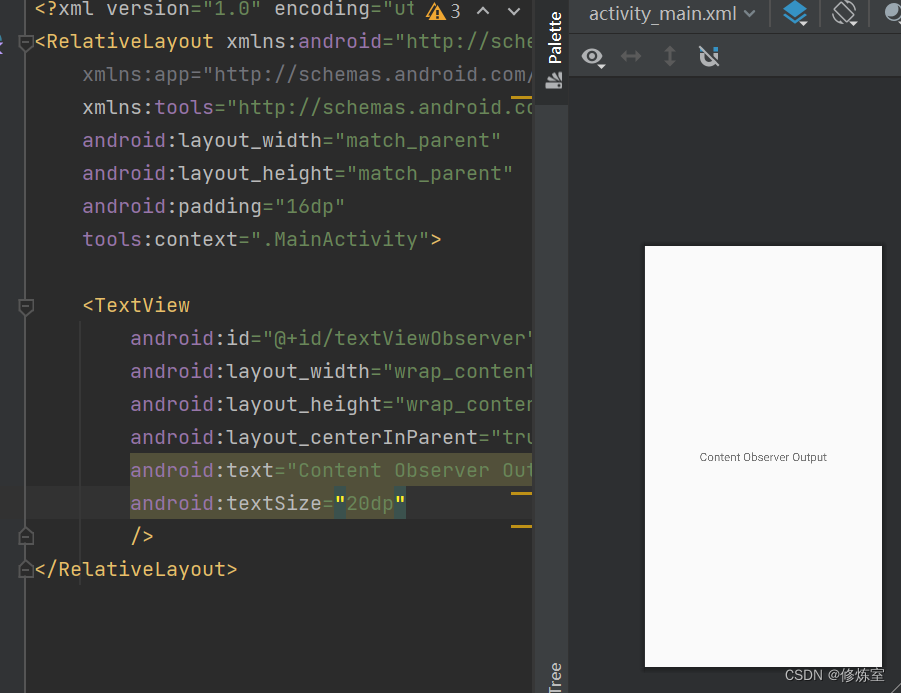
创建
activity_main.xml布局文件,用于显示监听到的内容。
<RelativeLayout xmlns:android="http://schemas.android.com/apk/res/android" xmlns:app="http://schemas.android.com/apk/res-auto" xmlns:tools="http://schemas.android.com/tools" android:layout_width="match_parent" android:layout_height="match_parent" android:padding="16dp" tools:context=".MainActivity"> <TextView android:id="@+id/textViewObserver" android:layout_width="wrap_content" android:layout_height="wrap_content" android:layout_centerInParent="true" android:text="Content Observer Output" /> RelativeLayout>- 1
- 2
- 3
- 4
- 5
- 6
- 7
- 8
- 9
- 10
- 11
- 12
- 13
- 14
- 15
- 16
- 创建
MainActivity.java,用于显示监听到的内容。
package com.leo.contactobserver; import android.database.ContentObserver; import android.net.Uri; import android.os.Bundle; import android.os.Handler; import android.util.Log; import android.widget.TextView; import androidx.appcompat.app.AppCompatActivity; public class ContactObserverActivity extends AppCompatActivity { private TextView textViewObserver; private ContentObserver contentObserver; @Override protected void onCreate(Bundle savedInstanceState) { super.onCreate(savedInstanceState); setContentView(R.layout.activity_main); textViewObserver = findViewById(R.id.textViewObserver); // 创建 ContentObserver 实例 contentObserver = new ContentObserver(new Handler()) { @Override public void onChange(boolean selfChange, Uri uri) { super.onChange(selfChange, uri); // 处理内容变化时的逻辑 Log.i("Content Changed: ", "URI: " + uri.toString()); Log.i("Content Changed: ", "Self Change: " + selfChange); // 你可以在这里更新 textViewObserver 中的内容 textViewObserver.setText("Content Changed: " + uri.toString()); } }; } @Override protected void onResume() { super.onResume(); // 注册 ContentObserver 监听内容变化 getContentResolver().registerContentObserver( Uri.parse("content://com.leo.contactprovider/contacts"), true, contentObserver); } @Override protected void onDestroy() { super.onDestroy(); // 在活动销毁时取消注册 ContentObserver getContentResolver().unregisterContentObserver(contentObserver); } }- 1
- 2
- 3
- 4
- 5
- 6
- 7
- 8
- 9
- 10
- 11
- 12
- 13
- 14
- 15
- 16
- 17
- 18
- 19
- 20
- 21
- 22
- 23
- 24
- 25
- 26
- 27
- 28
- 29
- 30
- 31
- 32
- 33
- 34
- 35
- 36
- 37
- 38
- 39
- 40
- 41
- 42
- 43
- 44
- 45
- 46
- 47
- 48
- 49
- 50
- 51
- 52
- 53
- 54
- 55
- 56
- 57
下面是关键部分的解释和强调:
-
ContentObserver:
ContentObserver是一个用于监听特定URI上数据变化的类。在代码中,我们创建了一个ContentObserver的实例,用于监听特定内容提供者的数据变化。 -
onChange方法:
onChange方法是ContentObserver的回调方法,当所监听的URI的数据发生变化时被调用。在这个方法内,你可以处理数据变化的逻辑。在代码中,通过Log记录了URI的变化以及selfChange的值。 -
onResume方法:在
onResume方法中,注册了ContentObserver,以监听特定URI上的内容变化。这样,只有当活动处于前台时,ContentObserver才会生效。 -
onDestroy方法:在
onDestroy方法中,取消了ContentObserver的注册。因为在活动被销毁时不再需要监听内容变化。通过取消注册,可以避免潜在的内存泄漏。
工作原理:
- 当内容提供者的数据发生变化时,内容提供者内部会调用
ContentResolver的notifyChange方法,并通知所有注册了监听的ContentObserver。 ContentObserver会触发onChange回调方法,其中包括了变化的URI和一个标志,指示是否是自身发起的变化 (selfChange)。- 你可以在
onChange方法中处理数据的变化,例如更新UI或记录日志。
- 修改配置文件
添加查询监听的authorities
<manifest xmlns:android="http://schemas.android.com/apk/res/android" xmlns:tools="http://schemas.android.com/tools"> <application android:allowBackup="true" android:dataExtractionRules="@xml/data_extraction_rules" android:fullBackupContent="@xml/backup_rules" android:icon="@mipmap/ic_launcher" android:label="@string/app_name" android:roundIcon="@mipmap/ic_launcher_round" android:supportsRtl="true" android:theme="@style/Theme.AppCompat.DayNight" tools:targetApi="31"> <activity android:name=".ContactObserverActivity" android:exported="true" android:label="@string/app_name" android:theme="@style/Theme.AppCompat.DayNight"> <intent-filter> <action android:name="android.intent.action.MAIN" /> <category android:name="android.intent.category.LAUNCHER" /> intent-filter> activity> application> <queries> <provider android:authorities="com.leo.contactprovider" android:exported="true" /> queries> manifest>- 1
- 2
- 3
- 4
- 5
- 6
- 7
- 8
- 9
- 10
- 11
- 12
- 13
- 14
- 15
- 16
- 17
- 18
- 19
- 20
- 21
- 22
- 23
- 24
- 25
- 26
- 27
- 28
- 29
- 30
- 31
- 32
- 33
- 34
- 35
确保你的
ContactObserverService正确注册和注销 ContentObserver,以及广播消息的发送和接收。实现效果
provider对数据进行修改,observe监听到数据修改

-
相关阅读:
提高matlab运算效率——预分配内存
05【SpringMVC的数据绑定】
Java-反射
Python循环语句(一)
Apache Commons Text 库简介
2093197-94-3,DBCO-BODIPY FL,二苯并环辛炔-BODIPY FL点击化学染料环辛炔
站在健康保障行业拐点,轻松集团如何“无界开元”?
【Unity3D】选中物体描边特效
多vlan实现互访,使用NAT、DHCP、ACL等技术实现公司组网
Keepalived手动编译安装以及Nginx网关服务器冗余策略
- 原文地址:https://blog.csdn.net/qq_22841387/article/details/133708103
