-
基于matomo实现业务数据埋点采集上报
matomo是一款Google-analytics数据埋点采集上报的平替方案,可保护您的数据和客户的隐私;正如它官网的slogan: Google Analytics alternative that protects your data and your customers' privacy; 该项目源码开源免费,支持私有化部署,保证数据安全、可靠;支持多种方式集成,不管你的应用是传统的html多页面应用还是现代的SPA单页面应用,不管你的应用是CSR渲染还是SSR渲染,均可支持;

- <script>
- var _paq = window._paq = window._paq || [];
- /* tracker methods like "setCustomDimension" should be called before "trackPageView" */
- _paq.push(['trackPageView']); // 记录页面视图
- _paq.push(['enableLinkTracking']); // 在所有适用的链接元素上安装链接跟踪
- (function () {
- var u = "https://test-matobo.jnt-express.com.cn/"; // matomo私有服务器地址
- _paq.push(['setTrackerUrl', u + 'matomo.php']); // 指定 Matomo 服务器 URL
- _paq.push(['setSiteId', '9']); // 设置追踪的站点唯一编码(指定网站 ID) 该id将作为唯一标识来区分matomo正在采集数据的应用
- var d = document, g = d.createElement('script'), s = d.getElementsByTagName('script')[0];
- g.async=true; g.src = u + 'matomo.js'; s.parentNode.insertBefore(g, s); // async 属性指定该脚本SDK将会在加载完毕后执行
- })();
- script>
-
常用Api:
-
setCustomUrl(string):
Override the page's reported URL,覆盖页面报告的 URL;给matomo上报业务系统的地址路径、路由信息等
-
trackPageView([customTitle]):
Log a page view. 记录页面视图信息并上报页面标题
-
setUserId(userId):
Sets a User ID to this user (such as an email address or a username). 设置该用户的用户 ID(例如电子邮件地址或用户名)
-
resetUserId:
Clears (un-set) the User ID. 清除(取消设置)用户 ID
-
trackEvent(category,action,[name],[value]):
Log an event with an event category (Videos, Music, Games...), an event action (Play, Pause, Duration, Add Playlist, Downloaded, Clicked...), and an optional event name and optional numeric value 记录事件,其中包含事件类别(视频、音乐、游戏...)、事件操作(播放、暂停、持续时间、添加播放列表、下载、单击...)以及可选事件名称和可选数值;此api将作为行为埋点,例记录按钮点击次数上报等场景使用
-
接入方式
matomo支持多种方式接入,不管你的应用是传统的html多页面应用,还是现代的vue、react等单页面应用
传统的html多页面应用接入:
- <script>
- var _paq = window._paq = window._paq || [];
- /* tracker methods like "setCustomDimension" should be called before "trackPageView" */
- _paq.push(['trackPageView']);
- _paq.push(['enableLinkTracking']);
- (function() {
- var u="https://test-matobo.jnt-express.com.cn/";
- _paq.push(['setTrackerUrl', u+'matomo.php']);
- _paq.push(['setSiteId', '10']);
- var d=document, g=d.createElement('script'), s=d.getElementsByTagName('script')[0];
- g.async=true; g.src=u+'matomo.js'; s.parentNode.insertBefore(g,s);
- })();
- script>
引入SDK即可自动采集部分数据,如有特殊需求需要记录页面信息及标题,在对应的地方调用window._paq.push方法去传递参数即可;api跟其他方式保持一致;
- /** src/plugins/matomo.ts */
- export default function useMatomo() {
- /** 页面地址信息上报 */
- const setCustomUrl = (url: string) => {
- ;(window as any)._paq.push(['setCustomUrl', `${url}`])
- }
- /** 页面标题信息上报 */
- const trackPageView = (title: string | any) => {
- ;(window as any)._paq.push(['trackPageView', `${title}`])
- }
- /** 用户信息userId上报 */
- const setUserId = (userId: string | number | boolean) => {
- ;(window as any)._paq.push(['setUserId', `${userId}`])
- ;(window as any)._paq.push(['trackPageView'])
- }
- /** 重置userId,这里多次调用trackAllContentImpressions是为了在退出登录的时候重置调userId,并在下一次登录时重新生成一条最新的记录 */
- const resetUserId = () => {
- // UserID passed to Matomo (see https://developer.matomo.org/guides/tracking-javascript-guide#user-id)
- ;(window as any)._paq.push(['resetUserId'])
- ;(window as any)._paq.push(['trackAllContentImpressions', 'new_visit=1'])
- ;(window as any)._paq.push(['trackPageView'])
- ;(window as any)._paq.push(['trackAllContentImpressions'])
- }
- /**
- * 行为埋点
- * $matomo.trackEvent('行为类别', '事件', 'name', 'value')
- * behaviorCategory 行为类别
- * event 事件
- * name 事件名称
- * value 事件值
- */
- const trackEvent = (behaviorCategory: string, event: string, name: string, value?: string | number) => {
- ;(window as any)._paq.push(['trackEvent', `${behaviorCategory}`, `${event}`, `${name}`])
- }
- return {
- setCustomUrl,
- trackPageView,
- setUserId,
- resetUserId,
- trackEvent
- }
- }
- <template>
- <ConfigProvider :locale="zhCN">
- <router-view />
- ConfigProvider>
- template>
- <script lang="ts" setup>
- import { onMounted, watch } from 'vue'
- import { ConfigProvider } from 'ant-design-vue'
- import { useRouter } from 'vue-router'
- import zhCN from 'ant-design-vue/lib/locale-provider/zh_CN'
- import useMatomo from '@/plugins/matomo'
- import { useAuthStore } from '@/store/auth'
- const router = useRouter()
- const authStore = useAuthStore()
- const matomo = useMatomo()
- /**
- 在App.vue中记录每个路由切换的路径及页面标题信息;
- sertUserId一般在登录完成之后调用,这里在App.vue中调用是为了解决token存在,spa应用直接进目标页面而跳过登录页无法触发setUserId上报的问题
- */
- watch(
- () => router.currentRoute.value,
- (newValue: any) => {
- // 这里延迟是因为matomo sdk加载是异步非阻塞加载,所以为了能正确的获取到window上matomo的实例,我们这里会有略微延迟
- setTimeout(() => {
- /**
- * 记录跳转页面及页面标题 userCode及nickName均为业务系统数据,此处做拼接传入
- **/
- const name =
- authStore.userInfo?.userCode !== undefined
- ? `${authStore.userInfo?.userCode} | ${authStore.userInfo?.nickName}`
- : ''
- matomo.setUserId(name)
- matomo.setCustomUrl(window.location.href)
- matomo.trackPageView(router.currentRoute.value.meta.title)
- }, 500)
- }
- )
- <script lang="ts" setup>
- import { reactive, ref, onMounted } from 'vue'
- import useMatomo from '@/plugins/matomo'
- const matomo = useMatomo()
- const jumpPage = (data: any) => {
- /** 登录成功后在跳转之前将业务数据userCode和nickName上报 */
- const { userCode, nickName, menuTree } = data
- const name = `${userCode} | ${nickName}` || ''
- matomo.setUserId(name)
- }
- script>
- <script lang="ts" setup>
- import { reactive, ref, onMounted } from 'vue'
- import useMatomo from '@/plugins/matomo'
- const matomo = useMatomo()
- const exportBtn = () => {
- /** 例如需要记录导出按钮的点击次数,在导出按钮中trackEvent即可 */
- matomo.trackEvent('品牌监控报表', '导出', 'export')
- script>
vue-matomo npm包方式引入:
- /** 官方提供了vue-matomo这个库,仅适用于vue2,vue3方式接入会有问题 */
- npm install --save vue-matomo
- /** main.js */
- import Vue from 'vue'
- import VueMatomo from 'vue-matomo'
- Vue.use(VueMatomo, {
- // 请求对应服务域名,如果是私有化部署,可以填写自己内网的私有域名,如果是公网部署填写https://matomo.example.com即可
- host: 'https://matomo.example.com',
- /** 新建项目的script文件中会存在siteId这个变量,这个是跟项目绑定的唯一标识,通过该变量索引查找到对应项目 */
- siteId: 5,
- // 最终的追踪js文件名 默认 'piwik'
- trackerFileName: 'matomo',
- siteId: 9,
- router: router,
- // 支持外部链接跟踪
- enableLinkTracking: true,
- // 是否需要在发送追踪信息之前请求许可 默认false
- requireConsent: false,
- // 是否追踪初始页面 默认true
- trackInitialView: true,
- debug: false
- });
- // 挂载到vue的实例中之后,我们可以使用this.$matomo or window._paq.push or window.Piwik.getTracker 等三种方式来访问均可,此处使用this来访问
其实就是在业务代码中做侵入式埋点了,在对应的业务逻辑中使用 this.$matomo && this.$matomo.trackPageView() 或 window._paq.push(['trackPageView']) 等api来进行注入埋点采集数据并上报,两者功能效果相同,区别仅仅只是调用方式不同,挂载到实例中直接以funtion函数的方式调用传参,window全局变量调用通过 push方法来调用,push方法接收一个数组,数组第一项为key,后续剩余参数为name;
-
vue3
vue3由于使用Composition API,且生命周期机制跟vue2不同,同时matomo又是异步加载资源,所以在main.ts文件中即使挂载了对应的实例,通过getCurrentInstance()?.appContext.config.globalProperties.$matomo 来访问matomo对应实例,无法保证能准确的获取,即使你通过nextTick;因为加载matomo资源不是响应式的,若在页面渲染完成时,matomo资源文件未加载完成,此时获取到的matomo实例仍然为undefined;至于matomo的实例只在页面渲染的那一刻就决定你单次加载是否包含matomo实例
参考github issues:
https://github.com/AmazingDreams/vue-matomo/issues/117
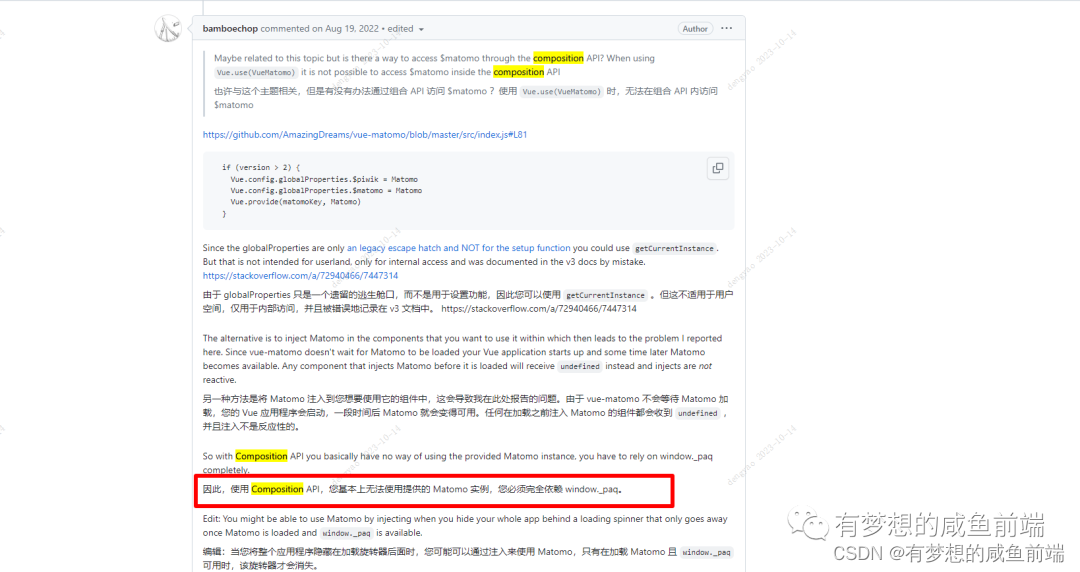
解决方案:
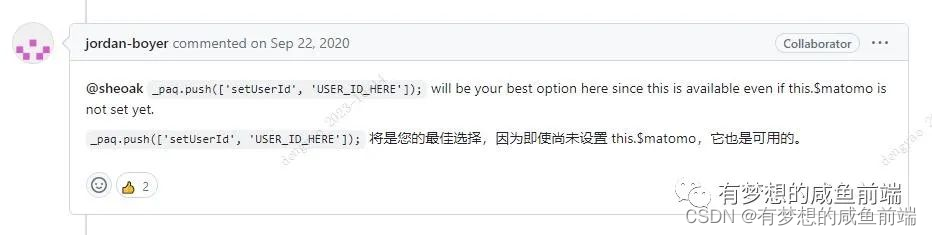
通过window._pag.push 来访问全局变量,因为即使你获取到的this.$matomo实例是undefined,window._paq.push也可以保证它是可用的;
社区没有提供react-matomo之类的npm包/工具来给开发者使用,可以参考Hooks方案,将使用到的Api封装成Hooks,通过window._paq.push的方式在需要的地方来调用;
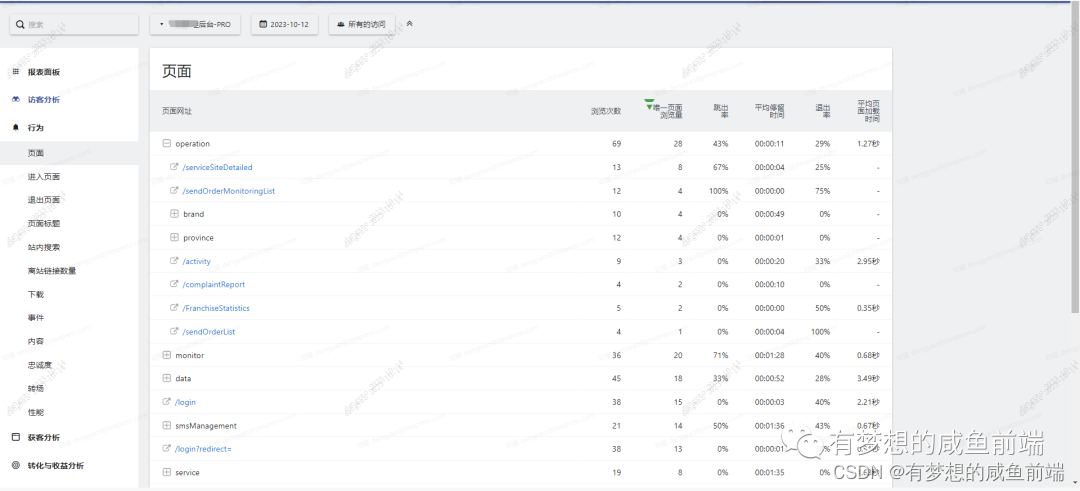
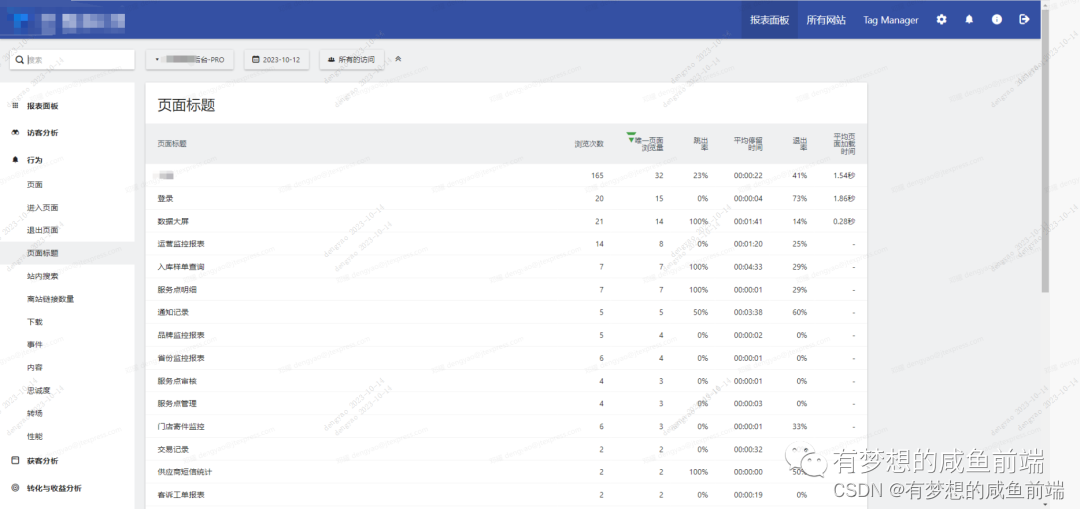
由于是私有化部署,关于公司logo及业务数据等相关较敏感的数据均已打码,只展示具体收集指标和效果;
数据采集上报最终效果图:




-
相关阅读:
Python学习笔记第四十三天(NumPy 数学函数)
PyQt5_寻找顶(底)背离并可视化
python实现简单的神经网络,python实现神经网络算法
Springboot毕设项目博恒人力资源规划系统671c9(java+VUE+Mybatis+Maven+Mysql)
STC8H8K64U I2C主机模式相关寄存器
华为云云耀云服务器 L 实例评测|配置教程 + 用 Python 简单绘图
Nginx学习与使用
屡试不爽的爆款软文套路,媒介盒子无偿分享
聊聊产品经理原型设计中的 “道术器”
H5通过打开小程序的坑
- 原文地址:https://blog.csdn.net/dengyao46395665/article/details/133827201
