-
【JAVA】集合与背后的逻辑框架,包装类,List,Map,Set,静态内部类
collection

Collection 接口,在 Java 当中,Collection 也是重要的数据结构。
Collection创建
在创建 Collection 的时候,要通过 new 关键字来使用。但是查看 Collection 源码的时候,发现 Collecting 是一个接口:

**因为接口是不能实例化的,所以 new 的时候,要用一个具体的类。**这里用ArrayList来举例:Collection collection = new ArrayList();- 1
collection使用泛型
使用泛型就是加上 <> 里面写元素类型,要注意的是,这里的类型全是包装类。字符串的包装类是:String 整形的包装类是:Integer 。写了包装类的话,add 的时候就只能添加这一类型:
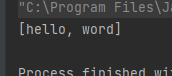
public static void main(String[] args) { Collection<String> collection = new ArrayList<String>(); collection.add("hello"); collection.add("word"); System.out.println(collection); }- 1
- 2
- 3
- 4
- 5
- 6
Collection 后面的 String 可以不写,因为不写的话,编译器会通过前面的 String 来推导出相应的类型。如果这里 add 非字符类型的话,就会报错。运行结果如下:
collection方法
Collection 里面有很多自带的方法:

使用代码测试:public static void main(String[] args) { Collection<String> collection = new ArrayList<>(); collection.add("hello"); collection.add("word"); System.out.println(collection); System.out.println(collection.size()); System.out.println(collection.isEmpty()); collection.remove("word"); System.out.println(collection); Object[] objects = collection.toArray(); System.out.println(Arrays.toString(objects)); System.out.println(objects); }- 1
- 2
- 3
- 4
- 5
- 6
- 7
- 8
- 9
- 10
- 11
- 12
- 13

Map 接口
Map 是在 util 包下的接口。Map 有两个参数

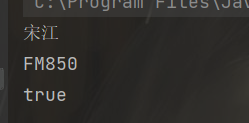
public static void main(String[] args) { Map<String,String> map = new HashMap<>(); map.put("Lockey","鲁班锁"); map.put("及时雨","宋江"); String ret = map.get("及时雨"); String tmp = map.getOrDefault("及时雨1","FM850"); System.out.println(ret); System.out.println(tmp); boolean flag = map.containsKey("Lockey"); System.out.println(flag); }- 1
- 2
- 3
- 4
- 5
- 6
- 7
- 8
- 9
- 10
- 11
Map的存储结构
- map在存储的时候,并不是顺序存储的,而是通过映射去存储的。代码示例:
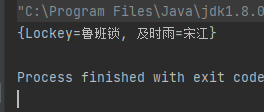
public static void main(String[] args) { Map<String,String> map = new HashMap<>(); map.put("及时雨","宋江"); map.put("Lockey","鲁班锁"); System.out.println(map); }- 1
- 2
- 3
- 4
- 5
- 6
先输出 “Lockey” 然后才是 “及时雨” 。
HashMap和TreeMap的有序和无序
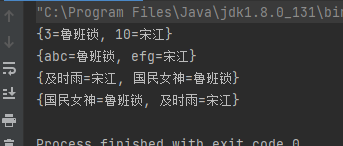
- HashMap存储的时候是根据key值排序的,是有序的。
- TreeMap放入的时候没有进行比较,没有排序。
public static void main(String[] args) { Map<Integer,String> map = new HashMap<>(); map.put(10,"宋江"); map.put(3,"鲁班锁"); System.out.println(map); Map<String,String> map2 = new HashMap<>(); map2.put("efg","宋江"); map2.put("abc","鲁班锁"); System.out.println(map2); Map<String,String> map3 = new TreeMap<>(); map3.put("及时雨","宋江"); map3.put("国民女神","鲁班锁"); System.out.println(map3); Map<String,String> map4 = new HashMap<>(); map4.put("及时雨","宋江"); map4.put("国民女神","鲁班锁"); System.out.println(map4); }- 1
- 2
- 3
- 4
- 5
- 6
- 7
- 8
- 9
- 10
- 11
- 12
- 13
- 14
- 15
- 16
- 17
- 18
- 19
包装类
包装类是根据基本类型出现的,八大基本类型对应着八种包装类:

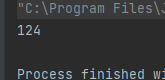
要注意的是:String 不是包装类。**包装类的好处在于:可以完成对数据的操作。**例如:把字符串变为整形:public static void main(String[] args) { String str = "123"; int ret = Integer.valueOf(str); System.out.println(ret+1); }- 1
- 2
- 3
- 4
- 5
装箱与拆箱(装包与拆包)
装箱:把简单数据类型变为包装类类型
拆箱:把包装类类型变为简单数据类型代码示例,这里是隐式的:
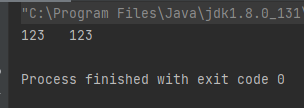
public static void main(String[] args) { //装箱 Integer a = 123; //拆箱 int b = a;//隐式的:因为把 Integer 变为 int 了 System.out.println(a+" "+b); }- 1
- 2
- 3
- 4
- 5
- 6
- 7
下面我们通过 powershell 窗口来看编译的过程:

可以看到,画圈的部分就是两次过程。第一次是通过 Integer 的 valueOf 来把 123 变成 Integer 类。第二次则是通过 Integer 的 intValue 来变成 int 类型。下面的就是字符串的拼接了。
显式拆包:
通过直接将方法写出来,一看就明白了的方法就是显式的:public static void main(String[] args) { //这里就是显式的装包 Integer a2 = Integer.valueOf(123); Integer a3 = new Integer(123); //显式的拆包 int b2 = a2.intValue(); double d = a2.doubleValue(); }- 1
- 2
- 3
- 4
- 5
- 6
- 7
- 8
LIst
List使用
在使用 List 的时候,后面括号可以加参数,也可以不加参数,加的参数是表示容量大小:
public static void main(String[] args) { List<String> list1 = new ArrayList<>(20); List<String> list2 = new ArrayList<>(); }- 1
- 2
- 3
- 4
List 是一个很大的类,这里用它下层的 ArrayList :
public static void main(String[] args) { ArrayList<String> list2 = new ArrayList<>(); list2.add("hello"); list2.add("word"); list2.add("123"); System.out.println(list2); ArrayList<String> list3 = new ArrayList<>(list2); System.out.println(list3); }- 1
- 2
- 3
- 4
- 5
- 6
- 7
- 8
- 9
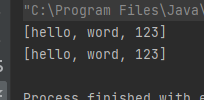
可以使用另外一个 Array List 对 list 初始化:这里的 list3 就是用 list2 来进行初始化。List的多种输出方式
直接通过字符串输出
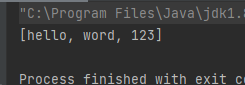
public static void main(String[] args) { ArrayList<String> list2 = new ArrayList<>(); list2.add("hello"); list2.add("word"); list2.add("123"); System.out.println(list2); }- 1
- 2
- 3
- 4
- 5
- 6
- 7
通过for循环打印
- 用size()获取长度,用add()添加,用get(int)获取
public static void main(String[] args) { ArrayList<String> list2 = new ArrayList<>(); list2.add("hello"); list2.add("word"); list2.add("123"); for (int i = 0; i < list2.size(); i++){ System.out.println(list2.get(i)); } }- 1
- 2
- 3
- 4
- 5
- 6
- 7
- 8
- 9

通过foreach输出
public static void main(String[] args) { ArrayList<String> list2 = new ArrayList<>(); list2.add("hello"); list2.add("word"); list2.add("123"); for (String s:list2) { System.out.println(s); } }- 1
- 2
- 3
- 4
- 5
- 6
- 7
- 8
- 9
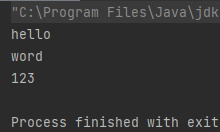
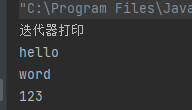
通过迭代器打印
- 通过使用List的方法:iterator()来完成输出
public static void main(String[] args) { ArrayList<String> list2 = new ArrayList<>(); list2.add("hello"); list2.add("word"); list2.add("123"); System.out.println("迭代器打印"); Iterator<String> i = list2.iterator(); while (i.hasNext()) { System.out.println(i.next()); } }- 1
- 2
- 3
- 4
- 5
- 6
- 7
- 8
- 9
- 10
- 11
List的API
add
List 当中的 add 方法,默认是放在最后一个位置的:
public static void main(String[] args) { //add 方法 默认是放到数组的最后一个位置的 ArrayList<String> list = new ArrayList<>(); list.add("a"); list.add("b"); list.add("c"); System.out.println(list); }- 1
- 2
- 3
- 4
- 5
- 6
- 7
- 8
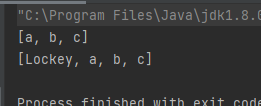
通过增加一个参数index的add方法
通过在 add 方法放第一次参数,将元素放到某个位置下面:
public static void main(String[] args) { ArrayList<String> list = new ArrayList<>(); list.add("a"); list.add("b"); list.add("c"); System.out.println(list); list.add(0,"Lockey"); System.out.println(list); }- 1
- 2
- 3
- 4
- 5
- 6
- 7
- 8
- 9
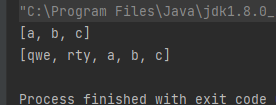
把一个 List 放在另一个 List 后面
通过 List 的方法 addALL 来完成,代码如下:
public static void main(String[] args) { ArrayList<String> list = new ArrayList<>(); list.add("a"); list.add("b"); list.add("c"); System.out.println(list); ArrayList<String> list1 = new ArrayList<>(); list1.add("qwe"); list1.add("rty"); list1.addAll(list); System.out.println(list1); }- 1
- 2
- 3
- 4
- 5
- 6
- 7
- 8
- 9
- 10
- 11
- 12
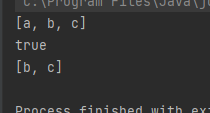
删除某个值
通过 remove 方法来完成删除:
public static void main9(String[] args) { ArrayList<String> list = new ArrayList<>(); list.add("a"); list.add("b"); list.add("c"); System.out.println(list); boolean flag = list.remove("a"); System.out.println(flag); System.out.println(list); }- 1
- 2
- 3
- 4
- 5
- 6
- 7
- 8
- 9
- 10
获取某个下标的值
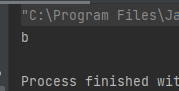
通过 get 方法来完成获取:
public static void main(String[] args) { ArrayList<String> list = new ArrayList<>(); list.add("a"); list.add("b"); list.add("c"); String ret = list.get(1); System.out.println(ret); }- 1
- 2
- 3
- 4
- 5
- 6
- 7
- 8
更改某个位置的值
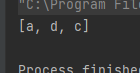
通过 set 方法来完成:
public static void main(String[] args) { ArrayList<String> list = new ArrayList<>(); list.add("a"); list.add("b"); list.add("c"); list.set(1,"d"); System.out.println(list); }- 1
- 2
- 3
- 4
- 5
- 6
- 7
- 8
清空List
通过 clear 方法来完成:
public static void main(String[] args) { ArrayList<String> list = new ArrayList<>(); list.add("a"); list.add("b"); list.add("c"); list.clear(); System.out.println(list); }- 1
- 2
- 3
- 4
- 5
- 6
- 7
- 8
Map的API
map 和 set 是一种专门用来搜索和查询的容器或数据结构,效率很高。是为了解决在 “增删查改” 情况下使用的数据结构。
HashMap 在存储元素的时候,是根据一个函数进行存储的,具体存储到哪里,由函数来确定。这个函数就是哈希函数。所以输出的时候,并不是按照存储顺序进行输出的。Map是一个接口类,没有继承自Collection,类中存储的是put
在 map 当中,put 是放入元素的意思,有两个参数,第一个是 key ,第二个是 value ,代码如下:
public static void main(String[] args) { Map<String, Integer> map = new HashMap<>(); map.put("abc",3); map.put("word",2); map.put("hello",4); System.out.println(map); }- 1
- 2
- 3
- 4
- 5
- 6
- 7
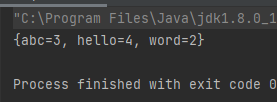
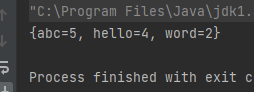
输出的时候按照key值从大到小输出。
put 如果存储元素的时候,如果 key 值相同的话,val 值会覆盖。代码如下:public static void main(String[] args) { Map<String, Integer> map = new HashMap<>(); map.put("abc",3); map.put("word",2); map.put("hello",4); map.put("abc",5); System.out.println(map); }- 1
- 2
- 3
- 4
- 5
- 6
- 7
- 8
get
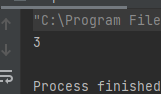
使用 get 通过 key 来获取对应的 value 的值。代码如下:
public static void main(String[] args) { Map<String, Integer> map = new HashMap<>(); map.put("abc",3); map.put("word",2); map.put("hello",4); int ret = map.get("abc"); System.out.println(ret); }- 1
- 2
- 3
- 4
- 5
- 6
- 7
- 8
getOrDefault
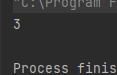
getOrDefault 方法有两个参数,一个是 key ,如果没有 key 的话,就返回设置的默认值。如果有 key 的话,就返回 key 的 value 。代码如下:
public static void main(String[] args) { Map<String, Integer> map = new HashMap<>(); map.put("abc",3); map.put("word",2); map.put("hello",4); System.out.println(map.getOrDefault("abc",98)); }- 1
- 2
- 3
- 4
- 5
- 6
- 7
因为 abc 存在,所以返回 abc 的 value 。就是 3 。
remove
remove 方法有一个参数,参数是输入的 key ,返回对应的 value 。如果没有 key 的话,就返回 null 。代码如下:
public static void main(String[] args) { Map<String, Integer> map = new HashMap<>(); map.put("abc",3); map.put("word",2); map.put("hello",4); Integer ret2 = map.remove("abc"); System.out.println(ret2); }- 1
- 2
- 3
- 4
- 5
- 6
- 7
- 8
Set的API
set 是一个集合,存入里面的数据会自动去重。Set 是继承自 Collection 的接口类,Set 中只存储了 Key 。
set 自动去重
放入 set 的数据会自动去重,代码如下:
public static void main4(String[] args) { Set<Integer> set = new HashSet<>(); set.add(1); set.add(2); set.add(3); set.add(1); System.out.println(set); }- 1
- 2
- 3
- 4
- 5
- 6
- 7
- 8
contains是否包含
remove删除
isEmpty()判空
clear()清空
静态内部类
1.外部类可通过内部类的对象调用内部类的私有成员变量或方法。
2.静态内部类访问外部类的静态成员变量或方法必须是静态的。
♥♥♥码字不易,大家的支持就是我坚持下去的动力♥♥♥
版权声明:本文为CSDN博主「亚太地区百大最帅面孔第101名」的原创文章 -
相关阅读:
Java的static成员和内部类
STM32 通过USB接口读写挂载的SD卡(支持fatfs文件系统)
有效预警6要素:亿级调用量的阿里云弹性计算SRE实践
Util应用框架 UI 开发快速入门
宠物医院信息展示预约小程序的效果如何
学习ASP.NET Core Blazor编程系列二十七——JWT登录(1)
1084 外观数列
有 AI,无障碍,AIoT 设备为视障人群提供便利
系统03:15min导图复习 文件管理
[附源码]Python计算机毕业设计Django葡萄酒销售管理系统论文
- 原文地址:https://blog.csdn.net/partworld/article/details/133011469

- 最新文章
-
【FHE】我们如何实现同态加密推理(八):SiLU 的密文化——两条路径,和一个 8 字节的开关
SQLcl 中 c/old/new 替换变量为何失效?先定位再替换
不让模型写作文,直接从它脑子里读答案:Jev 决策在 .NET 的两条路线
Halo插件:支持GitHub的图床附件策略
电视投屏界的“一股清流”!SimpleTVCast 6.0.0-beta 抢先体验:无需TV端App,界面大换血!✨
华三VXLAN集中式网关实战指南:Spine多活网关 + 双活接入(M-LAG)
软件更好写之后口碑会更重要
大 O、大 Omega、大 Theta 的区别,O(n) 复杂度是什么意思
Java标签跳转:一个鲜为人知但却很实用的小技巧
多智能体系统论文速读