-
对paddleOCR中的字符识别模型转ONNX
对paddle OCR中的模型转换成ONNX。
转换代码:
- import os
- import sys
- import yaml
- import numpy as np
- import cv2
- import argparse
- import paddle
- from paddle import nn
- from argparse import ArgumentParser, RawDescriptionHelpFormatter
- import paddle.distributed as dist
- from ppocr.postprocess import build_post_process
- from ppocr.utils.save_load import init_model
- from ppocr.modeling.architectures import build_model
- class AttrDict(dict):
- """Single level attribute dict, NOT recursive"""
- def __init__(self, **kwargs):
- super(AttrDict, self).__init__()
- super(AttrDict, self).update(kwargs)
- def __getattr__(self, key):
- if key in self:
- return self[key]
- raise AttributeError("object has no attribute '{}'".format(key))
- global_config = AttrDict()
- default_config = {'Global': {'debug': False, }}
- class ArgsParser(ArgumentParser):
- def __init__(self):
- super(ArgsParser, self).__init__(
- formatter_class=RawDescriptionHelpFormatter)
- # self.add_argument("-c", "--config", default='./configs/ch_PP-OCRv2_rec_idcard.yml',
- # help="configuration file to use")
- self.add_argument("-c", "--config", default='./configs/ch_PP-OCRv2_rec.yml',
- help="configuration file to use")
- self.add_argument(
- "-o", "--opt", nargs='+', help="set configuration options")
- def parse_args(self, argv=None):
- args = super(ArgsParser, self).parse_args(argv)
- assert args.config is not None, \
- "Please specify --config=configure_file_path."
- args.opt = self._parse_opt(args.opt)
- return args
- def _parse_opt(self, opts):
- config = {}
- if not opts:
- return config
- for s in opts:
- s = s.strip()
- k, v = s.split('=')
- config[k] = yaml.load(v, Loader=yaml.Loader)
- return config
- def merge_config(config):
- """
- Merge config into global config.
- Args:
- config (dict): Config to be merged.
- Returns: global config
- """
- for key, value in config.items():
- if "." not in key:
- if isinstance(value, dict) and key in global_config:
- global_config[key].update(value)
- else:
- global_config[key] = value
- else:
- sub_keys = key.split('.')
- assert (
- sub_keys[0] in global_config
- ), "the sub_keys can only be one of global_config: {}, but get: {}, please check your running command".format(
- global_config.keys(), sub_keys[0])
- cur = global_config[sub_keys[0]]
- for idx, sub_key in enumerate(sub_keys[1:]):
- if idx == len(sub_keys) - 2:
- cur[sub_key] = value
- else:
- cur = cur[sub_key]
- def load_config(file_path):
- """
- Load config from yml/yaml file.
- Args:
- file_path (str): Path of the config file to be loaded.
- Returns: global config
- """
- merge_config(default_config)
- _, ext = os.path.splitext(file_path)
- assert ext in ['.yml', '.yaml'], "only support yaml files for now"
- merge_config(yaml.load(open(file_path, 'rb'), Loader=yaml.Loader))
- return global_config
- def check_device(use_gpu, use_xpu=False):
- """
- Log error and exit when set use_gpu=true in paddlepaddle
- cpu version.
- """
- err = "Config {} cannot be set as true while your paddle " \
- "is not compiled with {} ! \nPlease try: \n" \
- "\t1. Install paddlepaddle to run model on {} \n" \
- "\t2. Set {} as false in config file to run " \
- "model on CPU"
- try:
- if use_gpu and use_xpu:
- print("use_xpu and use_gpu can not both be ture.")
- if use_gpu and not paddle.is_compiled_with_cuda():
- print(err.format("use_gpu", "cuda", "gpu", "use_gpu"))
- sys.exit(1)
- if use_xpu and not paddle.device.is_compiled_with_xpu():
- print(err.format("use_xpu", "xpu", "xpu", "use_xpu"))
- sys.exit(1)
- except Exception as e:
- pass
- def getArgs(is_train=False):
- FLAGS = ArgsParser().parse_args()
- config = load_config(FLAGS.config)
- merge_config(FLAGS.opt)
- # check if set use_gpu=True in paddlepaddle cpu version
- use_gpu = config['Global']['use_gpu']
- use_xpu = False
- alg = config['Architecture']['algorithm']
- assert alg in [
- 'EAST', 'DB', 'SAST', 'Rosetta', 'CRNN', 'STARNet', 'RARE', 'SRN',
- 'CLS', 'PGNet', 'Distillation', 'NRTR', 'TableAttn', 'SAR', 'PSE',
- 'SEED', 'SDMGR', 'LayoutXLM', 'LayoutLM', 'LayoutLMv2', 'PREN', 'FCE',
- 'SVTR', 'ViTSTR', 'ABINet', 'DB++', 'TableMaster', 'SPIN', 'VisionLAN',
- 'Gestalt', 'SLANet', 'RobustScanner'
- ]
- device = 'gpu:{}'.format(dist.ParallelEnv().dev_id) if use_gpu else 'cpu'
- check_device(use_gpu, use_xpu)
- device = paddle.set_device(device)
- config['Global']['distributed'] = dist.get_world_size() != 1
- return config, device
- class CRNN(nn.Layer):
- def __init__(self, config, device):
- super(CRNN, self).__init__()
- # 定义预处理参数
- mean = (0.5, 0.5, 0.5)
- std = (0.5, 0.5, 0.5)
- self.mean = paddle.to_tensor(mean).reshape([1, 3, 1, 1])
- self.std = paddle.to_tensor(std).reshape([1, 3, 1, 1])
- self.config = config
- # build post process
- self.post_process_class = build_post_process(config['PostProcess'],
- config['Global'])
- # build model
- if hasattr(self.post_process_class, 'character'):
- char_num = len(getattr(self.post_process_class, 'character'))
- if self.config['Architecture']["algorithm"] in ["Distillation",
- ]: # distillation model
- for key in self.config['Architecture']["Models"]:
- if self.config['Architecture']['Models'][key]['Head'][
- 'name'] == 'MultiHead': # for multi head
- out_channels_list = {}
- if self.config['PostProcess'][
- 'name'] == 'DistillationSARLabelDecode':
- char_num = char_num - 2
- out_channels_list['CTCLabelDecode'] = char_num
- out_channels_list['SARLabelDecode'] = char_num + 2
- self.config['Architecture']['Models'][key]['Head'][
- 'out_channels_list'] = out_channels_list
- else:
- self.config['Architecture']["Models"][key]["Head"][
- 'out_channels'] = char_num
- elif self.config['Architecture']['Head'][
- 'name'] == 'MultiHead': # for multi head
- out_channels_list = {}
- if self.config['PostProcess']['name'] == 'SARLabelDecode':
- char_num = char_num - 2
- out_channels_list['CTCLabelDecode'] = char_num
- out_channels_list['SARLabelDecode'] = char_num + 2
- self.config['Architecture']['Head'][
- 'out_channels_list'] = out_channels_list
- else: # base rec model
- self.config['Architecture']["Head"]['out_channels'] = char_num
- # 加载模型
- self.model = build_model(config['Architecture'])
- # load_model(config, self.model)
- init_model(self.config, self.model)
- self.model.eval()
- def forward(self, x):
- # x = paddle.transpose(x, [0,3,1,2])
- # x = x / 255.0
- # x = (x - self.mean) / self.std
- model_out = self.model(x)
- # return model_out
- preds_idx = model_out.argmax(axis=2, name='class').astype('float32')
- # preds_idx = model_out.argmax(axis=2, name='class')
- preds_prob = model_out.max(axis=2, name='score').astype('float32')
- return preds_idx, preds_prob
- EXPORT_ONNX = True
- DYNAMIC = False
- if __name__ == '__main__':
- config, device = getArgs()
- model_crnn = CRNN(config, device=device)
- # 构建输入数据images:
- image_path = "1.jpg"
- img = cv2.imread(image_path)
- img = cv2.resize(img, (320, 32))
- print('input data:', img.shape)
- img = img.astype(np.float32)
- img = img.transpose((2, 0, 1)) / 255
- input_data = img[np.newaxis, :]
- print('input data:', input_data.shape)
- x = paddle.to_tensor(input_data)
- print('input data:', x.shape)
- output_idx, output_prob = model_crnn(x)
- print('output_idx: ', output_idx)
- print('output_prob: ', output_prob)
- input_spec = paddle.static.InputSpec.from_tensor(x, name='input')
- onnx_save_path = "./export_onnx"
- if EXPORT_ONNX:
- onnx_model_name = onnx_save_path + "/char_recognize_20230526_v1"
- if DYNAMIC:
- input_spec = paddle.static.InputSpec(
- shape=[None, 32, 320, 3], dtype='float32', name='input')
- # ONNX模型导出
- paddle.onnx.export(model_crnn, onnx_model_name, input_spec=[input_spec], opset_version=11,
- enable_onnx_checker=True, output_spec=[output_idx, output_prob])
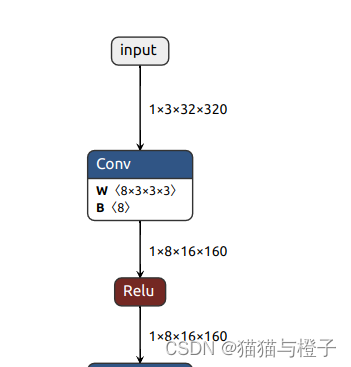
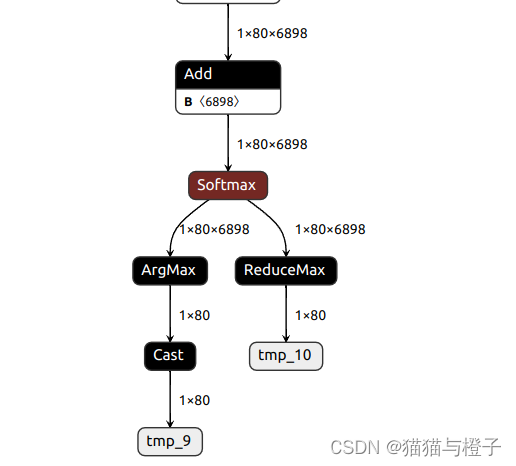
转换后的网络结构绘制出来,绘制使用的工具Netron
绘制出的起始和末尾的网络结构:
测试ONNX的代码:
- '''
- 测试转出的onnx模型
- '''
- import cv2
- import numpy as np
- import torch
- import onnxruntime as rt
- import math
- import os
- class TestOnnx:
- def __init__(self, onnx_file, character_dict_path, use_space_char=True):
- self.sess = rt.InferenceSession(onnx_file)
- # 获取输入节点名称
- self.input_names = [input.name for input in self.sess.get_inputs()]
- # 获取输出节点名称
- self.output_names = [output.name for output in self.sess.get_outputs()]
- self.character = []
- self.character.append("blank")
- with open(character_dict_path, "rb") as fin:
- lines = fin.readlines()
- for line in lines:
- line = line.decode('utf-8').strip("\n").strip("\r\n")
- self.character.append(line)
- if use_space_char:
- self.character.append(" ")
- def resize_norm_img(self, img, image_shape=[3, 32, 320]):
- imgC, imgH, imgW = image_shape
- h = img.shape[0]
- w = img.shape[1]
- ratio = w / float(h)
- if math.ceil(imgH * ratio) > imgW:
- resized_w = imgW
- else:
- resized_w = int(math.ceil(imgH * ratio))
- resized_image = cv2.resize(img, (resized_w, imgH))
- resized_image = resized_image.astype('float32')
- if image_shape[0] == 1:
- resized_image = resized_image / 255
- resized_image = resized_image[np.newaxis, :]
- else:
- resized_image = resized_image.transpose((2, 0, 1)) / 255
- resized_image -= 0.5
- resized_image /= 0.5
- padding_im = np.zeros((imgC, imgH, imgW), dtype=np.float32)
- padding_im[:, :, 0:resized_w] = resized_image
- return padding_im
- # # 准备模型运行的feed_dict
- def process(self, input_names, image):
- feed_dict = dict()
- for input_name in input_names:
- feed_dict[input_name] = image
- return feed_dict
- def get_ignored_tokens(self):
- return [0]
- def decode(self, text_index, text_prob=None, is_remove_duplicate=False):
- """ convert text-index into text-label. """
- result_list = []
- ignored_tokens = self.get_ignored_tokens()
- batch_size = len(text_index)
- for batch_idx in range(batch_size):
- selection = np.ones(len(text_index[batch_idx]), dtype=bool)
- if is_remove_duplicate:
- selection[1:] = text_index[batch_idx][1:] != text_index[
- batch_idx][:-1]
- for ignored_token in ignored_tokens:
- selection &= text_index[batch_idx] != ignored_token
- char_list = [
- self.character[int(text_id)].replace('\n', '')
- for text_id in text_index[batch_idx][selection]
- ]
- if text_prob is not None:
- conf_list = text_prob[batch_idx][selection]
- else:
- conf_list = [1] * len(selection)
- if len(conf_list) == 0:
- conf_list = [0]
- text = ''.join(char_list)
- result_list.append((text, np.mean(conf_list).tolist()))
- return result_list
- def test(self, image_path):
- img_onnx = cv2.imread(image_path)
- # img_onnx = cv2.resize(img_onnx, (320, 32))
- # img_onnx = img_onnx.transpose((2, 0, 1)) / 255
- img_onnx = self.resize_norm_img(img_onnx)
- onnx_indata = img_onnx[np.newaxis, :, :, :]
- onnx_indata = torch.from_numpy(onnx_indata)
- # print('diff:', onnx_indata - input_data)
- print('image shape: ', onnx_indata.shape)
- onnx_indata = np.array(onnx_indata, dtype=np.float32)
- feed_dict = self.process(self.input_names, onnx_indata)
- output_onnx = self.sess.run(self.output_names, feed_dict)
- # print('output1 shape: ', output_onnx[0].shape)
- # print('output1: ', output_onnx[0])
- # print('output2 shape: ', output_onnx[1].shape)
- # print('output2: ', output_onnx[1])
- preds_idx = output_onnx[0]
- preds_prob = output_onnx[1]
- post_result = self.decode(preds_idx, preds_prob, is_remove_duplicate=True)
- if isinstance(post_result, dict):
- rec_info = dict()
- for key in post_result:
- if len(post_result[key][0]) >= 2:
- rec_info[key] = {
- "label": post_result[key][0][0],
- "score": float(post_result[key][0][1]),
- }
- print(image_path, rec_info)
- else:
- if len(post_result[0]) >= 2:
- # info = post_result[0][0] + "\t" + str(post_result[0][1])
- info = post_result[0][0]
- print(image_path, info)
- if __name__=='__main__':
- image_dir = "./sample/img"
- onnx_file = './export_onnx/char_recognize_20230526_v1.onnx'
- character_dict_path = './all_label_num_20230517.txt'
- testobj = TestOnnx(onnx_file, character_dict_path)
- files = os.listdir(image_dir)
- for file in files:
- image_path = os.path.join(image_dir, file)
- result = testobj.test(image_path)
模型转换结束。
-
相关阅读:
中小企业数字化转型的三条建议
Android Framework如何从萌白到封神学习?
【Linux】tar 与 zip 命令
如何在windows系统环境下使用tail命令查看日志
Go基础语法:map
https部署(nginx代理) keycloak ,js加载不出来的问题
web前端课程设计——重庆旅游7页 HTML+CSS+JavaScript
语料库数据处理个案实例(词性赋码、词性还原)
Layui之动态树
PyQt5快速开发与实战 7.1 信号与槽介绍
- 原文地址:https://blog.csdn.net/qq_22764813/article/details/133787584
