-
01-10 周二 PyCharm远程Linux服务器配置进行端点调试
01-10 周二 PyCharm远程Linux服务器配置 时间 版本 修改人 描述 2023年1月10日14:04:15 V0.1 宋全恒 新建文档 2023年2月6日11:03:45 V0.2 宋全恒 添加快捷指令别名的实现方便虚拟环境的切换 简介
使用 PyCharm,您可以使用位于另一台计算机(服务器)上的解释器调试应用程序。
工具菜单
在使用PyCharm时,发现菜单栏中没有工具菜单栏,通过如下的方式进行配置。

配置过程
部署配置
这个步骤的主要目标是可以通过PyCharm自动将本地程序的变更同步到远程的Linux服务器,并且当本地文件和服务器的文件变更时,可以双向获取更新。
在工具菜单->部署-> 配置,创建SFTP连接(远程文件传输协议)、配置映射和排除的路径
连接配置

配置过程如下:

这样连接配置就正常了,
映射配置
根路径配置
在连接配置时,注意根路径对于Linux服务器来说,为“/”即可,默认为"/root",我的项目打算部署在路径/home/sqh/FastBuild目录下,则根路径为/即可。

映射配置

可以同时添加多个映射,在项目有多个子项目,分别部署到不同位置时。
排除的路径
本小节主要用于一些不需要的同步,比如说pycharm产生的.idea目录,或者在服务器上产生的日志文件,等不需要同步的内容可以采用这种方式进行过滤。

将项目部署到服务器
操作PyCharm部署项目到服务器的图示如下:

然后使用XShell连接34服务器,查看上传的文件目录

配置python解释器

在博客中,查看了上述两个方法进行远程调试,作者推荐第一种。简单浏览了一下第二种方式,需要下载pydevd-pycharm软件包,并且同时需要修改源程序,比较复杂,不再演示。有问题参考博客即可。
创建python虚拟环境
首先创建python虚拟环境,主要使用virtualenv实现的。
下载virtualenv软件
软件安装需要使用pip工具。
$ pip3 install virtualenv -i https://pypi.tuna.tsinghua.edu.cn/simple/- 1
创建虚拟环境
# cd /home/sqh/FastBuild $ virtualenv envname # 创建一个名字为envname的虚拟环境 $ virtualenv -p python2 envname # 如果安装了多个python版本,如py2和py3,需要指定使用哪个创建虚拟环境 # 注意,要指定python3.7以上的环境为FastBuild搭建环境 $ virtualenv -p /usr/local/dros/python/bin/python3 fastbuild # 下面的程序用于验证 (fastbuild) root@szfyd-alg02:/home/sqh/FastBuild# /usr/local/dros/python/bin/python3 -V Python 3.7.14- 1
- 2
- 3
- 4
- 5
- 6
- 7
- 8
- 9
具体执行如下:
(fastbuild) root@node34-a100:/home/sqh/FastBuild# virtualenv fastbuild created virtual environment CPython3.7.0.final.0-64 in 353ms creator CPython3Posix(dest=/home/sqh/FastBuild/fastbuild, clear=False, no_vcs_ignore=False, global=False) seeder FromAppData(download=False, pip=bundle, setuptools=bundle, wheel=bundle, via=copy, app_data_dir=/root/.local/share/virtualenv) added seed packages: pip==22.3.1, setuptools==65.6.3, wheel==0.38.4 activators BashActivator,CShellActivator,FishActivator,NushellActivator,PowerShellActivator,PythonActivator root@node34-a100:/home/sqh/FastBuild# cd fastbuild/ root@node34-a100:/home/sqh/FastBuild/fastbuild# ls bin lib pyvenv.cfg root@node34-a100:/home/sqh/FastBuild/fastbuild# source bin/activate (fastbuild) root@node34-a100:/home/sqh/FastBuild/fastbuild# pip list Package Version ---------- ------- pip 22.2.2 setuptools 63.4.1 wheel 0.37.1 [notice] A new release of pip available: 22.2.2 -> 22.3.1 [notice] To update, run: pip install --upgrade pip- 1
- 2
- 3
- 4
- 5
- 6
- 7
- 8
- 9
- 10
- 11
- 12
- 13
- 14
- 15
- 16
- 17
- 18
- 19
- 20
- 21
- 22
可以看到在/home/sqh/FastBuild创建了虚拟环境fastbuild:
(fastbuild) root@node34-a100:/home/sqh/FastBuild/fastbuild# ll total 24 drwxr-xr-x 4 root root 4096 Jan 11 02:52 ./ drwxr-xr-x 10 root root 4096 Jan 11 02:52 ../ drwxr-xr-x 2 root root 4096 Jan 11 02:52 bin/ -rw-r--r-- 1 root root 40 Jan 11 02:52 .gitignore drwxr-xr-x 3 root root 4096 Jan 11 02:52 lib/ -rw-r--r-- 1 root root 245 Jan 11 02:52 pyvenv.cfg- 1
- 2
- 3
- 4
- 5
- 6
- 7
- 8
- 9
激活虚拟环境
root@node34-a100:/home/sqh/FastBuild/fastbuild# cd /home/sqh/FastBuild/fastbuild root@node34-a100:/home/sqh/FastBuild/fastbuild# source bin/activate (fastbuild) root@node34-a100:/home/sqh/FastBuild/fastbuild# ll- 1
- 2
- 3
- 4
虚拟环境操作
# 在虚拟环境下查看当前python版本 python -V # 在虚拟环境下查看当前pip版本 pip -V # 查看当前虚拟环境安装的模块 pip list # 于虚拟环境下安装模块 pip install module_name- 1
- 2
- 3
- 4
- 5
- 6
- 7
- 8
取消虚拟环境
(fastbuild) root@node34-a100:/home/sqh/FastBuild/fastbuild# which python /home/sqh/FastBuild/fastbuild/bin/python (fastbuild) root@node34-a100:/home/sqh/FastBuild/fastbuild# pip -V pip 22.2.2 from /home/sqh/FastBuild/fastbuild/lib/python3.7/site-packages/pip (python 3.7) (fastbuild) root@node34-a100:/home/sqh/FastBuild# deactivate root@node34-a100:/home/sqh/FastBuild# root@node34-a100:/home/sqh/FastBuild# which python /root/anaconda3/bin/python root@node34-a100:/home/sqh/FastBuild# which pip /root/anaconda3/bin/pip- 1
- 2
- 3
- 4
- 5
- 6
- 7
- 8
- 9
- 10
- 11
- 12
在虚拟环境中配置FastBuild依赖
项目的依赖均位于requirements.txt.
可以看到起初创建的虚拟环境中没有什么软件,执行软件安装,下载需要的依赖。
确保已经激活了fastbuild环境。
(fastbuild) root@node34-a100:/home/sqh/FastBuild# pip list Package Version ---------- ------- pip 22.2.2 setuptools 63.4.1 wheel 0.37.1 [notice] A new release of pip available: 22.2.2 -> 22.3.1 [notice] To update, run: pip install --upgrade pip (fastbuild) root@node34-a100:/home/sqh/FastBuild# pip install -r requirements.txt Collecting anyio==3.6.1 Using cached anyio-3.6.1-py3-none-any.whl (80 kB) Collecting APScheduler==3.9.1 Using cached APScheduler-3.9.1-py2.py3-none-any.whl (59 kB) Collecting autopep8==1.7.0 Using cached autopep8-1.7.0-py2.py3-none-any.whl (45 kB) Collecting bcrypt==4.0.0 Using cached bcrypt-4.0.0-cp36-abi3-manylinux_2_24_x86_64.whl (594 kB) Collecting certifi==2022.6.15 Using cached certifi-2022.6.15-py3-none-any.whl (160 kB) Collecting cffi==1.15.1 Using cached cffi-1.15.1-cp37-cp37m-manylinux_2_17_x86_64.manylinux2014_x86_64.whl (427 kB) Collecting charset-normalizer==2.1.0 Using cached charset_normalizer-2.1.0-py3-none-any.whl (39 kB) Collecting click==8.1.3 Using cached click-8.1.3-py3-none-any.whl (96 kB) Collecting colorama==0.4.5 Using cached colorama-0.4.5-py2.py3-none-any.whl (16 kB) Collecting cryptography==38.0.1 Using cached cryptography-38.0.1-cp36-abi3-manylinux_2_24_x86_64.whl (4.0 MB) Collecting distlib==0.3.5 Using cached distlib-0.3.5-py2.py3-none-any.whl (466 kB) Collecting fastapi==0.85.0 Using cached fastapi-0.85.0-py3-none-any.whl (55 kB) Collecting filelock==3.8.0 Using cached filelock-3.8.0-py3-none-any.whl (10 kB) Collecting greenlet==1.1.3 Using cached greenlet-1.1.3-cp37-cp37m-manylinux_2_17_x86_64.manylinux2014_x86_64.whl (150 kB) Collecting h11==0.14.0 Using cached h11-0.14.0-py3-none-any.whl (58 kB) Collecting httptools==0.5.0 Downloading httptools-0.5.0-cp37-cp37m-manylinux_2_5_x86_64.manylinux1_x86_64.manylinux_2_17_x86_64.manylinux2014_x86_64.whl (404 kB) ━━━━━━━━━━━━━━━━━━━━━━━━━━━━━━━━━━━━━━━━ 404.7/404.7 kB 1.7 MB/s eta 0:00:00 Collecting idna==3.3 Using cached idna-3.3-py3-none-any.whl (61 kB) Collecting loguru==0.6.0 Using cached loguru-0.6.0-py3-none-any.whl (58 kB) Collecting paramiko==2.11.0 Using cached paramiko-2.11.0-py2.py3-none-any.whl (212 kB) Collecting platformdirs==2.5.2 Using cached platformdirs-2.5.2-py3-none-any.whl (14 kB) Collecting pycodestyle==2.9.1 Using cached pycodestyle-2.9.1-py2.py3-none-any.whl (41 kB) Collecting pycparser==2.21 Using cached pycparser-2.21-py2.py3-none-any.whl (118 kB) Collecting pydantic==1.10.2 Using cached pydantic-1.10.2-cp37-cp37m-manylinux_2_17_x86_64.manylinux2014_x86_64.whl (11.8 MB) Collecting PyNaCl==1.5.0 Using cached PyNaCl-1.5.0-cp36-abi3-manylinux_2_17_x86_64.manylinux2014_x86_64.manylinux_2_24_x86_64.whl (856 kB) Collecting python-dotenv==0.21.0 Downloading python_dotenv-0.21.0-py3-none-any.whl (18 kB) Collecting pytz==2022.4 Using cached pytz-2022.4-py2.py3-none-any.whl (500 kB) Collecting pytz-deprecation-shim==0.1.0.post0 Using cached pytz_deprecation_shim-0.1.0.post0-py2.py3-none-any.whl (15 kB) Collecting PyYAML==6.0 Using cached PyYAML-6.0-cp37-cp37m-manylinux_2_5_x86_64.manylinux1_x86_64.manylinux_2_12_x86_64.manylinux2010_x86_64.whl (596 kB) Collecting requests==2.28.1 Using cached requests-2.28.1-py3-none-any.whl (62 kB) Collecting six==1.16.0 Using cached six-1.16.0-py2.py3-none-any.whl (11 kB) Collecting sniffio==1.3.0 Using cached sniffio-1.3.0-py3-none-any.whl (10 kB) Collecting SQLAlchemy==1.4.41 Using cached SQLAlchemy-1.4.41-cp37-cp37m-manylinux_2_5_x86_64.manylinux1_x86_64.manylinux_2_17_x86_64.manylinux2014_x86_64.whl (1.6 MB) Collecting starlette==0.20.4 Using cached starlette-0.20.4-py3-none-any.whl (63 kB) Collecting toml==0.10.2 Using cached toml-0.10.2-py2.py3-none-any.whl (16 kB) Collecting typing_extensions==4.3.0 Using cached typing_extensions-4.3.0-py3-none-any.whl (25 kB) Collecting tzdata==2022.4 Using cached tzdata-2022.4-py2.py3-none-any.whl (336 kB) Collecting tzlocal==4.2 Using cached tzlocal-4.2-py3-none-any.whl (19 kB) Collecting urllib3==1.26.11 Using cached urllib3-1.26.11-py2.py3-none-any.whl (139 kB) Collecting utils==1.0.1 Downloading utils-1.0.1-py2.py3-none-any.whl (21 kB) Collecting uvicorn==0.18.3 Using cached uvicorn-0.18.3-py3-none-any.whl (57 kB) Collecting virtualenv==20.16.3 Using cached virtualenv-20.16.3-py2.py3-none-any.whl (8.8 MB) Collecting watchfiles==0.18.1 Downloading watchfiles-0.18.1-cp37-abi3-manylinux_2_17_x86_64.manylinux2014_x86_64.whl (1.2 MB) ━━━━━━━━━━━━━━━━━━━━━━━━━━━━━━━━━━━━━━━━ 1.2/1.2 MB 9.0 MB/s eta 0:00:00 Collecting websockets==10.4 Downloading websockets-10.4-cp37-cp37m-manylinux_2_5_x86_64.manylinux1_x86_64.manylinux_2_17_x86_64.manylinux2014_x86_64.whl (106 kB) ━━━━━━━━━━━━━━━━━━━━━━━━━━━━━━━━━━━━━━━━ 106.7/106.7 kB 31.8 MB/s eta 0:00:00 Collecting win32-setctime==1.1.0 Using cached win32_setctime-1.1.0-py3-none-any.whl (3.6 kB) Requirement already satisfied: setuptools>=0.7 in ./fastbuild/lib/python3.7/site-packages (from APScheduler==3.9.1->-r requirements.txt (line 2)) (63.4.1) Collecting importlib-metadata Downloading importlib_metadata-6.0.0-py3-none-any.whl (21 kB) Collecting backports.zoneinfo Using cached backports.zoneinfo-0.2.1-cp37-cp37m-manylinux1_x86_64.whl (70 kB) Collecting zipp>=0.5 Downloading zipp-3.11.0-py3-none-any.whl (6.6 kB) WARNING: The candidate selected for download or install is a yanked version: 'apscheduler' candidate (version 3.9.1 at https://files.pythonhosted.org/packages/e4/9f/c3937d4babe62504b874d4bf2c0d85aa69c7f59fa84cf6050f3b9dc5d83e/APScheduler-3.9.1-py2.py3-none-any.whl (from https://pypi.org/simple/apscheduler/) (requires-python:>=2.7, !=3.0.*, !=3.1.*, !=3.2.*, !=3.3.*, !=3.4.*, <4)) Reason for being yanked: Not compatible with Python 2.7 Installing collected packages: pytz, distlib, zipp, win32-setctime, websockets, utils, urllib3, tzdata, typing_extensions, toml, sniffio, six, PyYAML, python-dotenv, pycparser, pycodestyle, platformdirs, loguru, idna, httptools, greenlet, filelock, colorama, charset-normalizer, certifi, bcrypt, backports.zoneinfo, requests, pytz-deprecation-shim, pydantic, importlib-metadata, h11, cffi, autopep8, anyio, watchfiles, virtualenv, tzlocal, starlette, SQLAlchemy, PyNaCl, cryptography, click, uvicorn, paramiko, fastapi, APScheduler Successfully installed APScheduler-3.9.1 PyNaCl-1.5.0 PyYAML-6.0 SQLAlchemy-1.4.41 anyio-3.6.1 autopep8-1.7.0 backports.zoneinfo-0.2.1 bcrypt-4.0.0 certifi-2022.6.15 cffi-1.15.1 charset-normalizer-2.1.0 click-8.1.3 colorama-0.4.5 cryptography-38.0.1 distlib-0.3.5 fastapi-0.85.0 filelock-3.8.0 greenlet-1.1.3 h11-0.14.0 httptools-0.5.0 idna-3.3 importlib-metadata-6.0.0 loguru-0.6.0 paramiko-2.11.0 platformdirs-2.5.2 pycodestyle-2.9.1 pycparser-2.21 pydantic-1.10.2 python-dotenv-0.21.0 pytz-2022.4 pytz-deprecation-shim-0.1.0.post0 requests-2.28.1 six-1.16.0 sniffio-1.3.0 starlette-0.20.4 toml-0.10.2 typing_extensions-4.3.0 tzdata-2022.4 tzlocal-4.2 urllib3-1.26.11 utils-1.0.1 uvicorn-0.18.3 virtualenv-20.16.3 watchfiles-0.18.1 websockets-10.4 win32-setctime-1.1.0 zipp-3.11.0 [notice] A new release of pip available: 22.2.2 -> 22.3.1 [notice] To update, run: pip install --upgrade pip (fastbuild) root@node34-a100:/home/sqh/FastBuild# pip list Package Version --------------------- ----------- anyio 3.6.1 APScheduler 3.9.1 autopep8 1.7.0 backports.zoneinfo 0.2.1 bcrypt 4.0.0 certifi 2022.6.15 cffi 1.15.1 charset-normalizer 2.1.0 click 8.1.3 colorama 0.4.5 cryptography 38.0.1 distlib 0.3.5 ...- 1
- 2
- 3
- 4
- 5
- 6
- 7
- 8
- 9
- 10
- 11
- 12
- 13
- 14
- 15
- 16
- 17
- 18
- 19
- 20
- 21
- 22
- 23
- 24
- 25
- 26
- 27
- 28
- 29
- 30
- 31
- 32
- 33
- 34
- 35
- 36
- 37
- 38
- 39
- 40
- 41
- 42
- 43
- 44
- 45
- 46
- 47
- 48
- 49
- 50
- 51
- 52
- 53
- 54
- 55
- 56
- 57
- 58
- 59
- 60
- 61
- 62
- 63
- 64
- 65
- 66
- 67
- 68
- 69
- 70
- 71
- 72
- 73
- 74
- 75
- 76
- 77
- 78
- 79
- 80
- 81
- 82
- 83
- 84
- 85
- 86
- 87
- 88
- 89
- 90
- 91
- 92
- 93
- 94
- 95
- 96
- 97
- 98
- 99
- 100
- 101
- 102
- 103
- 104
- 105
- 106
- 107
- 108
- 109
- 110
- 111
- 112
- 113
- 114
- 115
- 116
- 117
- 118
- 119
- 120
- 121
- 122
- 123
- 124
- 125
- 126
- 127
- 128
- 129
- 130
- 131
- 132
- 133
配置shell快捷命令
由于在调试时,需要频繁的使用fastbuild,切换到目录,并激活虚拟环境,因此可以使用别名的方式引入shell命令,比如说我们引入fb命令,来自动的切换到工作目录,并激活虚拟环境。可以使用如下配置:
修改配置文件
~/.bashrc,添加alias语句命令,如下所示:80 # some more ls aliases 81 alias ll='ls -alF' 82 alias la='ls -A' 83 alias l='ls -CF' 84 alias fb='cd /home/sqh/FastBuild; source fastbuild/bin/activate'- 1
- 2
- 3
- 4
- 5
然后
source ~/.bashrc- 1
可以看到,在连接服务器之后,可以直接键入命令
fb实现目录切换和虚拟环境的激活。*** System restart required *** Last login: Mon Feb 6 02:13:29 2023 from 10.11.12.108 root@node34-a100:~# fb (fastbuild) root@node34-a100:/home/sqh/FastBuild#- 1
- 2
- 3
- 4
配置远程python解释器
注: 主要是配置项目解释器(通过SSH选取服务端的python解释器)- 1

点击下一步,选择Python解释器
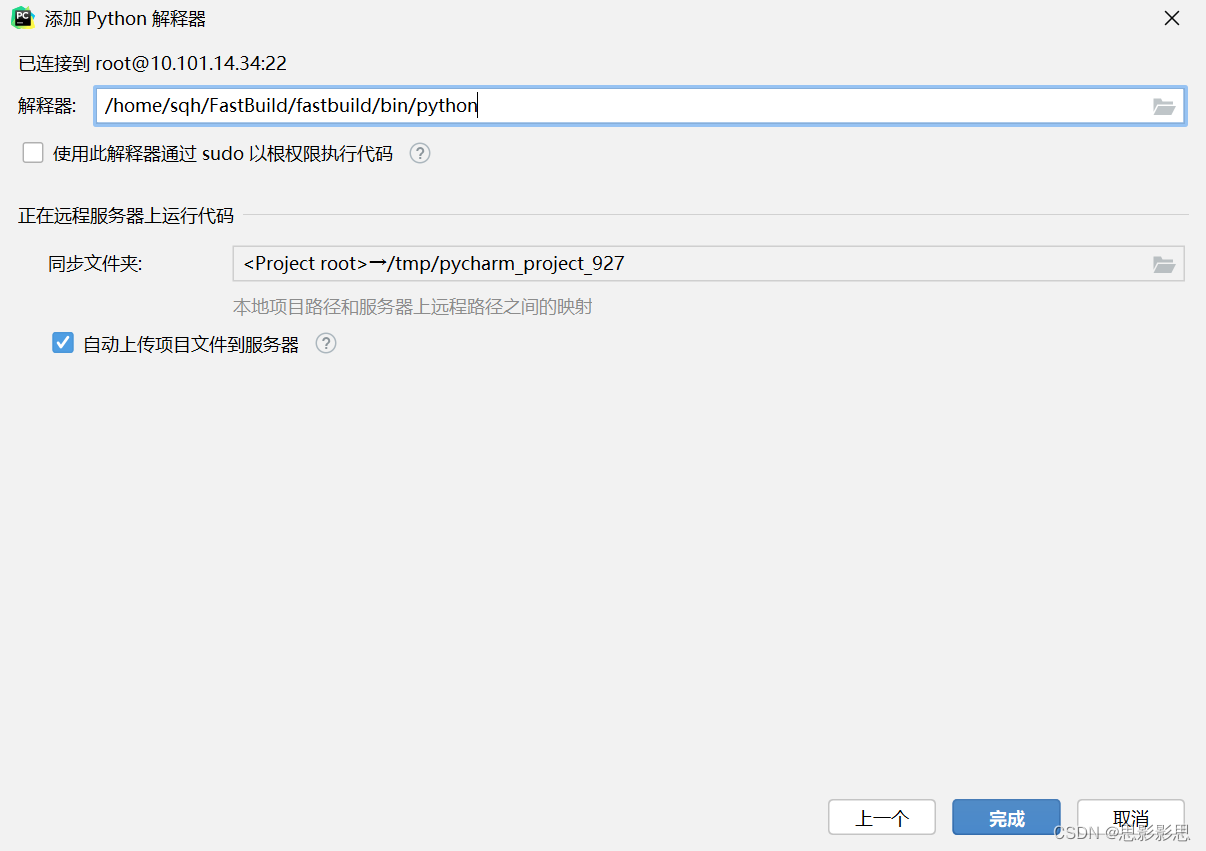

注: 勾选同步文件夹,由于服务器在FastBuild目录下产生了目录fastbuild虚拟环境,因此可以使用之前排除的路径,把该目录排除,以防止服务器该目录同步到本机。

相当于在PyCharm中新建了一个python解释器变量。接下来要指定项目使用该解释器
配置使用Python解释器
修改项目调试的python解释器环境


远程调试
远程调试服务器代码,就可以通过pycharm来启动项目了。

总结
本文详细的描述了使用PyCharm来调试远程Linux服务器的代码,通过直接调试服务器上的的代码,可以解决在Windows上的差异(比如说路径分隔符),而且在使用FastBuild进行镜像构建的时候,需要使用docker运行环境,在真实环境上运行能够更加方便快捷的开发。
-
相关阅读:
vue3 + vite + ts + setup , 第九练 自定义指令directive的使用,简单封装一个拖动指令
lsof-文件监控常用命令
千访 | “霸总”人设揽粉近十万!小红书企业号还能这么玩?
AIE双三唑桥联荧光环糊精分子/β-环糊精包覆肼二水杨腙聚集诱导发光微球的制备
基于TI DRV10970驱动直流无刷电机
电力系统机组组合优化调度(IEEE14节点、IEEE30节点、IEEE118节点)(Matlab代码实现)
「Dr. Bomkus 的试炼」——最详尽的通关资讯!
P1918 保龄球
前端知识学习案例8-开发企业网站8-实现关于我们的部分1
微软出品自动化神器【Playwright+Java】系列(五) 之 常见点击事件操作
- 原文地址:https://blog.csdn.net/lk142500/article/details/133813856
