-
前端--CSS

文章目录
- CSS的介绍
-
引入方式
-
代码风格
-
选择器
-
复合选择器 (选学)
-
常用元素属性
-
背景属性
-
圆角矩形
-
Chrome 调试工具 -- 查看 CSS 属性
-
元素的显示模式
-
盒模型
-
弹性布局
一、CSS的介绍
层叠样式表 (Cascading Style Sheets).CSS 能够对网页中元素位置的排版进行像素级精确控制, 实现美化页面的效果. 能够做到页面的样式和结构分离.基础语法规范
- 选择器 + {一条/N条声明}
- 选择器决定针对谁修改 (找谁)
- 声明决定修改啥. (干啥)
- 声明的属性是键值对. 使用 ; 区分键值对, 使用 : 区分键和值.
- <style>
- p {
- /* 设置字体颜色 */
- color: red;
- /* 设置字体大小 */
- font-size: 30px;
- }
- style>
- <p>hellop>
注意:- CSS 要写到 style 标签中(还有其他写法) .
- style 标签可以放到页面任意位置. 一般放到 head 标签内.
- CSS 使用 /* */ 作为注释. (使用 ctrl + / 快速切换) .
二、引入方式
1.内部样式表
写在 style 标签中. 嵌入到 html 内部. 理论上来说 style 放到 html 的哪里都行. 但是一般都是放到 head 标签中.优点: 这样做能够让样式和页面结构分离.缺点: 分离的还不够彻底. 尤其是 css 内容多的时候.2.行内样式表
通过 style 属性, 来指定某个标签的样式. 只适合于写简单样式. 只针对某个标签生效.缺点: 不能写太复杂的样式. 这种写法优先级较高, 会覆盖其他的样式.- html>
- <html lang="en">
- <head>
- <meta charset="UTF-8">
- <meta name="viewport" content="width=device-width, initial-scale=1.0">
- <title>Documenttitle>
- <style>
- div {
- color: red;
- }
- style>
- head>
- <body>
- <div style="color:green">想要生活过的去, 头上总得带点绿div>
- body>
- html>

此时我们可以发现此时的红色被覆盖了。
3.外部样式
实际开发中最常用的方式.1. 创建一个 css 文件.2. 使用 link 标签引入 cssrel="stylesheet" href="[CSS文件路径]">
创建 demo.html
- <head>
- <meta charset="UTF-8">
- <meta name="viewport" content="width=device-width, initial-scale=1.0">
- <title>外部样式title>
- <link rel="stylesheet" href="style.css">
- head>
- <body>
- <div>上帝为你关上一扇门, 然后就去睡觉了div>
- body>
创建 style.css
- div {
- color: red;
- }
注意: 不要忘记 link 标签调用 CSS, 否则不生效.
优点: 样式和结构彻底分离了.缺点: 受到浏览器缓存影响, 修改之后 不一定 立刻生效.- 关于缓存:
- 这是计算机中一种常见的提升性能的技术手段.
- 网页依赖的资源(图片/CSS/JS等)通常是从服务器上获取的. 如果频繁访问该网站, 那么这些外部资源就没必要反复从服务器获取. 就可以使用缓存先存起来(就是存在本地磁盘上了). 从而提高访问效率.
- 可以通过 ctrl + F5 强制刷新页面, 强制浏览器重新获取 css 文件.
三、代码风格
1.样式格式
1.紧凑风格
p { color : red ; font-size : 30px ;}2.展开风格(推荐)
p {color : red ;font-size : 30px ;}注意:虽然 CSS 不区分大小写, 我们开发时统一使用小写字母 。
空格规范- 冒号后面带空格
- 选择器和 { 之间也有一个空格.
四、选择器
1.选择器的功能
选中页面中指定的标签元素. 要先选中元素, 才能设置元素的属性.1.选择器的种类
以下内容只是 CSS2 标准中支持的选择器, 在 CSS3 中还做出了一些补充.1. 基础选择器: 单个选择器构成的
- 标签选择器
- 类选择器
- id 选择器
- 通配符选择器
2. 复合选择器: 把多种基础选择器综合运用起来.
- 后代选择器
- 子选择器
- 并集选择器
- 伪类选择器
2.基础选择器
特点: 能快速为同一类型的标签都选择出来. 但是不能差异化选择 。测试代码:- html>
- <html lang="en">
- <head>
- <meta charset="UTF-8">
- <meta name="viewport" content="width=device-width, initial-scale=1.0">
- <title>Documenttitle>
- <style>
- p {
- color: red;
- }
- div {
- color: green;
- }
- style>
- head>
- <body>
- <p>咬人猫p>
- <p>咬人猫p>
- <p>咬人猫p>
- <div>阿叶君div>
- <div>阿叶君div>
- <div>阿叶君div>
- body>
- html>

3.类选择器
特点:- 差异化表示不同的标签
- 可以让多个标签的都使用同一个标签.
- html>
- <html lang="en">
- <head>
- <meta charset="UTF-8">
- <meta name="viewport" content="width=device-width, initial-scale=1.0">
- <title>Documenttitle>
- <style>
- .blue {
- color: blue;
- }
- style>
- head>
- <body>
- <div class="blue">咬人猫div>
- <div>咬人猫div>
- body>
- html>
 语法细节:
语法细节:- 类名用 . 开头的
- 下方的标签使用 class 属性来调用.
- 一个类可以被多个标签使用, 一个标签也能使用多个类(多个类名要使用空格分割, 这种做法可以让代码更好复用)
- 如果是长的类名, 可以使用 - 分割.
- 不要使用纯数字, 或者中文, 以及标签名来命名类名.
代码示例: 使用多个类名注意: 一个标签可以同时使用多个类名这样做可以把相同的属性提取出来, 达到简化代码的效果.- html>
- <html lang="en">
- <head>
- <meta charset="UTF-8">
- <meta name="viewport" content="width=device-width, initial-scale=1.0">
- <title>Documenttitle>
- <style>
- .box {
- width: 200px;
- height: 150px;
- }
- .red {
- background-color: red;
- }
- .green {
- background-color: green;
- }
- style>
- head>
- <body>
- <div class="box red">div>
- <div class="box green">div>
- <div class="box red">div>
- body>
- html>

4.id 选择器
和类选择器类似.- CSS 中使用 # 开头表示 id 选择器
-
id 选择器的值和 html 中某个元素的 id 值相同
-
html 的元素 id 不必带 #
-
id 是唯一的, 不能被多个标签使用 (是和 类选择器 最大的区别)
- html>
- <html lang="en">
- <head>
- <meta charset="UTF-8">
- <meta name="viewport" content="width=device-width, initial-scale=1.0">
- <title>Documenttitle>
- <style>
- #ha {
- color: red;
- }
- style>
- head>
- <body>
- <div id="ha">蛤蛤蛤div>
- body>
- html>

5.通配符选择器
使用 * 的定义, 选取所有的标签.- * {
- color: red;
- }
页面的所有内容都会被改成 红色 .不需要被页面结构调用.6.基础选择器小结

五、复合选择器 (选学)
后代选择器又叫包含选择器. 选择某个父元素中的某个子元素.元素1 元素2 {样式声明}- 元素 1 和 元素 2 要使用空格分割
- 元素 1 是父级, 元素 2 是子级, 只选元素 2 , 不影响元素 1
代码示例: 把 ol 中的 li 修改颜色, 不影响 ul- html>
- <html lang="en">
- <head>
- <meta charset="UTF-8">
- <meta name="viewport" content="width=device-width, initial-scale=1.0">
- <title>Documenttitle>
- <style>
- ol li {
- color: red;
- }
- style>
- head>
- <body>
- <ul>
- <li>aaali>
- <li>bbbli>
- <li>cccli>
- ul>
- <ol>
- <li>dddli>
- <li>eeeli>
- <li>fffli>
- ol>
- body>
- html>
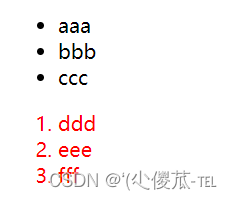 代码示例: 元素 2 不一定非是 儿子, 也可以是孙子.
- html>
- <html lang="en">
- <head>
- <meta charset="UTF-8">
- <meta name="viewport" content="width=device-width, initial-scale=1.0">
- <title>Documenttitle>
- <style>
- /* ul li a {
- color: yellow;
- } */
- ul a {
- color: yellow;
- }
- style>
- head>
- <body>
- <ul>
- <li>aaali>
- <li>bbbli>
- <li><a href="#">ccca>li>
- ul>
- body>
- html>
 代码示例: 可以是任意基础选择器的组合. (包括类选择器, id 选择器)
- html>
- <html lang="en">
- <head>
- <meta charset="UTF-8">
- <meta name="viewport" content="width=device-width, initial-scale=1.0">
- <title>Documenttitle>
- <style>
- .one li a {
- color: green;
- }
- style>
- head>
- <body>
- <ol class="one">
- <li>dddli>
- <li>eeeli>
- <li><a href="#">fffa>li>
- <li><a href="#">fffa>li>
- <li><a href="#">fffa>li>
- ol>
- body>
- html>

1.子选择器
和后代选择器类似, 但是只能选择子标签.元素1>元素2 { 样式声明 }- 使用大于号分割
- 只选亲儿子, 不选孙子元素
后代选择器的写法, 会把链接1 和 2 都选中.- html>
- <html lang="en">
- <head>
- <meta charset="UTF-8">
- <meta name="viewport" content="width=device-width, initial-scale=1.0">
- <title>Documenttitle>
- <style>
- .two a {
- color: red;
- }
- style>
- head>
- <body>
- <div class="two">
- <a href="#">链接1a>
- <p><a href="#">链接2a>p>
- div>
- body>
- html>
 子选择器的写法, 只选链接 1
- html>
- <html lang="en">
- <head>
- <meta charset="UTF-8">
- <meta name="viewport" content="width=device-width, initial-scale=1.0">
- <title>Documenttitle>
- <style>
- .two>a {
- color: red;
- }
- style>
- head>
- <body>
- <div class="two">
- <a href="#">链接1a>
- <p><a href="#">链接2a>p>
- div>
- body>
- html>
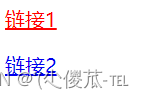
2.并集选择器
用于选择多组标签. (集体声明)元素1, 元素2 { 样式声明 }- 通过 逗号 分割等多个元素.
- 表示同时选中元素 1 和 元素 2
- 任何基础选择器都可以使用并集选择器.
- 并集选择器建议竖着写. 每个选择器占一行. (最后一个选择器不能加逗号)
代码示例 :1. 把苹果和香蕉颜色改成红色- html>
- <html lang="en">
- <head>
- <meta charset="UTF-8">
- <meta name="viewport" content="width=device-width, initial-scale=1.0">
- <title>Documenttitle>
- <style>
- div, h3 {
- color: red;
- }
- style>
- head>
- <body>
- <div>苹果div>
- <h3>香蕉h3>
- <ul>
- <li>鸭梨li>
- <li>橙子li>
- ul>
- body>
- html>
 2. 把鸭梨和橙子也都一起改成红色
- html>
- <html lang="en">
- <head>
- <meta charset="UTF-8">
- <meta name="viewport" content="width=device-width, initial-scale=1.0">
- <title>Documenttitle>
- <style>
- div,
- h3,
- ul>li {
- color: red;
- }
- style>
- head>
- <body>
- <div>苹果div>
- <h3>香蕉h3>
- <ul>
- <li>鸭梨li>
- <li>橙子li>
- ul>
- body>
- html>

3.伪类选择器
1) 链接伪类选择器
- a:link 选择未被访问过的链接
- a:visited 选择已经被访问过的链接
- a:hover 选择鼠标指针悬停上的链接
- a:active 选择活动链接(鼠标按下了但是未弹起)
- html>
- <html lang="en">
- <head>
- <meta charset="UTF-8">
- <meta name="viewport" content="width=device-width, initial-scale=1.0">
- <title>Documenttitle>
- <style>
- a:link {
- color: black;
- /* 去掉 a 标签的下划线 */
- text-decoration: none;
- }
- a:visited {
- color: green;
- }
- a:hover {
- color: red;
- }
- a:active {
- color: blue;
- }
- style>
- head>
- <body>
- <a href="#">小猫a>
- body>
- html>
示例:如何让一个已经被访问过的链接恢复成未访问的状态?清空浏览器历史记录即可. ctrl + shift + delete注意事项- 按照 LVHA 的顺序书写, 例如把 active 拿到前面去, 就会导致 active 失效. 记忆规则 "绿化"
- 浏览器的 a 标签都有默认样式, 一般实际开发都需要单独制定样式.
- 实际开发主要给链接做一个样式, 然后给 hover 做一个样式即可. link, visited, active 用的不多.
a {color : black ;}a : hover {color : red ;}2) :force 伪类选择器
选取获取焦点的 input 表单元素.- html>
- <html lang="en">
- <head>
- <meta charset="UTF-8">
- <meta name="viewport" content="width=device-width, initial-scale=1.0">
- <title>Documenttitle>
- <style>
- .three>input:focus {
- color: red;
- }
- style>
- head>
- <body>
- <div class="three">
- <input type="text">
- <input type="text">
- <input type="text">
- <input type="text">
- div>
- body>
- html>

六、常用元素属性
1.字体属性
1.设置字体
- body {
- font-family: '微软雅黑';
- font-family: 'Microsoft YaHei';
- }
- 字体名称可以用中文, 但是不建议.
- 多个字体之间使用逗号分隔. (从左到右查找字体, 如果都找不到, 会使用默认字体. )
- 如果字体名有空格, 使用引号包裹.
- 建议使用常见字体, 否则兼容性不好.
- html>
- <html lang="en">
- <head>
- <meta charset="UTF-8">
- <meta name="viewport" content="width=device-width, initial-scale=1.0">
- <title>Documenttitle>
- <style>
- .font-family .one {
- font-family: 'Microsoft YaHei';
- }
- .font-family .two {
- font-family: '宋体';
- }
- style>
- head>
- <body>
- <div class="font-family">
- <div class="one">
- 这是微软雅黑
- div>
- <div class="two">
- 这是宋体
- div>
- div>
- body>
- html>

2.大小
- p {
- font-size: 20px;
- }
- 不同的浏览器默认字号不一样, 最好给一个明确值. (chrome 默认是 16px)
- 可以给 body 标签使用 font-size
- 要注意单位 px 不要忘记.
- 标题标签需要单独指定大小
注意: 实际上它设置的是字体中字符框的高度;实际的字符字形可能比这些框高或矮- html>
- <html lang="en">
- <head>
- <meta charset="UTF-8">
- <meta name="viewport" content="width=device-width, initial-scale=1.0">
- <title>Documenttitle>
- <style>
- .font-size .one {
- font-size: 40px;
- }
- .font-size .two {
- font-size: 20px;
- }
- style>
- head>
- <body>
- <div class="font-size">
- <div class="one">
- 大大大
- div>
- <div class="two">
- 小小小
- div>
- div>
- body>
- html>

3.粗细
- p {
- font-weight: bold;
- font-weight: 700;
- }
- 可以使用数字表示粗细.
- 700 == bold, 400 是不变粗, == normal
- 取值范围是 100 -> 900
4.文字样式- /* 设置倾斜 */
- font-style: italic;
- /* 取消倾斜 */
- font-style: normal;
很少把某个文字变倾斜.
但是经常要把 em / i 改成不倾斜.
- html>
- <html lang="en">
- <head>
- <meta charset="UTF-8">
- <meta name="viewport" content="width=device-width, initial-scale=1.0">
- <title>Documenttitle>
- <style>
- .font-style em {
- font-style: normal;
- }
- .font-style div {
- font-style: italic;
- }
- style>
- head>
- <body>
- <div class="font-style">
- <em>
- 放假啦
- em>
- <div class="one">
- 听说要加班
- div>
- div>
- body>
- html>

2.文本属性
1.文本颜色
认识 RGB
我们的显示器是由很多很多的 "像素" 构成的. 每个像素视为一个点, 这个点就能反映出一个具体的颜色. 我们使用 R (red), G (green), B (blue) 的方式表示颜色(色光三原色). 三种颜色按照不同的比例搭配, 就能混合出各种五彩斑斓的效果. 计算机中针对 R, G, B 三个分量, 分别使用一个字节表示(8个比特位, 表示的范围是 0-255, 十六进制表示为 00-FF).数值越大, 表示该分量的颜色就越浓. 255, 255, 255 就表示白色; 0, 0, 0 就表示黑色.设置文本颜色
color : red ;color : #ff0000 ;color : rgb ( 255 , 0 , 0 );鼠标悬停在 vscode 的颜色上, 会出现颜色选择器, 可以手动调整颜色.color 属性值的写法:- 预定义的颜色值(直接是单词)
- [最常用] 十六进制形式
- RGB 方式
十六进制形式表示颜色, 如果两两相同, 就可以用一个来表示.#ff00ff => #f0f- html>
- <html lang="en">
- <head>
- <meta charset="UTF-8">
- <meta name="viewport" content="width=device-width, initial-scale=1.0">
- <title>Documenttitle>
- <style>
- .color {
- color: red;
- /* color: rgb(255, 0, 0); */
- /* color: #ff0000; */
- }
- style>
- head>
- <body>
- <div class="color">这是一段话div>
- body>
- html>

2.文本对齐
控制文字水平方向的对齐.不光能控制文本对齐, 也能控制图片等元素居中或者靠右
text-align : [ 值 ];- center: 居中对齐
- left: 左对齐
- right: 右对齐
- html>
- <html lang="en">
- <head>
- <meta charset="UTF-8">
- <meta name="viewport" content="width=device-width, initial-scale=1.0">
- <title>Documenttitle>
- <style>
- .text-align .one {
- text-align: left;
- }
- .text-align .two {
- text-align: right;
- }
- .text-align .three {
- text-align: center;
- }
- style>
- head>
- <body>
- <div class="text-align">
- <div class="one">左对齐div>
- <div class="two">右对齐div>
- <div class="three">居中对齐div>
- div>
- body>
- html>

3.文本装饰
text-decoration : [ 值 ];常用取值:- underline 下划线. [常用]
- none 啥都没有. 可以给 a 标签去掉下划线.
- overline 上划线. [不常用]
- line-through 删除线 [不常用]
- html>
- <html lang="en">
- <head>
- <meta charset="UTF-8">
- <meta name="viewport" content="width=device-width, initial-scale=1.0">
- <title>Documenttitle>
- <style>
- .text-decorate .one {
- text-decoration: none;
- }
- .text-decorate .two {
- text-decoration: underline;
- }
- .text-decorate .three {
- text-decoration: overline;
- }
- .text-decorate .four {
- text-decoration: line-through;
- }
- style>
- head>
- <body>
- <div class="text-decorate">
- <div class="one">啥都没有div>
- <div class="two">下划线div>
- <div class="three">上划线div>
- <div class="four">删除线div>
- div>
- body>
- html>

4.文本缩进
控制段落的 首行 缩进 (其他行不影响)
text-indent : [ 值 ];- 单位可以使用 px 或者 em.
- 使用 em 作为单位更好. 1 个 em 就是当前元素的文字大小.
- 缩进可以是负的, 表示往左缩进. (会导致文字就冒出去了)
- html>
- <html lang="en">
- <head>
- <meta charset="UTF-8">
- <meta name="viewport" content="width=device-width, initial-scale=1.0">
- <title>Documenttitle>
- <style>
- .text-indent .one {
- text-indent: 2em;
- }
- .text-indent .two {
- text-indent: -2em;
- }
- style>
- head>
- <body>
- <div class="text-indent">
- <div class="one">正常缩进div>
- <div class="two">反向缩进div>
- div>
- body>
- html>

5.行高
行高指的是上下文本行之间的基线距离.HTML 中展示文字涉及到这几个基准线:- 顶线
- 中线
- 基线 (相当于英语四线格的倒数第二条线)
- 底线
内容区:底线和顶线包裹的区域,即下图深灰色背景区域 其实基线之间的距离 = 顶线间距离 = 底线间距离 = 中线间距离text-indent : [ 值 ];注意 1: 行高 = 上边距 + 下边距 + 字体大小上下边距是相等的, 此处字体大小是 16px, 行高 40px, 上下边距就分别是 12px
- html>
- <html lang="en">
- <head>
- <meta charset="UTF-8">
- <meta name="viewport" content="width=device-width, initial-scale=1.0">
- <title>Documenttitle>
- <style>
- .line-height .one {
- line-height: 40px;
- font-size: 16px;
- }
- style>
- head>
- <body>
- <div class="line-height">
- <div>
- 上一行
- div>
- <div class="one">
- 中间行
- div>
- <div>
- 下一行
- div>
- div>
- body>
- html>
 注意 2: 行高也可以取 normal 等值 .这个取决于浏览器的实现. chrome 上 normal 为 21 px注意 3: 行高等与元素高度 , 就可以实现文字居中对齐 .
- html>
- <html lang="en">
- <head>
- <meta charset="UTF-8">
- <meta name="viewport" content="width=device-width, initial-scale=1.0">
- <title>Documenttitle>
- <style>
- .line-height .two {
- height: 100px;
- line-height: 100px;
- }
- style>
- head>
- <body>
- <div class="line-height">
- <div class="two">
- 文本垂直居中
- div>
- div>
- body>
- html>
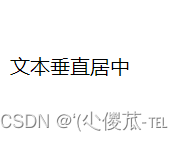
七、背景属性
1.背景颜色
默认是 transparent (透明) 的. 可以通过设置颜色的方式修改.background-color: [ 指定颜色 ]- html>
- <html lang="en">
- <head>
- <meta charset="UTF-8">
- <meta name="viewport" content="width=device-width, initial-scale=1.0">
- <title>Documenttitle>
- <style>
- body {
- background-color: #f3f3f3;
- }
- .bgc .one {
- background-color: red;
- }
- .bgc .two {
- background-color: #0f0;
- }
- .bgc .three {
- /* 背景透明 */
- background-color: transparent;
- }
- style>
- head>
- <body>
- <div class="bgc">
- <div class="one">红色背景div>
- <div class="two">绿色背景div>
- <div class="three">透明背景div>
- div>
- body>
- html>

2.背景图片
background-image: url(...);
比 image 更方便控制位置 ( 图片在盒子中的位置 )注意:- 1. url 不要遗漏.
- 2. url 可以是绝对路径, 也可以是相对路径
- 3. url 上可以加引号, 也可以不加.
- html>
- <html lang="en">
- <head>
- <meta charset="UTF-8">
- <meta name="viewport" content="width=device-width, initial-scale=1.0">
- <title>Documenttitle>
- <style>
- .bgi .one {
- background-image: url(前端.jpg);
- height: 300px;
- }
- style>
- head>
- <body>
- <div class="bgi">
- <div class="one">背景图片div>
- div>
- body>
- html>

3.背景平铺
background-repeat: [平铺方式]
重要取值:- repeat: 平铺
- no-repeat: 不平铺
- repeat-x: 水平平铺
- repeat-y: 垂直平铺
默认是 repeat.背景颜色和背景图片可以同时存在. 背景图片在背景颜色的上方.- html>
- <html lang="en">
- <head>
- <meta charset="UTF-8">
- <meta name="viewport" content="width=device-width, initial-scale=1.0">
- <title>Documenttitle>
- <style>
- .bgr .one {
- background-image: url(前端.jpg);
- height: 300px;
- background-repeat: no-repeat;
- }
- .bgr .two {
- background-image: url(前端.jpg);
- height: 300px;
- background-repeat: repeat-x;
- }
- .bgr .three {
- background-image: url(前端.jpg);
- height: 300px;
- background-repeat: repeat-y;
- }
- style>
- head>
- <body>
- <div class="bgr">
- <div class="one">不平铺div>
- <div class="two">水平平铺div>
- <div class="three">垂直平铺div>
- div>
- body>
- html>

4.背景位置
background-position: x y;
修改图片的位置.
参数有三种风格:- 1. 方位名词: (top, left, right, bottom)
- 2. 精确单位: 坐标或者百分比(以左上角为原点)
- 3. 混合单位: 同时包含方位名词和精确单位
- html>
- <html lang="en">
- <head>
- <meta charset="UTF-8">
- <meta name="viewport" content="width=device-width, initial-scale=1.0">
- <title>Documenttitle>
- <style>
- .bgp .one {
- background-image: url(前端.jpg);
- height: 500px;
- background-repeat: no-repeat;
- background-color: purple;
- background-position: center;
- }
- style>
- head>
- <body>
- <div class="bgp">
- <div class="one">背景居中div>
- div>
- body>
- html>
注意- 如果参数的两个值都是方位名词, 则前后顺序无关. (top left 和 left top 等效)
- 如果只指定了一个方位名词, 则第二个默认居中. (left 则意味着水平居中, top 意味着垂直居中. )
- 如果参数是精确值, 则的的第一个肯定是 x , 第二个肯定是 y. (100 200 意味着 x 为 100, y 为 200)
- 如果参数是精确值, 且只给了一个数值, 则该数值一定是 x 坐标, 另一个默认垂直居中.
- 如果参数是混合单位, 则第一个值一定为 x, 第二个值为 y 坐标. (100 center 表示横坐标为 100, 垂
- 直居中)
关于坐标系 :计算机中的平面坐标系 , 一般是左手坐标系 ( 和高中数学上常用的右手系不一样 . y 轴是往下指的 ).
5.背景尺寸
background-size : length | percentage | cover | contain ;- 可以填具体的数值: 如 40px 60px 表示宽度为 40px, 高度为 60px
- 也可以填百分比: 按照父元素的尺寸设置.
- cover: 把背景图像扩展至足够大,以使背景图像完全覆盖背景区域。背景图像的某些部分也许无
- 法显示在背景定位区域中。
- 把图像图像扩展至最大尺寸,以使其宽度和高度完全适应内容区域.
注意体会 contain 和 cover 的区别 . 当元素为矩形 ( 不是正方形 ) 时 , 区别是很明显的 .- html>
- <html lang="en">
- <head>
- <meta charset="UTF-8">
- <meta name="viewport" content="width=device-width, initial-scale=1.0">
- <title>Documenttitle>
- <style>
- .bgs .one {
- width: 500px;
- height: 300px;
- background-image: url(前端.jpg);
- background-repeat: no-repeat;
- background-position: center;
- background-size: contain;
- }
- style>
- head>
- <body>
- <div class="bgs">
- <div class="one">背景尺寸div>
- div>
- body>
- html>
contain:
cover:

八、圆角矩形
通过 border-radius 使边框带圆角效果.1.基本用法
border-radius: length;
length 是内切圆的半径. 数值越大, 弧线越强烈
- html>
- <html lang="en">
- <head>
- <meta charset="UTF-8">
- <meta name="viewport" content="width=device-width, initial-scale=1.0">
- <title>Documenttitle>
- <style>
- div {
- width: 200px;
- height: 100px;
- border: 2px solid green;
- border-radius: 10px;
- }
- style>
- head>
- <body>
- <div>蛤蛤div>
- body>
- html>

2.生成圆形
让 border-radius 的值为正方形宽度的一半即可.- html>
- <html lang="en">
- <head>
- <meta charset="UTF-8">
- <meta name="viewport" content="width=device-width, initial-scale=1.0">
- <title>Documenttitle>
- <style>
- div {
- width: 200px;
- height: 200px;
- border: 2px solid green;
- border-radius: 100px;
- /* 或者用 50% 表示宽度的一半 */
- border-radius: 50%;
- }
- style>
- head>
- <body>
- <div>蛤蛤div>
- body>
- html>

3.生成圆角矩形
让 border-radius 的值为矩形高度的一半即可- html>
- <html lang="en">
- <head>
- <meta charset="UTF-8">
- <meta name="viewport" content="width=device-width, initial-scale=1.0">
- <title>Documenttitle>
- <style>
- div {
- width: 200px;
- height: 100px;
- border: 2px solid green;
- border-radius: 50px;
- }
- style>
- head>
- <body>
- <div>蛤蛤div>
- body>
- html>

4.展开写法
border-radius 是一个复合写法. 实际上可以针对四个角分别设置.border-radius : 2em ;等价于border-top-left-radius : 2em ;border-top-right-radius : 2em ;border-bottom-right-radius : 2em ;border-bottom-left-radius : 2em ;border-radius: 10px 20px 30px 40px;
等价于(按照顺时针排列)border-top-left-radius : 10px ;border-top-right-radius : 20px ;border-bottom-right-radius : 30px ;border-bottom-left-radius : 40px ;九、Chrome 调试工具 -- 查看 CSS 属性
1.打开浏览器
有两种方式可以打开 Chrome 调试工具- 直接按 F12 键
- 鼠标右键页面 => 检查元素
2.标签页含义
- elements 查看标签结构
- console 查看控制台
- source 查看源码+断点调试
- network 查看前后端交互过程
- application 查看浏览器提供的一些扩展功能(本地存储等)
- Performance, Memory, Security, Lighthouse
3.elements 标签页使用
- ctrl + 滚轮进行缩放, ctrl + 0 恢复原始大小.
- 使用 左上角 箭头选中元素
- 右侧可以查看当前元素的属性, 包括引入的类.
- 右侧可以修改选中元素的 css 属性. 例如颜色, 可以点击颜色图标, 弹出颜色选择器, 修改颜色. 例如
- 字体大小, 可以使用方向键来微调数值.
- 此处的修改不会影响代码, 刷新就还原了~
- 如果 CSS 样式写错了, 也会在这里有提示. (黄色感叹号)

十、元素的显示模式
在 CSS 中, HTML 的标签的显示模式有很多.此处只重点介绍两个:- 块级元素
- 行内元素
1.块级元素
常见的元素:- h1 - h6
- p
- div
- ul
- ol
- li
- ....
特点:- 独占一行
- 高度, 宽度, 内外边距, 行高都可以控制.
- 宽度默认是父级元素宽度的 100% (和父元素一样宽)
- 是一个容器(盒子), 里面可以放行内和块级元素.
- html>
- <html lang="en">
- <head>
- <meta charset="UTF-8">
- <meta name="viewport" content="width=device-width, initial-scale=1.0">
- <title>Documenttitle>
- <style>
- .demo1 .parent {
- width: 500px;
- height: 500px;
- background-color: green;
- }
- .demo1 .child {
- /* 不写 width, 默认和父元素一样宽 */
- /* 不写 height, 默认为 0 (看不到了) */
- height: 200px;
- background-color: red;
- }
- style>
- head>
- <body>
- <div class="demo1">
- <div class="parent">
- <div class="child">
- child1
- div>
- <div class="child">
- child2
- div>
- div>
- div>
- body>
- html>
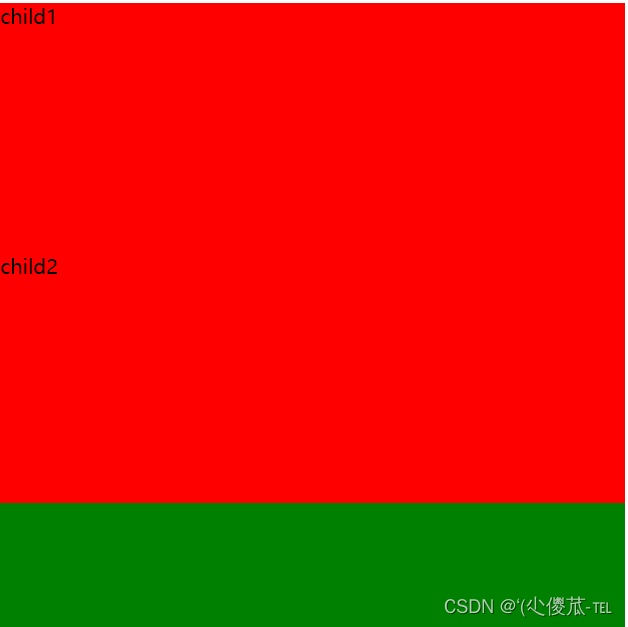
注意:
- 文字类的元素内不能使用块级元素
- p 标签主要用于存放文字, 内部不能放块级元素, 尤其是 div
蛤蛤2.行内元素/内联元素
常见的元素:- a
- strong
- b
- em
- i
- del
- s
- ins
- u
- span
特点:- 不独占一行, 一行可以显示多个
- 设置高度, 宽度, 行高无效
- 左右外边距有效(上下无效). 内边距有效.
- 默认宽度就是本身的内容
- 行内元素只能容纳文本和其他行内元素, 不能放块级元素
- html>
- <html lang="en">
- <head>
- <meta charset="UTF-8">
- <meta name="viewport" content="width=device-width, initial-scale=1.0">
- <title>Documenttitle>
- <style>
- .demo2 span {
- width: 200px;
- height: 200px;
- background-color: red;
- }
- style>
- head>
- <body>
- <div class="demo2">
- <span>child1span>
- <span>child2span>
- <span>child3span>
- div>
- body>
- html>

注意:
- a 标签中不能再放 a 标签 (虽然 chrome 不报错, 但是最好不要这么做).
- a 标签里可以放块级元素, 但是更建议先把 a 转换成块级元素.
3.行内元素和块级元素的区别
- 块级元素独占一行, 行内元素不独占一行
- 块级元素可以设置宽高, 行内元素不能设置宽高.
- 块级元素四个方向都能设置内外边距, 行内元素垂直方向不能设置.
4.改变显示模式
使用 display 属性可以修改元素的显示模式.- 可以把 div 等变成行内元素, 也可以把 a , span 等变成块级元素.
- display: block 改成块级元素 [常用]
- display: inline 改成行内元素 [很少用]
- display: inline-block 改成行内块元素
十一、盒模型
每一个 HTML 元素就相当于是一个矩形的 "盒子"这个盒子由这几个部分构成- 边框 border
- 内容 content
- 内边距 padding
- 外边距 margin
