-
微信小程序开发记录
微信小程序开发记录,做个笔记后面不踩坑
1、终端npm安装插件前需要使用 npm init生成包管理文件
且需要配置- 1
//project.config.json "packNpmRelationList": [ { "packageJsonPath": "./package.json", "miniprogramNpmDistDir": "./" } ],- 1
- 2
- 3
- 4
- 5
- 6
- 7
2、 微信小程序中方便使用的contUp数字滚动插件
使用示例 下例需求是8s更新数据,所以记录了老的值,这样每次更新会从老的值滚动到新的值- 1
- 2
//{{today.payAmount}} 万元- 1
- 2
- 3
- 4
- 5
- 6
- 7
- 8
- 9
- 10
- 11
- 12
- 13
- 14
- 15
- 16
- 17
- 18
- 19
- 20
- 21
- 22
- 23
- 24
- 25
- 26
- 27
- 28
- 29
- 30
- 31
- 32
- 33
- 34
- 35
- 36
- 37
- 38
- 39
- 40
- 41
- 42
- 43
- 44
- 45
- 46
- 47
- 48
- 49
- 50
- 51
- 52
- 53
- 54
- 55
- 56
- 57
- 58
- 59
- 60
- 61
- 62
- 63
- 64
- 65
- 66
- 67
- 68
- 69
- 70
- 71
- 72
- 73
- 74
- 75
3、微信小程序中的echatrs
- ec-canvas版本要和echarts版本对应
- 可以在echarts指定下载所需要的图标以减小体积
- 小程序的图表format返回无法识别
xxx - echatrs容器一定要指定宽高否则无法显示
- 真机调试需要域名白名单,真机调试1.0会有各种奇怪的bug,建议用2.0
- 抖音小程序头部自定义需要主体满足条件,微信小程序不需要(截至目前)
- 区分各种页面跳转方式(是否需要保存上一个页面),wx.reLaunch()删除所有页面跳转新页面,防止用户用手机自带返回返回到上一张页面
- 代码使用示例 (组件中的echatrs+定时更新数据)
import * as echarts from '../../ec-canvas/echarts'; const {dcApi} = require('../../api/index.js'); const {getColForCollection} = require('../../utils/util'); Component({ data: { ec: { // 将 lazyLoad 设为 true 后,需要手动初始化图表 lazyLoad: true } }, options: { addGlobalClass: true }, lifetimes: { attached: function () { // 获取组件 this.ecComponent = this.selectComponent('#mychart-fourth'); this.init(); this.startInterval(); }, detached() { this.stopInterval(); } }, methods: { init() { this.ecComponent.init((canvas, width, height, dpr) => { // 获取组件的 canvas、width、height 后的回调函数 // 在这里初始化图表 const chart = echarts.init(canvas, null, { width: width, height: height, devicePixelRatio: dpr // new }); this.setOption(chart); // 将图表实例绑定到 this 上,可以在其他成员函数(如 dispose)中访问 this.chart = chart; this.setData({ isLoaded: true, isDisposed: false }); // 注意这里一定要返回 chart 实例,否则会影响事件处理等 return chart; }); }, setOption(chart) { dcApi.online_summary().then((res) => { const data = getColForCollection( res.data, ['brand', 'amt'], ['name', 'value'] ); let option = {...} this.ecComponent.chart.setOption(option) }); }, startInterval() { const that = this; // 缓存 this this.intervalId = setInterval(() => { that.setOption(); }, 8000); }, stopInterval() { if (this.intervalId) { clearInterval(this.intervalId); } } } });- 1
- 2
- 3
- 4
- 5
- 6
- 7
- 8
- 9
- 10
- 11
- 12
- 13
- 14
- 15
- 16
- 17
- 18
- 19
- 20
- 21
- 22
- 23
- 24
- 25
- 26
- 27
- 28
- 29
- 30
- 31
- 32
- 33
- 34
- 35
- 36
- 37
- 38
- 39
- 40
- 41
- 42
- 43
- 44
- 45
- 46
- 47
- 48
- 49
- 50
- 51
- 52
- 53
- 54
- 55
- 56
- 57
- 58
- 59
- 60
- 61
- 62
- 63
- 64
- 65
- 66
- 67
- 68
- 69
- 70
- 71
4、微信小程序文本横向无缝滚动
背景:
微信小程序中列表宽度不够长,其中某字段显示不完整,因此要使其自动滚动。
(最初看网上很多用定时器实现,但他们的案例中都只是一个横幅、用定时器也无所谓。但是我的需求中是一个上下无限滚动的列表,如果设置定时器性能耗费太大,因此只用css实现)样例图:
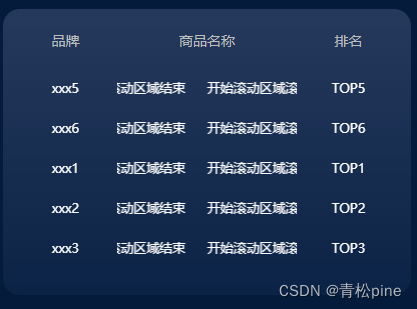
我这里是列表轮播 + 商品名称字段左右滚动
微信小程序轮播组件swiper有个坑:display-multiple-items设置的值如果大于列表长度,内容将无法显示这里主要记录文本横向 无缝 滚动
先说思路:使用css动画让文本向左移动
@keyframes scrollText { 0% { transform: translateX(0%); } 100% { transform: translateX(-100%); } }- 1
- 2
- 3
- 4
- 5
- 6
- 7
- 8
此时有个问题,不是 无缝 的,文本将在右边出现大量空白,在移动到末尾,再突然出现 ,很难看
要处理这个问题:在文本后面添加一个占位文本、当右边本为空白时 显示占位文本,当一轮动画结束时,第一个文本再覆盖占位文本,视觉上就是无限的 无缝滚动 ,要让一轮动画结束完全覆盖占位文本 也很简单,设置一个向左padding值,<view class="scroll-text-warp"> <text class="scroll-text" style="{{item.scrollStyle}}"> {{item.goods}} </text> <text class="scroll-text" style="{{item.scrollStyle}}"> {{item.goods}} </text> </view>- 1
- 2
- 3
- 4
.scroll-text { white-space: nowrap; display: inline-block; animation: scrollText 10s linear infinite; padding-left: 40rpx; }- 1
- 2
- 3
- 4
- 5
- 6
- 7
统一设置速率(文案长短不一 用同样的动画时长会出现滚动速率不同),
list.forEach((item) => { console.log('item',item) const textLength = item.goods.length; const animationDuration = textLength * 0.5 + 's'; item.scrollStyle = `animation: scrollText ${animationDuration} linear infinite;`; }); this.setData({list});- 1
- 2
- 3
- 4
- 5
- 6
- 7
总代码:
wxml<view class="fifth-warp card-bg" style="height: 500rpx;margin-top: 200rpx;"> <view class="tab-header"> <text class="header-item" style="width: 180rpx;">品牌</text> <text class="header-item" style="width: 200rpx;flex: 1;">商品名称</text> <text class="header-item" style="width: 180rpx;">排名</text> </view> <swiper vertical="true" autoplay="true" circular="true" interval="2000" display-multiple-items='{{list.length>5?5:list.length}}' style="height: 350rpx;"> <block wx:for-index="idx" wx:for='{{list}}' wx:key="index"> <swiper-item> <view class='swiper-content'> <text class='content-item' style="min-width: 180rpx;">{{item.brand}}</text> <view class="scroll-text-warp"> <text class="scroll-text" style="{{item.scrollStyle}}"> {{item.goods}} </text> <text class="scroll-text" style="{{item.scrollStyle}}"> {{item.goods}} </text> </view> <text class='content-item' style="min-width: 180rpx;">TOP{{item.rank}}</text> </view> </swiper-item> </block> </swiper> </view>- 1
- 2
- 3
- 4
- 5
- 6
- 7
- 8
- 9
- 10
- 11
- 12
- 13
- 14
- 15
- 16
- 17
- 18
- 19
- 20
- 21
- 22
- 23
- 24
- 25
wxss.tab-header { width: 100%; display: flex; text-align: center; align-items: center; color: #BDBDBD; } .header-item { font-size: 26rpx; padding: 20rpx 0 40rpx 0; } .swiper-content { display: flex; } .content-item { font-size: 24rpx; text-align: center; } .scroll-text-warp { width: 100%; overflow: hidden; font-size: 24rpx; display: flex; } .scroll-text { white-space: nowrap; display: inline-block; animation: scrollText 10s linear infinite; padding-left: 40rpx; } @keyframes scrollText { 0% { transform: translateX(0%); /* 开始位置 */ } 100% { transform: translateX(-100%); /* 结束位置 */ } }- 1
- 2
- 3
- 4
- 5
- 6
- 7
- 8
- 9
- 10
- 11
- 12
- 13
- 14
- 15
- 16
- 17
- 18
- 19
- 20
- 21
- 22
- 23
- 24
- 25
- 26
- 27
- 28
- 29
- 30
- 31
- 32
- 33
- 34
- 35
- 36
- 37
- 38
- 39
- 40
- 41
- 42
- 43
- 44
- 45
- 46
- 47
jsconst {dcApi_ljq} = require('../../api/index.js'); Component({ options: { addGlobalClass: true }, lifetimes: { attached: function () { this.getList(); } }, data: { list: [] }, methods: { getList() { let list = [ {brand: 'xxx1', goods: '开始滚动区域滚动区域滚动区域滚动区域滚动区域结束',rank:1}, {brand: 'xxx2', goods: '开始滚动区域滚动区域滚动区域滚动区域滚动区域结束',rank:2}, {brand: 'xxx3', goods: '开始滚动区域滚动区域滚动区域滚动区域滚动区域结束',rank:3}, {brand: 'xxx4', goods: '开始滚动区域滚动区域滚动区域滚动区域滚动区域结束',rank:4}, {brand: 'xxx5', goods: '开始滚动区域滚动区域滚动区域滚动区域滚动区域结束',rank:5}, {brand: 'xxx6', goods: '开始滚动区域滚动区域滚动区域滚动区域滚动区域结束',rank:6}, ]; list.forEach((item) => { console.log('item',item) const textLength = item.goods.length; const animationDuration = textLength * 0.5 + 's'; item.scrollStyle = `animation: scrollText ${animationDuration} linear infinite;`; }); this.setData({list}); } } });- 1
- 2
- 3
- 4
- 5
- 6
- 7
- 8
- 9
- 10
- 11
- 12
- 13
- 14
- 15
- 16
- 17
- 18
- 19
- 20
- 21
- 22
- 23
- 24
- 25
- 26
- 27
- 28
- 29
- 30
- 31
- 32
- 33
- 34
- 35
- 36
- 37
-
相关阅读:
恢复数据库 NBU ZDLRA Backup
猿创征文 |【SpringBoot2】快速上手SpringBoot
网络时代下的声音之路:如何在中央新闻媒体发布网评稿
探索计算机内部的神秘语言:二进制的魅力
基于改进D-S证据理论的多源空战信息博弈融合方法
Camera2 OpenCamera流程
一个文件管理系统的软硬件配置清单
数组去重方法总结(记录)
Navicat运行sql文件导入数据不全或导入失败
String 地址引用问题
- 原文地址:https://blog.csdn.net/qq_43223007/article/details/133762289
