-
实现Promise所有核心功能和方法

一直以来对Promise只是会用简单的方法,例如then,catch等,对于其余各种方法也只是简单了解,这次想要通过实现Promise来加深对Promise的使用
话不多说,直接开始,简单粗暴一步步来
一:了解Promise
1.1 什么是Promise
Promise是一种用于处理异步操作的JS对象,可以通过链式调用的方式来处理操作的结果
使Promise可以更加优雅地处理异步代码,避免回调地狱的产生
1.2 Promise的三种状态
- Pending(进行中):初始状态,表示操作尚未完成
- Fulfilled(已完成):表示操作成功完成
- Rejected(已拒绝):表示操作失败
1.3 示例
通过示例来了解Promise的基本用法
const p = new Promise((resolve, reject) => { resolve(1) }) const p2 = p.then(res => { console.log(res) // 1 throw 'xxx' }) p2.catch(error => { console.log(error); //xxx })- 1
- 2
- 3
- 4
- 5
- 6
- 7
- 8
- 9
- 10
- 11
- 12
- 13
- 14
- 15
* 通过`new Promise`创建一个Promise实例对象,在构造函数中传入一个执行器函数,该函数接收两个参数 * resolve函数:如果操作成功,调用resolve函数并传递结果 * reject函数:如果调用失败,或抛出错误,调用reject函数并传递错误信息 * 通过Promise的实例对象上的`then方法`,可以指定操作成功时所要执行的回调函数 * 通过`catch方法`,可以指定操作失败时候要执行的回调函数 * 在上述代码中,调用resolve函数,更改为成功状态并传递结果1 * 通过调用p实例上的then方法来接收传递的结果,res接收到的结果即是1,并自定义回调函数,在回调函数中抛出错误信息'xxx',并使用p2来接收p.then的返回值 * p2实际也是一个Promise实例,因为promise支持链式调用,返回值也是一个promise对象,那么p.then中抛出的错误会被p2实例身上的catch方法捕获 * 最终通过`catch方法`打印对应的错误信息 `状态变化` * 执行器函数执行`resolve(1)`,会将p实例对象的状态由`Pending`转为`Fulfilled`状态,即由待定状态转为成功状态 * 在p实例的then回调函数中,抛出错误信息xxx,由于异常未被捕获,p2对象状态被设置为`Rejected`,p2实例的catch方法会根据此时p2实例的状态捕获错误信息xxx `then方法` * 实际上,Promise对象的`then`方法会根据实例的不同状态执行不同的处理方法 * then方法接收两个可选参数,`onFulfied`和`onRejected`,分别表示成功时和失败时的回调函数 * 当Promise对象的状态为Fulfilled(已完成)时,`then`方法会立即执行`onFulfilled`回调函数,并将操作结果作为参数传递给该函数。 * 当Promise对象的状态为Rejected(已拒绝)时,`then`方法会立即执行`onRejected`回调函数,并将拒绝原因(错误信息)作为参数传递给该函数。 ```javascript const p = new Promise((resolve, reject) => { resolve(1) // reject('xxx') }) p.then(res => { console.log(res) // 1 }, error => { console.log(error); })- 1
- 2
- 3
- 4
- 5
- 6
- 7
- 8
- 9
- 10
- 11
- 12
- 13
- 14
- 15
- 16
- 17
- 18
- 19
- 20
- 21
- 22
- 23
- 24
- 25
- 26
- 27
- 28
- 29
- 30
- 31
- 32
- 33
- 34
- 35
- 36
- 37
- 38
- 39
- 该代码,如果执行resolve函数,状态会被改为Fulfilled(已完成),那么就会执行then方法中的第一个回调函数,并将1传递给res
- 如果执行reject函数,状态会被改为Rejected(已拒绝),执行第二个回调函数,并将xxx传递给error
- 在之前的代码中,catch方法的功能和执行
onRejected回调函数(第二个参数的回调函数)是一致的,都是用于当实例对象为Rejected状态时候,执行对应的回调函数,并将错误信息作为参数传递给该函数- 在MDN中有说明,此方法是
Promise.prototype.then(undefined, onRejected)的一种简写形式
- 在MDN中有说明,此方法是
二:实现Promise核心功能
了解Promise的基本使用过后,那么就可以来一步步去实现一个Promise,先去实现Promise的核心功能*
- 构造函数:通过class创建
MyPromise类,接收执行器函数(resolve/reject)并执行 - 更改状态和原因:通过resolve和reject函数去更改实例对象的状态,并将原因(操作结果)作为参数传递
- 初步实现then方法:添加实例then方法,并判断传入then方法的参数类型,设置成功和失败的回调函数
- 支持异步操作和多次调用:设置数组存储回调函数来实现多次通过实例调用then方法(非链式调用),通过设置异步函数来处理异步调用resolve/reject
- then的异步执行
- then的链式调用:返回MyPromise实例,异常处理,获取then的返回值,对于不同的返回值做出不同处理
2.1 构造函数
class MyPromise { // 1. 添加构造函数 constructor(func) { // 2. 定义resolve/reject const resolve = (result) => { console.log(result) //success } const reject = (result) => { console.log(result) } // 3. 执行回调函数 func(resolve, reject) } } const p = new MyPromise((resolve, reject) => { resolve('success') // reject('error') })- 1
- 2
- 3
- 4
- 5
- 6
- 7
- 8
- 9
- 10
- 11
- 12
- 13
- 14
- 15
- 16
- 17
- 18
- 19
- 20
- 21
- 22
- 23
- 24
- 25
- 26
- 创建构造函数,并由
func接收传入的回调函数 - 设置回调函数的两个参数,resolve,reject函数
- 执行func回调函数
2.2 更改状态和设置原因
//1. 设置三种状态 const PENDING = 'pending' const FULFILLED = 'fulfilled' const REJECTED = 'rejected' class MyPromise { constructor(func) { //2. 设置result存储原因 /初始化状态 this.state = PENDING this.result = undefined const resolve = (result) => { //3. 通过resolve/reject修改状态 //注意判断状态条件 使得状态不可逆 if (this.state === PENDING) { this.state = FULFILLED this.result = result } } const reject = (result) => { if (this.state === PENDING) { this.state = REJECTED this.result = result } } func(resolve, reject) } } const p = new MyPromise((resolve, reject) => { resolve('success') reject('error') })- 1
- 2
- 3
- 4
- 5
- 6
- 7
- 8
- 9
- 10
- 11
- 12
- 13
- 14
- 15
- 16
- 17
- 18
- 19
- 20
- 21
- 22
- 23
- 24
- 25
- 26
- 27
- 28
- 29
- 30
- 31
- 32
- 33
- 34
- 35
- 36
- 37
- 设置三种状态,pending,fufilled,rejected。
- 初始化实例状态为pending
- 设置result变量存储resolve、reject传递过来的结果
- 执行resolve、reject函数时候,修改状态
注意状态的不可逆,状态只能由pending -> fulfilled或者pending -> rejected,不可以从fulfilled -> rejected,条件判断一下,即便resolve,reject都执行了,实例状态还是由第一个执行的函数改变
const p = new MyPromise((resolve, reject) => { resolve('success') reject('error') })- 1
- 2
- 3
- 4
- 5

2.3 初步实现then方法
class MyPromise { constructor(func) { //... } // 1. 添加实例方法 then (onFulfilled, onRejected) { // 2. 参数判断 onFulfilled = typeof onFulfilled === 'function' ? onFulfilled : x => x onRejected = typeof onRejected === 'function' ? onRejected : x => { throw x } // 2.1 执行成功回调 // 2.2 执行失败回调 if (this.state === FULFILLED) { onFulfilled(this.result) } else if (this.state === REJECTED) { onRejected(this.result) } } } const p = new MyPromise((resolve, reject) => { resolve('success') // reject('error') }) p.then(res => { console.log('p1:', res) // p1: success })- 1
- 2
- 3
- 4
- 5
- 6
- 7
- 8
- 9
- 10
- 11
- 12
- 13
- 14
- 15
- 16
- 17
- 18
- 19
- 20
- 21
- 22
- 23
- 24
- 25
- 26
- 27
- 28
- 29
- 30
- 31
- 32
- 33
- 34
- 添加实例then方法,接收两个参数,一个执行
成功的回调函数onFulfilled,一个执行失败的回调函数onRejected - 作为调用者,对then方法的参数可能设置有不同形式,可能是简单的变量或是正确的回调函数形式,因此在then方法内部需要对传递过来的参数进行一个判断
- 使用
typeof关键字对参数类型进行判断,对于onFulfilled和onRejected,如果是回调函数都不做处理- onFulfilled如果不是回调函数,其内部转化为一个恒等函数((x) => x),只是简单的把值传递一下,也没有什么处理
mdn上这么说:如果onFulfilled不是一个函数,则内部会被替换为一个恒等函数((x) => x),它只是简单地将兑现值向前传递。- onRejected如果不是回调函数,对其抛出其拒绝的原因
mdn上这么说:如果onRejected不是一个函数,则内部会被替换为一个抛出器函数((x) => { throw x; }),它会抛出它收到的拒绝原因
关键在于状态判断:根据实例的状态来执行不同的回调函数- FULFILLED状态:执行第一个回调函数onFulfilled回调,并把
原因(结果),传递给then方法的参数 - REJECTED状态:执行第二个回调函数onRejected回调,并把
原因(结果),传递给then方法的参数
- FULFILLED状态:执行第一个回调函数onFulfilled回调,并把
- 通过以上处理,then方法就可以正确调用,并可以根据不同状态执行不同的回调函数,来接收对应的结果
2.4 支持异步操作和多次调用
此时then方法为同步const p = new MyPromise((resolve, reject) => { resolve('success') }) p.then(res => { console.log('p1:', res) //p1: success })- 1
- 2
- 3
- 4
- 5
- 6
- 7
- 8
- 9
- 根据目前我们实现的代码,通过调用resolve函数改变实例状态,通过then方法根据状态处理不同的结果,成功打印success
- Promise是支持异步操作resolve/reject函数,如果使用我们的代码直接设置异步操作,能否正确输出结果呢?
const p = new MyPromise((resolve, reject) => { setTimeout(() => { resolve('success') }, 2000); }) p.then(res => { console.log('p1:', res) })- 1
- 2
- 3
- 4
- 5
- 6
- 7
- 8
- 9
- 10
- 11
- 12
- 13
- 为什么无法正常输出呢?设置一个定时器异步操作resolve为什么就无法在then方法中正确处理结果呢?在控制台打印一下此时的实例状态
- 很明显,p的状态根据设置定时器,初始为pending,定时器结束后,执行resolve设置为fulfilled状态,那么想到此时的
then方法是同步的,它不会等到定时器结束才执行 - 一开始实例状态是pending,直接执行了then方法,但我们没有在then方法中对pending状态做出处理,也就没有正确执行回调,所以就什么都没有了
- 那么怎么正确处理呢?
先保存此时的回调和结果,等状态改变了再执行
const PENDING = 'pending' const FULFILLED = 'fulfilled' const REJECTED = 'rejected' class MyPromise { constructor(func) { //... //保存成功的回调函数 this.onResolveCallbacks = [] //保存失败的回调函数 this.onRejectCallbacks = [] const resolve = (result) => { if (this.state === PENDING) { this.state = FULFILLED this.result = result //遍历执行保存的回调函数 this.onResolveCallbacks.forEach(fn => fn()) } } const reject = (result) => { if (this.state === PENDING) { this.state = REJECTED this.result = result //遍历执行保存的回调函数 this.onRejectCallbacks.forEach(fn => fn()) } } func(resolve, reject) } then (onFulfilled, onRejected) { //... if (this.state === FULFILLED) { onFulfilled(this.result) } else if (this.state === REJECTED) { onRejected(this.result) } else if (this.state === PENDING) { //PENDING状态处理 this.onResolveCallbacks.push(() => { onFulfilled(this.result) }) this.onRejectCallbacks.push(() => { onRejected(this.result) }) } } } const p = new MyPromise((resolve, reject) => { setTimeout(() => { resolve('success') }, 2000); }) p.then(res => { console.log('p1:', res) //p1: success })- 1
- 2
- 3
- 4
- 5
- 6
- 7
- 8
- 9
- 10
- 11
- 12
- 13
- 14
- 15
- 16
- 17
- 18
- 19
- 20
- 21
- 22
- 23
- 24
- 25
- 26
- 27
- 28
- 29
- 30
- 31
- 32
- 33
- 34
- 35
- 36
- 37
- 38
- 39
- 40
- 41
- 42
- 43
- 44
- 45
- 46
- 47
- 48
- 49
- 50
- 51
- 52
- 53
- 54
- 55
- 56
- 57
- 58
- 59
- 60
- 61
- 62
- 63
- 64
- 65
- 66
- 67
- 68
- 69
- 70
- 71
- 添加两个数组用于存储执行成功和失败的回调函数,在状态为pending的时候先添加到对应数组中
- 等待调用resolve/reject改变状态后,再依次从数组中取出对应成功or失败的回调函数并执行
- 对于多次调用
then方法,由于我们用数组存储回调函数,即可以多次调用then方法了(非链式调用)
const p = new MyPromise((resolve, reject) => { setTimeout(() => { resolve('success') }, 2000); }) p.then(res => { console.log('p1:', res) }) p.then(res => { console.log('p1:', res) }) p.then(res => { console.log('p1:', res) })- 1
- 2
- 3
- 4
- 5
- 6
- 7
- 8
- 9
- 10
- 11
- 12
- 13
- 14
- 15
- 16
- 17
- 18
- 19
- 20
- 21
- 这次就成功打印结果了

2.5 then的异步执行
在2.4中,我们实现了异步操作resolve/reject,能够成功处理对应结果,但当时的
then方法还是同步的在Promise中then方法是异步的
console.log(1); const p1 = new Promise((resolve, reject) => { resolve('success') }) p1.then(res => { console.log(res); }) console.log(2);- 1
- 2
- 3
- 4
- 5
- 6
- 7
- 8
- 9
- 10
- 11
- 12
执行结果为: 1 2 success
在MyPromise中我们未对then方法的调用处理异步,此时还是同步的
console.log(1); const p = new MyPromise((resolve, reject) => { resolve('success') }) p.then(res => { console.log('p1:', res) }) console.log(2);- 1
- 2
- 3
- 4
- 5
- 6
- 7
- 8
- 9
- 10
- 11
- 12
执行结果为:1 p1: success 2
使用settimeout处理异步then (onFulfilled, onRejected) { //... if (this.state === FULFILLED) { setTimeout(() => { onFulfilled(this.result) }, 0); } else if (this.state === REJECTED) { setTimeout(() => { onRejected(this.result) }, 0); } else if (this.state === PENDING) { //执行回调 this.onResolveCallbacks.push(() => { setTimeout(() => { onFulfilled(this.result) }, 0); }) this.onRejectCallbacks.push(() => { setTimeout(() => { onRejected(this.result) }, 0); }) } } }- 1
- 2
- 3
- 4
- 5
- 6
- 7
- 8
- 9
- 10
- 11
- 12
- 13
- 14
- 15
- 16
- 17
- 18
- 19
- 20
- 21
- 22
- 23
- 24
- 25
- 26
- 27
- 28
- 29
- 30
- 31
- 32
- 33
- 34
- 通过 setTimeout 方法将 then 方法的执行放到宏任务中执行,在同步任务执行完毕后,then 方法才会被调用
2.6 then的链式调用
对于then的链式调用即需要实现很多关键点
- 返回一个新的MyPromise实例可以继续调用then方法
- 获取实例的返回值并处理异常
- 对于不同返回值做出不同的处理
- 普通返回值
- 返回值是MyPromise实例
- 返回值是对应的实例(重复引用)即该抛出错误
- 对于三种状态统一进行处理
返回一个新实例then (onFulfilled, onRejected) { //... const p2 = new MyPromise((resolve, reject) => { //... }) return p2 } const p = new MyPromise((resolve, reject) => { resolve('success') }) p.then(res => { console.log('p1:', res) return 1 }).then(res => { console.log('p2:', res) })- 1
- 2
- 3
- 4
- 5
- 6
- 7
- 8
- 9
- 10
- 11
- 12
- 13
- 14
- 15
- 16
- 17
- 18
- 19
- 20
- 21
- 22

-
可以链式调用then方法不会报错,但是第二个then方法明显无法第一个then方法的返回值,
说明未对第一个实例的返回值进行处理 -
在Promise中,第一个then方法的返回值会传递给第二个链式调用的then方法的第一个回调函数的参数,即第二个then应该打印p2: 1
获取实例的返回值并对异常做出处理then (onFulfilled, onRejected) { //... const p2 = new MyPromise((resolve, reject) => { if (this.state === FULFILLED) { setTimeout(() => { try { const res = onFulfilled(this.result) //将实例返回值传递给下一个then方法的onFulfilled回调函数 resolve(res) } catch (error) { //处理异常 将错误信息传递给下一个then方法的onRjected回调函数 reject(error) } }, 0); } //... return p2 } } const p = new MyPromise((resolve, reject) => { resolve('success') }) p.then(res => { console.log('p1:', res) return 1 }).then(res => { console.log('p2:', res) })- 1
- 2
- 3
- 4
- 5
- 6
- 7
- 8
- 9
- 10
- 11
- 12
- 13
- 14
- 15
- 16
- 17
- 18
- 19
- 20
- 21
- 22
- 23
- 24
- 25
- 26
- 27
- 28
- 29
- 30
- 31
- 32
- 33
- 34
- 35
- 36
- 获取onFulfilled回调函数的返回值,即是then方法中第一个函数的返回值
异常处理,在then方法中,可能会抛出各种异常错误,因此需要利用try catch对异常做出处理- 没有异常,就调用resolve函数,将返回值传递给下一个then方法的onFulfilled回调函数
- 有异常,就调用reject函数,将error捕获的错误传递给下一个then方法的onRejected回调函数
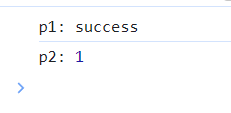
- then方法中抛出错误
p.then(res => { console.log('p1:', res) throw 'xxxx' return 1 }).then(res => { console.log('p2:', res) }, error => { console.log('p2:', error) })- 1
- 2
- 3
- 4
- 5
- 6
- 7
- 8
- 9
- 10
- 11
- 12

当返回值为MyPromise实例then (onFulfilled, onRejected) { //... const p2 = new MyPromise((resolve, reject) => { if (this.state === FULFILLED) { setTimeout(() => { try { const res = onFulfilled(this.result) //1. 处理返回MyPromise实例 if (res instanceof MyPromise) { res.then(res => resolve(res), error => reject(error)) } else { //将实例返回值传递给下一个then方法的onFulfilled回调函数 resolve(res) } } catch (error) { //处理异常 将错误信息传递给下一个then方法的onRjected回调函数 reject(error) } }, 0); //... } }) return p2 } } const p = new MyPromise((resolve, reject) => { resolve('success') }) p.then(res => { console.log('p1:', res) return new MyPromise((resolve, reject) => { resolve(2) // reject('error') }) }).then(res => { console.log('p2:', res) //2 }, error => { console.log('p2:', error) })- 1
- 2
- 3
- 4
- 5
- 6
- 7
- 8
- 9
- 10
- 11
- 12
- 13
- 14
- 15
- 16
- 17
- 18
- 19
- 20
- 21
- 22
- 23
- 24
- 25
- 26
- 27
- 28
- 29
- 30
- 31
- 32
- 33
- 34
- 35
- 36
- 37
- 38
- 39
- 40
- 41
- 42
- 43
- 44
- 45
- 46
- 47
- 48
- 49
- 50
- 51
- 当第一个then方法返回值如果是MyPromise实例的时候
- 我们利用
instanceof关键判断,res获取的返回值是否是MyPromise实例,如果是该实例 - 通过then方法先获取对应的结果,再通过resolve/reject将结果传递给下一个then方法的回调函数
当返回值和接受返回值的实例一致(重复引用)const p2 = new MyPromise((resolve, reject) => { if (this.state === FULFILLED) { setTimeout(() => { try { const res = onFulfilled(this.result) // 处理重复引用 if (res === p2) { throw new TypeError('Chaining cycle detected for promise #' ) } //处理返回MyPromise实例 if (res instanceof MyPromise) { res.then(res => resolve(res), error => reject(error)) } else { //将实例返回值传递给下一个then方法的onFulfilled回调函数 resolve(res) } } catch (error) { //处理异常 将错误信息传递给下一个then方法的onRjected回调函数 reject(error) } }, 0); } //... }) return p2- 1
- 2
- 3
- 4
- 5
- 6
- 7
- 8
- 9
- 10
- 11
- 12
- 13
- 14
- 15
- 16
- 17
- 18
- 19
- 20
- 21
- 22
- 23
- 24
- 25
- 26
- 27
- 28
const p2 = p.then(res => { console.log('p1:', res) return p2 }) p2.then(res => { console.log('p2:', res) }, error => { console.log('p2:', error) })- 1
- 2
- 3
- 4
- 5
- 6
- 7
- 8
- 9
- 10
- 11
- 12
- 当p2 接收then方法的返回值时,返回值也是p2,在Promise中会直接抛出错误
- 因此我们也需要判断res 和 p2是否一致,如果一致就是重复引用,直接抛出错误,有catch捕获错误,并利用reject传递给下一个then方法中的onRejected回调函数中

抽离函数- 我们不仅需要在实例状态为onFulfilled时候,对返回值进行处理,对于其余两个状态也是需要相同的处理,为了实现代码复用,将上述处理过程抽离成一个函数
- 在三种状态中依次调用该方法
//封装函数 处理then方法 function resolvePromise (p2, res, resolve, reject) { //1. 重复引用 直接抛出错误 if (res === p2) { throw new TypeError('Chaining cycle detected for promise #' ) } //2. 返回值是MyPromise实例 利用then获取对应的resolve/reject的值 if (res instanceof MyPromise) { res.then(res => resolve(res), error => reject(error)) } else { //3.处理普通返回值 resolve(res) } }- 1
- 2
- 3
- 4
- 5
- 6
- 7
- 8
- 9
- 10
- 11
- 12
- 13
- 14
- 15
//then方法 两个参数 onFulfilled, onRejected then (onFulfilled, onRejected) { //... const p2 = new MyPromise((resolve, reject) => { if (this.state === FULFILLED) { setTimeout(() => { try { //... resolvePromise(p2, res, resolve, reject) } }, 0); } else if (this.state === REJECTED) { setTimeout(() => { try { //... resolvePromise(p2, res, resolve, reject) } }, 0); } else if (this.state === PENDING) { this.onResolveCallbacks.push(() => { setTimeout(() => { try { //... resolvePromise(p2, res, resolve, reject) } }, 0); }) this.onRejectCallbacks.push(() => { setTimeout(() => { try { //... resolvePromise(p2, res, resolve, reject) } }, 0); }) } }) return p2 }- 1
- 2
- 3
- 4
- 5
- 6
- 7
- 8
- 9
- 10
- 11
- 12
- 13
- 14
- 15
- 16
- 17
- 18
- 19
- 20
- 21
- 22
- 23
- 24
- 25
- 26
- 27
- 28
- 29
- 30
- 31
- 32
- 33
- 34
- 35
- 36
- 37
- 38
- 39
- 40
- 41
- 42
- 43
- 44
- 45
- 46
- 47
- 48
三:实现Promise实例方法
核心功能实现之后,开始去实现,Promise实例上的方法
3.1 catch方法
在之前的示例中有出现过catch方法的示例,也大体讲解了下catch方法与then方法之间的联系与关系
引用MDN中对catch方法的论述:
Promise实例的catch()方法用于注册一个在 promise 被拒绝时调用的函数。它会立即返回一个等效的Promise对象,这可以允许你链式调用其他 promise 的方法- 此方法是
Promise.prototype.then(undefined, onRejected)的一种简写形式
总结一下:catch方法等同于then(undefined, onRejected)
catch()方法用于捕获并处理 Promise 实例的拒绝状态。当 Promise 实例被拒绝时,catch()方法会被调用,并传递拒绝的原因作为参数。- 返回一个
Promise实例
实现参数(onRejected):一个在此 Promise 对象被拒绝时异步执行的函数。它的返回值将成为
catch()返回的 Promise 对象的兑现值返回值:返回一个新Promise,新Promise在返回时总处于待定状态
catch (onRejected) { return this.then(undefined, onRejected) }- 1
- 2
- 3
- 4
const p = new MyPromise((resolve, reject) => { reject('error') }) p.then(res => { console.log(res) }).catch(error => { console.log('p:', error); //p: error })- 1
- 2
- 3
- 4
- 5
- 6
- 7
- 8
- 9
- 10
- 11
- 12
3.2 finally方法
Promise实例的finally()方法用于注册一个在 promise 敲定(兑现或拒绝)时调用的函数。它会立即返回一个等效的Promise对象,这可以允许你链式调用其他 promise 方法。如果你想在 promise 敲定时进行一些处理或者清理,无论其结果如何,那么
finally()方法会很有用。总结一下:- 无论该Promise实例最终是被成功兑现(resolve),还是被拒绝(reject),finally方法都会被调用
- 返回一个Promise实例
实现参数(onFinally):回调函数
返回值:返回一个Promise实例
//finally方法 finally (onFinally) { return this.then(onFinally, onFinally) }- 1
- 2
- 3
- 4
- 5
const p = new MyPromise((resolve, reject) => { // reject('error') resolve('success') }) p.then(res => { console.log(res) }).catch(error => { console.log('p:', error); }).finally(() => { console.log(1); // success 1 })- 1
- 2
- 3
- 4
- 5
- 6
- 7
- 8
- 9
- 10
- 11
- 12
- 13
- 14
- 15
- 16
- 无论是成功的兑现resolve(‘success’),还是拒绝reject(‘error’),最终都会调用finally函数并执行其中的回调函数
四:实现Promise静态方法
Promise还提供了一些静态方法,是在构造函数上调用的,而不是在实例上调用的
4.1 resolve方法
Promise.resolve()静态方法将给定的值转换为一个Promise。如果该值本身就是一个 Promise,那么该 Promise 将被返回;如果该值是一个 thenable 对象,Promise.resolve()将调用其then()方法及其两个回调函数Promise中的resolve方法const p = Promise.resolve(1) console.log(p); p1 = Promise.resolve(p) console.log(p1);- 1
- 2
- 3
- 4
- Promise.resolve,将给定的1转化为了一个Promise对象
- 如果再把一个Promise对象传递给Promise.resolve中,它不会继续封装该Promise,而是将这个Promise对象返回
思路- 当接收的值是一个Promise对象时候,直接返回该对象
- 否则,返回一个新Promise对象,并调用resolve,兑现对应的值
实现参数(value):resolve方法接收的值,可能为MyPromise
返回值:MyPromise
static resolve (value) { //是一个MyPromise直接返回 if (value instanceof MyPromise) { return value } //其余转化为MyPromise并返回 return new MyPromise(resolve => { resolve(value) }) }- 1
- 2
- 3
- 4
- 5
- 6
- 7
- 8
- 9
- 10
- 11
- 12
- 13
- 利用instanceof关键字判断value是否为一个MyPromises实例,如果是,直接返回该MyPromise
- 返回一个Promise实例,并调用resolve兑现该值,
即该实例状态直接被转为fulfilled
const p = MyPromise.resolve(1) console.log(p); const p1 = MyPromise.resolve(p) console.log(p1);- 1
- 2
- 3
- 4

4.2 reject方法
Promise.reject()静态方法返回一个已拒绝(rejected)的Promise对象,拒绝原因为给定的参数。这个说的就很清楚
- 返回一个Promise对象
- 调用reject更改状态为rejected拒绝,并把原因传递过去
实现参数(value):该
Promise对象被拒绝的原因。返回值:Promise对象
static reject (value) { //直接返回一个Promise return new MyPromise((undefined, reject) => { reject(value) }) }- 1
- 2
- 3
- 4
- 5
- 6
- 7
- 8
- 9
const p = MyPromise.reject('error') p.catch(error => { console.log(error); })- 1
- 2
- 3
- 4
- 5

4.3 race方法
Promise.race()静态方法接受一个 promise 可迭代对象作为输入,并返回一个Promise。这个返回的 promise 会随着第一个 promise 的敲定而敲定。总结一下- 接收一个promise可迭代对象,例如为数组,元素都为promise
- 数组中的所有promise实例进行竞争,谁敲定的最快(状态改变的最快),就返回谁的Promise实例
在promise中const p1 = new Promise((resolve, reject) => { setTimeout(() => { resolve('p1') }, 1000); }) const p2 = 'p2' const p3 = new Promise((resolve, reject) => { setTimeout(() => { reject('p3') }, 3000); }) const p = Promise.race([p1, p2, p3]) p.then(res => { console.log(res); }).catch(error => { console.log(error); })- 1
- 2
- 3
- 4
- 5
- 6
- 7
- 8
- 9
- 10
- 11
- 12
- 13
- 14
- 15
- 16
- 17
- 18
- 19
- 20
- 21
- 22
- 23
- 24
- 设定两个Promise实例和一个基本类型值,p1实例设置定时器1秒后兑现结果,p2为基本类型值’p2’,p3设置一个定时器3秒后拒绝
- 调用Promise.race()方法,并把p1,p2,p3作为数组传递race方法
- race方法内部,会先将不是promise对象转化为promise对象,然后所有Promise实例进行竞争,显然没有设置定时器的p2实例最快,返回p2实例
- 最终通过then方法兑现对应的结果

思路- 接收一个数组,元素都为Promise实例,那么如果接受的不是数组呢?抛出错误
- 返回值为一个Promise实例
- 遍历数组,把不是Promise实例的转化为Promise实例
- 等待第一个Promise的敲定(状态改变)
实现参数(iterable):可迭代对象,例如数组
返回值:Promise
static race (promises) { //返回一个promsie return new MyPromise((resolve, reject) => { //如果参数不是一个数组直接抛出错误 if (!Array.isArray(promises)) { return reject(new TypeError('Argument is not iterable')) } //遍历数组等待第一个敲定 promises.forEach(p => { //由于p不一定是一个promise 先转化为promise MyPromise.resolve(p).then(res => { resolve(res) }, error => { reject(error) }) }) }) }- 1
- 2
- 3
- 4
- 5
- 6
- 7
- 8
- 9
- 10
- 11
- 12
- 13
- 14
- 15
- 16
- 17
- 18
- 19
- 20
- 21
- 22
- 23
- 24
- 首先返回一个MyPromise实例,在其中写对应逻辑
- 利用Array.isArray方法判断是否为一个数组,不是数组抛出错误
- 遍历数组,通过resolve方法将不是Promise实例转化为Promise实例
- 调用then方法,接收Promise实例敲定后传递的结果或拒绝的原因
- 谁最先敲定(改变状态),谁直接调用resolve/reject把结果或原因返回
4.4 all方法
Promise.all()静态方法接受一个 Promise 可迭代对象作为输入,并返回一个Promise。当所有输入的 Promise 都被兑现时,返回的 Promise 也将被兑现(即使传入的是一个空的可迭代对象),并返回一个包含所有兑现值的数组。如果输入的任何 Promise 被拒绝,则返回的 Promise 将被拒绝,并带有第一个被拒绝的原因。总结一下- 跟race方法接收参数形式一样,都是一个数组,元素为Promise实例
- 返回值为一个Promise实例
等所有的Promise实例全部都被兑现了,并将兑现的值按照Promise传入数组的位置,依次存放到一个数组中- 最后将返回值的Promise实例兑现,并把这个结果数组传递
- 只要其中有Promise拒绝了,那么返回的Promise就被拒绝,并把原因传递
在Promise中const p1 = new Promise((resolve, reject) => { setTimeout(() => { resolve('p1') }, 1000); }) const p2 = 'p2' const p3 = new Promise((resolve, reject) => { setTimeout(() => { resolve('p3') }, 3000); }) const p = Promise.all([p1, p2, p3]) p.then(res => { console.log(res); }).catch(error => { console.log(error); })- 1
- 2
- 3
- 4
- 5
- 6
- 7
- 8
- 9
- 10
- 11
- 12
- 13
- 14
- 15
- 16
- 17
- 18
- 19
- 20
- 21
- 22
- 23
- 24
- 当数组中的所有Promise实例全部被兑现,兑现的值也会按照对应位置存放在一个数组中
- 等所有Promise实例都被兑现了,最终兑现返回的promise实例,并把这个结果数组传递
const p1 = new Promise((resolve, reject) => { setTimeout(() => { resolve('p1') }, 1000); }) const p2 = 'p2' const p3 = new Promise((resolve, reject) => { setTimeout(() => { reject('p3') }, 3000); }) const p = Promise.all([p1, p2, p3]) p.then(res => { console.log(res); }).catch(error => { console.log(error); })- 1
- 2
- 3
- 4
- 5
- 6
- 7
- 8
- 9
- 10
- 11
- 12
- 13
- 14
- 15
- 16
- 17
- 18
- 19
- 20
- 21
- 22
- 23
- 24
- 但如果只要有一个promise实例被拒绝了,返回的promise直接拒绝

思路- 判断参数,是否是一个数组,不是数组就抛出错误
- 返回一个Promise实例
- 如果是空数组,直接兑现
- 遍历数组,把数组中不是Promise实例的转化为Promise实例
- 维护一个数组和一个计数器
- 遍历数组,等待所有Primose兑现
通过索引记录兑现值在数组中的位置,保证跟参数中顺序一致利用计数器计数,等待所有promise实例兑现
实现static all (promises) { //返回一个promise return new MyPromise((resolve, reject) => { //不是数组抛出错误 if (!Array.isArray(promises)) { return reject(new TypeError('Argument is not iterable')) } //空数组直接兑现 promises.length === 0 && resolve(promises) const result = [] let count = 0 //foreach取出全部的promise promises.forEach((p, index) => { MyPromise.resolve(p).then(res => { //记录结果 result[index] = res //判断全部兑现 传递result count++ count === promises.length && resolve(result) }, error => { //处理拒绝 reject(error) }) }) }) }- 1
- 2
- 3
- 4
- 5
- 6
- 7
- 8
- 9
- 10
- 11
- 12
- 13
- 14
- 15
- 16
- 17
- 18
- 19
- 20
- 21
- 22
- 23
- 24
- 25
- 26
- 27
- 28
- 29
- 30
- 31
- 32
- 33
- 34
- 还是利用Array.isArray方法判断参数是否为一个数组
- 判断参数数组是否为空数组,空数组直接兑现,并把空数组传递
- 遍历数组中,利用resolve方法把不是promise实例的元素转化为priomise实例
通过result[index]索引记录对应的promise实例的兑现值count计数器等所有的promise实例兑现,最后传递result数组
4.5 allSettled方法
Promise.allSettled()静态方法将一个 Promise 可迭代对象作为输入,并返回一个单独的Promise。当所有输入的 Promise 都已敲定时(包括传入空的可迭代对象时),返回的 Promise 将被兑现,并带有描述每个 Promise 结果的对象数组总结一下- 接受参数和返回值与all方法类似
- 等全部promise实例敲定时(all方法是兑现时),也就意味着allSettled方法允许出现被拒绝时的状态,不会像all方法一样被拒绝时,返回值也直接被拒绝
在promise中const p1 = new Promise((resolve, reject) => { setTimeout(() => { resolve('p1') }, 1000); }) const p2 = 'p2' const p3 = new Promise((resolve, reject) => { setTimeout(() => { reject('p3') }, 3000); }) const p = Promise.allSettled([p1, p2, p3]) p.then(res => { console.log(res); }).catch(error => { console.log(error); })- 1
- 2
- 3
- 4
- 5
- 6
- 7
- 8
- 9
- 10
- 11
- 12
- 13
- 14
- 15
- 16
- 17
- 18
- 19
- 20
- 21
- 22
- 23
- 24

- 与all方法不同的是,当数组中的promise实例有被拒绝的状态的时候,返回的promise也不会直接被拒绝,而是会把这个状态记录,原因传递,其余promise继续兑现
- 同时,与all方法不同的是,最终传递的结果数组中是以对象形式
- status为fulfilled状态时候,另个属性就是value,兑现值
- statue为rejected状态时候,另个属性就是reason,拒绝原因
- 但大体内层逻辑与all方法大体相同
实现//settled方法 static allSettled (promises) { //返回promise return new MyPromise((resolve, reject) => { //判断数组 if (!Array.isArray(promises)) { return reject(new TypeError('Argument is not iterable')) } // 为空 promises.length === 0 && resolve(promises) const result = [] let count = 0 //遍历数组 promises.forEach((p, index) => { MyPromise.resolve(p).then(res => { //记录 result[index] = { status: FULFILLED, value: res } count++ count === promises.length && resolve(result) }, error => { result[index] = { status: REJECTED, reason: error } count++ count === promises.length && resolve(result) }) }) }) }- 1
- 2
- 3
- 4
- 5
- 6
- 7
- 8
- 9
- 10
- 11
- 12
- 13
- 14
- 15
- 16
- 17
- 18
- 19
- 20
- 21
- 22
- 23
- 24
- 25
- 26
- 27
- 28
- 29
- 30
- 31
- 32
- 33
- 与all方法不同的是
- 在兑现或拒绝每个promise实例的时候,对于索引记录下是以对象形式存入数组中
- 无论兑现还是拒绝,利用计数器等到全部promise敲定之后再将返回值敲定,并把结果数组传递
4.6 any方法
Promise.any()静态方法将一个 Promise 可迭代对象作为输入,并返回一个Promise。当输入的任何一个 Promise 兑现时,这个返回的 Promise 将会兑现,并返回第一个兑现的值。当所有输入 Promise 都被拒绝(包括传递了空的可迭代对象)时,它会以一个包含拒绝原因数组的AggregateError拒绝。总结一下- 接收参数和返回值与all方法类似
- 但有种像all方法反过来的感觉
- 只要有一个promise兑现,返回值promise立即兑现
- all方法是只要有一个promise被拒绝,返回值promise直接被拒绝
- 只有当全部promise实例都被拒绝时候,返回值promise才会被拒绝,并传递一个拒绝原因的数组
实现static any (promises) { // 1. 返回Promise,数组判断 return new MyPromise((resolve, reject) => { if (!Array.isArray(promises)) { return reject(new TypeError('Argument is not iterable')) } // 2. 空数组直接拒绝 promises.length === 0 && reject(new AggregateError(promises, 'All promises were rejected')) // 3. 等待结果 const errors = [] let count = 0 promises.forEach((p, index) => { MyPromise.resolve(p).then(res => { // 3.1 第一个兑现 resolve(res) }, err => { // 3.2 全部拒绝 errors[index] = err count++ count === promises.length && reject(new AggregateError(errors, 'All promises were rejected')) }) }) }) } }- 1
- 2
- 3
- 4
- 5
- 6
- 7
- 8
- 9
- 10
- 11
- 12
- 13
- 14
- 15
- 16
- 17
- 18
- 19
- 20
- 21
- 22
- 23
- 24
- 25
- 26
- 27
- 28
- 29
- 30
- 31
- 逻辑上是all方法的反过来
五:完整代码
function resolvePromise (p2, res, resolve, reject) { //1. 重复引用 直接抛出错误 if (res === p2) { throw new TypeError('Chaining cycle detected for promise #' ) } //2. 返回值是MyPromise实例 利用then获取对应的resolve/reject的值 if (res instanceof MyPromise) { res.then(res => resolve(res), error => reject(error)) } else { //3.处理普通返回值 resolve(res) } } const PENDING = 'pending' const FULFILLED = 'fulfilled' const REJECTED = 'rejected' class MyPromise { constructor(func) { //初始状态pending this.state = PENDING //初始原因undefined this.result = undefined //保存成功的回调函数 this.onResolveCallbacks = [] //保存失败的回调函数 this.onRejectCallbacks = [] //更改状态 const resolve = (result) => { if (this.state === PENDING) { this.state = FULFILLED this.result = result //遍历执行保存的回调函数 this.onResolveCallbacks.forEach(fn => fn()) } }; const reject = (result) => { if (this.state === PENDING) { this.state = REJECTED this.result = result //遍历执行保存的回调函数 this.onRejectCallbacks.forEach(fn => fn()) } }; //捕获错误 try { //执行函数 func(resolve, reject) } catch (error) { reject(error) } } //then方法 两个参数 onFulfilled, onRejected then (onFulfilled, onRejected) { //参数判断 onFulfilled = typeof onFulfilled === 'function' ? onFulfilled : x => x onRejected = typeof onRejected === 'function' ? onRejected : error => { throw error } //链式调用 返回新的promise实例 const p2 = new MyPromise((resolve, reject) => { //根据状态执行成功失败的回调 if (this.state === FULFILLED) { //并把失败的原因传递过去 setTimeout(() => { //处理异常 调用reject并把异常传过去 try { //res为p1的返回值 判断是否为promise const res = onFulfilled(this.result) resolvePromise(p2, res, resolve, reject) } catch (error) { reject(error) } }, 0); } else if (this.state === REJECTED) { setTimeout(() => { //使用try catch捕获错误 try { //获取p1返回值 const res = onRejected(this.result) resolvePromise(p2, res, resolve, reject) } catch (error) { reject(error) } }, 0); } else if (this.state === PENDING) { //保存成功的回调 this.onResolveCallbacks.push(() => { setTimeout(() => { //处理异常 try { //获取返回值 const res = onFulfilled(this.result) resolvePromise(p2, res, resolve, reject) } catch (error) { reject(error) } }, 0); }) //保存失败的回调 this.onRejectCallbacks.push(() => { setTimeout(() => { //处理异常 try { //获取返回值 const res = onRejected(this.result) resolvePromise(p2, res, resolve, reject) } catch (error) { reject(error) } }, 0); }) } }) //返回新的promise实例实现链式调用 return p2 } //catch方法 catch (onRejected) { //调用then中的onRejected回调 return this.then(undefined, onRejected) } //finally方法 finally (onFinally) { return this.then(onFinally, onFinally) } //resolve方法 static resolve (value) { //是一个MyPromise直接返回 if (value instanceof MyPromise) { return value } //其余转化为MyPromise并返回 return new MyPromise(resolve => { resolve(value) }) } //reject方法 static reject (value) { //直接返回一个Promise return new MyPromise((undefined, reject) => { reject(value) }) } //race方法 static race (promises) { //返回一个promsie return new MyPromise((resolve, reject) => { //如果参数不是一个数组直接抛出错误 if (!Array.isArray(promises)) { return reject(new TypeError('Argument is not iterable')) } //遍历数组等待第一个敲定 promises.forEach(p => { //由于p不一定是一个promise 先转化为promise MyPromise.resolve(p).then(res => { resolve(res) }, error => { reject(error) }) }) }) } //all方法 static all (promises) { //返回一个promise return new MyPromise((resolve, reject) => { //不是数组抛出错误 if (!Array.isArray(promises)) { return reject(new TypeError('Argument is not iterable')) } //空数组直接兑现 promises.length === 0 && resolve(promises) const result = [] let count = 0 //foreach取出全部的promise promises.forEach((p, index) => { MyPromise.resolve(p).then(res => { //记录结果 result[index] = res //判断全部兑现 传递result count++ count === promises.length && resolve(result) }, error => { //处理拒绝 reject(error) }) }) }) } //settled方法 static allSettled (promises) { //返回promise return new MyPromise((resolve, reject) => { //判断数组 if (!Array.isArray(promises)) { return reject(new TypeError('Argument is not iterable')) } // 为空 promises.length === 0 && resolve(promises) const result = [] let count = 0 //遍历数组 promises.forEach((p, index) => { MyPromise.resolve(p).then(res => { //记录 result[index] = { status: FULFILLED, value: res } count++ count === promises.length && resolve(result) }, error => { result[index] = { status: REJECTED, reason: error } count++ count === promises.length && resolve(result) }) }) }) } //any方法 static any (promises) { // 1. 返回Promise,数组判断 return new MyPromise((resolve, reject) => { if (!Array.isArray(promises)) { return reject(new TypeError('Argument is not iterable')) } // 2. 空数组直接拒绝 promises.length === 0 && reject(new AggregateError(promises, 'All promises were rejected')) // 3. 等待结果 const errors = [] let count = 0 promises.forEach((p, index) => { MyPromise.resolve(p).then(res => { // 3.1 第一个兑现 resolve(res) }, err => { // 3.2 全部拒绝 errors[index] = err count++ count === promises.length && reject(new AggregateError(errors, 'All promises were rejected')) }) }) }) } }- 1
- 2
- 3
- 4
- 5
- 6
- 7
- 8
- 9
- 10
- 11
- 12
- 13
- 14
- 15
- 16
- 17
- 18
- 19
- 20
- 21
- 22
- 23
- 24
- 25
- 26
- 27
- 28
- 29
- 30
- 31
- 32
- 33
- 34
- 35
- 36
- 37
- 38
- 39
- 40
- 41
- 42
- 43
- 44
- 45
- 46
- 47
- 48
- 49
- 50
- 51
- 52
- 53
- 54
- 55
- 56
- 57
- 58
- 59
- 60
- 61
- 62
- 63
- 64
- 65
- 66
- 67
- 68
- 69
- 70
- 71
- 72
- 73
- 74
- 75
- 76
- 77
- 78
- 79
- 80
- 81
- 82
- 83
- 84
- 85
- 86
- 87
- 88
- 89
- 90
- 91
- 92
- 93
- 94
- 95
- 96
- 97
- 98
- 99
- 100
- 101
- 102
- 103
- 104
- 105
- 106
- 107
- 108
- 109
- 110
- 111
- 112
- 113
- 114
- 115
- 116
- 117
- 118
- 119
- 120
- 121
- 122
- 123
- 124
- 125
- 126
- 127
- 128
- 129
- 130
- 131
- 132
- 133
- 134
- 135
- 136
- 137
- 138
- 139
- 140
- 141
- 142
- 143
- 144
- 145
- 146
- 147
- 148
- 149
- 150
- 151
- 152
- 153
- 154
- 155
- 156
- 157
- 158
- 159
- 160
- 161
- 162
- 163
- 164
- 165
- 166
- 167
- 168
- 169
- 170
- 171
- 172
- 173
- 174
- 175
- 176
- 177
- 178
- 179
- 180
- 181
- 182
- 183
- 184
- 185
- 186
- 187
- 188
- 189
- 190
- 191
- 192
- 193
- 194
- 195
- 196
- 197
- 198
- 199
- 200
- 201
- 202
- 203
- 204
- 205
- 206
- 207
- 208
- 209
- 210
- 211
- 212
- 213
- 214
- 215
- 216
- 217
- 218
- 219
- 220
- 221
- 222
- 223
- 224
- 225
- 226
- 227
- 228
- 229
- 230
- 231
- 232
- 233
- 234
- 235
- 236
- 237
- 238
- 239
- 240
- 241
- 242
- 243
- 244
- 245
- 246
- 247
- 248
- 249
- 250
- 251
- 252
- 253
- 254
- 255
- 256
- 257
- 258
- 259
- 260
- 261
- 262
- 263
- 264
- 265
- 266
- 267
- 268
- 269
- 270
- 271
- 272
- 273
- 274
- 275
- 276
- 277
- 278
- 279
- 280
- 281
- 282
- 283
- 284
- 285
- 286
- 287
- 288
- 289
- 290
- 291
- 292
- 293
- 294
- 295
- 296
- 297
- 298
- 299
- 300
- 301
- 302
六:总结
写完身心俱疲,但又有种知识充斥在脑海中的感觉,以前也只是了解会用promise的几种方法,也不了解其中方法的逻辑,
只有对其实现一下,才会对其更加的掌握,现在对promise有了更深的了解了,希望在以后使用promise的时候,调用其中的方法时候,能够想到其中的逻辑是怎么实现的,这样能更放心的去使用
参考文章:
本文由mdnice多平台发布
-
相关阅读:
基于SSM的校园音乐点歌系统平台
Linux rpm方式安装 MYSQL8.0
SpringBoot SpringBoot 原理篇 3 核心原理 3.3 启动流程【2】
SpringCloud - Spring Cloud 之 Config分布式配置;server,client配置(十五)
【vue3】一些关于hooks的使用经验
高性能网络编程 - 关于单台服务器并发TCP连接数理论值的讨论
气膜建筑的维护有哪些?
【Docker Compose】
Node.Js编码注意事项
记录--UNI-APP安卓本地打包详细教程(保姆级)
- 原文地址:https://blog.csdn.net/Czc1357618897/article/details/133757473
