-
028.Python面向对象_类&补充_元类

我 的 个 人 主 页:👉👉 失心疯的个人主页 👈👈
入 门 教 程 推 荐 :👉👉 Python零基础入门教程合集 👈👈
虚 拟 环 境 搭 建 :👉👉 Python项目虚拟环境(超详细讲解) 👈👈
PyQt5 系 列 教 程:👉👉 Python GUI(PyQt5)文章合集 👈👈
Oracle数据库教程:👉👉 Oracle数据库文章合集 👈👈
优 质 资 源 下 载 :👉👉 资源下载合集 👈👈
补充_元类
概念
- 创建类对象的类,就是元类
- 理解:
- 1、对象是怎么产生的:对象是由类创建出来的
- 2、类是不是对象:类也是对象
- 3、类对象是不是可以由另外一个类创建出来:可以(元类)
- 示例
n = 10 print(n.__class__) #s = 'abc' print(s.__class__) # class Person: pass p = Person() print(p.__class__) # print('=' * 50) print(n.__class__.__class__) # print(int.__class__) # print(s.__class__.__class__) # print(str.__class__) # print(p.__class__.__class__) # print(Person.__class__) # - 1
- 2
- 3
- 4
- 5
- 6
- 7
- 8
- 9
- 10
- 11
- 12
- 13
- 14
- 15
- 16
- 17
- 18
- 19
- 20
- 21
- 22
- 23
- 24
- 25
- 图解

类对象创建方式
- 方式一
- 通过
class关键字声明 - Python解释器扫描到这一段代码,会根据类描述自动创建类对象
- 语法
class ClassName: # 类对象代码块 pass- 1
- 2
- 3
- 示例
class Person: sex = '男' def eat(self, thing): print(self.name, f'用筷子吃{thing}') p = Person() p.name = '张三' print(p.name) # 张三 print(p.sex) # 男 p.eat('白菜') # 张三 用筷子吃白菜- 1
- 2
- 3
- 4
- 5
- 6
- 7
- 8
- 9
- 10
- 11
- 12
- 13
- 方式二
- 通过
type函数手动创建 - 语法
var = type(name: str, bases: tuple[type, ...], dict:dict[str, Any], **kwargs) # var: 变量名,用于接收类对象 # name:类名(字符串类型) # bases:父对象(元组类型) # dict:用键值对存放类属性和类方法(字典类型)- 1
- 2
- 3
- 4
- 5
- 6
- 7
- 示例
def eat(self, thing): print(self.name, f'用筷子吃{thing}') xxx = type('Person', (), {'sex': '男', 'eat': eat}) p = xxx() p.name = '张三' print(p.name) # 张三 print(p.sex) # 男 p.eat('白菜') # 张三 用筷子吃白菜- 1
- 2
- 3
- 4
- 5
- 6
- 7
- 8
- 9
- 10
- 11
- 12
- 图解

元类查找机制
- 两种方式创建类对象,最终都是要通过元类来创建。但是并不是每一个类的创建都是通过
type这个元类来创建,而是有一个元类查找机制 - 利用元类查找机制,我们就可以通过指定类的元类来对类的创建过程进行干预
- 元类查找机制
- 创建一个类步骤
- 第一步:到自己的类描述中查找是否存在
__metaclass__属性标明元类- 如果有,则用标明的元类进行创建
- 第二步:到自己继承的父类里面查找父类是否存在
__metaclass__属性标明元类- 如果有,则用父类标明的元类进行创建
- 第三步:到模块内查找是否存在
__metaclass__属性标明元类- 如果有,则用模块级元类进行创建
- 第四步:前面三种元类都没有,则会找到
type元类进行创建
- 示例
# 模块级,通过__metaclass__属性指定元类 ccc __metaclass__ = ccc class Animal: # 父类级,通过__metaclass__属性指定元类 bbb __metaclass__ = bbb pass class Person(Animal): # 自身级,通过__metaclass__属性指定元类 aaa __metaclass__ = aaa pass- 1
- 2
- 3
- 4
- 5
- 6
- 7
- 8
- 9
- 10
- 11
- 12
- 13
- 14
- 图解
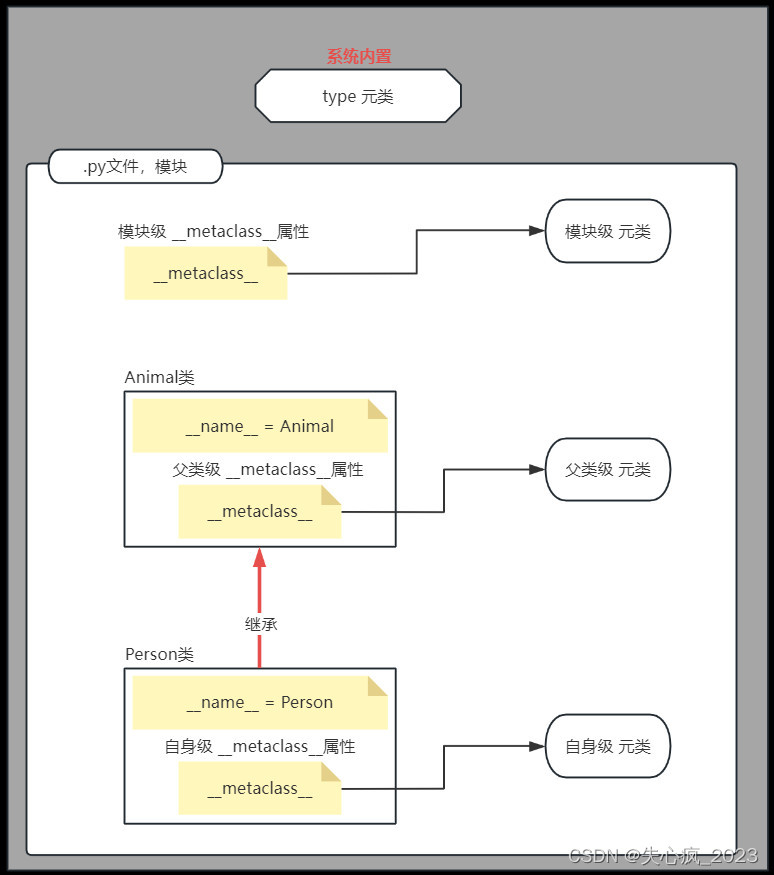
元类的应用场景
- 1、拦截类的创建
- 2、修改类
- 3、返回修改之后的类
- 后面详细讲解
类的描述
-
目的
- 方便李清逻辑思路
- 方便多人合作开发时的沟通
- 方便生成项目文档
- …
-
描述方式
- 类描述语法
class ClassName: """ 关于这个类的描述:类的作用、构造函数等;类属性的描述 Attributes: count:类型,作用 """ count = 1 def run(self, distance, step): """ 关于这个方法的作用 :param distance: 类型,参数的含义,是否有默认值 :param step: 类型,参数的含义,是否有默认值 :return: 返回值的类型,返回结果的含义 """ print("这里是run方法的代码块") return distance / step- 1
- 2
- 3
- 4
- 5
- 6
- 7
- 8
- 9
- 10
- 11
- 12
- 13
- 14
- 15
- 16
- 17
- 查看类描述
help(ClassName)- 1
- 运行结果
class ClassName(builtins.object) | 关于这个类的描述:类的作用、构造函数等;类属性的描述 | Attributes: | count:类型,作用 | | Methods defined here: | | run(self, distance, step) | 关于这个方法的作用 | :param distance: 类型,参数的含义,是否有默认值 | :param step: 类型,参数的含义,是否有默认值 | :return: 返回值的类型,返回结果的含义 | | ---------------------------------------------------------------------- | Data descriptors defined here: | | __dict__ | dictionary for instance variables (if defined) | | __weakref__ | list of weak references to the object (if defined) | | ---------------------------------------------------------------------- | Data and other attributes defined here: | | count = 1- 1
- 2
- 3
- 4
- 5
- 6
- 7
- 8
- 9
- 10
- 11
- 12
- 13
- 14
- 15
- 16
- 17
- 18
- 19
- 20
- 21
- 22
- 23
- 24
- 25
- 26
- 27
- 类描述语法
-
生成项目文档
-
方法1:使用内置模块(pydoc)
-
具体步骤
- 在cmd窗口执行命令
查看文档描述: python3 -m pydoc 模块名称(不带.py 后缀) 启动本地服务浏览文档: python3 -m pydoc -p 端口号 python3 -m pydoc -b 生成指定模块html文档: python3 -m pydoc -w 模块名称(不带.py 后缀)- 1
- 2
- 3
- 4
- 5
- 6
- 7
- 8
- 9
-
方法2:使用第三方模块(Sphinx、epydoc、doxygen)
- 具体步骤在后面学习包和模块的时候进行详细讲解
-
示例
-
类描述代码(
06-classdesc.py)class ClassName: """ 关于这个类的描述:类的作用、构造函数等;类属性的描述 Attributes: count:类型,作用 """ count = 1 def run(self, distance, step): """ 关于这个方法的作用 :param distance: 类型,参数的含义,是否有默认值 :param step: 类型,参数的含义,是否有默认值 :return: 返回值的类型,返回结果的含义 """ print("这里是run方法的代码块") return distance / step- 1
- 2
- 3
- 4
- 5
- 6
- 7
- 8
- 9
- 10
- 11
- 12
- 13
- 14
- 15
- 16
- 17
- 18
- 19
-
生成描述文档(只需要执行1、5即可)
-
1、打开
cmd,先切换到对应盘符,再使用cd 目录路径命令进入项目目录- 这里也可以直接鼠标右键py文件–open in – Terminal`

-
2、直接查看模块的描述文档
python -m pydoc 06-classdesc -
3、查看模块名称中包含指定关键字的模块
python -m pydoc -k 类 -
4、在本地机器上的给定端口上启动HTTP服务器,用浏览器查看类描述
python -m pydoc -p 1234-
在任意未使用的端口上启动HTTP服务器,并打开Web浏览器以交互方式浏览文档
python -m pydoc -b -

-

-

-
如果模块名称是中文,则会报错
-

-
-
5、将模块的HTML文档写到当前目录下的文件中
python -m pydoc -w classdesc- 通过指定目录名可以生成目录内所有模块的HTML文档
python -m pydoc -w 目录名\,需要将cmd的目录切换到上一级 
- 通过指定目录名可以生成目录内所有模块的HTML文档
-
-
cmd命令补充
python --help # 查看python3命令中的帮助文档 # 2023年10月,cmd直接输入python是执行python3,在之前是需要输入python3 -b : issue warnings about str(bytes_instance), str(bytearray_instance) and comparing bytes/bytearray with str. (-bb: issue errors) -B : don't write .pyc files on import; also PYTHONDONTWRITEBYTECODE=x -c cmd : program passed in as string (terminates option list) -d : turn on parser debugging output (for experts only, only works on debug builds); also PYTHONDEBUG=x -E : ignore PYTHON* environment variables (such as PYTHONPATH) -h : print this help message and exit (also --help) -i : inspect interactively after running script; forces a prompt even if stdin does not appear to be a terminal; also PYTHONINSPECT=x -I : isolate Python from the user's environment (implies -E and -s) -m mod : run library module as a script (terminates option list) # 以脚本形式运行库模块(终止选项列表) -O : remove assert and __debug__-dependent statements; add .opt-1 before .pyc extension; also PYTHONOPTIMIZE=x -OO : do -O changes and also discard docstrings; add .opt-2 before .pyc extension -q : don't print version and copyright messages on interactive startup -s : don't add user site directory to sys.path; also PYTHONNOUSERSITE -S : don't imply 'import site' on initialization -u : force the stdout and stderr streams to be unbuffered; this option has no effect on stdin; also PYTHONUNBUFFERED=x -v : verbose (trace import statements); also PYTHONVERBOSE=x can be supplied multiple times to increase verbosity -V : print the Python version number and exit (also --version) when given twice, print more information about the build -W arg : warning control; arg is action:message:category:module:lineno also PYTHONWARNINGS=arg -x : skip first line of source, allowing use of non-Unix forms of #!cmd -X opt : set implementation-specific option. The following options are available:- 1
- 2
- 3
- 4
- 5
- 6
- 7
- 8
- 9
- 10
- 11
- 12
- 13
- 14
- 15
- 16
- 17
- 18
- 19
- 20
- 21
- 22
- 23
- 24
- 25
- 26
- 27
- 28
- 29
- 30
- 31
- 32
- 33
-
查看
pydoc模块帮助文档python -m pydoc -hpydoc <name> ... Show text documentation on something. <name> may be the name of a Python keyword, topic, function, module, or package, or a dotted reference to a class or function within a module or module in a package. If <name> contains a '\', it is used as the path to a Python source file to document. If name is 'keywords', 'topics', or 'modules', a listing of these things is displayed. # 显示某事的文本文档。可以是Python关键字、主题、函数、模块或包的名称,也可以是对模块或包中的模块中的类或函数的带点引用。如果 pydoc -k <keyword> Search for a keyword in the synopsis lines of all available modules. # 在所有可用模块的概要行中搜索关键字 pydoc -n <hostname> Start an HTTP server with the given hostname (default: localhost). # 使用给定的主机名(默认:localhost)启动HTTP服务器。 pydoc -p <port> Start an HTTP server on the given port on the local machine. Port number 0 can be used to get an arbitrary unused port. # 在本地机器上的给定端口上启动HTTP服务器。端口号0可用于获取任意未使用的端口。 pydoc -b Start an HTTP server on an arbitrary unused port and open a Web browser to interactively browse documentation. This option can be used in combination with -n and/or -p. # 在任意未使用的端口上启动HTTP服务器,并打开Web浏览器以交互方式浏览文档。该选项可以与-n和/或-p组合使用。 pydoc -w <name> ... Write out the HTML documentation for a module to a file in the current directory. If <name> contains a '\', it is treated as a filename; if it names a directory, documentation is written for all the contents. # 将模块的HTML文档写到当前目录下的文件中。如果包含'\',它将被用作要记录的Python源文件的路径。如果name是'keywords', 'topics'或'modules',则显示这些内容的列表。 包含'\',则将其视为文件名;如果它命名一个目录,则为所有内容编写文档。 - 1
- 2
- 3
- 4
- 5
- 6
- 7
- 8
- 9
- 10
- 11
- 12
- 13
- 14
- 15
- 16
- 17
- 18
- 19
- 20
- 21
- 22
- 23
-
相关阅读:
node_modules包路径查找规则,依赖版本生效规则
STM32 CAN过滤器标识符学习笔记
如何在 Ubuntu上使用 Nginx 设置密码验证
推挽输出和开漏输出-三极管-mos管
干洗店管理系统洗鞋店预约上门小程序洗护流程;
论文阅读_深度学习的医疗异常检测综述
【Java】面向对象程序设计 课程笔记 面向对象基础
[mapstruct]pom依赖引入
CSS基础教程3——字体和文字样式(上)
单片机中的 _nop_() 延时以及其相关的基础扩展
- 原文地址:https://blog.csdn.net/weixin_50296259/article/details/133721896


- 最新文章
-
沪漂五周年了:我越来越迷茫了
Agentic Skill Routing 实战:别再把所有 Skill 塞进 AI Agent 上下文
MySQL-Seconds_behind_master的精度误差
[MAF预定义ChatClient中间件-03]CachingChatClient——利用缓存省钱省时间
AI的至暗历史:从万众期待到被政府撤资,AI的两次死亡徘徊
Agent OS :五种驯服不确定性的范式
PortSwigger SQL注入LAB11
数据库即时编译JIT
[Begin]AI Learn Data Day 0
深度学习进阶(二十七)现代 LLM 的核心架构设计其二:SwiGLU