-
图文结合丨Prometheus+Grafana+GreatSQL性能监控系统搭建指南(上)
一、环境介绍
本文环境,以及本文所采用数据库为
GreatSQL 8.0.32-24$ cat /etc/system-release Red Hat Enterprise Linux Server release 7.9 (Maipo) $ uname -a Linux gip 3.10.0-1160.el7.x86_64 #1 SMP Tue Aug 18 14:50:17 EDT 2020 x86_64 x86_64 x86_64 GNU/Linux $ ldd --version ldd (GNU libc) 2.17- 1
- 2
- 3
- 4
- 5
二、手动安装
0.简单介绍
- Prometheus Server : 用于收集和存储时间序列数据。
- Client Library : 客户端库,为需要监控的服务生成相应的 metrics 并暴露给 Prometheus server。当Prometheus server 来 pull 时,直接返回实时状态的 metrics。
- Push Gateway : 主要用于短期的 jobs。由于这类 jobs 存在时间较短,可能在 Prometheus 来 pull 之前就消失了。为此,这次 jobs 可以直接向 Prometheus server 端推送它们的 metrics。这种方式主要用于服务层面的metrics,对于机器层面的 metrices,需要使用 node exporter。
- Exporters : 用于暴露已有的第三方服务的 metrics 给 Prometheus。
- Alertmanager : 从 Prometheus server 端接收到 alerts 后,会进行去除重复数据,分组,并路由到对收的接收方式,发出报警。常见的接收方式有:电子邮件,pagerduty,OpsGenie, webhook 等。
网上介绍很多这里就不再过多介绍了
1.安装Prometheus
官网下载最新二进制安装包➥ https://prometheus.io/download/
可以看到有很多的版本,这里选择LTS的版本,LTS在软件版本中通常表示
Long Term Support,即长期支持版本,对于Prometheus来说,LTS版本表示这个版本会获得更长期的支持和维护,而非LTS版本则更新频繁,新特性来得快,但稳定性和支持周期较短,所以在追求稳定的生产环境中,建议优先考虑使用LTS长期支持版本。
这里选择二进制软件包
prometheus-2.45.0.linux-amd64.tar.gz$ mkdir /usr/local/prometheus $ cd /usr/local/prometheus $ wget https://github.com/prometheus/prometheus/releases/download/v2.45.0/prometheus-2.45.0.linux-amd64.tar.gz- 1
- 2
下载完成后,用
sha256sum校验一下安装包,没问题的话解压即可$ sha256sum prometheus-2.45.0.linux-amd64.tar.gz 1c7f489a3cc919c1ed0df2ae673a280309dc4a3eaa6ee3411e7d1f4bdec4d4c5 $ tar xvf prometheus-2.45.0.linux-amd64.tar.gz- 1
- 2
建议使用systemctld来管理守护进程Prometheus服务
若文件路径或名字和本文不同记得修改
$ vi /lib/systemd/system/prometheus.service [Unit] Description=Prometheus server Documentation=https://prometheus.io/docs/introduction/overview/ After=network-online.target [Service] Type=simple User=root Group=root Restart=on-abnormal ExecStart=/usr/local/prometheus/prometheus-2.45.0.linux-amd64/prometheus \ --config.file=/usr/local/prometheus/prometheus-2.45.0.linux-amd64/prometheus.yml \ --storage.tsdb.path=/usr/local/prometheus/prometheus-2.45.0.linux-amd64/data \ --storage.tsdb.retention.time=60d \ --web.enable-lifecycle [Install] WantedBy=multi-user.target- 1
- 2
- 3
- 4
- 5
- 6
- 7
- 8
- 9
- 10
- 11
- 12
- 13
- 14
- 15
- 16
- 17
- 18
使用
$ ./prometheus -h就可以看到帮助信息通知systemd重新加载配置文件
$ systemctl daemon-reload以下为相关systemd命令
$ systemctl enable prometheus.service # 设置为开机自启动 $ systemctl disable prometheus.service # 如果不想设置为开机自启动,可以关闭 $ systemctl start prometheus.service # 开启服务 $ systemctl status prometheus.service # 查看状态 $ systemctl restart prometheus.service # 重启服务 $ systemctl stop prometheus.service # 停止服务
启动
Prometheus server,并查看是否启动成功active (running)$ systemctl start prometheus.service $ systemctl status prometheus.service ● prometheus.service - Prometheus server Loaded: loaded (/usr/lib/systemd/system/prometheus.service; disabled; vendor preset: disabled) Active: active (running) since 三 2023-09-06 16:14:34 CST; 2s ago Docs: https://prometheus.io/docs/introduction/overview/ Main PID: 21472 (prometheus) CGroup: /system.slice/prometheus.service └─21472 /usr/local/prometheus/prometheus-2.45.0.linux-amd64/prometheus --config.file=/usr/local/prometheus/prometheus-2.45.0.linux-amd64/prometheus.yml --storage.tsdb.path=/usr/local/pr... #下方省略- 1
- 2
- 3
- 4
- 5
- 6
- 7
- 8
- 9
- 10
若启动失败可自行排查
$ journalctl -u prometheus.service -f访问地址:
名称 地址 prometheus http://172.17.137.104:9090/ 监控指标 http://172.17.137.104:9090/metrics 界面如下:

安装完成Prometheus,接下来安装Alertmanager
2.安装Alertmanager
官网下载➥ https://prometheus.io/download/

这里我们选择
alertmanager-0.26.0.linux-amd64.tar.gz$ cd /usr/local/prometheus $ wget https://github.com/prometheus/alertmanager/releases/download/v0.26.0/alertmanager-0.26.0.linux-amd64.tar.gz- 1
下载完成后,用
sha256sum校验一下安装包,没问题的话解压即可$ sha256sum alertmanager-0.26.0.linux-amd64.tar.gz abd73e2ee6bf67d3888699660abbecba7b076bf1f9459a3a8999d493b149ffa6 $ tar xvf alertmanager-0.26.0.linux-amd64.tar.gz- 1
- 2
建议使用Systemd来管理守护进程Alertmanager服务
若文件路径或名字,和下方示例不同记得修改
$ vi /lib/systemd/system/alertmanager.service [Unit] Description=Alert Manager Wants=network-online.target After=network-online.target [Service] Type=simple User=root Group=root Restart=always ExecStart=/usr/local/prometheus/alertmanager-0.26.0.linux-amd64/alertmanager \ --config.file=/usr/local/prometheus/alertmanager-0.26.0.linux-amd64/alertmanager.yml \ --storage.path=/usr/local/prometheus/alertmanager-0.26.0.linux-amd64/data [Install] WantedBy=multi-user.target- 1
- 2
- 3
- 4
- 5
- 6
- 7
- 8
- 9
- 10
- 11
- 12
- 13
- 14
- 15
- 16
通知systemd重新加载配置文件
$ systemctl daemon-reload启动
alertmanager.service$ systemctl start alertmanager.service若启动失败可自行排查
journalctl -u alertmanager.service -f访问地址
应用名称 地址 Alertmanager http://172.17.137.104:9093/ Alertmanager界面如下

添加Prometheus配置
因为我们安装了Alertmanager,所以需要添加到Prometheus里面
$ vi /usr/local/prometheus/prometheus-2.45.0.linux-amd64/prometheus.yml把
# - alertmanager:9093修改为localhost:9093因为我们是装在同一个机器上,所以是localhost,若安装不在同一个机器上请修改为正确IP地址
# Alertmanager configuration alerting: alertmanagers: - static_configs: - targets: - localhost:9093 <--修改这里,注意缩进- 1
- 2
- 3
- 4
- 5
注意!yml文件是有缩进格式的,修改时不要打乱原有格式
在
rule_files:添加- "alert.yml",前面缩进只需保留两格!# Load rules once and periodically evaluate them according to the global 'evaluation_interval'. rule_files: - "alert.yml" <--添加这里,注意缩进2格即可 # - "first_rules.yml" # - "second_rules.yml"- 1
- 2
- 3
- 4
增加触发器配置文件
编辑新文件
alert.yml添加以下内容,注意格式缩进$ vi /usr/local/prometheus/prometheus-2.45.0.linux-amd64/alert.yml groups: - name: Prometheus alert rules: # 任何实例超过30s无法联系的情况发出告警 - alert: 服务告警 expr: up == 0 for: 30s labels: severity: critical annotations: instance: "{{ $labels.instance }}" description: "{{ $labels.job }} 服务已关闭"- 1
- 2
- 3
- 4
- 5
- 6
- 7
- 8
- 9
- 10
- 11
- 12
- 13
检查一下配置文件,与下方一致即为成功
$ cd /usr/local/prometheus/prometheus-2.45.0.linux-amd64 $ ./promtool check config prometheus.yml Checking prometheus.yml SUCCESS: 1 rule files found SUCCESS: prometheus.yml is valid prometheus config file syntax Checking alert.yml SUCCESS: 1 rules found- 1
- 2
- 3
- 4
- 5
- 6
- 7
接下来重启一下Prometheus或重新加载配置文件
$ systemctl restart prometheus # 二选一即可 $ curl -X POST http://localhost:9090/-/reload- 1
- 2
再次访问
http://172.17.137.104:9093/,并检查Status,确认没有问题
3.安装Grafana
官网下载Grafana➥https://grafana.com/grafana/download
进入官网后选择Linux,下方会展示出安装方式,这里选择二进制的方式安装
$ wget https://dl.grafana.com/enterprise/release/grafana-enterprise-10.1.1.linux-amd64.tar.gz $ tar -zxvf grafana-enterprise-10.1.1.linux-amd64.tar.gz- 1
创建 Systemd 服务
$ vi /lib/systemd/system/grafana-server.service [Unit] Description=Grafana server Documentation=https://doce.grafana.org [Service] Type=simple User=root Group=root Restart=on-abnormal ExecStart=/usr/local/prometheus/grafana-10.1.1/bin/grafana-server \ --config=/usr/local/prometheus/grafana-10.1.1/conf/defaults.ini \ --homepath=/usr/local/prometheus/grafana-10.1.1 [Install] WantedBy=multi-user.target- 1
- 2
- 3
- 4
- 5
- 6
- 7
- 8
- 9
- 10
- 11
- 12
- 13
- 14
- 15
通知 Systemd 重新加载配置文件
$ systemctl daemon-reload启动
grafana-server.service$ systemctl start grafana-server.service若启动失败可自行排查
journalctl -u grafana-server.service -f访问地址
应用名称 地址 Grafana http://172.17.137.104:3000/ 
没问题安装成功!
4.安装node_exporter
下载node_exporter➥ https://prometheus.io/download/
下拉网页找到
node_exporter选择对应文件名下载即可$ wget https://github.com/prometheus/node_exporter/releases/download/v1.6.1/node_exporter-1.6.1.linux-amd64.tar.gz #验证一下是否下载完整 $ sha256sum node_exporter-1.6.1.linux-amd64.tar.gz $ tar -xvf node_exporter-1.6.1.linux-amd64.tar.gz- 1
- 2
- 3
创建 Systemd 服务
$ vi /lib/systemd/system/node_exporter.service [Unit] Description=node_exporter Documentation=https://prometheus.io/ After=network.target [Service] Type=simple User=root Group=root Restart=on-abnormal ExecStart=/usr/local/prometheus/node_exporter-1.6.1.linux-amd64/node_exporter [Install] WantedBy=multi-user.target- 1
- 2
- 3
- 4
- 5
- 6
- 7
- 8
- 9
- 10
- 11
- 12
- 13
通知 Systemd 重新加载配置文件
$ systemctl daemon-reload启动
alertmanager.service$ systemctl start node_exporter.service若启动失败可自行排查
journalctl -u node_exporter.service -fnode_exporter访问地址:
应用名称 地址 node_exporter http://172.17.137.104:9100/metrics 添加Prometheus配置
安装完成后还需要添加Prometheus配置,为避免大家打错,这里采用追加写入
$ cat >> /usr/local/prometheus/prometheus-2.45.0.linux-amd64/prometheus.yml <<"EOF" # 在scrape_configs这行下面添加配置 - job_name: "node-exporter" scrape_interval: 15s static_configs: - targets: ["localhost:9100"] labels: instance: prometheus服务器 EOF- 1
- 2
- 3
- 4
- 5
- 6
- 7
- 8
重载Prometheus配置
$ curl -X POST http://localhost:9090/-/reloadPrometheus web上检查一下
http://172.17.137.104:9090/,点击Status->Targets
可以看到有node_exporter,以及可以检查下我们配置的触发器
Alerts->勾选Inactive
至此,通过二进制安装Prometheus就到此完成!
三、使用Grafana
1. 添加Prometheus数据源
我们可以进入Grafana对监控的内容做一个图形的展示,登入
http://172.17.137.104:3000/
输入默认用户名
admin,默认密码admin,之后会提示你修改密码,然后就成功登入Grafana
进入后添加Prometheus的数据源,在
Connections里有Data sources,总之找到Data sources即可
点击
Add data source选择Prometheus,进入配置
在红框处填写Prometheus地址,因为本文部署在本机,所以是localhost,填写完成后滑动页面到最下方,点击
Save & test保存和测试2.导入Grafana仪表盘
下载Grafana仪表盘➥https://grafana.com/grafana/dashboards/

红框框起来的就是我们需要下载的Node Exporter Full,如果首页没有展示的话,可以直接搜索
点击进去,选择
Copy ID to clipboard复制ID
进入
http://172.17.137.104:3000/到Grafana上,选择Dashboards,点击New
选择
Import
在红框处粘贴刚刚复制的,其实也就是
1860,接着点击LOAD加载
可以修改一下名字,在选择下
Prometheus点击Import导入即可
这样就完成了Grafana对Prometheus数据的展示
四、监控GreatSQL
不建议采用GreatSQL的root用户监控,因为root的权限非常大,所以我们进入GreatSQL先创建一个用于监控的用户
greatsql> CREATE USER 'exporter'@'localhost' IDENTIFIED BY 'GreatSQL@666'; greatsql> GRANT PROCESS,REPLICATION CLIENT,SELECT ON *.* TO 'exporter'@'localhost';- 1
接下来需要安装
mysqld_exporter,本文依旧采用二进制方式安装在[点击此处下载https://prometheus.io/download/中找到`mysqld_exporter`,下载即可
$ wget https://github.com/prometheus/mysqld_exporter/releases/download/v0.15.0/mysqld_exporter-0.15.0.linux-amd64.tar.gz #验证一下是否下载完整 $ sha256sum mysqld_exporter-0.15.0.linux-amd64.tar.gz $ tar -xvf mysqld_exporter-0.15.0.linux-amd64.tar.gz- 1
- 2
- 3
创建一个连接数据库的文件
.mysqld_exporter.cnf$ vi /usr/local/prometheus/mysqld_exporter-0.15.0.linux-amd64/.mysqld_exporter.cnf #填入以下内容即可 [client] user=exporter password=GreatSQL@666 host=localhost port=3306- 1
- 2
- 3
- 4
- 5
- 6
创建 Systemd 服务
$ vi /lib/systemd/system/mysqld_exporter.service [Unit] Description=Prometheus GreatSQL After=network.target [Service] Type=simple User=root Group=root Restart=always ExecStart=/usr/local/prometheus/mysqld_exporter-0.15.0.linux-amd64/mysqld_exporter \ --config.my-cnf=/usr/local/prometheus/mysqld_exporter-0.15.0.linux-amd64/.mysqld_exporter.cnf \ --collect.global_status \ --collect.auto_increment.columns \ --collect.info_schema.processlist \ --collect.binlog_size \ --collect.info_schema.tablestats \ --collect.global_variables \ --collect.info_schema.innodb_metrics \ --collect.info_schema.query_response_time \ --collect.info_schema.userstats \ --collect.info_schema.tables \ --collect.perf_schema.tablelocks \ --collect.perf_schema.file_events \ --collect.perf_schema.eventswaits \ --collect.perf_schema.indexiowaits \ --collect.perf_schema.tableiowaits \ --collect.slave_status \ --collect.perf_schema.replication_group_members \ --collect.perf_schema.replication_group_member_stats \ --web.listen-address=0.0.0.0:9104 [Install] WantedBy=multi-user.target- 1
- 2
- 3
- 4
- 5
- 6
- 7
- 8
- 9
- 10
- 11
- 12
- 13
- 14
- 15
- 16
- 17
- 18
- 19
- 20
- 21
- 22
- 23
- 24
- 25
- 26
- 27
- 28
- 29
- 30
- 31
- 32
- 33
通知 Systemd 重新加载配置文件
$ systemctl daemon-reload启动
alertmanager.service$ systemctl start mysqld_exporter.service若启动失败可自行排查
journalctl -u mysqld_exporter.service -f访问一下看看能否成功
http://172.17.137.104:91041.添加Prometheus配置
安装完成后还需要添加Prometheus配置,为避免大家打错,这里采用追加写入
$ cat >> /usr/local/prometheus/prometheus-2.45.0.linux-amd64/prometheus.yml <<"EOF" # mysqld-exporter配置 - job_name: "mysqld-exporter" static_configs: - targets: ["localhost:9104"] labels: instance: prometheus服务器 EOF- 1
- 2
- 3
- 4
- 5
- 6
- 7
重载Prometheus配置
$ curl -X POST http://localhost:9090/-/reloadPrometheus web上检查一下
http://172.17.137.104:9090/,点击Status->Targets2.增加触发器配置文件
编辑
prometheus.yml在rule_files:添加- "alert.yml",前面缩进只需保留两格!$ vi /usr/local/prometheus/prometheus-2.45.0.linux-amd64/prometheus.yml # Load rules once and periodically evaluate them according to the global 'evaluation_interval'. rule_files: - "alert.yml" - "rules/*.yml" <-添加这里,注意缩进2格即可 # - "first_rules.yml" # - "second_rules.yml"- 1
- 2
- 3
- 4
- 5
- 6
- 7
表示把rules文件夹下的所有yml文件都导入进来
$ mkdir /usr/local/prometheus/prometheus-2.45.0.linux-amd64/rules $ vi /usr/local/prometheus/prometheus-2.45.0.linux-amd64/rules/mysqld.yml groups: - name: GreatSQL rules: # 任何实例超过30s无法联系的情况发出告警 - alert: GreatSQLDown expr: mysql_up == 0 for: 30s labels: severity: critical annotations: summary: "GreatSQL Down,实例:{{ $labels.instance }}" description: "连接不上GreatSQL了,当前状态为:{{ $value }}"- 1
- 2
- 3
- 4
- 5
- 6
- 7
- 8
- 9
- 10
- 11
- 12
- 13
类似的告警信息都可以自行编写
检查一下配置文件,出现
SUCCESS: prometheus.yml is valid prometheus config file syntax即为成功$ cd /usr/local/prometheus/prometheus-2.45.0.linux-amd64 $ ./promtool check config prometheus.yml Checking prometheus.yml SUCCESS: 2 rule files found SUCCESS: prometheus.yml is valid prometheus config file syntax Checking alert.yml SUCCESS: 1 rules found Checking rules/mysqld.yml SUCCESS: 1 rules found- 1
- 2
- 3
- 4
- 5
- 6
- 7
- 8
接下来重启一下 Prometheus 或重新加载配置文件
$ systemctl restart prometheus # 二选一即可 $ curl -X POST http://localhost:9090/-/reload- 1
- 2
再次访问
http://172.17.137.104:9093/,并检查Status,确认没有问题3.导入Grafana仪表盘
展示 Prometheus 从 mysql_exporter 收集到的数据,添加仪表盘ID
7362
修改名称后点击
Import即可
可以看到页面中已经展示了许多内容,例如GreatSQL数据库运行的时间,QPS值,InnoDB Buffer Pool Size,Buffer Poll of Total RAM等
这里
Buffer Poll of Total RAM值有些低,说明设置的InnoDB buffer pool大小不对,应该设置约占用总内存的50%到75%,这样可以合理利用内存,提高缓存命中率。来简单看几个监控项目的意义和内容
MySQL Connections,监控GreatSQL的连接数,有最大连接数及最大使用连接数MySQL Client Thread Activity,监控GreatSQL的活动线程数,有连接线程数(Threads Connected)和运行线程数(Threads Running)MySQL Table Locks,监控GreatSQL的表锁,我们可以看到GreatSQL从存储引擎请求了多少表级锁。在InnoDB的情况下,很多时候锁实际上可能是行锁,因为它只在少数特定情况下使用表级锁。比较“立即锁定”和“等待锁定”最有用。如果等待的锁数正在上升,则表示存在锁争用。否则,锁立即上升和下降是正常活动。
来查看下QPS是如何监控的,鼠标移动到内容的右上角,会出现三个点,点击
Edit,进入编辑
可以看到如下内容

这段监控规则中使用了rate()和irate()函数来计算GreatSQL queries状态计数器的速率。
- mysql_global_status_queries{instance="$host"} 表示提取实例$host的queries全局状态计数器。
- rate()函数计算该计数器在$interval时间段内的每秒速率。
- irate()函数计算该计数器在最近5分钟的每个瞬时速率。
- 或运算符表示取这两者中的较大值。
如果觉得你想监控的内容没有你想要的,可以点击右上角
Add,点击Visualization添加监控内容
例如我想添加一个
group_replication_flow_control_countMGR累计触发流控的次数,在Select metric中搜索想监控的状态,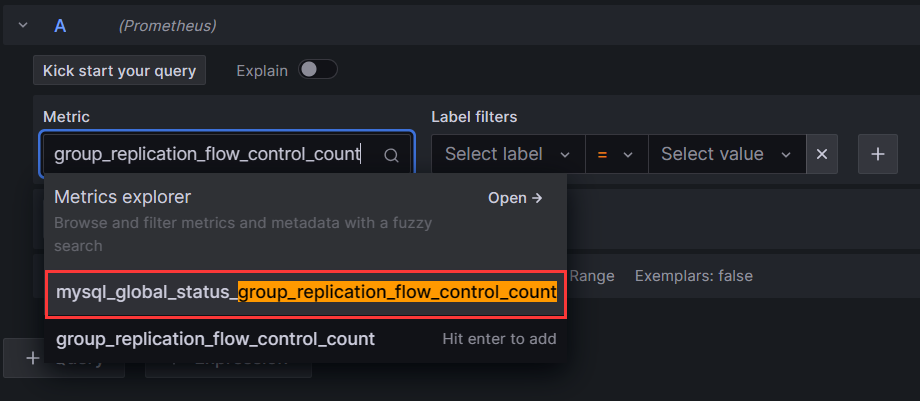
label标签
Label filters用于过滤和选择时间序列数据。它可以针对特定的标签值来选择显示哪些时间序列。
例如
instance="192.168.1.1:9090"表示只选择instance标签值为"192.168.1.1:9090"的时间序列。可以在Grafana的面板中使用Label filters字段来指定过滤条件,其作用主要包括:
- 选择特定实例的数据:如
instance="A"只看实例A的数据 - 查看特定模式匹配的实例:如
instance=~"10\\.8\\..*"选取符合模式的实例 - 查看某个状态的序列:
state="200"只看状态码为200的 - 组合多个标签进行过滤:
instance=~"1\\d\\.8\\..*",state!="500" - 也可以直接输入PromQL进行各种复杂过滤
Operations
Operations选项允许对查询结果进行各种操作,常用的操作及含义如下:
- Rate:计算计数器的增长速率,常用于计数器指标的速率转换,如QPS。
- Delta:计算时间序列的增量变化值。
- Derivative:计算时间序列的一阶导数,表示瞬时变化率。
- Integral:对时间序列求积分,计算面积图。
- Aggregation:对结果series做聚合,如平均,最大最小值等。
- Transform:进行数学变换,如log等。
- Aliasing:结果串进行重命名。
- Group by:分组归类。
我们可以选中Metric后,在Operations下拉列表中选择所需要的计算操作。这些操作无需修改PromQL查询语句,在结果集上进行,可以方便地衍生出新的时间序列。例如可以将 COUNTER 计数器转换为 QPS 速率等。这为Grafana提供了灵活的统计和分析能力。
添加完成参数后点击
Apply应用即可,回到界面上就可以看到刚刚添加的监控项了
记得要对整个仪表盘也保存,点击右上角图标如下所示,保存即可

也可以对表的情况进行监控,只需导入仪表盘ID
9625
至此,通过Prometheus监控GreatSQL到此结束,下部文章将介绍如何使用告警功能
使用Prometheus并不太好监控GreatSQL的MGR,推荐还是使用PMM来监控
欢迎阅读《使用PMM图形化监控MySQL MGR动态》https://mp.weixin.qq.com/s/8v94kxczl5m0MFcp_Dm87w
相关文章:
技术分享 | Prometheus+Grafana监控MySQL浅析➥https://mp.weixin.qq.com/s/Y8YHE7_oBPIfceV8HVywtw
Prometheus+Grafana+钉钉部署一个单机的MySQL监控告警系统➥https://mp.weixin.qq.com/s/vck-uD2mmZSQ-RvzU9b0ug
Enjoy GreatSQL :)
关于 GreatSQL
GreatSQL是适用于金融级应用的国内自主开源数据库,具备高性能、高可靠、高易用性、高安全等多个核心特性,可以作为MySQL或Percona Server的可选替换,用于线上生产环境,且完全免费并兼容MySQL或Percona Server。
相关链接: GreatSQL社区 Gitee GitHub Bilibili
GreatSQL社区:

社区有奖建议反馈: https://greatsql.cn/thread-54-1-1.html
社区博客有奖征稿详情: https://greatsql.cn/thread-100-1-1.html
(对文章有疑问或者有独到见解都可以去社区官网提出或分享哦~)
技术交流群:
微信&QQ群:
QQ群:533341697
微信群:添加GreatSQL社区助手(微信号:
wanlidbc)好友,待社区助手拉您进群。 -
相关阅读:
配置web&数据库开发环境
数据中台体系化建设核心方法论
【脏读、脏写、不可重复读、幻读】数据库数据并发产生的问题
【Go语言】(一)环境搭建与了解VScode工具
Jquery 通过class名称属性,匹配元素
链表的常见数据结构及题目
双11网络机顶盒哪个好?数码博主横评20款盘点网络机顶盒排名
Java关于由子类构造器生成的父类对象的反射问题
开发那些事儿:Linux系统中如何安装离线版本MySQL?
全局配置-window和tabBar
- 原文地址:https://blog.csdn.net/GreatSQL2021/article/details/133694617
