-
Go 存储系列:B+树存储引擎 boltdb
boltdb 介绍
boltdb是一个纯go编写的支持事务的文件型单机kv数据库
- 支持事务: boltdb数据库支持两类事务:读写事务、只读事务。这一点就和其他kv数据库有很大区别
- 文件型: boltdb所有的数据都是存储在磁盘上的,所以它属于文件型数据库。这里补充一下个人的理解,在某种维度来看,boltdb很像一个简陋版的innodb存储引擎。底层数据都存储在文件上,同时数据都涉及数据在内存和磁盘的转换。但不同的是,innodb在事务上的支持比较强大
- 单机: boltdb不是分布
例子
package main import ( "log" "github.com/boltdb/bolt" ) func main() { // 打开数据库文件 db, err := bolt.Open("./my.db", 0600, nil) if err != nil { panic(err) } defer db.Close() // 往db里面插入数据 err = db.Update(func(tx *bolt.Tx) error { //创建一个bucket(一系列的k/v集合,可嵌套) bucket, err := tx.CreateBucketIfNotExists([]byte("user")) if err != nil { log.Fatalf("CreateBucketIfNotExists err:%s", err.Error()) return err } //在bucket中放入一个k/v数据 if err = bucket.Put([]byte("hello"), []byte("world")); err != nil { log.Fatalf("bucket Put err:%s", err.Error()) return err } return nil }) if err != nil { log.Fatalf("db.Update err:%s", err.Error()) } // 从db里面读取数据 err = db.View(func(tx *bolt.Tx) error { //找到bucket bucket := tx.Bucket([]byte("user")) //找k/v数据 val := bucket.Get([]byte("hello")) log.Printf("the get val:%s", val) val = bucket.Get([]byte("hello2")) log.Printf("the get val2:%s", val) return nil }) if err != nil { log.Fatalf("db.View err:%s", err.Error()) } }- 1
- 2
- 3
- 4
- 5
- 6
- 7
- 8
- 9
- 10
- 11
- 12
- 13
- 14
- 15
- 16
- 17
- 18
- 19
- 20
- 21
- 22
- 23
- 24
- 25
- 26
- 27
- 28
- 29
- 30
- 31
- 32
- 33
- 34
- 35
- 36
- 37
- 38
- 39
- 40
- 41
- 42
- 43
- 44
- 45
- 46
- 47
- 48
1.打开数据库文件 2.开始一个事务 3.创建一个bucket(一系列的k/v集合,可嵌套) 4.在bucket中放入一个k/v数据 5.关闭事务- 1
- 2
- 3
- 4
- 5
- 6
- 7
每一系列的操作都是一次事务操作,要么是只读事务,要么是读写事务。每次对数据的增删改查操作都是基于bucket进行。
boltdb 结构
在boltdb中,一个db对应一个真实的磁盘文件。
而在具体的文件中,boltdb又是按照以page为单位来读取和写入数据的,也就是说所有的数据在磁盘上都是按照页(page)来存储的,而此处的页大小是保持和操作系统对应的内存页大小一致,也就是4k。
DB
这里只是把DB的一些重要属性列了出来
data,dataref:使用mmap 映射的实际 db 数据
meta0,meta1:元数据,存储数据库的元信息,例如空闲列表页id、放置桶的根页等
pageSize:页(page)大小
freelist:空闲列表页,所有已经可以重新利用的空闲页列表ids、将来很快被释放掉的事务关联的页列表pending、页id的缓存type DB struct { path string file *os.File // DB 文件 dataref []byte // mmap'ed readonly, write throws SEGV data *[maxMapSize]byte // 实际文件数据 meta0 *meta meta1 *meta pageSize int freelist *freelist // 操作文件 ops struct { writeAt func(b []byte, off int64) (n int, err error) } }- 1
- 2
- 3
- 4
- 5
- 6
- 7
- 8
- 9
- 10
- 11
- 12
- 13
- 14
- 15
- 16
- 17
meta
meta page 是 boltDB 实例元数据所在处,它告诉人们它是什么以及如何理解整个数据库文件,其结构如下:
type meta struct { magic uint32 version uint32 pageSize uint32 flags uint32 root bucket freelist pgid pgid pgid txid txid checksum uint64 }- 1
- 2
- 3
- 4
- 5
- 6
- 7
- 8
- 9
- 10
- 11
字段 说明 magic 一个生成好的 32 位随机数,用来确定该文件是一个 boltDB 实例的数据库文件(另一个文件起始位置拥有相同数据的可能性极低) version 表明该文件所属的 boltDB 版本,便于日后做兼容与迁移 page_size 上文提到的 PAGE_SIZE flags 保留字段,未使用 root boltDB 实例的所有索引及数据通过一种树形结构组织,而这个树形结构的根节点就是 root,也就是二叉树的根节点 freelist boltDB 在数据删除过程中可能出现剩余磁盘空间,这些空间会被分块记录在 freelist 中备用 pgid 下一个将要分配的 page id (已分配的所有 pages 的最大 id 加 1) txid 下一个将要分配的事务 id。事务 id 单调递增,是每个事务发生的逻辑时间,它在实现 boltDB 的并发访问控制中起到重要作用 checksum 用于确认 meta page 数据本身的完整性,保证读取的就是上一次正确写入的数据 为什么DB中有两份 meta page?这可以理解为一种本地容错方案:如果一个事务在 meta page 落盘的过程中崩溃,磁盘上的数据就可能处在不正确的状态,导致数据库文件不可用。因此 boltDB 准备了两份 meta page A 和 B,如果上次写入的是 A,这次就写入 B,反之亦然,以此保证发现一份 meta page 失效时,可以立即将数据恢复到另一个 meta page 表示的状态。下面这段代码就是说明上述情况
// meta retrieves the current meta page reference. func (db *DB) meta() *meta { // We have to return the meta with the highest txid which doesn't fail // validation. Otherwise, we can cause errors when in fact the database is // in a consistent state. metaA is the one with the higher txid. metaA := db.meta0 metaB := db.meta1 if db.meta1.txid > db.meta0.txid { metaA = db.meta1 metaB = db.meta0 } // Use higher meta page if valid. Otherwise fallback to previous, if valid. if err := metaA.validate(); err == nil { return metaA } else if err := metaB.validate(); err == nil { return metaB } // This should never be reached, because both meta1 and meta0 were validated // on mmap() and we do fsync() on every write. panic("bolt.DB.meta(): invalid meta pages")- 1
- 2
- 3
- 4
- 5
- 6
- 7
- 8
- 9
- 10
- 11
- 12
- 13
- 14
- 15
- 16
- 17
- 18
- 19
- 20
- 21
- 22
Page
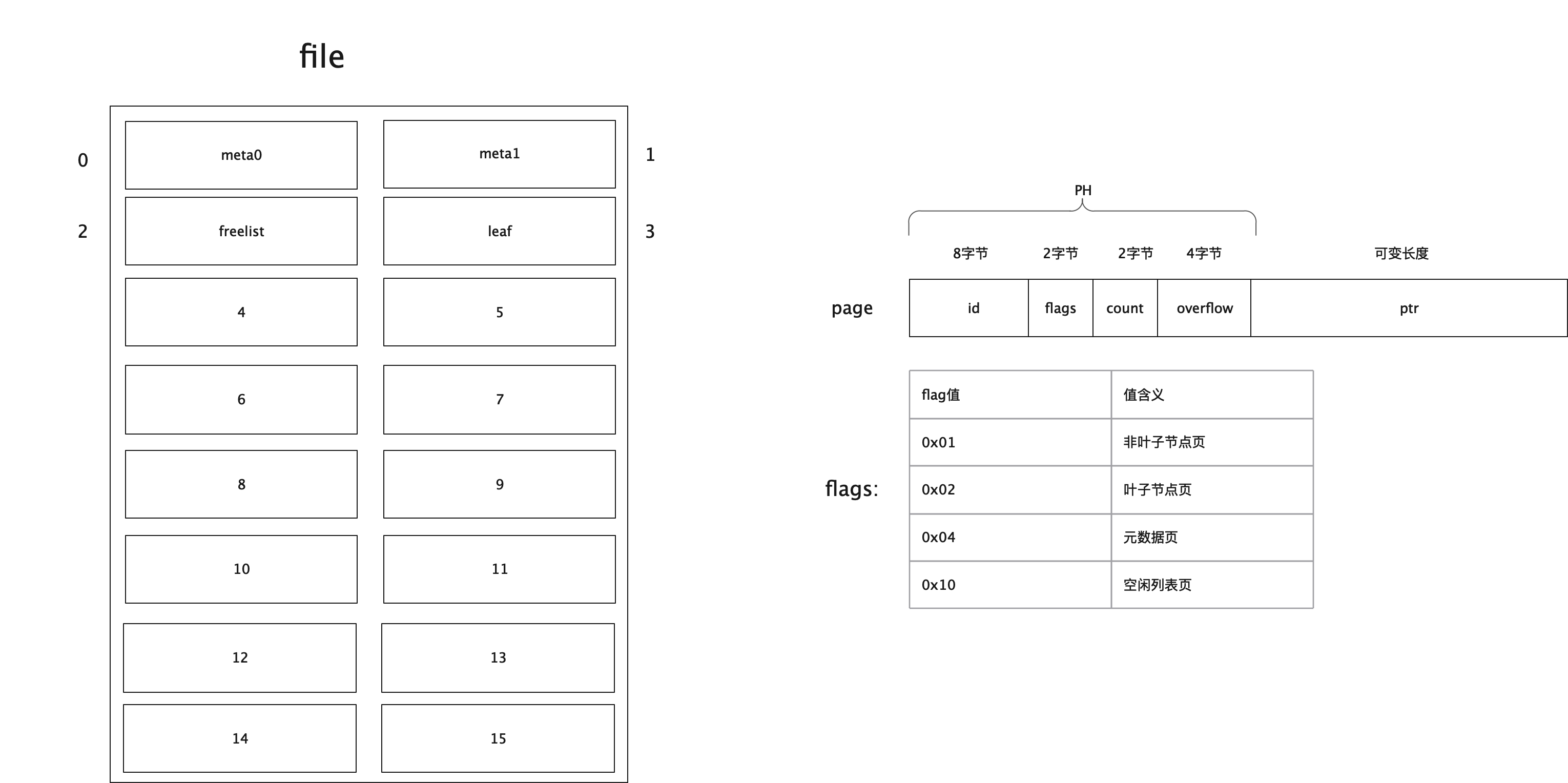
type pgid uint64 type page struct { // 页id 8字节 id pgid // flags:页类型,可以是分支,叶子节点,元信息,空闲列表 2字节,该值的取值详细参见下面描述 flags uint16 // 个数 2字节,统计叶子节点、非叶子节点、空闲列表页的个数 count uint16 // 4字节,数据是否有溢出,主要在空闲列表上有用 overflow uint32 // 真实的数据 ptr uintptr }- 1
- 2
- 3
- 4
- 5
- 6
- 7
- 8
- 9
- 10
- 11
- 12
- 13
其中,ptr是一个无类型指针,它就是表示每页中真实的存储的数据地址。而其余的几个字段(id、flags、count、overflow)是页头信息。
字段 说明 id page id flags 区分 page 类型的标识 count 记录 page 中的元素个数 overflow 当遇到体积巨大、单个 page 无法装下的数据时,会溢出到其它 pages,overflow 记录溢出数 ptr 指向 page 数据的内存地址,该字段仅在内存中存在 Bucket
在boltdb中,一个db对应底层的一个磁盘文件。一个db就像一个大柜子一样,其中可以被分隔多个小柜子,用来存储同类型的东西。每个小柜子在boltdb中就是Bucket了。bucket英文为桶。很显然按照字面意思来理解,它在生活中也是存放数据的一种容器。目前为了方便大家理解,在boltdb中的Bucket可以粗略的认为,它里面主要存放的内容就是我们的k/v键值对。
// 16 byte const bucketHeaderSize = int(unsafe.Sizeof(bucket{})) const ( minFillPercent = 0.1 maxFillPercent = 1.0 ) // DefaultFillPercent is the percentage that split pages are filled. // This value can be changed by setting Bucket.FillPercent. const DefaultFillPercent = 0.5 // Bucket represents a collection of key/value pairs inside the database. // 一组key/value的集合,也就是一个b+树 type Bucket struct { *bucket //在内联时bucket主要用来存储其桶的value并在后面拼接所有的元素,即所谓的内联 tx *Tx // the associated transaction buckets map[string]*Bucket // subbucket cache page *page // inline page reference,内联页引用 rootNode *node // materialized node for the root page. nodes map[pgid]*node // node cache // Sets the threshold for filling nodes when they split. By default, // the bucket will fill to 50% but it can be useful to increase this // amount if you know that your write workloads are mostly append-only. // // This is non-persisted across transactions so it must be set in every Tx. // 填充率 FillPercent float64 } // bucket represents the on-file representation of a bucket. // This is stored as the "value" of a bucket key. If the bucket is small enough, // then its root page can be stored inline in the "value", after the bucket // header. In the case of inline buckets, the "root" will be 0. type bucket struct { root pgid // page id of the bucket's root-level page sequence uint64 // monotonically incrementing, used by NextSequence() } // newBucket returns a new bucket associated with a transaction. func newBucket(tx *Tx) Bucket { var b = Bucket{tx: tx, FillPercent: DefaultFillPercent} if tx.writable { b.buckets = make(map[string]*Bucket) b.nodes = make(map[pgid]*node) } return b }- 1
- 2
- 3
- 4
- 5
- 6
- 7
- 8
- 9
- 10
- 11
- 12
- 13
- 14
- 15
- 16
- 17
- 18
- 19
- 20
- 21
- 22
- 23
- 24
- 25
- 26
- 27
- 28
- 29
- 30
- 31
- 32
- 33
- 34
- 35
- 36
- 37
- 38
- 39
- 40
- 41
- 42
- 43
node
node节点,既可能是叶子节点,也可能是根节点,也可能是分支节点。是物理磁盘上读取进来的页page的内存表现形式。
// node represents an in-memory, deserialized page. type node struct { bucket *Bucket // 关联一个桶 isLeaf bool unbalanced bool // 值为true的话,需要考虑页合并 spilled bool // 值为true的话,需要考虑页分裂 key []byte // 对于分支节点的话,保留的是最小的key pgid pgid // 分支节点关联的页id parent *node // 该节点的parent children nodes // 该节点的孩子节点 inodes inodes // 该节点上保存的索引数据 } // inode represents an internal node inside of a node. // It can be used to point to elements in a page or point // to an element which hasn't been added to a page yet. type inode struct { // 表示是否是子桶叶子节点还是普通叶子节点。如果flags值为1表示子桶叶子节点,否则为普通叶子节点 flags uint32 // 当inode为分支元素时,pgid才有值,为叶子元素时,则没值 pgid pgid key []byte // 当inode为分支元素时,value为空,为叶子元素时,才有值 value []byte } type inodes []inode- 1
- 2
- 3
- 4
- 5
- 6
- 7
- 8
- 9
- 10
- 11
- 12
- 13
- 14
- 15
- 16
- 17
- 18
- 19
- 20
- 21
- 22
- 23
- 24
- 25
整体结构
file 是 整理文件的结构,page 是页的结构,flags 是说明这一页存储的是什么数据
关系
刚刚我们提到了 DB,Bucket,Page,Node,那么他们之间的关系是什么样子的呢?

DB 中的操作其实是通过 TX(事物)进行操作的,每一个TX 都会拷贝当前的 meta 信息,也会拷贝当前的root bucket,bucket 中就会记录着每一个page 和 当前这些 page 有那一些node
// init initializes the transaction. func (tx *Tx) init(db *DB) { tx.db = db tx.pages = nil // Copy the meta page since it can be changed by the writer. tx.meta = &meta{} // 实现MVCC的关键,复制meta db.meta().copy(tx.meta) // Copy over the root bucket. tx.root = newBucket(tx) tx.root.bucket = &bucket{} *tx.root.bucket = tx.meta.root // Increment the transaction id and add a page cache for writable transactions. // 如果是写事物,则会记录当前这个TX的新增加的 page if tx.writable { tx.pages = make(map[pgid]*page) tx.meta.txid += txid(1) } }- 1
- 2
- 3
- 4
- 5
- 6
- 7
- 8
- 9
- 10
- 11
- 12
- 13
- 14
- 15
- 16
- 17
- 18
- 19
- 20
- 21
- 22
boltdb 读写流程
boltdb 的读写流程是通过 Cursor 来实现的,对于Cursor,你可以简单理解是 对Bucket这颗b+树的遍历工作,一个Bucket对象关联一个Cursor。
读写流程
写一个k/v 数据,写一个 key 的数据其实就是往 bucket
- 先获取到 c := b.Cursor()
- 通过 c.seek(key) 找到 key
- 写到 node 中去:c.node().put(key, key, value, 0, 0)
func (b *Bucket) Put(key []byte, value []byte) error { if b.tx.db == nil { return ErrTxClosed } else if !b.Writable() { return ErrTxNotWritable } else if len(key) == 0 { return ErrKeyRequired } else if len(key) > MaxKeySize { return ErrKeyTooLarge } else if int64(len(value)) > MaxValueSize { return ErrValueTooLarge } // Move cursor to correct position. c := b.Cursor() k, _, flags := c.seek(key) // Return an error if there is an existing key with a bucket value. if bytes.Equal(key, k) && (flags&bucketLeafFlag) != 0 { return ErrIncompatibleValue } // Insert into node. key = cloneBytes(key) c.node().put(key, key, value, 0, 0) return nil }- 1
- 2
- 3
- 4
- 5
- 6
- 7
- 8
- 9
- 10
- 11
- 12
- 13
- 14
- 15
- 16
- 17
- 18
- 19
- 20
- 21
- 22
- 23
- 24
- 25
- 26
- 27
- 28
在获取到这个 node 之前,这个node 的内存数据已经指向了磁盘文件中的一个page
// node creates a node from a page and associates it with a given parent. func (b *Bucket) node(pgid pgid, parent *node) *node { _assert(b.nodes != nil, "nodes map expected") // Retrieve node if it's already been created. if n := b.nodes[pgid]; n != nil { return n } // Otherwise create a node and cache it. n := &node{bucket: b, parent: parent} if parent == nil { b.rootNode = n } else { parent.children = append(parent.children, n) } // Use the inline page if this is an inline bucket. var p = b.page if p == nil { p = b.tx.page(pgid) } // Read the page into the node and cache it. n.read(p) // 这里的 p 就是内存磁盘数据 b.nodes[pgid] = n // Update statistics. b.tx.stats.NodeCount++ return n }- 1
- 2
- 3
- 4
- 5
- 6
- 7
- 8
- 9
- 10
- 11
- 12
- 13
- 14
- 15
- 16
- 17
- 18
- 19
- 20
- 21
- 22
- 23
- 24
- 25
- 26
- 27
- 28
- 29
- 30
- 31
- 32
- 33
事务实现
事务可以说是一个数据库必不可少的特性,对boltdb而言也不例外。我们都知道提到事务,必然会想到事务的四大特性 ACID。
ACID 的实现
- 原子性: 在boltdb中,数据先写内存,然后再提交时刷盘。如果其中有异常发生,事务就会回滚。同时再加上同一时间只有一个进行对数据执行写入操作。所以它要么写成功提交、要么写失败回滚。也就支持原子性了。
- 隔离性: TX 在初始化的时候会保留一整套完整的视图和元数据信息,彼此之间相互隔离。因此通过这两点就保证了隔离性。
- 持久性: boltdb是一个文件数据库,所有的数据最终都保存在文件中。当事务结束(Commit)时,会将数据进行刷盘。同时,boltdb通过冗余一份元数据来做容错。
当事务提交时,如果写入到一半机器挂了,此时数据就会有问题。而当boltdb再次恢复时,会对元数据进行校验和修复。这两点就保证事务中的持久性。
读写&只读事务
-
在boltdb中支持两类事务:读写事务、只读事务。同一时间有且只能有一个读写事务执行;但同一个时间可以允许有多个只读事务执行。每个事务都拥有自己的一套一致性视图。
-
事物由三个步骤:Begin,Commit,Rollback 分别是 开始,提交,回滚事物。
Begin
在读写事务中,开始事务时加锁,也就是db.rwlock.Lock()。在事务提交或者回滚时才释放锁:db.rwlock.UnLock()。同时也印证了我们前面说的,同一时刻只能有一个读写事务在执行。
// beginTx 只读事物 func (db *DB) beginTx() (*Tx, error) { // Lock the meta pages while we initialize the transaction. We obtain // the meta lock before the mmap lock because that's the order that the // write transaction will obtain them. db.metalock.Lock() // Obtain a read-only lock on the mmap. When the mmap is remapped it will // obtain a write lock so all transactions must finish before it can be // remapped. db.mmaplock.RLock() // Exit if the database is not open yet. if !db.opened { db.mmaplock.RUnlock() db.metalock.Unlock() return nil, ErrDatabaseNotOpen } // Create a transaction associated with the database. t := &Tx{} t.init(db) // Keep track of transaction until it closes. db.txs = append(db.txs, t) n := len(db.txs) // Unlock the meta pages. db.metalock.Unlock() // Update the transaction stats. db.statlock.Lock() db.stats.TxN++ db.stats.OpenTxN = n db.statlock.Unlock() return t, nil } // 读写事物 func (db *DB) beginRWTx() (*Tx, error) { // If the database was opened with Options.ReadOnly, return an error. if db.readOnly { return nil, ErrDatabaseReadOnly } // Obtain writer lock. This is released by the transaction when it closes. // This enforces only one writer transaction at a time. db.rwlock.Lock() // Once we have the writer lock then we can lock the meta pages so that // we can set up the transaction. db.metalock.Lock() defer db.metalock.Unlock() // Exit if the database is not open yet. if !db.opened { db.rwlock.Unlock() return nil, ErrDatabaseNotOpen } // Create a transaction associated with the database. t := &Tx{writable: true} t.init(db) db.rwtx = t // Free any pages associated with closed read-only transactions. var minid txid = 0xFFFFFFFFFFFFFFFF // 找到最小的事务id for _, t := range db.txs { if t.meta.txid < minid { minid = t.meta.txid } } if minid > 0 { // 将之前事务关联的page全部释放了,因为在只读事务中,没法释放,只读事务的页,因为可能当前的事务已经完成 ,但实际上其他的读事务还在用 db.freelist.release(minid - 1) } return t, nil }- 1
- 2
- 3
- 4
- 5
- 6
- 7
- 8
- 9
- 10
- 11
- 12
- 13
- 14
- 15
- 16
- 17
- 18
- 19
- 20
- 21
- 22
- 23
- 24
- 25
- 26
- 27
- 28
- 29
- 30
- 31
- 32
- 33
- 34
- 35
- 36
- 37
- 38
- 39
- 40
- 41
- 42
- 43
- 44
- 45
- 46
- 47
- 48
- 49
- 50
- 51
- 52
- 53
- 54
- 55
- 56
- 57
- 58
- 59
- 60
- 61
- 62
- 63
- 64
- 65
- 66
- 67
- 68
- 69
- 70
- 71
- 72
- 73
- 74
- 75
- 76
- 77
- 78
- 79
- 80
- 81
Commit
- 先判定节点要不要合并、分裂
- 对空闲列表的判断,是否存在溢出的情况,溢出的话,需要重新分配空间
- 将事务中涉及改动的页进行排序(保证尽可能的顺序IO),排序后循环写入到磁盘中,最后再执行刷盘
- 当数据写入成功后,再将元信息页写到磁盘中,刷盘以保证持久化
- 上述操作中,但凡有失败,当前事务都会进行回滚
func (tx *Tx) Commit() error { _assert(!tx.managed, "managed tx commit not allowed") if tx.db == nil { return ErrTxClosed } else if !tx.writable { return ErrTxNotWritable } // TODO(benbjohnson): Use vectorized I/O to write out dirty pages. // Rebalance nodes which have had deletions. var startTime = time.Now() // 删除时,进行平衡,页合并 tx.root.rebalance() if tx.stats.Rebalance > 0 { tx.stats.RebalanceTime += time.Since(startTime) } // spill data onto dirty pages. startTime = time.Now() if err := tx.root.spill(); err != nil { tx.rollback() return err } tx.stats.SpillTime += time.Since(startTime) // Free the old root bucket. tx.meta.root.root = tx.root.root opgid := tx.meta.pgid // Free the freelist and allocate new pages for it. This will overestimate // the size of the freelist but not underestimate the size (which would be bad). tx.db.freelist.free(tx.meta.txid, tx.db.page(tx.meta.freelist)) p, err := tx.allocate((tx.db.freelist.size() / tx.db.pageSize) + 1) if err != nil { tx.rollback() return err } // 将freelist写入到连续的新页中 if err := tx.db.freelist.write(p); err != nil { tx.rollback() return err } tx.meta.freelist = p.id // If the high water mark has moved up then attempt to grow the database. if tx.meta.pgid > opgid { if err := tx.db.grow(int(tx.meta.pgid+1) * tx.db.pageSize); err != nil { tx.rollback() return err } } // Write dirty pages to disk. startTime = time.Now() // 写入变动的数据 if err := tx.write(); err != nil { tx.rollback() return err } // If strict mode is enabled then perform a consistency check. // Only the first consistency error is reported in the panic. if tx.db.StrictMode { ch := tx.Check() var errs []string for { err, ok := <-ch if !ok { break } errs = append(errs, err.Error()) } if len(errs) > 0 { panic("check fail: " + strings.Join(errs, "\n")) } } // Write meta to disk. if err := tx.writeMeta(); err != nil { tx.rollback() return err } tx.stats.WriteTime += time.Since(startTime) // Finalize the transaction. tx.close() // Execute commit handlers now that the locks have been removed. for _, fn := range tx.commitHandlers { fn() } return nil } // write writes any dirty pages to disk. func (tx *Tx) write() error { // Sort pages by id. pages := make(pages, 0, len(tx.pages)) for _, p := range tx.pages { pages = append(pages, p) } // Clear out page cache early. tx.pages = make(map[pgid]*page) sort.Sort(pages) // Write pages to disk in order. for _, p := range pages { size := (int(p.overflow) + 1) * tx.db.pageSize offset := int64(p.id) * int64(tx.db.pageSize) // Write out page in "max allocation" sized chunks. ptr := (*[maxAllocSize]byte)(unsafe.Pointer(p)) for { // Limit our write to our max allocation size. sz := size if sz > maxAllocSize-1 { sz = maxAllocSize - 1 } // Write chunk to disk. buf := ptr[:sz] if _, err := tx.db.ops.writeAt(buf, offset); err != nil { return err } // Update statistics. tx.stats.Write++ // Exit inner for loop if we've written all the chunks. size -= sz if size == 0 { break } // Otherwise move offset forward and move pointer to next chunk. offset += int64(sz) ptr = (*[maxAllocSize]byte)(unsafe.Pointer(&ptr[sz])) } } // Ignore file sync if flag is set on DB. if !tx.db.NoSync || IgnoreNoSync { if err := fdatasync(tx.db); err != nil { return err } } // Put small pages back to page pool. for _, p := range pages { // Ignore page sizes over 1 page. // These are allocated using make() instead of the page pool. if int(p.overflow) != 0 { continue } buf := (*[maxAllocSize]byte)(unsafe.Pointer(p))[:tx.db.pageSize] // See https://go.googlesource.com/go/+/f03c9202c43e0abb130669852082117ca50aa9b1 for i := range buf { buf[i] = 0 } tx.db.pagePool.Put(buf) } return nil }- 1
- 2
- 3
- 4
- 5
- 6
- 7
- 8
- 9
- 10
- 11
- 12
- 13
- 14
- 15
- 16
- 17
- 18
- 19
- 20
- 21
- 22
- 23
- 24
- 25
- 26
- 27
- 28
- 29
- 30
- 31
- 32
- 33
- 34
- 35
- 36
- 37
- 38
- 39
- 40
- 41
- 42
- 43
- 44
- 45
- 46
- 47
- 48
- 49
- 50
- 51
- 52
- 53
- 54
- 55
- 56
- 57
- 58
- 59
- 60
- 61
- 62
- 63
- 64
- 65
- 66
- 67
- 68
- 69
- 70
- 71
- 72
- 73
- 74
- 75
- 76
- 77
- 78
- 79
- 80
- 81
- 82
- 83
- 84
- 85
- 86
- 87
- 88
- 89
- 90
- 91
- 92
- 93
- 94
- 95
- 96
- 97
- 98
- 99
- 100
- 101
- 102
- 103
- 104
- 105
- 106
- 107
- 108
- 109
- 110
- 111
- 112
- 113
- 114
- 115
- 116
- 117
- 118
- 119
- 120
- 121
- 122
- 123
- 124
- 125
- 126
- 127
- 128
- 129
- 130
- 131
- 132
- 133
- 134
- 135
- 136
- 137
- 138
- 139
- 140
- 141
- 142
- 143
- 144
- 145
- 146
- 147
- 148
- 149
- 150
- 151
- 152
- 153
- 154
- 155
- 156
- 157
- 158
- 159
- 160
- 161
- 162
- 163
- 164
- 165
- 166
- 167
- 168
- 169
Rollback
Rollback()中,主要对不同事务进行不同操作:
- 如果当前事务是只读事务,则只需要从db中的txs中找到当前事务,然后移除掉即可。
- 如果当前事务是读写事务,则需要将空闲列表中和该事务关联的页释放掉,同时重新从freelist中加载空闲页。
// Rollback closes the transaction and ignores all previous updates. Read-only // transactions must be rolled back and not committed. func (tx *Tx) Rollback() error { _assert(!tx.managed, "managed tx rollback not allowed") if tx.db == nil { return ErrTxClosed } tx.rollback() return nil } func (tx *Tx) rollback() { if tx.db == nil { return } if tx.writable { // 移除该事务关联的pages tx.db.freelist.rollback(tx.meta.txid) // 重新从freelist页中读取构建空闲列表 tx.db.freelist.reload(tx.db.page(tx.db.meta().freelist)) } tx.close() } func (tx *Tx) close() { if tx.db == nil { return } if tx.writable { // Grab freelist stats. var freelistFreeN = tx.db.freelist.free_count() var freelistPendingN = tx.db.freelist.pending_count() var freelistAlloc = tx.db.freelist.size() // Remove transaction ref & writer lock. tx.db.rwtx = nil tx.db.rwlock.Unlock() // Merge statistics. tx.db.statlock.Lock() tx.db.stats.FreePageN = freelistFreeN tx.db.stats.PendingPageN = freelistPendingN tx.db.stats.FreeAlloc = (freelistFreeN + freelistPendingN) * tx.db.pageSize tx.db.stats.FreelistInuse = freelistAlloc tx.db.stats.TxStats.add(&tx.stats) tx.db.statlock.Unlock() } else { // 只读事务 tx.db.removeTx(tx) } // Clear all references. tx.db = nil tx.meta = nil tx.root = Bucket{tx: tx} tx.pages = nil } // removeTx removes a transaction from the database. func (db *DB) removeTx(tx *Tx) { // Release the read lock on the mmap. db.mmaplock.RUnlock() // Use the meta lock to restrict access to the DB object. db.metalock.Lock() // Remove the transaction. for i, t := range db.txs { if t == tx { last := len(db.txs) - 1 db.txs[i] = db.txs[last] db.txs[last] = nil db.txs = db.txs[:last] break } } n := len(db.txs) // Unlock the meta pages. db.metalock.Unlock() // Merge statistics. db.statlock.Lock() db.stats.OpenTxN = n db.stats.TxStats.add(&tx.stats) db.statlock.Unlock() }- 1
- 2
- 3
- 4
- 5
- 6
- 7
- 8
- 9
- 10
- 11
- 12
- 13
- 14
- 15
- 16
- 17
- 18
- 19
- 20
- 21
- 22
- 23
- 24
- 25
- 26
- 27
- 28
- 29
- 30
- 31
- 32
- 33
- 34
- 35
- 36
- 37
- 38
- 39
- 40
- 41
- 42
- 43
- 44
- 45
- 46
- 47
- 48
- 49
- 50
- 51
- 52
- 53
- 54
- 55
- 56
- 57
- 58
- 59
- 60
- 61
- 62
- 63
- 64
- 65
- 66
- 67
- 68
- 69
- 70
- 71
- 72
- 73
- 74
- 75
- 76
- 77
boltDB 的 MVCC 实现
数据库通常需要能够并发处理多个正在进行的只读事务和读写事务,但如果没能处理好 ”新写入的数据什么时候对哪些事务可见“ 的问题,就会导致读取的数据前后不一致。数据库的使用者通常会认为数据库中的数据应该是”突变”的,这种“突变”用计算机语言来描述,就是:数据库状态以读写事务为单位,进行原子性变化。
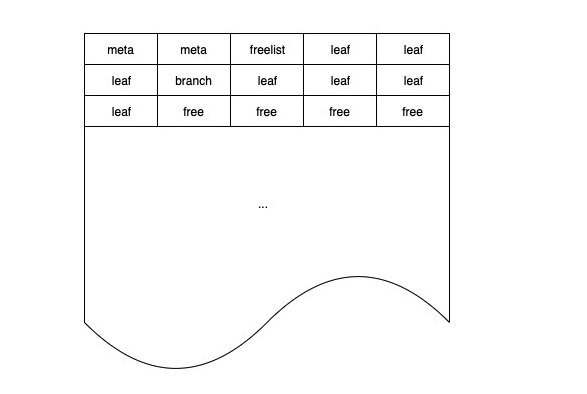
boltDB 将数据库文件分成大小相等的若干块,每块是一个 page,如下图所示:
meta page
meta page 存储数据库的元信息,包括 root bucket 等。在读写事务执行过程中,可能在增删改键值数据的过程中修改 root bucket,引起 meta page 的变化。因此在初始化事务时,每个事务都需要复制一份独立 meta,以防止读写事务的执行影响到只读事务。
freelist page
freelist 负责记录整个实例的可分配 page 信息,在读写事务执行过程中,会从 freelist 中申请新的 pages,也会释放 pages 到 freelist 中,引起 freelist page 的变化。由于 boltDB 只允许一个读写事务同时进行,且只有读写事务需要访问 freelist page,因此 freelist page 全局只存一份即可,无需复制。
mmap
在数据存储层一节中介绍过,boltDB 将数据的读缓冲托管给 mmap。每个只读事务在启动时需要获取 mmap 的读锁,保证所读取数据的正确性;当读写事务申请新 pages 时,可能出现当前 mmap 的空间不足,需要重新 mmap 的情况,这时读写事务就需要获取 mmap 的写锁,这时就需要等待所有只读事务执行完毕后才能继续。因此 boltDB 也建议用户,如果可能出现长时间的只读事务,务必将 mmap 的初始大小调高一些。
版本号
每当 boltDB 执行新的读写事务,就有可能产生新版本的数据,因此只要读写事务的 id 是单调递增的,就可以利用事务 id 作为数据的版本号。
参考
-
相关阅读:
HTTP头部信息解释分析(详细整理)(转载)
Linux vi/vim
IDEA中maven的设置以及相关功能
Java三大版本及 JVM JDK JRE 及 SDK API
c 各种例子
Nginx人门详解
Servlet和拦截器Filter
操作系统知识点梳理-进程线程
语法基础(变量、输入输出、表达式与顺序语句)
数据结构-栈和队列力扣题
- 原文地址:https://blog.csdn.net/baidu_32452525/article/details/133646565