-
springcloud之项目实战搭建单体
写在前面
在上篇文章 中我们介绍了项目的整体内容以及架构,本文就开始实现一个单体的版本,在之后的文章中,在使用springcloud相关组件将这个单体的版本一步步的拆分为微服务的版本,在开始之前再贴下组件图:

本文我们分别来实现这四个组件。
源码 。
1:优惠券模板服务
完成后结构如下图:

1.1:api
定义服务请求和相应需要用到的公共的beans,单独定义的好处是,如果需要用到的话,单独引用即可,不需要引入其他不需要的类。
首先来定义优惠券类型的枚举:@Getter @AllArgsConstructor public enum CouponType { UNKNOWN("unknown", "0"), MONEY_OFF("满减券", "1"), DISCOUNT("打折", "2"), RANDOM_DISCOUNT("随机减", "3"), LONELY_NIGHT_MONEY_OFF("晚间双倍优惠券", "4"); private String description; // 存在数据库里的最终code private String code; public static CouponType convert(String code) { // .orElse(UNKNOWN) 避免有人使坏 return Stream.of(values()) .filter(bean -> bean.code.equalsIgnoreCase(code)) .findFirst() .orElse(UNKNOWN); } }- 1
- 2
- 3
- 4
- 5
- 6
- 7
- 8
- 9
- 10
- 11
- 12
- 13
- 14
- 15
- 16
- 17
- 18
- 19
- 20
- 21
然后定义优惠券模板类:
@Data @NoArgsConstructor @AllArgsConstructor @Builder public class CouponTemplateInfo { private Long id; @NotNull private String name; // 优惠券描述 @NotNull private String desc; // 优惠券类型 @NotNull private String type; // 适用门店 - 若无则为全店通用券 private Long shopId; /** 优惠券规则 */ @NotNull private TemplateRule rule; private Boolean available; }- 1
- 2
- 3
- 4
- 5
- 6
- 7
- 8
- 9
- 10
- 11
- 12
- 13
- 14
- 15
- 16
- 17
- 18
- 19
- 20
- 21
- 22
- 23
- 24
- 25
- 26
- 27
- 28
- 29
优惠券类:
@Data @NoArgsConstructor @AllArgsConstructor @Builder public class CouponInfo { private Long id; private Long templateId; private Long userId; private Long shopId; private Integer status; private CouponTemplateInfo template; }- 1
- 2
- 3
- 4
- 5
- 6
- 7
- 8
- 9
- 10
- 11
- 12
- 13
- 14
- 15
- 16
- 17
- 18
- 19
具体的参考源码。
1.2:dao
采用spring data jpa
约定由于配置,提高生产力!。dao继承JpaRepositry,拥有基础的增删改查功能:/** * coupon_template 表的spring data jpa(构建在hibernate之上的db操作框架)接口 * https://blog.csdn.net/wang0907/article/details/131550318 */ public interface CouponTemplateDao extends JpaRepository<CouponTemplate, Long> { // 根据Shop ID查询出所有券模板 List<CouponTemplate> findAllByShopId(Long shopId); // IN查询 + 分页支持的语法 Page<CouponTemplate> findAllByIdIn(List<Long> Id, Pageable page); // 根据shop ID + 可用状态查询店铺有多少券模板 Integer countByShopIdAndAvailable(Long shopId, Boolean available); // 将优惠券设置为不可用 @Modifying @Query("update CouponTemplate c set c.available = 0 where c.id = :id") int makeCouponUnavailable(@Param("id") Long id); }- 1
- 2
- 3
- 4
- 5
- 6
- 7
- 8
- 9
- 10
- 11
- 12
- 13
- 14
- 15
- 16
- 17
- 18
- 19
- 20
- 21
1.3:controller
定义模板模块对外的接口:
@Slf4j @RestController @RequestMapping("/template") public class CouponTemplateController { @Autowired private CouponTemplateService couponTemplateService; // 创建优惠券 @PostMapping("/addTemplate") public CouponTemplateInfo addTemplate(@Valid @RequestBody CouponTemplateInfo request) { log.info("Create coupon template: data={}", request); return couponTemplateService.createTemplate(request); } ... }- 1
- 2
- 3
- 4
- 5
- 6
- 7
- 8
- 9
- 10
- 11
- 12
- 13
- 14
- 15
- 16
我们先来通过地址
http://localhost:20000/template/addTemplate添加几张优惠券:- 满减券

{"name":"全场满10减1元","desc":"满减券描述,每人限制最多10张","type":"1","total":100,"available":true,"rule":{"limitation":10,"discount":{"quota":10,"threshold":1000}}}- 1
- 晚间随机立减
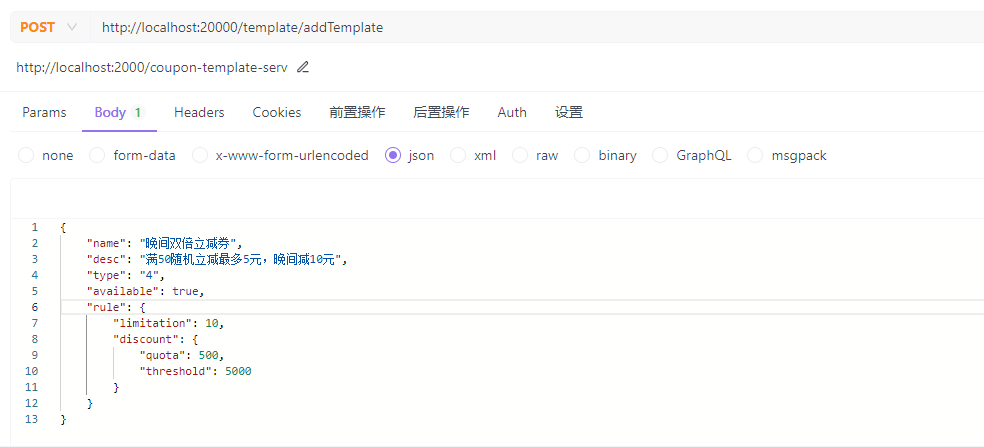
{"name":"晚间双倍立减券","desc":"满50随机立减最多5元,晚间减10元","type":"4","available":true,"rule":{"limitation":10,"discount":{"quota":500,"threshold":5000}}}- 1
- 随机立减
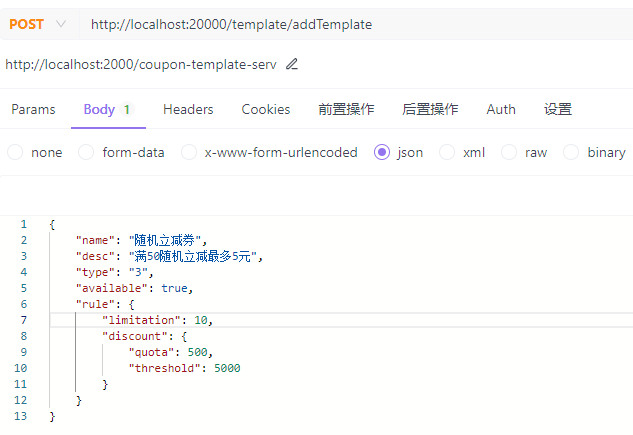
{"name":"随机立减券","desc":"满50随机立减最多5元","type":"3","available":true,"rule":{"limitation":10,"discount":{"quota":500,"threshold":5000}}}- 1
- 打折券

{"name":"打折券满10元打9折","desc":"每人限制最多10张","type":"2","available":true,"rule":{"limitation":10,"discount":{"quota":90,"threshold":1000}}}- 1

测试如下,则为成功:

2:优惠券计算模块

2.1:api
定义其他模块可能用到的pojo,具体参考源码。
2.2:calculator
具体计算模块,定义各种优惠券的计算服务,主要的技术点是采用了模板方法设计模式 ,类图如下:

具体参考源码。
测试如下,则为成功:

json:
{"products":[{"price":3000,"count":2,"shopId":3},{"price":1000,"count":4,"shopId":1}],"couponId":10,"couponInfos":[{"id":10,"templateId":2,"userId":null,"shopId":null,"template":{"name":"单店满减","desc":"满40减5","type":"1","available":true,"shopId":1,"rule":{"limitation":10,"discount":{"quota":500,"threshold":4000}}}}],"userId":1}- 1
3:用户服务

在pom中需要引入template和calculator,这样我们就有了一个
三合一的单体应用了(后面我们来一起改造它!!!)。3.1:api
定义用到的pojo,具体看源码。
3.2:dao
具体看源码。
3.2:impl
定义接口,服务层代码,定义用户领券,删除券等操作,如下用户领券代码:
@PostMapping("requestCoupon") public Coupon requestCoupon(@Valid @RequestBody RequestCoupon request) { return customerService.requestCoupon(request); }- 1
- 2
- 3
- 4
启动后测试
领券:{ "userId": 1, "couponTemplateId": 2 }- 1
- 2
- 3
- 4

优惠券试算:{ "products": [ { "price": 3000, "count": 2, "shopId": 3 }, { "price": 1000, "count": 10, "shopId": 1 } ], "couponIDs": [ 1 ], "userId": 1 }- 1
- 2
- 3
- 4
- 5
- 6
- 7
- 8
- 9
- 10
- 11
- 12
- 13
- 14
- 15
- 16
- 17
- 18

这样我们的一个
单体应用就完成了,掌声!!!4:平台组件
写在后面
参考文章列表
-
相关阅读:
纵享丝滑!Cesium + ffmpegserver 生成高质量动态视频【逐帧生成】
springboot+java大学生新生入学报到报道系统+jsp004
Espresso Test 3: Fragment Test
类与对象(上篇)
如何快速将Zabbix5.0升级至6.0?
图生视频模型训练数据集
记一次内部分享——瞎扯淡
tensorflow的数据类型
ROS机器人实战,对标古月老师HRMRP机器人(一)——机器人总体方案设计
React的受控组件和非受控组件
- 原文地址:https://blog.csdn.net/wang0907/article/details/133272271

- 最新文章
-
【FHE】我们如何实现同态加密推理(八):SiLU 的密文化——两条路径,和一个 8 字节的开关
SQLcl 中 c/old/new 替换变量为何失效?先定位再替换
不让模型写作文,直接从它脑子里读答案:Jev 决策在 .NET 的两条路线
Halo插件:支持GitHub的图床附件策略
电视投屏界的“一股清流”!SimpleTVCast 6.0.0-beta 抢先体验:无需TV端App,界面大换血!✨
华三VXLAN集中式网关实战指南:Spine多活网关 + 双活接入(M-LAG)
软件更好写之后口碑会更重要
大 O、大 Omega、大 Theta 的区别,O(n) 复杂度是什么意思
Java标签跳转:一个鲜为人知但却很实用的小技巧
多智能体系统论文速读