-
IIS部署Flask
启用 CGI
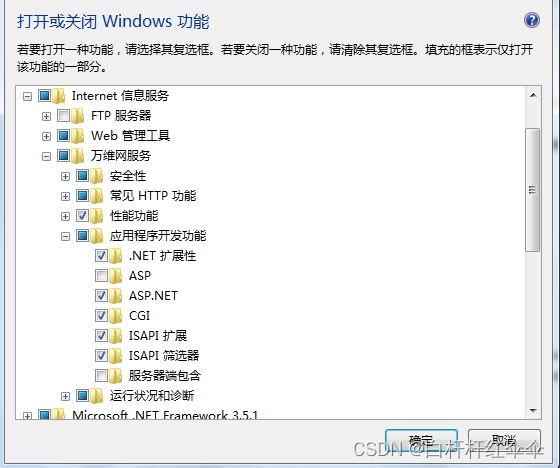
安装wfastcgi
pip install wfastcgi
启用 wfastcgi
首先以管理员身份运行wfastcgi-enable来在IIS上启用wfastcgi,这个命令位于c:\python_dir\scripts,也就是你需要确保此目录在系统的PATH里,或者你需要cd到这个目录后再执行。
# cd to python_dir\scripts if it is not in PATH
wfastcgi-enable
记住命令执行成功后返回的信息:
C:\Python34\Scripts> wfastcgi-enable
Applied configuration changes to section “system.webServer/fastCgi” for “MACHINE/WEBROOT/APPHOST” at configuration commit path “MACHINE/WEBROOT/APPHOST”
“C:\Python34\python.exe|C:\Python34\lib\site-packages\wfastcgi.py” can now be used as a FastCGI script processor
“C:Python34python.exe|C:Python34libsite-packageswfastcgi.py” 在下文的配置文件中需要使用。
Tips: 使用命令 wfastcgi-disable 可以将其移除。
创建 web.config 文件
下面是一个web.config文件的例子,你只需要修改对应部分就可以使用。
<configuration> <system.webServer> <handlers> <add name="FlaskFastCGI" path="*" verb="*" modules="FastCgiModule" scriptProcessor="C:\Python34\python.exe|C:\Python34\lib\site-packages\wfastcgi.py" resourceType="Unspecified" requireAccess="Script" /> handlers> <security> <requestFiltering allowDoubleEscaping="true">requestFiltering> security> system.webServer> <appSettings> <add key="WSGI_HANDLER" value="hello.app" /> <add key="PYTHONPATH" value="~/" /> <add key="WSGI_LOG" value="C:\logs\oboeqa_web.log" /> <add key="WSGI_RESTART_FILE_REGEX" value="" /> appSettings> configuration>- 1
- 2
- 3
- 4
- 5
- 6
- 7
- 8
- 9
- 10
- 11
- 12
- 13
- 14
- 15
- 16
- 17
- 18
- 19
- 20
- 21
- 22
- 23
- 24
- 25
- 26
- 27
- 28
IIS 创建站点(方法同asp.net站点部署相同)
添加映射模块
选择站点下的映射模块
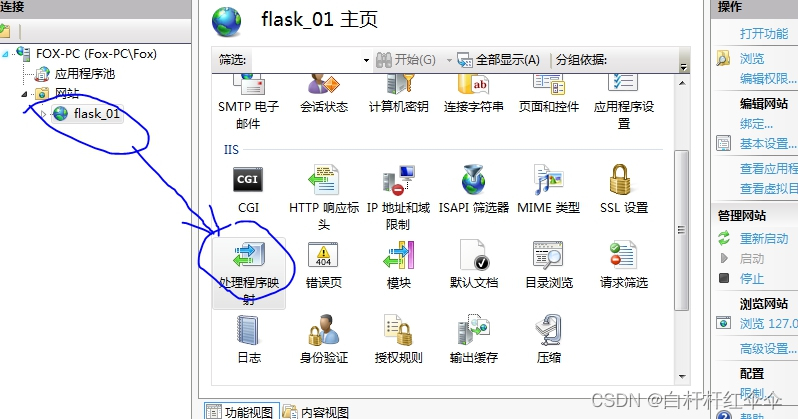
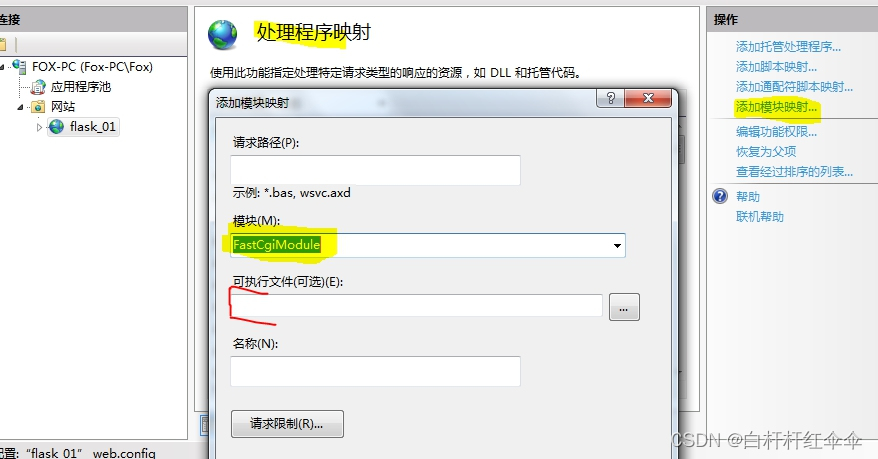
模块必须选择FastCgiModule
可执行程序选择wfastcgi-enable输出的路径
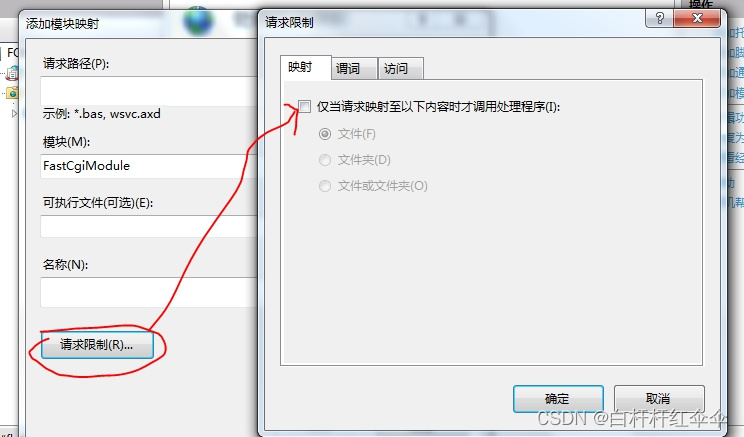
去掉映射下的复选框
保存后会在web.config中增加一条新的handlers记录,把原来的删掉就可以
注意事项:
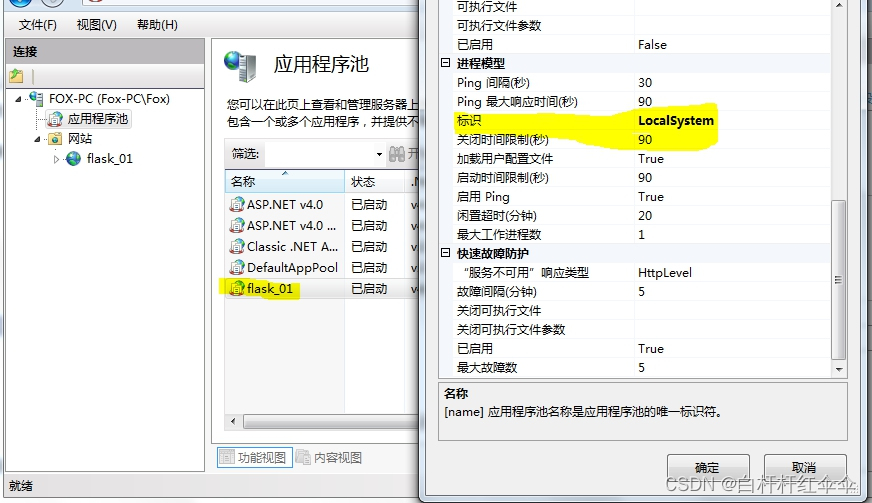
在II8.0及以上版本会出现权限问题,需要修改应用程序池的标识为 localSystem
-
相关阅读:
字符串的使用
无人值守的好帮手| 周界雷视声光报警柱工勘配置指导
SW曲面实体导出工程图
Redis第一篇之基础入门,可以快速上手进行一些基础的操作
论文阅读《Robust Monocular Depth Estimation under Challenging Conditions》
asp.net core webapi signalR通信
大模型的全面回顾,看透大模型 | A Comprehensive Overview of Large Language Models
记一次难忘的大厂面试经历
机器学习实操1
Python学习六
- 原文地址:https://blog.csdn.net/qq_27953479/article/details/133648735
