-
【红外图像增强】基于引力和侧向抑制网络的红外图像增强模型(Matlab代码实现)
💥💥💞💞欢迎来到本博客❤️❤️💥💥
🏆博主优势:🌞🌞🌞博客内容尽量做到思维缜密,逻辑清晰,为了方便读者。
⛳️座右铭:行百里者,半于九十。
📋📋📋本文目录如下:🎁🎁🎁
目录

💥1 概述
一种基于引力和侧向抑制网络的图像增强新算法.
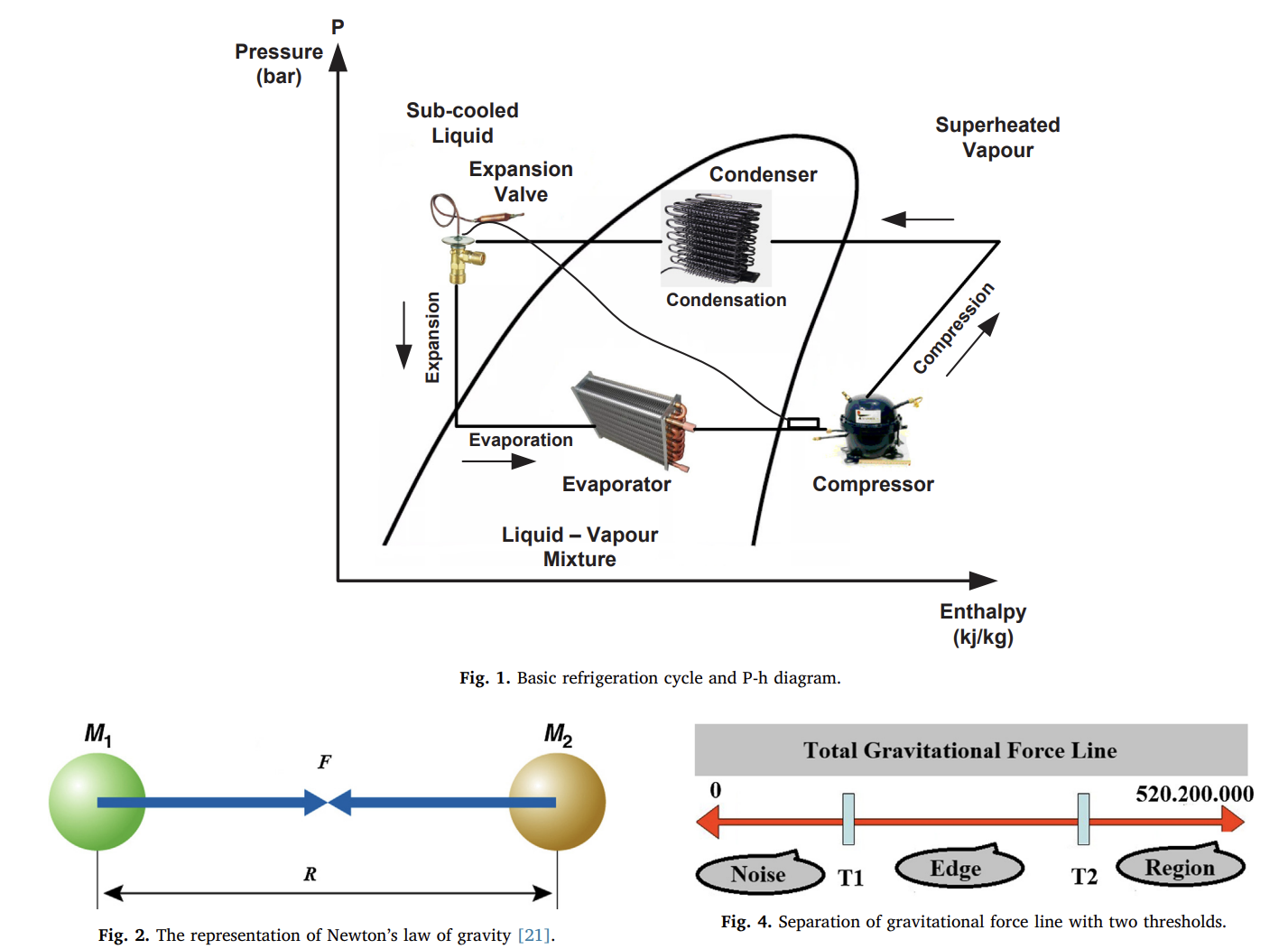
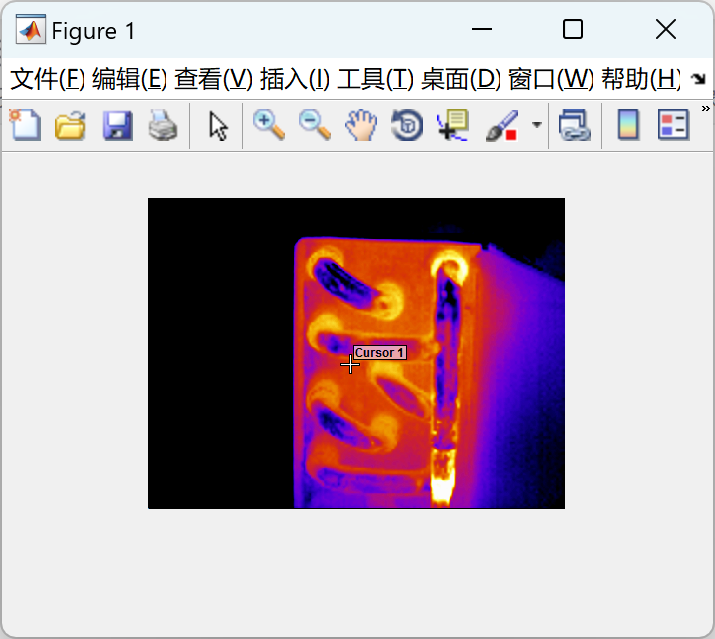
红外热像仪产生的彩色红外图像中经常会遇到低对比度、噪点和边缘模糊等问题。针对这些问题,我们提出了一种基于引力和横向抑制网络的图像增强算法。
文献:

摘要:
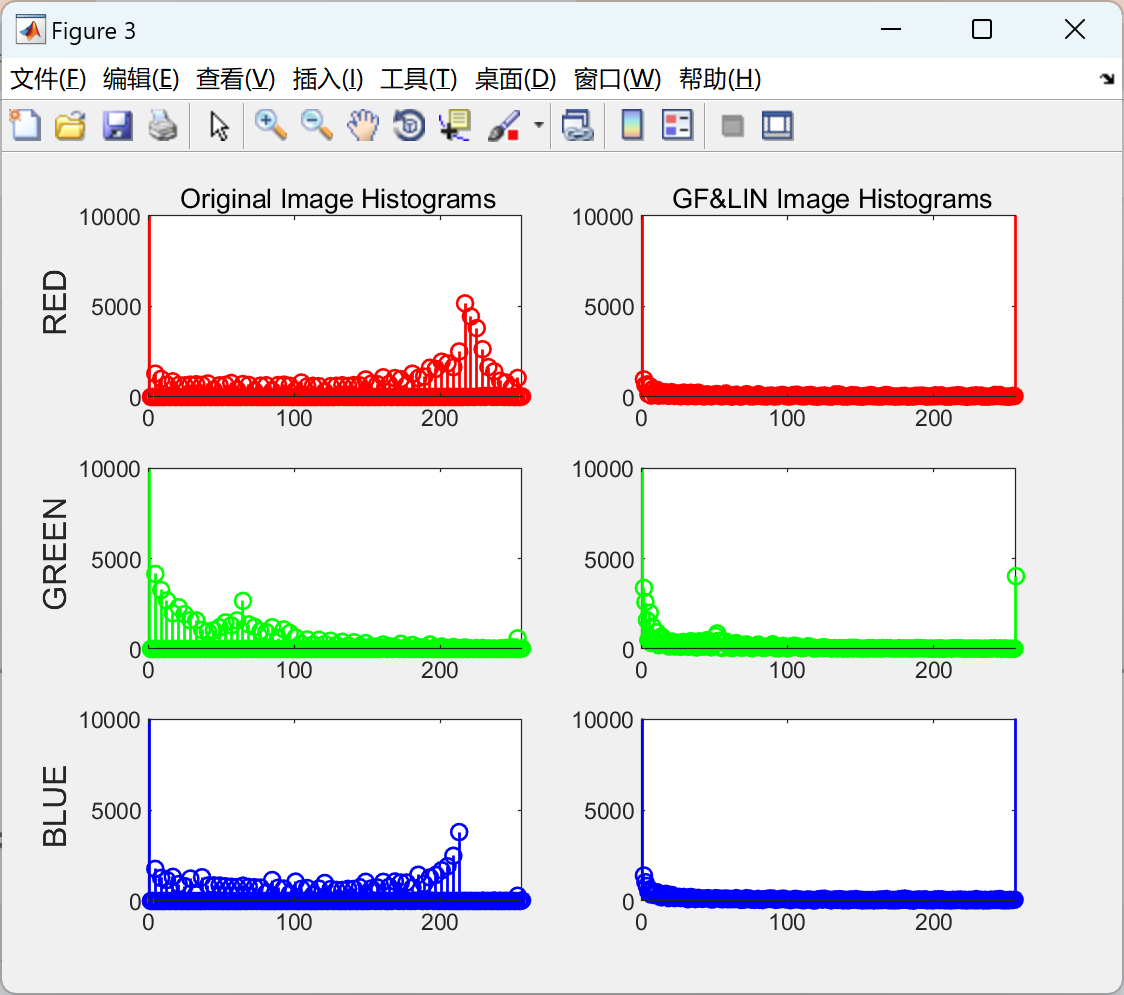
红外热像仪产生的彩色红外图像中经常会遇到低对比度、噪点和边缘模糊等问题。针对这些问题,我们提出了一种基于引力和横向抑制网络的图像增强算法。首先,获得彩色红外图像各维的总引力信息。这些使用三维颜色属性获得的二维三灰度图像有助于定义每个维度内的噪声、边缘和区域。其次,对这3张灰度图像进行双重阈值的约束。使用均值滤波器降低噪声,使用横向抑制网络进行分辨率和边缘检测,使用区域重力因子进行对比度控制。最后,再次组合每个维度并生成颜色增强图像。本研究旨在开发一种用于冷却系统中红外图像分析的增强图像的方法。研究中使用的图像由压缩机、冷凝器和属于冷却系统的蒸发器组成。我们的方法的实现简单易懂,并产生更准确的结果。实验结果表明,所提方法能够消除噪声、模糊和低对比度,并且比其他方法更能改善红外图像的细节。
关键词:
📚2 运行结果

部分代码:
- function varargout = rgbhist(I,Iout)
- %RGBHIST Histogram of RGB values.
- if (size(I, 3) ~= 3)
- error('rgbhist:numberOfSamples', 'Input image must be RGB.')
- end
- if (size(Iout, 3) ~= 3)
- error('rgbhist:numberOfSamples', 'Input image must be RGB.')
- end
- nBins = 256;
- rHist = imhist(I(:,:,1), nBins);
- gHist = imhist(I(:,:,2), nBins);
- bHist = imhist(I(:,:,3), nBins);
- rHist_out = imhist(Iout(:,:,1), nBins);
- gHist_out = imhist(Iout(:,:,2), nBins);
- bHist_out = imhist(Iout(:,:,3), nBins);
- %Input image curves
- subplot(3,2,1);
- h(1) = stem(1:256, rHist);
- axis ([0 256 0 10000])
- ylabel('\fontsize{12} RED');
- title(['\fontsize{10} Original Image Histograms']);
- subplot(3,2,3)
- h(2) = stem(1:256, gHist);
- axis ([0 256 0 10000])
- ylabel('\fontsize{12} GREEN');
- subplot(3,2,5)
- h(3) = stem(1:256, bHist);
- axis ([0 256 0 10000])
- ylabel('\fontsize{12} BLUE');
- set(h(1),'Color','r','LineWidth',1)
- set(h(2),'Color','g','LineWidth',1)
- set(h(3),'Color','b','LineWidth',1)
- %Output image curves
- subplot(3,2,2);
- h(4) = stem(1:256, rHist_out);
- axis ([0 256 0 10000])
- title(['\fontsize{10} GF&LIN Image Histograms']);
- subplot(3,2,4)
- h(5) = stem(1:256, gHist_out);
- axis ([0 256 0 10000])
- subplot(3,2,6)
- h(6) = stem(1:256, bHist_out);
- axis ([0 256 0 10000])
- set(h(4),'Color','r','LineWidth',1)
- set(h(5),'Color','g','LineWidth',1)
- set(h(6),'Color','b','LineWidth',1)
function varargout = rgbhist(I,Iout)
%RGBHIST Histogram of RGB values.if (size(I, 3) ~= 3)
error('rgbhist:numberOfSamples', 'Input image must be RGB.')
end
if (size(Iout, 3) ~= 3)
error('rgbhist:numberOfSamples', 'Input image must be RGB.')
end
nBins = 256;rHist = imhist(I(:,:,1), nBins);
gHist = imhist(I(:,:,2), nBins);
bHist = imhist(I(:,:,3), nBins);rHist_out = imhist(Iout(:,:,1), nBins);
gHist_out = imhist(Iout(:,:,2), nBins);
bHist_out = imhist(Iout(:,:,3), nBins);%Input image curves
subplot(3,2,1);
h(1) = stem(1:256, rHist);
axis ([0 256 0 10000])
ylabel('\fontsize{12} RED');
title(['\fontsize{10} Original Image Histograms']);
subplot(3,2,3)
h(2) = stem(1:256, gHist);
axis ([0 256 0 10000])
ylabel('\fontsize{12} GREEN');
subplot(3,2,5)
h(3) = stem(1:256, bHist);
axis ([0 256 0 10000])
ylabel('\fontsize{12} BLUE');set(h(1),'Color','r','LineWidth',1)
set(h(2),'Color','g','LineWidth',1)
set(h(3),'Color','b','LineWidth',1)
%Output image curves
subplot(3,2,2);
h(4) = stem(1:256, rHist_out);
axis ([0 256 0 10000])
title(['\fontsize{10} GF&LIN Image Histograms']);
subplot(3,2,4)
h(5) = stem(1:256, gHist_out);
axis ([0 256 0 10000])subplot(3,2,6)
h(6) = stem(1:256, bHist_out);
axis ([0 256 0 10000])set(h(4),'Color','r','LineWidth',1)
set(h(5),'Color','g','LineWidth',1)
set(h(6),'Color','b','LineWidth',1)
🎉3 参考文献
文章中一些内容引自网络,会注明出处或引用为参考文献,难免有未尽之处,如有不妥,请随时联系删除。
🌈4 Matlab代码及文献
-
相关阅读:
ResultSet底层和Statement
【个人记录 | 研二预答辩】
m短波宽带通信系统的信道建模matlab仿真
浅谈DDoS攻击和CC攻击的区别
【LeetCode每日一题】——78.子集
痞子衡嵌入式:从功耗测试角度了解i.MXRTxxx系列片内SRAM分区电源控制
中华传统文化题材网页设计主题:基于HTML+CSS设计放飞青春梦想网页【学生网页设计作业源码】
直播课堂系统,打造出超过线下培训场景200%的在线学习课堂
SqlSugar安装使用和插入、更新、删除等基本操作
【佳学基因检测】Node.js http模组中req参数的使用
- 原文地址:https://blog.csdn.net/m0_64583023/article/details/133150516
- 最新文章
-
沪漂五周年了:我越来越迷茫了
Agentic Skill Routing 实战:别再把所有 Skill 塞进 AI Agent 上下文
MySQL-Seconds_behind_master的精度误差
[MAF预定义ChatClient中间件-03]CachingChatClient——利用缓存省钱省时间
AI的至暗历史:从万众期待到被政府撤资,AI的两次死亡徘徊
Agent OS :五种驯服不确定性的范式
PortSwigger SQL注入LAB11
数据库即时编译JIT
[Begin]AI Learn Data Day 0
深度学习进阶(二十七)现代 LLM 的核心架构设计其二:SwiGLU