-
麦田物语学习
设置预设
将对一个物体的操作保存下来,直接用于其他的物体,比较省力
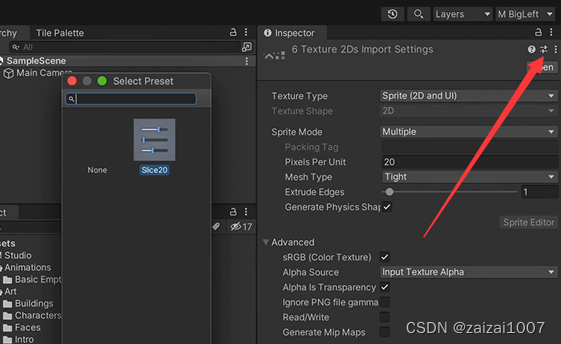
当设置好一个物体后点击箭头所指的地方,保存预设,在其他物体的面板里点击预设使用
sprite renderer 图片渲染顺序参考点

sorting group
因为人物的sprite为了实现遮挡有不同的的orderlayer,但是这样的话可能因为图片太多顺序混乱然后导致身体分家,所以添加一个组件让身体合并为同一块

修改游戏的渲染方式
因为做的是俯视角的游戏,所以修改为按照 y 轴渲染

这样可以实现y轴俯视角的游戏,实现自然的遮挡效果
实现地图
使用Tilemap,设置不同的Sorting Layer实现遮挡关系
规则瓦片 RuleTile

使用方法:
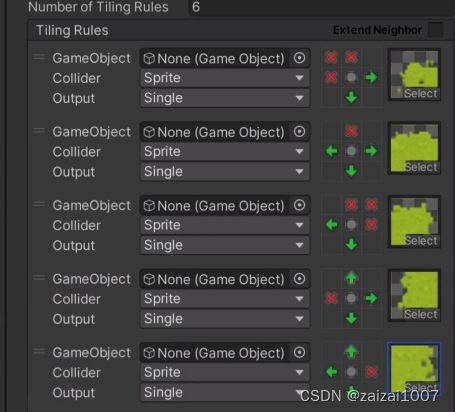
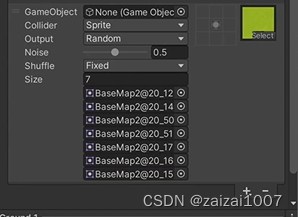
瓦片地图的缝隙

使用Map Sprite Atlas 将图片素材打包成一张图片,使用的时候就会忽略素材之间的缝隙紧密贴合在一起
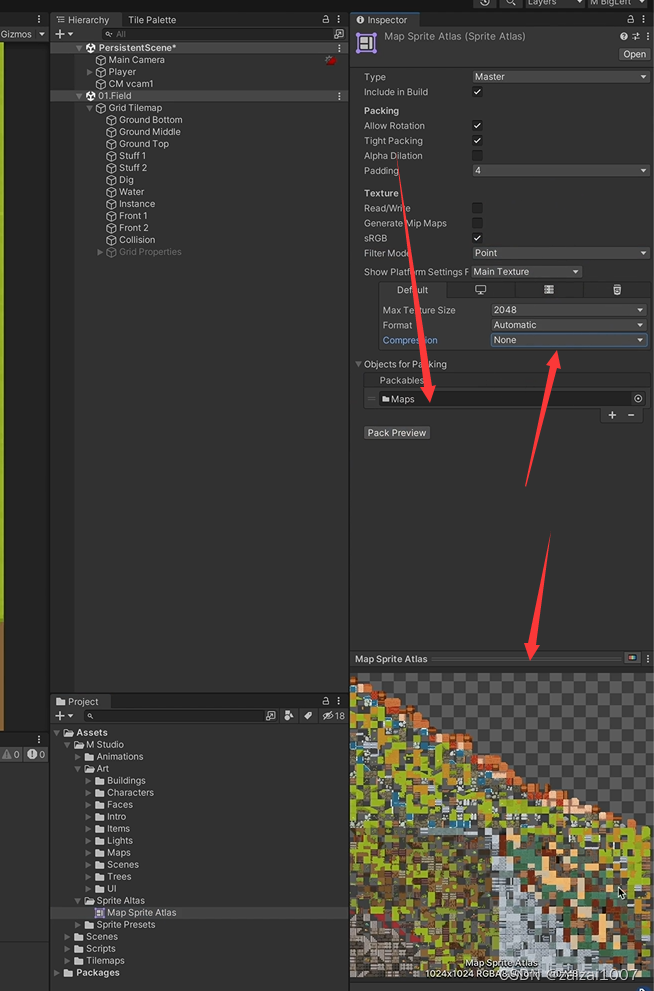
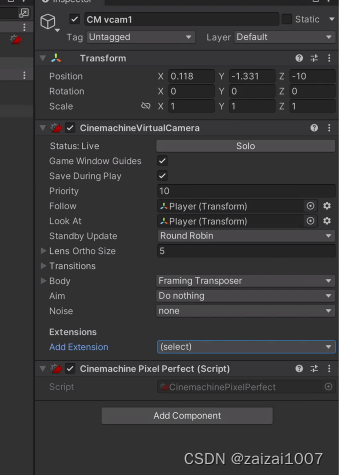
Camera 设置

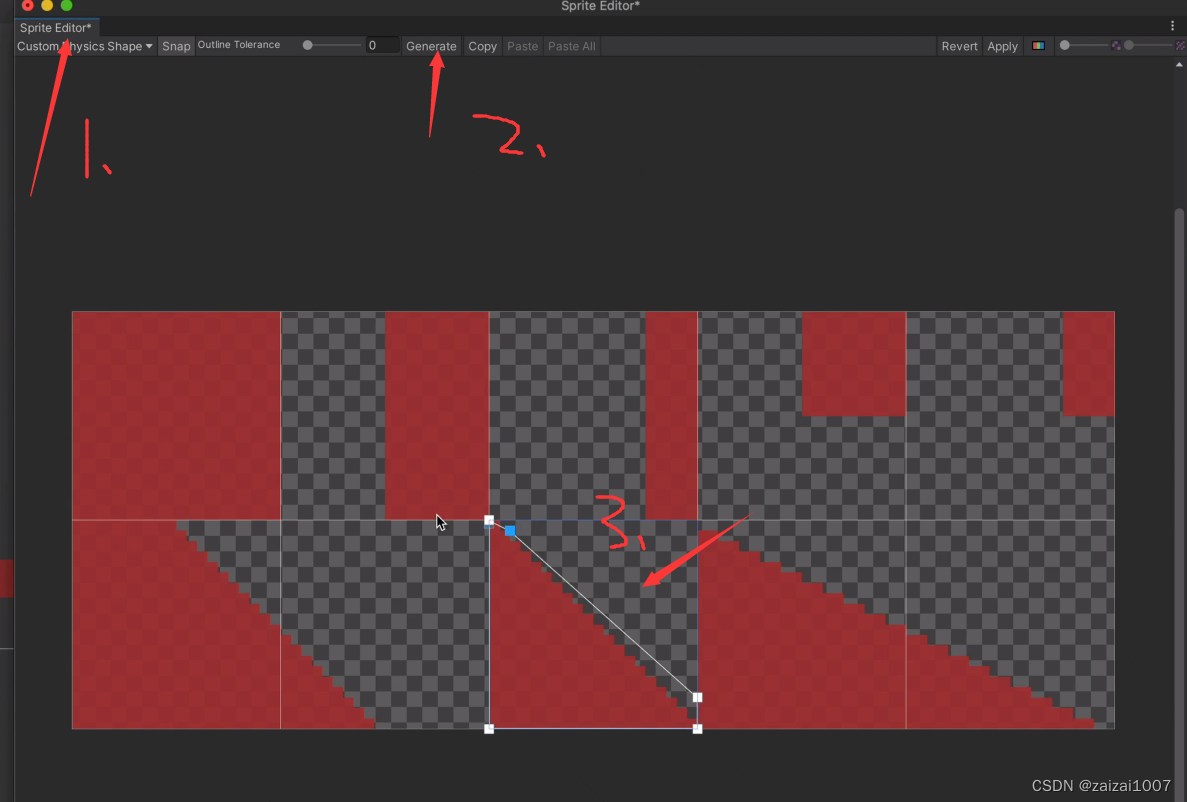
修改图片素材的碰撞关系
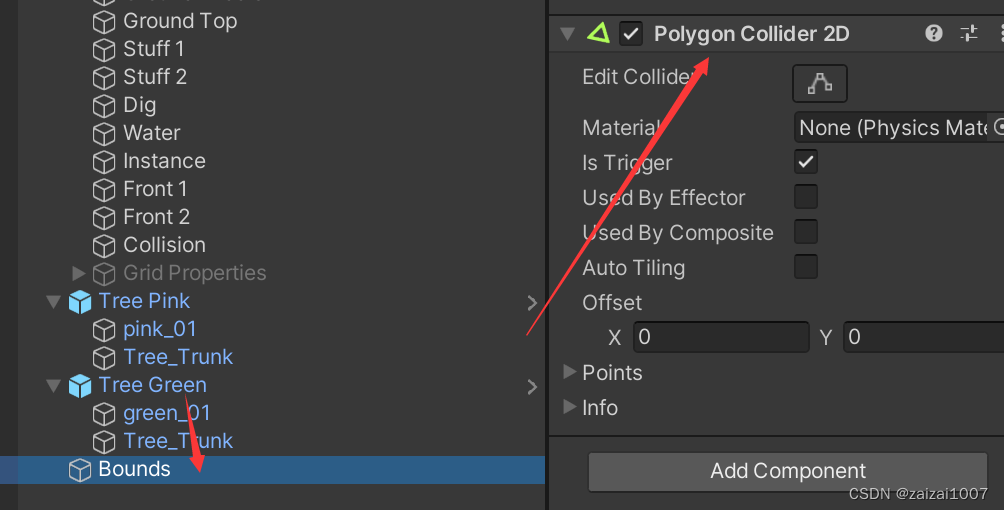
实现摄像机边界功能

- using System.Collections;
- using System.Collections.Generic;
- using Cinemachine;
- using UnityEngine;
- public class SwitchBounds : MonoBehaviour
- {
- private void Start()
- {
- SwitchConfinerShape();
- }
- //让CinemaChine 在切换场景后刚好能找到新场景的polygon collider 然后获取
- private void SwitchConfinerShape()
- {
- PolygonCollider2D confinerShape = GameObject.
- FindGameObjectWithTag("BoundsConfiner").GetComponent
(); - CinemachineConfiner confiner = GetComponent
(); - confiner.m_BoundingShape2D = confinerShape;
- //Call this if the bounding shape's points change at runtime
- //清理缓存,不清理的话可能切换场景的时候并没有实际更改边界
- confiner.InvalidatePathCache();
- }
- }
背包
ItemDetails
- [System.Serializable]
- public class ItemDetails
- {
- public int itemID;
- public string name;
- public ItemType itemType;
- public Sprite itemIcon;
- public Sprite itemOnWorldSprite;
- public string itemDescription;
- public int itemUseRadius;
- public bool canPickedup;
- public bool canDropped;
- public bool canCarried;
- public int itemPrice;
- [Range(0, 1)]
- public float sellPercentage;
- }
SO文件
- using System.Collections;
- using System.Collections.Generic;
- using UnityEngine;
- [CreateAssetMenu(fileName = "ItemDataList_SO",menuName = "Inventory/ItemDataList")]
- public class ItemDataList_SO : ScriptableObject
- {
- public List
itemDetailsList; - }
UI ToolKit 与 UI Builder
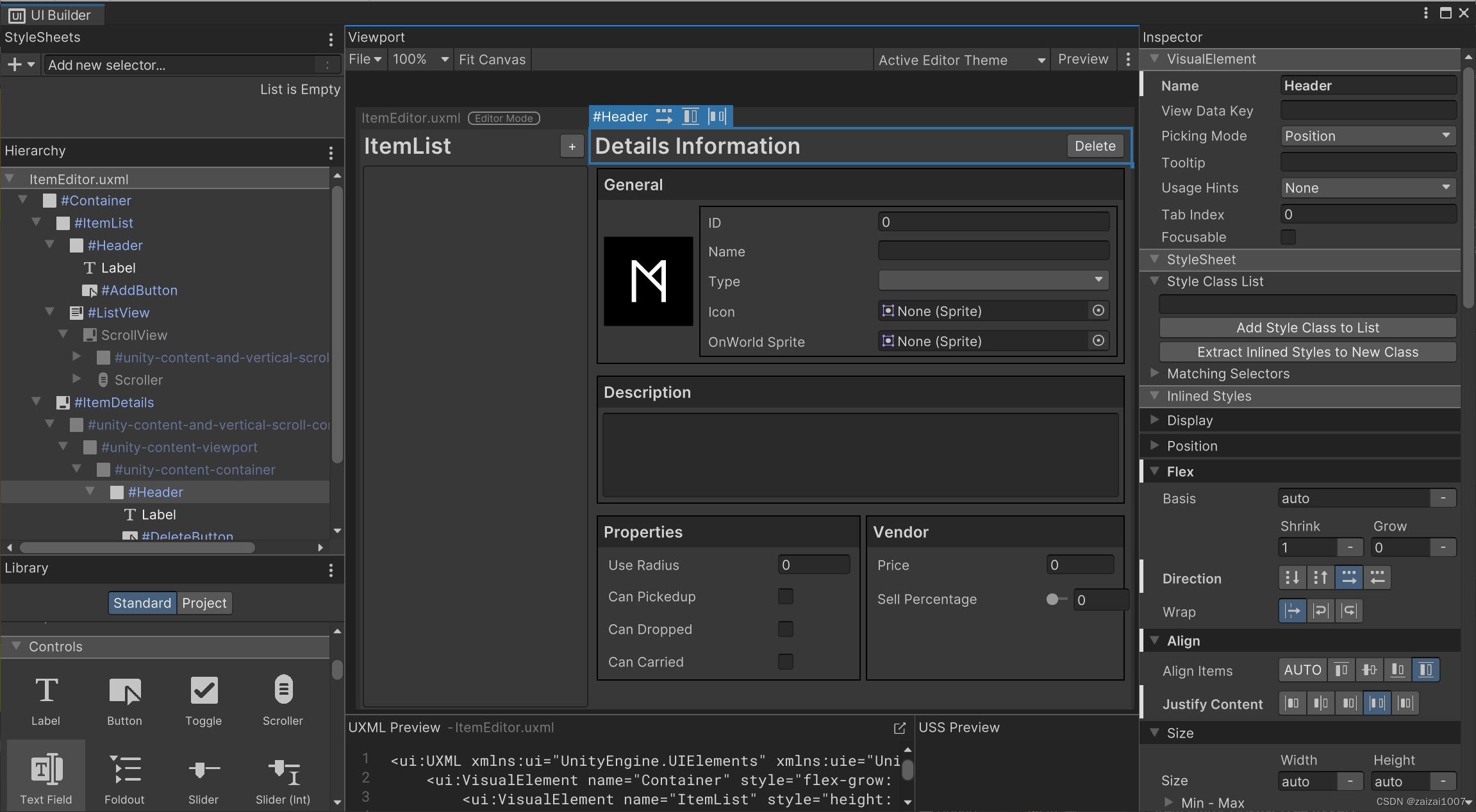
 UI Builder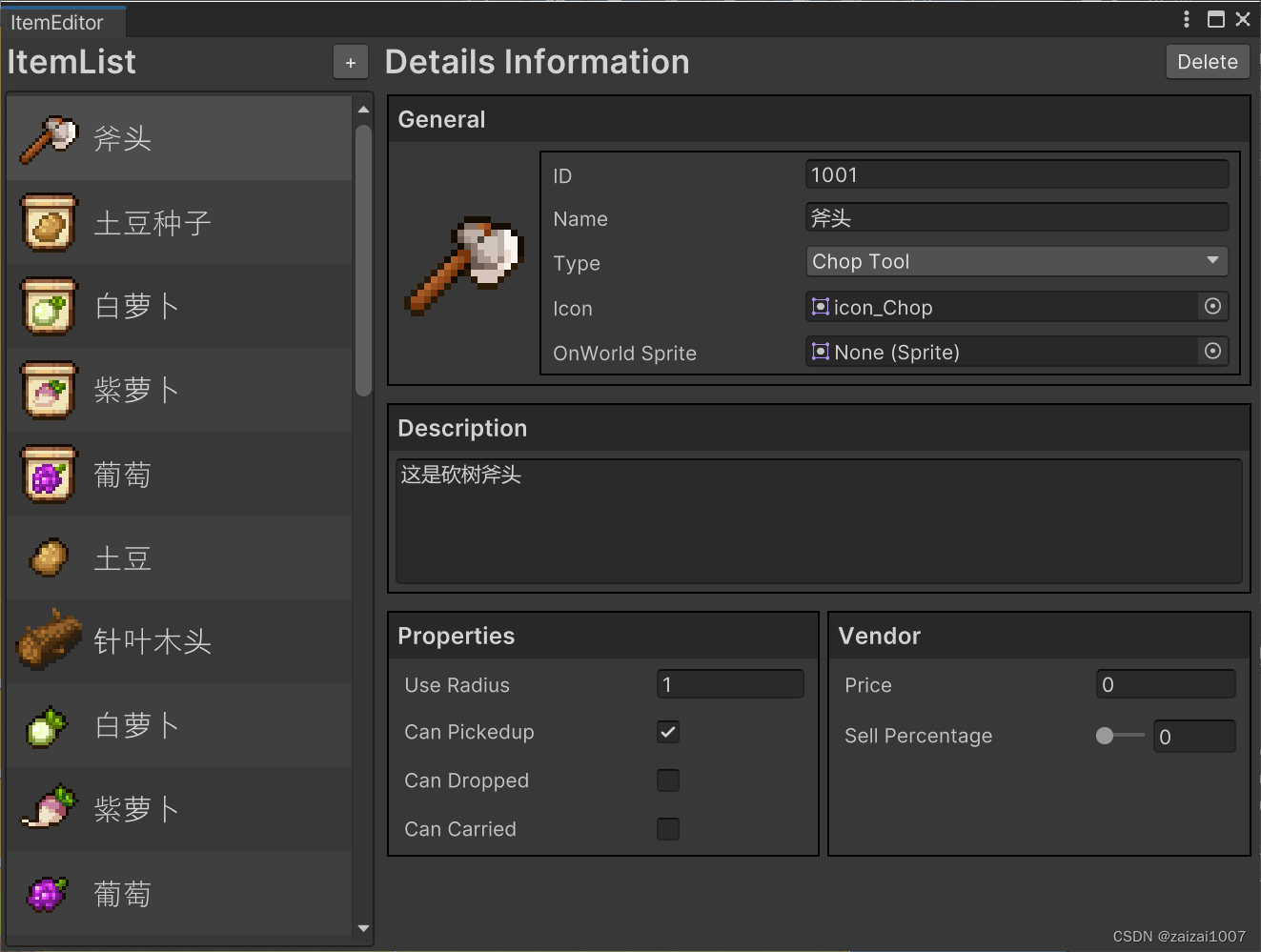
- using System;
- using System.Collections.Generic;
- using System.Linq;
- using UnityEditor;
- using UnityEditor.UIElements;
- using UnityEngine;
- using UnityEngine.UIElements;
- public class ItemEditor : EditorWindow
- {
- private ItemDataList_SO dataBase;
- private List
itemList = new List (); - private VisualTreeAsset itemRowTemplate;
- private ScrollView itemDetailsSection;
- private ItemDetails activeItem;
- //默认预览图片
- private Sprite defaultIcon;
- private VisualElement iconPreview;
- //获得VisualElement
- private ListView itemListView;
- [MenuItem("M STUDIO/ItemEditor")]
- public static void ShowExample()
- {
- ItemEditor wnd = GetWindow
(); - wnd.titleContent = new GUIContent("ItemEditor");
- }
- public void CreateGUI()
- {
- // Each editor window contains a root VisualElement object
- VisualElement root = rootVisualElement;
- // VisualElements objects can contain other VisualElement following a tree hierarchy.
- // VisualElement label = new Label("Hello World! From C#");
- // root.Add(label);
- // Import UXML
- var visualTree = AssetDatabase.LoadAssetAtPath
("Assets/Editor/UI Builder/ItemEditor.uxml"); - VisualElement labelFromUXML = visualTree.Instantiate();
- root.Add(labelFromUXML);
- //拿到模版数据
- itemRowTemplate = AssetDatabase.LoadAssetAtPath
("Assets/Editor/UI Builder/ItemRowTemplate.uxml"); - //拿默认Icon图片
- defaultIcon = AssetDatabase.LoadAssetAtPath
("Assets/M Studio/Art/Items/Icons/icon_M.png"); - //变量赋值
- itemListView = root.Q
("ItemList").Q ("ListView"); - itemDetailsSection = root.Q
("ItemDetails"); - iconPreview = itemDetailsSection.Q
("Icon"); - //获得按键
- root.Q
- root.Q
- //加载数据
- LoadDataBase();
- //生成ListView
- GenerateListView();
- }
- #region 按键事件
- private void OnDeleteClicked()
- {
- itemList.Remove(activeItem);
- itemListView.Rebuild();
- itemDetailsSection.visible = false;
- }
- private void OnAddItemClicked()
- {
- ItemDetails newItem = new ItemDetails();
- newItem.itemName = "NEW ITEM";
- newItem.itemID = 1001 + itemList.Count;
- itemList.Add(newItem);
- itemListView.Rebuild();
- }
- #endregion
- private void LoadDataBase()
- {
- //返回寻找的文件的GUID,返回的是一个string[]
- var dataArray = AssetDatabase.FindAssets("ItemDataList_SO");
- if (dataArray.Length > 1)
- {
- //将GUID转换为path,根据path寻找文件,因为只有一个文件,所以直接访问索引0就可以
- var path = AssetDatabase.GUIDToAssetPath(dataArray[0]);
- //返回的是 object 类型,所以需要转换一下
- dataBase = AssetDatabase.LoadAssetAtPath(path, typeof(ItemDataList_SO)) as ItemDataList_SO;
- }
- itemList = dataBase.itemDetailsList;
- //如果不标记则无法保存数据
- EditorUtility.SetDirty(dataBase);
- // Debug.Log(itemList[0].itemID);
- }
- private void GenerateListView()
- {
- Func
makeItem = () => itemRowTemplate.CloneTree(); - Action
- {
- if (i < itemList.Count)
- {
- if (itemList[i].itemIcon != null)
- e.Q
("Icon").style.backgroundImage = itemList[i].itemIcon.texture; - e.Q
- }
- };
- itemListView.fixedItemHeight = 50; //根据需要高度调整数值
- itemListView.itemsSource = itemList;
- itemListView.makeItem = makeItem;
- itemListView.bindItem = bindItem;
- itemListView.onSelectionChange += OnListSelectionChange;
- //右侧信息面板不可见
- itemDetailsSection.visible = false;
- }
- private void OnListSelectionChange(IEnumerable<object> selectedItem)
- {
- activeItem = (ItemDetails)selectedItem.First();
- GetItemDetails();
- itemDetailsSection.visible = true;
- }
- private void GetItemDetails()
- {
- itemDetailsSection.MarkDirtyRepaint();
- itemDetailsSection.Q
("ItemID").value = activeItem.itemID; - itemDetailsSection.Q
("ItemID").RegisterValueChangedCallback(evt => - {
- //当面板中的数据一更新就会调用回调函数将新数值写到文件中
- activeItem.itemID = evt.newValue;
- });
- itemDetailsSection.Q
("ItemName").value = activeItem.itemName; - itemDetailsSection.Q
("ItemName").RegisterValueChangedCallback(evt => - {
- activeItem.itemName = evt.newValue;
- itemListView.Rebuild();
- });
- iconPreview.style.backgroundImage = activeItem.itemIcon == null ? defaultIcon.texture : activeItem.itemIcon.texture;
- itemDetailsSection.Q
("ItemIcon").value = activeItem.itemIcon; - itemDetailsSection.Q
("ItemIcon").RegisterValueChangedCallback(evt => - {
- Sprite newIcon = evt.newValue as Sprite;
- activeItem.itemIcon = newIcon;
- iconPreview.style.backgroundImage = newIcon == null ? defaultIcon.texture : newIcon.texture;
- itemListView.Rebuild();
- });
- //其他所有变量的绑定
- itemDetailsSection.Q
("ItemSprite").value = activeItem.itemOnWorldSprite; - itemDetailsSection.Q
("ItemSprite").RegisterValueChangedCallback(evt => - {
- activeItem.itemOnWorldSprite = (Sprite)evt.newValue;
- });
- itemDetailsSection.Q
("ItemType").Init(activeItem.itemType); - itemDetailsSection.Q
("ItemType").value = activeItem.itemType; - itemDetailsSection.Q
("ItemType").RegisterValueChangedCallback(evt => - {
- activeItem.itemType = (ItemType)evt.newValue;
- });
- itemDetailsSection.Q
("Description").value = activeItem.itemDescription; - itemDetailsSection.Q
("Description").RegisterValueChangedCallback(evt => - {
- activeItem.itemDescription = evt.newValue;
- });
- itemDetailsSection.Q
("ItemUseRadius").value = activeItem.itemUseRadius; - itemDetailsSection.Q
("ItemUseRadius").RegisterValueChangedCallback(evt => - {
- activeItem.itemUseRadius = evt.newValue;
- });
- itemDetailsSection.Q
("CanPickedup").value = activeItem.canPickedup; - itemDetailsSection.Q
("CanPickedup").RegisterValueChangedCallback(evt => - {
- activeItem.canPickedup = evt.newValue;
- });
- itemDetailsSection.Q
("CanDropped").value = activeItem.canDropped; - itemDetailsSection.Q
("CanDropped").RegisterValueChangedCallback(evt => - {
- activeItem.canDropped = evt.newValue;
- });
- itemDetailsSection.Q
("CanCarried").value = activeItem.canCarried; - itemDetailsSection.Q
("CanCarried").RegisterValueChangedCallback(evt => - {
- activeItem.canCarried = evt.newValue;
- });
- itemDetailsSection.Q
("Price").value = activeItem.itemPrice; - itemDetailsSection.Q
("Price").RegisterValueChangedCallback(evt => - {
- activeItem.itemPrice = evt.newValue;
- });
- itemDetailsSection.Q
("SellPercentage").value = activeItem.sellPercentage; - itemDetailsSection.Q
("SellPercentage").RegisterValueChangedCallback(evt => - {
- activeItem.sellPercentage = evt.newValue;
- });
- }
- }
UI版面大小根据内容量自动改变大小

-
相关阅读:
像素间的关系
2022/9/14(cf·div3)https://codeforces.com/contest/1729
什么是layer1,layer2,为什么区块链需要layer2?
Java-Day14 异常和异常处理
c++里对 new 、delete 运算符的重载
C51--项目--感应开关盖垃圾桶
图像的频域--学习笔记
Java面试题:当任务数超过线程池的核心线程数时,如何让它不进入队列,而是直接启用最大线程数
sentinel blockHandler不生效
【C语言】模拟实现字符串库函数
- 原文地址:https://blog.csdn.net/zaizai1007/article/details/133543482

- 最新文章
-
沪漂五周年了:我越来越迷茫了
Agentic Skill Routing 实战:别再把所有 Skill 塞进 AI Agent 上下文
MySQL-Seconds_behind_master的精度误差
[MAF预定义ChatClient中间件-03]CachingChatClient——利用缓存省钱省时间
AI的至暗历史:从万众期待到被政府撤资,AI的两次死亡徘徊
Agent OS :五种驯服不确定性的范式
PortSwigger SQL注入LAB11
数据库即时编译JIT
[Begin]AI Learn Data Day 0
深度学习进阶(二十七)现代 LLM 的核心架构设计其二:SwiGLU