-
Win10系统中GPU深度学习环境配置记录
运行环境
系统:Win10
处理器 Intel(R) Core(TM) i7-9700K CPU @ 3.60GHz 3.60 GHz
机带 RAM 16.0 GB
设备 ID A18D4ED3-8CA1-4DC6-A6EF-04A33043A5EF
产品 ID 00342-35285-64508-AAOEM
系统类型 64 位操作系统, 基于 x64 的处理器显卡:NVIDIA GeForce RTX 2070
驱动程序版本: 30.0.15.1252
驱动程序日期: 2022/4/15
DirectX 版本: 12 (FL 12.1)
物理位置: PCI 总线 1、设备 0、功能 0
专用 GPU 内存 0.6/8.0 GB
共享 GPU 内存 0.0/8.0 GB
GPU 内存 0.6/16.0 GB配置环境
使用GPU进行深度学习需要安装Cuda CuDNN 以及tensorflow或者pytorch等python深度学习框架。
我们可以通过tensorflow官网找到适配的cuDNN和CUDA的版本,网址为:
https://tensorflow.google.cn/instal/source_windows 现在打开显示报错,原文(地址cuDNN和CUDA的安装_cuda和cudnn安装-CSDN博客)显示对应版本如下图:

这里使用版本:Cuda 11.2 CuDnn 8.1 tensorflow_gpu-2.5.0
Cuda下载与安装
CUDA Toolkit 12.2 Update 2 Downloads | NVIDIA Developer ,点击


选择对应版本进行下载:

下载就得到Cuda11.2安装包。
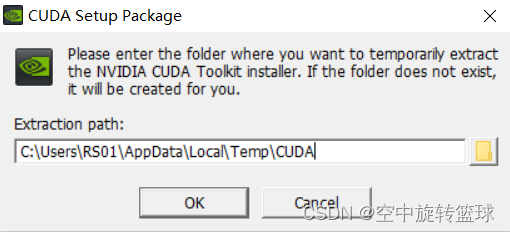
下面开始安装,点击安装包安装cuda,文件先解压,然后开始安装。


Cudnn下载与安装
下载地址:cuDNN Archive | NVIDIA Developer
这里注意需要注册账号登录之后才能下载。

下载完整之后的安装包:

Cudnn安装
首先解压下载后的文件,打开文件夹
将bin中所有文件复制到CUDA的bin文件夹(CUDA默认安装到了C:\Program Files\NVIDIA GPU Computing Toolkit\CUDA)


Tensotflow2 下载由于官网下载速度太慢了,这里在CSDN资源里面下载的,地址:https://download.csdn.net/download/zizhuangzhuang/19339448
版本名称:tensorflow_gpu-2.5.0-cp37-cp37m-win_amd64.whl,这里手动安装到pycharm环境中。手动安装可以参考以前写的博客:python中如何导入gdal包?_python导入gdal_空中旋转篮球的博客-CSDN博客
安装好之后可以在pycharm中查看到结果。

环境测试
运行深度学习代码,显示cuda加载成功,但是显示错误“Could not load dynamic library 'cudnn64_8.dll'; dlerror: cudnn64_8.dll not found”
- 2023-10-03 11:11:58.542341: I tensorflow/stream_executor/platform/default/dso_loader.cc:53] Successfully opened dynamic library cudart64_110.dll
- 10249
- 2023-10-03 11:12:04.352079: I tensorflow/stream_executor/platform/default/dso_loader.cc:53] Successfully opened dynamic library nvcuda.dll
- 2023-10-03 11:12:04.430194: I tensorflow/core/common_runtime/gpu/gpu_device.cc:1733] Found device 0 with properties:
- pciBusID: 0000:01:00.0 name: NVIDIA GeForce RTX 2070 computeCapability: 7.5
- coreClock: 1.62GHz coreCount: 36 deviceMemorySize: 8.00GiB deviceMemoryBandwidth: 417.29GiB/s
- 2023-10-03 11:12:04.430800: I tensorflow/stream_executor/platform/default/dso_loader.cc:53] Successfully opened dynamic library cudart64_110.dll
- 2023-10-03 11:12:04.577966: I tensorflow/stream_executor/platform/default/dso_loader.cc:53] Successfully opened dynamic library cublas64_11.dll
- 2023-10-03 11:12:04.578162: I tensorflow/stream_executor/platform/default/dso_loader.cc:53] Successfully opened dynamic library cublasLt64_11.dll
- 2023-10-03 11:12:04.668754: I tensorflow/stream_executor/platform/default/dso_loader.cc:53] Successfully opened dynamic library cufft64_10.dll
- 2023-10-03 11:12:04.685764: I tensorflow/stream_executor/platform/default/dso_loader.cc:53] Successfully opened dynamic library curand64_10.dll
- 2023-10-03 11:12:04.734948: I tensorflow/stream_executor/platform/default/dso_loader.cc:53] Successfully opened dynamic library cusolver64_11.dll
- 2023-10-03 11:12:04.776406: I tensorflow/stream_executor/platform/default/dso_loader.cc:53] Successfully opened dynamic library cusparse64_11.dll
- 2023-10-03 11:12:04.781208: W tensorflow/stream_executor/platform/default/dso_loader.cc:64] Could not load dynamic library 'cudnn64_8.dll'; dlerror: cudnn64_8.dll not found
- 2023-10-03 11:12:04.781436: W tensorflow/core/common_runtime/gpu/gpu_device.cc:1766] Cannot dlopen some GPU libraries. Please make sure the missing libraries mentioned above are
重启一下电脑,使用以下代码监测GPU并指定使用GPU重新进行训练 :
- # 指定使用 GPU 设备
- print(tf.__version__)
- print('is_gpu_available',tf.test.is_gpu_available)
- physical_devices = tf.config.list_physical_devices('GPU')
- print(physical_devices)
- tf.config.experimental.set_memory_growth(physical_devices[0], True)
运行情况如下,没有报以上错误了:
- 2.5.0
- is_gpu_available
0x000001953DC52C18> - 2023-10-03 23:25:54.193660: I tensorflow/stream_executor/platform/default/dso_loader.cc:53] Successfully opened dynamic library nvcuda.dll
- 2023-10-03 23:25:54.258133: I tensorflow/core/common_runtime/gpu/gpu_device.cc:1733] Found device 0 with properties:
- pciBusID: 0000:01:00.0 name: NVIDIA GeForce RTX 2070 computeCapability: 7.5
- coreClock: 1.62GHz coreCount: 36 deviceMemorySize: 8.00GiB deviceMemoryBandwidth: 417.29GiB/s
- 2023-10-03 23:25:54.258495: I tensorflow/stream_executor/platform/default/dso_loader.cc:53] Successfully opened dynamic library cudart64_110.dll
- 2023-10-03 23:25:54.317482: I tensorflow/stream_executor/platform/default/dso_loader.cc:53] Successfully opened dynamic library cublas64_11.dll
- 2023-10-03 23:25:54.317677: I tensorflow/stream_executor/platform/default/dso_loader.cc:53] Successfully opened dynamic library cublasLt64_11.dll
- 2023-10-03 23:25:54.344522: I tensorflow/stream_executor/platform/default/dso_loader.cc:53] Successfully opened dynamic library cufft64_10.dll
- 2023-10-03 23:25:54.352334: I tensorflow/stream_executor/platform/default/dso_loader.cc:53] Successfully opened dynamic library curand64_10.dll
- 2023-10-03 23:25:54.375640: I tensorflow/stream_executor/platform/default/dso_loader.cc:53] Successfully opened dynamic library cusolver64_11.dll
- [PhysicalDevice(name='/physical_device:GPU:0', device_type='GPU')]
- 2023-10-03 23:25:54.397368: I tensorflow/stream_executor/platform/default/dso_loader.cc:53] Successfully opened dynamic library cusparse64_11.dll
- 2023-10-03 23:25:54.400881: I tensorflow/stream_executor/platform/default/dso_loader.cc:53] Successfully opened dynamic library cudnn64_8.dll
- 2023-10-03 23:25:54.401098: I tensorflow/core/common_runtime/gpu/gpu_device.cc:1871] Adding visible gpu devices: 0
- Found 10249 files belonging to 16 classes.
- Using 3075 files for training.
- 2023-10-03 23:25:54.764308: I tensorflow/core/platform/cpu_feature_guard.cc:142] This TensorFlow binary is optimized with oneAPI Deep Neural Network Library (oneDNN) to use the following CPU instructions in performance-critical operations: AVX AVX2
- To enable them in other operations, rebuild TensorFlow with the appropriate compiler flags.
- 2023-10-03 23:25:54.765206: I tensorflow/core/common_runtime/gpu/gpu_device.cc:1733] Found device 0 with properties:
- pciBusID: 0000:01:00.0 name: NVIDIA GeForce RTX 2070 computeCapability: 7.5
- coreClock: 1.62GHz coreCount: 36 deviceMemorySize: 8.00GiB deviceMemoryBandwidth: 417.29GiB/s
- 2023-10-03 23:25:54.765556: I tensorflow/core/common_runtime/gpu/gpu_device.cc:1871] Adding visible gpu devices: 0
- 2023-10-03 23:25:55.259383: I tensorflow/core/common_runtime/gpu/gpu_device.cc:1258] Device interconnect StreamExecutor with strength 1 edge matrix:
- 2023-10-03 23:25:55.259576: I tensorflow/core/common_runtime/gpu/gpu_device.cc:1264] 0
- 2023-10-03 23:25:55.259684: I tensorflow/core/common_runtime/gpu/gpu_device.cc:1277] 0: N
- 2023-10-03 23:25:55.260261: I tensorflow/core/common_runtime/gpu/gpu_device.cc:1418] Created TensorFlow device (/job:localhost/replica:0/task:0/device:GPU:0 with 6001 MB memory) -> physical GPU (device: 0, name: NVIDIA GeForce RTX 2070, pci bus id: 0000:01:00.0, compute capability: 7.5)
训练速度有很大提升:训练参数:Trainable params: 11,150,544
CPU状态及训练速度:

- Epoch 1/50
- 257/257 [==============================] - 524s 2sep - loss: 1.4153 - accuracy: 0.5106 - val_loss: 2.0161 - val_accuracy: 0.4628
GPU状态及速度,GPU温度急剧上升,很快就升到80摄氏度以上。GPU训练速度提升了进10倍。

- 257/257 [==============================] - 66s 209ms/step - loss: 1.3817 - accuracy: 0.5200 - val_loss: 1.6644 - val_accuracy: 0.5265
- Epoch 2/50
- 257/257 [==============================] - 52s 201ms/step - loss: 0.9899 - accuracy: 0.6371 - val_loss: 3.9179 - val_accuracy: 0.2101
- Epoch 3/50
-
相关阅读:
查看Linux系统信息的常用命令
LQ0208 梅森素数【大数】
从源码彻底理解 Prometheus/VictoriaMetrics 中的 relabel_configs/metric_relabel_configs 配置
LeetCode160:相交链表
好市多(Costco)验厂要求合集
Docker安装Jenkins打包Maven项目为Docker镜像并运行【保姆级图文教学】
UE5加载websocket模块为空
【校招VIP】前端算法考察之链表算法
我常用的5个效率小工具,强烈推荐
Python期末复习题:函数
- 原文地址:https://blog.csdn.net/soderayer/article/details/133513597
