-
UE5.1编辑器拓展【一、脚本化资产行为,通知,弹窗,高效复制多个同样的资产】
目录
添加新的模块:EditorScriptingUtilities
插件制作
首先第一步是做一个插件:

因为是用于编辑器的,所以在模块中我们需要进行更改:
将类型改为Editor,下方的加载则是在默认之前:PreDefault.

添加新的类:AssetActionUtility
AssetActionUtility可以用于创建、删除和重命名资产,以及管理资产的引用关系。
将创建的这个类放入插件中,并命名:


此时此刻我们会发现是编译失败的,那是因为我们缺失了相关的模块。

所以我们对模块进行添加:

在添加了相应的模块之后,我们发现,竟仍然是无法识别头文件的状态:

这种时候,我们就需要去这个模块的build.cs中去查看:
在发现这个路径之后,我们来到我们现在插件的build.cs中去进行添加:
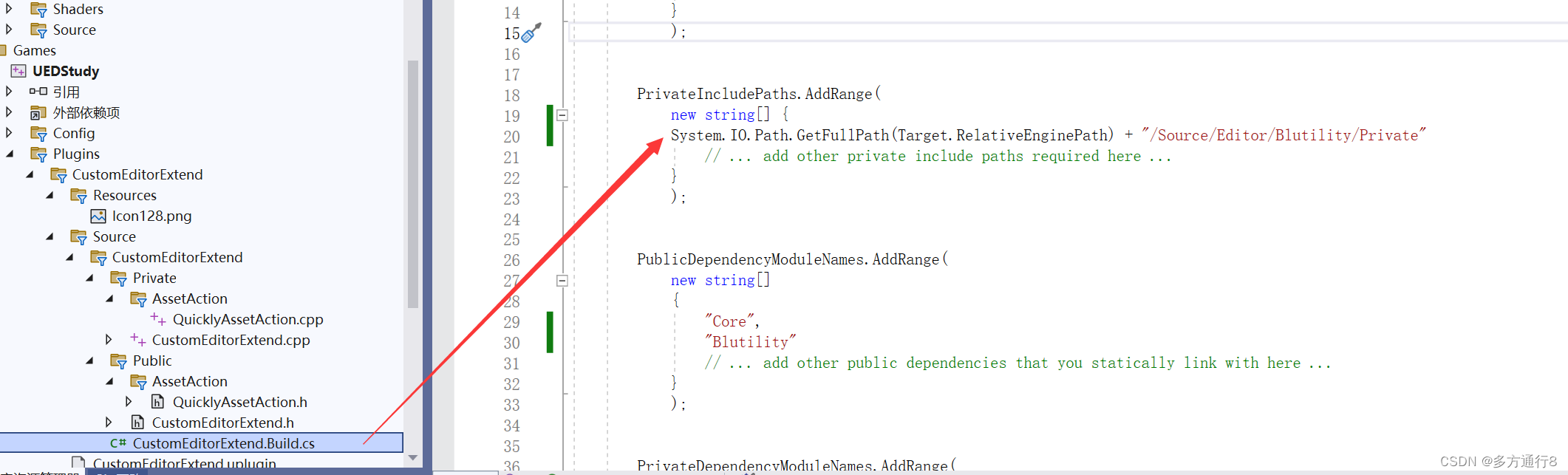
- System.IO.Path.GetFullPath(Target.RelativeEnginePath) + "/Source/Editor/Blutility/Private"
- System.IO.Path.GetFullPath(Target.RelativeEnginePath)是获取虚幻引擎的相对路径
- "/Source/Editor/Blutility/Private"是模块文件的位置
这样就可以编译成功了。
添加新的模块:EditorScriptingUtilities

路径了解
了解一下关于路径的概念:
路径分为两种,分别是Object Path和Package Path.
假设现在有资产a在文件夹test里面:
Object Path的意思就是直接到资产的名字,那么地址就是/Game/test/a
Package Path的意思就是/Game/test/
添加debug的头文件
这个所谓的debug头文件是自己创建的,主要是为了方便使用更多的其他debug函数。
首先要准备3个头文件:
#include "Misc/MessageDialog.h"
这个头文件的作用是弹出对话框的
#include "Framework/Notifications/NotificationManager.h"
#include "Widgets/Notifications/SNotificationList.h"这两个头文件的作用是弹出通知的
代码【debug.h】内涵注释:
这个并不用cpp文件

- #pragma once
- #include "Misc/MessageDialog.h"
- #include "Framework/Notifications/NotificationManager.h"
- #include "Widgets/Notifications/SNotificationList.h"
- void DebugPrint(const FString& DebugMessage, const FColor& DebugColor)
- {
- //将打印到屏幕上
- if (GEngine)
- {
- GEngine->AddOnScreenDebugMessage(-1, 8, DebugColor, DebugMessage);
- }
- }
- void DebugPrintLog(const FString& DebugMessage)
- {
- UE_LOG(LogTemp, Warning, TEXT("%s"), *DebugMessage);
- }
- //弹出窗口,返回窗口类型
- EAppReturnType::Type ShowMsgDialog(EAppMsgType::Type MsgType, const FString& Message,bool bShowMessageAsWarning=true )
- {
- if (bShowMessageAsWarning)
- {
- FText MsgTitle = FText::FromString("!Warning!");
- //第一个输入弹出的窗口类型,第二个是警告信息,第三个是消息标题
- return FMessageDialog::Open(MsgType, FText::FromString(Message), &MsgTitle);
- }
- else
- {
- return FMessageDialog::Open(MsgType, FText::FromString(Message));
- }
- }
- //消息通知
- void ShowNotifyInfo(const FString& Message,float FadeOutTime)
- {
- FNotificationInfo NotifyInfo(FText::FromString(Message));
- NotifyInfo.bUseLargeFont = true;//是否用较大粗体显示字体
- NotifyInfo.FadeOutDuration = FadeOutTime;//淡出时间
- //添加通知
- FSlateNotificationManager::Get().AddNotification(NotifyInfo);
- }
写函数
在了解了一些基本知识后,我们开始在继承了AssetActionUtility的文件的头文件中写一个复制资产的函数:
.h文件
- // Fill out your copyright notice in the Description page of Project Settings.
- #pragma once
- #include "CoreMinimal.h"
- #include "AssetActionUtility.h"
- #include "QuicklyAssetAction.generated.h"
- /**
- *
- */
- UCLASS()
- class CUSTOMEDITOREXTEND_API UQuicklyAssetAction : public UAssetActionUtility
- {
- GENERATED_BODY()
- public:
- UFUNCTION(CallInEditor)
- void DuplicateAssets(int32 DuplicateNum);
- };
然后到cpp文件中进行实现,实现的同时也要包含制作的debug头文件,用于debug:
.cpp文件
- // Fill out your copyright notice in the Description page of Project Settings.
- #include "AssetAction/QuicklyAssetAction.h"
- #include "Debug.h"
- #include "EditorUtilityLibrary.h"
- #include "EditorAssetLibrary.h"
- void UQuicklyAssetAction::DuplicateAssets(int32 DuplicateNum)
- {
- if (DuplicateNum<=0)
- {
- ShowMsgDialog(EAppMsgType::Ok, "Please enter a valid value >0", true);
- return;
- }
- //获取选择的资产数据,比如获取的是一个,还是多个资产
- TArray
SelectedAssetsData= UEditorUtilityLibrary::GetSelectedAssetData(); - //用于计数的Counter,复制成功则+1,记录总共复制了多少资产
- uint32 Counter = 0;
- //迭代选择的SelectedAssetsData数组
- for (const FAssetData& SelectedAssetData:SelectedAssetsData)
- {
- //这里迭代的是数组中的一个资产要复制的数量
- for (int32 i = 0; i < DuplicateNum; i++)
- {
- FString SourceAssetPath = SelectedAssetData.ObjectPath.ToString();//获取资产路径【路径名字+资产名字】
- FString NewDuplicatedAssetName = SelectedAssetData.AssetName.ToString()+TEXT("_")+FString::FromInt(i+1);//新复制的资产名字
- FString NewPathName = FPaths::Combine(SelectedAssetData.PackagePath.ToString(), NewDuplicatedAssetName);//将包路径【没有资产名字的路径】和新的名字结合
- //DuplicateAsset输入的两个,第一个是源路径,第二个是目标路径
- //这里判断是否复制资产是否有效,有效就保存,并且Counter+1
- if (UEditorAssetLibrary::DuplicateAsset(SourceAssetPath, NewPathName))
- {
- //保存资产,输入路径。 第二个输入是bool,为是否为改变后进行保存【而我们要直接保存,所以是false】
- UEditorAssetLibrary::SaveAsset(NewPathName,false);
- Counter++;
- }
- }
- }
- if (Counter>0)//这里是通知有多少资产复制成功了
- {
- ShowNotifyInfo("Duplicate Success:" + FString::FromInt(Counter) + " Files!",7);
- }
- }
-
相关阅读:
【ruoyi】微服务关闭登录验证码
bat常规脚本命令(用到才会写,未完待续10/27)
java基于ssm的图书销售库存管理入库信息系统
国芯方案——电子吊钩秤方案
【博客486】prometheus-----rate,irate,increase的原理
手把手教你下载XShell免费版(超详细)
JAVA开发(记一次504 gateway timeout错误排查过程)
java计算机毕业设计基于Web的社区商超系统的设计与实现源码+数据库+系统+lw文档+mybatis+运行部署
Execute Crond Service on openEuler
2.1 初探大数据
- 原文地址:https://blog.csdn.net/q244645787/article/details/133385100
- 最新文章
-
沪漂五周年了:我越来越迷茫了
Agentic Skill Routing 实战:别再把所有 Skill 塞进 AI Agent 上下文
MySQL-Seconds_behind_master的精度误差
[MAF预定义ChatClient中间件-03]CachingChatClient——利用缓存省钱省时间
AI的至暗历史:从万众期待到被政府撤资,AI的两次死亡徘徊
Agent OS :五种驯服不确定性的范式
PortSwigger SQL注入LAB11
数据库即时编译JIT
[Begin]AI Learn Data Day 0
深度学习进阶(二十七)现代 LLM 的核心架构设计其二:SwiGLU