-
CH34X-MPHSI高速Master扩展应用—I2C设备调试
一、前言
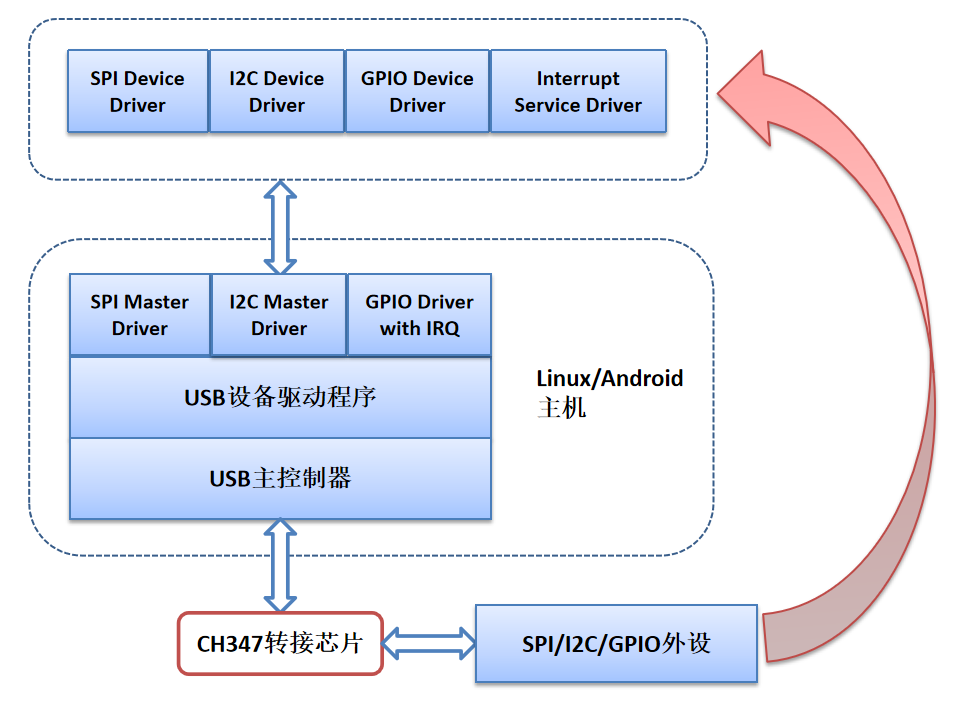
本文介绍,基于USB2.0高速USB转接芯片CH347,配合厂商提供的USB转MPHSI(Multi Protocol High-Speed Serial Interface)Master总线驱动(CH34X-MPHSI-Master)为系统扩展I2C总线的用法,除此之外,还可以扩展SPI总线和GPIO等资源。
驱动软件正常工作后,会在系统下创建新的I2C Master,拥有独立的bus num,原I2C器件的设备驱动可直接通过DTS配置文件或者sysfs节点挂载到该总线上,原有设备驱动无需任何修改。
项目地址:GitHub - WCHSoftGroup/ch34x_mphsi_master_linux
二、应用框图
三、CH347 I2C接口特点
CH347F 的I2C接口
PIN脚 I2C功能脚 GPIO复用脚 11 SCL - 12 SDA - CH347T 的I2C接口
PIN脚 I2C功能脚 GPIO复用脚 11 SCL gpio3 12 SDA - CH347F/T支持至少4种I2C时钟:20kHz,100kHz,400kHz和750kHz。驱动配置的默认I2C时钟为100KHz,当前不支持动态修改该时钟频率,若需要修改可以在ch34x_mphsi_i2c_init函数中修改。
此外,芯片支持时钟延展功能(I2C Clock Stretching),如果需要开启,也可以在ch34x_mphsi_i2c_init 函数中开启。
四、驱动使用与确认SPI总线信息
本文基于树莓派4B平台,使用CH347F/T芯片通过树莓派的USB接口扩展I2C总线接口,介绍不同的I2C设备的应用实例。
1. 编译驱动
- root@raspberrypi:/home/wch/ch34x_mphsi_master_linux_V1.1/driver # make
- make -C /lib/modules/6.1.21-v8+/build M=/home/wch/ch34x_mphsi_master_linux_V1.1/driver modules
- make[1]: 进入目录“/usr/src/linux-headers-6.1.21-v8+”
- CC [M] /home/wch/ch34x_mphsi_master_linux_V1.1/driver/ch34x_mphsi_master_usb.o
- CC [M] /home/wch/ch34x_mphsi_master_linux_V1.1/driver/ch34x_mphsi_master_spi.o
- CC [M] /home/wch/ch34x_mphsi_master_linux_V1.1/driver/ch34x_mphsi_master_i2c.o
- CC [M] /home/wch/ch34x_mphsi_master_linux_V1.1/driver/ch34x_mphsi_master_gpio.o
- LD [M] /home/wch/ch34x_mphsi_master_linux_V1.1/driver/ch34x_mphsi_master.o
- MODPOST /home/wch/ch34x_mphsi_master_linux_V1.1/driver/Module.symvers
- CC [M] /home/wch/ch34x_mphsi_master_linux_V1.1/driver/ch34x_mphsi_master.mod.o
- LD [M] /home/wch/ch34x_mphsi_master_linux_V1.1/driver/ch34x_mphsi_master.ko
- make[1]: 离开目录“/usr/src/linux-headers-6.1.21-v8+”
2. 加载驱动
- root@raspberrypi:/home/wch/ch34x_mphsi_master_linux_V1.1/driver # make load
- insmod ch34x_mphsi_master.ko
3、确认I2C总线信息
将CH347F/T 设备通过USB连接至树莓派,查看系统日志,可看到扩展的I2C总线号为I2C bus 22
- [ 218.193644] ch34x_mphsi_master: loading out-of-tree module taints kernel.
- [ 218.194619] mphsi-ch34x 1-1.2:1.2: ch34x_cfg_probe: output SPI slave with CS0
- [ 218.194633] mphsi-ch34x 1-1.2:1.2: ch34x_cfg_probe: output SPI slave with CS1
- [ 218.195050] mphsi-ch34x 1-1.2:1.2: ch34x_spi_probe: SPI master connected to SPI bus 7
- [ 218.195323] mphsi-ch34x 1-1.2:1.2: ch34x_mphsi_i2c_probe: I2C master connected to I2C bus 22
- [ 218.195645] mphsi-ch34x 1-1.2:1.2: ch34x_mphsi_gpio_probe: registered GPIOs from 501 to 503
- [ 218.195663] mphsi-ch34x 1-1.2:1.2: ch34x_usb_probe: USB to SPI/I2C/GPIO adapter ch34x now attached.
- [ 218.195778] usbcore: registered new interface driver mphsi-ch34x
也可使用 i2c-tools 工具查看系统所有I2C总线。
- root@raspberrypi:~ # i2cdetect -l
- i2c-20 i2c fef04500.i2c I2C adapter
- i2c-1 i2c bcm2835 (i2c@7e804000) I2C adapter
- i2c-21 i2c fef09500.i2c I2C adapter
- i2c-22 i2c ch34x-mphsi-i2c at bus 001 device 003 I2C adapter
将SHT3X-DIS模块连接到CH347的I2C接口,然后扫描I2C总线下的I2C设备,设备(UU)地址为0x44(如果未加载对应设备驱动,UU位置显示为44)
root@raspberrypi:~ # i2cdetect -y -a 22
     0  1  2  3  4  5  6  7  8  9  a  b  c  d  e  f
00: 00 -- -- -- -- -- -- -- -- -- -- -- -- -- -- --
10: -- -- -- -- -- -- -- -- -- -- -- -- -- -- -- --
20: -- -- -- -- -- -- -- -- -- -- -- -- -- -- -- --
30: -- -- -- -- -- -- -- -- -- -- -- -- -- -- -- --
40: -- -- -- -- UU -- -- -- -- -- -- -- -- -- -- --
50: -- -- -- -- -- -- -- -- -- -- -- -- -- -- -- --
60: -- -- -- -- -- -- -- -- -- -- -- -- -- -- -- --
70: -- -- -- -- -- -- -- -- -- -- -- -- -- -- -- --
五、24C02 EEPROM模块调试
24C02是一个2Kbit的串行EEPROM存储芯片,可存储256个字节数据。
root@raspberrypi:~ # i2cdetect -y -a 22
     0  1  2  3  4  5  6  7  8  9  a  b  c  d  e  f
00: -- -- -- -- -- -- -- -- -- -- -- -- -- -- -- --
10: -- -- -- -- -- -- -- -- -- -- -- -- -- -- -- --
20: -- -- -- -- -- -- -- -- -- -- -- -- -- -- -- --
30: -- -- -- -- -- -- -- -- -- -- -- -- -- -- -- --
40: -- -- -- -- -- -- -- -- -- -- -- -- -- -- -- --
50: 50 51 52 53 54 55 56 57 -- -- -- -- -- -- -- --
60: -- -- -- -- -- -- -- -- -- -- -- -- -- -- -- --
70: -- -- -- -- -- -- -- -- -- -- -- -- -- -- -- --
读写EEPROM
root@raspberrypi:~ # i2cset -y 22 0x50 0 0x11
root@raspberrypi:~ # i2cset -y 22 0x50 1 0x11
root@raspberrypi:~ # i2cset -y 22 0x50 2 0x22
root@raspberrypi:~ #
root@raspberrypi:~ # i2cget -y 22 0x50 0
0x11
root@raspberrypi:~ # i2cget -y 22 0x50 1
0x11
root@raspberrypi:~ # i2cget -y 22 0x50 2
0x22
root@raspberrypi:~ #
root@raspberrypi:~ # i2ctransfer 22 w8@0x50 0x00 0xff-
WARNING! This program can confuse your I2C bus, cause data loss and worse!
I will send the following messages to device file /dev/i2c-22:
msg 0: addr 0x50, write, len 8, buf 0x00 0xff 0xfe 0xfd 0xfc 0xfb 0xfa 0xf9
Continue? [y/N] y
root@raspberrypi:~ #
root@raspberrypi:~ # i2ctransfer 22 w1@0x50 0x00 r7
WARNING! This program can confuse your I2C bus, cause data loss and worse!
I will send the following messages to device file /dev/i2c-22:
msg 0: addr 0x50, write, len 1, buf 0x00
msg 1: addr 0x50, read, len 7
Continue? [y/N] y
0xff 0xfe 0xfd 0xfc 0xfb 0xfa 0xf9
root@raspberrypi:~ #
六、SHT3X-DIS温湿度传感器模块调试
SHT3x-DIS是Sensirion新一代的温湿度传感器芯片,精度为±2%RH和±0.3℃,输入电压范围从2.4V到5.5V,采用IIC总线接口,速率可达1MHz。测量温湿度范围分别为是-40℃ ~ 125℃和0 ~ 100%。
加载sht3x驱动
root@raspberrypi:~ # insmod sht3x.ko将 i2c_client 设备名挂载到 I2C 总线
- root@raspberrypi:~ # echo "sht3x 0x44" > /sys/bus/i2c/devices/i2c-22/new_device
- [ 1594.345331] i2c i2c-22: new_device: Instantiated device sht3x at 0x44
运行测试程序,获取当前温度和湿度信息
- root@raspberrypi:~ # ./sht3x_test_app
- temperature: 27.14 humidity: 62.28
七、MPU6050功能测试
MPU6050 是 InvenSense 公司推出的整合性 6 轴运动处理组件,其内部整合了 3 轴陀螺仪和 3 轴加速度传感器,并且含有一个IIC 接口, 可用于连接外部磁力传感器,并利用自带的数字运动处理器(DMP: Digital Motion Processor) 硬件加速引擎,通过主 I2C接口,向应用端输出完整的 9 轴融合演算数据。
加载 mpu6050 驱动
root@raspberrypi:~ # insmod mpu6050.ko将 i2c_client 设备名挂载到 I2C 总线
- root@raspberrypi:~ # echo "mpu6050 0x68" > /sys/bus/i2c/devices/i2c-22/new_device
- [ 188.063732] i2c i2c-22: new_device: Instantiated device i2c_mpu6050 at 0x68
运行测试程序,可获取当前位置信息(原始数据)
- root@raspberrypi:/home/wch/mpu6050_test # ./test_app
- AX=1112, AY=-574, AZ=16212 GX=-252, GY=-16, GZ=-38
- AX=1054, AY=-578, AZ=16220 GX=-259, GY=-17, GZ=-41
- AX=1066, AY=-584, AZ=16260 GX=-163, GY=-26, GZ=-41
-
相关阅读:
Springboot vue旅游资讯网站管理系统
更适合爬虫的正则表达式
客户需求调研的三个实用工具
第4章 docker仓库管理
入行测试已经4年了 ,进阿里后迷茫了3个月,做完这个项目我决定离职....
day24-服务器端渲染技术02
maven如何手动添加jar包到本地仓库
【论文阅读|深读】DNGR:Deep Neural Networks for Learning Graph Representations
在阿里云 ACK 上部署 EMQX MQTT 服务器集群
Java -- 每日一问:谈谈常用的分布式ID的设计方案?Snowflake是否受冬令时切换影响?
- 原文地址:https://blog.csdn.net/WCH_TechGroup/article/details/133353169