-
基于 STP 的可靠网络配置
基于 STP 的可靠网络配置
1.项目背景
Jan16 公司为提高网络的可靠性,使用了两台高性能交换机作为核心交换机,接入层交换机与核心层交换机互联,形成冗余结构,拓扑如图 1 所示,具体要求如下:
(1)为避免交换环路问题,需配置交换机的 STP 功能,要求核心交换机有较高优先级,SW1 为根交换机,SW2 为备用根交换机,SW1-SW3 和 SW1-SW4 为主链路;
(2)技术部使用 VLAN10,网络地址为 10.0.1/24,PC1 和 PC2 分别接入到 SW3 和 SW4。

图 1 网络拓扑图
2.项目规划设计
根据拓扑图 1可知,SW1 和 SW2 为核心交换机,其中将 SW1 配置为根交换机,SW2 为备用根交换机;SW3 和 SW4 作为接入交换机,其中 SW1-SW3 及 SW1-SW4 的链路由主链路,SW2-SW4 及 SW2-SW3 的 2 条链路作为备用链路。
因此在 STP 配置中可将 SW1 的优先级设为最高,SW2 的优先级为次高,如:SW1 的优先级为 0,SW2 的优先级为 4096。
同时,考虑到技术部的计算机划分在 VLAN10 的网段内,且计算机连接在不同的交换机上,故交换机之间的链路需配置为 Trunk 模式。
具体配置步骤如下:
(1)创建 VLAN
(2)将交换机端口划分至相应 VLAN
(3)开启 STP
(4)配置 STP 优先级
(5)配置各部门计算机的 IP 地址
具体规划如下表:
表 1 VLAN 规划表
VLAN ID
VLAN 描述信息
IP 地址段
用途
Vlan10
Technical
192.168.1.1-5/24
技术部
表 2 端口规划表
本端设备
端口号
端口类型
对端设备
对端接口
SW1
GE0/0/1
Trunk
SW3
GE0/0/1
SW1
GE0/0/2
Trunk
SW4
GE 0/0/1
SW1
GE0/0/3
Trunk
SW2
GE 0/0/3
SW2
GE0/0/1
Trunk
SW3
GE0/0/2
SW2
GE0/0/2
Trunk
SW4
GE0/0/2
SW2
GE0/0/3
Trunk
SW1
GE0/0/3
SW3
GE0/0/1
Trunk
SW1
GE0/0/1
SW3
GE0/0/2
Trunk
SW2
GE0/0/1
SW3
Eth0/0/1
Access
技术部 PC1
Eth0/0/1
SW4
GE0/0/1
Trunk
SW1
GE0/0/2
SW4
GE0/0/2
Trunk
SW2
GE0/0/2
SW4
Eth0/0/1
Access
技术部 PC1
Eth0/0/1
PC1
GE0/0/1
Null
SW3
Eth0/0/1
PC2
GE0/0/1
Null
SW4
Eth0/0/1
表 3 IP 地址规划表
计算机
IP 地址
技术部 PC1
192.168.1.1/24
技术部 PC2
192.168.1.2/24
3.项目实施
(1)创建 VLAN
为各部门创建相应的 VLAN。
- SW1 的配置
system-view Enter system view, return user view with Ctrl+Z.
[Huawei]sysname SW1
[SW1]vlan 10
[SW1-vlan10]description Technical
- SW2 的配置
system-view Enter system view, return user view with Ctrl+Z.
[Huawei]sysname SW2
[SW2]vlan 10
[SW2-vlan10]description Technical
- SW3 的配置
system-view Enter system view, return user view with Ctrl+Z.
[Huawei]sysname SW3
[SW3]vlan 10
[SW3-vlan10]description Technical
- SW4 的配置
system-view Enter system view, return user view with Ctrl+Z.
[Huawei]sysname SW4
[SW4]vlan 10
[SW4-vlan10]description Technical
(2)将端口划分至相应 VLAN
①SW1 的配置
[SW1]port-group group-member GigabitEthernet 0/0/1 to GigabitEthernet 0/0/3
[SW1-port-group]port link-type trunk
[SW1-GigabitEthernet0/0/1]port link-type trunk
[SW1-GigabitEthernet0/0/2]port link-type trunk
[SW1-GigabitEthernet0/0/3]port link-type trunk
[SW1-port-group]port trunk allow-pass vlan 10
[SW1-GigabitEthernet0/0/1]port trunk allow-pass vlan 10
[SW1-GigabitEthernet0/0/2]port trunk allow-pass vlan 10
[SW1-GigabitEthernet0/0/3]port trunk allow-pass vlan 10
[SW1-port-group]
②SW2 的配置
[SW2]port-group group-member GigabitEthernet 0/0/1 to GigabitEthernet 0/0/3
[SW2-port-group]port link-type trunk
[SW2-GigabitEthernet0/0/1]port link-type trunk
[SW2-GigabitEthernet0/0/2]port link-type trunk
[SW2-GigabitEthernet0/0/3]port link-type trunk
[SW2-port-group]port trunk allow-pass vlan 10
[SW2-GigabitEthernet0/0/1]port trunk allow-pass vlan 10
[SW2-GigabitEthernet0/0/2]port trunk allow-pass vlan 10
[SW2-GigabitEthernet0/0/3]port trunk allow-pass vlan 10
[SW2-port-group]
③SW3 的配置
[SW3]interface Ethernet 0/0/1
[SW3-Ethernet0/0/1]port link-type access
[SW3-Ethernet0/0/1]port default vlan 10
[SW3-Ethernet0/0/1]port-group group-member GigabitEthernet 0/0/1 to GigabitEther
net 0/0/2
[SW3-port-group]port link-type trunk
[SW3-GigabitEthernet0/0/1]port link-type trunk
[SW3-GigabitEthernet0/0/2]port link-type trunk
[SW3-port-group]port trunk allow-pass vlan 10
[SW3-GigabitEthernet0/0/1]port trunk allow-pass vlan 10
[SW3-GigabitEthernet0/0/2]port trunk allow-pass vlan 10
[SW3-port-group]
- SW4 的配置
[SW4]interface Ethernet 0/0/1
[SW4-Ethernet0/0/1]port link-type access
[SW4-Ethernet0/0/1]port default vlan 10
[SW4-Ethernet0/0/1]port-group group-member GigabitEthernet 0/0/1 to GigabitEther
net 0/0/2
[SW4-port-group]port link-type trunk
[SW4-GigabitEthernet0/0/1]port link-type trunk
[SW4-GigabitEthernet0/0/2]port link-type trunk
[SW4-port-group]port trunk allow-pass vlan 10
[SW4-GigabitEthernet0/0/1]port trunk allow-pass vlan 10
[SW4-GigabitEthernet0/0/2]port trunk allow-pass vlan 10
[SW4-port-group]
(3)开启 STP
①SW1 的配置
[SW1]stp enable
[SW1]stp mode stp
②SW2 的配置
[SW2]stp enable
[SW2]stp mode stp
③SW3 的配置
[SW3]stp enable
[SW3]stp mode stp
④SW4 的配置
[SW4]stp enable
[SW4]stp mode stp
(4)配置 STP 优先级
将 SW1 配置为主根交换机,SW2 为备份根交换机。
方法 1:SW1 的优先级改为 0,SW2 的优先级改为 4096
①SW1 的配置
[SW1]stp priority 0
②SW2 的配置
[SW2]stp priority 4096
方法 2:
首先删除在SW1 上所配置的优先级,使用 stp root primary 命令配置主根交
换机。
[SW1]undo stp priority
[SW1]stp root primary
删除在 SW2 上所配置的优先级,使用 stp root secondary 命令配置备份根交换机
[SW2]undo stp priority
[SW2] stp root secondary
(5)配置各部门计算机的 IP 地址

图 2 技术部PC1 IP 配置图

图 3技术部PC2 IP 配置图
4.项目验证
(1)验证各交换机的 VLAN 配置信息
①SW1 的配置
[SW1]display vlan
The total number of vlans is : 2
--------------------------------------------------------------------------------
U: Up; D: Down; TG: Tagged; UT: Untagged;
MP: Vlan-mapping; ST: Vlan-stacking;
#: ProtocolTransparent-vlan; *: Management-vlan;
--------------------------------------------------------------------------------
VID Type Ports
--------------------------------------------------------------------------------
1 common UT:GE0/0/1(U) GE0/0/2(U) GE0/0/3(U) GE0/0/4(D)
GE0/0/5(D) GE0/0/6(D) GE0/0/7(D) GE0/0/8(D)
GE0/0/9(D) GE0/0/10(D) GE0/0/11(D) GE0/0/12(D)
GE0/0/13(D) GE0/0/14(D) GE0/0/15(D) GE0/0/16(D)
GE0/0/17(D) GE0/0/18(D) GE0/0/19(D) GE0/0/20(D)
GE0/0/21(D) GE0/0/22(D) GE0/0/23(D) GE0/0/24(D)
10 common TG:GE0/0/1(U) GE0/0/2(U) GE0/0/3(U)
VID Status Property MAC-LRN Statistics Description
--------------------------------------------------------------------------------
1 enable default enable disable VLAN 0001
10 enable default enable disable Technical
[SW1]
②SW2 的配置
[SW2]display vlan
The total number of vlans is : 2
--------------------------------------------------------------------------------
U: Up; D: Down; TG: Tagged; UT: Untagged;
MP: Vlan-mapping; ST: Vlan-stacking;
#: ProtocolTransparent-vlan; *: Management-vlan;
--------------------------------------------------------------------------------
VID Type Ports
--------------------------------------------------------------------------------
1 common UT:GE0/0/1(U) GE0/0/2(U) GE0/0/3(U) GE0/0/4(D)
GE0/0/5(D) GE0/0/6(D) GE0/0/7(D) GE0/0/8(D)
GE0/0/9(D) GE0/0/10(D) GE0/0/11(D) GE0/0/12(D)
GE0/0/13(D) GE0/0/14(D) GE0/0/15(D) GE0/0/16(D)
GE0/0/17(D) GE0/0/18(D) GE0/0/19(D) GE0/0/20(D)
GE0/0/21(D) GE0/0/22(D) GE0/0/23(D) GE0/0/24(D)
10 common TG:GE0/0/1(U) GE0/0/2(U) GE0/0/3(U)
VID Status Property MAC-LRN Statistics Description
--------------------------------------------------------------------------------
1 enable default enable disable VLAN 0001
10 enable default enable disable Technical
[SW2]
③SW3 的配置
[SW3]display vlan
The total number of vlans is : 2
--------------------------------------------------------------------------------
U: Up; D: Down; TG: Tagged; UT: Untagged;
MP: Vlan-mapping; ST: Vlan-stacking;
#: ProtocolTransparent-vlan; *: Management-vlan;
--------------------------------------------------------------------------------
VID Type Ports
--------------------------------------------------------------------------------
1 common UT:Eth0/0/2(D) Eth0/0/3(D) Eth0/0/4(D) Eth0/0/5(D)
Eth0/0/6(D) Eth0/0/7(D) Eth0/0/8(D) Eth0/0/9(D)
Eth0/0/10(D) Eth0/0/11(D) Eth0/0/12(D) Eth0/0/13(D)
Eth0/0/14(D) Eth0/0/15(D) Eth0/0/16(D) Eth0/0/17(D)
Eth0/0/18(D) Eth0/0/19(D) Eth0/0/20(D) Eth0/0/21(D)
Eth0/0/22(D) GE0/0/1(U) GE0/0/2(U)
10 common UT:Eth0/0/1(U)
TG:GE0/0/1(U) GE0/0/2(U)
VID Status Property MAC-LRN Statistics Description
--------------------------------------------------------------------------------
1 enable default enable disable VLAN 0001
10 enable default enable disable Technical
[SW3]
④SW4 的配置
[SW4]display vlan
The total number of vlans is : 2
--------------------------------------------------------------------------------
U: Up; D: Down; TG: Tagged; UT: Untagged;
MP: Vlan-mapping; ST: Vlan-stacking;
#: ProtocolTransparent-vlan; *: Management-vlan;
--------------------------------------------------------------------------------
VID Type Ports
--------------------------------------------------------------------------------
1 common UT:Eth0/0/2(D) Eth0/0/3(D) Eth0/0/4(D) Eth0/0/5(D)
Eth0/0/6(D) Eth0/0/7(D) Eth0/0/8(D) Eth0/0/9(D)
Eth0/0/10(D) Eth0/0/11(D) Eth0/0/12(D) Eth0/0/13(D)
Eth0/0/14(D) Eth0/0/15(D) Eth0/0/16(D) Eth0/0/17(D)
Eth0/0/18(D) Eth0/0/19(D) Eth0/0/20(D) Eth0/0/21(D)
Eth0/0/22(D) GE0/0/1(U) GE0/0/2(U)
10 common UT:Eth0/0/1(U)
TG:GE0/0/1(U) GE0/0/2(U)
VID Status Property MAC-LRN Statistics Description
--------------------------------------------------------------------------------
1 enable default enable disable VLAN 0001
10 enable default enable disable Technical
[SW4]
(2)查看各交换机的 STP 状态
查看各交换机 STP 状态信息,SW1、SW2 使用 display stp 命令查看 stp 模式是否正确, SW3、SW4 使用 display stp brief 命令查看备用端口是否处于 Discarding 状态。
①SW1 的配置
[SW1]display stp
-------[CIST Global Info][Mode STP]-------
CIST Bridge :0 .4c1f-cc23-1a63
Config Times :Hello 2s MaxAge 20s FwDly 15s MaxHop 20
Active Times :Hello 2s MaxAge 20s FwDly 15s MaxHop 20
CIST Root/ERPC :0 .4c1f-cc23-1a63 / 0
CIST RegRoot/IRPC :0 .4c1f-cc23-1a63 / 0
CIST RootPortId :0.0
BPDU-Protection :Disabled
CIST Root Type :Primary root
TC or TCN received :161
TC count per hello :0
STP Converge Mode :Normal
Time since last TC :0 days 0h:0m:12s
Number of TC :86
Last TC occurred :GigabitEthernet0/0/2
----[Port1(GigabitEthernet0/0/1)][FORWARDING]----
Port Protocol :Enabled
Port Role :Designated Port
Port Priority :128
Port Cost(Dot1T ) :Config=auto / Active=20000
Designated Bridge/Port :0.4c1f-cc23-1a63 / 128.1
Port Edged :Config=default / Active=disabled
Point-to-point :Config=auto / Active=true
Transit Limit :147 packets/hello-time
---- More ----
②SW2 的配置
[SW2]display stp
-------[CIST Global Info][Mode STP]-------
CIST Bridge :4096 .4c1f-ccd3-3e10
Config Times :Hello 2s MaxAge 20s FwDly 15s MaxHop 20
Active Times :Hello 2s MaxAge 20s FwDly 15s MaxHop 20
CIST Root/ERPC :0 .4c1f-cc23-1a63 / 20000
CIST RegRoot/IRPC :4096 .4c1f-ccd3-3e10 / 0
CIST RootPortId :128.3
BPDU-Protection :Disabled
CIST Root Type :Secondary root
TC or TCN received :400
TC count per hello :0
STP Converge Mode :Normal
Time since last TC :0 days 0h:1m:18s
Number of TC :88
Last TC occurred :GigabitEthernet0/0/3
----[Port1(GigabitEthernet0/0/1)][FORWARDING]----
Port Protocol :Enabled
Port Role :Designated Port
Port Priority :128
Port Cost(Dot1T ) :Config=auto / Active=20000
Designated Bridge/Port :4096.4c1f-ccd3-3e10 / 128.1
Port Edged :Config=default / Active=disabled
Point-to-point :Config=auto / Active=true
Transit Limit :147 packets/hello-time
---- More ----
③SW3 的配置
[SW3]display stp
-------[CIST Global Info][Mode STP]-------
CIST Bridge :32768.4c1f-cc13-6b1a
Config Times :Hello 2s MaxAge 20s FwDly 15s MaxHop 20
Active Times :Hello 2s MaxAge 20s FwDly 15s MaxHop 20
CIST Root/ERPC :0 .4c1f-cc23-1a63 / 20000
CIST RegRoot/IRPC :32768.4c1f-cc13-6b1a / 0
CIST RootPortId :128.23
BPDU-Protection :Disabled
TC or TCN received :335
TC count per hello :0
STP Converge Mode :Normal
Time since last TC :0 days 0h:0m:25s
Number of TC :95
Last TC occurred :GigabitEthernet0/0/1
----[Port1(Ethernet0/0/1)][LEARNING]----
Port Protocol :Enabled
Port Role :Designated Port
Port Priority :128
Port Cost(Dot1T ) :Config=auto / Active=200000
Designated Bridge/Port :32768.4c1f-cc13-6b1a / 128.1
Port Edged :Config=default / Active=disabled
Point-to-point :Config=auto / Active=true
Transit Limit :147 packets/hello-time
Protection Type :None
---- More ----
④W4 的配置
[SW4]display stp
-------[CIST Global Info][Mode STP]-------
CIST Bridge :32768.4c1f-ccd5-6d06
Config Times :Hello 2s MaxAge 20s FwDly 15s MaxHop 20
Active Times :Hello 2s MaxAge 20s FwDly 15s MaxHop 20
CIST Root/ERPC :0 .4c1f-cc23-1a63 / 20000
CIST RegRoot/IRPC :32768.4c1f-ccd5-6d06 / 0
CIST RootPortId :128.23
BPDU-Protection :Disabled
TC or TCN received :665
TC count per hello :0
STP Converge Mode :Normal
Time since last TC :0 days 0h:0m:39s
Number of TC :90
Last TC occurred :GigabitEthernet0/0/1
----[Port1(Ethernet0/0/1)][FORWARDING]----
Port Protocol :Enabled
Port Role :Designated Port
Port Priority :128
Port Cost(Dot1T ) :Config=auto / Active=200000
Designated Bridge/Port :32768.4c1f-ccd5-6d06 / 128.1
Port Edged :Config=default / Active=disabled
Point-to-point :Config=auto / Active=true
Transit Limit :147 packets/hello-time
Protection Type :None
---- More ----
(3)测试各部门计算机的互通性
通过 Ping 命令,测试各部门内部通信息的情况。使用技术算机Ping 本部门的计算机:

图 4技术部PC1 ping 技术部PC2 测试图
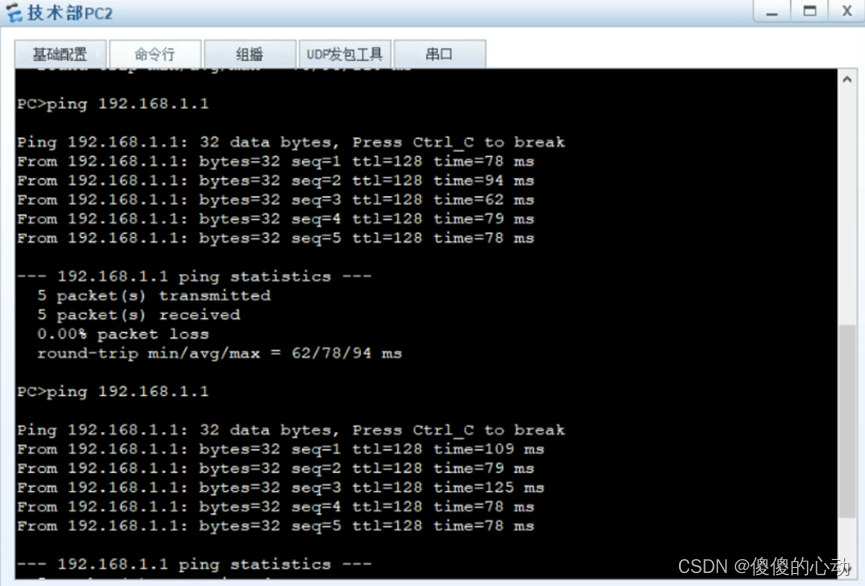
图 5技术部PC2 ping 技术部PC1测试图
5.配置脚本
- SW1
//SW1
system-view
sysname SW1
vlan 10
description Technical
quit
port-group group-member GigabitEthernet 0/0/1 to GigabitEthernet 0/0/3
port link-type trunk
port trunk allow-pass vlan 10
quit
stp enable
stp mode stp
stp priority 0
return
save
y
!
- SW2
//SW2
system-view
sysname SW2
vlan 10
description Technical
quit
port-group group-member GigabitEthernet 0/0/1 to GigabitEthernet 0/0/3
port link-type trunk
port trunk allow-pass vlan 10
quit
stp enable
stp mode stp
stp priority 4096
return
save
y
!
- SW3
//SW3
system-view
sysname SW3
vlan 10
description Technical
quit
interface Ethernet 0/0/1
port link-type access
port default vlan 10
port-group group-member GigabitEthernet 0/0/1 to GigabitEthernet 0/0/2
port link-type trunk
port trunk allow-pass vlan 10
quit
stp enable
stp mode stp
return
save
y
!
- SW4
//SW4
system-view
sysname SW4
vlan 10
description Technical
quit
interface Ethernet 0/0/1
port link-type access
port default vlan 10
port-group group-member GigabitEthernet 0/0/1 to GigabitEthernet 0/0/2
port link-type trunk
port trunk allow-pass vlan 10
quit
stp enable
stp mode stp
return
save
y
!
网络技术是一个广阔而不断演化的领域,不断学习和不断更新知识是成功的关键。你已经迈出了第一步,学习并部署STP,这只是冰山一角。继续前进,探索更多的网络协议和技术,不断提高自己的技能
-
相关阅读:
JDBC、ORM、JPA与Spring Data JPA
C++内存泄漏排查以及几个工具
JVM 线上排查命令
Sigrity仿真之POWER DC操作步骤
linux对一个文件夹中的所有文件重命名
《Java 多线程实战系列》- 01 基本概念与底层原理
Unity动画Animation Day05
开源大模型之辩:真假开源
pcsx2模拟器怎么设置流畅?
[软考中级]软件设计师-uml
- 原文地址:https://blog.csdn.net/m0_63624418/article/details/133325973
- 最新文章
-
沪漂五周年了:我越来越迷茫了
Agentic Skill Routing 实战:别再把所有 Skill 塞进 AI Agent 上下文
MySQL-Seconds_behind_master的精度误差
[MAF预定义ChatClient中间件-03]CachingChatClient——利用缓存省钱省时间
AI的至暗历史:从万众期待到被政府撤资,AI的两次死亡徘徊
Agent OS :五种驯服不确定性的范式
PortSwigger SQL注入LAB11
数据库即时编译JIT
[Begin]AI Learn Data Day 0
深度学习进阶(二十七)现代 LLM 的核心架构设计其二:SwiGLU